Deleting an empty partition also deletes a partition with data.

bogeybunky

New member
Local time
5:32 AM
Messages
11
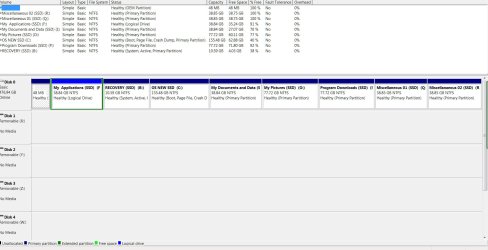
I recently cloned my HDD to a new SSD and that seemed to go okay. The original HHD had 2 partitions named Miscellaneous 1 and Miscellaneous 2. I honestly do not know where those 2 partitions came from. I guess I could have created them some years ago, but I just do not remember. As you would expect after the cloning I had those same 2 partitions on my new SSD. When I check partition properties they both show up with about 100 MB used space and 39 GB of free space. I want to clean up that drive (as well as my new drive) so I deleted them on the HDD using Disk Management. For some reason when I did that it also deleted 2 partitions that had data and pictures in them. That was okay since I have that information on the new drive, but I would like to get rid of the 2 Miscellaneous partitions on the SSD, but am afraid to do so. When I run Disk Management it does not show the missing files on the HDD (as I would expect) and does show them on the SSD (again as I would expect).

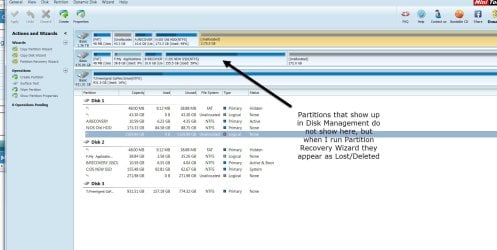
I learned about Partition Wizard Mini-tool from this forum. I ran the Partition Recovery Wizard and it shows the 2 miscellaneous and 2 data files as lost/deleted on the SSD. I have attached screen shots that hopefully will help to explain what I am trying to describe. Any comments or suggestions about what may have happened and what I need to do will be greatly appreciated. Thank you very much.
 

Attachments

  • Disk Mangement Screen Shot.jpg
    Disk Mangement Screen Shot.jpg
    211.6 KB · Views: 11
  • Mini Tool Partition Wizard.jpg
    Mini Tool Partition Wizard.jpg
    172.3 KB · Views: 7

My Computer My Computer

At a glance

Windows 7 Ultimate x642.80 gigahertz AMD Phenom II X6 1055T8192 MBATI Radeon HD 5670 (Display adaptor)
Computer type
PC/Desktop
Computer Manufacturer/Model Number
Dell Studio XPS 7100
OS
Windows 7 Ultimate x64
CPU
2.80 gigahertz AMD Phenom II X6 1055T
Motherboard
Dell )FF3FN A00
Memory
8192 MB
Graphics Card(s)
ATI Radeon HD 5670 (Display adaptor)
Monitor(s) Displays
3 Monitors
Hard Drives
1.500 TB Hard Drive (Not sure of make or model-- came with system)
512 GB Crucial MX 100 SSD that I just installed
Seagate FA GoFlex Hard Drive (USB) (1TB)
WD My Book 1140 USB Hard Drive (2TB)
Internet Speed
7-8 MBPS
Antivirus
AVG 2014
Browser
Chrome
One other thing I forgot to mention in my original post is I tried to run the Partition Recovery Wizard and it always tells me that at least one partition will be deleted. I don't understand that and it scared me away.

This is my first post here. Why do all the other post thread titles appear in bold and mine does not?
 

My Computer My Computer

At a glance

Windows 7 Ultimate x642.80 gigahertz AMD Phenom II X6 1055T8192 MBATI Radeon HD 5670 (Display adaptor)
Computer type
PC/Desktop
Computer Manufacturer/Model Number
Dell Studio XPS 7100
OS
Windows 7 Ultimate x64
CPU
2.80 gigahertz AMD Phenom II X6 1055T
Motherboard
Dell )FF3FN A00
Memory
8192 MB
Graphics Card(s)
ATI Radeon HD 5670 (Display adaptor)
Monitor(s) Displays
3 Monitors
Hard Drives
1.500 TB Hard Drive (Not sure of make or model-- came with system)
512 GB Crucial MX 100 SSD that I just installed
Seagate FA GoFlex Hard Drive (USB) (1TB)
WD My Book 1140 USB Hard Drive (2TB)
Internet Speed
7-8 MBPS
Antivirus
AVG 2014
Browser
Chrome
Please don't get confused and confuse us also running both WDM and Partition Recovery Wizard.

Partition Recovery Wizard should be run for a specific purpose and if there is no necessity, there is no need to run it.

(Since you had cloned the 1.5TB HDD onto the 500GB SDD whatever partition manipulations you had done on the 1.5TB HDD since its inception in the system are bound to leave an imprint on the SSD and Partition Recovery Wizard will bring up that old history. But the fact is we are not interested in it.)

To make things clear I would like you to do the following:

1. Remove your 1.5TB HDD from your system by disconnecting the power and data cables to it. Please remove any other external drives/pen drives. We don't need to see those.:)

2. Boot your system and check that everything is fine, confirm that all data you need is there.

3. Now post a screenshot of Windows Disk Management and tell us what you want to do with this SSD drive further and what your problem is. You will be advised appropriately by other experts here taking into account that it is a DELL OEM machine. ( I normally shy away from SSDs for I had never touched one.:))

Once this is done, tell us what you want to do with the 1.5TB HDD. You can reconnect it to the system and confirm that it has no data in it that you may be interested in , you may wipe it clean and format it as you like.

Where is the need for Partition Recovery Wizard at all?
 
Last edited:

My Computer My Computer

At a glance

Windows 7 Home Premium 32 bit
OS
Windows 7 Home Premium 32 bit
Why do all the other post thread titles appear in bold and mine does not?

Read threads are shown as Normal font.Threads with unread posts are shown in Bold font.
 

My Computer My Computer

At a glance

Windows 7 Home Premium 64bitIntel Core i7 2670QMSamsung 8GB 1333MhznVidia Geforce 540M GT 2GB
Computer type
Laptop
Computer Manufacturer/Model Number
Dell XPS L502x
OS
Windows 7 Home Premium 64bit
CPU
Intel Core i7 2670QM
Motherboard
Intel HM67 Mobile Express Chipset
Memory
Samsung 8GB 1333Mhz
Graphics Card(s)
nVidia Geforce 540M GT 2GB
Sound Card
Realtek High Definition Audio
Monitor(s) Displays
15.6" Dell Standard RGB-LED Backlit Display
Screen Resolution
1366x768
Hard Drives
Seagate Momentus 2.5" 750GB HDD 5400rpm
Internet Speed
3.1 Mbits/s
Antivirus
AVG Free, Kaspersky
Browser
Google chrome
Thank you Imrankhan
 

My Computer My Computer

At a glance

Windows 7 Ultimate x642.80 gigahertz AMD Phenom II X6 1055T8192 MBATI Radeon HD 5670 (Display adaptor)
Computer type
PC/Desktop
Computer Manufacturer/Model Number
Dell Studio XPS 7100
OS
Windows 7 Ultimate x64
CPU
2.80 gigahertz AMD Phenom II X6 1055T
Motherboard
Dell )FF3FN A00
Memory
8192 MB
Graphics Card(s)
ATI Radeon HD 5670 (Display adaptor)
Monitor(s) Displays
3 Monitors
Hard Drives
1.500 TB Hard Drive (Not sure of make or model-- came with system)
512 GB Crucial MX 100 SSD that I just installed
Seagate FA GoFlex Hard Drive (USB) (1TB)
WD My Book 1140 USB Hard Drive (2TB)
Internet Speed
7-8 MBPS
Antivirus
AVG 2014
Browser
Chrome
Thank you for your suggestions jumanji. I will do as you requested and post back here as soon as I can. It will take a little time as I have just had rotator cuff surgery and essentially have only one hand to work with as far as disconnecting the internal HD. As to Partition Recovery Wizard I obviously did not know that I did not need it. I will stick with DM as you suggest.
 

My Computer My Computer

At a glance

Windows 7 Ultimate x642.80 gigahertz AMD Phenom II X6 1055T8192 MBATI Radeon HD 5670 (Display adaptor)
Computer type
PC/Desktop
Computer Manufacturer/Model Number
Dell Studio XPS 7100
OS
Windows 7 Ultimate x64
CPU
2.80 gigahertz AMD Phenom II X6 1055T
Motherboard
Dell )FF3FN A00
Memory
8192 MB
Graphics Card(s)
ATI Radeon HD 5670 (Display adaptor)
Monitor(s) Displays
3 Monitors
Hard Drives
1.500 TB Hard Drive (Not sure of make or model-- came with system)
512 GB Crucial MX 100 SSD that I just installed
Seagate FA GoFlex Hard Drive (USB) (1TB)
WD My Book 1140 USB Hard Drive (2TB)
Internet Speed
7-8 MBPS
Antivirus
AVG 2014
Browser
Chrome
Take your time and do it at your convenience. We are always here - someone or other. :)
 

My Computer My Computer

At a glance

Windows 7 Home Premium 32 bit
OS
Windows 7 Home Premium 32 bit
Deleting an empty partition also deletes a partition with data

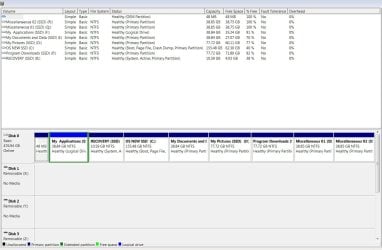
Okay have done as jumanji suggested and screenshot of Disk Mgt is attached. Everything seems to work fine.

Now what I would like to do is reattach the internal HDD, totally remove everything on it and create new partitions for backing up my SSD. Would appreciate suggestions for the best way to do this.

On my SSD I still have 2 partitions labeled Misc 1 and Misc 2. I would like to remove them, but when I just deleted them on my of HDD 2 other partitions were also deleted. I still do not understand how that happened. At any rate am reluctant to do that. I have everything from my SSD backed up, but just trying to avoid any unforeseen problems. Thanks again for everyone's help.
 

Attachments

  • Disk Mgt Screen Shot with only SSD attached.jpg
    Disk Mgt Screen Shot with only SSD attached.jpg
    148.1 KB · Views: 9

My Computer My Computer

At a glance

Windows 7 Ultimate x642.80 gigahertz AMD Phenom II X6 1055T8192 MBATI Radeon HD 5670 (Display adaptor)
Computer type
PC/Desktop
Computer Manufacturer/Model Number
Dell Studio XPS 7100
OS
Windows 7 Ultimate x64
CPU
2.80 gigahertz AMD Phenom II X6 1055T
Motherboard
Dell )FF3FN A00
Memory
8192 MB
Graphics Card(s)
ATI Radeon HD 5670 (Display adaptor)
Monitor(s) Displays
3 Monitors
Hard Drives
1.500 TB Hard Drive (Not sure of make or model-- came with system)
512 GB Crucial MX 100 SSD that I just installed
Seagate FA GoFlex Hard Drive (USB) (1TB)
WD My Book 1140 USB Hard Drive (2TB)
Internet Speed
7-8 MBPS
Antivirus
AVG 2014
Browser
Chrome
Since you say you have your data backed up adequately I'm not going to deal with your mystery partition deletion. Likely something to do with the excess Primary partition anomaly. You can have four total Primary partitions only, or three Primary before you convert one to Logical and then have as many adjacent Logicals to that one as you want. MBR disks can't support as many Primary partitions as you show there.

But somehow the clone ended up with all Partitions as Logical except protected OEM, with Recovery still marked Active. This is impossible too since no Logical partition can be marked Active or contain the System boot files booting Win7. So again you have an anomaly that an MBR disk cannot support at all and which will not function as it is marked.

You can try to convert the Recovery on SSD to Primary using Partition Wizard Convert to Logical/Primary then assure it is still Partition Marked Active to run http://www.sevenforums.com/tutorials/105541-startup-repair-run-3-separate-times.html with the HDD unplugged to see if it can be correctly marked System Active and boot itself. But Recovery may not run from a clone so you'd need to test that to see if you want to even keep Recovery on the SSD, since it contains the inferior factory install and might not even function.

It would be much better given these critical issues if you'd delete all partitions on the SSD during a booted http://www.sevenforums.com/tutorials/219487-clean-reinstall-factory-oem-windows-7-a.html#post1839164 with the HDD unplugged. You really don't want to clone a grossly inferior factory install when you have the chance to do a perfect install to enjoy on the SSD.

Short of that I would make the Recovery bootable as given to test if it will boot to run, and if not convert the SSD's Win7 partition to Primary, mark Active and run the 3 Repairs with HD unplugged until the SSD is booting itself as signified by the System Active flags on C. Hopefully with the HDD unplugged the SSD Win7 will boot as C if it was correctly cloned using the OS Auto drive letter selection.

Then I'd delete the Recovery leaving it on the HDD only, or copying it to the HDD for backup using Partition Wizard, resize the new C on SSD to the left and as far to the right as you want. PW will work with the Free Space which results from Logical partitions being deleted, while in Disk Mgmt you must delete it again to make it Unallocated first. Partition Wizard Resize Video

All in all, you have one of the bigger messes ever seen here where we have dealt with tens of thousands of these. Best to start over following the steps in http://www.sevenforums.com/tutorials/219487-clean-reinstall-factory-oem-windows-7-a.html#post1839164 which will assure a perfect install every time.
 
Last edited:

My Computer My Computer

At a glance

Windows 7 64 Bit Home Premium SP1i7-3820GSkill F3-14900CL9Q - 16GBEVGA GeForce GTX660 - Driver 352.86
Computer type
PC/Desktop
Computer Manufacturer/Model Number
Home Built - Jan 2013
OS
Windows 7 64 Bit Home Premium SP1
CPU
i7-3820
Motherboard
Asus P9X79-PRO - Bios 4608
Memory
GSkill F3-14900CL9Q - 16GB
Graphics Card(s)
EVGA GeForce GTX660 - Driver 352.86
Sound Card
On board Realtek ALC898
Monitor(s) Displays
Acer S271HL
Screen Resolution
1920 x 1080
Hard Drives
#1- Samsung 840 Pro Series
#2- Western Digital WD1002FAEX Sata3 Black
#3- Western Digital WD1002FAEX Sata3 Black
PSU
Corsair CMPSU-850TX-V2 - 850 watt (by Seasonic)
Case
Corsair Obsidian 550D
Cooling
Standard 3 120mm case fans, Cooler Master Hyper 212 EVO
Keyboard
MS KC-0405
Mouse
Intellimouse 5-button
Internet Speed
56 Mbits/Sec (on a good day)
Antivirus
Avast & Malwarebytes
Browser
Firefox
Other Info
Asus DVD - DRW-24B1ST 24X
Bob, it can only be an MBR disk with an Active flag present since GPT disks cannot be marked Active.

But if you look at his SSD in the earlier screenshot somehow the partitions except the protected OEM have all cloned as Logical, even the ones deleted which are now (Logical) Free Space. So he must have set the cloning utility to make them Logical. This of course precluded being able to transfer MBR and Track0 because the System partition cannot be on a Logical since it can't be marked Active. Yet his Logical Recovery clone is marked Active which tells us there is serious dysfunction that I'm not sure I would even want to try to salvage. But I gave him the steps to try. It would be much better given the circumstances to Clean Reinstall, or clone only C as a Primary Active partition and then run Repairs until it is booting the SSD.

Recovery may not boot to run on the clone anyway and should be tested to see before keeping it. But it can be added to a Dual Boot later if he needs to run Recovery using Boot Recovery Partition using EasyBCD

333406d1410813416t-deleting-empty-partition-also-deletes-partition-data-disk-mangement-screen-shot.jpg
 
For my two cents worth the only safe way to clone a large drive to a smaller one - which in itself is not possible - logic should tell anyone that cloning a 1.5TB to a 500GB drive would be like trying to put 4 litres of water into a 1 litre pot? is to use Macrium Reflect.

With it you can drag and drop the partitions one wants on the smaller drive up to what it can fit on. But I stand to be corrected of course.
 

My Computer My Computer

At a glance

Desk1 7 Home Prem / Desk2 10 Pro / Main lap A...Desk1 i5 3750K / Laptop i7 GTX 860M / Desk2 i...Desk1 8GB (1866) / Desk2 16GB (1333) / Laptop...Desk 1& 2NVidia GTX 650 & Laptops on board Intel
Computer type
PC/Desktop
Computer Manufacturer/Model Number
Own build (new) Desk1 / Asus ROG Win 7 / Desk2 1st build
OS
Desk1 7 Home Prem / Desk2 10 Pro / Main lap Asus ROG 10 Pro 2 laptop Toshiba 7 Pro Asus P2520 7 & 10
CPU
Desk1 i5 3750K / Laptop i7 GTX 860M / Desk2 i5 2500
Motherboard
Desk1 Asus P877-V / Desk2 Gigabyte H67 UD3H / Laptop ?
Memory
Desk1 8GB (1866) / Desk2 16GB (1333) / Laptop 8Gb DDR3
Graphics Card(s)
Desk 1& 2NVidia GTX 650 & Laptops on board Intel
Sound Card
Desk 1 & 2 -XONAR DG Realtek High Def audio Laptop
Monitor(s) Displays
Desk 1 Benq HD 2450 / Desk2 Philips 24" / Laptop 17.5"
Screen Resolution
1920x1080 D1 & D2 & Laptop 1
Hard Drives
Desk1 Samsung 120GB 830 SSD
Asus ROG 256GB 850 Pro SSD
Desk2 Samsung 840 256 SSD
Toshiba 120GB EVO
PSU
Desk 1 Corsair HX 1050/ Laptop ? / Desk 2 Corsair HX 650
Case
Desk 1 Cooler HAF XM ? Toshiba laptop / Desk2 Coolermaster
Cooling
Fans on all Desk1 -2 Desk2 - all Coolermasters 5 Laptop ?
Keyboard
Desk 1 MS Sidewinder X6 Desk 2 MS Sidewinder X 4
Mouse
Desk 1&2 - Gigabyte MS 900 gamer - laptop - Logitec wireless
Internet Speed
ADSL2+
Other Info
One other Desktop (tester) and spare Toshba laptop both with SSD's
Running Kaspersky 2016 ISS on all machines config'd identically
Logitec audio stereo systems on each machine (x3)
Canon MG5250MFC
Router/modem TP-Link running WPA2SK
Bob, it can only be an MBR disk with an Active flag present since GPT disks cannot be marked Active.

You know, I didn't realize that very visual clue until you said it! Thanks.
You are right. That clone went badly.

bogeybunky: please ignore my last post. Follow Gregrockers instructions.
 

My Computer My Computer

At a glance

Windows 7 64 Bit Home Premium SP1i7-3820GSkill F3-14900CL9Q - 16GBEVGA GeForce GTX660 - Driver 352.86
Computer type
PC/Desktop
Computer Manufacturer/Model Number
Home Built - Jan 2013
OS
Windows 7 64 Bit Home Premium SP1
CPU
i7-3820
Motherboard
Asus P9X79-PRO - Bios 4608
Memory
GSkill F3-14900CL9Q - 16GB
Graphics Card(s)
EVGA GeForce GTX660 - Driver 352.86
Sound Card
On board Realtek ALC898
Monitor(s) Displays
Acer S271HL
Screen Resolution
1920 x 1080
Hard Drives
#1- Samsung 840 Pro Series
#2- Western Digital WD1002FAEX Sata3 Black
#3- Western Digital WD1002FAEX Sata3 Black
PSU
Corsair CMPSU-850TX-V2 - 850 watt (by Seasonic)
Case
Corsair Obsidian 550D
Cooling
Standard 3 120mm case fans, Cooler Master Hyper 212 EVO
Keyboard
MS KC-0405
Mouse
Intellimouse 5-button
Internet Speed
56 Mbits/Sec (on a good day)
Antivirus
Avast & Malwarebytes
Browser
Firefox
Other Info
Asus DVD - DRW-24B1ST 24X
Deleting an empty partition also deletes a partition with data

Okay here is my reply. First I want to thank all of you who have made suggestions as to how I should proceed. Gregrocker, in particular, thank you for all the time you have obviously spent in analyzing my situation. I cannot possibly explain how I managed to create one of the bigger messes you have ever seen here. All I know is I read about how wonderful the SSD would be from an upgrade standpoint so that was my ultimate goal. Compared to most of my friends and acquaintances I can tell you that I am a computer genius. On the other hand I will be the first to admit that I cannot hold a candle to your expertise and that is why I am so appreciative of the time and effort that has gone into trying to help me.

I purchased the Crucial MX100 SSD which had very good reviews from what I could find. Acronis True Image 2014 came with the SSD and was the recommended software to do the cloning. It seemed to work like a charm and was very easy to use. There were no check boxes or anything to specify primary, logical, etc. All I had to do was select what to clone and where to clone it to. It easily handled the small drive size because all that was cloned was the used space from each partition. After that was done I changed the boot sequence (temporarily at first) to reboot from the SSD. It booted quickly (just over 1 minute compared to about 6 1/2 minutes from the HDD. So I changed the boot sequence permanently in the BIOS and to this day it seems to be working great. I disconnected the internal hard drive and disconnected external hard drive to truly test that the SSD was doing the work. Nothing changed. It continued to work beautifully as before.

I reconnected the internal HD and wanted to clean it up to be used exclusively for backup storage. That was what got me started in the forum. I had deleted some of the old partitions and some strange things were happening. I did not want to go any further for fear I was going to screw something up. Then I got Gregrocker's analysis and found out what a mess I had. I never knew about the 4 partition limitation, etc. and quite honestly was not totally sure of the distinctions between primary, active, logical, etc. Guess I just muddled along. I can obviously see that on the SSD all partitions except the OEM partition and the F: partition are listed as Primary Partitions. I cannot tell you why or how that happened. I don't even want the last 2 partitions (Misc 1 and 2). They came over in the cloning and I am not sure where they came from on the HDD. It is certainly possible that I created them years ago, but I don't remember doing it. I do know that when I deleted them on the HDD it also deleted other partitions so I have not touched them.

I can appreciate that Gregrocker's suggestion to do a clean install on the SSD is the best way to go. However, it does not seem to be the best course for me in my situation. Everything is working fine, I am religiously backing up all my data files (to external hard drives and the cloud). It seems to me that I should just disconnect the internal hard drive and see how things go for a while. The worst that could happen is that I would have to do the clean install somewhere down the road. Down the road at some point I will most likely upgrade the computer and at that point I can upgrade and reinstall my other software. I know that I have 7 Primary Partitions and now know that is not possible. So I must have confused the system so much that it cannot even label them correctly. I know that the Active partition is the bootable partition and on my system the Recovery partition is listed as Active. So maybe that partition is booting up my system or maybe it too is mislabeled and my Drive C is doing the booting.

In any event thank you again for all who have contributed your suggestions. Unless someone tells me I am a complete idiot for doing so I am going to proceed as I described above.
 

My Computer My Computer

At a glance

Windows 7 Ultimate x642.80 gigahertz AMD Phenom II X6 1055T8192 MBATI Radeon HD 5670 (Display adaptor)
Computer type
PC/Desktop
Computer Manufacturer/Model Number
Dell Studio XPS 7100
OS
Windows 7 Ultimate x64
CPU
2.80 gigahertz AMD Phenom II X6 1055T
Motherboard
Dell )FF3FN A00
Memory
8192 MB
Graphics Card(s)
ATI Radeon HD 5670 (Display adaptor)
Monitor(s) Displays
3 Monitors
Hard Drives
1.500 TB Hard Drive (Not sure of make or model-- came with system)
512 GB Crucial MX 100 SSD that I just installed
Seagate FA GoFlex Hard Drive (USB) (1TB)
WD My Book 1140 USB Hard Drive (2TB)
Internet Speed
7-8 MBPS
Antivirus
AVG 2014
Browser
Chrome
Deleting an empty partition also deletes a partition with data

Thanks Greg for your continued efforts. It has finally dawned on me that when looking at my screenshot that shows both the HDD and the SDD you are confusing which is the SSD and vice-versa. In the Disk Mgt screenshot Disk 0 is the HDD and Disk 1 is the SSD. Earlier in this thread jumanji recommended disconnecting the HDD and all external hard drives. That screen shot is posted earlier showing only the SSD information. When I did that the SSD booted up just fine with no problems. However, Disk Mgt does show everything as Primary Partition except OEM and Recovery partitions.

I am going to do as you suggested and disconnect the HDD. When I did it before I just disconnected the power and SATA cables. I am wondering if it would affect anything if I disconnected both drives and used the original HDD cables to connect the SSD. I really have no idea if this matters or not, but I did want to point out the discrepancy as to which disk is the SSD to see if that changes your thinking in any way. I will post a new screen shot to show my results.
 

My Computer My Computer

At a glance

Windows 7 Ultimate x642.80 gigahertz AMD Phenom II X6 1055T8192 MBATI Radeon HD 5670 (Display adaptor)
Computer type
PC/Desktop
Computer Manufacturer/Model Number
Dell Studio XPS 7100
OS
Windows 7 Ultimate x64
CPU
2.80 gigahertz AMD Phenom II X6 1055T
Motherboard
Dell )FF3FN A00
Memory
8192 MB
Graphics Card(s)
ATI Radeon HD 5670 (Display adaptor)
Monitor(s) Displays
3 Monitors
Hard Drives
1.500 TB Hard Drive (Not sure of make or model-- came with system)
512 GB Crucial MX 100 SSD that I just installed
Seagate FA GoFlex Hard Drive (USB) (1TB)
WD My Book 1140 USB Hard Drive (2TB)
Internet Speed
7-8 MBPS
Antivirus
AVG 2014
Browser
Chrome
Deleting an empty partition also deletes a partition with data

New screen shot with only SSD attached.
 

Attachments

  • Disk Mgt Screen Shot only SSD attached.jpg
    Disk Mgt Screen Shot only SSD attached.jpg
    134.7 KB · Views: 0

My Computer My Computer

At a glance

Windows 7 Ultimate x642.80 gigahertz AMD Phenom II X6 1055T8192 MBATI Radeon HD 5670 (Display adaptor)
Computer type
PC/Desktop
Computer Manufacturer/Model Number
Dell Studio XPS 7100
OS
Windows 7 Ultimate x64
CPU
2.80 gigahertz AMD Phenom II X6 1055T
Motherboard
Dell )FF3FN A00
Memory
8192 MB
Graphics Card(s)
ATI Radeon HD 5670 (Display adaptor)
Monitor(s) Displays
3 Monitors
Hard Drives
1.500 TB Hard Drive (Not sure of make or model-- came with system)
512 GB Crucial MX 100 SSD that I just installed
Seagate FA GoFlex Hard Drive (USB) (1TB)
WD My Book 1140 USB Hard Drive (2TB)
Internet Speed
7-8 MBPS
Antivirus
AVG 2014
Browser
Chrome
When you have so many small partition it is easy to overload one. Much better to have one large data partition, linked to the OS via Libraries or moving User folders to it.
http://www.sevenforums.com/tutorials/585-library-include-folder.html
http://www.sevenforums.com/tutorials/595-library-set-save-folder.html
http://www.sevenforums.com/tutorials/18629-user-folders-change-default-location.html

Likewise I would not have Programs installed on their own partition. They integrate themselves into registry until uninstalled and therefore become a part of the OS on C.

Did you test Dell HD diagnostics from F12 menu at boot to see if it will boot and run? Did you test
How to restore your Windows 7 computer to factory settings | Dell US to see if it will queue up to run from boot?
 
Deleting an empty partition also deletes a partition with data

I agree with you Greg about having programs in a separate partition. At the time (due to my ignorance) it made sense to me, but I discontinued that a long time ago. I just need to uninstall and reinstall those programs that are still there and then I can delete that partition.

Also, agree on use of Libraries. I have never fully understood their benefit, but your links have been very helpful.

With regard to the Recovery partition. I believe you said you don't like them and I don't really see the need either after all these years. I hate to be dense, but I am not following the reason for trying to test how to restore Windows 7 to factory default. Currently, my Recovery partition is listed as the Active Primary Partition. Can I just change the Active Designation to the Drive C partition and see if it will still boot up.

I did run the Dell Diagnostics, but I believe that was when I still had the old HDD attached. I will try again now with just the SSD .
 

My Computer My Computer

At a glance

Windows 7 Ultimate x642.80 gigahertz AMD Phenom II X6 1055T8192 MBATI Radeon HD 5670 (Display adaptor)
Computer type
PC/Desktop
Computer Manufacturer/Model Number
Dell Studio XPS 7100
OS
Windows 7 Ultimate x64
CPU
2.80 gigahertz AMD Phenom II X6 1055T
Motherboard
Dell )FF3FN A00
Memory
8192 MB
Graphics Card(s)
ATI Radeon HD 5670 (Display adaptor)
Monitor(s) Displays
3 Monitors
Hard Drives
1.500 TB Hard Drive (Not sure of make or model-- came with system)
512 GB Crucial MX 100 SSD that I just installed
Seagate FA GoFlex Hard Drive (USB) (1TB)
WD My Book 1140 USB Hard Drive (2TB)
Internet Speed
7-8 MBPS
Antivirus
AVG 2014
Browser
Chrome
Back
Top