Solved Burnt out from error error error! Time to go back to Paper.

I understand you were trying to repair your Win7 following http://www.sevenforums.com/tutorials/219533-troubleshooting-windows-7-failure-boot.html which first determines if there is infection to clear. You tried to run Kapersky Rescue disk but didn't appear to find out how to use it to scan for infection even though a tutorial was posted earlier showing exactly how this is done. Here is another: How to Use the Kaspersky Rescue Disk to Clean Your Infected PC

Hello gregrocker. Thank you for your help.
My HP Laptop crash was almost a month ago. It was hard to get help on my first thread, so it's dragging out...

My PC crashed after I ran this stupid Screen Saver I had downloaded from the Rocket Dock Website. It makes the screen look likes it's on fire.
I don't like Screen Savers but was curious. Yes 'KILLS THE CAT"
LOL. Here is the link to my 1st. thread on the subject.
http://www.sevenforums.com/general-discussion/341755-error-0xc000000f-2.html#post2856707

I read several of you're Tutorials a few weeks ago and this is why I made the Kaspersky Disc.

I also found a You Tube video shortly after. It is excellent. I followed it precisely.
Kaspersky Rescue Disk - Download - Burn - Scan - - YouTube

The Disc boots into the program but gives me a message:

It says>(not in caps)
YOUR COMPUTER HAS BEEN SHUT DOWN INCORRECTLY. THE FILE SYSTEM IS GOING TO BE MOUNTED.
THE PROCEDURE MAY CAUSE DAMAGE TO IT. TO AVOID FILE CORRUPTION, YOU ARE ADVISED TO SHUT DOWN THE OPERATING SYSTEM CORRECTLY BEFORE USING KASPERSKY DISK.

OPTIONS...
CONTINUE SKIP RESTART COMPUTER

So, I got stuck here and didn't know if I should just click continue...

I made a LUCID PUPPY DISC and rescued all my data.
I had to 'MOUNT' C Drive to do so. Everything went fine.
I experimented, I could 'Mount' all of them.
That is why I don't understand the message.

I ran the Diagnostic tool (Memory) a few weeks ago. It never found anything.
It ran for about 20 minutes or so. I could run it again.
 
Last edited:

My Computer My Computer

At a glance

Windows 7 Home Premium (x64) Service Pack 1 (...Intel Pentium P6200 2.13 GHz4.00 GBIntel HD Graphics
Computer type
Laptop
Computer Manufacturer/Model Number
HP 2000-150CA Notebook
OS
Windows 7 Home Premium (x64) Service Pack 1 (build 7601)
CPU
Intel Pentium P6200 2.13 GHz
Motherboard
HP 3674 28.49 1066 MH / BIOS: HP F.34
Memory
4.00 GB
Graphics Card(s)
Intel HD Graphics
Sound Card
Multimedia HD
Monitor(s) Displays
15.3
Screen Resolution
1366X768
Hard Drives
Hitachi HTS545050B9A300 ATA
(500.11 GB)
Keyboard
Standard PS2
Mouse
Synaptics PS2 Port Touch Pad / Microsoft HID-compliant mouse
Internet Speed
100 Mbps
Antivirus
MSE
Browser
PaleMoon / Fire Fox
Other Info
Purchased 2011
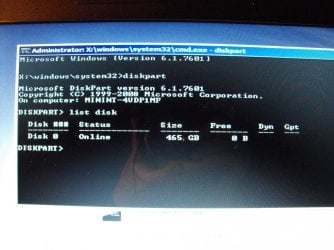
Hi Elljay, haven't heard from you, this series of CMD's using DISKPART should get your netbook running again.

  • Boot with the repair disk you made.

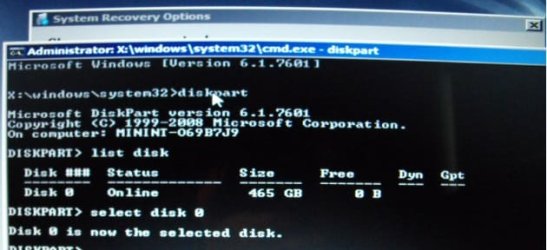
  • At the Command Prompt type; DISKPART.

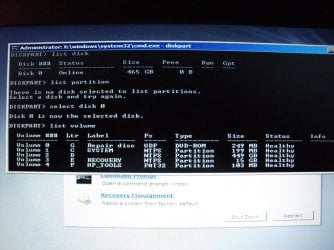
  • After the prompt changes to DISKPART, type; LIST DISK. You should see a list with your optical drive, the hard drive, and card reader ports.
  • Hi Anak. It is my HP Laptop.
  • I am communicating with you using my Netbook.
  • Sorry, the quote seems to be copying your bullets.
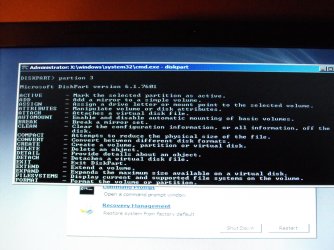
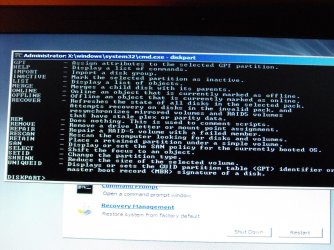
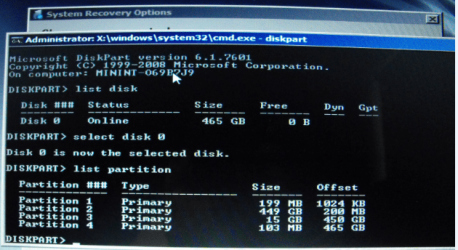
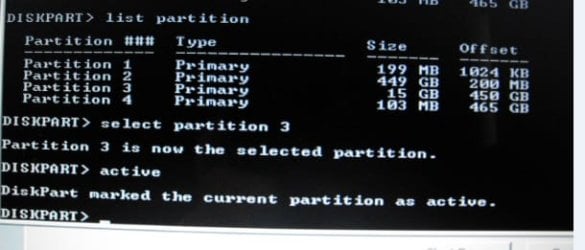
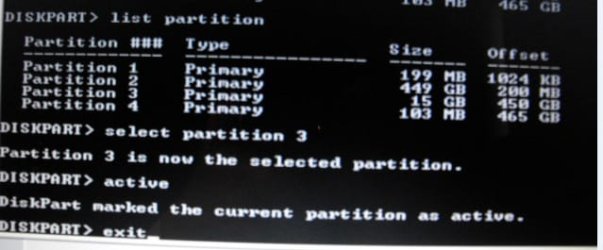
  • Here is what I have...
 

Attachments

  • DSCF4997.jpg
    DSCF4997.jpg
    979.3 KB · Views: 0
  • DSCF4999.jpg
    DSCF4999.jpg
    935.3 KB · Views: 0
  • DSCF5001.jpg
    DSCF5001.jpg
    950.4 KB · Views: 1
  • DSCF5002.jpg
    DSCF5002.jpg
    977.6 KB · Views: 0

My Computer My Computer

At a glance

Windows 7 Home Premium (x64) Service Pack 1 (...Intel Pentium P6200 2.13 GHz4.00 GBIntel HD Graphics
Computer type
Laptop
Computer Manufacturer/Model Number
HP 2000-150CA Notebook
OS
Windows 7 Home Premium (x64) Service Pack 1 (build 7601)
CPU
Intel Pentium P6200 2.13 GHz
Motherboard
HP 3674 28.49 1066 MH / BIOS: HP F.34
Memory
4.00 GB
Graphics Card(s)
Intel HD Graphics
Sound Card
Multimedia HD
Monitor(s) Displays
15.3
Screen Resolution
1366X768
Hard Drives
Hitachi HTS545050B9A300 ATA
(500.11 GB)
Keyboard
Standard PS2
Mouse
Synaptics PS2 Port Touch Pad / Microsoft HID-compliant mouse
Internet Speed
100 Mbps
Antivirus
MSE
Browser
PaleMoon / Fire Fox
Other Info
Purchased 2011
Am now wondering if the hard drive is a suspect one myself and the failure of most things so far ie the running of the Kaspersky rescue disk has me foxed as it should just boot into the program with very little difficulty:confused:
In fact I would not be surprised if there were more than the hard drive being at fault:(

Hello ICit3lol.
The Disc does boot into the program but gives me a message:

It says> (not in caps)
YOUR COMPUTER HAS BEEN SHUT DOWN INCORRECTLY. THE FILE SYSTEM IS GOING TO BE MOUNTED.
THE PROCEDURE MAY CAUSE DAMAGE TO IT. TO AVOID FILE CORRUPTION, YOU ARE ADVISED TO SHUT DOWN THE OPERATING SYSTEM CORRECTLY BEFORE USING KASPERSKY DISK.

OPTIONS...
CONTINUE SKIP RESTART COMPUTER

So, I got stuck here and didn't know if I should just click continue...

I made a LUCID PUPPY DISC and rescued all my data.
I had to 'MOUNT' C Drive to do so. Everything went fine.
I experimented, I could 'Mount' all of them.
That is why I don't understand the message.

I ran Windows Memory Diagnostic. It said it was fine.
I was able to save everything from my HDD without any problems.
 

My Computer My Computer

At a glance

Windows 7 Home Premium (x64) Service Pack 1 (...Intel Pentium P6200 2.13 GHz4.00 GBIntel HD Graphics
Computer type
Laptop
Computer Manufacturer/Model Number
HP 2000-150CA Notebook
OS
Windows 7 Home Premium (x64) Service Pack 1 (build 7601)
CPU
Intel Pentium P6200 2.13 GHz
Motherboard
HP 3674 28.49 1066 MH / BIOS: HP F.34
Memory
4.00 GB
Graphics Card(s)
Intel HD Graphics
Sound Card
Multimedia HD
Monitor(s) Displays
15.3
Screen Resolution
1366X768
Hard Drives
Hitachi HTS545050B9A300 ATA
(500.11 GB)
Keyboard
Standard PS2
Mouse
Synaptics PS2 Port Touch Pad / Microsoft HID-compliant mouse
Internet Speed
100 Mbps
Antivirus
MSE
Browser
PaleMoon / Fire Fox
Other Info
Purchased 2011
I feel like just running that damn Kaspersky Disc.:axe:
 

My Computer My Computer

At a glance

Windows 7 Home Premium (x64) Service Pack 1 (...Intel Pentium P6200 2.13 GHz4.00 GBIntel HD Graphics
Computer type
Laptop
Computer Manufacturer/Model Number
HP 2000-150CA Notebook
OS
Windows 7 Home Premium (x64) Service Pack 1 (build 7601)
CPU
Intel Pentium P6200 2.13 GHz
Motherboard
HP 3674 28.49 1066 MH / BIOS: HP F.34
Memory
4.00 GB
Graphics Card(s)
Intel HD Graphics
Sound Card
Multimedia HD
Monitor(s) Displays
15.3
Screen Resolution
1366X768
Hard Drives
Hitachi HTS545050B9A300 ATA
(500.11 GB)
Keyboard
Standard PS2
Mouse
Synaptics PS2 Port Touch Pad / Microsoft HID-compliant mouse
Internet Speed
100 Mbps
Antivirus
MSE
Browser
PaleMoon / Fire Fox
Other Info
Purchased 2011
Without going all the way back Eli I am wondering if we have suggested a RAM test and for me personally I am not a real fan of that Windows feature.
So take a look at this

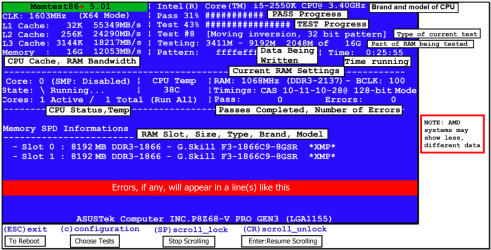
MEMTEST

http://www.sevenforums.com/tutorials/105647-ram-test-memtest86.html this one you will need to make a bootable disk set the BIOS to optical (or USB if preferred) boot the machine and let it run for at LEAST 8 passes unless the errors come up straight away. Takes fair time to complete and some leave it running overnight.

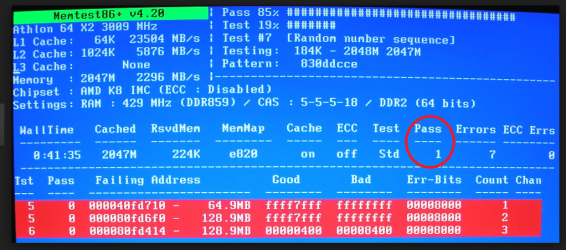
When you run the memtest if the errors come up straight away a in my pic then you will need to test each stick if you have more than one and if it is only one then test again in another slot because it could also be a fault on the board.
 

Attachments

  • MEMTEST INFO.PNG
    MEMTEST INFO.PNG
    108.1 KB · Views: 0
  • MEMTESTERROR.PNG
    MEMTESTERROR.PNG
    237.1 KB · Views: 0

My Computer My Computer

At a glance

Desk1 7 Home Prem / Desk2 10 Pro / Main lap A...Desk1 i5 3750K / Laptop i7 GTX 860M / Desk2 i...Desk1 8GB (1866) / Desk2 16GB (1333) / Laptop...Desk 1& 2NVidia GTX 650 & Laptops on board Intel
Computer type
PC/Desktop
Computer Manufacturer/Model Number
Own build (new) Desk1 / Asus ROG Win 7 / Desk2 1st build
OS
Desk1 7 Home Prem / Desk2 10 Pro / Main lap Asus ROG 10 Pro 2 laptop Toshiba 7 Pro Asus P2520 7 & 10
CPU
Desk1 i5 3750K / Laptop i7 GTX 860M / Desk2 i5 2500
Motherboard
Desk1 Asus P877-V / Desk2 Gigabyte H67 UD3H / Laptop ?
Memory
Desk1 8GB (1866) / Desk2 16GB (1333) / Laptop 8Gb DDR3
Graphics Card(s)
Desk 1& 2NVidia GTX 650 & Laptops on board Intel
Sound Card
Desk 1 & 2 -XONAR DG Realtek High Def audio Laptop
Monitor(s) Displays
Desk 1 Benq HD 2450 / Desk2 Philips 24" / Laptop 17.5"
Screen Resolution
1920x1080 D1 & D2 & Laptop 1
Hard Drives
Desk1 Samsung 120GB 830 SSD
Asus ROG 256GB 850 Pro SSD
Desk2 Samsung 840 256 SSD
Toshiba 120GB EVO
PSU
Desk 1 Corsair HX 1050/ Laptop ? / Desk 2 Corsair HX 650
Case
Desk 1 Cooler HAF XM ? Toshiba laptop / Desk2 Coolermaster
Cooling
Fans on all Desk1 -2 Desk2 - all Coolermasters 5 Laptop ?
Keyboard
Desk 1 MS Sidewinder X6 Desk 2 MS Sidewinder X 4
Mouse
Desk 1&2 - Gigabyte MS 900 gamer - laptop - Logitec wireless
Internet Speed
ADSL2+
Other Info
One other Desktop (tester) and spare Toshba laptop both with SSD's
Running Kaspersky 2016 ISS on all machines config'd identically
Logitec audio stereo systems on each machine (x3)
Canon MG5250MFC
Router/modem TP-Link running WPA2SK
Do or are you using another machine as you're working on this one?
Yes, I am using another machine to communicate here. I have a little Acer Netbook.
Although it gets hard on my eyes, it is better than nothing.
It is beside my crashed HP.
Apologies here, I misunderstood. :o


I feel like just running that damn Kaspersky Disc.:axe:

Well, you do have all your important files saved, right? Just make sure you have any pertinent information concerning your favorite programs like license #'s, and key #'s.

Then run the kaspersky disk and click on continue, see what happens.

If that won't run check the memory like ICit2lol suggested, if that looks okay, try the outline I provided in post #59.
 

My Computer My Computer

At a glance

Originally Win 7 Hm Prem x64 Ver 6.1.7600 Bui...Intel i3 530 2.93GHz, 2933MHz 2 Cores 4 Logic...6GB of 1,333MHz DDR3 SDRAM32MB Intel Graphics Media Accelerator HD IGChip
Computer type
PC/Desktop
Computer Manufacturer/Model Number
Gateway DX4831-01e (Mid-Tower Desktop)
OS
Originally Win 7 Hm Prem x64 Ver 6.1.7600 Build 7601-SP1 | Upgraded to Windows 10 December 14, 2019
CPU
Intel i3 530 2.93GHz, 2933MHz 2 Cores 4 Logical Processors
Motherboard
Gateway H57M01 133 megahertz
Memory
6GB of 1,333MHz DDR3 SDRAM
Graphics Card(s)
32MB Intel Graphics Media Accelerator HD IGChip
Sound Card
Realtek High Definition Audio
Monitor(s) Displays
Gateway HX2000 20inch TFT active matrix TN
Screen Resolution
1600 x 900 x 59 hertz
Hard Drives
WDC WD10EADS-00M2B0 [HDD] (1000.20 GB) -- drive 0,
HL-DT-ST DVDRAM GH41N [CD-ROM dr]
Four card readers, and Four USB 2.0
PSU
300watts.
Case
Mid-Tower Desktop
Cooling
Stock from Gateway
Keyboard
Natural Ergonomic Keyboard 4000, see Other Info
Mouse
Orig. Gateway wore out now using Insignia USB wired optical
Internet Speed
Vz FIOS 10ms png 57.64Mbps down 65.53Mbps up Speedtest.org
Antivirus
Zamana Anti-logger with Anti-malware, MSE, Windows Firewall,
Browser
IE11.0.9600.19399-Upd ver11.0.135, Firefox 68.0.1 x64
Other Info
System Specs by Belarc.

BIOS: American Megatrends Inc. P01-A0 11/17/2009

Replaced the MS 'Natural' Standard PS/2 Enhanced 101-102 Keyboard with a new Natural Ergonomic Keyboard 4000 on August 1st 2014.

Canon Pixma MG3222 Printer.

Updated to IE11 on 12102015 | Fios Quantum Router g1100

Additional AV: SpywareBlaster, manual Mbam, SAS

My Computer My Computer

At a glance

Windows 7 Home Premium (x64) Service Pack 1 (...Intel Pentium P6200 2.13 GHz4.00 GBIntel HD Graphics
Computer type
Laptop
Computer Manufacturer/Model Number
HP 2000-150CA Notebook
OS
Windows 7 Home Premium (x64) Service Pack 1 (build 7601)
CPU
Intel Pentium P6200 2.13 GHz
Motherboard
HP 3674 28.49 1066 MH / BIOS: HP F.34
Memory
4.00 GB
Graphics Card(s)
Intel HD Graphics
Sound Card
Multimedia HD
Monitor(s) Displays
15.3
Screen Resolution
1366X768
Hard Drives
Hitachi HTS545050B9A300 ATA
(500.11 GB)
Keyboard
Standard PS2
Mouse
Synaptics PS2 Port Touch Pad / Microsoft HID-compliant mouse
Internet Speed
100 Mbps
Antivirus
MSE
Browser
PaleMoon / Fire Fox
Other Info
Purchased 2011
Without going all the way back Eli I am wondering if we have suggested a RAM test and for me personally I am not a real fan of that Windows feature.
So take a look at this
No ICit2lol, a Ram test wasn't mentioned, but I did run the Memeory Diagnostic tool on the Repair Disc awhile back.(because it was there and the link worked) It didn't find anything. I will try this. Thank you.
 
Last edited:

My Computer My Computer

At a glance

Windows 7 Home Premium (x64) Service Pack 1 (...Intel Pentium P6200 2.13 GHz4.00 GBIntel HD Graphics
Computer type
Laptop
Computer Manufacturer/Model Number
HP 2000-150CA Notebook
OS
Windows 7 Home Premium (x64) Service Pack 1 (build 7601)
CPU
Intel Pentium P6200 2.13 GHz
Motherboard
HP 3674 28.49 1066 MH / BIOS: HP F.34
Memory
4.00 GB
Graphics Card(s)
Intel HD Graphics
Sound Card
Multimedia HD
Monitor(s) Displays
15.3
Screen Resolution
1366X768
Hard Drives
Hitachi HTS545050B9A300 ATA
(500.11 GB)
Keyboard
Standard PS2
Mouse
Synaptics PS2 Port Touch Pad / Microsoft HID-compliant mouse
Internet Speed
100 Mbps
Antivirus
MSE
Browser
PaleMoon / Fire Fox
Other Info
Purchased 2011
Hi Elljay, haven't heard from you, this series of CMD's using DISKPART should get your netbook running again.

The capitalized CMD's are to make it easier for you to see, they do not have to be capitalized.

  • Boot with the repair disk you made.

  • At the Command Prompt type; DISKPART.

  • After the prompt changes to DISKPART, type; LIST DISK. You should see a list with your optical drive, the hard drive, and card reader ports.

  • In order to be sure we are working with the hard drive (HDD) only, type; SELECT DISK 0 (That is a zero not a letter O). You should see; “Disk 0 is now the selected disk”.

  • At the next DISKPART prompt, instead of List Volume type; LIST PARTITION.
   Note
You should see a list of the partitions on the netbook's hard drive disk (HDD). What we're after is that Volume E – Recovery volume, if the partition is not labeled as Recovery then the only thing you can go by is the size of the partition.

In your pix of the volumes in post #46 select the one that matches the 15 GB size of the Volume 3 E Recovery. The pix is showing Volume 3 as the third partition in descending order.

But, when I do it on my machine, my recovery is named recovery and it is listed as partition "1". If you are unsure take a screenshot and post it so we can look at it to make sure which one you need to select.

  • You would type in; Select PARTITION 3 or ? - You should see; Partition 3 or ? is now the selected partition.

  • At the next Diskpart prompt, type; ACTIVE. - You should see; "Diskpart marked the current partition active".

  • At the next Diskpart prompt, type Exit.
The CMD window should close and bring you back to the repair disk screen, close it out and remove the repair disk from the optical drive. If everything is already closed out remove the rescue disk.

  • Restart your netbook, and observe.
Since you mentioned in earlier conversation that you have already gone through the recovery process, watch to see if this restart looks like the recovery process you are used to. If anything looks abnormal please take screenshots and post them in your next reply, with providence the recovery will take and you will have your netbook back.


Ok Anak. I did do this Command a few days ago. I guess the threads start to get so long, they get hard to follow. i posted the results. They are at post #46
 

My Computer My Computer

At a glance

Windows 7 Home Premium (x64) Service Pack 1 (...Intel Pentium P6200 2.13 GHz4.00 GBIntel HD Graphics
Computer type
Laptop
Computer Manufacturer/Model Number
HP 2000-150CA Notebook
OS
Windows 7 Home Premium (x64) Service Pack 1 (build 7601)
CPU
Intel Pentium P6200 2.13 GHz
Motherboard
HP 3674 28.49 1066 MH / BIOS: HP F.34
Memory
4.00 GB
Graphics Card(s)
Intel HD Graphics
Sound Card
Multimedia HD
Monitor(s) Displays
15.3
Screen Resolution
1366X768
Hard Drives
Hitachi HTS545050B9A300 ATA
(500.11 GB)
Keyboard
Standard PS2
Mouse
Synaptics PS2 Port Touch Pad / Microsoft HID-compliant mouse
Internet Speed
100 Mbps
Antivirus
MSE
Browser
PaleMoon / Fire Fox
Other Info
Purchased 2011
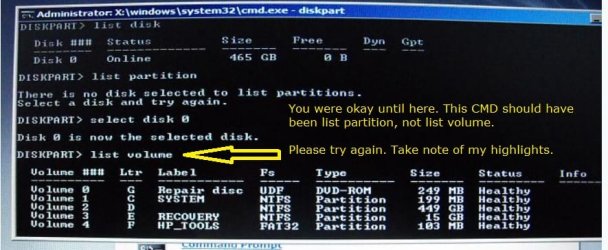
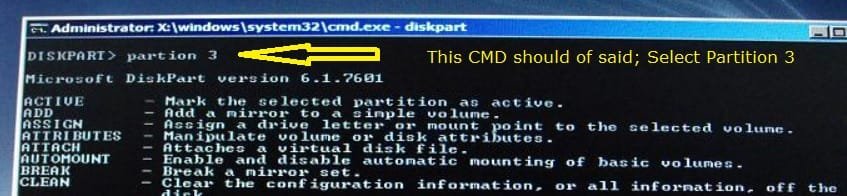
You made two errors, step 5 and 6; See notations within snips.

ej5.JPG

And:

ej6.jpg

The reason you saw a list of CMD's after you entered partition 3 in the second pix is because it didn't match the first cmd. When that happens the cmd window will throw up a list to help guide you.
To use a metaphor; you were mixing apples (volumes in the first cmd) and oranges (partitions in the second).

I've made some changes in the steps, numbered them, and highlighted critical cmd's in blue to help clarify the procedure.

Step #6 still concerns me, keep my note in mind. Hopefully the list of partitions will say that partition 3 is recovery and you can type in Select PARTITION 3 and finish the last three steps.


The capitalized CMD's are to make it easier for you to see, they do not have to be capitalized.

1.) Boot with the repair disk you made.

2.) At the Command Prompt type; DISKPART

3.) After the prompt changes to DISKPART, type; LIST DISK You should see a list with your optical drive, the hard drive, and card reader ports.

4.) In order to be sure we are working with the hard drive (HDD) only, type; SELECT DISK 0 (That is a zero not a letter O). You should see; “Disk 0 is now the selected disk”.

5.) At the next DISKPART prompt, instead of List Volume type; LIST PARTITION

   Note
You should see a list of the partitions on the HP's hard drive disk (HDD). What we're after is that Volume E – Recovery volume, if the partition is not labeled as Recovery then the only thing you can go by is the size of the partition.

In your pix of the volumes in post #46 select the one that matches the 15 GB size of the Volume 3 E Recovery. The pix is showing Volume 3 as the third partition in descending order.

But, when I do it on my machine, my recovery is named recovery and it is listed as partition "1". If you are unsure take a screenshot and post it so we can look at it to make sure which one you need to select.


6.) You would type in; Select PARTITION 3 or ? - You should see; Partition 3 or ? is now the selected partition.

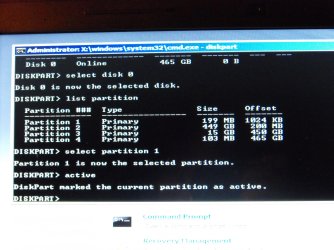
7.) At the next Diskpart prompt, type; ACTIVE - You should see; "Diskpart marked the current partition active".

8.) At the next Diskpart prompt, type Exit

The CMD window should close and bring you back to the repair disk screen, close it out and remove the repair disk from the optical drive. If everything is already closed out remove the repair disk.

9.) Restart the HP, and observe.

Since you mentioned in earlier conversation that you have already gone through the recovery process, watch to see if this restart looks like the recovery process you are used to. If anything looks abnormal please take screenshots and post them in your next reply, with providence the recovery will take and you will have your HP back.
 

My Computer My Computer

At a glance

Originally Win 7 Hm Prem x64 Ver 6.1.7600 Bui...Intel i3 530 2.93GHz, 2933MHz 2 Cores 4 Logic...6GB of 1,333MHz DDR3 SDRAM32MB Intel Graphics Media Accelerator HD IGChip
Computer type
PC/Desktop
Computer Manufacturer/Model Number
Gateway DX4831-01e (Mid-Tower Desktop)
OS
Originally Win 7 Hm Prem x64 Ver 6.1.7600 Build 7601-SP1 | Upgraded to Windows 10 December 14, 2019
CPU
Intel i3 530 2.93GHz, 2933MHz 2 Cores 4 Logical Processors
Motherboard
Gateway H57M01 133 megahertz
Memory
6GB of 1,333MHz DDR3 SDRAM
Graphics Card(s)
32MB Intel Graphics Media Accelerator HD IGChip
Sound Card
Realtek High Definition Audio
Monitor(s) Displays
Gateway HX2000 20inch TFT active matrix TN
Screen Resolution
1600 x 900 x 59 hertz
Hard Drives
WDC WD10EADS-00M2B0 [HDD] (1000.20 GB) -- drive 0,
HL-DT-ST DVDRAM GH41N [CD-ROM dr]
Four card readers, and Four USB 2.0
PSU
300watts.
Case
Mid-Tower Desktop
Cooling
Stock from Gateway
Keyboard
Natural Ergonomic Keyboard 4000, see Other Info
Mouse
Orig. Gateway wore out now using Insignia USB wired optical
Internet Speed
Vz FIOS 10ms png 57.64Mbps down 65.53Mbps up Speedtest.org
Antivirus
Zamana Anti-logger with Anti-malware, MSE, Windows Firewall,
Browser
IE11.0.9600.19399-Upd ver11.0.135, Firefox 68.0.1 x64
Other Info
System Specs by Belarc.

BIOS: American Megatrends Inc. P01-A0 11/17/2009

Replaced the MS 'Natural' Standard PS/2 Enhanced 101-102 Keyboard with a new Natural Ergonomic Keyboard 4000 on August 1st 2014.

Canon Pixma MG3222 Printer.

Updated to IE11 on 12102015 | Fios Quantum Router g1100

Additional AV: SpywareBlaster, manual Mbam, SAS
Ok Anak. I did it correctly this time.
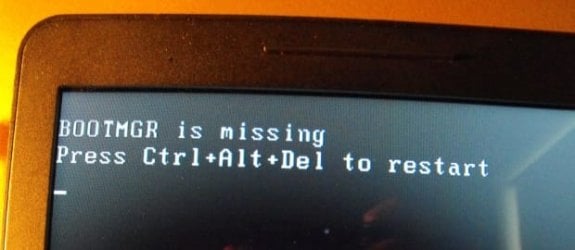
I get BOOTMGR is missing.:rolleyes:
 

Attachments

  • 1..jpg
    1..jpg
    27.7 KB · Views: 18
  • 2..png
    2..png
    115.1 KB · Views: 18
  • 4..jpg
    4..jpg
    23.8 KB · Views: 19
  • 5..jpg
    5..jpg
    22.8 KB · Views: 19
  • 6..jpg
    6..jpg
    19.8 KB · Views: 19

My Computer My Computer

At a glance

Windows 7 Home Premium (x64) Service Pack 1 (...Intel Pentium P6200 2.13 GHz4.00 GBIntel HD Graphics
Computer type
Laptop
Computer Manufacturer/Model Number
HP 2000-150CA Notebook
OS
Windows 7 Home Premium (x64) Service Pack 1 (build 7601)
CPU
Intel Pentium P6200 2.13 GHz
Motherboard
HP 3674 28.49 1066 MH / BIOS: HP F.34
Memory
4.00 GB
Graphics Card(s)
Intel HD Graphics
Sound Card
Multimedia HD
Monitor(s) Displays
15.3
Screen Resolution
1366X768
Hard Drives
Hitachi HTS545050B9A300 ATA
(500.11 GB)
Keyboard
Standard PS2
Mouse
Synaptics PS2 Port Touch Pad / Microsoft HID-compliant mouse
Internet Speed
100 Mbps
Antivirus
MSE
Browser
PaleMoon / Fire Fox
Other Info
Purchased 2011
Try booting Recovery partition now from the HP F11 or ESC Boot menu keys, or as shown in Performing an HP System Recovery (Windows 7) | HP® Support.

Had you earlier confirmed that the 199mb System Reserved partition was Active? We are getting a bit ahead of ourselves since these steps come later in http://www.sevenforums.com/tutorials/219533-troubleshooting-windows-7-failure-boot.html but if HP Recovery will not boot after marking Active, I would move the Active flag back to Partition 1 and run http://www.sevenforums.com/tutorials/105541-startup-repair-run-3-separate-times.html to try to start it. If that fails, move it to the Win7 partition and then try the 3 repairs again. If neither work it does not mean that its irreparable since you may need to fully disinfect or repair System files before it will be able to start.

And I will again remind you that you are only rearranging the deck chairs on the Titanic here since all of this effort is going to salvage the worst possible install of Win7 one can own, while what we specialize in here is the best possible install detailed in http://www.sevenforums.com/tutorials/219487-clean-reinstall-factory-oem-windows-7-a.html#post1839164.
 
Last edited:

My Computer My Computer

At a glance

Originally Win 7 Hm Prem x64 Ver 6.1.7600 Bui...Intel i3 530 2.93GHz, 2933MHz 2 Cores 4 Logic...6GB of 1,333MHz DDR3 SDRAM32MB Intel Graphics Media Accelerator HD IGChip
Computer type
PC/Desktop
Computer Manufacturer/Model Number
Gateway DX4831-01e (Mid-Tower Desktop)
OS
Originally Win 7 Hm Prem x64 Ver 6.1.7600 Build 7601-SP1 | Upgraded to Windows 10 December 14, 2019
CPU
Intel i3 530 2.93GHz, 2933MHz 2 Cores 4 Logical Processors
Motherboard
Gateway H57M01 133 megahertz
Memory
6GB of 1,333MHz DDR3 SDRAM
Graphics Card(s)
32MB Intel Graphics Media Accelerator HD IGChip
Sound Card
Realtek High Definition Audio
Monitor(s) Displays
Gateway HX2000 20inch TFT active matrix TN
Screen Resolution
1600 x 900 x 59 hertz
Hard Drives
WDC WD10EADS-00M2B0 [HDD] (1000.20 GB) -- drive 0,
HL-DT-ST DVDRAM GH41N [CD-ROM dr]
Four card readers, and Four USB 2.0
PSU
300watts.
Case
Mid-Tower Desktop
Cooling
Stock from Gateway
Keyboard
Natural Ergonomic Keyboard 4000, see Other Info
Mouse
Orig. Gateway wore out now using Insignia USB wired optical
Internet Speed
Vz FIOS 10ms png 57.64Mbps down 65.53Mbps up Speedtest.org
Antivirus
Zamana Anti-logger with Anti-malware, MSE, Windows Firewall,
Browser
IE11.0.9600.19399-Upd ver11.0.135, Firefox 68.0.1 x64
Other Info
System Specs by Belarc.

BIOS: American Megatrends Inc. P01-A0 11/17/2009

Replaced the MS 'Natural' Standard PS/2 Enhanced 101-102 Keyboard with a new Natural Ergonomic Keyboard 4000 on August 1st 2014.

Canon Pixma MG3222 Printer.

Updated to IE11 on 12102015 | Fios Quantum Router g1100

Additional AV: SpywareBlaster, manual Mbam, SAS
And I will again remind you that you are only rearranging the deck chairs on the Titanic here since all of this effort is going to salvage the worst possible install of Win7 one can own, while what we specialize in here is the best possible install detailed in http://www.sevenforums.com/tutorials/219487-clean-reinstall-factory-oem-windows-7-a.html#post1839164.

Hi gregrocker. I hear you loud and clear about the clean reinstall. In the past few weeks, I have read the tutorials a few times already and again yesterday. I have not proceeded because I'm a chicken. I am worried that it's going to be over my head. I have gone to the download links and have no idea what I am looking for.

Yes gregrocker and Anak, I did. I tried Ctrl+Alt+Del restart 4 times. The screen goes black and then back to BOOTMGR is missing.

No, I never confirmed that the 199mb System Reserved partition was Active. I have been trying to follow Anak's suggestions precisely because I really don't know what I am doing. I am just learning.

Ok, I will go back to Command Prompt and do that. I think I understand.
I type in diskpart again etc...and pick 199mb and make it ACTIVE.
Then EXIT and run REPAIR x3.
 
Last edited:

My Computer My Computer

At a glance

Windows 7 Home Premium (x64) Service Pack 1 (...Intel Pentium P6200 2.13 GHz4.00 GBIntel HD Graphics
Computer type
Laptop
Computer Manufacturer/Model Number
HP 2000-150CA Notebook
OS
Windows 7 Home Premium (x64) Service Pack 1 (build 7601)
CPU
Intel Pentium P6200 2.13 GHz
Motherboard
HP 3674 28.49 1066 MH / BIOS: HP F.34
Memory
4.00 GB
Graphics Card(s)
Intel HD Graphics
Sound Card
Multimedia HD
Monitor(s) Displays
15.3
Screen Resolution
1366X768
Hard Drives
Hitachi HTS545050B9A300 ATA
(500.11 GB)
Keyboard
Standard PS2
Mouse
Synaptics PS2 Port Touch Pad / Microsoft HID-compliant mouse
Internet Speed
100 Mbps
Antivirus
MSE
Browser
PaleMoon / Fire Fox
Other Info
Purchased 2011
Was this the download you were unsure of? http://msft.digitalrivercontent.net/win/X17-58997.iso
Don't you already have the latest official 64 bit Home premium installer w/SP1 to do the repairs? What other downloads are you unsure of? You should be asking back these questions, not vaguely referring to having them.

Have you attempted by every means to boot Recovery from F11, ESC, and as shown in the HP tutorial I linked? Why no report back on each of those attempts?

Only after all efforts are made to boot Recovery while it's marked Active should you move the Active flag to the 199mb and run 3 Startup Repairs.
 
Was this the download you were unsure of? http://msft.digitalrivercontent.net/win/X17-58997.iso
Don't you already have the latest official 64 bit Home premium installer w/SP1 to do the repairs? What other downloads are you unsure of? You should be asking back these questions, not vaguely referring to having them.

Have you attempted by every means to boot Recovery from F11, ESC, and as shown in the HP tutorial I linked? Why no report back on each of those attempts?

Only after all efforts are made to boot Recovery while it's marked Active should you move the Active flag to the 199mb and run 3 Startup Repairs.

Hi gregrocker.
I am sorry it is getting confusing. The thread is 8 pages long. I did all these things weeks ago with ICit2lol, Anak, jamanji and a few others that suggested things. F11 does not work. Safe Mode does not work. Safe Mode with Net Working does not work.

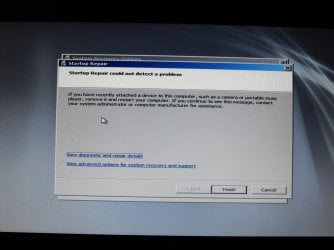
I am in the process of running Startup Repair for the 3rd time - with 199mb ACTIVE.

What I did so far was;
Make a Repair Disc,
Puppy Linux Disc,
Kaspersky Rescue Disc,
(and went to their forum and asked why the disc gives me that warning.
I haven't had an answer back about that.)
Umbuntu Desktop Disc
and now a Trinity Rescue Disc.
I have also googled things and surfed the web.
I have followed all of Anak and ICit2lol's suggestions except for the Ram test ICit2lol suggested.
I did run the Windows Memory Diagnostic test though. It didn't find anything. I ran it x2.
I don't think there is anything wrong with the HDD. I had no problem rescuing my files with Puppy Linux Disc.

No, I don't have the latest official 64 bit Home premium installer w/SP1. I never got that far.
I was confused by the choices. I think it is because I am mentally getting tired. It has been a lot for me to absorb.
I am not technical but I am trying.
 

Attachments

  • DSCF5061.jpg
    DSCF5061.jpg
    835.3 KB · Views: 0
  • DSCF5062.jpg
    DSCF5062.jpg
    885.5 KB · Views: 0

My Computer My Computer

At a glance

Windows 7 Home Premium (x64) Service Pack 1 (...Intel Pentium P6200 2.13 GHz4.00 GBIntel HD Graphics
Computer type
Laptop
Computer Manufacturer/Model Number
HP 2000-150CA Notebook
OS
Windows 7 Home Premium (x64) Service Pack 1 (build 7601)
CPU
Intel Pentium P6200 2.13 GHz
Motherboard
HP 3674 28.49 1066 MH / BIOS: HP F.34
Memory
4.00 GB
Graphics Card(s)
Intel HD Graphics
Sound Card
Multimedia HD
Monitor(s) Displays
15.3
Screen Resolution
1366X768
Hard Drives
Hitachi HTS545050B9A300 ATA
(500.11 GB)
Keyboard
Standard PS2
Mouse
Synaptics PS2 Port Touch Pad / Microsoft HID-compliant mouse
Internet Speed
100 Mbps
Antivirus
MSE
Browser
PaleMoon / Fire Fox
Other Info
Purchased 2011
Anak had you mark the Recovery partition Active to see if Recovery would either boot itself at reboot, or if it would now run from F11 or ESC key. I asked you twice today to do this, even giving you the official steps from HP to run Performing an HP System Recovery (Windows 7) | HP® Support. I understand how it can become confusing so just needed you to ask back if you were confused.

If this isn't what Anak intended then he can clarify it, but this is the reason Recovery would be marked Active.

If Recovery won't run by either of those methods when marked Active, and Win7 won't start with 199mb System partition marked Active to run http://www.sevenforums.com/tutorials/105541-startup-repair-run-3-separate-times.html, then try moving the Active flag to the WIn7 partition itself to run the 3 repairs again.

I assume you are wanting to complete the full checklist of everything that can be done to start Win7 provided in http://www.sevenforums.com/tutorials/219533-troubleshooting-windows-7-failure-boot.html.

Did you actually complete a bootable virus scan and get results showing if it was infected or not, and if infected did it clean up?

After that did you try http://www.sevenforums.com/tutorials/139810-sfc-scannow-run-command-prompt-boot.html?

Next try all of the bootrec and bootsect commands given in Use Bootrec.exe in the Windows RE to troubleshoot startup issues.

It isn't a good idea to work when you are tired so take your time and get plenty of rest. Don't let your frustrations get the best of you since it always gets resolved with either the repairs or doing the http://www.sevenforums.com/tutorials/219487-clean-reinstall-factory-oem-windows-7-a.html#post1839164. A milliion users have done the reinstall without a single failure or complaint, so why do you think you would be any different? We are here to help you every step of the way, and we do not quit or fail.
 
If this isn't what Anak intended then he can clarify it, but this is the reason Recovery would be marked Active.
Yes, that is what I intended.
 

My Computer My Computer

At a glance

Originally Win 7 Hm Prem x64 Ver 6.1.7600 Bui...Intel i3 530 2.93GHz, 2933MHz 2 Cores 4 Logic...6GB of 1,333MHz DDR3 SDRAM32MB Intel Graphics Media Accelerator HD IGChip
Computer type
PC/Desktop
Computer Manufacturer/Model Number
Gateway DX4831-01e (Mid-Tower Desktop)
OS
Originally Win 7 Hm Prem x64 Ver 6.1.7600 Build 7601-SP1 | Upgraded to Windows 10 December 14, 2019
CPU
Intel i3 530 2.93GHz, 2933MHz 2 Cores 4 Logical Processors
Motherboard
Gateway H57M01 133 megahertz
Memory
6GB of 1,333MHz DDR3 SDRAM
Graphics Card(s)
32MB Intel Graphics Media Accelerator HD IGChip
Sound Card
Realtek High Definition Audio
Monitor(s) Displays
Gateway HX2000 20inch TFT active matrix TN
Screen Resolution
1600 x 900 x 59 hertz
Hard Drives
WDC WD10EADS-00M2B0 [HDD] (1000.20 GB) -- drive 0,
HL-DT-ST DVDRAM GH41N [CD-ROM dr]
Four card readers, and Four USB 2.0
PSU
300watts.
Case
Mid-Tower Desktop
Cooling
Stock from Gateway
Keyboard
Natural Ergonomic Keyboard 4000, see Other Info
Mouse
Orig. Gateway wore out now using Insignia USB wired optical
Internet Speed
Vz FIOS 10ms png 57.64Mbps down 65.53Mbps up Speedtest.org
Antivirus
Zamana Anti-logger with Anti-malware, MSE, Windows Firewall,
Browser
IE11.0.9600.19399-Upd ver11.0.135, Firefox 68.0.1 x64
Other Info
System Specs by Belarc.

BIOS: American Megatrends Inc. P01-A0 11/17/2009

Replaced the MS 'Natural' Standard PS/2 Enhanced 101-102 Keyboard with a new Natural Ergonomic Keyboard 4000 on August 1st 2014.

Canon Pixma MG3222 Printer.

Updated to IE11 on 12102015 | Fios Quantum Router g1100

Additional AV: SpywareBlaster, manual Mbam, SAS
Elljay, after consulting with Steve (Anak) I'd be willing to walk you through the booted phase of a reinstall over the phone up to installing TeamViewer, then connect to set it up, install all Updates and any drivers, your programs, optimize it as I do all my installs.

I do this for those who are struggling yet trying and eager to learn. You clearly have the ability to do the actual install steps during boot, then the rest is easy for me as well as good practice.

To do this I need you to rescue any files using the Win7 disk to http://www.sevenforums.com/tutorials/93347-copy-paste-windows-recovery-console.html. I gave you the ISO download earlier to burn to disk using tool in Step 2 of http://www.sevenforums.com/tutorials/219487-clean-reinstall-factory-oem-windows-7-a.html#post1839164.

Then i will provide links for your network driver to install if necessary to get online and Teamviewe to download to backup. Make a list of the programs you use so I can gathering the installers you don't have. Do you use Office and have its disk and/or key? What word processing do you use?

Think this over as I'd need to do this for you before Tues when I travel for two weeks until I'd have time to do it from my Calif home.
 
Back
Top