Solved System Restore Folder over 1tb even after Disk Cleanup

albino1

New member
Local time
3:00 PM
Messages
5
Hey all,

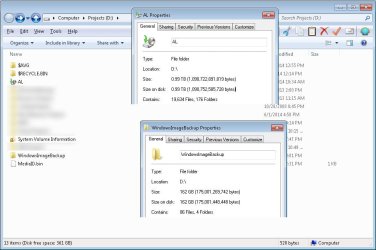
I've recently run into an issue where my System Restore folder(s?) is getting very large. I currently have two folders that appear to be backups: one with a special icon named after my Computer Name and if I double click on that the System Restore process is prompted; the other appears to be a normal folder and is called "WindowsImageBackup".

In order to clear up space I ran the Disk Cleanup utility to remove all of the shadow copies and all of the restore points except for the latest one. WindowsImageBackup is now down to 162gb which is very manageable, but the folder with my Computer Name and the special icon is still over 1tb.

I have a few questions, not the last of which is are there supposed to be two folders? And if there is supposed to be two folders, how do I reduce the size from the astronomically large 1tb of usage?

Any help would be appreciated. Thanks.
 

My Computer My Computer

Computer type
PC/Desktop
OS
Windows 7 Professional 64 bit

My Computer My Computer

Computer type
PC/Desktop
Computer Manufacturer/Model Number
Custom
OS
Dual Boot: Windows 8.1 & Server 2012r2 VMs: Kali Linux, Backbox, Matriux, Windows 8.1
CPU
A10 7700 Kavari SteamRoller
Motherboard
ASUS A88XM-PLUS (FM2+ )
Memory
8GB DDR3 SDRAM PC3-8500
Graphics Card(s)
1024MB ATI AMD Radeon R7 Graphics
Sound Card
Realtek High Definition Audio
Monitor(s) Displays
Samsung
Hard Drives
SSD Crucial 120gb
WD VelociRaptor 1tb
PSU
Rosewill Gaming 650w
Case
Rosewill Galaxy 2
Internet Speed
55/12
Antivirus
Malwarebytes, MSE, SAS
Browser
FireFox, Chrome

Attachments

  • AL-SystemRestoreFolders.jpg
    AL-SystemRestoreFolders.jpg
    82.3 KB · Views: 4

My Computer My Computer

Computer type
PC/Desktop
OS
Windows 7 Professional 64 bit
WindowsImageBackup is now down to 162gb which is very manageable, but the folder with my Computer Name and the special icon is still over 1tb.
Firstly 162GB is a large system image suggesting you have too much data on your operating system partition which may be able to be moved elsewhere and backed up differently.


Your file/folder backup is massive. Try going into Backup and Restore > Manage space and see how many backup sets you have. You may want to delete some of the older ones if you have a lot. Also, Windows backup is not the best for backing up lots of large data files like videos etc - I'd use something else even a manual copy.
 

My Computer My Computer

Computer type
PC/Desktop
Computer Manufacturer/Model Number
Own build
OS
Windows 7x64 Home Premium SP1
CPU
Intel i7 2600k
Motherboard
ASUS P8Z68 Deluxe
Memory
G.Skill Ripjaws (DDR3-1600) 2x4GB
Graphics Card(s)
Nvidia GeForce GTS 450; Intel HD Graphics 3000(GT2+)
Monitor(s) Displays
Dell Ultrasharp IPS panel U2311H, Samsung SyncMaster P2350
Screen Resolution
1920x1080
Hard Drives
Samsung 850 Pro SSD 256GB, Samsung SSD 840 120GB, Seagates 1TB Barracuda ST31000528AS x2
PSU
Seasonic M12II 520W
Case
Lian Li Lancool PC-K60
Cooling
Case: 1x120mm, 3x140mm CPU: Hyper 212+
Keyboard
Logitech MK520 (wireless)
Mouse
Logitech MK520
Internet Speed
6-7 Mbps
Antivirus
Norton Security Premium, Malwarebytes on 2 (MSE on 3rd PC)
Browser
FireFox
Other Info
Audio: Logitech Z523 2.1
WindowsImageBackup is now down to 162gb which is very manageable, but the folder with my Computer Name and the special icon is still over 1tb.
Firstly 162GB is a large system image suggesting you have too much data on your operating system partition which may be able to be moved elsewhere and backed up differently.


I don't have a lot of stuff on my operating system drive. There's maybe 2gb of music from iTunes, and I have a Virtual Machine which takes up 15gb, but other than that it's just Windows and Program Files stuff.


Your file/folder backup is massive. Try going into Backup and Restore > Manage space and see how many backup sets you have. You may want to delete some of the older ones if you have a lot. Also, Windows backup is not the best for backing up lots of large data files like videos etc - I'd use something else even a manual copy.


This is where all the space is going, you're right. There's 15 Backups all in the 60-90gb range. I don't even know what this is... do I need this for System Restore? Is it safe to delete the previous 14 backups?
 

My Computer My Computer

Computer type
PC/Desktop
OS
Windows 7 Professional 64 bit
This is where all the space is going, you're right. There's 15 Backups all in the 60-90gb range. I don't even know what this is... do I need this for System Restore? Is it safe to delete the previous 14 backups?
Personally, I wouldn't delete all 14. I'd keep at least 2 in case the current backup set is faulty but it's your data and your call. If you delete data on your PC then clearly this won't be backed up in more recent backup data sets. My backup sets are typically ~6GB and for much more than this I find Windows backup painfully slow and backup using other means.

Your 162 GB image remains a puzzle. I think 30-60GB would be more typical. If you must image that amount then I'd certainly be looking at (free) Macrium reflect which will give you a decent amount of compression.
 

My Computer My Computer

Computer type
PC/Desktop
Computer Manufacturer/Model Number
Own build
OS
Windows 7x64 Home Premium SP1
CPU
Intel i7 2600k
Motherboard
ASUS P8Z68 Deluxe
Memory
G.Skill Ripjaws (DDR3-1600) 2x4GB
Graphics Card(s)
Nvidia GeForce GTS 450; Intel HD Graphics 3000(GT2+)
Monitor(s) Displays
Dell Ultrasharp IPS panel U2311H, Samsung SyncMaster P2350
Screen Resolution
1920x1080
Hard Drives
Samsung 850 Pro SSD 256GB, Samsung SSD 840 120GB, Seagates 1TB Barracuda ST31000528AS x2
PSU
Seasonic M12II 520W
Case
Lian Li Lancool PC-K60
Cooling
Case: 1x120mm, 3x140mm CPU: Hyper 212+
Keyboard
Logitech MK520 (wireless)
Mouse
Logitech MK520
Internet Speed
6-7 Mbps
Antivirus
Norton Security Premium, Malwarebytes on 2 (MSE on 3rd PC)
Browser
FireFox
Other Info
Audio: Logitech Z523 2.1
Personally, I wouldn't delete all 14. I'd keep at least 2 in case the current backup set is faulty but it's your data and your call. If you delete data on your PC then clearly this won't be backed up in more recent backup data sets. My backup sets are typically ~6GB and for much more than this I find Windows backup painfully slow and backup using other means.

Your 162 GB image remains a puzzle. I think 30-60GB would be more typical. If you must image that amount then I'd certainly be looking at (free) Macrium reflect which will give you a decent amount of compression.

Thanks for the feedback. I'm not intentionally imaging anything as far as the 1tb AL folder is concerned, I didn't even know that feature existed, and still don't really understand what it does. I suppose it's for the thing where you right click and choose Previous Versions? Whatever it is, it's set to what Windows 7 comes with by default because I haven't changed it. The only thing I know that I'm intentionally using is the normal System Restore :) Appreciate the help.
 

My Computer My Computer

Computer type
PC/Desktop
OS
Windows 7 Professional 64 bit
It looks like you have Windows backup and restore set to the default. This includes something called a system image as well as a separate file/folder backup of your personal data. I'd select "let me choose" and untick "create a system image". Select the default file/folder settings. When you want to create a system image use the separate select box over on the left "create a system image". A system image is a snapshot of your OS partition allowing you to restore everything even to a new HDD if your old one fails. But you may need to have a look at these tutorials to get an idea of what is going on
http://www.sevenforums.com/tutorials/663-backup-complete-computer-create-image-backup.html
http://www.sevenforums.com/tutorials/675-system-image-recovery.html
If that isn't enough you could look at a (free) imaging program - Macrium Reflect. It's better than the Windows one for a number of reasons and very popular here. Have a look at the tutorial section for this one.
It may look a bit overwhelming at first but it's worth the effort IMO.
 

My Computer My Computer

Computer type
PC/Desktop
Computer Manufacturer/Model Number
Own build
OS
Windows 7x64 Home Premium SP1
CPU
Intel i7 2600k
Motherboard
ASUS P8Z68 Deluxe
Memory
G.Skill Ripjaws (DDR3-1600) 2x4GB
Graphics Card(s)
Nvidia GeForce GTS 450; Intel HD Graphics 3000(GT2+)
Monitor(s) Displays
Dell Ultrasharp IPS panel U2311H, Samsung SyncMaster P2350
Screen Resolution
1920x1080
Hard Drives
Samsung 850 Pro SSD 256GB, Samsung SSD 840 120GB, Seagates 1TB Barracuda ST31000528AS x2
PSU
Seasonic M12II 520W
Case
Lian Li Lancool PC-K60
Cooling
Case: 1x120mm, 3x140mm CPU: Hyper 212+
Keyboard
Logitech MK520 (wireless)
Mouse
Logitech MK520
Internet Speed
6-7 Mbps
Antivirus
Norton Security Premium, Malwarebytes on 2 (MSE on 3rd PC)
Browser
FireFox
Other Info
Audio: Logitech Z523 2.1
That's a lot of great info, thanks so much!
 

My Computer My Computer

Computer type
PC/Desktop
OS
Windows 7 Professional 64 bit
Back
Top