Is HD really full?

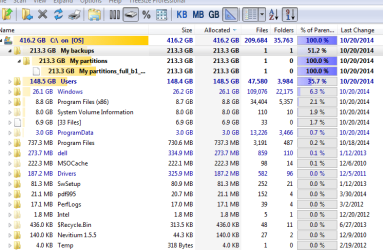
The TreeSize screenshot shows 239 GB on System Volume Information, far more than anything else. This folder is where system restore points are stored, you could try deleting some of the oldest ones or reducing the space assigned to it.
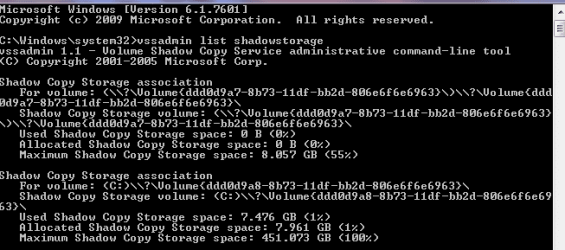
There are no 239GB of restore points. The snip in post 11 shows clearly that there is only 6.2GB of shadowstorage. The 239GBs is the whole system.
 

My Computer

Computer Manufacturer/Model Number
HP, Dell, Gateway, Toshiba - 4 laptops and 2 desktops
OS
Vista, Windows7, Mint Mate, Zorin, Windows 8
CPU
from 1.6GHz Duo to i7
Monitor(s) Displays
2x HP w2207
Hard Drives
5x HDD, 7x SSD, 12x Externals
Keyboard
with trackball - no mices
Mouse
Trackball mice
Internet Speed
DSL 6000
There are no 239GB of restore points. The snip in post 11 shows clearly that there is only 6.2GB of shadowstorage.
The Treesize snip in post 16 shows 239GB allocated to System Volume Information, with 53 actual files in it. Even if all but the latest restore point is "cleaned out", the 239GB allocation will remain but with only say 7GB inside of it actually in use for the latest restore point. This can be confirmed by using the System Protection -> Configure dialog, to see maximum size and what's actually in use.

Turning System Recovery OFF (using the System Protection dialog) for the drive should delete the currently allocated 253GB System Volume Information area entirely.

And then turning it back ON for the drive (which of course is what you want) but configuring its maximum space to say no more than 5% should limit its re-growth in the future to no more than about 25GB max. This should hold 3-4 restore points based on what his typical restore point size looks like.

If retaining more restore points than 3-4 are wanted, increase the maximum space slider to more than 5%, but for sure it should be something less than 10% absolute tops (and I feel that to be unnecessarily generous). You want some kind of reasonable upper limit here.
 

My Computer

Computer type
PC/Desktop
Computer Manufacturer/Model Number
Home-built, two systems (1) and (2)
OS
Windows 7 Pro x64 (1), Win7 Pro X64 (2)
CPU
i5-3350p 3.1Ghz/6MB-cache (1); E8400 3.0Ghz/6MB-cache (2)
Motherboard
ASUS P8Z77-V Pro (1); ASUS P5Q3 (2)
Memory
8GB PC3-12800 DDR3 (1); 4GB PC3-10600 DDR3 (2)
Graphics Card(s)
ATI HD7750 (1), (see TV cards); ATI R7 250 (2)
Sound Card
Realtek ALC892 HD Audio (1); Realtek ALC1200 HD Audio (2)
Monitor(s) Displays
Eizo HD2441W LCD, Eizo S2433W (1); Eizo 24" S2433W (2)
Screen Resolution
1920x1200, 1920x1200 (1); 1920x1200 (2)
Hard Drives
(1) 1TB SATA-II (7200RPM), 2x2TB SATA-III (7200RPM), 250GB SATA-III (10000RPM) for OS; 2x2TB external USB 3.0

(2) 320GB SATA-II (7200RPM), 750GB SATA-II (7200RPM), 150GB SATA-II (10000RPM) for OS; 2TB external USB 3.0
PSU
Nesteq ECS-6001 600W (1); Nesteq ECS-5001 500W (2)
Case
Acousti-Case 360 (1) and (2)
Cooling
Noctua NH-U12P SE2 for CPU, 2x120mm case fans (1) and (2)
Keyboard
IBM PS/2 (1) and (2)
Mouse
Logitech MX Revolution wireless (1); Microsoft wired (2)
Internet Speed
100mbps down / 10mbps up
Antivirus
Microsoft Security Essentials; Malwarebyte Anti-Malware Pro
Browser
Firefox
Other Info
Ceton InfiniTV 4-tuner cablecard-enabled TV card as well as Hauppauge HVR-2250 OTA/ATSC 2-tuner TV card in (1), running under Win7 WMC
There are no 239GB of restore points. The snip in post 11 shows clearly that there is only 6.2GB of shadowstorage. The 239GBs is the whole system.

That's not what Treesize shows, it reports 293GB of space used in System Volume Information, so the missing space IS there. My supposition, either the restore point metadata is damaged and vssadmin is getting it wrong or the NTFS file structure is incorrect and the directory entry is out of sync with the actual data, in which Treesize and all tools will report it wrong.

What about running CHKDSK and SFC?
 

My Computer

Computer type
Laptop
Computer Manufacturer/Model Number
Toshiba Sattelite A665-S6092
OS
Windows 7 Ultimate x64
CPU
Intel Core i7-740QM
Memory
8 GB DDR3
Graphics Card(s)
NVIDIA GeForce 330GT
Screen Resolution
1366x768
Hard Drives
Samsung 840 SSD 500GB
1TB USB3 external HD
Cooling
Coolermaster Notepal U3 notebook cooling pad
Internet Speed
3mbps ASDL
Antivirus
ClamWin 0.98.7
Browser
Opera 12.17 x86 (main), Firefox 38 (sec), IE11 (last resort)
Solved

A big shout out to all who helped tirelessly on this issue; especially dsperber and others who pointed to the Restore Point usage. I now have 234G free out of 451! Ran CC cleaner to top it off.:D
 

My Computer

Computer type
PC/Desktop
Computer Manufacturer/Model Number
Lenovo
OS
win7 64bit Pro
CPU
2.4
Memory
8G
Hard Drives
1T SSD
A big shout out to all who helped tirelessly on this issue; especially dsperber and others who pointed to the Restore Point usage. I now have 234G free out of 451! Ran CC cleaner to top it off.:D
Excellent!

Don't forget to now go into RMB on Computer -> Properties -> System Protection, and select your C-drive to ensure that
"protection" shows as ON (which is what you want).

And then be sure and push CONFIGURE..., to set your maximum space utilization for all accumulated restore points. You probably don't need more than 3-4 copies of restore points at most, so in your case with 7-9GB as your typical restore point size that would be no more than say 30GB max is my recommendation. Once this is set Windows will automatically delete the oldest restore points any time a new one is taken, to guarantee that you don't exceed your specified allowed maximum space utilization. I think with 3-4 system restore points retained you'll have all the "protection" you need.

Glad you got this resolved. Treesize is a wonderful product (I support the vendor, and have paid for the "Professional" license and additional capabilities).
 

My Computer

Computer type
PC/Desktop
Computer Manufacturer/Model Number
Home-built, two systems (1) and (2)
OS
Windows 7 Pro x64 (1), Win7 Pro X64 (2)
CPU
i5-3350p 3.1Ghz/6MB-cache (1); E8400 3.0Ghz/6MB-cache (2)
Motherboard
ASUS P8Z77-V Pro (1); ASUS P5Q3 (2)
Memory
8GB PC3-12800 DDR3 (1); 4GB PC3-10600 DDR3 (2)
Graphics Card(s)
ATI HD7750 (1), (see TV cards); ATI R7 250 (2)
Sound Card
Realtek ALC892 HD Audio (1); Realtek ALC1200 HD Audio (2)
Monitor(s) Displays
Eizo HD2441W LCD, Eizo S2433W (1); Eizo 24" S2433W (2)
Screen Resolution
1920x1200, 1920x1200 (1); 1920x1200 (2)
Hard Drives
(1) 1TB SATA-II (7200RPM), 2x2TB SATA-III (7200RPM), 250GB SATA-III (10000RPM) for OS; 2x2TB external USB 3.0

(2) 320GB SATA-II (7200RPM), 750GB SATA-II (7200RPM), 150GB SATA-II (10000RPM) for OS; 2TB external USB 3.0
PSU
Nesteq ECS-6001 600W (1); Nesteq ECS-5001 500W (2)
Case
Acousti-Case 360 (1) and (2)
Cooling
Noctua NH-U12P SE2 for CPU, 2x120mm case fans (1) and (2)
Keyboard
IBM PS/2 (1) and (2)
Mouse
Logitech MX Revolution wireless (1); Microsoft wired (2)
Internet Speed
100mbps down / 10mbps up
Antivirus
Microsoft Security Essentials; Malwarebyte Anti-Malware Pro
Browser
Firefox
Other Info
Ceton InfiniTV 4-tuner cablecard-enabled TV card as well as Hauppauge HVR-2250 OTA/ATSC 2-tuner TV card in (1), running under Win7 WMC
My supposition, either the restore point metadata is damaged and vssadmin is getting it wrong
That is the only possibility I can imagine because normally vssadmin gets the right data.
 

My Computer

Computer Manufacturer/Model Number
HP, Dell, Gateway, Toshiba - 4 laptops and 2 desktops
OS
Vista, Windows7, Mint Mate, Zorin, Windows 8
CPU
from 1.6GHz Duo to i7
Monitor(s) Displays
2x HP w2207
Hard Drives
5x HDD, 7x SSD, 12x Externals
Keyboard
with trackball - no mices
Mouse
Trackball mice
Internet Speed
DSL 6000
Uh Oh!

My free space has been undone; the only "work" that I've done is to image my system and back up partition via Seagate Disk Wizard. Now I only have 40G out of 500G.
Perhaps WH had a point regarding something damaged in restore? Why all the space to partition?
I've deleted my previous restore points but it did not help. Here are snips from VSSadmin, and TreeSize.
I hope there is a solution.
dos.PNG

tree.PNG
 

My Computer

Computer type
PC/Desktop
Computer Manufacturer/Model Number
Lenovo
OS
win7 64bit Pro
CPU
2.4
Memory
8G
Hard Drives
1T SSD
Solved again

I found the culprit: Seagate Discwizard made a copy not only on external HD but also on the OS. Deleted the OS file, and voila, have my free space back.:geek:
 

My Computer

Computer type
PC/Desktop
Computer Manufacturer/Model Number
Lenovo
OS
win7 64bit Pro
CPU
2.4
Memory
8G
Hard Drives
1T SSD
Now we have seen them all. There is really a million ways for things to get screwed up. LOL
 

My Computer

Computer Manufacturer/Model Number
HP, Dell, Gateway, Toshiba - 4 laptops and 2 desktops
OS
Vista, Windows7, Mint Mate, Zorin, Windows 8
CPU
from 1.6GHz Duo to i7
Monitor(s) Displays
2x HP w2207
Hard Drives
5x HDD, 7x SSD, 12x Externals
Keyboard
with trackball - no mices
Mouse
Trackball mice
Internet Speed
DSL 6000
Back
Top