No sound in headphones

Zodiac

New member
Local time
11:07 PM
Messages
11
I have Windows 7 64 bit and when I boot up windows without headphones plugged in, the sound works fine through the speakers but when I plug in the headphones they do not work. If I unplug the headphones, the sound starts coming out of the speakers. I have tried manually switching devices but that didn't work either and if I try to adjust volume the sound mixer crashes.

I just have integrated audio (device manager lists it as High Definition Audio Device and IDT High Definition Audio CODEC).

If I plug in the headphones and then start the laptop, the sound works fine through the headphones.

Any info on what may be going on?

Thanks.
 

My Computer My Computer

At a glance

Windows 7 Professional Build 7600AMD Athlon X2 Dual-Core QL-65ATI Mobility Radeon HD 4500 Series
Computer Manufacturer/Model Number
HP DV6 CTO
OS
Windows 7 Professional Build 7600
CPU
AMD Athlon X2 Dual-Core QL-65
Graphics Card(s)
ATI Mobility Radeon HD 4500 Series
Zodiac

So device manager lists the device and the driver is installed, right? what are the control panel options for the headphones/speakers? could you use the snipping tool (type snip in search) and make a screenshot and upload it to us?

ken
 

My Computer My Computer

At a glance

Win 8 Release candidate 8400[email protected]4 gigsNvidia 9600M
Computer Manufacturer/Model Number
HP Pavillion dv-7 1005 Tx
OS
Win 8 Release candidate 8400
CPU
[email protected]
Memory
4 gigs
Graphics Card(s)
Nvidia 9600M
Sound Card
HD built-in
Monitor(s) Displays
17" Wxga
Screen Resolution
1440x900
Cooling
none
Internet Speed
45Mb down 5Mb up
Thanks for the quick reply,

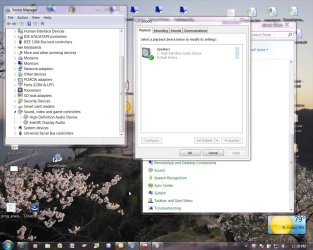
Yes everything is installed and working fine in device manager and here are the screenshots (I already booted the laptop with headphones in) let me know if you need anything else.

Thanks.
 

Attachments

  • devicemanager.JPG
    devicemanager.JPG
    44.5 KB · Views: 920
  • audio.JPG
    audio.JPG
    34.8 KB · Views: 728

My Computer My Computer

At a glance

Windows 7 Professional Build 7600AMD Athlon X2 Dual-Core QL-65ATI Mobility Radeon HD 4500 Series
Computer Manufacturer/Model Number
HP DV6 CTO
OS
Windows 7 Professional Build 7600
CPU
AMD Athlon X2 Dual-Core QL-65
Graphics Card(s)
ATI Mobility Radeon HD 4500 Series
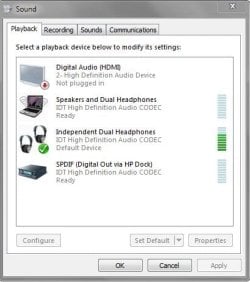
Choose "speakers and default headphones" as the default audio playback device.
 

My Computer My Computer

At a glance

7600.20510 x86P4 550 3.4 GHz HT running at 3.5 GHzOCZ 2 GB(2x1GB) DDR400mHz running @ 414 mHzHIS Radeon HD 3850 IceQ 3 Turbo HDMI Dual DL-...
Computer Manufacturer/Model Number
self built
OS
7600.20510 x86
CPU
P4 550 3.4 GHz HT running at 3.5 GHz
Motherboard
MSI PM8M3-V (MS-7211 v1.x) Micro-ATX mainboard
Memory
OCZ 2 GB(2x1GB) DDR400mHz running @ 414 mHz
Graphics Card(s)
HIS Radeon HD 3850 IceQ 3 Turbo HDMI Dual DL-DVI AGP
Sound Card
MOTU Traveler firewire studio interface 192 kHz 24 bit
Monitor(s) Displays
22" widescreen Acer X223W LCD, 17" Compaq P75 CRT
Screen Resolution
1680x1050 and 1280x1024
Hard Drives
SATA I x2 WD, 400 GB and 120 GB, SATA 2 WD Caviar Black 1 TB
PSU
350W generic
Case
Cybertronpc, it glows blue
Cooling
stock cpu fan, Ice-Q 3 gpu and system, many case fans
Keyboard
Logitch Classical Keyboard 200
Mouse
Logitech Mediaplay cordless
Internet Speed
1792/448 kbits/sec
Other Info
SATA II PCI fake RAID adapter, 1 GB Readyboost, original ATI Remote Wonder (even works with WMC perfectly), Logitech Rumblepad 2 game controller x2
These USB headphones, or do they plug into the speaker/headphone jack?
 

My Computer My Computer

At a glance

Win 7 Ultimate x64FX-8350 @ 4.6 GHz so farADATA XPG V1 Series Black 8GB DDR3 1600Sapphire R9 270x Dual-X
Computer type
PC/Desktop
Computer Manufacturer/Model Number
Me
OS
Win 7 Ultimate x64
CPU
FX-8350 @ 4.6 GHz so far
Motherboard
Asus M5A97 EVO
Memory
ADATA XPG V1 Series Black 8GB DDR3 1600
Graphics Card(s)
Sapphire R9 270x Dual-X
Sound Card
Xonar DGX w/ Corsair Vengence 1300
Monitor(s) Displays
Acer S232HL Abid
Screen Resolution
1920x1080
Hard Drives
120 GB OCZ Vertex 3
500 GB Seagate 7200.12
PSU
Antec Earthwatts 650W Green
Case
Antec Three Hundred
Cooling
Cooler Master 212 EVO
Keyboard
Logitech G510
Mouse
Logitech G500s
Internet Speed
35000/3000
Choose "speakers and default headphones" as the default audio playback device.

That's what it is normally set to when the headphones aren't plugged in but as soon as I plug in the headphones, it changes the default device.

These USB headphones, or do they plug into the speaker/headphone jack?


They plug into the headphone jack.
 

My Computer My Computer

At a glance

Windows 7 Professional Build 7600AMD Athlon X2 Dual-Core QL-65ATI Mobility Radeon HD 4500 Series
Computer Manufacturer/Model Number
HP DV6 CTO
OS
Windows 7 Professional Build 7600
CPU
AMD Athlon X2 Dual-Core QL-65
Graphics Card(s)
ATI Mobility Radeon HD 4500 Series
IDT High Definition Audio equals Conexant High-Definition Audio Chip.

Is there any control panel that gets installed with the drivers for it, or is the Windows controls it? Almost sounds like there is a jack sensing setting, or at least should be somewhere, that isn't working properly. Had a look at what passes for a manual, and there wasn't any info I could find regarding a control panel or any other sound card specific controls.
 

My Computer My Computer

At a glance

Win 7 Ultimate x64FX-8350 @ 4.6 GHz so farADATA XPG V1 Series Black 8GB DDR3 1600Sapphire R9 270x Dual-X
Computer type
PC/Desktop
Computer Manufacturer/Model Number
Me
OS
Win 7 Ultimate x64
CPU
FX-8350 @ 4.6 GHz so far
Motherboard
Asus M5A97 EVO
Memory
ADATA XPG V1 Series Black 8GB DDR3 1600
Graphics Card(s)
Sapphire R9 270x Dual-X
Sound Card
Xonar DGX w/ Corsair Vengence 1300
Monitor(s) Displays
Acer S232HL Abid
Screen Resolution
1920x1080
Hard Drives
120 GB OCZ Vertex 3
500 GB Seagate 7200.12
PSU
Antec Earthwatts 650W Green
Case
Antec Three Hundred
Cooling
Cooler Master 212 EVO
Keyboard
Logitech G510
Mouse
Logitech G500s
Internet Speed
35000/3000
It does have one and I'll try messing with the settings in there and let ya know.

Thanks.
 

My Computer My Computer

At a glance

Windows 7 Professional Build 7600AMD Athlon X2 Dual-Core QL-65ATI Mobility Radeon HD 4500 Series
Computer Manufacturer/Model Number
HP DV6 CTO
OS
Windows 7 Professional Build 7600
CPU
AMD Athlon X2 Dual-Core QL-65
Graphics Card(s)
ATI Mobility Radeon HD 4500 Series
I just received my new laptop and i have no headphone capability at all... How do i get it, any suggestions?
 

Attachments

  • sound.jpg
    sound.jpg
    147.2 KB · Views: 637

My Computer My Computer

At a glance

64 bit win 7 businessIntel(R) Core(TM) i54G
Computer Manufacturer/Model Number
HP elitebook 8440 notebook
OS
64 bit win 7 business
CPU
Intel(R) Core(TM) i5
Motherboard
A297 Processor
Memory
4G
Monitor(s) Displays
Dell duo screens
Hard Drives
232G
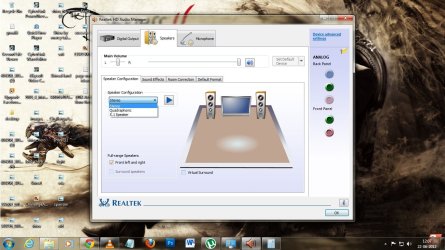
yup that happens cuz of the settings ,, as you use speaker set , the default setting in the driver(for me it is "Realtek HD Audio manager") settings would be stereo and that is what you need to change to 'headphone' mode before switching from speaker to regular headphone in audio driver manager

For wIN 7

go to control panel>Audio Driver manager(Relatek audio manager)>choose the tab "Speakers">speaker configuration>change from "stereo" to "headphone"

this should definitely work:cool:

hope this helped ,Thanks;)
 

Attachments

  • sad.jpg
    sad.jpg
    133.8 KB · Views: 810
Last edited:

My Computer My Computer

At a glance

Windows 7 Home Premium 32bit
OS
Windows 7 Home Premium 32bit
Hi Zodiac. I am having the same problem as of yours. Can you let me know of how you did solve the problem. TIA.
 

My Computer My Computer

At a glance

windows 7
Computer type
PC/Desktop
OS
windows 7
Hi Zodiac. I am having the same problem as of yours. Can you let me know of how you did solve the problem. TIA.


I don't remember if I ever did solve it, if I did it must have been something to do with the drivers. I might have ended up just reinstalling windows though because I remember this was a big issue I was having at the time. I have since moved on to a different laptop and never had this issue again.
 

My Computer My Computer

At a glance

Windows 7 Professional Build 7600AMD Athlon X2 Dual-Core QL-65ATI Mobility Radeon HD 4500 Series
Computer Manufacturer/Model Number
HP DV6 CTO
OS
Windows 7 Professional Build 7600
CPU
AMD Athlon X2 Dual-Core QL-65
Graphics Card(s)
ATI Mobility Radeon HD 4500 Series
Just wanted to post this for posterity. This is the top hit on google.

Windows would detect my headphones/external speakers, and they were set to default device, but no sound would come out.

Fixed the issue with these steps-
Turn off computer.
Hold down power button for 10 seconds, release and let pc boot up again.

It must have reset something in the bios, I dunno. But the audio in the headphones came back after booting up.

I previously uninstalled/reinstalled driver, rolled back, set default..... none of that worked.
Holding down power button before booting did the trick.
 

My Computer My Computer

At a glance

windows 7
OS
windows 7
I unplugged my dell laptop, took the battery out waited 30 seconds, put the battery back in. Once I booted back up the headphone volume was fixed.
 

My Computer My Computer

At a glance

Window 7 Professional 64bit
Computer type
PC/Desktop
Computer Manufacturer/Model Number
Dell E6520
OS
Window 7 Professional 64bit
For me, the problem appears when my notebook enters sleep mode with the headphones plugged in.
Workaround: remove the headphones, enter sleep mode and wake up.
After this, the headphones work again.
My notebook is Lenovo L430 with Realtek ALC3232 audio.
Others say that bios update could solve the problem.
 

My Computer My Computer

At a glance

Windows 7 Pro x64
Computer type
Laptop
Computer Manufacturer/Model Number
Lenovo
OS
Windows 7 Pro x64
Back
Top