Solved External Hard Drive failure. "Bad disk" after power failure

dime5150

New member
Local time
6:51 AM
Messages
15
Hi Everyone,

I'm hoping to get some help. I had a power outage while my WD Elements 1.5 TB Hard drive was on. I wasn't accessing it but apparently that was enough.

I had a lot of important data on it but losing hope after unsuccessful attempts to use PhotoRec to get items off it.

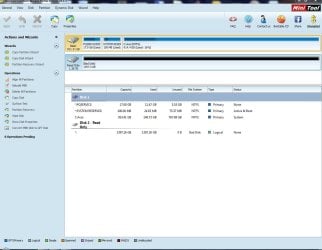
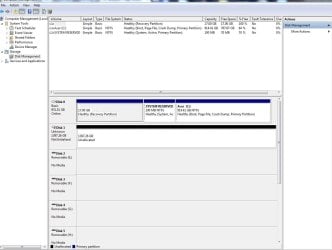
It doesn't show as accessible in MyComputer but is detected. I've included what it shows under the "Manage" view of the drive.

I've also tried MiniTool Partition but it doesn't seem to be able to fix the partition. I've also tried Partition Bad Disk and it just shows the whole 1.5 TB drive as one bad block. It won't let me fix it either.

Does anyone have any other bits of advice? I'm at a loss as what to do. It seems the data is not recoverable. I can't figure out how to get it to show or even how to use it again.

Please see attachments.

I'm grateful for any ideas/help please. Thank you.
 

Attachments
  • Manage.JPG
    Manage.JPG
    95.1 KB · Views: 10
  • Hard Drive - MiniTool partition.JPG
    Hard Drive - MiniTool partition.JPG
    94.5 KB · Views: 7

My Computer My Computer

Computer type
PC/Desktop
Computer Manufacturer/Model Number
Acer
OS
Windows 7 Home 64bit
Hard Drives
WD 1.5 TB Elements Hard Drive
Hello dime5150. Welcome to the forum

In PW, did you try "Rebuild MBR"?
 

My Computer My Computer

Computer type
PC/Desktop
Computer Manufacturer/Model Number
Home Built - Jan 2013
OS
Windows 7 64 Bit Home Premium SP1
CPU
i7-3820
Motherboard
Asus P9X79-PRO - Bios 4608
Memory
GSkill F3-14900CL9Q - 16GB
Graphics Card(s)
EVGA GeForce GTX660 - Driver 352.86
Sound Card
On board Realtek ALC898
Monitor(s) Displays
Acer S271HL
Screen Resolution
1920 x 1080
Hard Drives
#1- Samsung 840 Pro Series
#2- Western Digital WD1002FAEX Sata3 Black
#3- Western Digital WD1002FAEX Sata3 Black
PSU
Corsair CMPSU-850TX-V2 - 850 watt (by Seasonic)
Case
Corsair Obsidian 550D
Cooling
Standard 3 120mm case fans, Cooler Master Hyper 212 EVO
Keyboard
MS KC-0405
Mouse
Intellimouse 5-button
Internet Speed
56 Mbits/Sec (on a good day)
Antivirus
Avast & Malwarebytes
Browser
Firefox
Other Info
Asus DVD - DRW-24B1ST 24X
TVeblen: Thank you. No I have not tried that yet.

jumanji: Thank you as well for responding. I ran the Data Lifeguard Diagnostic for Windows with the following results:

Short Test: PASS
SMART Status: PASS

Sorry it took so long to respond. Let me know what next steps I should take. Eager to see if I can save the data off the drive!

I should also add that the drive is from 2010 so not under any warranty.
 
Last edited:

My Computer My Computer

Computer type
PC/Desktop
Computer Manufacturer/Model Number
Acer
OS
Windows 7 Home 64bit
Hard Drives
WD 1.5 TB Elements Hard Drive
You have to run the Extended Test also to detect and repair the bad sectors if any.

This extended test may take a long time. Do it and let us know the results.

If extended test passes, then post a screenshot of Windows Disk Management as well as Partition Wizard.
 

My Computer My Computer

OS
Windows 7 Home Premium 32 bit
jumanji: Thanks again.

When trying to run the Extended Test, it states "Too many bad sectors detected." and shows FAIL next to it.

Let me know what next steps I should take thanks!!
 

My Computer My Computer

Computer type
PC/Desktop
Computer Manufacturer/Model Number
Acer
OS
Windows 7 Home 64bit
Hard Drives
WD 1.5 TB Elements Hard Drive
When Partition Wizard showed your disk as Read only and Bad Disk, that is what I suspected. When there are too many bad sectors that couldn't be remapped to Reserved sectors which already got exhausted, the drive controller may make it read only.

I am afraid that I cannot suggest any means of data recovery from such an HDD full of bad sectors. You have already tried PhotoRec.

What I am surprised is whether a power failure can damage the HDD like this or it was just a coincidence. I am sending a PM to Anshad Edavana to look into this and see whether he has any ideas on how to go about this. He may take sometime to respond since it is already bed time here.

In the meanwhile you can try to clear the read only attribute by following the methods here, using elevated diskpart.
Change External hard drive from read only back to read & write - Microsoft Community

External Hard Drive Read Only - Trouble Shooting and Solution

I am not sure whether that will work but no harm in trying.

If by chance, the read only attribute gets cleared and you are able to access the drive, post-haste copy whatever data you can to another external. Yep have one ready to do that.

Good luck.
 

My Computer My Computer

OS
Windows 7 Home Premium 32 bit
Thanks Jumanji. I will try changing it to ready only. I also have an old computer laying around that I may try to install the OS Ubuntu on. People were saying sometimes Ubuntu can read external HD's thought dead.

Hopefully I can get it showing so I can at least get some items off of it. I'll let you know the result and let me know if you have any other ideas.
 

My Computer My Computer

Computer type
PC/Desktop
Computer Manufacturer/Model Number
Acer
OS
Windows 7 Home 64bit
Hard Drives
WD 1.5 TB Elements Hard Drive
Hi

"Too many bad sectors" message by "WD lifeguard Diagnostics" is definitely a bad news :shock:. Since the disk is detected as "Not initialized" by "Disk Management", i assume the MBR and partition table are destroyed or in unreadable state so the Ubuntu method is less likely to be succeeded. However there is nothing wrong in trying Linux as it saved my ass several times in similar situations. By the way you don't need to install Linux. You can simply boot Ubuntu as a live disc without installing it to hard drive.

Try Ubuntu before you install it | Ubuntu

If Linux can't identify neither partition table nor a valid file system, i would suggest the below steps.

1. Reboot in to Windows and download trial version of "HDTune Pro" from http://www.hdtune.com/files/hdtunepro_550_trial.exe

2. Connect your external HDD and open "HDtune Pro". Then select the disk in question from the drop down menu ( upper left corner ) and navigate to the "Error Scan" tab. Press the "Start" button and wait patiently until the scan completes.


e0b67f7b_HDTuneProCdriveerrors.gif


One the scan is finished, take a screenshot and upload it with next reply.

Take a screen capture (print your screen) - Windows Help
 

My Computer My Computer

Computer type
PC/Desktop
OS
Windows 7 Ultimate x64
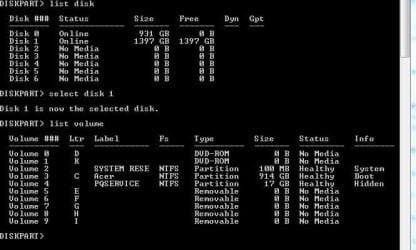
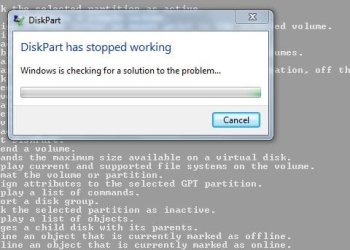
I went ahead and tried to display the disks/volumes as instructed to change external to read only. I run into a problem. When I select the appropriate disk (disk 1) which is the external and list volumes, it only shows the boot disk volumes. When I select "detail disk" it just stops diskpart from working and restarts it. I'm not able to change it. See attached screenshots.

I will try the Ubuntu route as well and then if that doesn't work, HDtunepro.

I will then post results. Thank you once again.
 

Attachments

  • disk part 1.JPG
    disk part 1.JPG
    45.7 KB · Views: 65
  • disk part 2.JPG
    disk part 2.JPG
    31.1 KB · Views: 65

My Computer My Computer

Computer type
PC/Desktop
Computer Manufacturer/Model Number
Acer
OS
Windows 7 Home 64bit
Hard Drives
WD 1.5 TB Elements Hard Drive
Hi,

Ubuntu wasn't able to detect the hard drive when connected. So unfortunately that did not work. :(

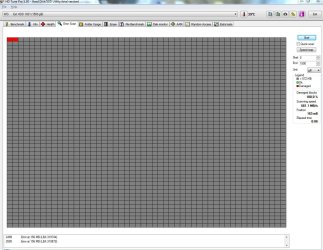
I went ahead and downloaded HD Tune Pro and ran the test. I've attached the result to this response. Let me know what I should do next. Thanks!


Hi

"Too many bad sectors" message by "WD lifeguard Diagnostics" is definitely a bad news :shock:. Since the disk is detected as "Not initialized" by "Disk Management", i assume the MBR and partition table are destroyed or in unreadable state so the Ubuntu method is less likely to be succeeded. However there is nothing wrong in trying Linux as it saved my ass several times in similar situations. By the way you don't need to install Linux. You can simply boot Ubuntu as a live disc without installing it to hard drive.

Try Ubuntu before you install it | Ubuntu

If Linux can't identify neither partition table nor a valid file system, i would suggest the below steps.

1. Reboot in to Windows and download trial version of "HDTune Pro" from http://www.hdtune.com/files/hdtunepro_550_trial.exe

2. Connect your external HDD and open "HDtune Pro". Then select the disk in question from the drop down menu ( upper left corner ) and navigate to the "Error Scan" tab. Press the "Start" button and wait patiently until the scan completes.


e0b67f7b_HDTuneProCdriveerrors.gif


One the scan is finished, take a screenshot and upload it with next reply.

Take a screen capture (print your screen) - Windows Help
 

Attachments

  • HD Tune Pro Test.JPG
    HD Tune Pro Test.JPG
    164.3 KB · Views: 6

My Computer My Computer

Computer type
PC/Desktop
Computer Manufacturer/Model Number
Acer
OS
Windows 7 Home 64bit
Hard Drives
WD 1.5 TB Elements Hard Drive
If your external drive is self powered (I.E: connected to it's own power) it's possible to remove the drive from the enclosure it's in and connect it directly to your computer without it's power controller. I have saved the data from a few external hard drives like that. Worth a shot if nothing else works
 

My Computer My Computer

Computer type
PC/Desktop
Computer Manufacturer/Model Number
Home Made
OS
Windows 7 Ultimate x64
CPU
Q6600 3.1ghz
Motherboard
Gigabyte GA-P35-DS3L
Memory
Kingston DDR2 6400 8GB
Graphics Card(s)
Gigabyte Radeon HD 6850 1GB 256-Bit
Sound Card
On board
Monitor(s) Displays
Acer X243H
Screen Resolution
1920x1080
Hard Drives
Intel 330 120GB SSD
WD 2TB 7200
PSU
Thermaltake Toughpower 750W Semi Modular
Case
Modified Alienware
Keyboard
A4Tech
Mouse
Gigabyte ECO600
Antivirus
Comodo
Browser
Cyberfox
If your external drive is self powered (I.E: connected to it's own power) it's possible to remove the drive from the enclosure it's in and connect it directly to your computer without it's power controller. I have saved the data from a few external hard drives like that. Worth a shot if nothing else works

Thanks. After all is said and done I may have to give that a shot. The data is important.
 

My Computer My Computer

Computer type
PC/Desktop
Computer Manufacturer/Model Number
Acer
OS
Windows 7 Home 64bit
Hard Drives
WD 1.5 TB Elements Hard Drive
Hi

Sorry for the late reply. The scan result doesn't looks good and indicates severe surface damage. Usually this kind of issues are beyond DIY and require service of a data recovery professional. I would also suggest trying to connect the HDD to a direct SATA port to isolate a possibly faulty USB-SATA ridge. But i am afraid that might not be possible with a "WD Elements" drive. WD has the bad habit of integrating USB-SATA bridge to the disk's PCB rather than using a separate logic board.

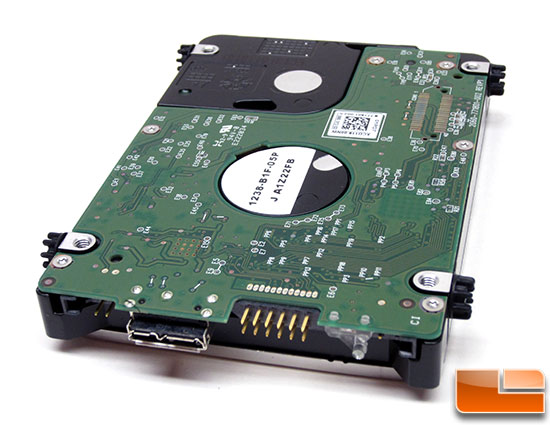
An example :
passport-2tb-inside2.jpg


If you open the enclosure and find a similar disk like the above one, the case will be beyond DIY.
 

My Computer My Computer

Computer type
PC/Desktop
OS
Windows 7 Ultimate x64
Thanks. Is there anything else I can do before opening it up?
 

My Computer My Computer

Computer type
PC/Desktop
Computer Manufacturer/Model Number
Acer
OS
Windows 7 Home 64bit
Hard Drives
WD 1.5 TB Elements Hard Drive
Also at this stage is the drive usable? Would initializing it do anything?

Curious if anyone has any other steps I should take.
 

My Computer My Computer

Computer type
PC/Desktop
Computer Manufacturer/Model Number
Acer
OS
Windows 7 Home 64bit
Hard Drives
WD 1.5 TB Elements Hard Drive
Would initializing it do anything?

Initializing will try to write a new MBR and an empty partition table which will further complicate the situation. With care, you can easily open the enclosure without damaging it. Then please report whether the disk has standard SATA connector or integrated USB connector.
 

My Computer My Computer

Computer type
PC/Desktop
OS
Windows 7 Ultimate x64
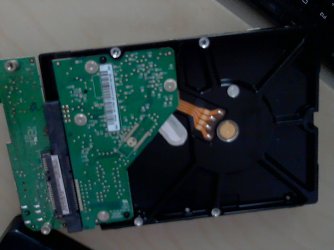
Hi. Sorta good news I guess. My HD is not like the one above. It has a detachable board that covers the connector. So it appears I can connect this to my computer and try to get access to it? I've posted a picture for reference. Please let me know how to proceed.

Thanks again.
 

Attachments

  • Picture 11.jpg
    Picture 11.jpg
    242.4 KB · Views: 35

My Computer My Computer

Computer type
PC/Desktop
Computer Manufacturer/Model Number
Acer
OS
Windows 7 Home 64bit
Hard Drives
WD 1.5 TB Elements Hard Drive

My Computer My Computer

Computer type
PC/Desktop
Computer Manufacturer/Model Number
Home Made
OS
Windows 7 Ultimate x64
CPU
Q6600 3.1ghz
Motherboard
Gigabyte GA-P35-DS3L
Memory
Kingston DDR2 6400 8GB
Graphics Card(s)
Gigabyte Radeon HD 6850 1GB 256-Bit
Sound Card
On board
Monitor(s) Displays
Acer X243H
Screen Resolution
1920x1080
Hard Drives
Intel 330 120GB SSD
WD 2TB 7200
PSU
Thermaltake Toughpower 750W Semi Modular
Case
Modified Alienware
Keyboard
A4Tech
Mouse
Gigabyte ECO600
Antivirus
Comodo
Browser
Cyberfox
Back
Top