Hows the MSE Final on System Resources?

Status
Not open for further replies.

DarkDavil

Avatar thanks to BFK :D
Power User
Local time
12:27 PM
Messages
432
Location
Illinois...India?
Im just wondering before i uninstall my current AV and install MSE.... how light is it on system resources... On Startup? During Scans?

Thanks :D
-DD
 

My Computer My Computer

Computer Manufacturer/Model Number
HP dv6000t CTO Entertainment Lappy |My Desktop @ Bottom
OS
7 x64/ Back-Track 4
CPU
Intel Core 2 Duo CPU 8300@ 2.4 Ghz
Motherboard
HP's Own
Memory
4096 MB DDR2
Graphics Card(s)
Nvidia 8400M GS
Sound Card
Altec Lansing (The usual on Laptops )
Monitor(s) Displays
Laptop Screen. 17' Wide.
Screen Resolution
1280 x 800
Hard Drives
150 GB HDD.
Cooling
2 External Fans, Undervolted, Coolant
Keyboard
Norm. Cheap Random Keyboard
Mouse
Norm. Cheap Random Mouse
Other Info
This is my Homemade Desktop :)
HDD: Western Digital Caviar Blue 320GB 16MB 7200RPM SATA2
And more to come in a bit! :D
hi !

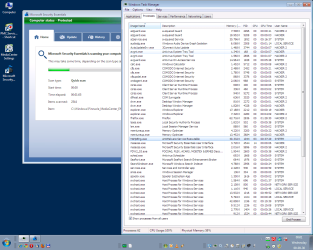
MSE Realtime Protection ON=1620 kB
MSE Scanning=2852 kB

at least that´s what taskmanager is telling me...
 

Attachments

  • MSE.png
    MSE.png
    39.1 KB · Views: 129

My Computer My Computer

Computer Manufacturer/Model Number
Dell
OS
W7-Enterprise + WS-2008 (Converted to Workstation)
CPU
P4 2,4GHz (at 1,8GHz, "slow" RDRAM, only 400MHz FSB...)
Motherboard
Intel 850E
Memory
2GB
Graphics Card(s)
NVIDIA QUADRO2 PRO 64MB
Sound Card
Yes
Monitor(s) Displays
Dell 1702FP
Screen Resolution
1280x1024
Hard Drives
Yes
PSU
Yes
Case
Yes
Cooling
Yes
Keyboard
Yes
Mouse
Yes, and i also have Cats...
Internet Speed
University: 100 MBit/s, Home: UMTS 7,2 MBit/s
Other Info
W7 on a DINOSAUR: P2 with 266MHz CPU & 160MB RAM
I find it somewhat funny that even though people build highly powerful rigs, often install too much RAM, overclock their CPU's and push performance to the max....they still worry over a few MB's here and there for something like antivirus.
 

My Computer My Computer

Computer Manufacturer/Model Number
Self-Built in July 2009
OS
Windows 7 Ultimate x64
CPU
Intel Q9550 2.83Ghz OC'd to 3.40Ghz
Motherboard
Gigabyte GA-EP45-UD3R rev. 1.1, F12 BIOS
Memory
8GB G.Skill PI DDR2-800, 4-4-4-12 timings
Graphics Card(s)
EVGA 1280MB Nvidia GeForce GTX570
Sound Card
Realtek ALC899A 8 channel onboard audio
Monitor(s) Displays
23" Acer x233H
Screen Resolution
1920x1080
Hard Drives
Intel X25-M 80GB Gen 2 SSD
Western Digital 1TB Caviar Black, 32MB cache. WD1001FALS
PSU
Corsair 620HX modular
Case
Antec P182
Cooling
stock
Keyboard
ABS M1 Mechanical
Mouse
Logitech G9 Laser Mouse
Internet Speed
15/2 cable modem
Other Info
Windows and Linux enthusiast. Logitech G35 Headset.
hi !

MSE Realtime Protection ON=1620 kB
MSE Scanning=2852 kB

at least that´s what taskmanager is telling me...


Why do you have 3 av programs installed? Theres no need for more than 1 and it needlessly uses up resources.
 

My Computer My Computer

Computer Manufacturer/Model Number
self built
OS
Windows 7 Professional 64-bit
CPU
Intel E8400 3GHz
Motherboard
Intel DX48BT2
Memory
Kingston PC3-10700H 4Gb
Graphics Card(s)
XFX Radeon HD 5850 BlackEd.
Sound Card
Asus Xonar DG
Monitor(s) Displays
2x Samsung SM-T220HD 22"
Screen Resolution
1680x1050 on two monitors
Hard Drives
OCZ Vertex 2 120gb 3.5" (OS)
Seagate Momentus XT 500gb
Samsung F3 1Tb (games)
2x Samsung F1 1Tb
PSU
Thermaltake ToughPower 850w
Case
Thermaltake Armor
Cooling
Scythe Mugen II
Keyboard
Microsoft Comfort Curve USB
Mouse
Razer Diamondback 3G
Internet Speed
8128/443
hi !

MSE Realtime Protection ON=1620 kB
MSE Scanning=2852 kB

at least that´s what taskmanager is telling me...


Click on "Show Processes From All Users" from the task manager and then post a screenshot. ;)

RTP and an Active scan.
 

My Computer My Computer

Computer type
PC/Desktop
Computer Manufacturer/Model Number
Airbot 2.0
OS
Windows 7 Ultimate x64 SP1
CPU
Core i7 920 (D0) @ 4Ghz, *26c idle *65c full load on air
Motherboard
Asus P6X58D Premium - Sata 6Gb/s - USB 3.0
Memory
12GB DDR3 Corsair Dominator -CMD12GX3M6A1600C8 at 1600MHz
Graphics Card(s)
Zotac Geforce GTX 770
Sound Card
ASUS Xonar D2X
Monitor(s) Displays
1 LG 24" Flatron W2453V-PF 1 Samsung 24" P2450H both 2ms RT
Screen Resolution
1920x1080@60hz
Hard Drives
1 Samsung 250GB 840 Evo SSD
1 OCZ Vertex2 180GB SSD
1 TB Samsung Spinpoint F1 7200RPM 32MB cache
2 500GB WD Caviar Blacks 7200RPM 32MB cache (WD5001AALS)

Pioneer DVD Burner DVR-S18M
PSU
Corsair HX1000W
Case
Cooler Master HAF 932
Cooling
Case Fans *3 230mm, *1 140mm/CPU - *Tuniq Tower 120 Extreme
Keyboard
Logitech Wireless MK700
Mouse
Logitech Wireless MK700
Internet Speed
DL 15 Mbps UL 0.98 Mbps
Antivirus
None
Browser
Firefox Nightly
Other Info
Processor-7.7 *RAM- 7.9 *Graphics-7.9 *Gaming Graphics- 7.9 *SSD- 7.8 W.E.I final score= 7.7
*Phone- LG Nexus 5
Thanks :D That info is fine enough :D I'll test it my-self too :D Thanks guys!
 

My Computer My Computer

Computer Manufacturer/Model Number
HP dv6000t CTO Entertainment Lappy |My Desktop @ Bottom
OS
7 x64/ Back-Track 4
CPU
Intel Core 2 Duo CPU 8300@ 2.4 Ghz
Motherboard
HP's Own
Memory
4096 MB DDR2
Graphics Card(s)
Nvidia 8400M GS
Sound Card
Altec Lansing (The usual on Laptops )
Monitor(s) Displays
Laptop Screen. 17' Wide.
Screen Resolution
1280 x 800
Hard Drives
150 GB HDD.
Cooling
2 External Fans, Undervolted, Coolant
Keyboard
Norm. Cheap Random Keyboard
Mouse
Norm. Cheap Random Mouse
Other Info
This is my Homemade Desktop :)
HDD: Western Digital Caviar Blue 320GB 16MB 7200RPM SATA2
And more to come in a bit! :D
hi !

thanks Airbot !

as you can see above, i thought it was a bit low...

i was using my "USER"-account, when i switched to my "ADMIN"-account, taskmanager showed some more memory being used.

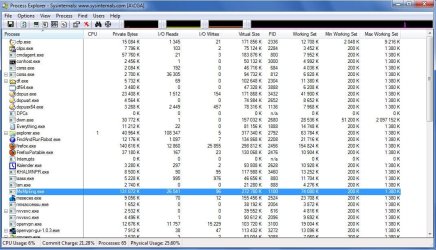
2 new screenshots:

look for MsMpEng.exe
RealTimeProtection=29.016 kB
Scanning=40.332 kB

however please observe that i´m still logged in as "USER", so taskmanager shows 2 userinterfaces for MSE...
 

Attachments

  • MSE 1.png
    MSE 1.png
    52.4 KB · Views: 44
  • MSE 2.png
    MSE 2.png
    64.2 KB · Views: 59

My Computer My Computer

Computer Manufacturer/Model Number
Dell
OS
W7-Enterprise + WS-2008 (Converted to Workstation)
CPU
P4 2,4GHz (at 1,8GHz, "slow" RDRAM, only 400MHz FSB...)
Motherboard
Intel 850E
Memory
2GB
Graphics Card(s)
NVIDIA QUADRO2 PRO 64MB
Sound Card
Yes
Monitor(s) Displays
Dell 1702FP
Screen Resolution
1280x1024
Hard Drives
Yes
PSU
Yes
Case
Yes
Cooling
Yes
Keyboard
Yes
Mouse
Yes, and i also have Cats...
Internet Speed
University: 100 MBit/s, Home: UMTS 7,2 MBit/s
Other Info
W7 on a DINOSAUR: P2 with 266MHz CPU & 160MB RAM
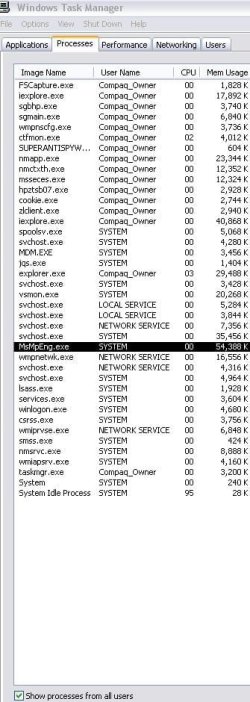
This is Windows XP home
 

Attachments

  • MSE1.JPG
    MSE1.JPG
    60.4 KB · Views: 66

My Computer My Computer

Computer type
PC/Desktop
Computer Manufacturer/Model Number
Bruce ... somewhere in his 40's
OS
Windows 7 Ultimate 32bit SP1
CPU
Intel(R) Core(TM)2 Quad CPU @ 2.40GHz, 2400 MHz
Motherboard
INTEL/D975XBX2
Memory
4 GB
Graphics Card(s)
ATI Radeon HD 2600 Pro
Monitor(s) Displays
Samsung SyncMaster 914v
Screen Resolution
1280 x 1024
Hard Drives
2/500GB each ... ST3500630AS ATA Device.
One is not connected
PSU
Rocketfish 700 W
Case
G.Skill Gigabyte Chassis
Keyboard
Standard PS/2 Keyboard
Mouse
Microsoft PS/2 Mouse
Internet Speed
DSL
Antivirus
Avira Internet Security
Browser
IE 11
Other Info
ATI HDMI Audio
hi !

swarfega: "Why do you have 3 av programs installed? Theres no need for more than 1 and it needlessly uses up resources."

isnt´that quite obviuos ?

i have been using MSE-beta, and of course i don´t trust it, since it´s a beta....

so i decided to keep AVIRA, at least until MSE is out of beta and released.

that turned out to be a VERY good decision, i have seen some strange behaviour, MSE turning itself off several times, and then refusing to turn on, even after numerous tries...

why A2 ?

because it has some additional protection not included in MSE...

currently i´m using: MSE, AVIRA, A2, MBAM, Winpatrol, Comodo´s firewall & Defence+, and a HOSTS-file, and i normally run on a "USER"-account.

and guess what ?

i have a "CLEAN" PC...

the only thing that gets detected are false positives, that´s because i have some A/V & firewall testsoftware in some folders.

"Theres no need for more than 1"

what planet are you from ? :D
 

My Computer My Computer

Computer Manufacturer/Model Number
Dell
OS
W7-Enterprise + WS-2008 (Converted to Workstation)
CPU
P4 2,4GHz (at 1,8GHz, "slow" RDRAM, only 400MHz FSB...)
Motherboard
Intel 850E
Memory
2GB
Graphics Card(s)
NVIDIA QUADRO2 PRO 64MB
Sound Card
Yes
Monitor(s) Displays
Dell 1702FP
Screen Resolution
1280x1024
Hard Drives
Yes
PSU
Yes
Case
Yes
Cooling
Yes
Keyboard
Yes
Mouse
Yes, and i also have Cats...
Internet Speed
University: 100 MBit/s, Home: UMTS 7,2 MBit/s
Other Info
W7 on a DINOSAUR: P2 with 266MHz CPU & 160MB RAM
hi !

swarfega: "Why do you have 3 av programs installed? Theres no need for more than 1 and it needlessly uses up resources."

isnt´that quite obviuos ?

i have been using MSE-beta, and of course i don´t trust it, since it´s a beta....

so i decided to keep AVIRA, at least until MSE is out of beta and released.

that turned out to be a VERY good decision, i have seen some strange behaviour, MSE turning itself off several times, and then refusing to turn on, even after numerous tries...

why A2 ?

because it has some additional protection not included in MSE...

currently i´m using: MSE, AVIRA, A2, MBAM, Winpatrol, Comodo´s firewall & Defence+, and a HOSTS-file, and i normally run on a "USER"-account.

and guess what ?

i have a "CLEAN" PC...

the only thing that gets detected are false positives, that´s because i have some A/V & firewall testsoftware in some folders.

"Theres no need for more than 1"

what planet are you from ? :D
:roflmao:
Whatever floats your boat ... :thumbsup:
And mine is running at abt 67k :) So its all good :D And idk why, but i usually prefer MS antivirus products, they some how run better on my W7 lappy then non MS Av's...
 
Last edited:

My Computer My Computer

Computer Manufacturer/Model Number
HP dv6000t CTO Entertainment Lappy |My Desktop @ Bottom
OS
7 x64/ Back-Track 4
CPU
Intel Core 2 Duo CPU 8300@ 2.4 Ghz
Motherboard
HP's Own
Memory
4096 MB DDR2
Graphics Card(s)
Nvidia 8400M GS
Sound Card
Altec Lansing (The usual on Laptops )
Monitor(s) Displays
Laptop Screen. 17' Wide.
Screen Resolution
1280 x 800
Hard Drives
150 GB HDD.
Cooling
2 External Fans, Undervolted, Coolant
Keyboard
Norm. Cheap Random Keyboard
Mouse
Norm. Cheap Random Mouse
Other Info
This is my Homemade Desktop :)
HDD: Western Digital Caviar Blue 320GB 16MB 7200RPM SATA2
And more to come in a bit! :D
hi !

thanks Airbot !

as you can see above, i thought it was a bit low...

i was using my "USER"-account, when i switched to my "ADMIN"-account, taskmanager showed some more memory being used.

2 new screenshots:

look for MsMpEng.exe
RealTimeProtection=29.016 kB
Scanning=40.332 kB

however please observe that i´m still logged in as "USER", so taskmanager shows 2 userinterfaces for MSE...

COMODO only uses 6MB of RAM for Defense+, ANtiVirus and Firewall? Dannng.....
Anyways I use ESET Smart security v4. Thats all I have. Not even MBAM or SAS. And nothing has ever gotten through.
 

My Computer My Computer

Computer Manufacturer/Model Number
HP
OS
Windows 7 Enterprise x64
CPU
AMD Athlon II X4 @ 2.6ghz
Memory
8GB
Graphics Card(s)
Galaxy 250 GTS 512MB Super-Clocked
Screen Resolution
1600x900
Hard Drives
640GB hard Drive
1.5TB External Hard Drive
PSU
700W OCZ StealthxStreme
Cooling
2 Heatsink and 3 Fans
Internet Speed
3MB/sec download, 322kb/sec upload
hi !

gamepro127: "COMODO only uses 6MB of RAM for Defense+, ANtiVirus and Firewall?"

no, i´m NOT using Comodo Antivirus, only Firewall & defence+...

"Anyways I use ESET Smart security v4. Thats all I have. Not even MBAM or SAS. And nothing has ever gotten through."

are you sure about that ? ;)
 

My Computer My Computer

Computer Manufacturer/Model Number
Dell
OS
W7-Enterprise + WS-2008 (Converted to Workstation)
CPU
P4 2,4GHz (at 1,8GHz, "slow" RDRAM, only 400MHz FSB...)
Motherboard
Intel 850E
Memory
2GB
Graphics Card(s)
NVIDIA QUADRO2 PRO 64MB
Sound Card
Yes
Monitor(s) Displays
Dell 1702FP
Screen Resolution
1280x1024
Hard Drives
Yes
PSU
Yes
Case
Yes
Cooling
Yes
Keyboard
Yes
Mouse
Yes, and i also have Cats...
Internet Speed
University: 100 MBit/s, Home: UMTS 7,2 MBit/s
Other Info
W7 on a DINOSAUR: P2 with 266MHz CPU & 160MB RAM
gamepro127, show us a pic of the system resources that ESET Smart security v4 is using. :)
 

My Computer My Computer

Computer type
PC/Desktop
Computer Manufacturer/Model Number
Bruce ... somewhere in his 40's
OS
Windows 7 Ultimate 32bit SP1
CPU
Intel(R) Core(TM)2 Quad CPU @ 2.40GHz, 2400 MHz
Motherboard
INTEL/D975XBX2
Memory
4 GB
Graphics Card(s)
ATI Radeon HD 2600 Pro
Monitor(s) Displays
Samsung SyncMaster 914v
Screen Resolution
1280 x 1024
Hard Drives
2/500GB each ... ST3500630AS ATA Device.
One is not connected
PSU
Rocketfish 700 W
Case
G.Skill Gigabyte Chassis
Keyboard
Standard PS/2 Keyboard
Mouse
Microsoft PS/2 Mouse
Internet Speed
DSL
Antivirus
Avira Internet Security
Browser
IE 11
Other Info
ATI HDMI Audio
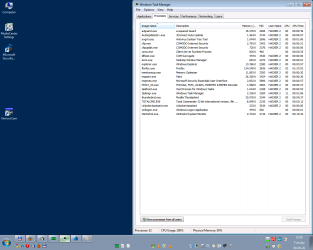
Here's mine, certainly not low on ram but I've got 8 gb so I guess it's not such a big deal.
 

Attachments

  • Capture.JPG
    Capture.JPG
    123 KB · Views: 120

My Computer My Computer

OS
Windows 7 64
CPU
AMD Phenom II X4 Black Edition 940
Motherboard
Gigabyte GA-MA790X-UD3P
Memory
8 GB
Graphics Card(s)
Nvidia 8800GTS
Monitor(s) Displays
Benq G2420HDBL
Screen Resolution
1920x1080
Case
Lian-Li
Internet Speed
10/10 mb/s
isnt´that quite obviuos?
No, it isn't quite obvious, because having two resident scanners will create all kinds of issues. If you weren't sure about testing a beta AV product, despite it's glowing reviews, load up a VM, and test it out there.
i have seen some strange behaviour, MSE turning itself off several times, and then refusing to turn on, even after numerous tries
See above. When you run two resident scanners, they will often conflict with each other, causing this behaviour. Isn't that obvious? (to steal your comments)
what planet are you from ? :D
Earth. It has never been a good idea to run two resident scanners. You run one resident scanners, one manual scanner, such as Malwarebytes Antimalware, and use common sense as your third layer of defense. That's all anyone should ever need to have a clean PC. No need to give swarfega the attitude, considering he was correct.
 

My Computer My Computer

OS
Windows 7 Ultimate x64 SP1
CPU
Intel Core i7-2600
Motherboard
Gigabyte GA-P67A-UD3P-B3
Memory
12 GB Patriot Extreme DDR3-1333
Graphics Card(s)
Nvidia GTX 470
Monitor(s) Displays
Dell UltraSharp 2209WA
Hard Drives
OCZ Agility3 240 GB, WD5001AALS, WD7501AALS
PSU
OCZ ModStream 700W
Case
CoolerMaster HAF 912 Advanced
Cooling
CoolerMaster Hyper 212 Plus
hi !

"No, it isn't quite obvious, because having two resident scanners will create all kinds of issues."

i know it´s a bad idea to run ESET, Kaspersky, Norton etc. together with MSE.

but since it was posted on some forums, (might have been here),
that the combination of MSE & Avira would work fine together, i decided to run both, just because MSE was a beta.

i even installed MSE with Avira running, just because i wanted to see if MSE would complain about running another A/V-software, and it didn´t.

"When you run two resident scanners, they will often conflict with each other, causing this behaviour. Isn't that obvious? (to steal your comments)"

no, it depends on what combination you use...

no, at first i also thought it might have something to do with Avira, so i turned off Avira, and still MSE wouldn´t turn on, in fact i even turned off ALL Antivirus & Antimalware programs just to be sure.

and the problem with MSE turning itself off has been reported by other people too...

"No need to give swarfega the attitude..."

attitude ???

"...considering he was correct."

was he ?

swarfega: "Why do you have 3 av programs installed? Theres no need for more than 1 and it needlessly uses up resources."

I don´t trust A/V-beta´s so i ran MSE & AVIRA.

on several sites / pages / forums it has been recommended to run an A/V-program together with an Antimalware-program fx. A2 / MBAM...

MSE & AVIRA & A2=3 programs...

I like to decide myself what i need on my PC !

btw. did i ask what planet YOU were from ? :huh:
 
Last edited:

My Computer My Computer

Computer Manufacturer/Model Number
Dell
OS
W7-Enterprise + WS-2008 (Converted to Workstation)
CPU
P4 2,4GHz (at 1,8GHz, "slow" RDRAM, only 400MHz FSB...)
Motherboard
Intel 850E
Memory
2GB
Graphics Card(s)
NVIDIA QUADRO2 PRO 64MB
Sound Card
Yes
Monitor(s) Displays
Dell 1702FP
Screen Resolution
1280x1024
Hard Drives
Yes
PSU
Yes
Case
Yes
Cooling
Yes
Keyboard
Yes
Mouse
Yes, and i also have Cats...
Internet Speed
University: 100 MBit/s, Home: UMTS 7,2 MBit/s
Other Info
W7 on a DINOSAUR: P2 with 266MHz CPU & 160MB RAM
Yes, he was. Not all AV software packages will complain if they detect another version because some don't look for another version.

Test how you wish on your own system, but don't ask someone else what planet they are from when they suggestion something correct and logical. There's no need for that.

I've been able to have weird issues with multiple AV products installed on the same PC, even if I've stopped one's services, removed it's start up entries, and triple checked that it wasn't in use at all. That's why the proper testing method would be to run it as the only AV app, or run it in a VM if you don't trust it....because you eliminate variables. That's part of the basic foundation of troubleshooting.
 

My Computer My Computer

OS
Windows 7 Ultimate x64 SP1
CPU
Intel Core i7-2600
Motherboard
Gigabyte GA-P67A-UD3P-B3
Memory
12 GB Patriot Extreme DDR3-1333
Graphics Card(s)
Nvidia GTX 470
Monitor(s) Displays
Dell UltraSharp 2209WA
Hard Drives
OCZ Agility3 240 GB, WD5001AALS, WD7501AALS
PSU
OCZ ModStream 700W
Case
CoolerMaster HAF 912 Advanced
Cooling
CoolerMaster Hyper 212 Plus
I dont understand this obsession with memory usage and antivirus programs? If memory usage is impacting your performance, then its time to add memory to your system.... If you already have more than 2gb ( and most on this forum do ) what is your beef if it uses 4mb or 64mb, in the end its worth what ever it uses to protect your system... :p
 

My Computer My Computer

Computer type
PC/Desktop
Computer Manufacturer/Model Number
LENOVO K450 @3.0GHZ
OS
64-bit Windows 8.1 Pro
CPU
Core(TM) i5 CPU 4330 Haswell @ 3.20GHz
Motherboard
LENOVO
Memory
12.00 GB
Graphics Card(s)
Intel(R) HD Graphics
Sound Card
Intel HD integtrated
Monitor(s) Displays
HP 25' ISP Monitor
Screen Resolution
1900/1020
Hard Drives
(1) ST1000DM003-1CH162 (2) Generic STORAGE DEVICE USB Device (3) Generic STORAGE DEVICE USB Device
Internet Speed
100mb down/10mb up
hi !

no he was NOT correct !

" Not all AV software packages will complain if they detect another version because some don't look for another version."

yes, i know !

read my post again...

MSE & AVIRA was reported to run fine together...

"correct and logical"
???

please read my post again !

i have already explained why i ran MSE & AVIRA together with A2...

he can NOT tell me what i need on *MY* PC !

i didn´t ASK what i needed, i answered his question "why 3 ?..."

"Test how you wish on your own system..."

thank you, that´s EXACTLY what i like to do !

"but don't ask someone else what planet they are from..."

why are YOU so upset, don´t you have any humor, or perhaps you didn´t see the *SMILEY* ?

may i suggest that you let swarfega himself decide if HE is offended by my answer ?
 

My Computer My Computer

Computer Manufacturer/Model Number
Dell
OS
W7-Enterprise + WS-2008 (Converted to Workstation)
CPU
P4 2,4GHz (at 1,8GHz, "slow" RDRAM, only 400MHz FSB...)
Motherboard
Intel 850E
Memory
2GB
Graphics Card(s)
NVIDIA QUADRO2 PRO 64MB
Sound Card
Yes
Monitor(s) Displays
Dell 1702FP
Screen Resolution
1280x1024
Hard Drives
Yes
PSU
Yes
Case
Yes
Cooling
Yes
Keyboard
Yes
Mouse
Yes, and i also have Cats...
Internet Speed
University: 100 MBit/s, Home: UMTS 7,2 MBit/s
Other Info
W7 on a DINOSAUR: P2 with 266MHz CPU & 160MB RAM
Whoa People... simmer down to a boil here... ;)
 

My Computer My Computer

Computer type
PC/Desktop
Computer Manufacturer/Model Number
LENOVO K450 @3.0GHZ
OS
64-bit Windows 8.1 Pro
CPU
Core(TM) i5 CPU 4330 Haswell @ 3.20GHz
Motherboard
LENOVO
Memory
12.00 GB
Graphics Card(s)
Intel(R) HD Graphics
Sound Card
Intel HD integtrated
Monitor(s) Displays
HP 25' ISP Monitor
Screen Resolution
1900/1020
Hard Drives
(1) ST1000DM003-1CH162 (2) Generic STORAGE DEVICE USB Device (3) Generic STORAGE DEVICE USB Device
Internet Speed
100mb down/10mb up
Status
Not open for further replies.
Back
Top