Solved Dual Boot: Win7: Boot Manager Status: 0xc000000f boot selection failed

Kaktussoft, it worked perfectly...thank you so much you are a real saviour...everything is right in place..except that I no longer have UBUNTU and its contents in my system..but I guess that's the price I had to pay...I'll install it fresh now! Just one last question...what was the problem? Why was I getting that error? Thanks again!! :)
 

My Computer My Computer

Computer type
Laptop
Computer Manufacturer/Model Number
Dell
OS
Windows 7 Home Premium 64 bit
I gave you the standard repair for GRUB interference (quoted below) a week ago which works for everyone else, except that they had theirs repaired a week sooner. :huh:

Supposedly all these commands were needed to preserve Ubuntu but you now report it isn't to be found? You can try to add it if it is still on the drive as suggested in Dual boot Ubuntu-Win7 .

If this doesn't help and you're now forced to reinstall it then I'd follow Dual Boot - Windows 7 and Linux - Windows 7 Forums

If all else fails, what always works is to Mark Partition Active the Win7 or it's 100 mb System Reserved partition Active then run http://www.sevenforums.com/tutorials/105541-startup-repair-run-3-separate-times.html.

You can then install EasyBCD to add Linus to a Windows Dual Boot menu as suggested in http://www.sevenforums.com/installation-setup/83923-where-install-ubuntu-my-system.html#post733626
 
Alright, so I restarted the system and now I can see Safe Mode and all...I selected "Last Known Good Configuration" and now CHKDSK is verifying files...2527 large files, 0 bad, 2 EA records processed, 44 reparse records and now it's verifying indexes...will let you know what happens!! :)
Why do "Last Known Good Configuration" ? Why not just a normal boot? chkdsk fixed all errors?
 

My Computer My Computer

Computer type
Laptop
Computer Manufacturer/Model Number
ACER ASPIRE 5742G
OS
Microsoft Windows 7 Home Premium 64-bits 7601 Multiprocessor Free Service Pack 1
CPU
Intel(R) Core(TM) i3 CPU M 370 @ 2.40GHz
Motherboard
Acer Aspire 5742G
Memory
4,00 GB
Graphics Card(s)
ATI Mobility Radeon HD 5400 Series
Sound Card
(1) AMD High Definition Audio Device (2) Realtek High Defi
Screen Resolution
1366 x 768 x 32 bits (4294967296 colors) @ 60 Hz
Hard Drives
WDC WD5000BEVT-22ZAT0
Kaktussoft, it worked perfectly...thank you so much you are a real saviour...everything is right in place..except that I no longer have UBUNTU and its contents in my system..but I guess that's the price I had to pay...I'll install it fresh now! Just one last question...what was the problem? Why was I getting that error? Thanks again!! :)
Why don't you read what I tell you? #28 explains how to add the ubuntu linux in the win7 bootmenu.
I asked you to do "select disk 0" in diskpart. You told me it was a wrong syntax.... But I'm almost sure you typed it wrong. I asked you to type "dir c:\users" that command failed because you were still in diskpart!
You told me OS partition was hidden, but in fact DELLUTILITY partition was hidden.

How can I tell yopu what was wrong if you give me wrong information?!
 

My Computer My Computer

Computer type
Laptop
Computer Manufacturer/Model Number
ACER ASPIRE 5742G
OS
Microsoft Windows 7 Home Premium 64-bits 7601 Multiprocessor Free Service Pack 1
CPU
Intel(R) Core(TM) i3 CPU M 370 @ 2.40GHz
Motherboard
Acer Aspire 5742G
Memory
4,00 GB
Graphics Card(s)
ATI Mobility Radeon HD 5400 Series
Sound Card
(1) AMD High Definition Audio Device (2) Realtek High Defi
Screen Resolution
1366 x 768 x 32 bits (4294967296 colors) @ 60 Hz
Hard Drives
WDC WD5000BEVT-22ZAT0
Most like there was something wrong with the boot menu. I asked you to export it in #5 . Maybe a bad disk? I asked you to chkdsk C in #5 . Without that info.... I'm not a magician I can't read what's on your disk from here.
 

My Computer My Computer

Computer type
Laptop
Computer Manufacturer/Model Number
ACER ASPIRE 5742G
OS
Microsoft Windows 7 Home Premium 64-bits 7601 Multiprocessor Free Service Pack 1
CPU
Intel(R) Core(TM) i3 CPU M 370 @ 2.40GHz
Motherboard
Acer Aspire 5742G
Memory
4,00 GB
Graphics Card(s)
ATI Mobility Radeon HD 5400 Series
Sound Card
(1) AMD High Definition Audio Device (2) Realtek High Defi
Screen Resolution
1366 x 768 x 32 bits (4294967296 colors) @ 60 Hz
Hard Drives
WDC WD5000BEVT-22ZAT0
Most like there was something wrong with the boot menu. I asked you to export it in #5 . Maybe a bad disk? I asked you to chkdsk C in #5 . Without that info.... I'm not a magician I can't read what's on your disk from here.

Yes, you did but it was 1 week ago and I didn't have the Win 7 CD back then and we started to run commands on Ubuntu and after I got the CD there was this other error with grub rescue and all and I forgot to do what you mentioned in #5....my bad, sorry :o After I got CD I just read the posts after that.
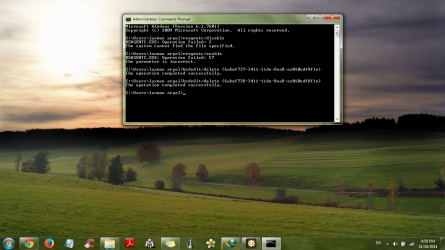
Yes, CHKDSK fixed all errors and now Windows is booting absolutely fine except that I can no longer see GRUB boot loader menu...All I need now is to get my old UBUNTU back...Has the Ubuntu been deleted from my system or is it still recoverable? I posted a screenshot of partitions if it would show sth:

I did what you mentioned in #28 and restarted...now there's Windows 7 and UBUNTU in WINDOWS BOOT MANAGER and when I select UBUNTU, I get this:
Code:
Try (hd0,0): FAT16: NO ANG0
Try (hd0,1): non-MS: skip
Try (hd0,2): EXT2:
Should I Add the Win 7 Boot entry too? as given here in Part D: http://www.sevenforums.com/tutorials/257048-dual-boot-windows-7-linux.html

I've attached bcd.txt by following the steps from #5...I've already run CHKDSK and I'm sure it has fixed all the errors...I ran those commands in #5 after I logged in to the OS, not from the Disc...in #5 i replaced 'Q:' with 'C:' as the "list volume" showed only two volumes with ltr D being DVD-RoM and ltr C being Partition.
 

Attachments

  • Untitled.png
    Untitled.png
    75.6 KB · Views: 2
  • bcd.txt
    bcd.txt
    3.8 KB · Views: 5
Last edited:

My Computer My Computer

Computer type
Laptop
Computer Manufacturer/Model Number
Dell
OS
Windows 7 Home Premium 64 bit
In elevated command prompt:
Code:
reagentc/disable
reagentc/enable
Tell me the ouput. Afterwards still elevated command prompt:
Code:
bcdedit/delete {6abef737-3411-11de-8ea8-ac010edf8f1e}
bcdedit/delete {6abef738-3411-11de-8ea8-ac010edf8f1e}
Post output as well. Those are 2 useless boot entries for recovery...but nothing references to it.

select UBUNTU in boot menu. You see only this... nothing more?
Try (hd0,0): FAT16: NO ANG0
Try (hd0,1): non-MS: skip
Try (hd0,2): EXT2:

Sure you did add ubuntu as grub2 in boot menu?
There's no need to add win7 again in win7 boot menu
 

My Computer My Computer

Computer type
Laptop
Computer Manufacturer/Model Number
ACER ASPIRE 5742G
OS
Microsoft Windows 7 Home Premium 64-bits 7601 Multiprocessor Free Service Pack 1
CPU
Intel(R) Core(TM) i3 CPU M 370 @ 2.40GHz
Motherboard
Acer Aspire 5742G
Memory
4,00 GB
Graphics Card(s)
ATI Mobility Radeon HD 5400 Series
Sound Card
(1) AMD High Definition Audio Device (2) Realtek High Defi
Screen Resolution
1366 x 768 x 32 bits (4294967296 colors) @ 60 Hz
Hard Drives
WDC WD5000BEVT-22ZAT0
In elevated command prompt:
Code:
reagentc/disable
reagentc/enable
Tell me the ouput. Afterwards still elevated command prompt:
Code:
bcdedit/delete {6abef737-3411-11de-8ea8-ac010edf8f1e}
bcdedit/delete {6abef738-3411-11de-8ea8-ac010edf8f1e}
Post output as well. Those are 2 useless boot entries for recovery...but nothing references to it.

select UBUNTU in boot menu. You see only this... nothing more?
Try (hd0,0): FAT16: NO ANG0
Try (hd0,1): non-MS: skip
Try (hd0,2): EXT2:

Sure you did add ubuntu as grub2 in boot menu?
There's no need to add win7 again in win7 boot menu

The output is in the screenshot...
Yes, I'm sure...I was careful not to select "grub(legacy)" instead of "grub2".
 

Attachments

  • Untitled.png
    Untitled.png
    342.6 KB · Views: 2

My Computer My Computer

Computer type
Laptop
Computer Manufacturer/Model Number
Dell
OS
Windows 7 Home Premium 64 bit
In screenshot I see that .... recovery environment setup is cconfused. And you deleted the two unrerefenced recovery entries. Now create a system repair disc http://www.sevenforums.com/tutorials/2083-system-repair-disc-create.html
Boot from it and run http://www.sevenforums.com/tutorials/681-startup-repair.html 3 times with reboot in between. After that http://www.sevenforums.com/tutorials/666-advanced-boot-options.html => repair your computer will boot succesfully. Just try it. Don't repair anything!! Just try
 

My Computer My Computer

Computer type
Laptop
Computer Manufacturer/Model Number
ACER ASPIRE 5742G
OS
Microsoft Windows 7 Home Premium 64-bits 7601 Multiprocessor Free Service Pack 1
CPU
Intel(R) Core(TM) i3 CPU M 370 @ 2.40GHz
Motherboard
Acer Aspire 5742G
Memory
4,00 GB
Graphics Card(s)
ATI Mobility Radeon HD 5400 Series
Sound Card
(1) AMD High Definition Audio Device (2) Realtek High Defi
Screen Resolution
1366 x 768 x 32 bits (4294967296 colors) @ 60 Hz
Hard Drives
WDC WD5000BEVT-22ZAT0
In screenshot I see that .... recovery environment setup is cconfused. And you deleted the two unrerefenced recovery entries. Now create a system repair disc http://www.sevenforums.com/tutorials/2083-system-repair-disc-create.html
Boot from it and run http://www.sevenforums.com/tutorials/681-startup-repair.html 3 times with reboot in between. After that http://www.sevenforums.com/tutorials/666-advanced-boot-options.html => repair your computer will boot succesfully. Just try it. Don't repair anything!! Just try

I inserted a blank dvd and when clicked on 'create disc' it shows this error:
Code:
System repair disc couldnot be created
The parameter is incorrect. (0x80070057)
So, now I can't even create a system repair disc! Should I try repairing with the Win 7 installation disc?
 

My Computer My Computer

Computer type
Laptop
Computer Manufacturer/Model Number
Dell
OS
Windows 7 Home Premium 64 bit
Do you have a 64 bits win7 install disk?

In elevated command prompt
Code:
dir/s/a  \*.wim 2>null
Post screenshot
 

My Computer My Computer

Computer type
Laptop
Computer Manufacturer/Model Number
ACER ASPIRE 5742G
OS
Microsoft Windows 7 Home Premium 64-bits 7601 Multiprocessor Free Service Pack 1
CPU
Intel(R) Core(TM) i3 CPU M 370 @ 2.40GHz
Motherboard
Acer Aspire 5742G
Memory
4,00 GB
Graphics Card(s)
ATI Mobility Radeon HD 5400 Series
Sound Card
(1) AMD High Definition Audio Device (2) Realtek High Defi
Screen Resolution
1366 x 768 x 32 bits (4294967296 colors) @ 60 Hz
Hard Drives
WDC WD5000BEVT-22ZAT0
Do you have a 64 bits win7 install disk?

In elevated command prompt
Code:
dir/s/a  \*.wim 2>null
Post screenshot

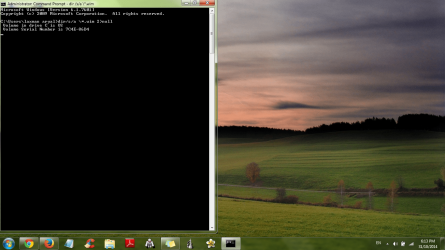
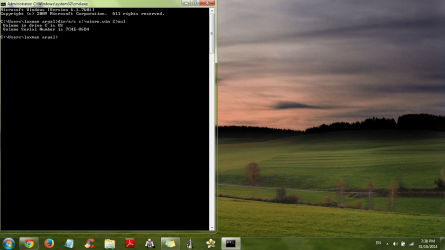
It's the same win7 install disc that I used earlier but I'm not sure about the 64 or 32 bits...the screenshot:
 

Attachments

  • Untitled.png
    Untitled.png
    244 KB · Views: 0

My Computer My Computer

Computer type
Laptop
Computer Manufacturer/Model Number
Dell
OS
Windows 7 Home Premium 64 bit
Code:
dir/s/a   \*.wim 2>null

Wait until command is completed! Then make screenshot and post
 

My Computer My Computer

Computer type
Laptop
Computer Manufacturer/Model Number
ACER ASPIRE 5742G
OS
Microsoft Windows 7 Home Premium 64-bits 7601 Multiprocessor Free Service Pack 1
CPU
Intel(R) Core(TM) i3 CPU M 370 @ 2.40GHz
Motherboard
Acer Aspire 5742G
Memory
4,00 GB
Graphics Card(s)
ATI Mobility Radeon HD 5400 Series
Sound Card
(1) AMD High Definition Audio Device (2) Realtek High Defi
Screen Resolution
1366 x 768 x 32 bits (4294967296 colors) @ 60 Hz
Hard Drives
WDC WD5000BEVT-22ZAT0
The system repair disk is actually just the same as the "repair my computer" option as in "advanced boot options". Because that option doesn't work..... it can't be copied to CD/DVD as well! There's no recovery environment now. The WIM-file (recovery environment in kind of zip-file) was pointing to sda2. And sda2 was marked ACTIVE. Was that previously an win7 boot partition and did you delete that partition (or override)?
 

My Computer My Computer

Computer type
Laptop
Computer Manufacturer/Model Number
ACER ASPIRE 5742G
OS
Microsoft Windows 7 Home Premium 64-bits 7601 Multiprocessor Free Service Pack 1
CPU
Intel(R) Core(TM) i3 CPU M 370 @ 2.40GHz
Motherboard
Acer Aspire 5742G
Memory
4,00 GB
Graphics Card(s)
ATI Mobility Radeon HD 5400 Series
Sound Card
(1) AMD High Definition Audio Device (2) Realtek High Defi
Screen Resolution
1366 x 768 x 32 bits (4294967296 colors) @ 60 Hz
Hard Drives
WDC WD5000BEVT-22ZAT0
The system repair disk is actually just the same as the "repair my computer" option as in "advanced boot options". Because that option doesn't work..... it can't be copied to CD/DVD as well! There's no recovery environment now. The WIM-file (recovery environment in kind of zip-file) was pointing to sda2. And sda2 was marked ACTIVE. Was that previously an win7 boot partition and did you delete that partition (or override)?

I'm not sure how do I find out? :confused:
Screenshot:
 

Attachments

  • Untitled.png
    Untitled.png
    261.4 KB · Views: 0

My Computer My Computer

Computer type
Laptop
Computer Manufacturer/Model Number
Dell
OS
Windows 7 Home Premium 64 bit
In elevated command prompt:
Code:
[B][FONT=Courier New][COLOR=#008800]dir/a/s  c:\winre.wim 2>nul[/COLOR][/FONT][/B]
Wait until command has finished! Post output
 

My Computer My Computer

Computer type
Laptop
Computer Manufacturer/Model Number
ACER ASPIRE 5742G
OS
Microsoft Windows 7 Home Premium 64-bits 7601 Multiprocessor Free Service Pack 1
CPU
Intel(R) Core(TM) i3 CPU M 370 @ 2.40GHz
Motherboard
Acer Aspire 5742G
Memory
4,00 GB
Graphics Card(s)
ATI Mobility Radeon HD 5400 Series
Sound Card
(1) AMD High Definition Audio Device (2) Realtek High Defi
Screen Resolution
1366 x 768 x 32 bits (4294967296 colors) @ 60 Hz
Hard Drives
WDC WD5000BEVT-22ZAT0
In windows recovery (start boot from recovery cd) . command prompt:
Code:
dir  X:\windows

Do you see folder SysWOW64? If so... it's a 64bits recovery disk. Post results
Code:
dir  C:\windows
It has SysWOW64?
 

My Computer My Computer

Computer type
Laptop
Computer Manufacturer/Model Number
ACER ASPIRE 5742G
OS
Microsoft Windows 7 Home Premium 64-bits 7601 Multiprocessor Free Service Pack 1
CPU
Intel(R) Core(TM) i3 CPU M 370 @ 2.40GHz
Motherboard
Acer Aspire 5742G
Memory
4,00 GB
Graphics Card(s)
ATI Mobility Radeon HD 5400 Series
Sound Card
(1) AMD High Definition Audio Device (2) Realtek High Defi
Screen Resolution
1366 x 768 x 32 bits (4294967296 colors) @ 60 Hz
Hard Drives
WDC WD5000BEVT-22ZAT0
In elevated command prompt:
Code:
[B][FONT=Courier New][COLOR=#008800]dir/a/s  c:\winre.wim 2>nul[/COLOR][/FONT][/B]
Wait until command has finished! Post output

The command had finished! Above 'Directory of C:..." the output are that of the previous screenshot and "14 Dir(s)..." is the absolute end below that there was the new line with "C:\Users\..." ...I couldn't manage to make the screenshot of the entire cmd prompt in one single shot...
 

My Computer My Computer

Computer type
Laptop
Computer Manufacturer/Model Number
Dell
OS
Windows 7 Home Premium 64 bit
Why don't you do #56 as requested and post that screenshot?
 

My Computer My Computer

Computer type
Laptop
Computer Manufacturer/Model Number
ACER ASPIRE 5742G
OS
Microsoft Windows 7 Home Premium 64-bits 7601 Multiprocessor Free Service Pack 1
CPU
Intel(R) Core(TM) i3 CPU M 370 @ 2.40GHz
Motherboard
Acer Aspire 5742G
Memory
4,00 GB
Graphics Card(s)
ATI Mobility Radeon HD 5400 Series
Sound Card
(1) AMD High Definition Audio Device (2) Realtek High Defi
Screen Resolution
1366 x 768 x 32 bits (4294967296 colors) @ 60 Hz
Hard Drives
WDC WD5000BEVT-22ZAT0
Why don't you do #56 as requested and post that screenshot?

There's no SysWOW64 in the CD (X:\Windows) but it is there in C:\Windows...i guess that means my system is 64 bits but the CD's not...
Screenshot:
 

Attachments

  • Untitled.png
    Untitled.png
    241.7 KB · Views: 1

My Computer My Computer

Computer type
Laptop
Computer Manufacturer/Model Number
Dell
OS
Windows 7 Home Premium 64 bit
Back
Top