Solved 3 Sequential Boot Crashes, now have Windows installed on 3 HDDs

Hoggy Dog

New member
Member
Local time
10:15 AM
Messages
48
I had a perfect-running CyberpowerPC-built PC, with a Gigabyte Z77 mobo, one 1TB HDD and 1 60GB SSD using Intel Smart Response to cache, plus an MSI GTX 570. It was fast and perfect.

After 2 years, my PC suddenly began displaying intermittent graphics glitches while gaming. I checked my Nvidia drivers and found that they were 2 versions out of date, despite having Windows Update set on automatic. I d/l the latest driver package, but got an unrecoverable crash in mid-install: the machine refused to boot, and neither the W7 OEM disc nor the Recovery Disk that I had made could repair it.

Checking CMOS, I discovered that the BIOS was not detecting my GTX 570 OR my SSD! I removed the GTX 570 since it had apparently failed and tried to boot using on-board graphics, but that also failed. I now began to suspect the motherboard, since memory tests ruled out any problem with my RAM DIMMs. After fruitless and pointless online discussions with CyberpowerPC and Gigabyte, I gave up and ordered a new HDD, this time opting for a giant 2TB drive. After installing it and installing Windows on it, I was able to finally boot the machine. My old 1TB WD HDD was now installed as a backup drive, and I was able to copy all of my old programs, data, games, etc. from it to my new 2TB drive. I reinstalled the GTX 570, but with it installed, neither it nor the internal graphics would work despite my setting BIOS options appropriately for each. So I removed the GTX 570 and was able to use internal graphics.

Now convinced I had a GFX card failure, I got a new GTX 970 and installed it, but had the same issue: no display from either the card nor the internal graphics with the card installed. So I removed it and went back to internal graphics.

Since basically the only common denominators still left in the machine were the motherboard and the SSD, I decided, in desperation, to replace them too. Since the Gigabyte mobo is no longer in stock anywhere, I got an ASRock Z77 board and installed it, along with a 64GB SSD which I hoped to put back as cache for my HDDs. After several BSOD-on-boot crashes, which rescue disks and the Windows disk were unable to repair, I was eventually able to install a NEW Windows-64 onto the SSD! So now, although I can boot from the SSD, I now have 3 installations of Windows, and the only one that actually works is on my SSD, thus preventing me from using it as a cache for my main HDD. I haven't bothered installing the GTX 970 yet. One issue at a time, please... :(

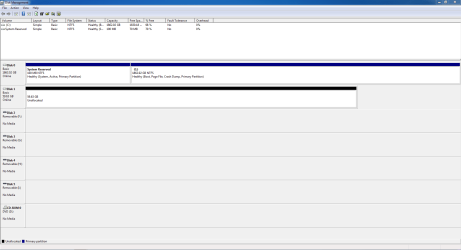
In addition to all this, I have a 100MB drive D: named "System Reserved" which does not correspond to any physical drive AFAIK. I never had that before tonight when the only way to boot was to install Windows on my SSD.

So now, none of my programs, games, etc. work because they are all on drive E: (my 2TB former boot drive c) and they are supposed to be on drive C:. I need to find some way to straighten this mess out without losing all my data. Also, as info, I have never overclocked anything on this machine- everything is bone-stock.

Does anyone have any advice as to how I can fix this so I have ONE bootable installation of Windows, on my 2TB HDD, and use my SSD as intended, i.e. as a cache to speed up my normal HDDs, instead of as my new system drive with no room for anything else?

Thanks in advance!

Disk Management Screenie:
DiskMgtScreenie.PNG
 
Last edited:

My Computer My Computer

Computer type
PC/Desktop
Computer Manufacturer/Model Number
Custom Build
OS
Windows 7 Home Premium 64 Bit
CPU
Intel Core i5 3570K
Motherboard
ASRock Z77 Extreme 4/A/ASR
Memory
16GB Corsair DDR3 1600 +
Graphics Card(s)
Gigabyte GV-N970WF3OC-4GD (GEForce GTX 970)
Hard Drives
WD 1TB SATA 6GB
Seagate 2TB SATA 6GB
ADATA 64GB SSD SATA 6GB (System Drive)
Antivirus
Emsisoft Anti-Malware; Malwarebytes; Bitdefender
Browser
Firefox

My Computer My Computer

Computer type
PC/Desktop
Computer Manufacturer/Model Number
Golden Mk. I.4
OS
Windows 10 Pro x64 ; Xubuntu x64
CPU
Intel i7 860 @ 2.80 GHz O/C'ed to 4.0GHz
Motherboard
Gigabyte P55A-UD3R Rev.1. Award BIOS F13
Memory
16GB Corsair Vengance DDR3 @ 661 MHz Dual Channel (9-9-9-24)
Graphics Card(s)
EVGA NVidia GTX 560 1024MB
Sound Card
Realtek Integrated
Monitor(s) Displays
Dual Samsung SyncMaster 2494HS
Screen Resolution
1920*1080 and 1920*1080
Hard Drives
1*Samsung 840 EVO 120GB SSD;
1*OCZ Vertex 2 60GB SSD;
2*Samsung F3 SpinPoint 1TB in RAID0;
1*Samsung F1 SpinPoint 1TB;
2*Western Digital 1TB External USB 3.0
1*Western Digital 500GB External USB 3.0
1*Seagate 500GB External USB 2.0
PSU
Thermaltake ToughPower QFan 750W
Case
Thermaltake Element S VK60001W2Z
Cooling
Corsair H60 Water Cooling, 2*230mm and 2*80mm case fans
Keyboard
Logitech G110
Mouse
Logitech MX518
Board will not allow me to delete a post, so this meaningless post is the result.
 

My Computer My Computer

Computer type
PC/Desktop
Computer Manufacturer/Model Number
Custom Build
OS
Windows 7 Home Premium 64 Bit
CPU
Intel Core i5 3570K
Motherboard
ASRock Z77 Extreme 4/A/ASR
Memory
16GB Corsair DDR3 1600 +
Graphics Card(s)
Gigabyte GV-N970WF3OC-4GD (GEForce GTX 970)
Hard Drives
WD 1TB SATA 6GB
Seagate 2TB SATA 6GB
ADATA 64GB SSD SATA 6GB (System Drive)
Antivirus
Emsisoft Anti-Malware; Malwarebytes; Bitdefender
Browser
Firefox
Save image to a USB thumb drive, then transfer to other computer.
 

My Computer My Computer

Computer type
PC/Desktop
Computer Manufacturer/Model Number
Golden Mk. I.4
OS
Windows 10 Pro x64 ; Xubuntu x64
CPU
Intel i7 860 @ 2.80 GHz O/C'ed to 4.0GHz
Motherboard
Gigabyte P55A-UD3R Rev.1. Award BIOS F13
Memory
16GB Corsair Vengance DDR3 @ 661 MHz Dual Channel (9-9-9-24)
Graphics Card(s)
EVGA NVidia GTX 560 1024MB
Sound Card
Realtek Integrated
Monitor(s) Displays
Dual Samsung SyncMaster 2494HS
Screen Resolution
1920*1080 and 1920*1080
Hard Drives
1*Samsung 840 EVO 120GB SSD;
1*OCZ Vertex 2 60GB SSD;
2*Samsung F3 SpinPoint 1TB in RAID0;
1*Samsung F1 SpinPoint 1TB;
2*Western Digital 1TB External USB 3.0
1*Western Digital 500GB External USB 3.0
1*Seagate 500GB External USB 2.0
PSU
Thermaltake ToughPower QFan 750W
Case
Thermaltake Element S VK60001W2Z
Cooling
Corsair H60 Water Cooling, 2*230mm and 2*80mm case fans
Keyboard
Logitech G110
Mouse
Logitech MX518
Save image to a USB thumb drive, then transfer to other computer.

Thanks. Got sharing to finally work- new install of Windows defaulted to password-protected sharing. :mad:

Disk management screamshot posted in OP above.
 

My Computer My Computer

Computer type
PC/Desktop
Computer Manufacturer/Model Number
Custom Build
OS
Windows 7 Home Premium 64 Bit
CPU
Intel Core i5 3570K
Motherboard
ASRock Z77 Extreme 4/A/ASR
Memory
16GB Corsair DDR3 1600 +
Graphics Card(s)
Gigabyte GV-N970WF3OC-4GD (GEForce GTX 970)
Hard Drives
WD 1TB SATA 6GB
Seagate 2TB SATA 6GB
ADATA 64GB SSD SATA 6GB (System Drive)
Antivirus
Emsisoft Anti-Malware; Malwarebytes; Bitdefender
Browser
Firefox
OK. When you did the installation, it looks like you never removed the other disks. Correct?
 

My Computer My Computer

Computer type
PC/Desktop
Computer Manufacturer/Model Number
Golden Mk. I.4
OS
Windows 10 Pro x64 ; Xubuntu x64
CPU
Intel i7 860 @ 2.80 GHz O/C'ed to 4.0GHz
Motherboard
Gigabyte P55A-UD3R Rev.1. Award BIOS F13
Memory
16GB Corsair Vengance DDR3 @ 661 MHz Dual Channel (9-9-9-24)
Graphics Card(s)
EVGA NVidia GTX 560 1024MB
Sound Card
Realtek Integrated
Monitor(s) Displays
Dual Samsung SyncMaster 2494HS
Screen Resolution
1920*1080 and 1920*1080
Hard Drives
1*Samsung 840 EVO 120GB SSD;
1*OCZ Vertex 2 60GB SSD;
2*Samsung F3 SpinPoint 1TB in RAID0;
1*Samsung F1 SpinPoint 1TB;
2*Western Digital 1TB External USB 3.0
1*Western Digital 500GB External USB 3.0
1*Seagate 500GB External USB 2.0
PSU
Thermaltake ToughPower QFan 750W
Case
Thermaltake Element S VK60001W2Z
Cooling
Corsair H60 Water Cooling, 2*230mm and 2*80mm case fans
Keyboard
Logitech G110
Mouse
Logitech MX518
OK. When you did the installation, it looks like you never removed the other disks. Correct?

Yes- I did not even have access to the other disks until I had re- re- re-installed Windows. The only drive that would allow me to install Windows on it was the SSD, so, gasping for air, I took that option.

I do NOT want to reformat the two HDDs for fear of losing pretty much my entire life. However, I don't know of any other way to re-install Windows on my 2TB drive, since it "thinks" it already has Windows on it and nothing will repair whatever is wrong with it.

EDIT: Upon re-reading your post, I realize that I don't know what you mean by "remove the other disks...." Physically disconnect them from the motherboard? Disable them in BIOS? Somehow delete the System partition from them? The answer is, I didn't do ANY of those things- I desperately NEED them because all my data, games, letters, videos, blah blah blah lives on them.
 

My Computer My Computer

Computer type
PC/Desktop
Computer Manufacturer/Model Number
Custom Build
OS
Windows 7 Home Premium 64 Bit
CPU
Intel Core i5 3570K
Motherboard
ASRock Z77 Extreme 4/A/ASR
Memory
16GB Corsair DDR3 1600 +
Graphics Card(s)
Gigabyte GV-N970WF3OC-4GD (GEForce GTX 970)
Hard Drives
WD 1TB SATA 6GB
Seagate 2TB SATA 6GB
ADATA 64GB SSD SATA 6GB (System Drive)
Antivirus
Emsisoft Anti-Malware; Malwarebytes; Bitdefender
Browser
Firefox
Yes, I meant physically disconnect them. Your SSD seems to be DISK1, but the boot manager appears to be in the 100MB System Reserved partition on DISK0. This happens when 2 or more disks are physically connected during installation.

I think you need a bit more experience than I can offer with this, so I'll find someone that can help. In the meantime, copy out all the data you want to keep to an external USB drive, in case a reinstall is required.
 

My Computer My Computer

Computer type
PC/Desktop
Computer Manufacturer/Model Number
Golden Mk. I.4
OS
Windows 10 Pro x64 ; Xubuntu x64
CPU
Intel i7 860 @ 2.80 GHz O/C'ed to 4.0GHz
Motherboard
Gigabyte P55A-UD3R Rev.1. Award BIOS F13
Memory
16GB Corsair Vengance DDR3 @ 661 MHz Dual Channel (9-9-9-24)
Graphics Card(s)
EVGA NVidia GTX 560 1024MB
Sound Card
Realtek Integrated
Monitor(s) Displays
Dual Samsung SyncMaster 2494HS
Screen Resolution
1920*1080 and 1920*1080
Hard Drives
1*Samsung 840 EVO 120GB SSD;
1*OCZ Vertex 2 60GB SSD;
2*Samsung F3 SpinPoint 1TB in RAID0;
1*Samsung F1 SpinPoint 1TB;
2*Western Digital 1TB External USB 3.0
1*Western Digital 500GB External USB 3.0
1*Seagate 500GB External USB 2.0
PSU
Thermaltake ToughPower QFan 750W
Case
Thermaltake Element S VK60001W2Z
Cooling
Corsair H60 Water Cooling, 2*230mm and 2*80mm case fans
Keyboard
Logitech G110
Mouse
Logitech MX518
copy out all the data you want to keep to an external USB drive, in case a reinstall is required.

Great minds think alike. That backup has been running for the past hour. :D

And yes, that is my SSD showing as Disk 1. The 2TB drive that is supposed to be my boot drive is Drive 0. According to my research, that's the correct way to connect them to function as I want them to function, i.e. the 2TB as main HDD, and the SSD as cache only using Intel Smart Response.
 

My Computer My Computer

Computer type
PC/Desktop
Computer Manufacturer/Model Number
Custom Build
OS
Windows 7 Home Premium 64 Bit
CPU
Intel Core i5 3570K
Motherboard
ASRock Z77 Extreme 4/A/ASR
Memory
16GB Corsair DDR3 1600 +
Graphics Card(s)
Gigabyte GV-N970WF3OC-4GD (GEForce GTX 970)
Hard Drives
WD 1TB SATA 6GB
Seagate 2TB SATA 6GB
ADATA 64GB SSD SATA 6GB (System Drive)
Antivirus
Emsisoft Anti-Malware; Malwarebytes; Bitdefender
Browser
Firefox
Once you finish your backup and it's all tucked away I would shut the computer down open the case and disconnect the SSD and 1TB drives (Physically disconnect the cables from either the MB side or the drive side which ever is easier), put the 2TB drive into SATA port 0 also disconnect any peripherals apart from the KB and mouse boot back into your BIOS and set your CD/DVD drive as 1st boot device or USB if Win 7 is on a USB stick. Reboot the computer with your installation media and install windows as per this guide
http://www.sevenforums.com/tutorials/219487-clean-reinstall-factory-oem-windows-7-a.html?ltr=C
Follow it closely as it's one of THE best guides online to install Windows 7. Once that's done and you have all the updates and drivers installed and everything is working properly shut the computer down and connect the SSD drive but here comes a tricky part since you have Windows already installed on the SSD you will need to format it before loading the newly installed operating system as otherwise you might have a problem booting up correctly so use this guide to enter Diskpart
http://www.sevenforums.com/tutorials/119713-diskpart-pc-startup.html
And this guide to delete the volume then use the link in No.8 to create a new one (Go to option 2)
http://www.sevenforums.com/tutorials/2674-partition-volume-create-new.html
when it's all done restart the computer and boot back into your bios and set it as you wish with the 2TB HD as 1st boot device. Once into Windows you can than use the SSD as you intended not forgetting this guide to optimize it all
http://www.sevenforums.com/tutorials/11728-optimize-windows-7-a.html
If you wish to also connect the 1TB drive unless it also has Windows on it you could just connect it and format it from within Windows in either Disk Management or Diskpart from an elevated command prompt. When that's all done start installing any peripherals such as printer etc. This is what I would have done and it worked for me in the past but many here are better suited to advise you and hope one of the gurus here has a look at this post to comment if there are any mistakes or silly suggestions
 

My Computer My Computer

Computer type
PC/Desktop
Computer Manufacturer/Model Number
Home Made
OS
Windows 7 Ultimate x64
CPU
Q6600 3.1ghz
Motherboard
Gigabyte GA-P35-DS3L
Memory
Kingston DDR2 6400 8GB
Graphics Card(s)
Gigabyte Radeon HD 6850 1GB 256-Bit
Sound Card
On board
Monitor(s) Displays
Acer X243H
Screen Resolution
1920x1080
Hard Drives
Intel 330 120GB SSD
WD 2TB 7200
PSU
Thermaltake Toughpower 750W Semi Modular
Case
Modified Alienware
Keyboard
A4Tech
Mouse
Gigabyte ECO600
Antivirus
Comodo
Browser
Cyberfox
Thanks, Shimshom- not being an "IT professional" but just a moderately computer-literate gamer, I have a couple of questions:

I won't worry about "what is 'slipstreaming'" since, apparently, I can just forget "slipstreaming the updates into [something or other]" and just update Windows normally.

Your response says to boot to windows using "my installation media..." Is that the OEM Windows 7 disk or the iso-containing bootable DvD I just created using the clean install guide? Either could be called "installation media" I think, and I have no idea which of them you mean.

Also, I read somewhere that there are particular requirements for Intel Smart Response to use a SSD as HDD cache, but I'm not sure how those requirements impact your advice here... I remember that the SATA controller(s) have to be configured a certain way, and once you install Windows it's too late to change if you don't get it right before installing Windows. I think it has to do with RAID configuration, but not sure if it applies if I do NOT want to run my 2 HDDs in any actual RAID mode due to the risk of exactly what happened to me: one glitch and you lose everything. I prefer to run my 2TB drive SSD-cached, and just use my 1TB drive as a backup disk. Any clues on how to configure all that while at the same time fixing the non-booting problem, partitions, etc.?

Thanks again for your help. It's almost 7:00 AM here so I suspect you may have retired for the night, Down Under. Cheers!
 
Last edited:

My Computer My Computer

Computer type
PC/Desktop
Computer Manufacturer/Model Number
Custom Build
OS
Windows 7 Home Premium 64 Bit
CPU
Intel Core i5 3570K
Motherboard
ASRock Z77 Extreme 4/A/ASR
Memory
16GB Corsair DDR3 1600 +
Graphics Card(s)
Gigabyte GV-N970WF3OC-4GD (GEForce GTX 970)
Hard Drives
WD 1TB SATA 6GB
Seagate 2TB SATA 6GB
ADATA 64GB SSD SATA 6GB (System Drive)
Antivirus
Emsisoft Anti-Malware; Malwarebytes; Bitdefender
Browser
Firefox
As stated Win7 was installed to the SSD yet the System boot files are on the System Reserved partition, as signified by the System label showing which is booting the OS and Active flag pointing to intended boot partition.

If you're going to change the mobo it cannot be expected that Win7 will boot with that major of a hardware change unless you first Adjust Win7 to boot on new hardware with Paragon Adaptive Restore CD. You may still be able to boot it if you're satisfied with that install by following the steps in the blue link with all other HD's unplugged, by pulling their data cable from the drive.

Otherwise from the present temporary SSD install I'd move any data not already backed up to the 1tb, power down to unplug all but the 2tb, then Clean Install Windows 7 deleting all partitions during install using the Drive Options in Steps 7/8 to Delete, create New and format - or just click Next to let the installer do it for you after deleting all partitions.

After install you can delete the SSD partition in Disk Mgmt to create and format new partition for your cache file. I have not heard of this method to create a cache but this may help: How to Set Up Intel Smart Response SSD Caching Technology | PCWorld

Once you have all of your files copied onto the 2tb I would wipe the 1tb of all code using Diskpart Clean Command to assure old boot code never interferes, then repartition in Disk Mgmt for your storage needs including a backup image so you don't need to reinstall again.

At all times be sure that the 2tb remains set as first HD to boot in BIOS setup.
 
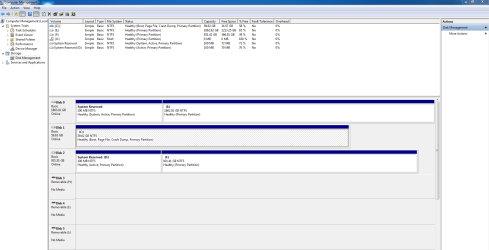
Thanks for all the help. I was able to successfully re-install Windows on my 2TB drive, then reconnect and clean my SSD. Unfortunately, despite following the steps one by one as given in the linked Clean Install tutorial, the 2TB drive still has a 100MB System Reserved partition, and there does not seem to be anything possible that I can do to enable Intel Smart Response technology- I have spent 9 hours now online, reading, researching Intel Rapid Storage and Intel Smart Response, to no avail. It worked great until the system crashed, now I can't make it work at all, including deleting the SSD partition, formatting it, deleting it again... every website seems to have a different strategy, and Intel pretends nothing could ever go wrong so they don't address the issues at all.

Here's another screenie of my Disk Management window in case anyone has any ideas.
DiskManagementScreen.PNG
 

My Computer My Computer

Computer type
PC/Desktop
Computer Manufacturer/Model Number
Custom Build
OS
Windows 7 Home Premium 64 Bit
CPU
Intel Core i5 3570K
Motherboard
ASRock Z77 Extreme 4/A/ASR
Memory
16GB Corsair DDR3 1600 +
Graphics Card(s)
Gigabyte GV-N970WF3OC-4GD (GEForce GTX 970)
Hard Drives
WD 1TB SATA 6GB
Seagate 2TB SATA 6GB
ADATA 64GB SSD SATA 6GB (System Drive)
Antivirus
Emsisoft Anti-Malware; Malwarebytes; Bitdefender
Browser
Firefox
You made a right royal mess of it all but not to worry since you have your data backed up no harm done just more experience gained. So here is an idea that should make your life simpler and still have fast computer just buy another SSD maybe 128 or 256GB if you can then install Windows on it using AHCI or RAID mode and again only have this drive connected while installing make sure it's optimized and then connect the other SSD, format it as ntfs and use it for the Pagefile and to move user folders into it such as Music Pictures etc. Then connect your 2TB format it and use it as the storage drive. It always surprises people how much faster the SSD drives are and it seems a lot less of mucking around and hours of searching for no result (At least so far) and I'm sure you have better things to do than spend days and weeks chasing it unless of course it's what you like doing. Otherwise wait for a more qualified person here to suggest other ways to fix it if your Windows installation is otherwise OK. Oh the 100MB partition is supposed to be there so leave it alone
 

My Computer My Computer

Computer type
PC/Desktop
Computer Manufacturer/Model Number
Home Made
OS
Windows 7 Ultimate x64
CPU
Q6600 3.1ghz
Motherboard
Gigabyte GA-P35-DS3L
Memory
Kingston DDR2 6400 8GB
Graphics Card(s)
Gigabyte Radeon HD 6850 1GB 256-Bit
Sound Card
On board
Monitor(s) Displays
Acer X243H
Screen Resolution
1920x1080
Hard Drives
Intel 330 120GB SSD
WD 2TB 7200
PSU
Thermaltake Toughpower 750W Semi Modular
Case
Modified Alienware
Keyboard
A4Tech
Mouse
Gigabyte ECO600
Antivirus
Comodo
Browser
Cyberfox
It would be expected that the installer would issue the 100mb System Reserved partition as explained in Clean Install Windows 7 which is perfectly normal and not at all undesirable.

The SSD is not formatted in the screenshot. Did you try the steps in ▶ How to Set Up Intel Smart Response SSD Caching Technology | PCWorld to RAID the SSD with the HD?

If nothing else works you can either move the paging file to the SSD to test performance that way: Virtual Memory Paging File - Change - Vista Forums

or install the OS and primary programs to the SSD, move the User folders to the HDD User Folders - Change Default Location

Then if you still need to conserve space set the paging file to 2gb only, install lesser-used programs to the HD. 60gb is rather small for an OS drive, but we've helped users install to the 32gb SSD chip on an MSATA drive before so we know it is doable.
 
Yes, I followed the PC World setup steps. The SSD was formatted for my first few tries, then I cleaned it and deleted the partition for my final attempt. I do not want to install the OS on the SSD, that's where I was earlier. I want the SSD to use Intel RST/SRT and cache my HDD as it did before the crash. My SATA controller is set to RAID in BIOS. Other than that, I don't know how to "RAID the SSD with the HDD." Thanks.
 

My Computer My Computer

Computer type
PC/Desktop
Computer Manufacturer/Model Number
Custom Build
OS
Windows 7 Home Premium 64 Bit
CPU
Intel Core i5 3570K
Motherboard
ASRock Z77 Extreme 4/A/ASR
Memory
16GB Corsair DDR3 1600 +
Graphics Card(s)
Gigabyte GV-N970WF3OC-4GD (GEForce GTX 970)
Hard Drives
WD 1TB SATA 6GB
Seagate 2TB SATA 6GB
ADATA 64GB SSD SATA 6GB (System Drive)
Antivirus
Emsisoft Anti-Malware; Malwarebytes; Bitdefender
Browser
Firefox
That is detailed in the PCWorld tutorial. A RAID is how SRT caches to the SSD. Otherwise you can move the paging file there manually to test how that works.

Did you follow every step? At what step does it fail?
 
Did you follow every step? At what step does it fail?
I followed every step meticulously, up to the point where it is no longer possible to follow it because the RST control "Accelerate" does not appear. In its place is a control labeled "Performance" and pressing that brings up only a power-conservation option.
 

My Computer My Computer

Computer type
PC/Desktop
Computer Manufacturer/Model Number
Custom Build
OS
Windows 7 Home Premium 64 Bit
CPU
Intel Core i5 3570K
Motherboard
ASRock Z77 Extreme 4/A/ASR
Memory
16GB Corsair DDR3 1600 +
Graphics Card(s)
Gigabyte GV-N970WF3OC-4GD (GEForce GTX 970)
Hard Drives
WD 1TB SATA 6GB
Seagate 2TB SATA 6GB
ADATA 64GB SSD SATA 6GB (System Drive)
Antivirus
Emsisoft Anti-Malware; Malwarebytes; Bitdefender
Browser
Firefox
It says that you may need to reinstall the OS to meet RST requirements.

It seems that you've replaced almost everything else so why not the SSD with a larger one so you can enjoy the fastest performance instead of RST which isn't that great by all reports?
 
Interesting development: I decided to remove the 100 MB System Reserved partition on the 1TB HDD. As soon as I did, it instantly changed to a raid disk all on its own! So now I have that drive and the SSD both RAID disks. Of course, it's the wrong HDD. But now it seems clear that what is preventing the 2TB drive from being a RAID drive is the System Reserved partition. Anybody know how I can merge that partition into the main partition without losing my data on that drive? Will Partition Magic or some similar utility do that?
 
Last edited:

My Computer My Computer

Computer type
PC/Desktop
Computer Manufacturer/Model Number
Custom Build
OS
Windows 7 Home Premium 64 Bit
CPU
Intel Core i5 3570K
Motherboard
ASRock Z77 Extreme 4/A/ASR
Memory
16GB Corsair DDR3 1600 +
Graphics Card(s)
Gigabyte GV-N970WF3OC-4GD (GEForce GTX 970)
Hard Drives
WD 1TB SATA 6GB
Seagate 2TB SATA 6GB
ADATA 64GB SSD SATA 6GB (System Drive)
Antivirus
Emsisoft Anti-Malware; Malwarebytes; Bitdefender
Browser
Firefox
Back
Top