Old default location 'C:\Users\(existing user account)recreated again

I believe that it is the general consensus not to mess with these folders. The only files I would be willing to move would be personal videos, pics and docs and even that must be done with care. That is all that I would recommend for others to move or you could end up with system, program, or profile stability issues depending upon what is changed by the user. Most of the modern OSs have very few files that can be safely moved or changed. If you or anyone else wishes to proceed with these actions do so at your own risk.:sarc:
Since first beta versions of Vista I have used Sysprep to relocate the whole main profile folder Users to another drive to save space on C: drive, both at home and professionally. I have not had a single issue because of this. The method is fool proof and reversible, designed and made possible by Microsoft.

http://www.sevenforums.com/tutorial...reate-move-during-windows-7-installation.html

Kari
 

My Computer My Computer

At a glance

Windows 10 Pro x64 EN-GB1.6 GHz Intel Core i7-720QM Processor6 GBATI Mobility Radeon HD 5850 Graphics
Computer type
Laptop
Computer Manufacturer/Model Number
HP ENVY 17-1150eg
OS
Windows 10 Pro x64 EN-GB
CPU
1.6 GHz Intel Core i7-720QM Processor
Memory
6 GB
Graphics Card(s)
ATI Mobility Radeon HD 5850 Graphics
Sound Card
Beats sound system with integrated subwoofer
Monitor(s) Displays
17" laptop display, 22" LED and 32" Full HD TV through HDMI
Screen Resolution
1600*900 (1), 1920*1080 (2&3)
Hard Drives
Internal: 2 x 500 GB SATA Hard Disk Drive 7200 rpm
External: 2TB for backups, 3TB USB3 network drive for media
Cooling
As Envy runs a bit warm, I have it on a Cooler Master pad
Keyboard
Logitech diNovo Media Desktop Laser (bluetooth)
Mouse
Logitech Performance Mouse MX
Internet Speed
50/10 Mbps VDSL
Antivirus
Windows Defender 4.3.9431.0
Browser
Maxthon 3.5.2., IE11
I have also moved my user profile to a different partition since Vista. Kari's sysprep method is the better way since it sets everything up before installing Windows is complete.

Other than the creation of a System Drive subset version of my profile, I have not had any issues. I don't believe there is a consensus either way - some people just get nervous.

There is a way to move one user profile or move all user profiles (and set the creation of new user profiles to the new location). It sounds as though you only moved your profile using the tutorial. If that is correct then you want Default on the System Drive (C:\Users\Default\). You can copy Default to C:, rename Default on D:\ to Default-D, and restart your system. Try creating a new Admin account.

If that is not correct (you changed the location for all users) then Default should be on that partition (D:\ for example).

This is not a suggestion, more of a warning:
When this issue happened to me the first few times, I renamed C:\Users\Dad to C:\Users\Dad-C and restarted ... I think the message was the same or similar to what you're getting when you try to create a new profile. Another oddity was a temp profile was created. I had to log in using my secondary Admin account to clean up that mess. That's why it's important to create a 2nd admin account. I THINK I deleted both the temp profile and the renamed profile and looked in the registry for any keys with the strings "c:\Users", "%SYSTEMDRIVE%\Users", "\Users", "Dad-C", and other possible matches. I'm sorry that it is a hunt instead of a "go to this key" but I didn't write it down.

If there is any consensus, I think it's that the extraneous folders on C:\ don't matter and can be left there.

Where the \Users\Default folder resides depends on the method to move User Profiles. It wouldn't hurt to copy D:\Users\Default to c:\Users - the contents are minimal and it might solve the error messsage when you try to create a new user account.

Bill
.
 

My Computer My Computer

At a glance

x64 (6.3.9600) Win8.1 Pro & soon dual boot x6...AMD A6-3420M APU with Radeon(tm) HD Graphics6.00 GBAMD Radeon(TM) HD 6520G
Computer type
Laptop
Computer Manufacturer/Model Number
HP Pavilion dv6-6c10us
OS
x64 (6.3.9600) Win8.1 Pro & soon dual boot x64 (6.1.7601) Win7_SP1 HomePrem
CPU
AMD A6-3420M APU with Radeon(tm) HD Graphics
Motherboard
Hewlett-Packard 1805
Memory
6.00 GB
Graphics Card(s)
AMD Radeon(TM) HD 6520G
Sound Card
(1) AMD High Definition Audio Device (2) IDT High Definiti
Monitor(s) Displays
HP W2072a 20" LCD (1600 x 900) @ 60 Hz
Screen Resolution
1366 x 768 x 32 bits (4294967296 colors) @ 60 Hz
Hard Drives
ST640LM0 00 HM641JI SATA Disk Device
Keyboard
Logitech k520 wireless KB
Mouse
Logitech m320 wireless mouse (bundled with KB)
Internet Speed
15/5 | 54 MB Wireless 'n'
Antivirus
Realtime: Defender or Avast | On-demand: Malwarebytes, ESET
Browser
IE 11 on Win8, IE 10 on win 7
Other Info
Media: [Gimp, Audacity, VLC] || Comm: [WEmail 2012, Skype] || Productivity: [OpenOffice,| Textpad] || Utils: [Sysinternals, cCleaner, Speccy, Defraggler]
Where the \Users\Default folder resides depends on the method to move User Profiles. It wouldn't hurt to copy D:\Users\Default to c:\Users - the contents are minimal and it might solve the error messsage when you try to create a new user account.

Bill
.

Thank you all of you very much,
I must really highly appreciate your time spending to reply to me.

I really realized the solution of that error 'The User Profile Service failed the logon. User profile cannot be loaded.'
I only wanted to confirm for 'UsernameIssues' I now understood that When I create a new profile, that Default user profile is copied to the new profile'

Thus, I told my experience Conclusion:: Since the default's profile folder is now copied on new location, and deleted from the old location 'C:\Users'. However, the old location of the default account's profile folder is still in the registry. As a result, whenever a newly account was created, then that error would be shown since system wanted to copy Default user profile to the new account, but it didn't find the default's folder in the Windows explore, as opposed to its location in the registry.(In other words, default's profile folder is only copied on the 'D:\users', however, in the registry is still 'C:\users\default'.). However, when I edited the registry to 'D:\users\default', then no error was there when creating a new account. Thus, what 'UsernameIssues' said 'he User Profile Service failed the logon. User profile cannot be loaded.'' is completely correct.

My problem is now only with those three programs which saved information of theirs in that the old location which was no existed.

Have you looked at my file ''ListCuser.txt:' ' I have uploaded to my Onedrive? Have you had a look at my details posted one day ago. here
 
Last edited:

My Computer My Computer

At a glance

Windows 7 Home Premium 64BitIntel Core i5, 2.3GHzDDR3- 6GBIntel Graphics Family, Radeon HD 6770M
Computer type
Laptop
Computer Manufacturer/Model Number
HP, Pavilion
OS
Windows 7 Home Premium 64Bit
CPU
Intel Core i5, 2.3GHz
Motherboard
Hewlett-Packard- Model 1657
Memory
DDR3- 6GB
Graphics Card(s)
Intel Graphics Family, Radeon HD 6770M
Hard Drives
Toshiba 700GB
Antivirus
Microsot Secuirty Eessentials
Browser
MS IE, Google Chrom, and FireFox
...do you think the number of NTUSER.DAT' indicates how many new users were created?
In my screen shot, there are three:
NTUSER.DAT
NTUSER.DAT.LOG1
NTUSER.DAT.LOG2
Each of them is dated with a different date.
~~~
I posted a reply on your question, but it seems to have vanished :-(

In the Default folder: the number of files with NTUSER.DAT in their name is not related to the number of new users that have been created on a computer. I don't know the function of the two that have LOG in their name. They don't seem to be needed.

I've not moved the entire Users folder, so I'll let those that have continue to speak on that.
 

My Computer My Computer

At a glance

W7 Pro SP1 64biti78GBIntel HD Graphics
Computer type
Laptop
Computer Manufacturer/Model Number
Employer provided Dell Latitude
OS
W7 Pro SP1 64bit
CPU
i7
Memory
8GB
Graphics Card(s)
Intel HD Graphics
Hard Drives
crappy SSD
Antivirus
Employer mandated Symantec Endpoint Protection
Browser
Pale Moon 64bit, IE11 64bit & Chrome 64bit
Where the \Users\Default folder resides depends on the method to move User Profiles. It wouldn't hurt to copy D:\Users\Default to c:\Users - the contents are minimal and it might solve the error messsage when you try to create a new user account.

Bill
.

Thank you all of you very much,
I must really highly appreciate your time spending to reply to me.
.....
My problem is now only with those three programs which saved information of theirs in that the old location which was no existed.

Have you looked at my file ''ListCuser.txt:' ' I have uploaded to my Onedrive? Have you had a look at my details posted one day ago. here

You're welcome.

That's what I thought the issue was - I think we're looking at it from different angles.

I did look at the ListCuser.txt file and the things I looked at look normal.

Could you provide the same list for the c:\user?

Open a standard Command Prompt and type the following command

C:
cd C:\Users

dir /a /s > ListCuser-b.txt

Then attach %USERPROFILE%\ListCuser-b.txt to your next post.​

Thanks,

Bill
.
 

My Computer My Computer

At a glance

x64 (6.3.9600) Win8.1 Pro & soon dual boot x6...AMD A6-3420M APU with Radeon(tm) HD Graphics6.00 GBAMD Radeon(TM) HD 6520G
Computer type
Laptop
Computer Manufacturer/Model Number
HP Pavilion dv6-6c10us
OS
x64 (6.3.9600) Win8.1 Pro & soon dual boot x64 (6.1.7601) Win7_SP1 HomePrem
CPU
AMD A6-3420M APU with Radeon(tm) HD Graphics
Motherboard
Hewlett-Packard 1805
Memory
6.00 GB
Graphics Card(s)
AMD Radeon(TM) HD 6520G
Sound Card
(1) AMD High Definition Audio Device (2) IDT High Definiti
Monitor(s) Displays
HP W2072a 20" LCD (1600 x 900) @ 60 Hz
Screen Resolution
1366 x 768 x 32 bits (4294967296 colors) @ 60 Hz
Hard Drives
ST640LM0 00 HM641JI SATA Disk Device
Keyboard
Logitech k520 wireless KB
Mouse
Logitech m320 wireless mouse (bundled with KB)
Internet Speed
15/5 | 54 MB Wireless 'n'
Antivirus
Realtime: Defender or Avast | On-demand: Malwarebytes, ESET
Browser
IE 11 on Win8, IE 10 on win 7
Other Info
Media: [Gimp, Audacity, VLC] || Comm: [WEmail 2012, Skype] || Productivity: [OpenOffice,| Textpad] || Utils: [Sysinternals, cCleaner, Speccy, Defraggler]
Thanks a lot,

I really have tried running that command once I got on the 'C:\Users' path. However, I faced an error access is denied.

pJvwnh.jpg


Thus, I thought that I should have run that command when I was on 'my existing user account'
C:\Users\Mohammad
However, the same error was shown to me.

1eiQnc.jpg


No error was there when running the command while on D:\Users\Mohammad
 

My Computer My Computer

At a glance

Windows 7 Home Premium 64BitIntel Core i5, 2.3GHzDDR3- 6GBIntel Graphics Family, Radeon HD 6770M
Computer type
Laptop
Computer Manufacturer/Model Number
HP, Pavilion
OS
Windows 7 Home Premium 64Bit
CPU
Intel Core i5, 2.3GHz
Motherboard
Hewlett-Packard- Model 1657
Memory
DDR3- 6GB
Graphics Card(s)
Intel Graphics Family, Radeon HD 6770M
Hard Drives
Toshiba 700GB
Antivirus
Microsot Secuirty Eessentials
Browser
MS IE, Google Chrom, and FireFox
Well that's odd.

It might be the write that's causing the Access Denied (my fault for not directing the output to your user temp folder), try it this way

Open an elevated Command Prompt and type the following commands
C:

cd C:\Users

dir /a /s > %TEMP%\ListCuser-b.txt

exit​

Then attach D:\Users\Mohammad\TEMP\ListCuser-b.txt to your next post.

If that doesn't work, don't worry about trying to run it. I was just trying to narrow down what was written to those locations.

Bill
.
 

My Computer My Computer

At a glance

x64 (6.3.9600) Win8.1 Pro & soon dual boot x6...AMD A6-3420M APU with Radeon(tm) HD Graphics6.00 GBAMD Radeon(TM) HD 6520G
Computer type
Laptop
Computer Manufacturer/Model Number
HP Pavilion dv6-6c10us
OS
x64 (6.3.9600) Win8.1 Pro & soon dual boot x64 (6.1.7601) Win7_SP1 HomePrem
CPU
AMD A6-3420M APU with Radeon(tm) HD Graphics
Motherboard
Hewlett-Packard 1805
Memory
6.00 GB
Graphics Card(s)
AMD Radeon(TM) HD 6520G
Sound Card
(1) AMD High Definition Audio Device (2) IDT High Definiti
Monitor(s) Displays
HP W2072a 20" LCD (1600 x 900) @ 60 Hz
Screen Resolution
1366 x 768 x 32 bits (4294967296 colors) @ 60 Hz
Hard Drives
ST640LM0 00 HM641JI SATA Disk Device
Keyboard
Logitech k520 wireless KB
Mouse
Logitech m320 wireless mouse (bundled with KB)
Internet Speed
15/5 | 54 MB Wireless 'n'
Antivirus
Realtime: Defender or Avast | On-demand: Malwarebytes, ESET
Browser
IE 11 on Win8, IE 10 on win 7
Other Info
Media: [Gimp, Audacity, VLC] || Comm: [WEmail 2012, Skype] || Productivity: [OpenOffice,| Textpad] || Utils: [Sysinternals, cCleaner, Speccy, Defraggler]
Thanks a lot,
I first moved into 'C:\Users', then I run the command.
I really have run that command, and it run well, but there neither was folder called 'Temp' created under 'D:\Users\Mohammad', Nor under 'C:\Users\Mohammad'.
When I didn't find any temp folder created, I run the command while on 'C:\Users\Mohammad', but also, no thing was created. I don't know where the file was saved.

gksxMK.jpg


I hope you find a way to let me know where I can find that 'temp' folder created by running that command.
It should be created under 'C:\Users\Mohammad' as long as I run the command while on 'C:\Users\Mohammad'. However, to be quite sure that I checked the 'D:\Users\Mohammad' as well.
 

My Computer My Computer

At a glance

Windows 7 Home Premium 64BitIntel Core i5, 2.3GHzDDR3- 6GBIntel Graphics Family, Radeon HD 6770M
Computer type
Laptop
Computer Manufacturer/Model Number
HP, Pavilion
OS
Windows 7 Home Premium 64Bit
CPU
Intel Core i5, 2.3GHz
Motherboard
Hewlett-Packard- Model 1657
Memory
DDR3- 6GB
Graphics Card(s)
Intel Graphics Family, Radeon HD 6770M
Hard Drives
Toshiba 700GB
Antivirus
Microsot Secuirty Eessentials
Browser
MS IE, Google Chrom, and FireFox
I hope you find a way to let me know where I can find that 'temp' folder created by running that command.
It should be created under 'C:\Users\Mohammad' as long as I run the command while on 'C:\Users\Mohammad'. However, to be quite sure that I checked the 'D:\Users\Mohammad' as well.

You can enter your TEMP folder simply by typing %temp% in File Explorer's addressbar and hitting Enter. It takes you directly to Temp folder, opening it in Explorer.

An easy way to get your directory listing and post it here, give this command:

dir /a /s | clip

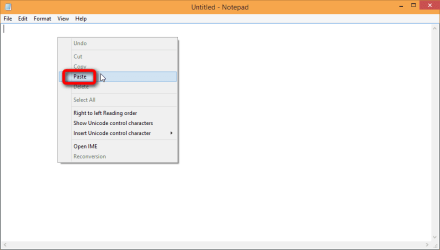
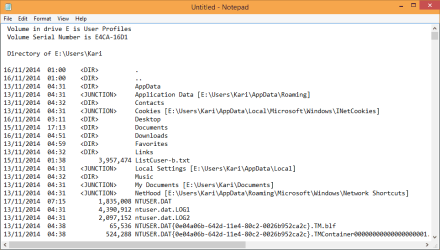
The Pipe symbol ('|') followed by parameter clip sends (pipes) the text output of any command, in this case DIR command, to clipboard. Now open the Notepad, right click inside the Notepad window and select Paste. The listing is now pasted in Notepad. Save the text file and attach it in your post here.

This easy process in screenshots:

Send command output to Clipboard:

2014-11-17_12h29_47.png

Paste in Notepad:

2014-11-17_12h29_04.png

Done:

2014-11-17_12h31_07.png
 
Last edited:

My Computer My Computer

At a glance

Windows 10 Pro x64 EN-GB1.6 GHz Intel Core i7-720QM Processor6 GBATI Mobility Radeon HD 5850 Graphics
Computer type
Laptop
Computer Manufacturer/Model Number
HP ENVY 17-1150eg
OS
Windows 10 Pro x64 EN-GB
CPU
1.6 GHz Intel Core i7-720QM Processor
Memory
6 GB
Graphics Card(s)
ATI Mobility Radeon HD 5850 Graphics
Sound Card
Beats sound system with integrated subwoofer
Monitor(s) Displays
17" laptop display, 22" LED and 32" Full HD TV through HDMI
Screen Resolution
1600*900 (1), 1920*1080 (2&3)
Hard Drives
Internal: 2 x 500 GB SATA Hard Disk Drive 7200 rpm
External: 2TB for backups, 3TB USB3 network drive for media
Cooling
As Envy runs a bit warm, I have it on a Cooler Master pad
Keyboard
Logitech diNovo Media Desktop Laser (bluetooth)
Mouse
Logitech Performance Mouse MX
Internet Speed
50/10 Mbps VDSL
Antivirus
Windows Defender 4.3.9431.0
Browser
Maxthon 3.5.2., IE11
Thank you both of you very much.


Well that's odd.
C:

cd C:\Users

dir /a /s > %TEMP%\ListCuser-b.txt

exit​
Then attach D:\Users\Mohammad\TEMP\ListCuser-b.txt to your next post.
.

But I really didn't find the 'TEMP' folder inside 'D:\Users\Mohammad\Temp', however, when I typed '%Temp%, as opposed to what is beings said, however, it is in 'D:\Users\Mohammad\AppData\Local\Temp'

ScSqNG.jpg


Also, could you please confirm for me these points:

First: why did I find the file 'ListCuser.txt' inside the existing user account's folder('D:\Users\Mohammad') when I run the command below while on D:\Users\Mohammad
dir /a /s > ListCuser.txt
Then attach %USERPROFILE%\ListCuser.txt to your next post.

Second: However, when I run the command above while on "C:\Users\Mohammad', I found an error 'access is denied'

Third: When I run the command 'dir /a /s > %TEMP%\ListCuser-b.txt' while on either "C:\Users\Mohammad' or even 'D:\Users\Mohammad', I didn't find the output file was listed(Saved) inside the existing user account's folder 'C:\Users\Mohammad' OR 'D:\Users\Mohammad'.
However, To get the output file, I had to either
"%Temp%" in the search box. OR by running that command 'dir /a /s | clip'


Fourth: I noticed you only said to me that I have to run that command after moving to 'C:\Users' without saying 'C:\Users\Existing user name"
C:
cd C:\Users
dir /a /s > %TEMP%\ListCuser-b.txt
exit

However, when I run that no output was there at all. However, I had to move to 'C:\Users\Mohammad'
C:\Users\Mohammad\ dir /a /s > %TEMP%\ListCuser-b.txt


With respect to the output file after running that command
C:\Users\Mohammad\ dir /a /s > %TEMP%\ListCuser-b.txt

EQa0nK.jpg


Thanks for Kari, who brought my attention to these ways:). As said before I found two ways to find the file (ListCuser-b.txt), which are: SINCE I GOT THEM BY DIFFERENT WAY, I REALLY UPLOADED THE TWO FILES TO LET YOU CHECK THEM, ALTHOUGH I AM FAIRLY SURE THAT THEY ARE SAME.

The file (ListCuser-b.txt) was found on 'D:\Users\Mohammad\AppData\Local\Temp' after searching '%temp%'

The file (ListCuser-b.txt) was copied to clipboard after running the command 'C:\Users\Mohammad\dir /a /s | clip'
 

Attachments

Last edited:

My Computer My Computer

At a glance

Windows 7 Home Premium 64BitIntel Core i5, 2.3GHzDDR3- 6GBIntel Graphics Family, Radeon HD 6770M
Computer type
Laptop
Computer Manufacturer/Model Number
HP, Pavilion
OS
Windows 7 Home Premium 64Bit
CPU
Intel Core i5, 2.3GHz
Motherboard
Hewlett-Packard- Model 1657
Memory
DDR3- 6GB
Graphics Card(s)
Intel Graphics Family, Radeon HD 6770M
Hard Drives
Toshiba 700GB
Antivirus
Microsot Secuirty Eessentials
Browser
MS IE, Google Chrom, and FireFox
Could you please provide me a way to delete all those files and folder listed under 'D:\Users\Mohammad\AppData\Local\Temp' since they are rubbish, I think? I tried deleting them manually, but some of them were not deleted.
 

My Computer My Computer

At a glance

Windows 7 Home Premium 64BitIntel Core i5, 2.3GHzDDR3- 6GBIntel Graphics Family, Radeon HD 6770M
Computer type
Laptop
Computer Manufacturer/Model Number
HP, Pavilion
OS
Windows 7 Home Premium 64Bit
CPU
Intel Core i5, 2.3GHz
Motherboard
Hewlett-Packard- Model 1657
Memory
DDR3- 6GB
Graphics Card(s)
Intel Graphics Family, Radeon HD 6770M
Hard Drives
Toshiba 700GB
Antivirus
Microsot Secuirty Eessentials
Browser
MS IE, Google Chrom, and FireFox
Could you please provide me a way to delete all those files and folder listed under 'D:\Users\Mohammad\AppData\Local\Temp' since they are rubbish, I think? I tried deleting them manually, but some of them were not deleted.

Go to Temp folder (%temp% + Enter in Explorer addressbar), select all files and press DEL on keyboard.
 

My Computer My Computer

At a glance

Windows 10 Pro x64 EN-GB1.6 GHz Intel Core i7-720QM Processor6 GBATI Mobility Radeon HD 5850 Graphics
Computer type
Laptop
Computer Manufacturer/Model Number
HP ENVY 17-1150eg
OS
Windows 10 Pro x64 EN-GB
CPU
1.6 GHz Intel Core i7-720QM Processor
Memory
6 GB
Graphics Card(s)
ATI Mobility Radeon HD 5850 Graphics
Sound Card
Beats sound system with integrated subwoofer
Monitor(s) Displays
17" laptop display, 22" LED and 32" Full HD TV through HDMI
Screen Resolution
1600*900 (1), 1920*1080 (2&3)
Hard Drives
Internal: 2 x 500 GB SATA Hard Disk Drive 7200 rpm
External: 2TB for backups, 3TB USB3 network drive for media
Cooling
As Envy runs a bit warm, I have it on a Cooler Master pad
Keyboard
Logitech diNovo Media Desktop Laser (bluetooth)
Mouse
Logitech Performance Mouse MX
Internet Speed
50/10 Mbps VDSL
Antivirus
Windows Defender 4.3.9431.0
Browser
Maxthon 3.5.2., IE11

My Computer My Computer

At a glance

Windows 7 Home Premium 64BitIntel Core i5, 2.3GHzDDR3- 6GBIntel Graphics Family, Radeon HD 6770M
Computer type
Laptop
Computer Manufacturer/Model Number
HP, Pavilion
OS
Windows 7 Home Premium 64Bit
CPU
Intel Core i5, 2.3GHz
Motherboard
Hewlett-Packard- Model 1657
Memory
DDR3- 6GB
Graphics Card(s)
Intel Graphics Family, Radeon HD 6770M
Hard Drives
Toshiba 700GB
Antivirus
Microsot Secuirty Eessentials
Browser
MS IE, Google Chrom, and FireFox
Could you please provide me a way to delete all those files and folder listed under 'D:\Users\Mohammad\AppData\Local\Temp' since they are rubbish, I think? I tried deleting them manually, but some of them were not deleted.

Go to Temp folder (%temp% + Enter in Explorer addressbar), select all files and press DEL on keyboard.


Thank you so much indeed, Kari, I would be saying that I run the CCleaner tool, and it deleted some of those files and folders of which 'ListCuser-b.txt'. If made a comparison between my screen shot of the Temp folder's contents posted before, and this one you will see that some files and folders have been deleted by running the CCleaner.

3wLc1k.png


Also, if I have followed you step for 'select all files and folders' inside the temp folder, and then delete them, then my avatar of Windows account will be deleted. I don't think that 'Avatar of windows account' will be listed in the temp folder. This is strange.
 

My Computer My Computer

At a glance

Windows 7 Home Premium 64BitIntel Core i5, 2.3GHzDDR3- 6GBIntel Graphics Family, Radeon HD 6770M
Computer type
Laptop
Computer Manufacturer/Model Number
HP, Pavilion
OS
Windows 7 Home Premium 64Bit
CPU
Intel Core i5, 2.3GHz
Motherboard
Hewlett-Packard- Model 1657
Memory
DDR3- 6GB
Graphics Card(s)
Intel Graphics Family, Radeon HD 6770M
Hard Drives
Toshiba 700GB
Antivirus
Microsot Secuirty Eessentials
Browser
MS IE, Google Chrom, and FireFox

My error: Then attach D:\Users\Mohammad\TEMP\ListCuser-b.txt to your next post
D:\Users\Mohammad\AppData\Local\Temp is correct.
%TEMP% is an environment variable for that folder - think of it as a shorthand way of getting to your Temp folder.

ListCuser.txt:
The 1st list was of your D:\Users folder - you have access to that folder so the file was written
The 2nd list was of the C:\Users folder - I'm not sure why you got the 'access denied', but that is not the issue you're trying to solve.

See %TEMP% above. The file was written where it should have been. If you're not familiar with variables, I can see where it might be confusing.

I hoped to get a full listing of C:\Users including Existing user name, but you said that there wasn't any output from that. The command produced output when you changed directories (cd) to your 'old' Profile folder.

I'm not sure there's any overriding entry for this sort of thing. I created a test account and moved it to another partition, then ran some programs on the new account. A few programs have resource files that pointed to the C:\User folder and a new 'old' account directory structure for that program resource was created.

I fixed the resource file and deleted the C:\Users new 'old' account and ran the program again to see if I missed a resource. No new folder tree was created in C:\Users so I know that I 'fixed' the issue for that program.

Programs are all different there are many files that might hold configuration information. Installers have their own instructions.

You already came to that answer when you changed Revo configuration.

Since I could not determine an overall solution, you'll have to look at the C:\User folder to see if any programs are writing there. If you can configure that program to NOT use the C:\Users folder, great!

If you cannot configure the program then I would leave the new 'old' folder on C: - it shouldn't contain anything large or important. In the case of the two programs

iSkysoft
iSkysoft\ISHelper
-- and --
Hewlett-Packard\HP Support Framework\Reg
Hewlett-Packard\HP Support Framework\Reg\RegistrationInfo.xml

I'm fairly certain that those folders were created temporarily when the programs were installed or updated.
 

My Computer My Computer

At a glance

x64 (6.3.9600) Win8.1 Pro & soon dual boot x6...AMD A6-3420M APU with Radeon(tm) HD Graphics6.00 GBAMD Radeon(TM) HD 6520G
Computer type
Laptop
Computer Manufacturer/Model Number
HP Pavilion dv6-6c10us
OS
x64 (6.3.9600) Win8.1 Pro & soon dual boot x64 (6.1.7601) Win7_SP1 HomePrem
CPU
AMD A6-3420M APU with Radeon(tm) HD Graphics
Motherboard
Hewlett-Packard 1805
Memory
6.00 GB
Graphics Card(s)
AMD Radeon(TM) HD 6520G
Sound Card
(1) AMD High Definition Audio Device (2) IDT High Definiti
Monitor(s) Displays
HP W2072a 20" LCD (1600 x 900) @ 60 Hz
Screen Resolution
1366 x 768 x 32 bits (4294967296 colors) @ 60 Hz
Hard Drives
ST640LM0 00 HM641JI SATA Disk Device
Keyboard
Logitech k520 wireless KB
Mouse
Logitech m320 wireless mouse (bundled with KB)
Internet Speed
15/5 | 54 MB Wireless 'n'
Antivirus
Realtime: Defender or Avast | On-demand: Malwarebytes, ESET
Browser
IE 11 on Win8, IE 10 on win 7
Other Info
Media: [Gimp, Audacity, VLC] || Comm: [WEmail 2012, Skype] || Productivity: [OpenOffice,| Textpad] || Utils: [Sysinternals, cCleaner, Speccy, Defraggler]
I hoped to get a full listing of C:\Users including Existing user name, but you said that there wasn't any output from that. The command produced output when you changed directories (cd) to your 'old' Profile folder.

I'm not sure there's any overriding entry for this sort of thing. I created a test account and moved it to another partition, then ran some programs on the new account. A few programs have resource files that pointed to the C:\User folder and a new 'old' account directory structure for that program resource was created.

I fixed the resource file and deleted the C:\Users new 'old' account and ran the program again to see if I missed a resource. No new folder tree was created in C:\Users so I know that I 'fixed' the issue for that program.

Programs are all different there are many files that might hold configuration information. Installers have their own instructions.

You already came to that answer when you changed Revo configuration.

Since I could not determine an overall solution, you'll have to look at the C:\User folder to see if any programs are writing there. If you can configure that program to NOT use the C:\Users folder, great!

If you cannot configure the program then I would leave the new 'old' folder on C: - it shouldn't contain anything large or important. In the case of the two programs

iSkysoft
iSkysoft\ISHelper
-- and --
Hewlett-Packard\HP Support Framework\Reg
Hewlett-Packard\HP Support Framework\Reg\RegistrationInfo.xml

I'm fairly certain that those folders were created temporarily when the programs were installed or updated.


Thanks lot, Yes I really already came to that answer when I changed Revo configuration. However, some programs cannot be configured inside them.

However, those three programs don't have any configuration settings to be setup into the new location.
I agree with you that those folders were created temporarily when the programs were installed or updated. Thus, if I deleted them, they will harm anything, also they will be recreated again.


Besides, installing the iSkysoft' and 'HP Support Framework' have resource files that pointed to the C:\Users\Existing user account', as opposed to installing the Sharp printer drivers, which has resource files that pointed to the C:\Users\Public'. 'Printer Status Monitor' folder created inside public account under the C:\Users\Public\Documents\Printer Status Monitor.
 

My Computer My Computer

At a glance

Windows 7 Home Premium 64BitIntel Core i5, 2.3GHzDDR3- 6GBIntel Graphics Family, Radeon HD 6770M
Computer type
Laptop
Computer Manufacturer/Model Number
HP, Pavilion
OS
Windows 7 Home Premium 64Bit
CPU
Intel Core i5, 2.3GHz
Motherboard
Hewlett-Packard- Model 1657
Memory
DDR3- 6GB
Graphics Card(s)
Intel Graphics Family, Radeon HD 6770M
Hard Drives
Toshiba 700GB
Antivirus
Microsot Secuirty Eessentials
Browser
MS IE, Google Chrom, and FireFox
Could you please reply to me to close this pending problem forever?
 

My Computer My Computer

At a glance

Windows 7 Home Premium 64BitIntel Core i5, 2.3GHzDDR3- 6GBIntel Graphics Family, Radeon HD 6770M
Computer type
Laptop
Computer Manufacturer/Model Number
HP, Pavilion
OS
Windows 7 Home Premium 64Bit
CPU
Intel Core i5, 2.3GHz
Motherboard
Hewlett-Packard- Model 1657
Memory
DDR3- 6GB
Graphics Card(s)
Intel Graphics Family, Radeon HD 6770M
Hard Drives
Toshiba 700GB
Antivirus
Microsot Secuirty Eessentials
Browser
MS IE, Google Chrom, and FireFox
It should not be an issue to delete the new 'old' folder in C:\Users - only the new 'old' folder though.

I usually err on the side of caution and rename the folder with a prfix of x1
D:\Users\Slartybart is my real profile that I moved
C:\Users\Slartybart is the folder that was created by an application configuration
--> C:\Users\x1-Slartybart is the renamed folder​

The new 'old' folder might be recreated by other programs or installs (usually the case) and after you investigate the impact (change program configuration if applicable) of the folder you can rename it.

After a while you can delete the renamed folder if no issues were caused by renaming the folder.

Bill
.
 

My Computer My Computer

At a glance

x64 (6.3.9600) Win8.1 Pro & soon dual boot x6...AMD A6-3420M APU with Radeon(tm) HD Graphics6.00 GBAMD Radeon(TM) HD 6520G
Computer type
Laptop
Computer Manufacturer/Model Number
HP Pavilion dv6-6c10us
OS
x64 (6.3.9600) Win8.1 Pro & soon dual boot x64 (6.1.7601) Win7_SP1 HomePrem
CPU
AMD A6-3420M APU with Radeon(tm) HD Graphics
Motherboard
Hewlett-Packard 1805
Memory
6.00 GB
Graphics Card(s)
AMD Radeon(TM) HD 6520G
Sound Card
(1) AMD High Definition Audio Device (2) IDT High Definiti
Monitor(s) Displays
HP W2072a 20" LCD (1600 x 900) @ 60 Hz
Screen Resolution
1366 x 768 x 32 bits (4294967296 colors) @ 60 Hz
Hard Drives
ST640LM0 00 HM641JI SATA Disk Device
Keyboard
Logitech k520 wireless KB
Mouse
Logitech m320 wireless mouse (bundled with KB)
Internet Speed
15/5 | 54 MB Wireless 'n'
Antivirus
Realtime: Defender or Avast | On-demand: Malwarebytes, ESET
Browser
IE 11 on Win8, IE 10 on win 7
Other Info
Media: [Gimp, Audacity, VLC] || Comm: [WEmail 2012, Skype] || Productivity: [OpenOffice,| Textpad] || Utils: [Sysinternals, cCleaner, Speccy, Defraggler]
It should not be an issue to delete the new 'old' folder in C:\Users - only the new 'old' folder though.

I usually err on the side of caution and rename the folder with a prfix of x1
D:\Users\Slartybart is my real profile that I moved
C:\Users\Slartybart is the folder that was created by an application configuration
--> C:\Users\x1-Slartybart is the renamed folder​
The new 'old' folder might be recreated by other programs or installs (usually the case) and after you investigate the impact (change program configuration if applicable) of the folder you can rename it.

After a while you can delete the renamed folder if no issues were caused by renaming the folder.

Bill
.


Thank you so much, Bill, I really would like kindly to concentrate with me:

Those three programs don't have any configuration settings to be setup into the new location.
I agree with you that those folders were created temporarily when the programs were installed or updated. Then, what I will do with such programs not configured within them.

Besides, installing the iSkysoft' and 'HP Support Framework' have resource files that pointed to the C:\Users\Existing user account', as opposed to installing the Sharp printer drivers, which has resource files that pointed to the C:\Users\Public'. 'Printer Status Monitor' folder created inside public account under the C:\Users\Public\Documents\Printer Status Monitor.

public account is another user account other than existing account, I really moved that public account into the same D location as existing accounts were moved to by following this articl. However, installing Sharp printer drivers create a new 'old' folder in the C:\Users\Public'

NOTE: with the public folder, document folder is only recreated. If you have a look at my previous posts, you will see that the Documents is only recreated in the old default 'C:\Users\Public\Documents\Printer Status Monitor'
 

My Computer My Computer

At a glance

Windows 7 Home Premium 64BitIntel Core i5, 2.3GHzDDR3- 6GBIntel Graphics Family, Radeon HD 6770M
Computer type
Laptop
Computer Manufacturer/Model Number
HP, Pavilion
OS
Windows 7 Home Premium 64Bit
CPU
Intel Core i5, 2.3GHz
Motherboard
Hewlett-Packard- Model 1657
Memory
DDR3- 6GB
Graphics Card(s)
Intel Graphics Family, Radeon HD 6770M
Hard Drives
Toshiba 700GB
Antivirus
Microsot Secuirty Eessentials
Browser
MS IE, Google Chrom, and FireFox
I see ...

Here's a trick I use to see if the registry has an try for the new 'old' folder.

Rename the folder that was created by the install or update.
I'll use C:\Users\Public as an example.
Rename C:\Users\Public to C:\Users\x-Public

Download cCleaner standard version (FREE)
Press the Run button on the download action bar
Do not select to install any additional software if offered (toolbars,etc) - untick the check box

Launch cCleaner and select the registry menu pick on the left - press the scan button.
Press the column header Data to sort the entries.
Important! Remove the tick from the checkbox in the selected column header. This should clear all checkboxes. The intent is to have nothing selected - empty checkboxes.

Pay attention here: scroll through the list looking for C:\Users\Public
Right click the entry
Select Open in Regedit
Rename the key or modify the value to D:\Users\Public

Close Regedit after you've made the change

When you have changed all references of C:\Users\Public to D:\Users\Public found by cCleaner, run another Registry scan to make sure.

You should focus on the C:\Users issue with this method. There might be other entries reported by cCleaner, but ignore them for now. If you want, please post a screen shot of what cCleaner Registry, Scan for issues reports before making any changes.

I do NOT want you to clean the registry at this point - you're using cCleaner to identify registry entries for the C:\Users issue, and changing the entry to point at the D:\Users location. This will work for any entry found that points to a profile in C:\Users\ that was moved to D:\Users\

The other option is to move D:\Users\Public back to C:\Users (just reverse the HowToGeek instructions)
If you share a lot of data using the Public account, then you might want to leave Public in D:\Users ...
if you don't share a lot of data using the Public account then C:\Users is probably the best location.

Bill
.
 

My Computer My Computer

At a glance

x64 (6.3.9600) Win8.1 Pro & soon dual boot x6...AMD A6-3420M APU with Radeon(tm) HD Graphics6.00 GBAMD Radeon(TM) HD 6520G
Computer type
Laptop
Computer Manufacturer/Model Number
HP Pavilion dv6-6c10us
OS
x64 (6.3.9600) Win8.1 Pro & soon dual boot x64 (6.1.7601) Win7_SP1 HomePrem
CPU
AMD A6-3420M APU with Radeon(tm) HD Graphics
Motherboard
Hewlett-Packard 1805
Memory
6.00 GB
Graphics Card(s)
AMD Radeon(TM) HD 6520G
Sound Card
(1) AMD High Definition Audio Device (2) IDT High Definiti
Monitor(s) Displays
HP W2072a 20" LCD (1600 x 900) @ 60 Hz
Screen Resolution
1366 x 768 x 32 bits (4294967296 colors) @ 60 Hz
Hard Drives
ST640LM0 00 HM641JI SATA Disk Device
Keyboard
Logitech k520 wireless KB
Mouse
Logitech m320 wireless mouse (bundled with KB)
Internet Speed
15/5 | 54 MB Wireless 'n'
Antivirus
Realtime: Defender or Avast | On-demand: Malwarebytes, ESET
Browser
IE 11 on Win8, IE 10 on win 7
Other Info
Media: [Gimp, Audacity, VLC] || Comm: [WEmail 2012, Skype] || Productivity: [OpenOffice,| Textpad] || Utils: [Sysinternals, cCleaner, Speccy, Defraggler]
Back
Top