

Since first beta versions of Vista I have used Sysprep to relocate the whole main profile folder Users to another drive to save space on C: drive, both at home and professionally. I have not had a single issue because of this. The method is fool proof and reversible, designed and made possible by Microsoft.I believe that it is the general consensus not to mess with these folders. The only files I would be willing to move would be personal videos, pics and docs and even that must be done with care. That is all that I would recommend for others to move or you could end up with system, program, or profile stability issues depending upon what is changed by the user. Most of the modern OSs have very few files that can be safely moved or changed. If you or anyone else wishes to proceed with these actions do so at your own risk.:sarc:
http://www.sevenforums.com/tutorial...reate-move-during-windows-7-installation.html
Kari
My Computer
At a glance
Windows 10 Pro x64 EN-GB1.6 GHz Intel Core i7-720QM Processor6 GBATI Mobility Radeon HD 5850 Graphics
- Computer type
- Laptop
- Computer Manufacturer/Model Number
- HP ENVY 17-1150eg
- OS
- Windows 10 Pro x64 EN-GB
- CPU
- 1.6 GHz Intel Core i7-720QM Processor
- Memory
- 6 GB
- Graphics Card(s)
- ATI Mobility Radeon HD 5850 Graphics
- Sound Card
- Beats sound system with integrated subwoofer
- Monitor(s) Displays
- 17" laptop display, 22" LED and 32" Full HD TV through HDMI
- Screen Resolution
- 1600*900 (1), 1920*1080 (2&3)
- Hard Drives
- Internal: 2 x 500 GB SATA Hard Disk Drive 7200 rpm
External: 2TB for backups, 3TB USB3 network drive for media
- Cooling
- As Envy runs a bit warm, I have it on a Cooler Master pad
- Keyboard
- Logitech diNovo Media Desktop Laser (bluetooth)
- Mouse
- Logitech Performance Mouse MX
- Internet Speed
- 50/10 Mbps VDSL
- Antivirus
- Windows Defender 4.3.9431.0
- Browser
- Maxthon 3.5.2., IE11



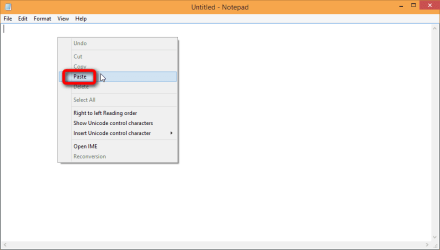
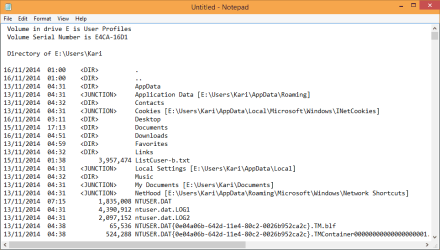


 . As said before I found two ways to find the file (ListCuser-b.txt), which are: SINCE I GOT THEM BY DIFFERENT WAY, I REALLY UPLOADED THE TWO FILES TO LET YOU CHECK THEM, ALTHOUGH I AM FAIRLY SURE THAT THEY ARE SAME.

