Solved New user created automatically with each restart

ij2014

New member
Local time
5:05 AM
Messages
16
I am facing this peculiar problem since last 4/5 days. Whenever I log into windows, a new user "wobrsqqw" gets created which is of the type "Standard User". From the control panel, it can be easily deleted. But, if I restart again, as soon as I get into windows, the same user gets created again. Once, I renamed it and restarted and surprisingly no new user got created. As soon as I deleted it and restarted again, again it got created. What might be the possible reason behind this? Thanks in advance.
 

My Computer My Computer

Computer type
Laptop
Computer Manufacturer/Model Number
Acer
OS
Windows 7 Ultimate 32bit
CPU
i3
Memory
3gb
Hard Drives
Hitachi 320 GB
Antivirus
ESET Smart Security 8
Browser
Chrome
Sounds like some kind of malware to me. Try running a full scan with your anti-virus software.
Download, install and run Malware Bytes Anti Malware (free version) and do a full scan.

Let them fix whatever they find. See if that helps.

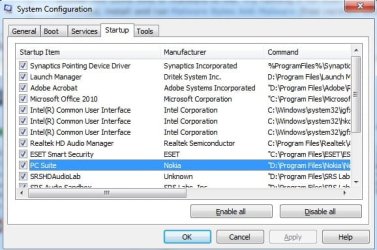
Also run msconfig and check the Startup tab to see if there is anything starting there that looks suspecious or unusual.

Windows key + R, type msconfig and press Enter.
 

My Computer My Computer

Computer type
PC/Desktop
Computer Manufacturer/Model Number
Lenovo IdeaCenter 450
OS
Windows 10 Pro X64
CPU
Intel Quad Core i7-4770 @ 3.4Ghz
Memory
16.0GB PC3-12800 DDR3 SDRAM 1600 MHz
Graphics Card(s)
Intel Integrated HD Graphics
Sound Card
Realtek HD Audio
Monitor(s) Displays
HP 22" LCD
Screen Resolution
1680 x 1050
Hard Drives
250GB Samsung EVO SATA-3 SSD
2TB Seagate ST2000DM001 SATA-2
1.5TB Seagate ST3150041AS SATA
Keyboard
Dell USB
Mouse
Lenovo USB
Internet Speed
Cable via Road Runner 3MB Upload, 30MB Download
Antivirus
Windows Defender, MBAM Pro, MBAE
Browser
Seamonkey
Other Info
UEFI/GPT
PLDS DVD-RW DH16AERSH
The only time this happens legitimately is if Windows Update needs a way to update your account to get past your password, or if an imaging or backup program has similar need. Are any of these the case?

Let us know what the scans find.
 
Thanks for your responses.
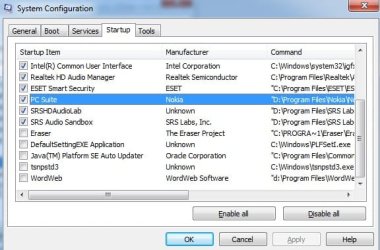
Ztruker, I also suspected it to be some malware. But a full scan with the antivirus did not reveal anything significant. I also downloaded and installed Malware Bytes Anti Malware and did a full scan. It too, did not find anything. I also checked the Startup tab of System Config. I am attaching screen shots of it.


gregrocker, no imaging or backup program as per my knowledge was getting executed during all this while. Is there a way to check them out?
 

Attachments

  • Startup1.jpg
    Startup1.jpg
    47.8 KB · Views: 40
  • Startup2.jpg
    Startup2.jpg
    41.6 KB · Views: 38

My Computer My Computer

Computer type
Laptop
Computer Manufacturer/Model Number
Acer
OS
Windows 7 Ultimate 32bit
CPU
i3
Memory
3gb
Hard Drives
Hitachi 320 GB
Antivirus
ESET Smart Security 8
Browser
Chrome
Can you also post a screenshot of task scheduler?

1.) Download herdprotect: (choose the portable version)

Download herdProtect - Free Anti-Malware Platform

2.) Run the scan.

3.) When the scan finishes, save the results per the screenshot below. Then upload the log here.

DO NOT REMOVE ANYTHING YET. I will advise if anything needs removed when I receive the log.

Attached Images
313957d1397626709-degrading-windows-performance-save-results.png


_____________________________________________________________________________________

Download DDS:

DDS.com

Save the file to your pc. Then open the dds icon to run the tool.
When done, DDS will open two (2) logs:
DDS.txt
Attach.txt

Save both reports to your desktop.
Include the contents of both logs in your next post by using the paperclip

picture.php
 

My Computer My Computer

Computer type
PC/Desktop
Computer Manufacturer/Model Number
Custom Built
OS
Windows 10 Pro
CPU
AMD Ryzen 5 2400G Processor with Radeon RX Vega 11 Graphics
Motherboard
ASRock X470 Master SLI/AC AM4 AMD Promontory X470 SATA 6Gb/s
Memory
G.SKILL Ripjaws V Series 16GB (2 x 8GB) 288-Pin DDR4 SDRAM D
Graphics Card(s)
2047MB NVIDIA GeForce GTX 1060 6GB (EVGA)
Sound Card
Motherboard Built in
Monitor(s) Displays
Acer R240HY bidx 23.8-Inch IPS HDMI DVI VGA (1920 x 1080) Wi
Screen Resolution
1920 x 1080
Hard Drives
1TB Sandisk SSD PLUS (Main drive)
500 GB Seagate 7200 RPM (Games)
500 GB Western Digital 7200 RPM (Virtual Machines)
PSU
CORSAIR TX Series TX650M 650W 80+ Gold Modular Power Supply
Case
CORSAIR CARBIDE SPEC-02 Mid-Tower Gaming Case, Red LED Fan
Cooling
220mm, two 120mm, and four 60mm fans
Keyboard
Wired Dell keyboard
Mouse
Wireless Logitech mouse
Internet Speed
250mb down, 30mb up
Antivirus
Panda Cloud Antivirus
Browser
Chrome-ish x64
Other Info
Your awesome for reading this.
You can uncheck all of those except Eset. Then test your touchpad to see if you have all the functions you want, e.g. scrolling.
 
andrew129260, as per your suggestion I am attaching the log files.
 

Attachments

My Computer My Computer

Computer type
Laptop
Computer Manufacturer/Model Number
Acer
OS
Windows 7 Ultimate 32bit
CPU
i3
Memory
3gb
Hard Drives
Hitachi 320 GB
Antivirus
ESET Smart Security 8
Browser
Chrome
gregrocker, I unchecked all of those, except Eset. Touchpad lost its scrolling functionality. Next, I unchecked Eset too. But even then, result was the same - the user got created perfectly each time.
 

My Computer My Computer

Computer type
Laptop
Computer Manufacturer/Model Number
Acer
OS
Windows 7 Ultimate 32bit
CPU
i3
Memory
3gb
Hard Drives
Hitachi 320 GB
Antivirus
ESET Smart Security 8
Browser
Chrome
Ok Greg, I will see if the guidelines given in the troubleshooting steps page help. Thanks.
 

My Computer My Computer

Computer type
Laptop
Computer Manufacturer/Model Number
Acer
OS
Windows 7 Ultimate 32bit
CPU
i3
Memory
3gb
Hard Drives
Hitachi 320 GB
Antivirus
ESET Smart Security 8
Browser
Chrome
thank you for the logs, give me some additional time to look through them. I do see that you have utorrent installed. If you are using torrents, your machines possible infection rates increases significantly.

Edit: Okay, I looked through the logs and other than the torrent software you appear to be clean. NO guarantee however.

I know a lot about malware but I am not an expert.


I would like you to scan with Hitman Pro as another run just to see, it certainly cannot hurt.

1.) Download hitman pro here for your windows version and install it.

2.) Open hitman pro. Click next.

picture.php


Read and Accept the license agreement, then checkmark the box and click next.

picture.php


Choose to only run a one time with this computer and click next

picture.php


The scan will start, wait until it completes, then click the save log button.

picture.php


Choose a place to save it for upload later

picture.php


Close out of hitman pro.

Find the log file wherever you saved it and upload it using the paperclip

picture.php
 
Last edited:

My Computer My Computer

Computer type
PC/Desktop
Computer Manufacturer/Model Number
Custom Built
OS
Windows 10 Pro
CPU
AMD Ryzen 5 2400G Processor with Radeon RX Vega 11 Graphics
Motherboard
ASRock X470 Master SLI/AC AM4 AMD Promontory X470 SATA 6Gb/s
Memory
G.SKILL Ripjaws V Series 16GB (2 x 8GB) 288-Pin DDR4 SDRAM D
Graphics Card(s)
2047MB NVIDIA GeForce GTX 1060 6GB (EVGA)
Sound Card
Motherboard Built in
Monitor(s) Displays
Acer R240HY bidx 23.8-Inch IPS HDMI DVI VGA (1920 x 1080) Wi
Screen Resolution
1920 x 1080
Hard Drives
1TB Sandisk SSD PLUS (Main drive)
500 GB Seagate 7200 RPM (Games)
500 GB Western Digital 7200 RPM (Virtual Machines)
PSU
CORSAIR TX Series TX650M 650W 80+ Gold Modular Power Supply
Case
CORSAIR CARBIDE SPEC-02 Mid-Tower Gaming Case, Red LED Fan
Cooling
220mm, two 120mm, and four 60mm fans
Keyboard
Wired Dell keyboard
Mouse
Wireless Logitech mouse
Internet Speed
250mb down, 30mb up
Antivirus
Panda Cloud Antivirus
Browser
Chrome-ish x64
Other Info
Your awesome for reading this.
Here goes the Hitman Pro scan log
 

Attachments

My Computer My Computer

Computer type
Laptop
Computer Manufacturer/Model Number
Acer
OS
Windows 7 Ultimate 32bit
CPU
i3
Memory
3gb
Hard Drives
Hitachi 320 GB
Antivirus
ESET Smart Security 8
Browser
Chrome
Is there any way to track this user creation? Any tool that will track the user creation and corresponding process that initiates the activity?
 

My Computer My Computer

Computer type
Laptop
Computer Manufacturer/Model Number
Acer
OS
Windows 7 Ultimate 32bit
CPU
i3
Memory
3gb
Hard Drives
Hitachi 320 GB
Antivirus
ESET Smart Security 8
Browser
Chrome
log looks good.

Unfortunately I no of know way to track this. Only suggestion I can think of is to keep checking computer management local users and groups after every reboot. It might seem annoying but try checking it after running some applications. Then restart, narrow a list down to find the cause.
 

My Computer My Computer

Computer type
PC/Desktop
Computer Manufacturer/Model Number
Custom Built
OS
Windows 10 Pro
CPU
AMD Ryzen 5 2400G Processor with Radeon RX Vega 11 Graphics
Motherboard
ASRock X470 Master SLI/AC AM4 AMD Promontory X470 SATA 6Gb/s
Memory
G.SKILL Ripjaws V Series 16GB (2 x 8GB) 288-Pin DDR4 SDRAM D
Graphics Card(s)
2047MB NVIDIA GeForce GTX 1060 6GB (EVGA)
Sound Card
Motherboard Built in
Monitor(s) Displays
Acer R240HY bidx 23.8-Inch IPS HDMI DVI VGA (1920 x 1080) Wi
Screen Resolution
1920 x 1080
Hard Drives
1TB Sandisk SSD PLUS (Main drive)
500 GB Seagate 7200 RPM (Games)
500 GB Western Digital 7200 RPM (Virtual Machines)
PSU
CORSAIR TX Series TX650M 650W 80+ Gold Modular Power Supply
Case
CORSAIR CARBIDE SPEC-02 Mid-Tower Gaming Case, Red LED Fan
Cooling
220mm, two 120mm, and four 60mm fans
Keyboard
Wired Dell keyboard
Mouse
Wireless Logitech mouse
Internet Speed
250mb down, 30mb up
Antivirus
Panda Cloud Antivirus
Browser
Chrome-ish x64
Other Info
Your awesome for reading this.
One of the Windows logs in the Computer Management>Event Viewer may log it, possibly System.

Waiting to see the installed Programs list.

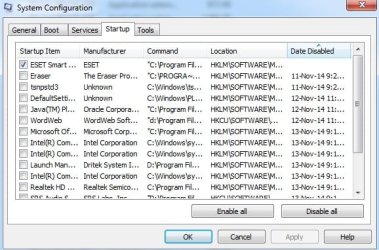
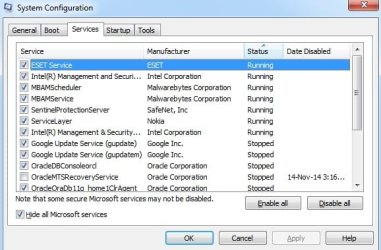
Check again at msconfig>Startup and >Services (after Hiding all MS) to see if anything is checked now.
 
Please find installed programs list and MSConfig screenshots attached
 

Attachments

  • MSConfig Startup.jpg
    MSConfig Startup.jpg
    51.5 KB · Views: 31
  • MSConfig Services.jpg
    MSConfig Services.jpg
    41 KB · Views: 28
  • Program List.doc
    Program List.doc
    141 KB · Views: 2

My Computer My Computer

Computer type
Laptop
Computer Manufacturer/Model Number
Acer
OS
Windows 7 Ultimate 32bit
CPU
i3
Memory
3gb
Hard Drives
Hitachi 320 GB
Antivirus
ESET Smart Security 8
Browser
Chrome
Windows security log has entries for this user creation event. I am providing the details associated with this
"A user account was created" event. [The computer name is Indra]


A user account was created.

Subject:
Security ID: SYSTEM
Account Name: INDRA$
Account Domain: WORKGROUP
Logon ID: 0x3e7

New Account:
Security ID: INDRA\wobrsqqw
Account Name: wobrsqqw
Account Domain: INDRA

Attributes:
SAM Account Name: wobrsqqw
Display Name: <value not set>
User Principal Name: -
Home Directory: <value not set>
Home Drive: <value not set>
Script Path: <value not set>
Profile Path: <value not set>
User Workstations: <value not set>
Password Last Set: <never>
Account Expires: <never>
Primary Group ID: 513
Allowed To Delegate To: -
Old UAC Value: 0x0
New UAC Value: 0x15
User Account Control:
Account Disabled
'Password Not Required' - Enabled
'Normal Account' - Enabled
User Parameters: <value not set>
SID History: -
Logon Hours: All

Additional Information:
Privileges -


------------The Details section of the above event:

- <Event xmlns="http://schemas.microsoft.com/win/2004/08/events/event">
- <System>
<Provider Name="Microsoft-Windows-Security-Auditing" Guid="{54849625-5478-4994-A5BA-3E3B0328C30D}" />
<EventID>4720</EventID>
<Version>0</Version>
<Level>0</Level>
<Task>13824</Task>
<Opcode>0</Opcode>
<Keywords>0x8020000000000000</Keywords>
<TimeCreated SystemTime="2014-11-14T15:36:58.716478800Z" />
<EventRecordID>43911</EventRecordID>
<Correlation />
<Execution ProcessID="580" ThreadID="616" />
<Channel>Security</Channel>
<Computer>Indra</Computer>
<Security />
</System>
- <EventData>
<Data Name="TargetUserName">wobrsqqw</Data>
<Data Name="TargetDomainName">INDRA</Data>
<Data Name="TargetSid">S-1-5-21-3330774905-1691639123-4124171393-1029</Data>
<Data Name="SubjectUserSid">S-1-5-18</Data>
<Data Name="SubjectUserName">INDRA$</Data>
<Data Name="SubjectDomainName">WORKGROUP</Data>
<Data Name="SubjectLogonId">0x3e7</Data>
<Data Name="PrivilegeList">-</Data>
<Data Name="SamAccountName">wobrsqqw</Data>
<Data Name="DisplayName">%%1793</Data>
<Data Name="UserPrincipalName">-</Data>
<Data Name="HomeDirectory">%%1793</Data>
<Data Name="HomePath">%%1793</Data>
<Data Name="ScriptPath">%%1793</Data>
<Data Name="ProfilePath">%%1793</Data>
<Data Name="UserWorkstations">%%1793</Data>
<Data Name="PasswordLastSet">%%1794</Data>
<Data Name="AccountExpires">%%1794</Data>
<Data Name="PrimaryGroupId">513</Data>
<Data Name="AllowedToDelegateTo">-</Data>
<Data Name="OldUacValue">0x0</Data>
<Data Name="NewUacValue">0x15</Data>
<Data Name="UserAccountControl">%%2080 %%2082 %%2084</Data>
<Data Name="UserParameters">%%1793</Data>
<Data Name="SidHistory">-</Data>
<Data Name="LogonHours">%%1797</Data>
</EventData>
</Event>


Do these provide any clue?
 

My Computer My Computer

Computer type
Laptop
Computer Manufacturer/Model Number
Acer
OS
Windows 7 Ultimate 32bit
CPU
i3
Memory
3gb
Hard Drives
Hitachi 320 GB
Antivirus
ESET Smart Security 8
Browser
Chrome
I google the text and ID# of repeat errors to see how others resolve them. In this case there is no known standard use of that account name found by Google so it must be randomly generated. It also appears to be a part of MS Security Audit, possibly run on or by your domain. Security Auditing Overview

Is this PC used for work? If so I would consult your IT dept.

I would not have Catalyst bloatware, Komodo, and would question Solid Fire Gold demo, Sentinel Protection installer.

None of those Services (after hiding all MS) need to start with Windows except your AV.
 

My Computer My Computer

Computer type
PC/Desktop
Computer Manufacturer/Model Number
Home made Desktop
OS
Windows 10 Pro. 64/ version 1709 Windows 7 Pro/64
CPU
Intel i7-6800K @ 4.3
Motherboard
ASUS X-99 Deluxe II
Memory
Corsair Platinum 16 gig @2400
Graphics Card(s)
EVGA GTX 1070 OC
Monitor(s) Displays
Asus 27" LED LCD/VE278Q
Screen Resolution
1920-1080 or 1280-720 HDMI
Hard Drives
INTEL SSD 730-240 Gb Sata 3.0/
PSU
EVGA Platium 1200W
Case
Phanteks Luxe Tempered Glass 8 fans/ one radiator
Cooling
XSPC/ Water Cooled CPU
Keyboard
Das 4 Professional
Mouse
Logitech M705/MX Anywhere 2-S
Internet Speed
100 mbits
Antivirus
Microsoft Security Essentials/ Malwarebytes Premium 3.0/ SAS
Browser
I.E. 11 default/Firefox/ ISP Time Warner Cable/Spectrum
Other Info
LG BluRay Burner/
Sound system-KLipsch-THX/
Icy Dock ssd Hot Swap bays.
Back
Top