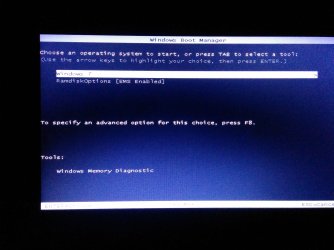
win 7 restore and f4 not working

Yes my recovery drive got hidden and is good. One quick doubt.
why do I get

"windows 7 and Ramdiskoptions [EMS emabled ] " as choice when I start my PC?


C:\windows\system32>diskpart

Microsoft DiskPart version 6.1.7601
Copyright (C) 1999-2008 Microsoft Corporation.
On computer: HANUMAN

DISKPART> select vol p

Volume 0 is the selected volume.

DISKPART> remove letter=p

DiskPart successfully removed the drive letter or mount point.

DISKPART> set id=27

DiskPart successfully set the partition ID.

DISKPART> detail part

Partition 1
Type : 27
Hidden: Yes
Active: No
Offset in Bytes: 1048576

Volume ### Ltr Label Fs Type Size Status Info
---------- --- ----------- ----- ---------- ------- --------- --------
* Volume 0 RECOVERY NTFS Partition 20 GB Healthy Hidden

DISKPART>
 

My Computer My Computer

At a glance

7atom1
Computer type
Laptop
Computer Manufacturer/Model Number
samsung
OS
7
CPU
atom
Memory
1

My Computer My Computer

At a glance

Microsoft Windows 7 Home Premium 64-bits 7601...Intel(R) Core(TM) i3 CPU M 370 @ 2.40GHz4,00 GBATI Mobility Radeon HD 5400 Series
Computer type
Laptop
Computer Manufacturer/Model Number
ACER ASPIRE 5742G
OS
Microsoft Windows 7 Home Premium 64-bits 7601 Multiprocessor Free Service Pack 1
CPU
Intel(R) Core(TM) i3 CPU M 370 @ 2.40GHz
Motherboard
Acer Aspire 5742G
Memory
4,00 GB
Graphics Card(s)
ATI Mobility Radeon HD 5400 Series
Sound Card
(1) AMD High Definition Audio Device (2) Realtek High Defi
Screen Resolution
1366 x 768 x 32 bits (4294967296 colors) @ 60 Hz
Hard Drives
WDC WD5000BEVT-22ZAT0
Please find the screen shot

C:\windows\system32>
C:\windows\system32>bcdedit/deletevalue {ramdiskoptions} description
The operation completed successfully.

C:\windows\system32>
 

Attachments

  • IMG_20141202_035912.jpg
    IMG_20141202_035912.jpg
    167.9 KB · Views: 0

My Computer My Computer

At a glance

7atom1
Computer type
Laptop
Computer Manufacturer/Model Number
samsung
OS
7
CPU
atom
Memory
1
Did you still see that wrong menu after doing #42 ? What happens if you select that option?
 

My Computer My Computer

At a glance

Microsoft Windows 7 Home Premium 64-bits 7601...Intel(R) Core(TM) i3 CPU M 370 @ 2.40GHz4,00 GBATI Mobility Radeon HD 5400 Series
Computer type
Laptop
Computer Manufacturer/Model Number
ACER ASPIRE 5742G
OS
Microsoft Windows 7 Home Premium 64-bits 7601 Multiprocessor Free Service Pack 1
CPU
Intel(R) Core(TM) i3 CPU M 370 @ 2.40GHz
Motherboard
Acer Aspire 5742G
Memory
4,00 GB
Graphics Card(s)
ATI Mobility Radeon HD 5400 Series
Sound Card
(1) AMD High Definition Audio Device (2) Realtek High Defi
Screen Resolution
1366 x 768 x 32 bits (4294967296 colors) @ 60 Hz
Hard Drives
WDC WD5000BEVT-22ZAT0
I restarted couple of time and tried different options.

Pressing F4 doesn't do anything. How ever selecting the second option i.e ramdiskoptions it is leading to recovery part.

But I doubt if my computer is infected with virus or so, will I still get boot menu option? how do we set F4 to ramdiskoption directly?
 

My Computer My Computer

At a glance

7atom1
Computer type
Laptop
Computer Manufacturer/Model Number
samsung
OS
7
CPU
atom
Memory
1
I restarted couple of time and tried different options.

Pressing F4 doesn't do anything. How ever selecting the second option i.e ramdiskoptions it is leading to recovery part.
bcdedit/enum all
again please. Looks like something is stuck for unknown reason. Why a hotkey F4 to a bootmenu? Normally F4 was a hotkey for the by manufacturer hacked mbr.


But I doubt if my computer is infected with virus or so, will I still get boot menu option? how do we set F4 to ramdiskoption directly?
A virus can destroy anything on disk, so mbr and bootmenu as well. That's why a recovery partition is useless. Make backups instead.
 

My Computer My Computer

At a glance

Microsoft Windows 7 Home Premium 64-bits 7601...Intel(R) Core(TM) i3 CPU M 370 @ 2.40GHz4,00 GBATI Mobility Radeon HD 5400 Series
Computer type
Laptop
Computer Manufacturer/Model Number
ACER ASPIRE 5742G
OS
Microsoft Windows 7 Home Premium 64-bits 7601 Multiprocessor Free Service Pack 1
CPU
Intel(R) Core(TM) i3 CPU M 370 @ 2.40GHz
Motherboard
Acer Aspire 5742G
Memory
4,00 GB
Graphics Card(s)
ATI Mobility Radeon HD 5400 Series
Sound Card
(1) AMD High Definition Audio Device (2) Realtek High Defi
Screen Resolution
1366 x 768 x 32 bits (4294967296 colors) @ 60 Hz
Hard Drives
WDC WD5000BEVT-22ZAT0
Microsoft Windows [Version 6.1.7601]
Copyright (c) 2009 Microsoft Corporation. All rights reserved.

C:\windows\system32>bcdedit/enum all

Windows Boot Manager
--------------------
identifier {bootmgr}
device partition=\Device\HarddiskVolume2
description Windows Boot Manager
locale en-US
inherit {globalsettings}
default {current}
resumeobject {7d6a7bbc-ade8-11df-a9e9-002454733de7}
displayorder {current}
{7d6a7bc5-ade8-11df-a9e9-002454733de7}
toolsdisplayorder {memdiag}
timeout 5

Windows Boot Loader
-------------------
identifier {current}
device partition=C:
path \windows\system32\winload.exe
description Windows 7
locale en-US
inherit {bootloadersettings}
recoverysequence {7d6a7bbe-ade8-11df-a9e9-002454733de7}
recoveryenabled Yes
osdevice partition=C:
systemroot \windows
resumeobject {7d6a7bbc-ade8-11df-a9e9-002454733de7}
nx OptIn
numproc 2

Windows Boot Loader
-------------------
identifier {7d6a7bbe-ade8-11df-a9e9-002454733de7}
device ramdisk=[C:]\Recovery\7d6a7bbe-ade8-11df-a9e9-002454733d
e7\Winre.wim,{7d6a7bbf-ade8-11df-a9e9-002454733de7}
path \windows\system32\winload.exe
description Windows Recovery Environment
inherit {bootloadersettings}
osdevice ramdisk=[C:]\Recovery\7d6a7bbe-ade8-11df-a9e9-002454733d
e7\Winre.wim,{7d6a7bbf-ade8-11df-a9e9-002454733de7}
systemroot \windows
nx OptIn
winpe Yes

Windows Boot Loader
-------------------
identifier {7d6a7bc5-ade8-11df-a9e9-002454733de7}
device ramdisk=[\Device\HarddiskVolume1]\sources\boot.wim,{ramd
iskoptions}
path \windows\system32\boot\winload.exe
description Restore to Factory
locale en-US
inherit {bootloadersettings}
osdevice ramdisk=[\Device\HarddiskVolume1]\sources\boot.wim,{ramd
iskoptions}
systemroot \windows
nx AlwaysOff
pae ForceDisable
detecthal Yes
winpe Yes
ems Yes

Resume from Hibernate
---------------------
identifier {7d6a7bbc-ade8-11df-a9e9-002454733de7}
device partition=C:
path \windows\system32\winresume.exe
description Windows Resume Application
locale en-US
inherit {resumeloadersettings}
filedevice partition=C:
filepath \hiberfil.sys
pae Yes
debugoptionenabled No

Windows Memory Tester
---------------------
identifier {memdiag}
device partition=\Device\HarddiskVolume2
path \boot\memtest.exe
description Windows Memory Diagnostic
locale en-US
inherit {globalsettings}
badmemoryaccess Yes

EMS Settings
------------
identifier {emssettings}
bootems Yes

Debugger Settings
-----------------
identifier {dbgsettings}
debugtype Serial
debugport 1
baudrate 115200

RAM Defects
-----------
identifier {badmemory}

Global Settings
---------------
identifier {globalsettings}
inherit {dbgsettings}
{emssettings}
{badmemory}

Boot Loader Settings
--------------------
identifier {bootloadersettings}
inherit {globalsettings}
{hypervisorsettings}

Hypervisor Settings
-------------------
identifier {hypervisorsettings}
hypervisordebugtype Serial
hypervisordebugport 1
hypervisorbaudrate 115200

Resume Loader Settings
----------------------
identifier {resumeloadersettings}
inherit {globalsettings}

Device options
--------------
identifier {7d6a7bbf-ade8-11df-a9e9-002454733de7}
description Ramdisk Options
ramdisksdidevice partition=C:
ramdisksdipath \Recovery\7d6a7bbe-ade8-11df-a9e9-002454733de7\boot.sdi

Setup Ramdisk Options
---------------------
identifier {ramdiskoptions}
ramdisksdidevice partition=\Device\HarddiskVolume1
ramdisksdipath \boot\boot.sdi

C:\windows\system32>

 

My Computer My Computer

At a glance

7atom1
Computer type
Laptop
Computer Manufacturer/Model Number
samsung
OS
7
CPU
atom
Memory
1
What happens if you do:
Code:
bcdedit/set {ramdiskoptions} description "Restore to Factory"
And reboot? Don't care to much about the name of the entry.
 

My Computer My Computer

At a glance

Microsoft Windows 7 Home Premium 64-bits 7601...Intel(R) Core(TM) i3 CPU M 370 @ 2.40GHz4,00 GBATI Mobility Radeon HD 5400 Series
Computer type
Laptop
Computer Manufacturer/Model Number
ACER ASPIRE 5742G
OS
Microsoft Windows 7 Home Premium 64-bits 7601 Multiprocessor Free Service Pack 1
CPU
Intel(R) Core(TM) i3 CPU M 370 @ 2.40GHz
Motherboard
Acer Aspire 5742G
Memory
4,00 GB
Graphics Card(s)
ATI Mobility Radeon HD 5400 Series
Sound Card
(1) AMD High Definition Audio Device (2) Realtek High Defi
Screen Resolution
1366 x 768 x 32 bits (4294967296 colors) @ 60 Hz
Hard Drives
WDC WD5000BEVT-22ZAT0
C:\windows\system32>
C:\windows\system32>bcdedit/set {ramdiskoptions} description "Restore to Factory
"
The operation completed successfully.

C:\windows\system32>
 

My Computer My Computer

At a glance

7atom1
Computer type
Laptop
Computer Manufacturer/Model Number
samsung
OS
7
CPU
atom
Memory
1
C:\windows\system32>
C:\windows\system32>bcdedit/set {ramdiskoptions} description "Restore to Factory
"
The operation completed successfully.

C:\windows\system32>
Now the boot entry is correct?
 

My Computer My Computer

At a glance

Microsoft Windows 7 Home Premium 64-bits 7601...Intel(R) Core(TM) i3 CPU M 370 @ 2.40GHz4,00 GBATI Mobility Radeon HD 5400 Series
Computer type
Laptop
Computer Manufacturer/Model Number
ACER ASPIRE 5742G
OS
Microsoft Windows 7 Home Premium 64-bits 7601 Multiprocessor Free Service Pack 1
CPU
Intel(R) Core(TM) i3 CPU M 370 @ 2.40GHz
Motherboard
Acer Aspire 5742G
Memory
4,00 GB
Graphics Card(s)
ATI Mobility Radeon HD 5400 Series
Sound Card
(1) AMD High Definition Audio Device (2) Realtek High Defi
Screen Resolution
1366 x 768 x 32 bits (4294967296 colors) @ 60 Hz
Hard Drives
WDC WD5000BEVT-22ZAT0

My Computer My Computer

At a glance

Microsoft Windows 7 Home Premium 64-bits 7601...Intel(R) Core(TM) i3 CPU M 370 @ 2.40GHz4,00 GBATI Mobility Radeon HD 5400 Series
Computer type
Laptop
Computer Manufacturer/Model Number
ACER ASPIRE 5742G
OS
Microsoft Windows 7 Home Premium 64-bits 7601 Multiprocessor Free Service Pack 1
CPU
Intel(R) Core(TM) i3 CPU M 370 @ 2.40GHz
Motherboard
Acer Aspire 5742G
Memory
4,00 GB
Graphics Card(s)
ATI Mobility Radeon HD 5400 Series
Sound Card
(1) AMD High Definition Audio Device (2) Realtek High Defi
Screen Resolution
1366 x 768 x 32 bits (4294967296 colors) @ 60 Hz
Hard Drives
WDC WD5000BEVT-22ZAT0
When I restart it gives me choice to enter either windows or ramdisk. I did set id to 27 and it is fine. If it is an easy step to make F4 work its well and good, If not lets leave it there, no point in spending more time with it. Apart from that every thing seems to be perfect.
 

My Computer My Computer

At a glance

7atom1
Computer type
Laptop
Computer Manufacturer/Model Number
samsung
OS
7
CPU
atom
Memory
1
It's perfect asa it is now
 

My Computer My Computer

At a glance

Microsoft Windows 7 Home Premium 64-bits 7601...Intel(R) Core(TM) i3 CPU M 370 @ 2.40GHz4,00 GBATI Mobility Radeon HD 5400 Series
Computer type
Laptop
Computer Manufacturer/Model Number
ACER ASPIRE 5742G
OS
Microsoft Windows 7 Home Premium 64-bits 7601 Multiprocessor Free Service Pack 1
CPU
Intel(R) Core(TM) i3 CPU M 370 @ 2.40GHz
Motherboard
Acer Aspire 5742G
Memory
4,00 GB
Graphics Card(s)
ATI Mobility Radeon HD 5400 Series
Sound Card
(1) AMD High Definition Audio Device (2) Realtek High Defi
Screen Resolution
1366 x 768 x 32 bits (4294967296 colors) @ 60 Hz
Hard Drives
WDC WD5000BEVT-22ZAT0
Thank you very much. You were very helpful to me. No wonder you were called the GURU of Windows. Thank you once again
 

My Computer My Computer

At a glance

7atom1
Computer type
Laptop
Computer Manufacturer/Model Number
samsung
OS
7
CPU
atom
Memory
1
Back
Top