
win 7 restore and f4 not working

rocky903

New member
Local time
7:33 AM
Messages
24
Hi,

I am trying to restore my computer but my F4 option is not working. I am using Samsung laptop. I took backup using samsung backup and restore tool. I realised the mistake I have done. I installed linux and deleted that partition directly(formated) from windows. I got grub error. Which I solved with windows CD ( bootable setup installation cd). But I dont have acess to original backup though I did not delete that partition. I have shared the screen shot. I tried getting information from this thread but could'nt find a solution. I dont want to do more mistakes and risk my OS backup. Please let know what needs to be done
thanks
Rocky
 

Attachments
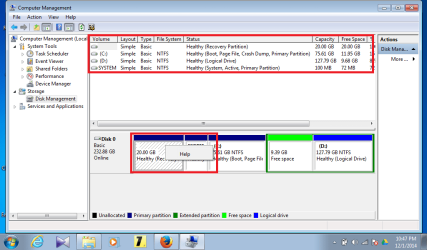
  • Untitled.png
    Untitled.png
    33.9 KB · Views: 1

My Computer My Computer

At a glance

7atom1
Computer type
Laptop
Computer Manufacturer/Model Number
samsung
OS
7
CPU
atom
Memory
1
So you deleted linux partition. Grub was still thje boot manager in MBR and you repaired that by running "startup repair".
All done exactly what I should advise you.

But now the replaced the boot manager from MBR. Most likely not a problem at all. You don't need to restire to "factory settings" anayway. Or do you?

Do you make backups... that's better and safer.
Anyway open http://www.sevenforums.com/tutorials/783-elevated-command-prompt.html and do
Code:
bcdedit/enum all > c:\t.txt

Now post c:\t.txt . You may delete that file afterwards.

Code:
diskpart
select  disk  0
list  part
[B][COLOR=red]--What's the partition number of the 20GB partition? Assume it's number 7.[/COLOR][/B]
select part  [COLOR=blue][B]7[/B][/COLOR]
detail part
exit

Post output.... I'm interesterd in its "type".
 

My Computer My Computer

At a glance

Microsoft Windows 7 Home Premium 64-bits 7601...Intel(R) Core(TM) i3 CPU M 370 @ 2.40GHz4,00 GBATI Mobility Radeon HD 5400 Series
Computer type
Laptop
Computer Manufacturer/Model Number
ACER ASPIRE 5742G
OS
Microsoft Windows 7 Home Premium 64-bits 7601 Multiprocessor Free Service Pack 1
CPU
Intel(R) Core(TM) i3 CPU M 370 @ 2.40GHz
Motherboard
Acer Aspire 5742G
Memory
4,00 GB
Graphics Card(s)
ATI Mobility Radeon HD 5400 Series
Sound Card
(1) AMD High Definition Audio Device (2) Realtek High Defi
Screen Resolution
1366 x 768 x 32 bits (4294967296 colors) @ 60 Hz
Hard Drives
WDC WD5000BEVT-22ZAT0
Thanks for your suggestions. I got the following output.


Windows Boot Manager
--------------------
identifier {bootmgr}
device partition=\Device\HarddiskVolume2
description Windows Boot Manager
locale en-US
inherit {globalsettings}
default {7d6a7bc1-ade8-11df-a9e9-002454733de7}
resumeobject {7d6a7bc0-ade8-11df-a9e9-002454733de7}
displayorder {current}
toolsdisplayorder {memdiag}
timeout 30

Windows Boot Loader
-------------------
identifier {current}
device partition=C:
path \windows\system32\winload.exe
description Windows 7
locale en-US
inherit {bootloadersettings}
recoverysequence {7d6a7bbe-ade8-11df-a9e9-002454733de7}
recoveryenabled Yes
osdevice partition=C:
systemroot \windows
resumeobject {7d6a7bbc-ade8-11df-a9e9-002454733de7}
nx OptIn
numproc 2

Windows Boot Loader
-------------------
identifier {7d6a7bbe-ade8-11df-a9e9-002454733de7}
device ramdisk=[C:]\Recovery\7d6a7bbe-ade8-11df-a9e9-002454733de7\Winre.wim,{7d6a7bbf-ade8-11df-a9e9-002454733de7}
path \windows\system32\winload.exe
description Windows Recovery Environment
inherit {bootloadersettings}
osdevice ramdisk=[C:]\Recovery\7d6a7bbe-ade8-11df-a9e9-002454733de7\Winre.wim,{7d6a7bbf-ade8-11df-a9e9-002454733de7}
systemroot \windows
nx OptIn
winpe Yes

Windows Boot Loader
-------------------
identifier {7d6a7bc2-ade8-11df-a9e9-002454733de7}

Resume from Hibernate
---------------------
identifier {7d6a7bbc-ade8-11df-a9e9-002454733de7}
device partition=C:
path \windows\system32\winresume.exe
description Windows Resume Application
locale en-US
inherit {resumeloadersettings}
filedevice partition=C:
filepath \hiberfil.sys
pae Yes
debugoptionenabled No

Windows Memory Tester
---------------------
identifier {memdiag}
device partition=\Device\HarddiskVolume2
path \boot\memtest.exe
description Windows Memory Diagnostic
locale en-US
inherit {globalsettings}
badmemoryaccess Yes

EMS Settings
------------
identifier {emssettings}
bootems Yes

Debugger Settings
-----------------
identifier {dbgsettings}
debugtype Serial
debugport 1
baudrate 115200

RAM Defects
-----------
identifier {badmemory}

Global Settings
---------------
identifier {globalsettings}
inherit {dbgsettings}
{emssettings}
{badmemory}

Boot Loader Settings
--------------------
identifier {bootloadersettings}
inherit {globalsettings}
{hypervisorsettings}

Hypervisor Settings
-------------------
identifier {hypervisorsettings}
hypervisordebugtype Serial
hypervisordebugport 1
hypervisorbaudrate 115200

Resume Loader Settings
----------------------
identifier {resumeloadersettings}
inherit {globalsettings}

Device options
--------------
identifier {7d6a7bbf-ade8-11df-a9e9-002454733de7}
description Ramdisk Options
ramdisksdidevice partition=C:
ramdisksdipath \Recovery\7d6a7bbe-ade8-11df-a9e9-002454733de7\boot.sdi
 

My Computer My Computer

At a glance

7atom1
Computer type
Laptop
Computer Manufacturer/Model Number
samsung
OS
7
CPU
atom
Memory
1
{7d6a7bc2-ade8-11df-a9e9-002454733de7} has no properties at all. And referenced by noone

and {7d6a7bc1-ade8-11df-a9e9-002454733de7} is the default boot entry. But that entry doens't exists!

in elevated command prompt:
Code:
bcdedit/delete {7d6a7bc2-ade8-11df-a9e9-002454733de7}
bcdedit/default  {current}

resumeobject {7d6a7bc0-ade8-11df-a9e9-002454733de7}
is incorrect and not found.
in elevated command prompt:
Code:
bcdedit /set {bootmgr} resumeobject {7d6a7bbc-ade8-11df-a9e9-002454733de7}

This won't fixed the main problem, but cleans remaining phantom bcd menu stuff.
 

My Computer My Computer

At a glance

Microsoft Windows 7 Home Premium 64-bits 7601...Intel(R) Core(TM) i3 CPU M 370 @ 2.40GHz4,00 GBATI Mobility Radeon HD 5400 Series
Computer type
Laptop
Computer Manufacturer/Model Number
ACER ASPIRE 5742G
OS
Microsoft Windows 7 Home Premium 64-bits 7601 Multiprocessor Free Service Pack 1
CPU
Intel(R) Core(TM) i3 CPU M 370 @ 2.40GHz
Motherboard
Acer Aspire 5742G
Memory
4,00 GB
Graphics Card(s)
ATI Mobility Radeon HD 5400 Series
Sound Card
(1) AMD High Definition Audio Device (2) Realtek High Defi
Screen Resolution
1366 x 768 x 32 bits (4294967296 colors) @ 60 Hz
Hard Drives
WDC WD5000BEVT-22ZAT0
Post #2 (the diskpart stuff) as well
 

My Computer My Computer

At a glance

Microsoft Windows 7 Home Premium 64-bits 7601...Intel(R) Core(TM) i3 CPU M 370 @ 2.40GHz4,00 GBATI Mobility Radeon HD 5400 Series
Computer type
Laptop
Computer Manufacturer/Model Number
ACER ASPIRE 5742G
OS
Microsoft Windows 7 Home Premium 64-bits 7601 Multiprocessor Free Service Pack 1
CPU
Intel(R) Core(TM) i3 CPU M 370 @ 2.40GHz
Motherboard
Acer Aspire 5742G
Memory
4,00 GB
Graphics Card(s)
ATI Mobility Radeon HD 5400 Series
Sound Card
(1) AMD High Definition Audio Device (2) Realtek High Defi
Screen Resolution
1366 x 768 x 32 bits (4294967296 colors) @ 60 Hz
Hard Drives
WDC WD5000BEVT-22ZAT0
Done as you have instructed.

Microsoft Windows [Version 6.1.7601]
Copyright (c) 2009 Microsoft Corporation. All rights reserved.

C:\windows\system32>bcdedit/delete {7d6a7bc2-ade8-11df-a9e9-002454733de7}
The operation completed successfully.

C:\windows\system32>bcdedit/default {current}
The operation completed successfully.

C:\windows\system32>bcdedit /set {bootmgr} resumeobject {7d6a7bbc-ade8-11df-a9e9
-002454733de7}
The operation completed successfully.

C:\windows\system32>diskpart

Microsoft DiskPart version 6.1.7601
Copyright (C) 1999-2008 Microsoft Corporation.
On computer: HANUMAN

DISKPART> select disk 0

Disk 0 is now the selected disk.

DISKPART> list part

Partition ### Type Size Offset
------------- ---------------- ------- -------
Partition 1 Recovery 20 GB 1024 KB
Partition 2 Primary 100 MB 20 GB
Partition 3 Primary 75 GB 20 GB
Partition 0 Extended 137 GB 95 GB
Partition 4 Logical 127 GB 105 GB

DISKPART> select part 1

Partition 1 is now the selected partition.

DISKPART> detail part

Partition 1
Type : 27
Hidden: Yes
Active: No
Offset in Bytes: 1048576

Volume ### Ltr Label Fs Type Size Status Info
---------- --- ----------- ----- ---------- ------- --------- --------
* Volume 3 RECOVERY NTFS Partition 20 GB Healthy Hidden


DISKPART> select disk 0

Disk 0 is now the selected disk.

DISKPART> list part

Partition ### Type Size Offset
------------- ---------------- ------- -------
Partition 1 Recovery 20 GB 1024 KB
Partition 2 Primary 100 MB 20 GB
Partition 3 Primary 75 GB 20 GB
Partition 0 Extended 137 GB 95 GB
Partition 4 Logical 127 GB 105 GB

DISKPART> select part 1

Partition 1 is now the selected partition.

DISKPART> detail part

Partition 1
Type : 27
Hidden: Yes
Active: No
Offset in Bytes: 1048576

Volume ### Ltr Label Fs Type Size Status Info
---------- --- ----------- ----- ---------- ------- --------- --------
* Volume 3 RECOVERY NTFS Partition 20 GB Healthy Hidden

DISKPART>
 

My Computer My Computer

At a glance

7atom1
Computer type
Laptop
Computer Manufacturer/Model Number
samsung
OS
7
CPU
atom
Memory
1
Code:
diskpart
select disk 0
select part 1
set  id=07  OVERRIDE
assign  letter=P
exit

Works? You have a new drive P now? It's not hidden ntfs anymore but normal ntfs. You can explore the P disk!
In elevated command prompt:
Code:
attrib/s  p:\*.wim
attrib p:\boot\bcd
Post output
 

My Computer My Computer

At a glance

Microsoft Windows 7 Home Premium 64-bits 7601...Intel(R) Core(TM) i3 CPU M 370 @ 2.40GHz4,00 GBATI Mobility Radeon HD 5400 Series
Computer type
Laptop
Computer Manufacturer/Model Number
ACER ASPIRE 5742G
OS
Microsoft Windows 7 Home Premium 64-bits 7601 Multiprocessor Free Service Pack 1
CPU
Intel(R) Core(TM) i3 CPU M 370 @ 2.40GHz
Motherboard
Acer Aspire 5742G
Memory
4,00 GB
Graphics Card(s)
ATI Mobility Radeon HD 5400 Series
Sound Card
(1) AMD High Definition Audio Device (2) Realtek High Defi
Screen Resolution
1366 x 768 x 32 bits (4294967296 colors) @ 60 Hz
Hard Drives
WDC WD5000BEVT-22ZAT0
DISKPART>

DISKPART> select disk 0

Disk 0 is now the selected disk.

DISKPART> select part 1

Partition 1 is now the selected partition.

DISKPART> set id=07 OVERRIDE

DiskPart successfully set the partition ID.

DISKPART> assign letter=P

DiskPart successfully assigned the drive letter or mount point.

DISKPART> exit

Leaving DiskPart...

C:\windows\system32>


C:\windows\system32>
C:\windows\system32>attrib/s p:\*.wim
A P:\Restore\Files\Windows\system32\oobe\FirstUXRes.WIM
A P:\sources\boot.wim

C:\windows\system32>attrib p:\boot\bcd
A P:\boot\bcd

C:\windows\system32>
 

My Computer My Computer

At a glance

7atom1
Computer type
Laptop
Computer Manufacturer/Model Number
samsung
OS
7
CPU
atom
Memory
1
Looks like P has WIM files (containers with files.... kind of zip file). You can also see WIM file as an DVD wehere you can boot from. p:\boot\bcd is the boot menu.

Code:
bcdedit/store  p:\boot\bcd
Post output

Do you want the recovery partition as an extra option to boot from in your current boot menu? Or do you want to know just a trick to start the recovery to factory settings? You most likely never will and have to use it!
 

My Computer My Computer

At a glance

Microsoft Windows 7 Home Premium 64-bits 7601...Intel(R) Core(TM) i3 CPU M 370 @ 2.40GHz4,00 GBATI Mobility Radeon HD 5400 Series
Computer type
Laptop
Computer Manufacturer/Model Number
ACER ASPIRE 5742G
OS
Microsoft Windows 7 Home Premium 64-bits 7601 Multiprocessor Free Service Pack 1
CPU
Intel(R) Core(TM) i3 CPU M 370 @ 2.40GHz
Motherboard
Acer Aspire 5742G
Memory
4,00 GB
Graphics Card(s)
ATI Mobility Radeon HD 5400 Series
Sound Card
(1) AMD High Definition Audio Device (2) Realtek High Defi
Screen Resolution
1366 x 768 x 32 bits (4294967296 colors) @ 60 Hz
Hard Drives
WDC WD5000BEVT-22ZAT0
I need it the way I brought my laptop new. Well I know my F4 is not working now. I need to activate it. And also my recovery drive just in case I need to restore to factory setting. Here is the output.

C:\windows\system32>bcdedit/store p:\boot\bcd

Windows Boot Manager
--------------------

identifier {bootmgr}
description Windows Boot Manager
locale en-US
inherit {globalsettings}
default {default}
displayorder {default}
toolsdisplayorder {memdiag}
timeout 30

Windows Boot Loader
-------------------
identifier {default}
device ramdisk=[boot]\sources\boot.wim,{7619dcc8-fafe-11d9-b411
-000476eba25f}
path \windows\system32\boot\winload.exe
description Samsung Recovery Solution 4
locale en-US
inherit {bootloadersettings}
osdevice ramdisk=[boot]\sources\boot.wim,{7619dcc8-fafe-11d9-b411
-000476eba25f}
systemroot \windows
nx AlwaysOff
pae ForceDisable
detecthal Yes
winpe Yes
ems Yes

C:\windows\system32>


Thanks
Rakesh
 

My Computer My Computer

At a glance

7atom1
Computer type
Laptop
Computer Manufacturer/Model Number
samsung
OS
7
CPU
atom
Memory
1
"system reserved" partition is ACTIVE now? You have a win7 install DVD and do know how to do "startup repair" command prompt etc from there?
 

My Computer My Computer

At a glance

Microsoft Windows 7 Home Premium 64-bits 7601...Intel(R) Core(TM) i3 CPU M 370 @ 2.40GHz4,00 GBATI Mobility Radeon HD 5400 Series
Computer type
Laptop
Computer Manufacturer/Model Number
ACER ASPIRE 5742G
OS
Microsoft Windows 7 Home Premium 64-bits 7601 Multiprocessor Free Service Pack 1
CPU
Intel(R) Core(TM) i3 CPU M 370 @ 2.40GHz
Motherboard
Acer Aspire 5742G
Memory
4,00 GB
Graphics Card(s)
ATI Mobility Radeon HD 5400 Series
Sound Card
(1) AMD High Definition Audio Device (2) Realtek High Defi
Screen Resolution
1366 x 768 x 32 bits (4294967296 colors) @ 60 Hz
Hard Drives
WDC WD5000BEVT-22ZAT0

My Computer My Computer

At a glance

Microsoft Windows 7 Home Premium 64-bits 7601...Intel(R) Core(TM) i3 CPU M 370 @ 2.40GHz4,00 GBATI Mobility Radeon HD 5400 Series
Computer type
Laptop
Computer Manufacturer/Model Number
ACER ASPIRE 5742G
OS
Microsoft Windows 7 Home Premium 64-bits 7601 Multiprocessor Free Service Pack 1
CPU
Intel(R) Core(TM) i3 CPU M 370 @ 2.40GHz
Motherboard
Acer Aspire 5742G
Memory
4,00 GB
Graphics Card(s)
ATI Mobility Radeon HD 5400 Series
Sound Card
(1) AMD High Definition Audio Device (2) Realtek High Defi
Screen Resolution
1366 x 768 x 32 bits (4294967296 colors) @ 60 Hz
Hard Drives
WDC WD5000BEVT-22ZAT0
When you say system reserve partition is active, does that mean I will be able to use my F4 at startup and repair. And why is my Recovery drive visible, generally its hidden with out any drive assigned to it. will it work if I remove the assigned P drive letter from it. Also I donot have Win 7 DVD. Thats the reason I am afraid to loose this recovery drive. I donot have CD drive either.
 

My Computer My Computer

At a glance

7atom1
Computer type
Laptop
Computer Manufacturer/Model Number
samsung
OS
7
CPU
atom
Memory
1
So you are suggesting me to go to disk management> right click on recovery drive and mark it as "Mark this partition active" is that correct.
 

My Computer My Computer

At a glance

7atom1
Computer type
Laptop
Computer Manufacturer/Model Number
samsung
OS
7
CPU
atom
Memory
1
So you are suggesting me to go to disk management> right click on recovery drive and mark it as "Mark this partition active" is that correct.
No!!!


Because you need a win7 system repair disc or win7 install dvd to be able to make the other partition active again. Should I give you instructions how to add "restore to factory" in the current boot menu?

Or make a bootable usb stick with win7 install dvd on it.
 

My Computer My Computer

At a glance

Microsoft Windows 7 Home Premium 64-bits 7601...Intel(R) Core(TM) i3 CPU M 370 @ 2.40GHz4,00 GBATI Mobility Radeon HD 5400 Series
Computer type
Laptop
Computer Manufacturer/Model Number
ACER ASPIRE 5742G
OS
Microsoft Windows 7 Home Premium 64-bits 7601 Multiprocessor Free Service Pack 1
CPU
Intel(R) Core(TM) i3 CPU M 370 @ 2.40GHz
Motherboard
Acer Aspire 5742G
Memory
4,00 GB
Graphics Card(s)
ATI Mobility Radeon HD 5400 Series
Sound Card
(1) AMD High Definition Audio Device (2) Realtek High Defi
Screen Resolution
1366 x 768 x 32 bits (4294967296 colors) @ 60 Hz
Hard Drives
WDC WD5000BEVT-22ZAT0
When you say system reserve partition is active, does that mean I will be able to use my F4 at startup and repair. And why is my Recovery drive visible, generally its hidden with out any drive assigned to it. will it work if I remove the assigned P drive letter from it. Also I donot have Win 7 DVD. Thats the reason I am afraid to loose this recovery drive. I donot have CD drive either.
I did unhide it by changing type from 07 to 27. It does work without a drive letter. And most likely it works with type 27 as well... but you can test that yourself later.
 

My Computer My Computer

At a glance

Microsoft Windows 7 Home Premium 64-bits 7601...Intel(R) Core(TM) i3 CPU M 370 @ 2.40GHz4,00 GBATI Mobility Radeon HD 5400 Series
Computer type
Laptop
Computer Manufacturer/Model Number
ACER ASPIRE 5742G
OS
Microsoft Windows 7 Home Premium 64-bits 7601 Multiprocessor Free Service Pack 1
CPU
Intel(R) Core(TM) i3 CPU M 370 @ 2.40GHz
Motherboard
Acer Aspire 5742G
Memory
4,00 GB
Graphics Card(s)
ATI Mobility Radeon HD 5400 Series
Sound Card
(1) AMD High Definition Audio Device (2) Realtek High Defi
Screen Resolution
1366 x 768 x 32 bits (4294967296 colors) @ 60 Hz
Hard Drives
WDC WD5000BEVT-22ZAT0
"Restore to Factory" in the current boot menu
 

My Computer My Computer

At a glance

7atom1
Computer type
Laptop
Computer Manufacturer/Model Number
samsung
OS
7
CPU
atom
Memory
1
bcdedit/store p:\boot\bcd /enum all

output please
 

My Computer My Computer

At a glance

Microsoft Windows 7 Home Premium 64-bits 7601...Intel(R) Core(TM) i3 CPU M 370 @ 2.40GHz4,00 GBATI Mobility Radeon HD 5400 Series
Computer type
Laptop
Computer Manufacturer/Model Number
ACER ASPIRE 5742G
OS
Microsoft Windows 7 Home Premium 64-bits 7601 Multiprocessor Free Service Pack 1
CPU
Intel(R) Core(TM) i3 CPU M 370 @ 2.40GHz
Motherboard
Acer Aspire 5742G
Memory
4,00 GB
Graphics Card(s)
ATI Mobility Radeon HD 5400 Series
Sound Card
(1) AMD High Definition Audio Device (2) Realtek High Defi
Screen Resolution
1366 x 768 x 32 bits (4294967296 colors) @ 60 Hz
Hard Drives
WDC WD5000BEVT-22ZAT0
C:\windows\system32>
C:\windows\system32>bcdedit/store p:\boot\bcd /enum all

Windows Boot Manager
--------------------
identifier {bootmgr}
description Windows Boot Manager
locale en-US
inherit {globalsettings}
default {default}
displayorder {default}
toolsdisplayorder {memdiag}
timeout 30

Windows Boot Loader
-------------------
identifier {default}
device ramdisk=[boot]\sources\boot.wim,{7619dcc8-fafe-11d9-b411
-000476eba25f}
path \windows\system32\boot\winload.exe
description Samsung Recovery Solution 4
locale en-US
inherit {bootloadersettings}
osdevice ramdisk=[boot]\sources\boot.wim,{7619dcc8-fafe-11d9-b411
-000476eba25f}
systemroot \windows
nx AlwaysOff
pae ForceDisable
detecthal Yes
winpe Yes
ems Yes

Windows Memory Tester
---------------------
identifier {memdiag}
device boot
path \boot\memtest.exe
description Windows Memory Diagnostic
locale en-US
inherit {globalsettings}

EMS Settings
------------
identifier {emssettings}
bootems Yes

Debugger Settings
-----------------
identifier {dbgsettings}
debugtype Serial
debugport 1
baudrate 115200

Global Settings
---------------
identifier {globalsettings}
inherit {dbgsettings}
{emssettings}

Boot Loader Settings
--------------------
identifier {bootloadersettings}
inherit {globalsettings}
{hypervisorsettings}

Hypervisor Settings
-------------------
identifier {hypervisorsettings}
description Hypervisor Settings
hypervisordebugtype Serial
hypervisordebugport 1
hypervisorbaudrate 115200

Device options
--------------
identifier {7619dcc8-fafe-11d9-b411-000476eba25f}
ramdisksdidevice boot
ramdisksdipath \boot\boot.sdi

C:\windows\system32>
 

My Computer My Computer

At a glance

7atom1
Computer type
Laptop
Computer Manufacturer/Model Number
samsung
OS
7
CPU
atom
Memory
1
bcdedit /create /device

What do you get as answer? Type correctly!!

Bcdedit /create /d "Restore to Factory" /application osloader

What do you get as answer? Type correctly!!

You how to cut and paste from and to command prompt?
 

My Computer My Computer

At a glance

Microsoft Windows 7 Home Premium 64-bits 7601...Intel(R) Core(TM) i3 CPU M 370 @ 2.40GHz4,00 GBATI Mobility Radeon HD 5400 Series
Computer type
Laptop
Computer Manufacturer/Model Number
ACER ASPIRE 5742G
OS
Microsoft Windows 7 Home Premium 64-bits 7601 Multiprocessor Free Service Pack 1
CPU
Intel(R) Core(TM) i3 CPU M 370 @ 2.40GHz
Motherboard
Acer Aspire 5742G
Memory
4,00 GB
Graphics Card(s)
ATI Mobility Radeon HD 5400 Series
Sound Card
(1) AMD High Definition Audio Device (2) Realtek High Defi
Screen Resolution
1366 x 768 x 32 bits (4294967296 colors) @ 60 Hz
Hard Drives
WDC WD5000BEVT-22ZAT0
Back
Top