Dualboot

Ok... This is far beyond my ability to understand...
I have tried classic "fixmbr" and "fixboot" with WinXP recovery console...
So it deleted Win7 boot manager, left the unbootable XP... So me and my dad we run again recovery console... After some time messing with bootcfg we finally restored WinXP Boot Manager with three OS's - boot.ini x 2 and win XP. All are booting to the WORKING XP.

So I guess now I have to restore Win Vista/7 Boot manager and let it boot to this kinda screwed XP boot manager...? Or what should I do now?

Damn it, this is hard.
 

My Computer My Computer

At a glance

Microsoft Windows 7 Ultimate x86 Build 7600Intel Core2Duo 2.44GHz2048GBATi Radeon X550 128MB
OS
Microsoft Windows 7 Ultimate x86 Build 7600
CPU
Intel Core2Duo 2.44GHz
Memory
2048GB
Graphics Card(s)
ATi Radeon X550 128MB
Monitor(s) Displays
Acer 17" AL1716
Screen Resolution
1280x1024
Hard Drives
WD320
WD80
Keyboard
Logitech G15
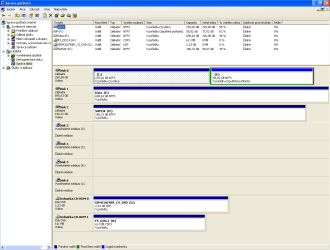
Here is Disk Managment window by the way (I hope you dont mind it is in czech)
 

Attachments

  • 1.PNG
    1.PNG
    27.4 KB · Views: 11

My Computer My Computer

At a glance

Microsoft Windows 7 Ultimate x86 Build 7600Intel Core2Duo 2.44GHz2048GBATi Radeon X550 128MB
OS
Microsoft Windows 7 Ultimate x86 Build 7600
CPU
Intel Core2Duo 2.44GHz
Memory
2048GB
Graphics Card(s)
ATi Radeon X550 128MB
Monitor(s) Displays
Acer 17" AL1716
Screen Resolution
1280x1024
Hard Drives
WD320
WD80
Keyboard
Logitech G15
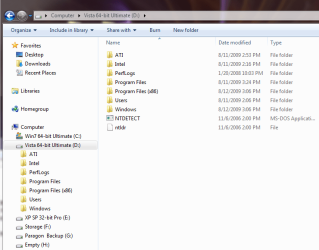
Try adding the XP boot files to 7 as I have them added to Vista and add the entry with EasyBCD.

You may have things too fouled up now; I hope you can get it sorted.


XP_Boot.PNG
 

My Computer My Computer

At a glance

W 7 64-bit UltimateIntel Q9550 Yorkfield8GB Dominator 8500C5DATI : XFX 5870
Computer Manufacturer/Model Number
* BFK Customs *
OS
W 7 64-bit Ultimate
CPU
Intel Q9550 Yorkfield
Motherboard
ASUS P5Q Pro
Memory
8GB Dominator 8500C5D
Graphics Card(s)
ATI : XFX 5870
Sound Card
Realtek HD Audio 7-1
Monitor(s) Displays
1x 47" LCD HDMI & 3x 26" LCD HDMI
Screen Resolution
1920x1080P & 1920x1200
Hard Drives
1x 80GB Intel X25-M G2 SSD : 1x 500GB & 1x 640GB WD Caviar Black(s)
PSU
Corsair 620HX
Case
Cooler Master RC-690
Cooling
Tuniq Tower 120, 2x 140mm and 3x 120mm case fans
Keyboard
Microsoft 500
Mouse
Razer Diamondback 3G
Internet Speed
14 Mb/s
Other Info
1x Koutech 3Gb/s SATA HDD Hot Swap Rack
Well those files are already present on Win7 drive... Now I cant log in on Windows 7 - there is no option in the screwed boot manager from XP.... There is only "boot.ini, boot.ini, win xp" and every choice leads to win xp... should I run EasyBCD on WinXP?... :rolleyes:
 

My Computer My Computer

At a glance

Microsoft Windows 7 Ultimate x86 Build 7600Intel Core2Duo 2.44GHz2048GBATi Radeon X550 128MB
OS
Microsoft Windows 7 Ultimate x86 Build 7600
CPU
Intel Core2Duo 2.44GHz
Memory
2048GB
Graphics Card(s)
ATi Radeon X550 128MB
Monitor(s) Displays
Acer 17" AL1716
Screen Resolution
1280x1024
Hard Drives
WD320
WD80
Keyboard
Logitech G15

My Computer My Computer

At a glance

W 7 64-bit UltimateIntel Q9550 Yorkfield8GB Dominator 8500C5DATI : XFX 5870
Computer Manufacturer/Model Number
* BFK Customs *
OS
W 7 64-bit Ultimate
CPU
Intel Q9550 Yorkfield
Motherboard
ASUS P5Q Pro
Memory
8GB Dominator 8500C5D
Graphics Card(s)
ATI : XFX 5870
Sound Card
Realtek HD Audio 7-1
Monitor(s) Displays
1x 47" LCD HDMI & 3x 26" LCD HDMI
Screen Resolution
1920x1080P & 1920x1200
Hard Drives
1x 80GB Intel X25-M G2 SSD : 1x 500GB & 1x 640GB WD Caviar Black(s)
PSU
Corsair 620HX
Case
Cooler Master RC-690
Cooling
Tuniq Tower 120, 2x 140mm and 3x 120mm case fans
Keyboard
Microsoft 500
Mouse
Razer Diamondback 3G
Internet Speed
14 Mb/s
Other Info
1x Koutech 3Gb/s SATA HDD Hot Swap Rack
Trying all these fixes, im not sure if it's the best way to go. If you don't mind dual booting on one physical HD, and provided that HD has enough space, I'd attempt to create two primary partitions, install Xp on one and W7 on the other. The boot manager will be there automatically (at least it turned out that way to mine).

Mine has

Earlier version of windows <==== Xp lives in there.
Win 7 <==== W7 sleeps here.
Receover Console <==== for rent.

Ps. The busines of OS installs should be one that is simple and easy to perform.
 

My Computer My Computer

At a glance

Windows 7 Ultimate 64BitGenuineIntel Intel(R) Core(TM) DuoCore T2400 ...2.00 GBMobile Intel(R) 945 Express Chipset
Computer Manufacturer/Model Number
Lenovo ThinkPad T60
OS
Windows 7 Ultimate 64Bit
CPU
GenuineIntel Intel(R) Core(TM) DuoCore T2400 @ 1.83GHz
Motherboard
Intel(R) 82801G (ICH7 Family)
Memory
2.00 GB
Graphics Card(s)
Mobile Intel(R) 945 Express Chipset
Sound Card
SoundMAX Integrated Digital HD Audio
Monitor(s) Displays
ThinkPad Display
Screen Resolution
1400x1050
Hard Drives
100Gb SATA
Keyboard
Standard Keyboard
Mouse
HID-compliant Mouse
Internet Speed
Cable Broadband - 54Mbps
Other Info
Intel(R) PRO/1000 PL Network Connection
11a/b/g Wireless LAN Mini PCI Express Adapter
Or you could simply enter the BIOS at boot time to determine which drive you want to boot to...


This works, but only if you have an independent boot record on each drive. To accomplish that you have to physically disconnect drives B and C whilst you are installing on drive A - etc.
I personally like this method of installation and switching the OS via the BIOS boot sequence. No mess with the boot record and when you want to uninstall one system, you need not fumble with the boot record either. But you have to open the box and pull the appropriate wires during the installation of each OS. I guess it is either that or EasyBCD.

The other reason this is a cleaner setup i forgot to mention...it also makes imaging your drives and seperate OS's much easier.
I have XP; Vistax64 and Win7 setup this way.
If one of these installs gets wonked i am 15 minutes away from being back up and running because my images contain only that OS's files and the contents of that HDD...

Try accomplishing that with an image of a dual-boot setup.

But to each his own...there's always more than one way to do things.
 

My Computer My Computer

At a glance

Vista Ultimate X64/ Windows 7 Dual-bootQ66004G OCZ PC2 8500 PlatinumEVGA 8800GTS Vid Card
Computer Manufacturer/Model Number
Self-Built
OS
Vista Ultimate X64/ Windows 7 Dual-boot
CPU
Q6600
Motherboard
ASUS P5K
Memory
4G OCZ PC2 8500 Platinum
Graphics Card(s)
EVGA 8800GTS Vid Card
Hard Drives
500G Seagate SATA
200G Seagate SATA
100G WD Caviar SATA
80G WD Caviar IDE
PSU
OCZ Elite 800W PSU
Case
RaidMax Smilodon Case
Or you could simply enter the BIOS at boot time to determine which drive you want to boot to...

Go in the bios every time you want to boot the other OS??
I don't see how that would be useful.

Wouldn't dual booting be a more practical solution? ;)

This takes me all of 3 - 4 seconds at boot...
 

My Computer My Computer

At a glance

Vista Ultimate X64/ Windows 7 Dual-bootQ66004G OCZ PC2 8500 PlatinumEVGA 8800GTS Vid Card
Computer Manufacturer/Model Number
Self-Built
OS
Vista Ultimate X64/ Windows 7 Dual-boot
CPU
Q6600
Motherboard
ASUS P5K
Memory
4G OCZ PC2 8500 Platinum
Graphics Card(s)
EVGA 8800GTS Vid Card
Hard Drives
500G Seagate SATA
200G Seagate SATA
100G WD Caviar SATA
80G WD Caviar IDE
PSU
OCZ Elite 800W PSU
Case
RaidMax Smilodon Case
Or you could simply enter the BIOS at boot time to determine which drive you want to boot to...

Go in the bios every time you want to boot the other OS??
I don't see how that would be useful.

Wouldn't dual booting be a more practical solution? ;)

This takes me all of 3 - 4 seconds at boot...


That is true, it's really no big deal to go via the BIOS. And the independent imaging scenario is a good one too.
 

My Computer My Computer

At a glance

Vista, Windows7, Mint Mate, Zorin, Windows 8from 1.6GHz Duo to i7
Computer Manufacturer/Model Number
HP, Dell, Gateway, Toshiba - 4 laptops and 2 desktops
OS
Vista, Windows7, Mint Mate, Zorin, Windows 8
CPU
from 1.6GHz Duo to i7
Monitor(s) Displays
2x HP w2207
Hard Drives
5x HDD, 7x SSD, 12x Externals
Keyboard
with trackball - no mices
Mouse
Trackball mice
Internet Speed
DSL 6000
Back
Top