
Solved Error Code 0x800706f7 Need help

endoxazo

New member
Local time
3:53 AM
Messages
10
I keep getting this message when I try to run the troubleshooter on my PC.

Package ID: Device Center Diagnostic
Path: Unknown
Error Code: 0x800706f7
Source: engine
User: (has my name)
Context: elevated

When I click troubleshoot, is shows a file msdt.exe.

I have no idea how to fix it much less what it is.
Can anyone help please.
Thanks much
Julie
 

My Computer

Computer Manufacturer/Model Number
HP2000-365dx
OS
windows 7 home premium 32bit
Last edited:

My Computer

Computer type
PC/Desktop
Computer Manufacturer/Model Number
Custom
OS
Dual Boot: Windows 8.1 & Server 2012r2 VMs: Kali Linux, Backbox, Matriux, Windows 8.1
CPU
A10 7700 Kavari SteamRoller
Motherboard
ASUS A88XM-PLUS (FM2+ )
Memory
8GB DDR3 SDRAM PC3-8500
Graphics Card(s)
1024MB ATI AMD Radeon R7 Graphics
Sound Card
Realtek High Definition Audio
Monitor(s) Displays
Samsung
Hard Drives
SSD Crucial 120gb
WD VelociRaptor 1tb
PSU
Rosewill Gaming 650w
Case
Rosewill Galaxy 2
Internet Speed
55/12
Antivirus
Malwarebytes, MSE, SAS
Browser
FireFox, Chrome
Thank you, I'm uninstalling it now. Hope this solves the problem.
Julie
 

My Computer

Computer Manufacturer/Model Number
HP2000-365dx
OS
windows 7 home premium 32bit
The problem is probably from the new updates. Its causing a lot of problems for a lot of people.

Try uninstalling this update: KB3004394

http://www.sevenforums.com/tutorials/24373-windows-update-uninstall-update.html

I uninstalled the update like you suggested. Unfortunately that caused the troubleshooter to not even respond at all. Though I am glad that I am not the only one experiencing this issue since the most recent update. It seems as if it is just a faulty update. I hope MS working on sending out a more stable build.

EDIT: I just tried to run it again a few moments after posting this and everything is running fine now. No troubleshooter errors at all.
 
Last edited:

My Computer

Computer type
PC/Desktop
OS
California
I did the uninstall and the Troubleshooter is working. I just have other problems with network adapters and my camera download software I need to figure out.
Thanks for the help!
 

My Computer

Computer Manufacturer/Model Number
HP2000-365dx
OS
windows 7 home premium 32bit
Glad you got that figured out, what types of network/camera problems are you having?
 

My Computer

Computer type
PC/Desktop
Computer Manufacturer/Model Number
Custom
OS
Dual Boot: Windows 8.1 & Server 2012r2 VMs: Kali Linux, Backbox, Matriux, Windows 8.1
CPU
A10 7700 Kavari SteamRoller
Motherboard
ASUS A88XM-PLUS (FM2+ )
Memory
8GB DDR3 SDRAM PC3-8500
Graphics Card(s)
1024MB ATI AMD Radeon R7 Graphics
Sound Card
Realtek High Definition Audio
Monitor(s) Displays
Samsung
Hard Drives
SSD Crucial 120gb
WD VelociRaptor 1tb
PSU
Rosewill Gaming 650w
Case
Rosewill Galaxy 2
Internet Speed
55/12
Antivirus
Malwarebytes, MSE, SAS
Browser
FireFox, Chrome
Hi Gator,

All four of the MS IASTAP adapters 1, 2,3, and the Teredo adapter have the yellow triangle next to them. I tried update drivers, it tells me the drivers are the latest. I read that I could uninstall them, reboot and let windows do the rest, but I am not a computer geek so I am doing more research.

I have a Fuji Finepix AX600 and I put the USB in the camera to download photos and got this message:

Fatal Error
Access Violation address 775732CD in module 'ntdll.dll'. Read of address 0A45EA68.
I sent it to Fuji but have not heard back. I've uninstalled the software, installed it from the disk again,no go. uninstalled it and re-installed from the Fuji site. Nothing. Every time inert the USB, the fatal error pops up and the numbers are different. I'm baffled. I still have to learn more on dll files before I even attempt to fix this problem.

I am wondering if these two problems are related in some way.
Thanks, Julie
 

My Computer

Computer Manufacturer/Model Number
HP2000-365dx
OS
windows 7 home premium 32bit
Hi Gator,

All four of the MS IASTAP adapters 1, 2,3, and the Teredo adapter have the yellow triangle next to them. I tried update drivers, it tells me the drivers are the latest. I read that I could uninstall them, reboot and let windows do the rest, but I am not a computer geek so I am doing more research.

I have a Fuji Finepix AX600 and I put the USB in the camera to download photos and got this message:

Fatal Error
Access Violation address 775732CD in module 'ntdll.dll'. Read of address 0A45EA68.
I sent it to Fuji but have not heard back. I've uninstalled the software, installed it from the disk again,no go. uninstalled it and re-installed from the Fuji site. Nothing. Every time inert the USB, the fatal error pops up and the numbers are different. I'm baffled. I still have to learn more on dll files before I even attempt to fix this problem.

I am wondering if these two problems are related in some way.
Thanks, Julie

For the network adapters, at the bottom right-hand corner there is a picture of a screen with a wire. If what you're saying is correct, it should have a yellow exclamation point. Right-click and click troubleshoot problems. When it finishes, if it hasn't fixed it, please tell me what it says.

As far as the camera goes, can you try installing the software in safe-mode and see if it works?
http://www.sevenforums.com/tutorials/69585-safe-mode.html

Also, I would make sure all of your drivers are up to date. Go to your PC manufacturers site or the support site for your motherboard if its a custom build and make sure your drivers are all up to date. Especially ethernet.
 

My Computer

Computer type
PC/Desktop
Computer Manufacturer/Model Number
Custom
OS
Dual Boot: Windows 8.1 & Server 2012r2 VMs: Kali Linux, Backbox, Matriux, Windows 8.1
CPU
A10 7700 Kavari SteamRoller
Motherboard
ASUS A88XM-PLUS (FM2+ )
Memory
8GB DDR3 SDRAM PC3-8500
Graphics Card(s)
1024MB ATI AMD Radeon R7 Graphics
Sound Card
Realtek High Definition Audio
Monitor(s) Displays
Samsung
Hard Drives
SSD Crucial 120gb
WD VelociRaptor 1tb
PSU
Rosewill Gaming 650w
Case
Rosewill Galaxy 2
Internet Speed
55/12
Antivirus
Malwarebytes, MSE, SAS
Browser
FireFox, Chrome
Hi Gator,

I'm not sure what you mean by "at the bottom right-hand corner there is a picture of a screen with a wire".

This is what I did, control panel, right click on the picture of the PC, troubleshoot, it detects for problems on the 4 adapters. I get a message: "There is a problem with the driver for the Microsoft Adapater ISATAP. Re-installing the driver might fix this problem". I click Apply this fix and get this message: Device driver software was not successfully installed.

I will try the safe mode for the camera in the morning as well as the driver update for my HP.
Thank Gator.
Julie
 

My Computer

Computer Manufacturer/Model Number
HP2000-365dx
OS
windows 7 home premium 32bit
Hi Gator,

I'm not sure what you mean by "at the bottom right-hand corner there is a picture of a screen with a wire".

This is what I did, control panel, right click on the picture of the PC, troubleshoot, it detects for problems on the 4 adapters. I get a message: "There is a problem with the driver for the Microsoft Adapater ISATAP. Re-installing the driver might fix this problem". I click Apply this fix and get this message: Device driver software was not successfully installed.

I will try the safe mode for the camera in the morning as well as the driver update for my HP.
Thank Gator.
Julie

Sorry, my explanation was poor. :(

This is what I mean:
wireless1.jpg


However, it seems as if you got it either way.

Can you please post a picture of Device Manager and Your Network Adapters?
For Device manager:
Press Windows Key + R > Type devmgmt.msc > Press Enter
Expand Network Adapters and anything else that has a Yellow exclamation point. Then use the Snipping tool: How to Use the Snipping Tool in Vista

Then post the picture in your next post
http://www.sevenforums.com/tutorials/9733-screenshots-files-upload-post-seven-forums.html

For Network Adapters:
Click Start button > Type Network and sharing Center and press enter > Click on "Change Adapter Settings" on the left panel

Follow the steps above to take a picture and post it here as well.
 

My Computer

Computer type
PC/Desktop
Computer Manufacturer/Model Number
Custom
OS
Dual Boot: Windows 8.1 & Server 2012r2 VMs: Kali Linux, Backbox, Matriux, Windows 8.1
CPU
A10 7700 Kavari SteamRoller
Motherboard
ASUS A88XM-PLUS (FM2+ )
Memory
8GB DDR3 SDRAM PC3-8500
Graphics Card(s)
1024MB ATI AMD Radeon R7 Graphics
Sound Card
Realtek High Definition Audio
Monitor(s) Displays
Samsung
Hard Drives
SSD Crucial 120gb
WD VelociRaptor 1tb
PSU
Rosewill Gaming 650w
Case
Rosewill Galaxy 2
Internet Speed
55/12
Antivirus
Malwarebytes, MSE, SAS
Browser
FireFox, Chrome
The problem is probably from the new updates. Its causing a lot of problems for a lot of people.

Try uninstalling this update: KB3004394

http://www.sevenforums.com/tutorials/24373-windows-update-uninstall-update.html

Thank you much Gator, I also started having this issue yesterday. Boom.... your instructions worked perfectly. Can I assume that this particular update will come around again in a less destructive form? Should we watch for any others in the latest batch as troublemakers?
 

My Computer

Computer type
PC/Desktop
OS
Windows 7 Home Premium 64bit
The problem is probably from the new updates. Its causing a lot of problems for a lot of people.

Try uninstalling this update: KB3004394

http://www.sevenforums.com/tutorials/24373-windows-update-uninstall-update.html

Thank you much Gator, I also started having this issue yesterday. Boom.... your instructions worked perfectly. Can I assume that this particular update will come around again in a less destructive form? Should we watch for any others in the latest batch as troublemakers?

Microsoft will probably issue some type of patch to work around it at some point in the future but I don't know anything specific as of right now. With updates, its always good to wait a little while and see the reaction of users after they download updates. After a few hours to a day, people should start reporting which updates are bad, if any.
 

My Computer

Computer type
PC/Desktop
Computer Manufacturer/Model Number
Custom
OS
Dual Boot: Windows 8.1 & Server 2012r2 VMs: Kali Linux, Backbox, Matriux, Windows 8.1
CPU
A10 7700 Kavari SteamRoller
Motherboard
ASUS A88XM-PLUS (FM2+ )
Memory
8GB DDR3 SDRAM PC3-8500
Graphics Card(s)
1024MB ATI AMD Radeon R7 Graphics
Sound Card
Realtek High Definition Audio
Monitor(s) Displays
Samsung
Hard Drives
SSD Crucial 120gb
WD VelociRaptor 1tb
PSU
Rosewill Gaming 650w
Case
Rosewill Galaxy 2
Internet Speed
55/12
Antivirus
Malwarebytes, MSE, SAS
Browser
FireFox, Chrome
:) I was experiencing the same problem!! This solution worked great!!!!!

 

My Computer

Computer type
Laptop
Computer Manufacturer/Model Number
Compaq
OS
32 Windows 7 Home Premium
Hi Gator. I don't have a computer with a needle picture, never seen that before. I have errands to day but will posts screen shots this afternoon.
Thanks so much for your help.
Julie
 

My Computer

Computer Manufacturer/Model Number
HP2000-365dx
OS
windows 7 home premium 32bit
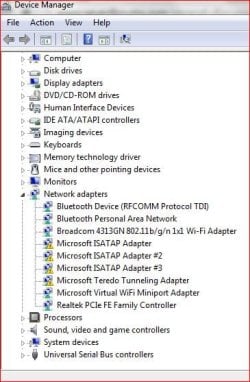
Attached are the pic of the DV showing the problematic adapters and networks
I did a diagnose of 2 of the networks that have the red x, they said I need an ethernet cable. Never before have I needed that. I have a simple laptop PC with wireless connection, I don't think I need LAN. I thought is was the adapters causing the problems.
Hope I did the pics correctly.
Thanks
Julie
 

Attachments

  • DV Screen.JPG
    DV Screen.JPG
    60 KB · Views: 9
  • Networks.JPG
    Networks.JPG
    49.3 KB · Views: 1

My Computer

Computer Manufacturer/Model Number
HP2000-365dx
OS
windows 7 home premium 32bit

My Computer

Computer type
PC/Desktop
Computer Manufacturer/Model Number
Custom
OS
Dual Boot: Windows 8.1 & Server 2012r2 VMs: Kali Linux, Backbox, Matriux, Windows 8.1
CPU
A10 7700 Kavari SteamRoller
Motherboard
ASUS A88XM-PLUS (FM2+ )
Memory
8GB DDR3 SDRAM PC3-8500
Graphics Card(s)
1024MB ATI AMD Radeon R7 Graphics
Sound Card
Realtek High Definition Audio
Monitor(s) Displays
Samsung
Hard Drives
SSD Crucial 120gb
WD VelociRaptor 1tb
PSU
Rosewill Gaming 650w
Case
Rosewill Galaxy 2
Internet Speed
55/12
Antivirus
Malwarebytes, MSE, SAS
Browser
FireFox, Chrome
no connectivity is fine
 

My Computer

Computer Manufacturer/Model Number
HP2000-365dx
OS
windows 7 home premium 32bit
Back
Top