Change the notification area icons!

darkstar09

New member
Local time
2:33 PM
Messages
9
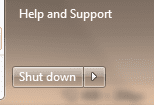
Two quick questions. How do I change the icons and the shutdown thing as shown in the attachments.

The shutdown thing looks so bad!
 

Attachments

  • SS1.png
    SS1.png
    7.2 KB · Views: 176
  • SS2.png
    SS2.png
    3.4 KB · Views: 8,276

My Computer My Computer

Computer Manufacturer/Model Number
HP
OS
Windows 7 Ultimate 64bit
CPU
AMD Athlon Dual Core QL-65 2.10 Ghz
Memory
4.00GB
Graphics Card(s)
ATI Radeon 4530
Click the notification area arrow and choose Customize. You can also drag and drop the icons in and out of hidden/shown status.
 
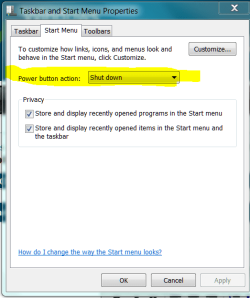
Right click the task bar, properties.

Start Menu tab

Select your preferred action.

.
 

Attachments

  • Capture.PNG
    Capture.PNG
    16.4 KB · Views: 86
Cheers for that but I was wondering weather I could make the shutdown area look like vistas? Because they way it is laid out is horrendous. Its like MS have just plonked it in there. And I was actually looking the change the actual look of the icons. So they aren't white and boring.
 

My Computer My Computer

Computer Manufacturer/Model Number
HP
OS
Windows 7 Ultimate 64bit
CPU
AMD Athlon Dual Core QL-65 2.10 Ghz
Memory
4.00GB
Graphics Card(s)
ATI Radeon 4530
.....So they aren't white and boring.

full agree. in every new win they gave us a more colorfull desktop and made us to addicts, last they gave us aero and now such boring icons? :shock:


that much i found out:
the iconns are located in \System32\taskbarcpl.dll
but i have no idea, how to change them.

anybody with more skills then me?
 

My Computer My Computer

OS
Windows 7 (x64)
Copy the taskbarcpl.dll on another partition.
Then open the dll with Restorator (x32, x64) or Reshacker (x32) and change them.
 

My Computer My Computer

OS
Win 7
i tested this with two icons (volume control, network). changing the icons in taskbarcpl.dll with restorator an writing the new file back to win directory made less problems than expected but had no effect on the icons shown besides the clock. only the icons at "Control Panel\All Control Panel Items\Notification Area Icons\System Icons" changed (which i don´t care).

perhaps my assumption was wrong? anybody with new ideas?
 

My Computer My Computer

OS
Windows 7 (x64)
You guys are real artists. But why bother? It does not make the system run any better.
 

My Computer My Computer

Computer Manufacturer/Model Number
HP, Dell, Gateway, Toshiba - 4 laptops and 2 desktops
OS
Vista, Windows7, Mint Mate, Zorin, Windows 8
CPU
from 1.6GHz Duo to i7
Monitor(s) Displays
2x HP w2207
Hard Drives
5x HDD, 7x SSD, 12x Externals
Keyboard
with trackball - no mices
Mouse
Trackball mice
Internet Speed
DSL 6000
and once again: thank you very much! :cool:
 

My Computer My Computer

OS
Windows 7 (x64)
my first attempt:

63005966.jpg


a little fine tuning and it will be perfect.
 

My Computer My Computer

OS
Windows 7 (x64)
glad i found this topic, just installed restorator 2007 and i'll give it a try, thanks guys ;)
 

My Computer My Computer

Computer type
PC/Desktop
Computer Manufacturer/Model Number
2015 Home Made with Great Performance
OS
Windows 8.1 x64 Enterprise
CPU
i5 4690K
Motherboard
Gigabyte GA-Z87X-UD5H
Memory
Corsair 16 GB DDR3 2000Mhz
Graphics Card(s)
Asus GTX760 2GB 256bit
Sound Card
Realtek OnBoard
Monitor(s) Displays
Samsung SyncMaster SA350 + LG 42LA660S
Screen Resolution
1920x1080 Full HD
Hard Drives
1x 640GB Western Digital SATA
1x 4TB Western Digital Green SATA
3x 2TB Western Digital Caviar Green RS SATA
1x 3TB Western Digital Caviar Green SATA
1x 128GB Corsair Force Red SSD
PSU
Corsair CX 600W
Case
Nexus Prominent 5
Cooling
CPU: Artic Cooler Freezer 13 + 5x120mm Case Fans @ 700RPM
Keyboard
Microsoft Wired Keyboard 600
Mouse
Microsoft Wireless Mobile Mouse 1000
Internet Speed
FO 1 Gbit/s
Antivirus
ESET / Malwarebytes
Browser
Opera / Chrome
Other Info
- Fan Controller Aerocool X-Vision 5
- 1x 1TB Hitachi DeskPlus External USB
- 1x 1TB Western Digital Passport External USB3
Koumy-Since I am running 7 Pro 64Bit SP1, I have pnidui.dll in multiple places:
1. C:\Windows\System32
2. C:\Windows\SysWOW64
3. C:\Windows\winsxs\amd64_microsoft-windows-netshell_31bf3856ad364e35_6.1.7601.17514_none_33a9704224aa536e
4. C:\Windows\winsxs\x86_microsoft-windows-netshell_31bf3856ad364e35_6.1.7601.17514_none_d78ad4be6c4ce238

For each 1; I opened the file using Resource Hacker, navigated to 'Icon Group>3048>1033' & Replaced Resource w/an icon of my choosing. I then clicked 'Save' & Resource Hacker saved my edit as well as renamed the original file to: pnidui_original.dll

I then rebooted, but nothing has changed; am I missing something?

There are also 4 pnidui.dll.mui in the same folders, do I need to edit these as well? If so, do you know what resource numbers to edit?
 

My Computer My Computer

Computer type
PC/Desktop
Computer Manufacturer/Model Number
Self built comfuser
OS
10 Pro. 64Bit
CPU
AMD FX 4100, 4-Core Black Edition. Socket AM3+ ~ 3.60GHz
Motherboard
ASUS M5A97 LE R2.0
Memory
2x 4GB Kingston HyperX DDR3-1866 (PC3-14900) - 8GB Total
Graphics Card(s)
ASUS Radeon HD 6670-2GD3
Sound Card
Onboard High Definition Audio Device
Monitor(s) Displays
HP 2009m LCD
Screen Resolution
1600x900, True Color (32bit), 60Hertz
Hard Drives
WD Blue - 1TB, 3D NAND - SATA SSD
PSU
XFX Pro 450W Core Edition - Fully Wired
Case
Antec Super Lanboy
Cooling
Stock CPU fan + 2 (1 front, 1 back) 120mm Antec fans
Keyboard
Logitech MK700/MK710
Mouse
Logitech M705
Internet Speed
Frontier FiOS 50/50
Antivirus
Windows Security
Browser
Vivaldi
Other Info
1x ASUS DRW-24B1ST Multi-DVD Rewriter
1x RocketFish AIO Media Card Reader
1x WD 1TB Passport USB External Drive
Koumy-Since I am running 7 Pro 64Bit SP1, I have pnidui.dll in multiple places:
1. C:\Windows\System32
2. C:\Windows\SysWOW64
3. C:\Windows\winsxs\amd64_microsoft-windows-netshell_31bf3856ad364e35_6.1.7601.17514_none_33a9704224aa536e
4. C:\Windows\winsxs\x86_microsoft-windows-netshell_31bf3856ad364e35_6.1.7601.17514_none_d78ad4be6c4ce238

For each 1; I opened the file using Resource Hacker, navigated to 'Icon Group>3048>1033' & Replaced Resource w/an icon of my choosing. I then clicked 'Save' & Resource Hacker saved my edit as well as renamed the original file to: pnidui_original.dll

I then rebooted, but nothing has changed; am I missing something?

There are also 4 pnidui.dll.mui in the same folders, do I need to edit these as well? If so, do you know what resource numbers to edit?

You only need to do them in C:\Windows\System32 and C:\Windows\SysWOW64 and just the pnidui.dll no .mui

Did you work on copies of the pnidui.dll ?
You should work on copies and then take ownership and give yourself permission and then rename the original and then move or copy the new modified one in place.
Look at post #6 in this thread and it will tell you how to take ownership and give permission and rename and replace http://www.sevenforums.com/customization/179502-basic-networking-information.html#post1525656
then restart and you should have it.


3. C:\Windows\winsxs\amd64_microsoft-windows-netshell_31bf3856ad364e35_6.1.7601.17514_none_33a9704224aa536e
4. C:\Windows\winsxs\x86_microsoft-windows-netshell_31bf3856ad364e35_6.1.7601.17514_none_d78ad4be6c4ce238
These should be put back to original by following the above and renaming the modified ones and renaming the originals to their original name. Then restart and go back in and delete the modified ones so they are not there.
Jerry
 

My Computer My Computer

Computer type
Laptop
Computer Manufacturer/Model Number
Sager NP9170
OS
Win 7 Pro x64 / Win 10 Pro
CPU
Intel(R) Core(TM) i7-3630QM CPU @ 2.40GHz
Motherboard
CLEVO P170EM
Memory
12 GB
Graphics Card(s)
(1) Intel(R) HD Graphics 4000 (2) NVIDIA GeForce GTX 675M
Sound Card
(1) Realtek High Definition Audio (2) Intel(R) Display Aud
Monitor(s) Displays
17.3
Screen Resolution
1920x1080
Hard Drives
(1) Samsung 860 EVO 500GB(OS) (1) Samsung 860 EVO 500GB(Data)
Keyboard
Backlite
Antivirus
MSE, Malwarebytes Pro
Browser
Firefox
Other Info
DESKTOP: Custom-built.
OS: Win 10 Pro x64.
CASE: Rosewill R5.
CPU: Intel I5 4670K CPU @ 3.40GHz.
CPU COOLER: Cool Master Hyper 212 EVO.
MOTHERBOARD: Asus Z87-A.
MEMORY: Kingston HyperX 2x4 GB.
GPU: Nvidia Geforce 650 TI.
PSU: Corsair TX750.
DRIVES: (1) Samsung 840 120 GB SSD (2) Western Digital blue 500 GB 7200 RPM.
Yes, I did take ownership of all files before I edited (just double-checked) & worked on the originals (since I made copies to the desktop & Resource Hacker makes copies as well).

I'm going to start over just in case I missed something. Does it matter that the icon I use stay in the same folder as when I 1st use it & perhaps SP1 is the culprit in not letting this happen?
 

My Computer My Computer

Computer type
PC/Desktop
Computer Manufacturer/Model Number
Self built comfuser
OS
10 Pro. 64Bit
CPU
AMD FX 4100, 4-Core Black Edition. Socket AM3+ ~ 3.60GHz
Motherboard
ASUS M5A97 LE R2.0
Memory
2x 4GB Kingston HyperX DDR3-1866 (PC3-14900) - 8GB Total
Graphics Card(s)
ASUS Radeon HD 6670-2GD3
Sound Card
Onboard High Definition Audio Device
Monitor(s) Displays
HP 2009m LCD
Screen Resolution
1600x900, True Color (32bit), 60Hertz
Hard Drives
WD Blue - 1TB, 3D NAND - SATA SSD
PSU
XFX Pro 450W Core Edition - Fully Wired
Case
Antec Super Lanboy
Cooling
Stock CPU fan + 2 (1 front, 1 back) 120mm Antec fans
Keyboard
Logitech MK700/MK710
Mouse
Logitech M705
Internet Speed
Frontier FiOS 50/50
Antivirus
Windows Security
Browser
Vivaldi
Other Info
1x ASUS DRW-24B1ST Multi-DVD Rewriter
1x RocketFish AIO Media Card Reader
1x WD 1TB Passport USB External Drive
Last edited:

My Computer My Computer

Computer type
PC/Desktop
Computer Manufacturer/Model Number
Self built comfuser
OS
10 Pro. 64Bit
CPU
AMD FX 4100, 4-Core Black Edition. Socket AM3+ ~ 3.60GHz
Motherboard
ASUS M5A97 LE R2.0
Memory
2x 4GB Kingston HyperX DDR3-1866 (PC3-14900) - 8GB Total
Graphics Card(s)
ASUS Radeon HD 6670-2GD3
Sound Card
Onboard High Definition Audio Device
Monitor(s) Displays
HP 2009m LCD
Screen Resolution
1600x900, True Color (32bit), 60Hertz
Hard Drives
WD Blue - 1TB, 3D NAND - SATA SSD
PSU
XFX Pro 450W Core Edition - Fully Wired
Case
Antec Super Lanboy
Cooling
Stock CPU fan + 2 (1 front, 1 back) 120mm Antec fans
Keyboard
Logitech MK700/MK710
Mouse
Logitech M705
Internet Speed
Frontier FiOS 50/50
Antivirus
Windows Security
Browser
Vivaldi
Other Info
1x ASUS DRW-24B1ST Multi-DVD Rewriter
1x RocketFish AIO Media Card Reader
1x WD 1TB Passport USB External Drive
Yes, I did take ownership of all files before I edited (just double-checked) & worked on the originals (since I made copies to the desktop & Resource Hacker makes copies as well).

I'm going to start over just in case I missed something. Does it matter that the icon I use stay in the same folder as when I 1st use it & perhaps SP1 is the culprit in not letting this happen?
You need to take ownership and give permission and rename them before you replace the .dll to you should follow that guide from post #6 from above.
As far as the icon goes after you have saved it in the .dll it doesn't matter where the icon is then because it's in the .dll. The original icon size is 32 x 32 pixels did replace it with the same size?
Jerry
 

My Computer My Computer

Computer type
Laptop
Computer Manufacturer/Model Number
Sager NP9170
OS
Win 7 Pro x64 / Win 10 Pro
CPU
Intel(R) Core(TM) i7-3630QM CPU @ 2.40GHz
Motherboard
CLEVO P170EM
Memory
12 GB
Graphics Card(s)
(1) Intel(R) HD Graphics 4000 (2) NVIDIA GeForce GTX 675M
Sound Card
(1) Realtek High Definition Audio (2) Intel(R) Display Aud
Monitor(s) Displays
17.3
Screen Resolution
1920x1080
Hard Drives
(1) Samsung 860 EVO 500GB(OS) (1) Samsung 860 EVO 500GB(Data)
Keyboard
Backlite
Antivirus
MSE, Malwarebytes Pro
Browser
Firefox
Other Info
DESKTOP: Custom-built.
OS: Win 10 Pro x64.
CASE: Rosewill R5.
CPU: Intel I5 4670K CPU @ 3.40GHz.
CPU COOLER: Cool Master Hyper 212 EVO.
MOTHERBOARD: Asus Z87-A.
MEMORY: Kingston HyperX 2x4 GB.
GPU: Nvidia Geforce 650 TI.
PSU: Corsair TX750.
DRIVES: (1) Samsung 840 120 GB SSD (2) Western Digital blue 500 GB 7200 RPM.
Back
Top