
Activation: Not Genuine, Windows Update Failing to Install (Errors)

JoelTho

New member
Local time
2:42 PM
Messages
19
Hello, everybody. I've had a rather rough time, lately, with my computer. For whatever reason, I could not update my computer via Windows Update. I constantly had errors. I could not figure out why nothing was downloading, and I found no solutions to the problem. Fast-Forward to about 5 days ago, and I encountered another, more annoying issue. I started to receive a pop-up notification letting me know that my version of Windows 7 (Home Premium, 64 Bit) was Not Genuine. I wondered... how could this be? I've had my computer for just over 2 years, with Windows 7 coming pre-installed. So I checked online on sites like this one, and I found a couple different solutions. One was to try to re-input the key. That did not work. Windows 7 was appearing as 'Activated', prior, but the issue of the "Non-Genuine" pop-up had risen.
From searching up the error code, I came across this suggestion:
HTML:
Recreate the Licensing Store 
1) Click Start button.
2) Type: CMD.exe into the 'Search programs and files' field 
3) Right-Click on CMD.exe and select Run as Administrator
4) Type: net stop sppsvc (It may ask you if you are sure, select yes)
Note: the Software Protection service may not be running, this is ok.
5) Type: cd %windir%\ServiceProfiles\NetworkService\AppData\Roaming\Microsoft\SoftwareProtectionPlatform
6) Type: rename tokens.dat tokens.bar
7) Type: cd %windir%\system32
8) Type: net start sppsvc
9) Type: slui.exe
10) After a couple of seconds Windows Activation dialog will appear. You may be asked to re-activate and/or re-enter your product key or Activation may occur automatically.

From Windows Activation (this time accessed after following the prior steps), I tried entering both the OEM and COA (sticker) product keys. They came up with either an error or a notification telling me that my key did not work. I cannot remember which of those keys received which response (to my fault, I apologize for not keeping track). After that, my computer background was removed and in place was a black screen stating that my copy of Windows 7 Home Premium was not genuine.
I tried once again to use the activation/re-entry of key program, but that did not work.
After error code 0xC004F063 kept occurring, I attempted something else. I tried to use SLMGR-REARM, based yet again (perhaps foolishly) on an internet suggestion to someone having an issue similar (but not identical) to mine. My computer restarted, and the Non-Genuine background appeared for about 10 seconds, before my computer 'snapped out of it' and the background just went plain black (I'm guessing my previous background from before the Non-Genuine message was deleted from my history). I went into my control panel and viewed the activation. This is what it now reads:

3b62f3744f1c8d269a2592ded8315b3c.png


Basically, what occurred is SLMGR-REARM made my Windows 7 into a 3 day trial...
I tried entering both my codes into Activation, once again (the OEM and COA), but both were 'already in use'. At that point, I also noticed that when I opened the Activation window, the option to phone Microsoft had disappeared. I did not think of phoning them earlier, as I wanted to try all possible things to see if I could fix the issue myself (idiot mistake, I know). So now, I'm stuck with a 3 day trial of Windows 7 (thanks to SLMGR-REARM), both my codes don't work, and I'm still getting a 'Not Genuine' pop-up.
Here is my MGADT log:
HTML:
Diagnostic Report (1.9.0027.0):
-----------------------------------------
Windows Validation Data-->

Validation Code: 0x8004FE21
Cached Online Validation Code: N/A, hr = 0xc004f012
Windows Product Key: *****-*****-4F8HK-M4P73-W8DQG
Windows Product Key Hash: Xs1iQgVeo0C+sObJxS7eu+FuBPQ=
Windows Product ID: 00359-OEM-8992687-00057
Windows Product ID Type: 2
Windows License Type: OEM SLP
Windows OS version: 6.1.7601.2.00010300.1.0.003
ID: {671B24A3-050A-4AA0-AA81-B4D3F38184CC}(3)
Is Admin: Yes
TestCab: 0x0
LegitcheckControl ActiveX: N/A, hr = 0x80070002
Signed By: N/A, hr = 0x80070002
Product Name: Windows 7 Home Premium
Architecture: 0x00000009
Build lab: 7601.win7sp1_gdr.140303-2144
TTS Error: 
Validation Diagnostic: 
Resolution Status: N/A

Vista WgaER Data-->
ThreatID(s): N/A, hr = 0x80070002
Version: N/A, hr = 0x80070002

Windows XP Notifications Data-->
Cached Result: N/A, hr = 0x80070002
File Exists: No
Version: N/A, hr = 0x80070002
WgaTray.exe Signed By: N/A, hr = 0x80070002
WgaLogon.dll Signed By: N/A, hr = 0x80070002

OGA Notifications Data-->
Cached Result: N/A, hr = 0x80070002
Version: N/A, hr = 0x80070002
OGAExec.exe Signed By: N/A, hr = 0x80070002
OGAAddin.dll Signed By: N/A, hr = 0x80070002

OGA Data-->
Office Status: 109 N/A
OGA Version: N/A, 0x80070002
Signed By: N/A, hr = 0x80070002
Office Diagnostics: 025D1FF3-364-80041010_025D1FF3-229-80041010_025D1FF3-230-1_025D1FF3-517-80040154_025D1FF3-237-80040154_025D1FF3-238-2_025D1FF3-244-80070002_025D1FF3-258-3

Browser Data-->
Proxy settings: N/A
User Agent: Mozilla/4.0 (compatible; MSIE; Win32)
Default Browser: C:\Program Files (x86)\Google\Chrome\Application\chrome.exe
Download signed ActiveX controls: Prompt
Download unsigned ActiveX controls: Disabled
Run ActiveX controls and plug-ins: Allowed
Initialize and script ActiveX controls not marked as safe: Disabled
Allow scripting of Internet Explorer Webbrowser control: Disabled
Active scripting: Allowed
Script ActiveX controls marked as safe for scripting: Allowed

File Scan Data-->
File Mismatch: C:\windows\system32\wat\watadminsvc.exe[7.1.7600.16395], Hr = 0x80092003
File Mismatch: C:\windows\system32\wat\watux.exe[7.1.7600.16395], Hr = 0x80092003
File Mismatch: C:\windows\system32\sppobjs.dll[6.1.7601.17514], Hr = 0x80092003
File Mismatch: C:\windows\system32\sppc.dll[6.1.7601.17514], Hr = 0x800b0100
File Mismatch: C:\windows\system32\sppcext.dll[6.1.7600.16385], Hr = 0x800b0100
File Mismatch: C:\windows\system32\sppwinob.dll[6.1.7601.17514], Hr = 0x80092003
File Mismatch: C:\windows\system32\slc.dll[6.1.7600.16385], Hr = 0x800b0100
File Mismatch: C:\windows\system32\slcext.dll[6.1.7600.16385], Hr = 0x800b0100
File Mismatch: C:\windows\system32\sppuinotify.dll[6.1.7600.16385], Hr = 0x80092003
File Mismatch: C:\windows\system32\slui.exe[6.1.7601.17514], Hr = 0x80092003
File Mismatch: C:\windows\system32\sppcomapi.dll[6.1.7601.17514], Hr = 0x800b0100
File Mismatch: C:\windows\system32\sppcommdlg.dll[6.1.7600.16385], Hr = 0x800b0100
File Mismatch: C:\windows\system32\sppsvc.exe[6.1.7601.17514], Hr = 0x80092003
File Mismatch: C:\windows\system32\drivers\spsys.sys[6.1.7127.0], Hr = 0x80092003
File Mismatch: C:\windows\system32\drivers\spldr.sys[6.1.7127.0], Hr = 0x80092003
File Mismatch: C:\windows\system32\systemcpl.dll[6.1.7601.17514], Hr = 0x800b0100
File Mismatch: C:\windows\system32\user32.dll[6.1.7601.17514], Hr = 0x800b0100

Other data-->
Office Details: <GenuineResults><MachineData><UGUID>{671B24A3-050A-4AA0-AA81-B4D3F38184CC}</UGUID><Version>1.9.0027.0</Version><OS>6.1.7601.2.00010300.1.0.003</OS><Architecture>x64</Architecture><PKey>*****-*****-*****-*****-W8DQG</PKey><PID>00359-OEM-8992687-00057</PID><PIDType>2</PIDType><SID>S-1-5-21-3304724378-175617510-49098709</SID><SYSTEM><Manufacturer>TOSHIBA</Manufacturer><Model>Satellite S875D</Model></SYSTEM><BIOS><Manufacturer>Insyde Corp.</Manufacturer><Version>6.10</Version><SMBIOSVersion major="2" minor="7"/><Date>20121002000000.000000+000</Date></BIOS><HWID>9C0F3407018400F2</HWID><UserLCID>0409</UserLCID><SystemLCID>0409</SystemLCID><TimeZone>Pacific Standard Time(GMT-08:00)</TimeZone><iJoin>0</iJoin><SBID><stat>3</stat><msppid></msppid><name></name><model></model></SBID><OEM><OEMID>TOSASU</OEMID><OEMTableID>TOSASU00</OEMTableID></OEM><GANotification/></MachineData><Software><Office><Result>109</Result><Products/><Applications/></Office></Software></GenuineResults>  

Spsys.log Content: 0x80070002

Licensing Data-->
Software licensing service version: 6.1.7601.17514

Name: Windows(R) 7, HomePremium edition
Description: Windows Operating System - Windows(R) 7, OEM_SLP channel
Activation ID: d2c04e90-c3dd-4260-b0f3-f845f5d27d64
Application ID: 55c92734-d682-4d71-983e-d6ec3f16059f
Extended PID: 00359-00178-926-800057-02-4105-7601.0000-0062015
Installation ID: 011751454176227706219455172911786184985174521693663584
Processor Certificate URL: http://go.microsoft.com/fwlink/?LinkID=88338
Machine Certificate URL: http://go.microsoft.com/fwlink/?LinkID=88339
Use License URL: http://go.microsoft.com/fwlink/?LinkID=88341
Product Key Certificate URL: http://go.microsoft.com/fwlink/?LinkID=88340
Partial Product Key: W8DQG
License Status: Initial grace period
Time remaining: 43140 minute(s) (29 day(s))
Remaining Windows rearm count: 2
Trusted time: 1/7/2015 12:48:00 AM

Windows Activation Technologies-->
HrOffline: 0x8004FE21
HrOnline: N/A
HealthStatus: 0x000000000001EFF0
Event Time Stamp: 1:6:2015 22:16
ActiveX: Registered, Version: 7.1.7600.16395
Admin Service: Registered, Version: 7.1.7600.16395
HealthStatus Bitmask Output:
Tampered File: %systemroot%\system32\sppobjs.dll
Tampered File: %systemroot%\system32\sppc.dll|sppc.dll.mui
Tampered File: %systemroot%\system32\sppcext.dll|sppcext.dll.mui
Tampered File: %systemroot%\system32\sppwinob.dll
Tampered File: %systemroot%\system32\slc.dll|slc.dll.mui
Tampered File: %systemroot%\system32\slcext.dll|slcext.dll.mui
Tampered File: %systemroot%\system32\sppuinotify.dll|sppuinotify.dll.mui
Tampered File: %systemroot%\system32\slui.exe|slui.exe.mui|COM Registration
Tampered File: %systemroot%\system32\sppcomapi.dll|sppcomapi.dll.mui
Tampered File: %systemroot%\system32\sppcommdlg.dll|sppcommdlg.dll.mui
Tampered File: %systemroot%\system32\sppsvc.exe|sppsvc.exe.mui
Tampered File: %systemroot%\system32\drivers\spsys.sys


HWID Data-->
HWID Hash Current: PgAAAAIAAgABAAIAAQAEAAAABAABAAEA7r5M54RGdxamJpr0Pt4QjGwQRMSKm1YZBulF4aAISJnYpgTxsN4=

OEM Activation 1.0 Data-->
N/A

OEM Activation 2.0 Data-->
BIOS valid for OA 2.0: yes
Windows marker version: 0x20001
OEMID and OEMTableID Consistent: yes
BIOS Information: 
  ACPI Table Name	OEMID Value	OEMTableID Value
  APIC			TOSASU		TOSASU00
  FACP			TOSASU		TOSASU00
  HPET			TOSASU		TOSASU00
  BOOT			TOSASU		TOSASU00
  MCFG			TOSASU		TOSASU00
  WDAT			TOSASU		TOSASU00
  UEFI			TOSASU		TOSASU00
  ASF!			TOSASU		TOSASU00
  SLIC			TOSASU		TOSASU00
  WDRT			TOSASU		TOSASU00
  SSDT			AMD   		POWERNOW
  SSDT			AMD   		POWERNOW

Is there any way possible for me to:
a) Undo the damage (replacement done by SLMGR-REARM) to clear for my ACTUAL keys, so that they are not listed as 'In Use'
b) Enter in my actual COA key and finally validate the program
c) Fix the issue of Windows Update failing to install (yet still download) key updates
d) Get the correct number to call Microsoft to see if I can get this issued resolved through them

And I guess the real question is:
Should I just back-up media and wipe the entire thing? Is it time to perhaps upgrade to Windows 8.1?

Thank you for your patience and time-- I know I have listed several things here (all of which are interconnected, it seems), and this may seem like a long, strung-out issue post. Any contribution from anyone is really welcomed. :)
 
Last edited:

My Computer My Computer

At a glance

Microsoft Windows 7 Home Premium 64-bit 7601 ...AMD A8-4500M APU with Radeon(tm) HD Graphics8.00 GB(1) AMD Radeon HD 7500/7600 Series (2) AMD Ra...
Computer type
PC/Desktop
Computer Manufacturer/Model Number
TOSHIBA Satellite S875D
OS
Microsoft Windows 7 Home Premium 64-bit 7601 Multiprocessor Free Service Pack 1
CPU
AMD A8-4500M APU with Radeon(tm) HD Graphics
Motherboard
AMD Pumori
Memory
8.00 GB
Graphics Card(s)
(1) AMD Radeon HD 7500/7600 Series (2) AMD Radeon HD 7640G
Sound Card
(1) Virtual Audio Cable (2) USB Audio Class 1.0 and 2.0 DA
Screen Resolution
1600 x 900
Hard Drives
(1) TOSHIBA MQ01ABD075 ATA Device (2) WD My Passport 0740 USB Device
NoelDP is the man to fix this - I'll point him to this thread.
 

My Computer My Computer

At a glance

Windows 10 Pro x64 ; Xubuntu x64Intel i7 860 @ 2.80 GHz O/C'ed to 4.0GHz16GB Corsair Vengance DDR3 @ 661 MHz Dual Cha...EVGA NVidia GTX 560 1024MB
Computer type
PC/Desktop
Computer Manufacturer/Model Number
Golden Mk. I.4
OS
Windows 10 Pro x64 ; Xubuntu x64
CPU
Intel i7 860 @ 2.80 GHz O/C'ed to 4.0GHz
Motherboard
Gigabyte P55A-UD3R Rev.1. Award BIOS F13
Memory
16GB Corsair Vengance DDR3 @ 661 MHz Dual Channel (9-9-9-24)
Graphics Card(s)
EVGA NVidia GTX 560 1024MB
Sound Card
Realtek Integrated
Monitor(s) Displays
Dual Samsung SyncMaster 2494HS
Screen Resolution
1920*1080 and 1920*1080
Hard Drives
1*Samsung 840 EVO 120GB SSD;
1*OCZ Vertex 2 60GB SSD;
2*Samsung F3 SpinPoint 1TB in RAID0;
1*Samsung F1 SpinPoint 1TB;
2*Western Digital 1TB External USB 3.0
1*Western Digital 500GB External USB 3.0
1*Seagate 500GB External USB 2.0
PSU
Thermaltake ToughPower QFan 750W
Case
Thermaltake Element S VK60001W2Z
Cooling
Corsair H60 Water Cooling, 2*230mm and 2*80mm case fans
Keyboard
Logitech G110
Mouse
Logitech MX518

My Computer My Computer

At a glance

Win 7 x64 Home Premium (and x86 VirtualBox VM...i3 370M/i7 6500U8GB - finally :)/8GBit's an i3, dude!/dual Intel&nVidia
Computer type
Laptop
Computer Manufacturer/Model Number
Asus K52F or Lenovo B51-80
OS
Win 7 x64 Home Premium (and x86 VirtualBox VM)/Win10
CPU
i3 370M/i7 6500U
Motherboard
Asus/Lenovo
Memory
8GB - finally :)/8GB
Graphics Card(s)
it's an i3, dude!/dual Intel&nVidia
Sound Card
onboard
Monitor(s) Displays
15.6" built-in
Screen Resolution
1366x768/1920x1080
Hard Drives
750GB Seagate internal
Sundry external drives attached to other computers on the local network
1TB SSD on the Lenovo
PSU
n/a
Internet Speed
as much as I can get - usually on a dongle/phone, so <1MB/s
Antivirus
MSE/Defender
Browser
IE11/12/Edge/Chrome/FF(if I must)
This may simply be caused by a bad set of Intel Rapid Storage Technology drivers -

Installing the Intel Rapid Storage Drivers
try downloading and installing them from here - https://downloadcenter.intel.com/Detail_Desc.aspx?agr=Y&ProdId=2101&DwnldID=22194

(you want the iata_enu.exe download)

Once complete, please reboot twice, then post another MGADiag report.

I attempted to install iata_enu.exe from the link you sent me, however this error came up after it loaded up InstallShield:
ohEXU7G.png


Another note: I do not have an Intel Motherboard or Intel Graphics. (I filled out my system specs below, if that helps).
 

My Computer My Computer

At a glance

Microsoft Windows 7 Home Premium 64-bit 7601 ...AMD A8-4500M APU with Radeon(tm) HD Graphics8.00 GB(1) AMD Radeon HD 7500/7600 Series (2) AMD Ra...
Computer type
PC/Desktop
Computer Manufacturer/Model Number
TOSHIBA Satellite S875D
OS
Microsoft Windows 7 Home Premium 64-bit 7601 Multiprocessor Free Service Pack 1
CPU
AMD A8-4500M APU with Radeon(tm) HD Graphics
Motherboard
AMD Pumori
Memory
8.00 GB
Graphics Card(s)
(1) AMD Radeon HD 7500/7600 Series (2) AMD Radeon HD 7640G
Sound Card
(1) Virtual Audio Cable (2) USB Audio Class 1.0 and 2.0 DA
Screen Resolution
1600 x 900
Hard Drives
(1) TOSHIBA MQ01ABD075 ATA Device (2) WD My Passport 0740 USB Device

My Computer My Computer

At a glance

Win 7 x64 Home Premium (and x86 VirtualBox VM...i3 370M/i7 6500U8GB - finally :)/8GBit's an i3, dude!/dual Intel&nVidia
Computer type
Laptop
Computer Manufacturer/Model Number
Asus K52F or Lenovo B51-80
OS
Win 7 x64 Home Premium (and x86 VirtualBox VM)/Win10
CPU
i3 370M/i7 6500U
Motherboard
Asus/Lenovo
Memory
8GB - finally :)/8GB
Graphics Card(s)
it's an i3, dude!/dual Intel&nVidia
Sound Card
onboard
Monitor(s) Displays
15.6" built-in
Screen Resolution
1366x768/1920x1080
Hard Drives
750GB Seagate internal
Sundry external drives attached to other computers on the local network
1TB SSD on the Lenovo
PSU
n/a
Internet Speed
as much as I can get - usually on a dongle/phone, so <1MB/s
Antivirus
MSE/Defender
Browser
IE11/12/Edge/Chrome/FF(if I must)
Try this driver instead
Satellite S875D-S7350 Support | Toshiba - in the drivers, look for the HDD Accelerator driver.

I installed the HDD Accelerator driver and restarted my computer a couple times for good measure, as you suggested. Here is my MGADiag report:

HTML:
Diagnostic Report (1.9.0027.0):
-----------------------------------------
Windows Validation Data-->

Validation Code: 0x8004FE21
Cached Online Validation Code: N/A, hr = 0xc004f012
Windows Product Key: *****-*****-4F8HK-M4P73-W8DQG
Windows Product Key Hash: Xs1iQgVeo0C+sObJxS7eu+FuBPQ=
Windows Product ID: 00359-OEM-8992687-00057
Windows Product ID Type: 2
Windows License Type: OEM SLP
Windows OS version: 6.1.7601.2.00010300.1.0.003
ID: {671B24A3-050A-4AA0-AA81-B4D3F38184CC}(3)
Is Admin: Yes
TestCab: 0x0
LegitcheckControl ActiveX: N/A, hr = 0x80070002
Signed By: N/A, hr = 0x80070002
Product Name: Windows 7 Home Premium
Architecture: 0x00000009
Build lab: 7601.win7sp1_gdr.140303-2144
TTS Error: 
Validation Diagnostic: 
Resolution Status: N/A

Vista WgaER Data-->
ThreatID(s): N/A, hr = 0x80070002
Version: N/A, hr = 0x80070002

Windows XP Notifications Data-->
Cached Result: N/A, hr = 0x80070002
File Exists: No
Version: N/A, hr = 0x80070002
WgaTray.exe Signed By: N/A, hr = 0x80070002
WgaLogon.dll Signed By: N/A, hr = 0x80070002

OGA Notifications Data-->
Cached Result: N/A, hr = 0x80070002
Version: N/A, hr = 0x80070002
OGAExec.exe Signed By: N/A, hr = 0x80070002
OGAAddin.dll Signed By: N/A, hr = 0x80070002

OGA Data-->
Office Status: 109 N/A
OGA Version: N/A, 0x80070002
Signed By: N/A, hr = 0x80070002
Office Diagnostics: 025D1FF3-364-80041010_025D1FF3-229-80041010_025D1FF3-230-1_025D1FF3-517-80040154_025D1FF3-237-80040154_025D1FF3-238-2_025D1FF3-244-80070002_025D1FF3-258-3

Browser Data-->
Proxy settings: N/A
User Agent: Mozilla/4.0 (compatible; MSIE; Win32)
Default Browser: C:\Program Files (x86)\Google\Chrome\Application\chrome.exe
Download signed ActiveX controls: Prompt
Download unsigned ActiveX controls: Disabled
Run ActiveX controls and plug-ins: Allowed
Initialize and script ActiveX controls not marked as safe: Disabled
Allow scripting of Internet Explorer Webbrowser control: Disabled
Active scripting: Allowed
Script ActiveX controls marked as safe for scripting: Allowed

File Scan Data-->
File Mismatch: C:\windows\system32\wat\watadminsvc.exe[7.1.7600.16395], Hr = 0x80092003
File Mismatch: C:\windows\system32\wat\watux.exe[7.1.7600.16395], Hr = 0x80092003
File Mismatch: C:\windows\system32\sppobjs.dll[6.1.7601.17514], Hr = 0x80092003
File Mismatch: C:\windows\system32\sppc.dll[6.1.7601.17514], Hr = 0x800b0100
File Mismatch: C:\windows\system32\sppcext.dll[6.1.7600.16385], Hr = 0x800b0100
File Mismatch: C:\windows\system32\sppwinob.dll[6.1.7601.17514], Hr = 0x80092003
File Mismatch: C:\windows\system32\slc.dll[6.1.7600.16385], Hr = 0x800b0100
File Mismatch: C:\windows\system32\slcext.dll[6.1.7600.16385], Hr = 0x800b0100
File Mismatch: C:\windows\system32\sppuinotify.dll[6.1.7600.16385], Hr = 0x80092003
File Mismatch: C:\windows\system32\slui.exe[6.1.7601.17514], Hr = 0x80092003
File Mismatch: C:\windows\system32\sppcomapi.dll[6.1.7601.17514], Hr = 0x800b0100
File Mismatch: C:\windows\system32\sppcommdlg.dll[6.1.7600.16385], Hr = 0x800b0100
File Mismatch: C:\windows\system32\sppsvc.exe[6.1.7601.17514], Hr = 0x80092003
File Mismatch: C:\windows\system32\drivers\spsys.sys[6.1.7127.0], Hr = 0x80092003
File Mismatch: C:\windows\system32\drivers\spldr.sys[6.1.7127.0], Hr = 0x80092003
File Mismatch: C:\windows\system32\systemcpl.dll[6.1.7601.17514], Hr = 0x800b0100
File Mismatch: C:\windows\system32\user32.dll[6.1.7601.17514], Hr = 0x800b0100

Other data-->
Office Details: <GenuineResults><MachineData><UGUID>{671B24A3-050A-4AA0-AA81-B4D3F38184CC}</UGUID><Version>1.9.0027.0</Version><OS>6.1.7601.2.00010300.1.0.003</OS><Architecture>x64</Architecture><PKey>*****-*****-*****-*****-W8DQG</PKey><PID>00359-OEM-8992687-00057</PID><PIDType>2</PIDType><SID>S-1-5-21-3304724378-175617510-49098709</SID><SYSTEM><Manufacturer>TOSHIBA</Manufacturer><Model>Satellite S875D</Model></SYSTEM><BIOS><Manufacturer>Insyde Corp.</Manufacturer><Version>6.10</Version><SMBIOSVersion major="2" minor="7"/><Date>20121002000000.000000+000</Date></BIOS><HWID>9C0F3407018400F2</HWID><UserLCID>0409</UserLCID><SystemLCID>0409</SystemLCID><TimeZone>Pacific Standard Time(GMT-08:00)</TimeZone><iJoin>0</iJoin><SBID><stat>3</stat><msppid></msppid><name></name><model></model></SBID><OEM><OEMID>TOSASU</OEMID><OEMTableID>TOSASU00</OEMTableID></OEM><GANotification/></MachineData><Software><Office><Result>109</Result><Products/><Applications/></Office></Software></GenuineResults>  

Spsys.log Content: 0x80070002

Licensing Data-->
Software licensing service version: 6.1.7601.17514

Name: Windows(R) 7, HomePremium edition
Description: Windows Operating System - Windows(R) 7, OEM_SLP channel
Activation ID: d2c04e90-c3dd-4260-b0f3-f845f5d27d64
Application ID: 55c92734-d682-4d71-983e-d6ec3f16059f
Extended PID: 00359-00178-926-800057-02-4105-7601.0000-0062015
Installation ID: 011751454176227706219455172911786184985174521693663584
Processor Certificate URL: http://go.microsoft.com/fwlink/?LinkID=88338
Machine Certificate URL: http://go.microsoft.com/fwlink/?LinkID=88339
Use License URL: http://go.microsoft.com/fwlink/?LinkID=88341
Product Key Certificate URL: http://go.microsoft.com/fwlink/?LinkID=88340
Partial Product Key: W8DQG
License Status: Initial grace period
Time remaining: 41820 minute(s) (29 day(s))
Remaining Windows rearm count: 2
Trusted time: 1/7/2015 11:41:01 PM

Windows Activation Technologies-->
HrOffline: 0x8004FE21
HrOnline: N/A
HealthStatus: 0x000000000001EFF0
Event Time Stamp: 1:6:2015 22:16
ActiveX: Registered, Version: 7.1.7600.16395
Admin Service: Registered, Version: 7.1.7600.16395
HealthStatus Bitmask Output:
Tampered File: %systemroot%\system32\sppobjs.dll
Tampered File: %systemroot%\system32\sppc.dll|sppc.dll.mui
Tampered File: %systemroot%\system32\sppcext.dll|sppcext.dll.mui
Tampered File: %systemroot%\system32\sppwinob.dll
Tampered File: %systemroot%\system32\slc.dll|slc.dll.mui
Tampered File: %systemroot%\system32\slcext.dll|slcext.dll.mui
Tampered File: %systemroot%\system32\sppuinotify.dll|sppuinotify.dll.mui
Tampered File: %systemroot%\system32\slui.exe|slui.exe.mui|COM Registration
Tampered File: %systemroot%\system32\sppcomapi.dll|sppcomapi.dll.mui
Tampered File: %systemroot%\system32\sppcommdlg.dll|sppcommdlg.dll.mui
Tampered File: %systemroot%\system32\sppsvc.exe|sppsvc.exe.mui
Tampered File: %systemroot%\system32\drivers\spsys.sys


HWID Data-->
HWID Hash Current: PgAAAAIAAgABAAIAAQAEAAAABAABAAEA7r5M54RGdxamJpr0Pt4QjGwQRMSKm1YZBulF4aAISJnYpgTxsN4=

OEM Activation 1.0 Data-->
N/A

OEM Activation 2.0 Data-->
BIOS valid for OA 2.0: yes
Windows marker version: 0x20001
OEMID and OEMTableID Consistent: yes
BIOS Information: 
  ACPI Table Name	OEMID Value	OEMTableID Value
  APIC			TOSASU		TOSASU00
  FACP			TOSASU		TOSASU00
  HPET			TOSASU		TOSASU00
  BOOT			TOSASU		TOSASU00
  MCFG			TOSASU		TOSASU00
  WDAT			TOSASU		TOSASU00
  UEFI			TOSASU		TOSASU00
  ASF!			TOSASU		TOSASU00
  SLIC			TOSASU		TOSASU00
  WDRT			TOSASU		TOSASU00
  SSDT			AMD   		POWERNOW
  SSDT			AMD   		POWERNOW
 

My Computer My Computer

At a glance

Microsoft Windows 7 Home Premium 64-bit 7601 ...AMD A8-4500M APU with Radeon(tm) HD Graphics8.00 GB(1) AMD Radeon HD 7500/7600 Series (2) AMD Ra...
Computer type
PC/Desktop
Computer Manufacturer/Model Number
TOSHIBA Satellite S875D
OS
Microsoft Windows 7 Home Premium 64-bit 7601 Multiprocessor Free Service Pack 1
CPU
AMD A8-4500M APU with Radeon(tm) HD Graphics
Motherboard
AMD Pumori
Memory
8.00 GB
Graphics Card(s)
(1) AMD Radeon HD 7500/7600 Series (2) AMD Radeon HD 7640G
Sound Card
(1) Virtual Audio Cable (2) USB Audio Class 1.0 and 2.0 DA
Screen Resolution
1600 x 900
Hard Drives
(1) TOSHIBA MQ01ABD075 ATA Device (2) WD My Passport 0740 USB Device
No change...

Please run the following commands in an Elevated Command Prompt

NET STOP CRYPTSVC
REN C:\WINDOWS\SYSTEM32\CATROOT2 CATROOT2OLD
NET START CRYPTSVC


once complete, leave the system alone for at least an hour to rebuild the database, then reboot, and run another MGADiag report and post the results.

Note that this may delete your Update History - but all updates will remain installed, and can be viewed in the Installed Updates listing.
 

My Computer My Computer

At a glance

Win 7 x64 Home Premium (and x86 VirtualBox VM...i3 370M/i7 6500U8GB - finally :)/8GBit's an i3, dude!/dual Intel&nVidia
Computer type
Laptop
Computer Manufacturer/Model Number
Asus K52F or Lenovo B51-80
OS
Win 7 x64 Home Premium (and x86 VirtualBox VM)/Win10
CPU
i3 370M/i7 6500U
Motherboard
Asus/Lenovo
Memory
8GB - finally :)/8GB
Graphics Card(s)
it's an i3, dude!/dual Intel&nVidia
Sound Card
onboard
Monitor(s) Displays
15.6" built-in
Screen Resolution
1366x768/1920x1080
Hard Drives
750GB Seagate internal
Sundry external drives attached to other computers on the local network
1TB SSD on the Lenovo
PSU
n/a
Internet Speed
as much as I can get - usually on a dongle/phone, so <1MB/s
Antivirus
MSE/Defender
Browser
IE11/12/Edge/Chrome/FF(if I must)
No change...

Please run the following commands in an Elevated Command Prompt

NET STOP CRYPTSVC
REN C:\WINDOWS\SYSTEM32\CATROOT2 CATROOT2OLD
NET START CRYPTSVC


once complete, leave the system alone for at least an hour to rebuild the database, then reboot, and run another MGADiag report and post the results.

Note that this may delete your Update History - but all updates will remain installed, and can be viewed in the Installed Updates listing.
Code:
Diagnostic Report (1.9.0027.0):
-----------------------------------------
Windows Validation Data-->

Validation Code: 0x8004FE21
Cached Online Validation Code: 0x0
Windows Product Key: *****-*****-4F8HK-M4P73-W8DQG
Windows Product Key Hash: Xs1iQgVeo0C+sObJxS7eu+FuBPQ=
Windows Product ID: 00359-OEM-8992687-00057
Windows Product ID Type: 2
Windows License Type: OEM SLP
Windows OS version: 6.1.7601.2.00010300.1.0.003
ID: {671B24A3-050A-4AA0-AA81-B4D3F38184CC}(3)
Is Admin: Yes
TestCab: 0x0
LegitcheckControl ActiveX: N/A, hr = 0x80070002
Signed By: N/A, hr = 0x80070002
Product Name: Windows 7 Home Premium
Architecture: 0x00000009
Build lab: 7601.win7sp1_gdr.140303-2144
TTS Error: 
Validation Diagnostic: 
Resolution Status: N/A

Vista WgaER Data-->
ThreatID(s): N/A, hr = 0x80070002
Version: N/A, hr = 0x80070002

Windows XP Notifications Data-->
Cached Result: N/A, hr = 0x80070002
File Exists: No
Version: N/A, hr = 0x80070002
WgaTray.exe Signed By: N/A, hr = 0x80070002
WgaLogon.dll Signed By: N/A, hr = 0x80070002

OGA Notifications Data-->
Cached Result: N/A, hr = 0x80070002
Version: N/A, hr = 0x80070002
OGAExec.exe Signed By: N/A, hr = 0x80070002
OGAAddin.dll Signed By: N/A, hr = 0x80070002

OGA Data-->
Office Status: 109 N/A
OGA Version: N/A, 0x80070002
Signed By: N/A, hr = 0x80070002
Office Diagnostics: 025D1FF3-364-80041010_025D1FF3-229-80041010_025D1FF3-230-1_025D1FF3-517-80040154_025D1FF3-237-80040154_025D1FF3-238-2_025D1FF3-244-80070002_025D1FF3-258-3

Browser Data-->
Proxy settings: N/A
User Agent: Mozilla/4.0 (compatible; MSIE; Win32)
Default Browser: C:\Program Files (x86)\Google\Chrome\Application\chrome.exe
Download signed ActiveX controls: Prompt
Download unsigned ActiveX controls: Disabled
Run ActiveX controls and plug-ins: Allowed
Initialize and script ActiveX controls not marked as safe: Disabled
Allow scripting of Internet Explorer Webbrowser control: Disabled
Active scripting: Allowed
Script ActiveX controls marked as safe for scripting: Allowed

File Scan Data-->
File Mismatch: C:\windows\system32\wat\watadminsvc.exe[7.1.7600.16395], Hr = 0x80092003
File Mismatch: C:\windows\system32\wat\watux.exe[7.1.7600.16395], Hr = 0x80092003
File Mismatch: C:\windows\system32\sppobjs.dll[6.1.7601.17514], Hr = 0x80092003
File Mismatch: C:\windows\system32\sppc.dll[6.1.7601.17514], Hr = 0x800b0100
File Mismatch: C:\windows\system32\sppcext.dll[6.1.7600.16385], Hr = 0x800b0100
File Mismatch: C:\windows\system32\sppwinob.dll[6.1.7601.17514], Hr = 0x80092003
File Mismatch: C:\windows\system32\slc.dll[6.1.7600.16385], Hr = 0x800b0100
File Mismatch: C:\windows\system32\slcext.dll[6.1.7600.16385], Hr = 0x800b0100
File Mismatch: C:\windows\system32\sppuinotify.dll[6.1.7600.16385], Hr = 0x80092003
File Mismatch: C:\windows\system32\slui.exe[6.1.7601.17514], Hr = 0x80092003
File Mismatch: C:\windows\system32\sppcomapi.dll[6.1.7601.17514], Hr = 0x800b0100
File Mismatch: C:\windows\system32\sppcommdlg.dll[6.1.7600.16385], Hr = 0x800b0100
File Mismatch: C:\windows\system32\sppsvc.exe[6.1.7601.17514], Hr = 0x80092003
File Mismatch: C:\windows\system32\drivers\spsys.sys[6.1.7127.0], Hr = 0x80092003
File Mismatch: C:\windows\system32\drivers\spldr.sys[6.1.7127.0], Hr = 0x80092003
File Mismatch: C:\windows\system32\systemcpl.dll[6.1.7601.17514], Hr = 0x800b0100
File Mismatch: C:\windows\system32\user32.dll[6.1.7601.17514], Hr = 0x800b0100

Other data-->
Office Details: <GenuineResults><MachineData><UGUID>{671B24A3-050A-4AA0-AA81-B4D3F38184CC}</UGUID><Version>1.9.0027.0</Version><OS>6.1.7601.2.00010300.1.0.003</OS><Architecture>x64</Architecture><PKey>*****-*****-*****-*****-W8DQG</PKey><PID>00359-OEM-8992687-00057</PID><PIDType>2</PIDType><SID>S-1-5-21-3304724378-175617510-49098709</SID><SYSTEM><Manufacturer>TOSHIBA</Manufacturer><Model>Satellite S875D</Model></SYSTEM><BIOS><Manufacturer>Insyde Corp.</Manufacturer><Version>6.10</Version><SMBIOSVersion major="2" minor="7"/><Date>20121002000000.000000+000</Date></BIOS><HWID>9C0F3407018400F2</HWID><UserLCID>0409</UserLCID><SystemLCID>0409</SystemLCID><TimeZone>Pacific Standard Time(GMT-08:00)</TimeZone><iJoin>0</iJoin><SBID><stat>3</stat><msppid></msppid><name></name><model></model></SBID><OEM><OEMID>TOSASU</OEMID><OEMTableID>TOSASU00</OEMTableID></OEM><GANotification/></MachineData><Software><Office><Result>109</Result><Products/><Applications/></Office></Software></GenuineResults>  

Spsys.log Content: 0x80070002

Licensing Data-->
Software licensing service version: 6.1.7601.17514

Name: Windows(R) 7, HomePremium edition
Description: Windows Operating System - Windows(R) 7, OEM_SLP channel
Activation ID: d2c04e90-c3dd-4260-b0f3-f845f5d27d64
Application ID: 55c92734-d682-4d71-983e-d6ec3f16059f
Extended PID: 00359-00178-926-800057-02-4105-7601.0000-0062015
Installation ID: 011751454176227706219455172911786184985174521693663584
Processor Certificate URL: http://go.microsoft.com/fwlink/?LinkID=88338
Machine Certificate URL: http://go.microsoft.com/fwlink/?LinkID=88339
Use License URL: http://go.microsoft.com/fwlink/?LinkID=88341
Product Key Certificate URL: http://go.microsoft.com/fwlink/?LinkID=88340
Partial Product Key: W8DQG
License Status: Initial grace period
Time remaining: 41280 minute(s) (28 day(s))
Remaining Windows rearm count: 2
Trusted time: 1/8/2015 7:52:41 AM

Windows Activation Technologies-->
HrOffline: 0x8004FE21
HrOnline: N/A
HealthStatus: 0x000000000001EFF0
Event Time Stamp: 1:8:2015 05:41
ActiveX: Registered, Version: 7.1.7600.16395
Admin Service: Registered, Version: 7.1.7600.16395
HealthStatus Bitmask Output:
Tampered File: %systemroot%\system32\sppobjs.dll
Tampered File: %systemroot%\system32\sppc.dll|sppc.dll.mui
Tampered File: %systemroot%\system32\sppcext.dll|sppcext.dll.mui
Tampered File: %systemroot%\system32\sppwinob.dll
Tampered File: %systemroot%\system32\slc.dll|slc.dll.mui
Tampered File: %systemroot%\system32\slcext.dll|slcext.dll.mui
Tampered File: %systemroot%\system32\sppuinotify.dll|sppuinotify.dll.mui
Tampered File: %systemroot%\system32\slui.exe|slui.exe.mui|COM Registration
Tampered File: %systemroot%\system32\sppcomapi.dll|sppcomapi.dll.mui
Tampered File: %systemroot%\system32\sppcommdlg.dll|sppcommdlg.dll.mui
Tampered File: %systemroot%\system32\sppsvc.exe|sppsvc.exe.mui
Tampered File: %systemroot%\system32\drivers\spsys.sys


HWID Data-->
HWID Hash Current: PgAAAAIAAgABAAIAAQAEAAAABAABAAEA7r5M54RGdxamJpr0Pt4QjGwQRMSKm1YZBulF4aAISJnYpgTxsN4=

OEM Activation 1.0 Data-->
N/A

OEM Activation 2.0 Data-->
BIOS valid for OA 2.0: yes
Windows marker version: 0x20001
OEMID and OEMTableID Consistent: yes
BIOS Information: 
  ACPI Table Name	OEMID Value	OEMTableID Value
  APIC			TOSASU		TOSASU00
  FACP			TOSASU		TOSASU00
  HPET			TOSASU		TOSASU00
  BOOT			TOSASU		TOSASU00
  MCFG			TOSASU		TOSASU00
  WDAT			TOSASU		TOSASU00
  UEFI			TOSASU		TOSASU00
  ASF!			TOSASU		TOSASU00
  SLIC			TOSASU		TOSASU00
  WDRT			TOSASU		TOSASU00
  SSDT			AMD   		POWERNOW
  SSDT			AMD   		POWERNOW
 

My Computer My Computer

At a glance

Microsoft Windows 7 Home Premium 64-bit 7601 ...AMD A8-4500M APU with Radeon(tm) HD Graphics8.00 GB(1) AMD Radeon HD 7500/7600 Series (2) AMD Ra...
Computer type
PC/Desktop
Computer Manufacturer/Model Number
TOSHIBA Satellite S875D
OS
Microsoft Windows 7 Home Premium 64-bit 7601 Multiprocessor Free Service Pack 1
CPU
AMD A8-4500M APU with Radeon(tm) HD Graphics
Motherboard
AMD Pumori
Memory
8.00 GB
Graphics Card(s)
(1) AMD Radeon HD 7500/7600 Series (2) AMD Radeon HD 7640G
Sound Card
(1) Virtual Audio Cable (2) USB Audio Class 1.0 and 2.0 DA
Screen Resolution
1600 x 900
Hard Drives
(1) TOSHIBA MQ01ABD075 ATA Device (2) WD My Passport 0740 USB Device
Still no change...
We'll have to go back to basics...

Please run a full CHKDSK and SFC scan....
Click on Start > All Programs > Accessories
Right-click on the Command Prompt entry
Select Run as Administrator and accept the UAC prompt - the Elevated Command Prompt window should pop up.
At the Command prompt, type
CHKDSK C: /R
and hit the Enter key.
You will be told that the drive is locked, and the CHKDSK will run at the next boot - hit the Y key, and then reboot.
The CHKDSK will take a few hours depending on the size of the drive, so be patient!
After the CHKDSK has run, Windows should boot normally (possibly after a second auto-reboot) - then run the SFC.

SFC -System File Checker - Instructions
Click on Start > All Programs > Accessories
Right-click on the Command Prompt entry
Select Run as Administrator and accept the UAC prompt - the Elevated Command Prompt window should pop up.
At the Command prompt, type
SFC /SCANNOW
and hit the Enter key
Wait for the scan to finish - make a note of any error messages - and then reboot.

Upload the CBS.log file (compressed, please!) to your reply - also post a new MGADiag report.
 

My Computer My Computer

At a glance

Win 7 x64 Home Premium (and x86 VirtualBox VM...i3 370M/i7 6500U8GB - finally :)/8GBit's an i3, dude!/dual Intel&nVidia
Computer type
Laptop
Computer Manufacturer/Model Number
Asus K52F or Lenovo B51-80
OS
Win 7 x64 Home Premium (and x86 VirtualBox VM)/Win10
CPU
i3 370M/i7 6500U
Motherboard
Asus/Lenovo
Memory
8GB - finally :)/8GB
Graphics Card(s)
it's an i3, dude!/dual Intel&nVidia
Sound Card
onboard
Monitor(s) Displays
15.6" built-in
Screen Resolution
1366x768/1920x1080
Hard Drives
750GB Seagate internal
Sundry external drives attached to other computers on the local network
1TB SSD on the Lenovo
PSU
n/a
Internet Speed
as much as I can get - usually on a dongle/phone, so <1MB/s
Antivirus
MSE/Defender
Browser
IE11/12/Edge/Chrome/FF(if I must)
Still no change...
We'll have to go back to basics...

Please run a full CHKDSK and SFC scan....
Click on Start > All Programs > Accessories
Right-click on the Command Prompt entry
Select Run as Administrator and accept the UAC prompt - the Elevated Command Prompt window should pop up.
At the Command prompt, type
CHKDSK C: /R
and hit the Enter key.
You will be told that the drive is locked, and the CHKDSK will run at the next boot - hit the Y key, and then reboot.
The CHKDSK will take a few hours depending on the size of the drive, so be patient!
After the CHKDSK has run, Windows should boot normally (possibly after a second auto-reboot) - then run the SFC.

SFC -System File Checker - Instructions
Click on Start > All Programs > Accessories
Right-click on the Command Prompt entry
Select Run as Administrator and accept the UAC prompt - the Elevated Command Prompt window should pop up.
At the Command prompt, type
SFC /SCANNOW
and hit the Enter key
Wait for the scan to finish - make a note of any error messages - and then reboot.

Upload the CBS.log file (compressed, please!) to your reply - also post a new MGADiag report.
Uploaded the CBS file in the attached .Zip folder.

This is the only error message that appeared when doing the SFC Scan:
Windows Resource Protection found corrupt files but was unable to fix some of them.
Here is the MGADiag Report:
Code:
Diagnostic Report (1.9.0027.0):
-----------------------------------------
Windows Validation Data-->

Validation Code: 0x8004FE21
Cached Online Validation Code: 0x0
Windows Product Key: *****-*****-4F8HK-M4P73-W8DQG
Windows Product Key Hash: Xs1iQgVeo0C+sObJxS7eu+FuBPQ=
Windows Product ID: 00359-OEM-8992687-00057
Windows Product ID Type: 2
Windows License Type: OEM SLP
Windows OS version: 6.1.7601.2.00010300.1.0.003
ID: {671B24A3-050A-4AA0-AA81-B4D3F38184CC}(3)
Is Admin: Yes
TestCab: 0x0
LegitcheckControl ActiveX: N/A, hr = 0x80070002
Signed By: N/A, hr = 0x80070002
Product Name: Windows 7 Home Premium
Architecture: 0x00000009
Build lab: 7601.win7sp1_gdr.140303-2144
TTS Error: 
Validation Diagnostic: 
Resolution Status: N/A

Vista WgaER Data-->
ThreatID(s): N/A, hr = 0x80070002
Version: N/A, hr = 0x80070002

Windows XP Notifications Data-->
Cached Result: N/A, hr = 0x80070002
File Exists: No
Version: N/A, hr = 0x80070002
WgaTray.exe Signed By: N/A, hr = 0x80070002
WgaLogon.dll Signed By: N/A, hr = 0x80070002

OGA Notifications Data-->
Cached Result: N/A, hr = 0x80070002
Version: N/A, hr = 0x80070002
OGAExec.exe Signed By: N/A, hr = 0x80070002
OGAAddin.dll Signed By: N/A, hr = 0x80070002

OGA Data-->
Office Status: 109 N/A
OGA Version: N/A, 0x80070002
Signed By: N/A, hr = 0x80070002
Office Diagnostics: 025D1FF3-364-80041010_025D1FF3-229-80041010_025D1FF3-230-1_025D1FF3-517-80040154_025D1FF3-237-80040154_025D1FF3-238-2_025D1FF3-244-80070002_025D1FF3-258-3

Browser Data-->
Proxy settings: N/A
User Agent: Mozilla/4.0 (compatible; MSIE; Win32)
Default Browser: C:\Program Files (x86)\Google\Chrome\Application\chrome.exe
Download signed ActiveX controls: Prompt
Download unsigned ActiveX controls: Disabled
Run ActiveX controls and plug-ins: Allowed
Initialize and script ActiveX controls not marked as safe: Disabled
Allow scripting of Internet Explorer Webbrowser control: Disabled
Active scripting: Allowed
Script ActiveX controls marked as safe for scripting: Allowed

File Scan Data-->
File Mismatch: C:\windows\system32\wat\watadminsvc.exe[7.1.7600.16395], Hr = 0x80092003
File Mismatch: C:\windows\system32\wat\watux.exe[7.1.7600.16395], Hr = 0x80092003
File Mismatch: C:\windows\system32\sppobjs.dll[6.1.7601.17514], Hr = 0x80092003
File Mismatch: C:\windows\system32\sppc.dll[6.1.7601.17514], Hr = 0x800b0100
File Mismatch: C:\windows\system32\sppcext.dll[6.1.7600.16385], Hr = 0x800b0100
File Mismatch: C:\windows\system32\sppwinob.dll[6.1.7601.17514], Hr = 0x80092003
File Mismatch: C:\windows\system32\slc.dll[6.1.7600.16385], Hr = 0x800b0100
File Mismatch: C:\windows\system32\slcext.dll[6.1.7600.16385], Hr = 0x800b0100
File Mismatch: C:\windows\system32\sppuinotify.dll[6.1.7600.16385], Hr = 0x80092003
File Mismatch: C:\windows\system32\slui.exe[6.1.7601.17514], Hr = 0x80092003
File Mismatch: C:\windows\system32\sppcomapi.dll[6.1.7601.17514], Hr = 0x800b0100
File Mismatch: C:\windows\system32\sppcommdlg.dll[6.1.7600.16385], Hr = 0x800b0100
File Mismatch: C:\windows\system32\sppsvc.exe[6.1.7601.17514], Hr = 0x80092003
File Mismatch: C:\windows\system32\drivers\spsys.sys[6.1.7127.0], Hr = 0x80092003
File Mismatch: C:\windows\system32\drivers\spldr.sys[6.1.7127.0], Hr = 0x80092003
File Mismatch: C:\windows\system32\systemcpl.dll[6.1.7601.17514], Hr = 0x800b0100
File Mismatch: C:\windows\system32\user32.dll[6.1.7601.17514], Hr = 0x800b0100

Other data-->
Office Details: <GenuineResults><MachineData><UGUID>{671B24A3-050A-4AA0-AA81-B4D3F38184CC}</UGUID><Version>1.9.0027.0</Version><OS>6.1.7601.2.00010300.1.0.003</OS><Architecture>x64</Architecture><PKey>*****-*****-*****-*****-W8DQG</PKey><PID>00359-OEM-8992687-00057</PID><PIDType>2</PIDType><SID>S-1-5-21-3304724378-175617510-49098709</SID><SYSTEM><Manufacturer>TOSHIBA</Manufacturer><Model>Satellite S875D</Model></SYSTEM><BIOS><Manufacturer>Insyde Corp.</Manufacturer><Version>6.10</Version><SMBIOSVersion major="2" minor="7"/><Date>20121002000000.000000+000</Date></BIOS><HWID>9C0F3407018400F2</HWID><UserLCID>0409</UserLCID><SystemLCID>0409</SystemLCID><TimeZone>Pacific Standard Time(GMT-08:00)</TimeZone><iJoin>0</iJoin><SBID><stat>3</stat><msppid></msppid><name></name><model></model></SBID><OEM><OEMID>TOSASU</OEMID><OEMTableID>TOSASU00</OEMTableID></OEM><GANotification/></MachineData><Software><Office><Result>109</Result><Products/><Applications/></Office></Software></GenuineResults>  

Spsys.log Content: 0x80070002

Licensing Data-->
Software licensing service version: 6.1.7601.17514

Name: Windows(R) 7, HomePremium edition
Description: Windows Operating System - Windows(R) 7, OEM_SLP channel
Activation ID: d2c04e90-c3dd-4260-b0f3-f845f5d27d64
Application ID: 55c92734-d682-4d71-983e-d6ec3f16059f
Extended PID: 00359-00178-926-800057-02-4105-7601.0000-0062015
Installation ID: 011751454176227706219455172911786184985174521693663584
Processor Certificate URL: http://go.microsoft.com/fwlink/?LinkID=88338
Machine Certificate URL: http://go.microsoft.com/fwlink/?LinkID=88339
Use License URL: http://go.microsoft.com/fwlink/?LinkID=88341
Product Key Certificate URL: http://go.microsoft.com/fwlink/?LinkID=88340
Partial Product Key: W8DQG
License Status: Initial grace period
Time remaining: 40440 minute(s) (28 day(s))
Remaining Windows rearm count: 2
Trusted time: 1/8/2015 10:33:26 PM

Windows Activation Technologies-->
HrOffline: 0x8004FE21
HrOnline: N/A
HealthStatus: 0x000000000001EFF0
Event Time Stamp: 1:8:2015 15:50
ActiveX: Registered, Version: 7.1.7600.16395
Admin Service: Registered, Version: 7.1.7600.16395
HealthStatus Bitmask Output:
Tampered File: %systemroot%\system32\sppobjs.dll
Tampered File: %systemroot%\system32\sppc.dll|sppc.dll.mui
Tampered File: %systemroot%\system32\sppcext.dll|sppcext.dll.mui
Tampered File: %systemroot%\system32\sppwinob.dll
Tampered File: %systemroot%\system32\slc.dll|slc.dll.mui
Tampered File: %systemroot%\system32\slcext.dll|slcext.dll.mui
Tampered File: %systemroot%\system32\sppuinotify.dll|sppuinotify.dll.mui
Tampered File: %systemroot%\system32\slui.exe|slui.exe.mui|COM Registration
Tampered File: %systemroot%\system32\sppcomapi.dll|sppcomapi.dll.mui
Tampered File: %systemroot%\system32\sppcommdlg.dll|sppcommdlg.dll.mui
Tampered File: %systemroot%\system32\sppsvc.exe|sppsvc.exe.mui
Tampered File: %systemroot%\system32\drivers\spsys.sys


HWID Data-->
HWID Hash Current: PgAAAAIAAgABAAIAAQAEAAAABAABAAEA7r5M54RGdxamJpr0Pt4QjGwQRMSKm1YZBulF4aAISJnYpgTxsN4=

OEM Activation 1.0 Data-->
N/A

OEM Activation 2.0 Data-->
BIOS valid for OA 2.0: yes
Windows marker version: 0x20001
OEMID and OEMTableID Consistent: yes
BIOS Information: 
  ACPI Table Name	OEMID Value	OEMTableID Value
  APIC			TOSASU		TOSASU00
  FACP			TOSASU		TOSASU00
  HPET			TOSASU		TOSASU00
  BOOT			TOSASU		TOSASU00
  MCFG			TOSASU		TOSASU00
  WDAT			TOSASU		TOSASU00
  UEFI			TOSASU		TOSASU00
  ASF!			TOSASU		TOSASU00
  SLIC			TOSASU		TOSASU00
  WDRT			TOSASU		TOSASU00
  SSDT			AMD   		POWERNOW
  SSDT			AMD   		POWERNOW
 

My Computer My Computer

At a glance

Microsoft Windows 7 Home Premium 64-bit 7601 ...AMD A8-4500M APU with Radeon(tm) HD Graphics8.00 GB(1) AMD Radeon HD 7500/7600 Series (2) AMD Ra...
Computer type
PC/Desktop
Computer Manufacturer/Model Number
TOSHIBA Satellite S875D
OS
Microsoft Windows 7 Home Premium 64-bit 7601 Multiprocessor Free Service Pack 1
CPU
AMD A8-4500M APU with Radeon(tm) HD Graphics
Motherboard
AMD Pumori
Memory
8.00 GB
Graphics Card(s)
(1) AMD Radeon HD 7500/7600 Series (2) AMD Radeon HD 7640G
Sound Card
(1) Virtual Audio Cable (2) USB Audio Class 1.0 and 2.0 DA
Screen Resolution
1600 x 900
Hard Drives
(1) TOSHIBA MQ01ABD075 ATA Device (2) WD My Passport 0740 USB Device
Very strange - SFC found this...
Code:
POQ 22 ends.
2015-01-08 15:50:15, Info                  CSI    0000006a [SR] Verify complete
2015-01-08 15:50:15, Error                 CSI    0000006b (F) [SR] Component not found: Microsoft-Windows-Security-SPP-UX, Version = 6.1.7600.16385, pA = PROCESSOR_ARCHITECTURE_AMD64 (9), Culture neutral, VersionScope = 1 nonSxS, PublicKeyToken = {l:8 b:31bf3856ad364e35}, Type neutral, TypeName neutral, PublicKey neutral[gle=0x80004005]
2015-01-08 15:50:15, Error                 CSI    [EMAIL="0000006c@2015/1/8:23:50:15.904"]0000006c@2015/1/8:23:50:15.904[/EMAIL] (F) d:\win7sp1_gdr\base\wcp\servicingapi\cmirepair.cpp(312): Error HRESULT_FROM_WIN32(ERROR_SXS_ASSEMBLY_MISSING) originated in function Windows::ServicingAPI::CCSIRepairTransaction::LockComponent expression: HRESULT_FROM_WIN32(14081L)
[gle=0x80004005]
2015-01-08 15:50:16, Error                 CSI    0000006d (F) [SR] Component not found: Microsoft-Windows-Security-SPP-UX, Version = 6.1.7600.16385, pA = PROCESSOR_ARCHITECTURE_IA32_ON_WIN64 (10), Culture neutral, VersionScope = 1 nonSxS, PublicKeyToken = {l:8 b:31bf3856ad364e35}, Type neutral, TypeName neutral, PublicKey neutral[gle=0x80004005]
2015-01-08 15:50:16, Error                 CSI    [EMAIL="0000006e@2015/1/8:23:50:16.098"]0000006e@2015/1/8:23:50:16.098[/EMAIL] (F) d:\win7sp1_gdr\base\wcp\servicingapi\cmirepair.cpp(312): Error HRESULT_FROM_WIN32(ERROR_SXS_ASSEMBLY_MISSING) originated in function Windows::ServicingAPI::CCSIRepairTransaction::LockComponent expression: HRESULT_FROM_WIN32(14081L)
[gle=0x80004005]
... but made no attempt to repair it that I can see!

Let's see what CheckSUR has to say...


Please download and save the CheckSUR tool from http://support.microsoft.com/kb/947821
(you'll need to look in the details for Windows 7, downloading from the Microsoft Download Center)

Run it - The tool can take anywhere from 5 mins to a couple of hours to run (or 'Install') depending on how much it has to do, and may exit silently - it may appear to freeze for most of that time, but be patient.
The result is logged in the C:\Windows\Logs\CBS\CheckSUR.log file - and an archive …\checksur.persist.log file

Then zip the CheckSUR.log and upload it to your OneDrive Public folder so I can take a look - post a link in your reply.
 

My Computer My Computer

At a glance

Win 7 x64 Home Premium (and x86 VirtualBox VM...i3 370M/i7 6500U8GB - finally :)/8GBit's an i3, dude!/dual Intel&nVidia
Computer type
Laptop
Computer Manufacturer/Model Number
Asus K52F or Lenovo B51-80
OS
Win 7 x64 Home Premium (and x86 VirtualBox VM)/Win10
CPU
i3 370M/i7 6500U
Motherboard
Asus/Lenovo
Memory
8GB - finally :)/8GB
Graphics Card(s)
it's an i3, dude!/dual Intel&nVidia
Sound Card
onboard
Monitor(s) Displays
15.6" built-in
Screen Resolution
1366x768/1920x1080
Hard Drives
750GB Seagate internal
Sundry external drives attached to other computers on the local network
1TB SSD on the Lenovo
PSU
n/a
Internet Speed
as much as I can get - usually on a dongle/phone, so <1MB/s
Antivirus
MSE/Defender
Browser
IE11/12/Edge/Chrome/FF(if I must)
Very strange - SFC found this...
Code:
POQ 22 ends.
2015-01-08 15:50:15, Info                  CSI    0000006a [SR] Verify complete
2015-01-08 15:50:15, Error                 CSI    0000006b (F) [SR] Component not found: Microsoft-Windows-Security-SPP-UX, Version = 6.1.7600.16385, pA = PROCESSOR_ARCHITECTURE_AMD64 (9), Culture neutral, VersionScope = 1 nonSxS, PublicKeyToken = {l:8 b:31bf3856ad364e35}, Type neutral, TypeName neutral, PublicKey neutral[gle=0x80004005]
2015-01-08 15:50:15, Error                 CSI    [EMAIL="0000006c@2015/1/8:23:50:15.904"]0000006c@2015/1/8:23:50:15.904[/EMAIL] (F) d:\win7sp1_gdr\base\wcp\servicingapi\cmirepair.cpp(312): Error HRESULT_FROM_WIN32(ERROR_SXS_ASSEMBLY_MISSING) originated in function Windows::ServicingAPI::CCSIRepairTransaction::LockComponent expression: HRESULT_FROM_WIN32(14081L)
[gle=0x80004005]
2015-01-08 15:50:16, Error                 CSI    0000006d (F) [SR] Component not found: Microsoft-Windows-Security-SPP-UX, Version = 6.1.7600.16385, pA = PROCESSOR_ARCHITECTURE_IA32_ON_WIN64 (10), Culture neutral, VersionScope = 1 nonSxS, PublicKeyToken = {l:8 b:31bf3856ad364e35}, Type neutral, TypeName neutral, PublicKey neutral[gle=0x80004005]
2015-01-08 15:50:16, Error                 CSI    [EMAIL="0000006e@2015/1/8:23:50:16.098"]0000006e@2015/1/8:23:50:16.098[/EMAIL] (F) d:\win7sp1_gdr\base\wcp\servicingapi\cmirepair.cpp(312): Error HRESULT_FROM_WIN32(ERROR_SXS_ASSEMBLY_MISSING) originated in function Windows::ServicingAPI::CCSIRepairTransaction::LockComponent expression: HRESULT_FROM_WIN32(14081L)
[gle=0x80004005]
... but made no attempt to repair it that I can see!

Let's see what CheckSUR has to say...


Please download and save the CheckSUR tool from http://support.microsoft.com/kb/947821
(you'll need to look in the details for Windows 7, downloading from the Microsoft Download Center)

Run it - The tool can take anywhere from 5 mins to a couple of hours to run (or 'Install') depending on how much it has to do, and may exit silently - it may appear to freeze for most of that time, but be patient.
The result is logged in the C:\Windows\Logs\CBS\CheckSUR.log file - and an archive …\checksur.persist.log file

Then zip the CheckSUR.log and upload it to your OneDrive Public folder so I can take a look - post a link in your reply.
Here is my OneDrive link to the download.
https://onedrive.live.com/redir?resid=4EA2541F24062098!177&authkey=!ABcfJxPFxLSng0k&ithint=file,zip
 

My Computer My Computer

At a glance

Microsoft Windows 7 Home Premium 64-bit 7601 ...AMD A8-4500M APU with Radeon(tm) HD Graphics8.00 GB(1) AMD Radeon HD 7500/7600 Series (2) AMD Ra...
Computer type
PC/Desktop
Computer Manufacturer/Model Number
TOSHIBA Satellite S875D
OS
Microsoft Windows 7 Home Premium 64-bit 7601 Multiprocessor Free Service Pack 1
CPU
AMD A8-4500M APU with Radeon(tm) HD Graphics
Motherboard
AMD Pumori
Memory
8.00 GB
Graphics Card(s)
(1) AMD Radeon HD 7500/7600 Series (2) AMD Radeon HD 7640G
Sound Card
(1) Virtual Audio Cable (2) USB Audio Class 1.0 and 2.0 DA
Screen Resolution
1600 x 900
Hard Drives
(1) TOSHIBA MQ01ABD075 ATA Device (2) WD My Passport 0740 USB Device
CheckSUR found nothing wrong.

Let's have a look at where some of the files are supposed to be...
Open an Elevated Command Prompt and run the following commands...

Code:
DIR C:\Windows\winsxs\amd64_microsoft-windows-security-spp-ux_31bf3856ad364e35_6.1.7600.16385_none_b7b69062b883381f
DIR C:\Windows\winsxs\wow64_microsoft-windows-security-spp-ux_31bf3856ad364e35_6.1.7600.16385_none_c20b3ab4ece3fa1a
ICACLS C:\Windows\winsxs\amd64_microsoft-windows-security-spp-ux_31bf3856ad364e35_6.1.7600.16385_none_b7b69062b883381f /T
ICACLS C:\Windows\winsxs\wow64_microsoft-windows-security-spp-ux_31bf3856ad364e35_6.1.7600.16385_none_c20b3ab4ece3fa1a /T
 
.

post the results.

Here are some instructions to make life easier :)
1) To open an Elevated Command Prompt Window (the ECP window), click on Start, All Programs, Accessories – then right-click on Command Prompt, and select Run as Administrator. Accept the UAC prompt.
2) To run the commands easier, highlight the block of commands, and right-click on the highlight – select Copy. In the CP Window, click on the black/white icon at top left – select Paste. The commands will run but may not complete the last command, so hit the Enter Key once.
3) To copy the results... click on the Black/White icon in the top left, and select Edit... 'Select All', and hit the Enter key - then use Ctrl+V or r-click+Paste to paste it into your response.
 

My Computer My Computer

At a glance

Win 7 x64 Home Premium (and x86 VirtualBox VM...i3 370M/i7 6500U8GB - finally :)/8GBit's an i3, dude!/dual Intel&nVidia
Computer type
Laptop
Computer Manufacturer/Model Number
Asus K52F or Lenovo B51-80
OS
Win 7 x64 Home Premium (and x86 VirtualBox VM)/Win10
CPU
i3 370M/i7 6500U
Motherboard
Asus/Lenovo
Memory
8GB - finally :)/8GB
Graphics Card(s)
it's an i3, dude!/dual Intel&nVidia
Sound Card
onboard
Monitor(s) Displays
15.6" built-in
Screen Resolution
1366x768/1920x1080
Hard Drives
750GB Seagate internal
Sundry external drives attached to other computers on the local network
1TB SSD on the Lenovo
PSU
n/a
Internet Speed
as much as I can get - usually on a dongle/phone, so <1MB/s
Antivirus
MSE/Defender
Browser
IE11/12/Edge/Chrome/FF(if I must)
Oops.... double posted by accident...
 
Last edited:

My Computer My Computer

At a glance

Microsoft Windows 7 Home Premium 64-bit 7601 ...AMD A8-4500M APU with Radeon(tm) HD Graphics8.00 GB(1) AMD Radeon HD 7500/7600 Series (2) AMD Ra...
Computer type
PC/Desktop
Computer Manufacturer/Model Number
TOSHIBA Satellite S875D
OS
Microsoft Windows 7 Home Premium 64-bit 7601 Multiprocessor Free Service Pack 1
CPU
AMD A8-4500M APU with Radeon(tm) HD Graphics
Motherboard
AMD Pumori
Memory
8.00 GB
Graphics Card(s)
(1) AMD Radeon HD 7500/7600 Series (2) AMD Radeon HD 7640G
Sound Card
(1) Virtual Audio Cable (2) USB Audio Class 1.0 and 2.0 DA
Screen Resolution
1600 x 900
Hard Drives
(1) TOSHIBA MQ01ABD075 ATA Device (2) WD My Passport 0740 USB Device
CheckSUR found nothing wrong.

Let's have a look at where some of the files are supposed to be...
Open an Elevated Command Prompt and run the following commands...

Code:
DIR C:\Windows\winsxs\amd64_microsoft-windows-security-spp-ux_31bf3856ad364e35_6.1.7600.16385_none_b7b69062b883381f
DIR C:\Windows\winsxs\wow64_microsoft-windows-security-spp-ux_31bf3856ad364e35_6.1.7600.16385_none_c20b3ab4ece3fa1a
ICACLS C:\Windows\winsxs\amd64_microsoft-windows-security-spp-ux_31bf3856ad364e35_6.1.7600.16385_none_b7b69062b883381f /T
ICACLS C:\Windows\winsxs\wow64_microsoft-windows-security-spp-ux_31bf3856ad364e35_6.1.7600.16385_none_c20b3ab4ece3fa1a /T
 
.

post the results.

Here are some instructions to make life easier :)
1) To open an Elevated Command Prompt Window (the ECP window), click on Start, All Programs, Accessories – then right-click on Command Prompt, and select Run as Administrator. Accept the UAC prompt.
2) To run the commands easier, highlight the block of commands, and right-click on the highlight – select Copy. In the CP Window, click on the black/white icon at top left – select Paste. The commands will run but may not complete the last command, so hit the Enter Key once.
3) To copy the results... click on the Black/White icon in the top left, and select Edit... 'Select All', and hit the Enter key - then use Ctrl+V or r-click+Paste to paste it into your response.


Here is what I've got:
Code:
Microsoft Windows [Version 6.1.7601]
Copyright (c) 2009 Microsoft Corporation.  All rights reserved.

C:\windows\system32>DIR C:\Windows\winsxs\amd64_microsoft-windows-security-spp-u
x_31bf3856ad364e35_6.1.7600.16385_none_b7b69062b883381f
 Volume in drive C is S3A7729D002
 Volume Serial Number is 2E3E-C709

 Directory of C:\Windows\winsxs

File Not Found

C:\windows\system32>DIR C:\Windows\winsxs\wow64_microsoft-windows-security-spp-u
x_31bf3856ad364e35_6.1.7600.16385_none_c20b3ab4ece3fa1a
 Volume in drive C is S3A7729D002
 Volume Serial Number is 2E3E-C709

 Directory of C:\Windows\winsxs

File Not Found

C:\windows\system32>ICACLS C:\Windows\winsxs\wow64_microsoft-windows-security-sp
p-ux_31bf3856ad364e35_6.1.7600.16385_none_c20b3ab4ece3fa1a /T
Successfully processed 0 files; Failed processing 0 files

C:\windows\system32>ICACLS C:\Windows\winsxs\amd64_microsoft-windows-security-sp
p-ux_31bf3856ad364e35_6.1.7600.16385_none_b7b69062b883381f /T
Successfully processed 0 files; Failed processing 0 files

C:\windows\system32>

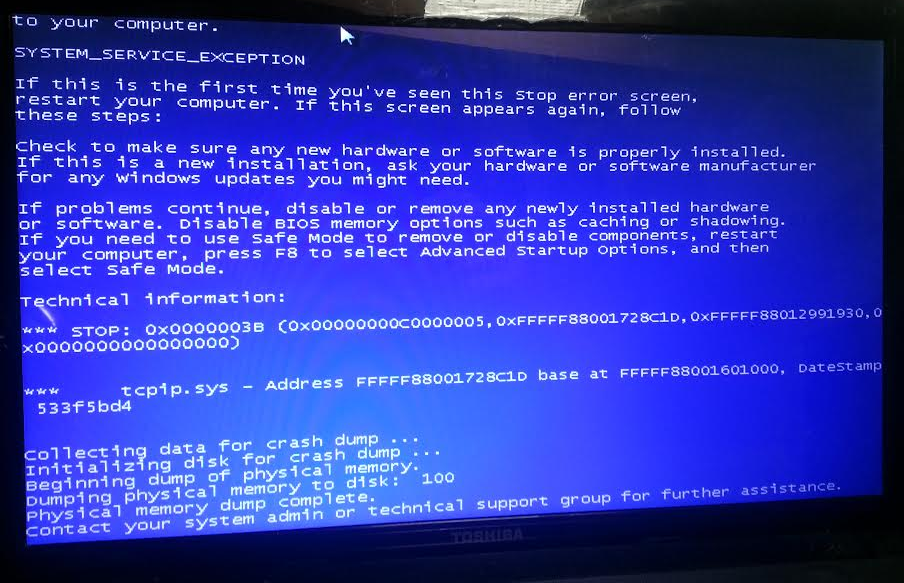
UPDATE:
So I left my computer open while I took a short nap, and I woke up to see this:
a6cfa7e7198ab6c3e7f0c8148d35eab8.png


I hope the image is clear enough to see the numbers and text well.
 

My Computer My Computer

At a glance

Microsoft Windows 7 Home Premium 64-bit 7601 ...AMD A8-4500M APU with Radeon(tm) HD Graphics8.00 GB(1) AMD Radeon HD 7500/7600 Series (2) AMD Ra...
Computer type
PC/Desktop
Computer Manufacturer/Model Number
TOSHIBA Satellite S875D
OS
Microsoft Windows 7 Home Premium 64-bit 7601 Multiprocessor Free Service Pack 1
CPU
AMD A8-4500M APU with Radeon(tm) HD Graphics
Motherboard
AMD Pumori
Memory
8.00 GB
Graphics Card(s)
(1) AMD Radeon HD 7500/7600 Series (2) AMD Radeon HD 7640G
Sound Card
(1) Virtual Audio Cable (2) USB Audio Class 1.0 and 2.0 DA
Screen Resolution
1600 x 900
Hard Drives
(1) TOSHIBA MQ01ABD075 ATA Device (2) WD My Passport 0740 USB Device
I think the BSOD is unrelated - but we'll come back to that later.

The fact that the files appear not to be present at all is worrying, since they should have showed up in the SFC scan as missing, and SFC should have at least attempted a repair..


I'll post a fix protocol a bit later.
 

My Computer My Computer

At a glance

Win 7 x64 Home Premium (and x86 VirtualBox VM...i3 370M/i7 6500U8GB - finally :)/8GBit's an i3, dude!/dual Intel&nVidia
Computer type
Laptop
Computer Manufacturer/Model Number
Asus K52F or Lenovo B51-80
OS
Win 7 x64 Home Premium (and x86 VirtualBox VM)/Win10
CPU
i3 370M/i7 6500U
Motherboard
Asus/Lenovo
Memory
8GB - finally :)/8GB
Graphics Card(s)
it's an i3, dude!/dual Intel&nVidia
Sound Card
onboard
Monitor(s) Displays
15.6" built-in
Screen Resolution
1366x768/1920x1080
Hard Drives
750GB Seagate internal
Sundry external drives attached to other computers on the local network
1TB SSD on the Lenovo
PSU
n/a
Internet Speed
as much as I can get - usually on a dongle/phone, so <1MB/s
Antivirus
MSE/Defender
Browser
IE11/12/Edge/Chrome/FF(if I must)
I think the BSOD is unrelated - but we'll come back to that later.

The fact that the files appear not to be present at all is worrying, since they should have showed up in the SFC scan as missing, and SFC should have at least attempted a repair..


I'll post a fix protocol a bit later.

Thank you for all your help so far! :) Hopefully we can get this all figured out soon!
 

My Computer My Computer

At a glance

Microsoft Windows 7 Home Premium 64-bit 7601 ...AMD A8-4500M APU with Radeon(tm) HD Graphics8.00 GB(1) AMD Radeon HD 7500/7600 Series (2) AMD Ra...
Computer type
PC/Desktop
Computer Manufacturer/Model Number
TOSHIBA Satellite S875D
OS
Microsoft Windows 7 Home Premium 64-bit 7601 Multiprocessor Free Service Pack 1
CPU
AMD A8-4500M APU with Radeon(tm) HD Graphics
Motherboard
AMD Pumori
Memory
8.00 GB
Graphics Card(s)
(1) AMD Radeon HD 7500/7600 Series (2) AMD Radeon HD 7640G
Sound Card
(1) Virtual Audio Cable (2) USB Audio Class 1.0 and 2.0 DA
Screen Resolution
1600 x 900
Hard Drives
(1) TOSHIBA MQ01ABD075 ATA Device (2) WD My Passport 0740 USB Device
FYI - tcip.sys is usually a networking issue (perhaps the network driver needs updating), but leave that till the updates/activation sorted first as Noel suggests.
 

My Computer My Computer

At a glance

Windows 10 Pro x64 ; Xubuntu x64Intel i7 860 @ 2.80 GHz O/C'ed to 4.0GHz16GB Corsair Vengance DDR3 @ 661 MHz Dual Cha...EVGA NVidia GTX 560 1024MB
Computer type
PC/Desktop
Computer Manufacturer/Model Number
Golden Mk. I.4
OS
Windows 10 Pro x64 ; Xubuntu x64
CPU
Intel i7 860 @ 2.80 GHz O/C'ed to 4.0GHz
Motherboard
Gigabyte P55A-UD3R Rev.1. Award BIOS F13
Memory
16GB Corsair Vengance DDR3 @ 661 MHz Dual Channel (9-9-9-24)
Graphics Card(s)
EVGA NVidia GTX 560 1024MB
Sound Card
Realtek Integrated
Monitor(s) Displays
Dual Samsung SyncMaster 2494HS
Screen Resolution
1920*1080 and 1920*1080
Hard Drives
1*Samsung 840 EVO 120GB SSD;
1*OCZ Vertex 2 60GB SSD;
2*Samsung F3 SpinPoint 1TB in RAID0;
1*Samsung F1 SpinPoint 1TB;
2*Western Digital 1TB External USB 3.0
1*Western Digital 500GB External USB 3.0
1*Seagate 500GB External USB 2.0
PSU
Thermaltake ToughPower QFan 750W
Case
Thermaltake Element S VK60001W2Z
Cooling
Corsair H60 Water Cooling, 2*230mm and 2*80mm case fans
Keyboard
Logitech G110
Mouse
Logitech MX518
I've uploaded a file - jltaa.zip - to my OneDrive at Noel's OneDrive
Please download and save it.

Right-click on the saved file and select Extract all...
Change the target to C:\ and click on Extract
Close all windows (it would be a good idea to print these instructions!)

Now reboot to the Repair Environment - as soon as the machine restarts, start tapping F8 - this should bring up the Advanced Boot Menu, at the top of which should be the option 'Repair my Computer'
Pick that
You'll have to log in with your username and password.

Pick the option to use a Command Prompt
At the prompt type
DIR C:\jltaa
hit the enter key - if you get a 'Not Found' error try
DIR D:\jltaa
or
DIR E:\jltaa


The drive letter in use when you find the folder will need to be substituted (for<drive>) into the following command...


XCOPY <drive>:\jltaa <drive>:\windows\winsxs /y /i /s /v /h


(e.g. XCOPY P:\wfire P:\windows\winsxs /y /i /s /v /h )


run the command (it should take almost no time) and when the prompt returns, type
EXIT
and hit the Enter key to exit Command Prompt - reboot to Normal Mode Windows.

Now run SFC /SCANNOW in an Elevated Command Prompt
then reboot and upload the new CBS.log file to your reply
 

My Computer My Computer

At a glance

Win 7 x64 Home Premium (and x86 VirtualBox VM...i3 370M/i7 6500U8GB - finally :)/8GBit's an i3, dude!/dual Intel&nVidia
Computer type
Laptop
Computer Manufacturer/Model Number
Asus K52F or Lenovo B51-80
OS
Win 7 x64 Home Premium (and x86 VirtualBox VM)/Win10
CPU
i3 370M/i7 6500U
Motherboard
Asus/Lenovo
Memory
8GB - finally :)/8GB
Graphics Card(s)
it's an i3, dude!/dual Intel&nVidia
Sound Card
onboard
Monitor(s) Displays
15.6" built-in
Screen Resolution
1366x768/1920x1080
Hard Drives
750GB Seagate internal
Sundry external drives attached to other computers on the local network
1TB SSD on the Lenovo
PSU
n/a
Internet Speed
as much as I can get - usually on a dongle/phone, so <1MB/s
Antivirus
MSE/Defender
Browser
IE11/12/Edge/Chrome/FF(if I must)
I've uploaded a file - jltaa.zip - to my OneDrive at Noel's OneDrive
Please download and save it.

Right-click on the saved file and select Extract all...
Change the target to C:\ and click on Extract
Close all windows (it would be a good idea to print these instructions!)

Now reboot to the Repair Environment - as soon as the machine restarts, start tapping F8 - this should bring up the Advanced Boot Menu, at the top of which should be the option 'Repair my Computer'
Pick that
You'll have to log in with your username and password.

Pick the option to use a Command Prompt
At the prompt type
DIR C:\jltaa
hit the enter key - if you get a 'Not Found' error try
DIR D:\jltaa
or
DIR E:\jltaa


The drive letter in use when you find the folder will need to be substituted (for<drive>) into the following command...


XCOPY <drive>:\jltaa <drive>:\windows\winsxs /y /i /s /v /h


(e.g. XCOPY P:\wfire P:\windows\winsxs /y /i /s /v /h )


run the command (it should take almost no time) and when the prompt returns, type
EXIT
and hit the Enter key to exit Command Prompt - reboot to Normal Mode Windows.

Now run SFC /SCANNOW in an Elevated Command Prompt
then reboot and upload the new CBS.log file to your reply

Hey! For whatever reason I did not get a notification from this message when you posted it three weeks ago, so I kind of forgot to check back.

The file you posted no longer exists in your OneDrive, unfortunately (I'm guessing you deleted it at some point in the last three weeks).

The current state of my PC:
I now have a black background on my computer and when I type in both of the possible keys (the one on the bottom of my computer and the other key that is supposed to be built in (I forget what it's called), I either an error or the activation key doesn't work.

Really sorry I couldn't get back to you but I have this site set to instant notifications and something went awry.

Thank you for all of your help thus far
-Joel
 

My Computer My Computer

At a glance

Microsoft Windows 7 Home Premium 64-bit 7601 ...AMD A8-4500M APU with Radeon(tm) HD Graphics8.00 GB(1) AMD Radeon HD 7500/7600 Series (2) AMD Ra...
Computer type
PC/Desktop
Computer Manufacturer/Model Number
TOSHIBA Satellite S875D
OS
Microsoft Windows 7 Home Premium 64-bit 7601 Multiprocessor Free Service Pack 1
CPU
AMD A8-4500M APU with Radeon(tm) HD Graphics
Motherboard
AMD Pumori
Memory
8.00 GB
Graphics Card(s)
(1) AMD Radeon HD 7500/7600 Series (2) AMD Radeon HD 7640G
Sound Card
(1) Virtual Audio Cable (2) USB Audio Class 1.0 and 2.0 DA
Screen Resolution
1600 x 900
Hard Drives
(1) TOSHIBA MQ01ABD075 ATA Device (2) WD My Passport 0740 USB Device
Back
Top