Solved Cannot see my data storage HDD (confession enclosed)

AaLF

New member
Member
VIP
Local time
7:28 AM
Messages
488
I have had 2 HDDs.


1 x Cdrive HDD
1 x Ddrive data-storage 700GB HDD

Cannot see drive D. No letter assigned. Disk Management only offers option to delete volume.

Confession > first attempt to see what Linux is all about has resulted in me indvertantly installing an 8GB linux partition inside the 700GB storage drive.

I need my pics, mp3s & mp4s pdfs etc etc back on line
 

My Computer My Computer

Computer type
PC/Desktop
Computer Manufacturer/Model Number
Generic - custom build
OS
Microsoft Windows 7 HomePremium 64-bit 7601 Multiprocessor Free Service Pack 1
CPU
Intel(R) Core(TM)2 Duo CPU E4500 @ 2.20GHz
Motherboard
Gigabyte Technology Co., Ltd. EP35-DS3P
Memory
8Gb
Graphics Card(s)
NVIDIA GeForce GT 710
Sound Card
(1) USB Audio Device (2) USB Audio Device (3) NVIDIA Hig
Monitor(s) Displays
older 21" thinkvision brand?
Screen Resolution
1680 x 1050
Hard Drives
WDC WD5000AAKS-22A7B0 ATA Device
ST3500418AS ATA Device
ST3320813AS ATA Device
PSU
ANTEC NEO ECO 520W
Case
generic tower
Cooling
couple of 4" fans
Keyboard
logitech k220
Mouse
logitech 305
Antivirus
malwarebytes premium
Browser
FireFox + opera
I have had 2 HDDs.


1 x Cdrive HDD
1 x Ddrive data-storage 700GB HDD

Cannot see drive D. No letter assigned. Disk Management only offers option to delete volume.

Confession > first attempt to see what Linux is all about has resulted in me indvertantly installing an 8GB linux partition inside the 700GB storage drive.

I need my pics, mp3s & mp4s pdfs etc etc back on line
Can you please post a screenshot from DISKMGMT.MSC, expanded to full-screen and with the columns spread so that we can see all of the text in the cells in the upper portion.

Also, you may or may not have destroyed the previous presumably single-partition 700GB drive, by creating that 8GB partition somewhere on it (or replacing whatever was there before). So you may have two partitions now, or just one 8GB partition, or who knows until we see the screenshot.

Finally, do you have a backup of what was on your D-drive previously? Or not?
 

My Computer My Computer

Computer type
PC/Desktop
Computer Manufacturer/Model Number
Home-built, two systems (1) and (2)
OS
Windows 7 Pro x64 (1), Win7 Pro X64 (2)
CPU
i5-3350p 3.1Ghz/6MB-cache (1); E8400 3.0Ghz/6MB-cache (2)
Motherboard
ASUS P8Z77-V Pro (1); ASUS P5Q3 (2)
Memory
8GB PC3-12800 DDR3 (1); 4GB PC3-10600 DDR3 (2)
Graphics Card(s)
ATI HD7750 (1), (see TV cards); ATI R7 250 (2)
Sound Card
Realtek ALC892 HD Audio (1); Realtek ALC1200 HD Audio (2)
Monitor(s) Displays
Eizo HD2441W LCD, Eizo S2433W (1); Eizo 24" S2433W (2)
Screen Resolution
1920x1200, 1920x1200 (1); 1920x1200 (2)
Hard Drives
(1) 1TB SATA-II (7200RPM), 2x2TB SATA-III (7200RPM), 250GB SATA-III (10000RPM) for OS; 2x2TB external USB 3.0

(2) 320GB SATA-II (7200RPM), 750GB SATA-II (7200RPM), 150GB SATA-II (10000RPM) for OS; 2TB external USB 3.0
PSU
Nesteq ECS-6001 600W (1); Nesteq ECS-5001 500W (2)
Case
Acousti-Case 360 (1) and (2)
Cooling
Noctua NH-U12P SE2 for CPU, 2x120mm case fans (1) and (2)
Keyboard
IBM PS/2 (1) and (2)
Mouse
Logitech MX Revolution wireless (1); Microsoft wired (2)
Internet Speed
100mbps down / 10mbps up
Antivirus
Microsoft Security Essentials; Malwarebyte Anti-Malware Pro
Browser
Firefox
Other Info
Ceton InfiniTV 4-tuner cablecard-enabled TV card as well as Hauppauge HVR-2250 OTA/ATSC 2-tuner TV card in (1), running under Win7 WMC
In addition to what dsperber requested, please also post a screenshot of the main Partition Wizard (PW) window
Download the Free home edition of PW here
Free download Magic Partition Manager Software, partition magic alternative, free partition magic, partition magic Windows 7 and server partition software - Partition Wizard Online

See: http://www.sevenforums.com/tutorials/9733-screenshots-files-upload-post-seven-forums.html

Please post information about your drives (dsperber already requested this - here's a tutuorial showing what members want to see)
Having this information also makes it easier to a discuss course of action.
See: http://www.sevenforums.com/tutorials/274797-disk-management-post-screen-capture-image.html

Thanks
 

My Computer My Computer

Computer type
Laptop
Computer Manufacturer/Model Number
HP Pavilion dv6-6c10us
OS
x64 (6.3.9600) Win8.1 Pro & soon dual boot x64 (6.1.7601) Win7_SP1 HomePrem
CPU
AMD A6-3420M APU with Radeon(tm) HD Graphics
Motherboard
Hewlett-Packard 1805
Memory
6.00 GB
Graphics Card(s)
AMD Radeon(TM) HD 6520G
Sound Card
(1) AMD High Definition Audio Device (2) IDT High Definiti
Monitor(s) Displays
HP W2072a 20" LCD (1600 x 900) @ 60 Hz
Screen Resolution
1366 x 768 x 32 bits (4294967296 colors) @ 60 Hz
Hard Drives
ST640LM0 00 HM641JI SATA Disk Device
Keyboard
Logitech k520 wireless KB
Mouse
Logitech m320 wireless mouse (bundled with KB)
Internet Speed
15/5 | 54 MB Wireless 'n'
Antivirus
Realtime: Defender or Avast | On-demand: Malwarebytes, ESET
Browser
IE 11 on Win8, IE 10 on win 7
Other Info
Media: [Gimp, Audacity, VLC] || Comm: [WEmail 2012, Skype] || Productivity: [OpenOffice,| Textpad] || Utils: [Sysinternals, cCleaner, Speccy, Defraggler]
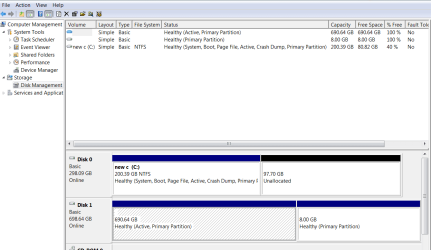
JPEG of disks attached. 700gb storage HDD = np letter option & linux installed on it in error.
 

Attachments

  • aalf hdds.png
    aalf hdds.png
    23.7 KB · Views: 4

My Computer My Computer

Computer type
PC/Desktop
Computer Manufacturer/Model Number
Generic - custom build
OS
Microsoft Windows 7 HomePremium 64-bit 7601 Multiprocessor Free Service Pack 1
CPU
Intel(R) Core(TM)2 Duo CPU E4500 @ 2.20GHz
Motherboard
Gigabyte Technology Co., Ltd. EP35-DS3P
Memory
8Gb
Graphics Card(s)
NVIDIA GeForce GT 710
Sound Card
(1) USB Audio Device (2) USB Audio Device (3) NVIDIA Hig
Monitor(s) Displays
older 21" thinkvision brand?
Screen Resolution
1680 x 1050
Hard Drives
WDC WD5000AAKS-22A7B0 ATA Device
ST3500418AS ATA Device
ST3320813AS ATA Device
PSU
ANTEC NEO ECO 520W
Case
generic tower
Cooling
couple of 4" fans
Keyboard
logitech k220
Mouse
logitech 305
Antivirus
malwarebytes premium
Browser
FireFox + opera
I think your data is ok, but I won't be certain until I see the PW screen shot I previously requested. The Disk Management image is great, but PW tells me a little more and that utility might come in handy. All I need to see is the main PW window, grab the screen shot and close PW for now.

I'd also like to know more about how you did all of this. It's only to get as much information about the issue before proceeding.

When you tried to install Linux did you make the 8GB part or did the install process?

If you made the 8GB how did you slice out the 8GB (which tool? Diskpart, Disk Management, Partition Wizard, other?)

Can you point me to the instructions you followed for the Linux install?

Part of the problem is the Active flag is set on Disk 1.
The correct part is Disk 0 - so that is ok

Launch an elevated Command Prompt (right click, select Run as administrator)
type the following commands
Diskpart
lis dis
sel dis 1
lis par
exit​

Post a screen shot of the Command Prompt window.

Thanks
 
Last edited:

My Computer My Computer

Computer type
Laptop
Computer Manufacturer/Model Number
HP Pavilion dv6-6c10us
OS
x64 (6.3.9600) Win8.1 Pro & soon dual boot x64 (6.1.7601) Win7_SP1 HomePrem
CPU
AMD A6-3420M APU with Radeon(tm) HD Graphics
Motherboard
Hewlett-Packard 1805
Memory
6.00 GB
Graphics Card(s)
AMD Radeon(TM) HD 6520G
Sound Card
(1) AMD High Definition Audio Device (2) IDT High Definiti
Monitor(s) Displays
HP W2072a 20" LCD (1600 x 900) @ 60 Hz
Screen Resolution
1366 x 768 x 32 bits (4294967296 colors) @ 60 Hz
Hard Drives
ST640LM0 00 HM641JI SATA Disk Device
Keyboard
Logitech k520 wireless KB
Mouse
Logitech m320 wireless mouse (bundled with KB)
Internet Speed
15/5 | 54 MB Wireless 'n'
Antivirus
Realtime: Defender or Avast | On-demand: Malwarebytes, ESET
Browser
IE 11 on Win8, IE 10 on win 7
Other Info
Media: [Gimp, Audacity, VLC] || Comm: [WEmail 2012, Skype] || Productivity: [OpenOffice,| Textpad] || Utils: [Sysinternals, cCleaner, Speccy, Defraggler]
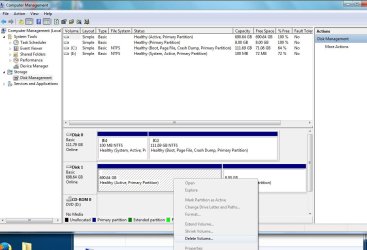
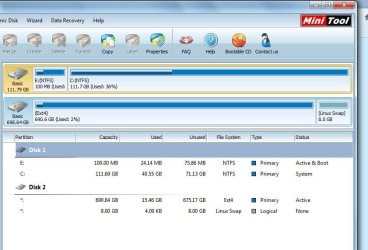
Sorry Bart....missed your post last time.....here we go, Win7 disk Management + Mini Tool
 

Attachments

  • aalf 2.jpg
    aalf 2.jpg
    92.2 KB · Views: 2
  • AaLF 3.jpg
    AaLF 3.jpg
    60.6 KB · Views: 3

My Computer My Computer

Computer type
PC/Desktop
Computer Manufacturer/Model Number
Generic - custom build
OS
Microsoft Windows 7 HomePremium 64-bit 7601 Multiprocessor Free Service Pack 1
CPU
Intel(R) Core(TM)2 Duo CPU E4500 @ 2.20GHz
Motherboard
Gigabyte Technology Co., Ltd. EP35-DS3P
Memory
8Gb
Graphics Card(s)
NVIDIA GeForce GT 710
Sound Card
(1) USB Audio Device (2) USB Audio Device (3) NVIDIA Hig
Monitor(s) Displays
older 21" thinkvision brand?
Screen Resolution
1680 x 1050
Hard Drives
WDC WD5000AAKS-22A7B0 ATA Device
ST3500418AS ATA Device
ST3320813AS ATA Device
PSU
ANTEC NEO ECO 520W
Case
generic tower
Cooling
couple of 4" fans
Keyboard
logitech k220
Mouse
logitech 305
Antivirus
malwarebytes premium
Browser
FireFox + opera
I recall nothing about the linux sitting there in the back corner. I have a 120GB SSD I've been plugging in to try out linux so I would not do any damage as I'm 'all thumbs'. Looks like i neglected to unplug the 2nd HDD.

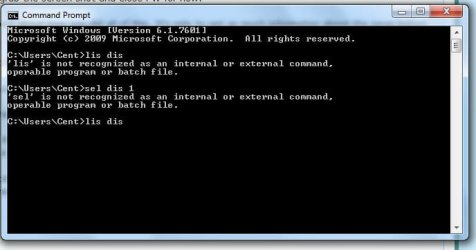
Here's the command prompt -
 

Attachments

  • aalf 4.jpg
    aalf 4.jpg
    26.6 KB · Views: 29

My Computer My Computer

Computer type
PC/Desktop
Computer Manufacturer/Model Number
Generic - custom build
OS
Microsoft Windows 7 HomePremium 64-bit 7601 Multiprocessor Free Service Pack 1
CPU
Intel(R) Core(TM)2 Duo CPU E4500 @ 2.20GHz
Motherboard
Gigabyte Technology Co., Ltd. EP35-DS3P
Memory
8Gb
Graphics Card(s)
NVIDIA GeForce GT 710
Sound Card
(1) USB Audio Device (2) USB Audio Device (3) NVIDIA Hig
Monitor(s) Displays
older 21" thinkvision brand?
Screen Resolution
1680 x 1050
Hard Drives
WDC WD5000AAKS-22A7B0 ATA Device
ST3500418AS ATA Device
ST3320813AS ATA Device
PSU
ANTEC NEO ECO 520W
Case
generic tower
Cooling
couple of 4" fans
Keyboard
logitech k220
Mouse
logitech 305
Antivirus
malwarebytes premium
Browser
FireFox + opera
If your 700GB partition on the second drive used to be NTFS, it no longer is. It's now EXT4 and 690GB (reduced to make room for your 8GB Linux partition), which is not recognized by Windows. That's why it looks like it does through DISKMGMT.MSC. Obviously that came from the Linux install story.

It shows 15.4GB in use on that partition, with 675GB free. If you're lucky, it might be completely undamaged... just in an EXT4 partition. So your data files might still be accessible, just not from Windows right now.

Anyway, although I haven't done it maybe others who know can confirm or deny that Partition Wizard can possibly convert the current EXT4 partition back to NTFS. I know PW can convert partitions from FAT32 to NTFS and vice versa, but I don't know if it can convert EXT4 to NTFS directly. If so, that's the simplest way to get it back.

If PW can't convert EXT4 to NTFS directly, then since you're only using 15GB another recovery method might be to use use Linux to copy the contents of the EXT4 partition to a FAT32 partition. You can use PW to make room for that FAT32 partition by shrinking that large EXT4 partition by 17GB or so, and allocate a FAT32 partition of 17GB in the now available space just freed up by reducing the size of the EXT4 partition.

Then in Linux copy the file contents of the EXT4 partition to the temporary FAT32 partition. Then boot to Windows, and using Partition Wizard delete the EXT4 partition, convert the FAT32 partition to NTFS, and then enlarge the now NTFS 17GB partition to use all of the space just freed up when you deleted the EXT4 partition.

You now have your NTFS partition back to its 690GB size (we haven't touched the 8GB Linux partition). It's the current EXT4 partition now converted back to NTFS through a series of operations described above. And presumably the 15GB of data files is still present and undamaged.

If this 15GB is critical and irreplaceable, I'd strongly recommend you back up that data somewhere (in Linux, if that's the only way to get to it right now) before fooling around with partitions and running the risk of doing something wrong and losing that data. You don't want to lose that data, of course.
 

My Computer My Computer

Computer type
PC/Desktop
Computer Manufacturer/Model Number
Home-built, two systems (1) and (2)
OS
Windows 7 Pro x64 (1), Win7 Pro X64 (2)
CPU
i5-3350p 3.1Ghz/6MB-cache (1); E8400 3.0Ghz/6MB-cache (2)
Motherboard
ASUS P8Z77-V Pro (1); ASUS P5Q3 (2)
Memory
8GB PC3-12800 DDR3 (1); 4GB PC3-10600 DDR3 (2)
Graphics Card(s)
ATI HD7750 (1), (see TV cards); ATI R7 250 (2)
Sound Card
Realtek ALC892 HD Audio (1); Realtek ALC1200 HD Audio (2)
Monitor(s) Displays
Eizo HD2441W LCD, Eizo S2433W (1); Eizo 24" S2433W (2)
Screen Resolution
1920x1200, 1920x1200 (1); 1920x1200 (2)
Hard Drives
(1) 1TB SATA-II (7200RPM), 2x2TB SATA-III (7200RPM), 250GB SATA-III (10000RPM) for OS; 2x2TB external USB 3.0

(2) 320GB SATA-II (7200RPM), 750GB SATA-II (7200RPM), 150GB SATA-II (10000RPM) for OS; 2TB external USB 3.0
PSU
Nesteq ECS-6001 600W (1); Nesteq ECS-5001 500W (2)
Case
Acousti-Case 360 (1) and (2)
Cooling
Noctua NH-U12P SE2 for CPU, 2x120mm case fans (1) and (2)
Keyboard
IBM PS/2 (1) and (2)
Mouse
Logitech MX Revolution wireless (1); Microsoft wired (2)
Internet Speed
100mbps down / 10mbps up
Antivirus
Microsoft Security Essentials; Malwarebyte Anti-Malware Pro
Browser
Firefox
Other Info
Ceton InfiniTV 4-tuner cablecard-enabled TV card as well as Hauppauge HVR-2250 OTA/ATSC 2-tuner TV card in (1), running under Win7 WMC
Linux couldn't "mount" the drive, nor look inside.

Minitool doesn't seem to like it either. Looks like a format coming up. I'll wait a day in case someone offers solution.
 

My Computer My Computer

Computer type
PC/Desktop
Computer Manufacturer/Model Number
Generic - custom build
OS
Microsoft Windows 7 HomePremium 64-bit 7601 Multiprocessor Free Service Pack 1
CPU
Intel(R) Core(TM)2 Duo CPU E4500 @ 2.20GHz
Motherboard
Gigabyte Technology Co., Ltd. EP35-DS3P
Memory
8Gb
Graphics Card(s)
NVIDIA GeForce GT 710
Sound Card
(1) USB Audio Device (2) USB Audio Device (3) NVIDIA Hig
Monitor(s) Displays
older 21" thinkvision brand?
Screen Resolution
1680 x 1050
Hard Drives
WDC WD5000AAKS-22A7B0 ATA Device
ST3500418AS ATA Device
ST3320813AS ATA Device
PSU
ANTEC NEO ECO 520W
Case
generic tower
Cooling
couple of 4" fans
Keyboard
logitech k220
Mouse
logitech 305
Antivirus
malwarebytes premium
Browser
FireFox + opera
My mistake, when I was writing the post, I edited it to correct an error.
Unfortunately, I also removed the critical piece of information, the actual program name. :(

I corrected post# 5, but I don't think it's necessary to run it now that you posted the Partition Wizard (PW) screen.
dsperber identified the problem, now let's see if there's a way to undo what the Linux install did.

Let's take a look at what's on the disk using Mint Mate on a thumb drive


1. Download the Rufus bootable USB drive creation utility
Rufus home page
Rufus FAQ
2. Download the Linux Mint Mate ISO
Select a download mirror from the pages below that is nearest your location to lessen download time
Linux Mint Mate 32 bit (32 or 64 bit machines)
Linux Mint Mate 64 bit (only 64 bit machines)
Linux Mint Mate documentation [PDF]
3. Create a bootable USB thumb drive using Rufus and the Linux Mint Mate ISO
Mint Mate is 1.3 GB, so you need a thumb drive with at least 2 GB.
:warn: Creating a bootable thumb drive erases all data on the thumb drive.
:warn: If you have data on the thumb drive that you need, move it to your Hard Drive or burn it to an Optical Disc.
  • Connect the USB thumb drive to a USB port
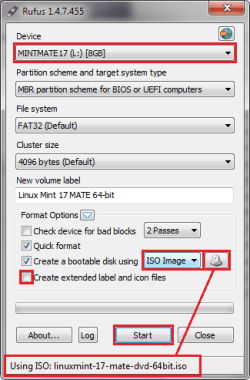
  • Launch Rufus

    00 RufusMintUSB.png
  • The fields in Rufus are filled in with defaults. The defaults work well, but a few things need to be verified or changed.
    1. Verify that Rufus selected the thumb drive you want to write. Change the Device if the wrong USB thumb drive is presented in that field.
    2. Change Create a bootable disk using from the default to ISO image
    3. Select Linux Mint Mate ISO as the source. The file should appear on the status bar
    4. unTick Create extended label and icon files
    5. Compare your Rufus window with the image above. If everything other than the Device field are the same, then continue to the next step. Note that the ISO name in the status bar is subject to change as new versions are released
    6. Press the Start button
  • The status bar notifies you when the process is Done
  • Press the Close button

Leave the Linux Mint Mate thumb drive connected for the next steps​
4. Boot to Linux Mint Mate
Save any files you are working on, then Restart your machine
Check your machine documentation to determine the key that brings up the Boot Order startup menu. This example is from an HP laptop that assigns it to the F9 key.
When the machine begins to start again (black screen) tap the F9 key to bring up the Boot Order startup menu. There is only a short time to "catch" the Boot Order menu. If Windows starts, you will have to try again.

There might be an option screen presented when Mint Mate starts, you can either wait for the default timeout or press enter.​
5. Press Computer to display the disk drives
The names will be unfamiliar, and you'll have to identify them by size. Open the 690 GB drive and post a screen shot.

Look in the Mint Mate menu for a snapshot application, there are two of them.
If you're not already connected to the Internet, connect now and post the screen shot.
This can all be done in Mint Mate.​


If you see your files, that's great. The easiest thing to do would be to create a folder on your c: drive and copy your files to that new folder.

If you see Linux Operating System files - a different tact will have to be taken.
 

My Computer My Computer

Computer type
Laptop
Computer Manufacturer/Model Number
HP Pavilion dv6-6c10us
OS
x64 (6.3.9600) Win8.1 Pro & soon dual boot x64 (6.1.7601) Win7_SP1 HomePrem
CPU
AMD A6-3420M APU with Radeon(tm) HD Graphics
Motherboard
Hewlett-Packard 1805
Memory
6.00 GB
Graphics Card(s)
AMD Radeon(TM) HD 6520G
Sound Card
(1) AMD High Definition Audio Device (2) IDT High Definiti
Monitor(s) Displays
HP W2072a 20" LCD (1600 x 900) @ 60 Hz
Screen Resolution
1366 x 768 x 32 bits (4294967296 colors) @ 60 Hz
Hard Drives
ST640LM0 00 HM641JI SATA Disk Device
Keyboard
Logitech k520 wireless KB
Mouse
Logitech m320 wireless mouse (bundled with KB)
Internet Speed
15/5 | 54 MB Wireless 'n'
Antivirus
Realtime: Defender or Avast | On-demand: Malwarebytes, ESET
Browser
IE 11 on Win8, IE 10 on win 7
Other Info
Media: [Gimp, Audacity, VLC] || Comm: [WEmail 2012, Skype] || Productivity: [OpenOffice,| Textpad] || Utils: [Sysinternals, cCleaner, Speccy, Defraggler]
Linux couldn't "mount" the drive, nor look inside.

Minitool doesn't seem to like it either. Looks like a format coming up. I'll wait a day in case someone offers solution.
Wait a while, there are members who know data recovery.

I posted something above.

What does Linux couldn't "mount" the drive, nor look inside. mean? What did you use as your Linux boot?

just curious.
 

My Computer My Computer

Computer type
Laptop
Computer Manufacturer/Model Number
HP Pavilion dv6-6c10us
OS
x64 (6.3.9600) Win8.1 Pro & soon dual boot x64 (6.1.7601) Win7_SP1 HomePrem
CPU
AMD A6-3420M APU with Radeon(tm) HD Graphics
Motherboard
Hewlett-Packard 1805
Memory
6.00 GB
Graphics Card(s)
AMD Radeon(TM) HD 6520G
Sound Card
(1) AMD High Definition Audio Device (2) IDT High Definiti
Monitor(s) Displays
HP W2072a 20" LCD (1600 x 900) @ 60 Hz
Screen Resolution
1366 x 768 x 32 bits (4294967296 colors) @ 60 Hz
Hard Drives
ST640LM0 00 HM641JI SATA Disk Device
Keyboard
Logitech k520 wireless KB
Mouse
Logitech m320 wireless mouse (bundled with KB)
Internet Speed
15/5 | 54 MB Wireless 'n'
Antivirus
Realtime: Defender or Avast | On-demand: Malwarebytes, ESET
Browser
IE 11 on Win8, IE 10 on win 7
Other Info
Media: [Gimp, Audacity, VLC] || Comm: [WEmail 2012, Skype] || Productivity: [OpenOffice,| Textpad] || Utils: [Sysinternals, cCleaner, Speccy, Defraggler]
So u know I already have mint-mate 17.1 on its own seperate 120gb SSD. Can I use that? I'm new & green to linux. Think i opened 'my computer' like with win7 but linux couldn't open the sick drive.
 

My Computer My Computer

Computer type
PC/Desktop
Computer Manufacturer/Model Number
Generic - custom build
OS
Microsoft Windows 7 HomePremium 64-bit 7601 Multiprocessor Free Service Pack 1
CPU
Intel(R) Core(TM)2 Duo CPU E4500 @ 2.20GHz
Motherboard
Gigabyte Technology Co., Ltd. EP35-DS3P
Memory
8Gb
Graphics Card(s)
NVIDIA GeForce GT 710
Sound Card
(1) USB Audio Device (2) USB Audio Device (3) NVIDIA Hig
Monitor(s) Displays
older 21" thinkvision brand?
Screen Resolution
1680 x 1050
Hard Drives
WDC WD5000AAKS-22A7B0 ATA Device
ST3500418AS ATA Device
ST3320813AS ATA Device
PSU
ANTEC NEO ECO 520W
Case
generic tower
Cooling
couple of 4" fans
Keyboard
logitech k220
Mouse
logitech 305
Antivirus
malwarebytes premium
Browser
FireFox + opera
@Slarty, the OP can just run Partition Recovery Wizard in PW and check whether it shows up the deleted partitions. Quick Scan and then Deep Scan if Quick Scan does not detect the old NTFS partition/partitions.
 

My Computer My Computer

OS
Windows 7 Home Premium 32 bit
Hi Jumunji. long time no see. Ran the PW Quickscan & clicked restore but it restored or remained as ext4 format.
 

My Computer My Computer

Computer type
PC/Desktop
Computer Manufacturer/Model Number
Generic - custom build
OS
Microsoft Windows 7 HomePremium 64-bit 7601 Multiprocessor Free Service Pack 1
CPU
Intel(R) Core(TM)2 Duo CPU E4500 @ 2.20GHz
Motherboard
Gigabyte Technology Co., Ltd. EP35-DS3P
Memory
8Gb
Graphics Card(s)
NVIDIA GeForce GT 710
Sound Card
(1) USB Audio Device (2) USB Audio Device (3) NVIDIA Hig
Monitor(s) Displays
older 21" thinkvision brand?
Screen Resolution
1680 x 1050
Hard Drives
WDC WD5000AAKS-22A7B0 ATA Device
ST3500418AS ATA Device
ST3320813AS ATA Device
PSU
ANTEC NEO ECO 520W
Case
generic tower
Cooling
couple of 4" fans
Keyboard
logitech k220
Mouse
logitech 305
Antivirus
malwarebytes premium
Browser
FireFox + opera
I can't take your words for granted unless you post the screenshot of Quick Scan results - the partitions found.:)

If Quick Scan does not find your original partitions, then do a Full/Deep scan and post the screenshot.

There is no point in restoring existing partitions found. You should only look for Deleted parttions found, and if found double click on it and see whether it shows your files.

And amongst the deleted partitions found - if found, you should only select those partitions, that will make the preview map at the bottom full as it existed before- which you only know best or supposed to know but we can only guess with permutations and combinations to bring the total capacity right.We had done it sucessfuly in one or two cases where the disk in its life had undergone multiple partitioning/formatting. Your case however is a little different in that the disk appears to have been formatted with an altogether different file system. So it is really difficult to say whether even a deep scan can find the original NTFS partitions. But no harm in doing deep scan and wait for lady luck to smile on you.:)
 
Last edited:

My Computer My Computer

OS
Windows 7 Home Premium 32 bit
So u know I already have mint-mate 17.1 on its own seperate 120gb SSD. Can I use that? I'm new & green to linux. Think i opened 'my computer' like with win7 but linux couldn't open the sick drive.
Sure use what you have. If it causes difficulty, try the other way.
 

My Computer My Computer

Computer type
Laptop
Computer Manufacturer/Model Number
HP Pavilion dv6-6c10us
OS
x64 (6.3.9600) Win8.1 Pro & soon dual boot x64 (6.1.7601) Win7_SP1 HomePrem
CPU
AMD A6-3420M APU with Radeon(tm) HD Graphics
Motherboard
Hewlett-Packard 1805
Memory
6.00 GB
Graphics Card(s)
AMD Radeon(TM) HD 6520G
Sound Card
(1) AMD High Definition Audio Device (2) IDT High Definiti
Monitor(s) Displays
HP W2072a 20" LCD (1600 x 900) @ 60 Hz
Screen Resolution
1366 x 768 x 32 bits (4294967296 colors) @ 60 Hz
Hard Drives
ST640LM0 00 HM641JI SATA Disk Device
Keyboard
Logitech k520 wireless KB
Mouse
Logitech m320 wireless mouse (bundled with KB)
Internet Speed
15/5 | 54 MB Wireless 'n'
Antivirus
Realtime: Defender or Avast | On-demand: Malwarebytes, ESET
Browser
IE 11 on Win8, IE 10 on win 7
Other Info
Media: [Gimp, Audacity, VLC] || Comm: [WEmail 2012, Skype] || Productivity: [OpenOffice,| Textpad] || Utils: [Sysinternals, cCleaner, Speccy, Defraggler]
@Slarty, the OP can just run Partition Recovery Wizard in PW and check whether it shows up the deleted partitions. Quick Scan and then Deep Scan if Quick Scan does not detect the old NTFS partition/partitions.
jumanji my friend,
I started writing PW instructions before retiring this morning. Made too many typing mistakes, so I just copied the Mint Mate post from another thread and pasted it here (although I had to change it a bit and made some typos - so I thought it best to just retire)

catching up on the thread.
 

My Computer My Computer

Computer type
Laptop
Computer Manufacturer/Model Number
HP Pavilion dv6-6c10us
OS
x64 (6.3.9600) Win8.1 Pro & soon dual boot x64 (6.1.7601) Win7_SP1 HomePrem
CPU
AMD A6-3420M APU with Radeon(tm) HD Graphics
Motherboard
Hewlett-Packard 1805
Memory
6.00 GB
Graphics Card(s)
AMD Radeon(TM) HD 6520G
Sound Card
(1) AMD High Definition Audio Device (2) IDT High Definiti
Monitor(s) Displays
HP W2072a 20" LCD (1600 x 900) @ 60 Hz
Screen Resolution
1366 x 768 x 32 bits (4294967296 colors) @ 60 Hz
Hard Drives
ST640LM0 00 HM641JI SATA Disk Device
Keyboard
Logitech k520 wireless KB
Mouse
Logitech m320 wireless mouse (bundled with KB)
Internet Speed
15/5 | 54 MB Wireless 'n'
Antivirus
Realtime: Defender or Avast | On-demand: Malwarebytes, ESET
Browser
IE 11 on Win8, IE 10 on win 7
Other Info
Media: [Gimp, Audacity, VLC] || Comm: [WEmail 2012, Skype] || Productivity: [OpenOffice,| Textpad] || Utils: [Sysinternals, cCleaner, Speccy, Defraggler]
.....
There is no point in restoring existing partitions found. You should only look for Deleted parttions found, and if found double click on it and see whether it shows your files.
Just so I'm clear and was on the correct path earlier, both of you are refereeing to
How to Make Partition Recovery | MiniTool Partition Wizard Tutorial

and eureka! Sleep deprivation prevented me from see that jumanji. I could not unwrap the ext# partition from any other that might appear in the scan results.

The key is, of course, only the deleted partitions. You are quite brilliant my friend.

Only by seeing the screen shots can anyone know what to do next.

The ball is in your court AaLF - show us what you see.

Thanks

Bill
.
 

My Computer My Computer

Computer type
Laptop
Computer Manufacturer/Model Number
HP Pavilion dv6-6c10us
OS
x64 (6.3.9600) Win8.1 Pro & soon dual boot x64 (6.1.7601) Win7_SP1 HomePrem
CPU
AMD A6-3420M APU with Radeon(tm) HD Graphics
Motherboard
Hewlett-Packard 1805
Memory
6.00 GB
Graphics Card(s)
AMD Radeon(TM) HD 6520G
Sound Card
(1) AMD High Definition Audio Device (2) IDT High Definiti
Monitor(s) Displays
HP W2072a 20" LCD (1600 x 900) @ 60 Hz
Screen Resolution
1366 x 768 x 32 bits (4294967296 colors) @ 60 Hz
Hard Drives
ST640LM0 00 HM641JI SATA Disk Device
Keyboard
Logitech k520 wireless KB
Mouse
Logitech m320 wireless mouse (bundled with KB)
Internet Speed
15/5 | 54 MB Wireless 'n'
Antivirus
Realtime: Defender or Avast | On-demand: Malwarebytes, ESET
Browser
IE 11 on Win8, IE 10 on win 7
Other Info
Media: [Gimp, Audacity, VLC] || Comm: [WEmail 2012, Skype] || Productivity: [OpenOffice,| Textpad] || Utils: [Sysinternals, cCleaner, Speccy, Defraggler]
Ran the wizard but I cannot see where it allows u to view the contents after a scan.
 

My Computer My Computer

Computer type
PC/Desktop
Computer Manufacturer/Model Number
Generic - custom build
OS
Microsoft Windows 7 HomePremium 64-bit 7601 Multiprocessor Free Service Pack 1
CPU
Intel(R) Core(TM)2 Duo CPU E4500 @ 2.20GHz
Motherboard
Gigabyte Technology Co., Ltd. EP35-DS3P
Memory
8Gb
Graphics Card(s)
NVIDIA GeForce GT 710
Sound Card
(1) USB Audio Device (2) USB Audio Device (3) NVIDIA Hig
Monitor(s) Displays
older 21" thinkvision brand?
Screen Resolution
1680 x 1050
Hard Drives
WDC WD5000AAKS-22A7B0 ATA Device
ST3500418AS ATA Device
ST3320813AS ATA Device
PSU
ANTEC NEO ECO 520W
Case
generic tower
Cooling
couple of 4" fans
Keyboard
logitech k220
Mouse
logitech 305
Antivirus
malwarebytes premium
Browser
FireFox + opera
Can you post this screen?

partition-recovery-3.png
 

My Computer My Computer

Computer type
Laptop
Computer Manufacturer/Model Number
HP Pavilion dv6-6c10us
OS
x64 (6.3.9600) Win8.1 Pro & soon dual boot x64 (6.1.7601) Win7_SP1 HomePrem
CPU
AMD A6-3420M APU with Radeon(tm) HD Graphics
Motherboard
Hewlett-Packard 1805
Memory
6.00 GB
Graphics Card(s)
AMD Radeon(TM) HD 6520G
Sound Card
(1) AMD High Definition Audio Device (2) IDT High Definiti
Monitor(s) Displays
HP W2072a 20" LCD (1600 x 900) @ 60 Hz
Screen Resolution
1366 x 768 x 32 bits (4294967296 colors) @ 60 Hz
Hard Drives
ST640LM0 00 HM641JI SATA Disk Device
Keyboard
Logitech k520 wireless KB
Mouse
Logitech m320 wireless mouse (bundled with KB)
Internet Speed
15/5 | 54 MB Wireless 'n'
Antivirus
Realtime: Defender or Avast | On-demand: Malwarebytes, ESET
Browser
IE 11 on Win8, IE 10 on win 7
Other Info
Media: [Gimp, Audacity, VLC] || Comm: [WEmail 2012, Skype] || Productivity: [OpenOffice,| Textpad] || Utils: [Sysinternals, cCleaner, Speccy, Defraggler]
Back
Top