Make Windows 7 bootable after motherboard swap

Make Windows 7 bootable after motherboard swap, or bootable after swapping hard drive to new machine. Software described Paragon P2P Adjust OS.


This procedure describes how to do it. Procedure can be used in case of:
  1. Download "Paragon Adaptive Restore 2010" from Paragon Adaptive Restore 2010 on my DROPBOX.
  2. Burn the ISO to CD/DVD using Windows Disc Image Burner or ImgBurn.
  3. Set CD/DVD as first boot device in BIOS.
Do the following:
  1. Boot the computer from Paragon Windows PE 3.0 based CD/DVD.
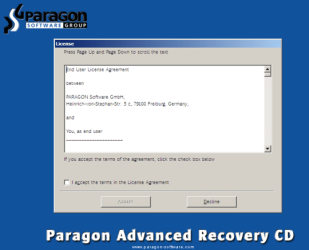
  2. Accept the end user license agreement, otherwise you are not able to use the tool.
    1.png
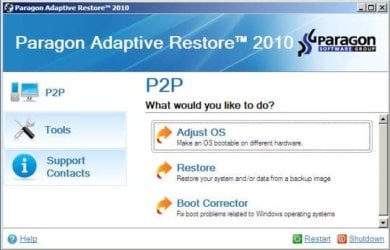
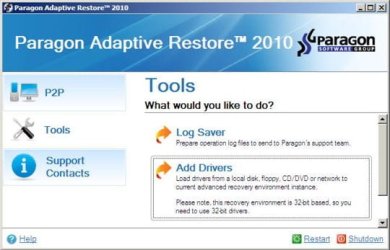
  3. Launch P2P Adjust OS.
    2.jpg
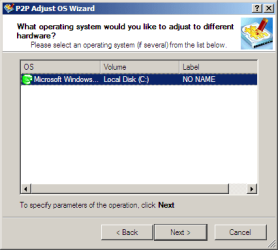
  4. Select the operating system you need to adjust to your new hardware.
    3.png
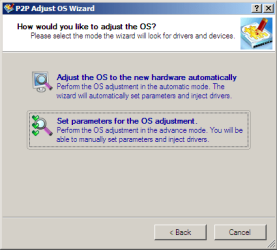
  5. Choose whether you want to add third-party drivers or not, and the way to do it.
    4.png
  6. If you chose "Adjust the OS to the new hardware automatically", the P2P Adjust OS Wizard will automatically accomplish all the necessary actions.
    5.png
  7. The only thing that might need your interaction is to specify additional driver repository.
    6.png
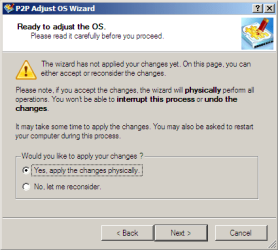
  8. At last, choose "Yes, apply the changes physically" and then restart your computer after operations are done. Do remember, you cannot interrupt the process or undo the changes.
    7.png
Compelete pdf manual: Paragon Adaptive Restore 2010 on my DROPBOX.

Just before the OS adjustment, you can additionally:
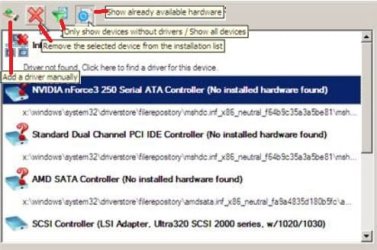
extra.JPG


   Warning
Sometimes the internal hard drive is not recognized in Paragon P2P Adjust OS due to missing SATA or RAID driver. In that case add specific drivers to Windows PE based Paragon Recovery Environment.
  1. Click to open Add Drivers dialog.
    a.jpg
  2. Browse for an .INF file of the required driver, then click the Open button to initiate the process.
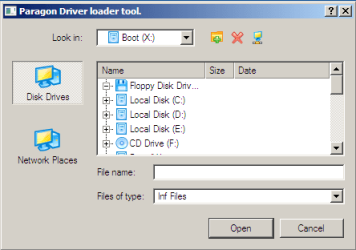
    b.png
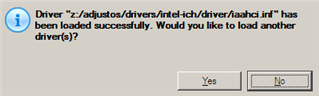
  3. Click Yes to confirm the operation.
    c.png
   Information
You can only add third-party drivers in INF file. If they are zipped, you need to unpack them before processing the steps. The Windows PE environment is 32bit-based, so you need to use 32-bit drivers for injection.
After procedure has finished succesfully and system boots fine, first check if Enable hardware auto-updating via Windows Update (Set to Automatic) is on so it will query Windows Update. After that:

  1. Uninstall Device and Device Driver for devices no longer attached to system. Uninstall associated software as well.
  2. Install all of your device drivers, then Windows Updates.
  3. Refresh your Windows Experience Index (WEI) score.
  4. When done, all you will need to do is to activate Windows 7.
After rebooting from disk, drivers should start swapping out in a cascade you can monitor by clicking on the system tray animation. Wait until all are finished before doing the requested restart. After reboot, go immediately to Check for Updates and install all Important and Optional Updates which may include critical drivers and patches for the OS to run on that hardware.

You must reactivate at the Change Product Key link on System page. If it's not present you can insert Product Key and then Activate using SLMgr Commands

On some systems you see "setup is preparing your computer for first use" on every reboot. Read this to fix that issue: Fix "Setup is Preparing Your Computer for First Use" on Every Reboot


Last edited:

My Computer My Computer

At a glance

Microsoft Windows 7 Home Premium 64-bits 7601...Intel(R) Core(TM) i3 CPU M 370 @ 2.40GHz4,00 GBATI Mobility Radeon HD 5400 Series
Computer type
Laptop
Computer Manufacturer/Model Number
ACER ASPIRE 5742G
OS
Microsoft Windows 7 Home Premium 64-bits 7601 Multiprocessor Free Service Pack 1
CPU
Intel(R) Core(TM) i3 CPU M 370 @ 2.40GHz
Motherboard
Acer Aspire 5742G
Memory
4,00 GB
Graphics Card(s)
ATI Mobility Radeon HD 5400 Series
Sound Card
(1) AMD High Definition Audio Device (2) Realtek High Defi
Screen Resolution
1366 x 768 x 32 bits (4294967296 colors) @ 60 Hz
Hard Drives
WDC WD5000BEVT-22ZAT0
Yup, I already got a bootable USB, just wondering if it would work :)

Thanks! Might play around with it this weekend, still debating if I wanna swap the board yet or wait till after Christmas when I can maybe get a new Case.
 

My Computer My Computer

At a glance

Windows 7 Ultimate 64bitIntel Core i5-4690K @ 4.7ghzG-Skill Snipers DDR3-1600 8GB oc'd@ 1866eVGA GTX 770 4GB FTW
Computer type
PC/Desktop
Computer Manufacturer/Model Number
Antares
OS
Windows 7 Ultimate 64bit
CPU
Intel Core i5-4690K @ 4.7ghz
Motherboard
ASRock Z97 Extreme6
Memory
G-Skill Snipers DDR3-1600 8GB oc'd@ 1866
Graphics Card(s)
eVGA GTX 770 4GB FTW
Sound Card
Creative X-Fi Titanium Fatal1ty Professional Series PCIe
Monitor(s) Displays
Acer K272HUL HDMI 27" 1440p
Screen Resolution
2560x1440
Hard Drives
Samsung 950 Pro M.2 512GB SSD, Samsong 850 Evo M.2 500GB SSD, Western Digital WD1002FAEX 1TB 6.0GBs HDD
PSU
EVGA SuperNOVA 750 G2
Case
CM Storm Trooper
Cooling
Corsair Hydro H105 High Performance w/ Dual GT AP-15's
Keyboard
Logitech G110
Mouse
RAZER Naga HEX Wraith Red
Internet Speed
Comcast 100mpbs
Yup, I already got a bootable USB, just wondering if it would work :)

Thanks! Might play around with it this weekend, still debating if I wanna swap the board yet or wait till after Christmas when I can maybe get a new Case.
It's just a winpe bootable DVD. Should work.... but never tried it myself.
 

My Computer My Computer

At a glance

Microsoft Windows 7 Home Premium 64-bits 7601...Intel(R) Core(TM) i3 CPU M 370 @ 2.40GHz4,00 GBATI Mobility Radeon HD 5400 Series
Computer type
Laptop
Computer Manufacturer/Model Number
ACER ASPIRE 5742G
OS
Microsoft Windows 7 Home Premium 64-bits 7601 Multiprocessor Free Service Pack 1
CPU
Intel(R) Core(TM) i3 CPU M 370 @ 2.40GHz
Motherboard
Acer Aspire 5742G
Memory
4,00 GB
Graphics Card(s)
ATI Mobility Radeon HD 5400 Series
Sound Card
(1) AMD High Definition Audio Device (2) Realtek High Defi
Screen Resolution
1366 x 768 x 32 bits (4294967296 colors) @ 60 Hz
Hard Drives
WDC WD5000BEVT-22ZAT0
New member, found this thread after a MB and CPU upgrade. The system boots, the Win7 logo starts to load, and then it reboots. Tried a system repair several times with no success.

I had tried the FIX HDC method using an ultimate boot cd prior to this and it did not work.

I have Win 7 Ultimate. I replaced an Asrock AMD board with a MSI Intel one (H97 Guard Pro), and of course changed the CPU (i5-4690K). The SanDisk SSD and memory remain the same. I have tried setting the BIOS as IDE and also ACHI with no success (the old MB used ACHI). I'm running the MB on a test bench, the old board had an Avermedia TV tuner card I have not swapped over as well as a generic esata interface card I can't swap over due to it being a PCI card and the new MB having no PCI slots.

I DL the Paragon file and burned the iso to a CD with no problem. It boots, I get into the main screen OK. I selected the auto repair function and it ran though very quickly. Restarting made no difference. I copied the MSI install DVD to a USB drive and allowed the Paragon system to use drivers from there. Still no Windows 7.

I've read through many of the posts here. I did get into disk partition and found I have disk 0 with partitions 1 (100 MB) and 2 (223 GB). Partition 1 is the active one.

I have a lot of programs I use on the drive, so I don't want to do a clean install. Any help or suggestions are appreciated.
 

My Computer My Computer

At a glance

7-64 Ultimatei5-4690K8 GB G.Skill Ripjaws X DDR1600CPU internal
Computer type
PC/Desktop
Computer Manufacturer/Model Number
Custom build
OS
7-64 Ultimate
CPU
i5-4690K
Motherboard
MSI H97 Guard Pro
Memory
8 GB G.Skill Ripjaws X DDR1600
Graphics Card(s)
CPU internal
Hard Drives
SanDisk 256 GB SSD
Antivirus
Bitdefender
Browser
Firefox
How was Ultimate activated?

What is "fix HDC method?" Never heard if it and we pioneered these workarounds

Try 3 Startup Repairs.
 
New member, found this thread after a MB and CPU upgrade. The system boots, the Win7 logo starts to load, and then it reboots. Tried a system repair several times with no success.

I had tried the FIX HDC method using an ultimate boot cd prior to this and it did not work.

I have Win 7 Ultimate. I replaced an Asrock AMD board with a MSI Intel one (H97 Guard Pro), and of course changed the CPU (i5-4690K). The SanDisk SSD and memory remain the same. I have tried setting the BIOS as IDE and also ACHI with no success (the old MB used ACHI). I'm running the MB on a test bench, the old board had an Avermedia TV tuner card I have not swapped over as well as a generic esata interface card I can't swap over due to it being a PCI card and the new MB having no PCI slots.

I DL the Paragon file and burned the iso to a CD with no problem. It boots, I get into the main screen OK. I selected the auto repair function and it ran though very quickly. Restarting made no difference. I copied the MSI install DVD to a USB drive and allowed the Paragon system to use drivers from there. Still no Windows 7.

I've read through many of the posts here. I did get into disk partition and found I have disk 0 with partitions 1 (100 MB) and 2 (223 GB). Partition 1 is the active one.

I have a lot of programs I use on the drive, so I don't want to do a clean install. Any help or suggestions are appreciated.
FIX HDC method is for winxp as far as I can remember. I hope you didn't make things worse by donig that.

The system boots, the Win7 logo starts to load, and then it reboots.
=>what error and bsod? Try http://www.sevenforums.com/tutorials/666-advanced-boot-options.html => "Disable Automatic Restart on System Failure" to disable that auto reboot once.
 

My Computer My Computer

At a glance

Microsoft Windows 7 Home Premium 64-bits 7601...Intel(R) Core(TM) i3 CPU M 370 @ 2.40GHz4,00 GBATI Mobility Radeon HD 5400 Series
Computer type
Laptop
Computer Manufacturer/Model Number
ACER ASPIRE 5742G
OS
Microsoft Windows 7 Home Premium 64-bits 7601 Multiprocessor Free Service Pack 1
CPU
Intel(R) Core(TM) i3 CPU M 370 @ 2.40GHz
Motherboard
Acer Aspire 5742G
Memory
4,00 GB
Graphics Card(s)
ATI Mobility Radeon HD 5400 Series
Sound Card
(1) AMD High Definition Audio Device (2) Realtek High Defi
Screen Resolution
1366 x 768 x 32 bits (4294967296 colors) @ 60 Hz
Hard Drives
WDC WD5000BEVT-22ZAT0
1. How was Ultimate activated?

2. What is "fix HDC method?" Never heard if it and we pioneered these workarounds

3. Try 3 Startup Repairs.
1. Online as far as I can recall, it's been a while since I built the original system.

2. Fix-Hdc is detailed here:
Fix_7hdc - Boot PE and fix offline Windows - The CD Forum

While it apparently originated in XP, people have reported it working in 7. From what I can tell, it goes through the registry and sets drive controller start codes to 0.

3. I've tried the three startup repairs in both IDE and ACHI modes w/o success. In IDE and AHCI mode, I'm currently getting this:
Problem event name: StartupRepairOffline
Problem signatures:
01: 6.1.7600.16385
02: Same as 01
03: Unknown
04: 21199656
05: AutoFailover
06: 19
07: NoRootCause

OS Version: 6.1.7600.2.0.0.256.1
LocaleID: 1033


1. FIX HDC method is for winxp as far as I can remember. I hope you didn't make things worse by doing that.

2. The system boots, the Win7 logo starts to load, and then it reboots.
=>what error and bsod? Try Advanced Boot Options => "Disable Automatic Restart on System Failure" to disable that auto reboot once.
1. See above re: FIX-HDC and Win 7.

2. The BSOD error is STOP: 0x0000007B (0xFFFFF880009A97E8, 0XFFFFFFFFC0000034, 0X0000000000000000, 0X0000000000000000)

I reinstalled W7 on the drive and it booted OK, I then used my backup copy via Acronis (I run a daily backup) to restore the drive, also no problems restoring files but Windows would not start.

After doing this, I tried the Paragon CD again and no luck.

On Microsoft Technet, I found a post that had the 0x0000007B problem. One solution that worked for several people was to use regedit and where SCSI Miniport appeared change the Start=3 to 0 (this is what FIX-HDC does from what I can tell). Here are the steps involved:

In the BIOS, i went change the SATA to IDE mode (NOT RAID, NOT AHCI)
1.Boot Win7 DVD
2.Choose the Language Selection.
3.Choose Repair.
4.On the recovery tools choose the Command Line Console
5.Type:regedit <ENTER>
7.Highlight HKEY_LOCAL_MACHINE
8.File > Load Hive
9.Select < windows partition with problem > \Windows\System32\config\system (Backup this first, it's advised)
10.Regedit will ask for a Key name: Name it something like "temp"
11.Located HKEY_LOCAL_MACHINE/temp/Select/Current
12.Searched for every key containing the value “SCSI Miniport” where the "Start" value was a "3" and changed the "Start" value to a "0". (F3 to search next result).
13.Highlight "temp"
14.File > Unload Hive
15.Restart
16.Enter in Win7 :)
 

My Computer My Computer

At a glance

7-64 Ultimatei5-4690K8 GB G.Skill Ripjaws X DDR1600CPU internal
Computer type
PC/Desktop
Computer Manufacturer/Model Number
Custom build
OS
7-64 Ultimate
CPU
i5-4690K
Motherboard
MSI H97 Guard Pro
Memory
8 GB G.Skill Ripjaws X DDR1600
Graphics Card(s)
CPU internal
Hard Drives
SanDisk 256 GB SSD
Antivirus
Bitdefender
Browser
Firefox
The small part (100 MB) was properly active, the larger one was not.

I did rebuild the bootsect this evening, no luck.

I gave up & did a new install and will work on transferring applications and data such as email.

Thanks for your tips & advice.
 

My Computer My Computer

At a glance

7-64 Ultimatei5-4690K8 GB G.Skill Ripjaws X DDR1600CPU internal
Computer type
PC/Desktop
Computer Manufacturer/Model Number
Custom build
OS
7-64 Ultimate
CPU
i5-4690K
Motherboard
MSI H97 Guard Pro
Memory
8 GB G.Skill Ripjaws X DDR1600
Graphics Card(s)
CPU internal
Hard Drives
SanDisk 256 GB SSD
Antivirus
Bitdefender
Browser
Firefox
OMG that actually worked! Thank you so much for saving me hours of work with this!
 

My Computer My Computer

At a glance

Win7 x64
Computer type
PC/Desktop
OS
Win7 x64
Thank you, excellent post.
 

My Computer My Computer

At a glance

Linux Lite 3.2 x64; Windows 7, 8.1Core2Duo 2.46GB ddr2nVidia
Computer type
PC/Desktop
Computer Manufacturer/Model Number
dell precision t3400 tower
OS
Linux Lite 3.2 x64; Windows 7, 8.1
CPU
Core2Duo 2.4
Memory
6GB ddr2
Graphics Card(s)
nVidia
Hard Drives
120gb SSD, 1TB HD, 2TB HD; sata II
Internet Speed
12/2
Browser
Vivaldi, Slimjet (Chromium) x64
is it normal to just say operation in process and have nothing happen for 30+ minutes? (no progress bar aka 0%)
 

My Computer My Computer

At a glance

64 bit Windows 7 Ultimate
Computer type
PC/Desktop
Computer Manufacturer/Model Number
more than you can count
OS
64 bit Windows 7 Ultimate
Antivirus
Avast + Mbam
No. Is your HD detected in BIOS setup?

Does the OS attempt to boot and stall? Where? If not describe the exact behavior at attempt to boot.
 
all is good, tried a second time after forcefully restarting. THIS time i put the motherboard's driver disc in when the paragon disc ejected, it worked like a charm!!!!

Oh man this ISO and PDF are going in to the tool box!!!
 

My Computer My Computer

At a glance

64 bit Windows 7 Ultimate
Computer type
PC/Desktop
Computer Manufacturer/Model Number
more than you can count
OS
64 bit Windows 7 Ultimate
Antivirus
Avast + Mbam
It is not unheard-of for PAR to prompt for storage driver since that is the one driver which can keep it from being able to adjust the OS at all if the drive cannot be accessed. However normally it will prompt for this and is one reason it ejects the PAR disk in the beginning.
 
It is not unheard-of for PAR to prompt for storage driver since that is the one driver which can keep it from being able to adjust the OS at all if the drive cannot be accessed. However normally it will prompt for this and is one reason it ejects the PAR disk in the beginning.

This is my guess as well. all i haven ow area few unidentified devices. for some reason WEI keeps scoring the SSD at 5.9. some time i will install those device drivers and time the boot up and see if it boots in 30 secinds or less like the rest of my SSD machines. the old mobo despite being from 2009 only had sata 1.
 

My Computer My Computer

At a glance

64 bit Windows 7 Ultimate
Computer type
PC/Desktop
Computer Manufacturer/Model Number
more than you can count
OS
64 bit Windows 7 Ultimate
Antivirus
Avast + Mbam
Thanks Kaktussoft for sharing this great information.

I'm running into some issues with my attempts though. After following the guide, Windows boots up, briefly flashes "Starting system for the first time", and goes to the login screen. The problem is that I cannot move the mouse, or enter anything with the keyboard. The both work fine while navigating the BIOS, so I know the USB connection itself is there. I figured this must be an issue with recognizing the USB3 hub, but even after downloading drivers from the motherboard manufacturer's site and injecting them with Paragon it still doesn't work.

Any pointers on what to attempt next?
 

My Computer My Computer

At a glance

Windows 7 Pro x64
Computer type
PC/Desktop
OS
Windows 7 Pro x64
Is this a wireless mouse and keyboard? If so try wired USB or PS2, or another mouse or keyboard.
 
Is this a wireless mouse and keyboard? If so try wired USB or PS2, or another mouse or keyboard.
Greg, you're really living up to your name! You ROCK! I was using a wired keyboard and mouse, but I swapped them out for a plain Dell set that I had laying around, and it worked!

Thank you for responding so quickly. I really appreciate it.
 

My Computer My Computer

At a glance

Windows 7 Pro x64
Computer type
PC/Desktop
OS
Windows 7 Pro x64
Glad to help. Now watch the drivers all swap out in the animation in System Tray, requiring several reboots.

Next Enable hardware auto-updating via Windows Update (Steps 3 and 6)
to Check for Updates, install all Important and Optional Updates.

Then check Device Manager to see if there are any drivers still missing, import them from the PC or Device's Support Downloads webpage. You can also trace any missing driver's Hardware Identification or find Device Manager - Finding Unknown Devices - Windows 7 Help Forums
 
Back
Top