Solved VB script: Rename all files in a folder to a specified prefix

moonsie

New member
Local time
7:17 AM
Messages
8
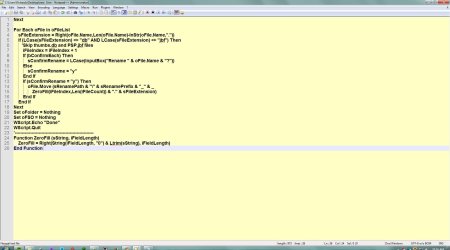
Hi, I'm trying to find help in entering paths and prefix's in my vb script.
I am of course a newbie to visual basic and don't know where to enter the path and wording for prefix.
Any help would be most appreciated.
Rich
 

Attachments

  • rename1.jpg
    rename1.jpg
    158.1 KB · Views: 2
  • rename2.jpg
    rename2.jpg
    114 KB · Views: 2

My Computer My Computer

OS
64 bit
You're not supposed to enter those in the script, but instead set as parameters to the file when you execute it. Example:

rename.vbs c:\somepath somePrefix

use " around the path if it contains spaces, example "c:\some folder"
 

My Computer My Computer

Computer type
Laptop
Computer Manufacturer/Model Number
HP Elitebook 8540p
OS
Windows 7 Pro 32
CPU
Intel(R) Core(TM) i5 CPU M 540 @ 2.53GHz
Motherboard
Hewlett-Packard 1521
Memory
4,00 GB (Usable 2,98)
Graphics Card(s)
NVIDIA NVS 5100M
Sound Card
NVIDIA High Definition Audio
Screen Resolution
1600x900
Hard Drives
INTEL SSDSA2CW120G3
Antivirus
F-Secure Internet Security
Browser
IE, Firefox, Opera
Other Info
Sandboxie,
SRP (Software Restriction Policy),
EMET (Enhanced Mitigation Experience Toolkit),
WFC (Windows Firewall Control by BiniSoft),
Malwarebytes Premium
Hi Tookeri, Thank you for responding.
Where do you place the rename.vbs c:\somepath someprefix ? I assume the top of the page.
 

My Computer My Computer

OS
64 bit
No. From a command window, or from the Start Orb :orb: in the text box "Search programs and files"

The script is designed that way so you never have to modify the code to be able to execute it for different paths and suffixes.
 

My Computer My Computer

Computer type
Laptop
Computer Manufacturer/Model Number
HP Elitebook 8540p
OS
Windows 7 Pro 32
CPU
Intel(R) Core(TM) i5 CPU M 540 @ 2.53GHz
Motherboard
Hewlett-Packard 1521
Memory
4,00 GB (Usable 2,98)
Graphics Card(s)
NVIDIA NVS 5100M
Sound Card
NVIDIA High Definition Audio
Screen Resolution
1600x900
Hard Drives
INTEL SSDSA2CW120G3
Antivirus
F-Secure Internet Security
Browser
IE, Firefox, Opera
Other Info
Sandboxie,
SRP (Software Restriction Policy),
EMET (Enhanced Mitigation Experience Toolkit),
WFC (Windows Firewall Control by BiniSoft),
Malwarebytes Premium
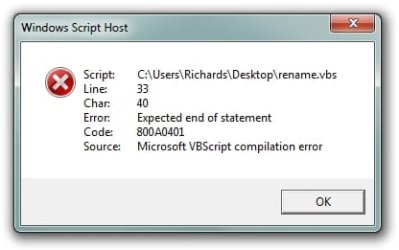
Tookeri, I receive this alert when I run the script.

The code: RenameFiles.vbs "c:\Users\Richards" sp_train 01.jpg
Where I placed the code:
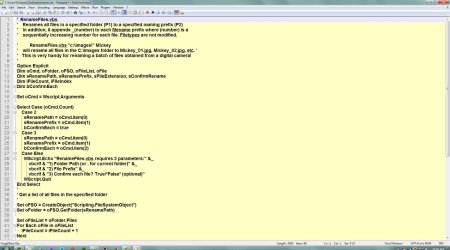
WScript.Echo "RenameFiles.vbs requires 2 parameters:" &_
vbcrlf & "1) Folder Path (or . for current folder)" &_
vbcrlf & "2) File Prefix" &_
vbcrlf & "3) Confirm each file? True/*False* (optional)"
WScript.Quit
RenameFiles.vbs "c:\Users\Richards" sp_train 01.jpg
 

Attachments

  • Windows Script Host.jpg
    Windows Script Host.jpg
    13.5 KB · Views: 18

My Computer My Computer

OS
64 bit
Not sure I understand what you did when you "placed the code". You shouldn't add anything to or in the code.
If this was copied from the code then delete the bold line:

WScript.Echo "RenameFiles.vbs requires 2 parameters:" &_
vbcrlf & "1) Folder Path (or . for current folder)" &_
vbcrlf & "2) File Prefix" &_
vbcrlf & "3) Confirm each file? True/*False* (optional)"
WScript.Quit
RenameFiles.vbs "c:\Users\Richards" sp_train 01.jpg
 

My Computer My Computer

Computer type
Laptop
Computer Manufacturer/Model Number
HP Elitebook 8540p
OS
Windows 7 Pro 32
CPU
Intel(R) Core(TM) i5 CPU M 540 @ 2.53GHz
Motherboard
Hewlett-Packard 1521
Memory
4,00 GB (Usable 2,98)
Graphics Card(s)
NVIDIA NVS 5100M
Sound Card
NVIDIA High Definition Audio
Screen Resolution
1600x900
Hard Drives
INTEL SSDSA2CW120G3
Antivirus
F-Secure Internet Security
Browser
IE, Firefox, Opera
Other Info
Sandboxie,
SRP (Software Restriction Policy),
EMET (Enhanced Mitigation Experience Toolkit),
WFC (Windows Firewall Control by BiniSoft),
Malwarebytes Premium
Hi Tookeri,
I really feel dense.
I removed all the code I added to the original script and ran it in an Admin command prompt and received these errors.
Microsoft Windows [Version 6.1.7601]
Copyright (c) 2009 Microsoft Corporation. All rights reserved.

C:\Windows\System32>Option Explicit
'Option' is not recognized as an internal or external command,
operable program or batch file.

C:\Windows\System32>Dim oCmd, oFolder, oFSO, oFileList, oFile
'Dim' is not recognized as an internal or external command,
operable program or batch file.

C:\Windows\System32>Dim sRenamePath, sRenamePrefix, sFileExtension, sConfirmRena
me
'Dim' is not recognized as an internal or external command,
operable program or batch file.

C:\Windows\System32>Dim iFileCount, iFileIndex
'Dim' is not recognized as an internal or external command,
operable program or batch file.

C:\Windows\System32>Dim bConfirmEach
'Dim' is not recognized as an internal or external command,
operable program or batch file.

Thanks for your patience.
 

My Computer My Computer

OS
64 bit
Not sure why that's failing. As a test try in the command prompt to only type rename.vbs without parameters. That should print the information about how the parameters work.

Also test from Windows Start :orb: Search to see if that makes a difference.

And check if the script came with any specific instructions on how to execute it.
 

My Computer My Computer

Computer type
Laptop
Computer Manufacturer/Model Number
HP Elitebook 8540p
OS
Windows 7 Pro 32
CPU
Intel(R) Core(TM) i5 CPU M 540 @ 2.53GHz
Motherboard
Hewlett-Packard 1521
Memory
4,00 GB (Usable 2,98)
Graphics Card(s)
NVIDIA NVS 5100M
Sound Card
NVIDIA High Definition Audio
Screen Resolution
1600x900
Hard Drives
INTEL SSDSA2CW120G3
Antivirus
F-Secure Internet Security
Browser
IE, Firefox, Opera
Other Info
Sandboxie,
SRP (Software Restriction Policy),
EMET (Enhanced Mitigation Experience Toolkit),
WFC (Windows Firewall Control by BiniSoft),
Malwarebytes Premium
I removed all the code I added to the original script and ran it in an Admin command prompt and received these errors.
[...]
C:\Windows\System32>Option Explicit
'Option' is not recognized as an internal or external command,
operable program or batch file.

[etc. ...]
Some confusion needs clearing up.

WScript.exe and CScript.exe are the interpreters for VBScript (and JScript alike). The only scripting language that Cmd.exe recognises is Batch and solely Batch. The command prompt wants nothing to do with other languages. It does not know what to do with other languages.

So don't go pasting lines of VBScript into the command prompt and expect no errors will be returned.
 

My Computer My Computer

Computer type
PC/Desktop
OS
Windows 10, Windows 8.1 Pro, Windows 7 Professional, OS X El Capitan
Hi there

If you can download a Live LINUX CD then it's simple (beware of spaces / whitespace though in file names).
This command will add PRE_ to the filenames for example.

ls | xargs -I {} mv {} PRE_{}

Here's another command script (Linux) -- it will find say all html files and add prefix_ in front of their names
for f in $(find . -name '*.html'); do mv "$f" "$(dirname "$f")/prefix_$(basename "$f")"; done

With PERL it's also astonishingly simple

perl -e 'rename $_, "PRE_$_" for <*>

I think you can install perl on windows

Installing Perl on Windows (32 and 64 bit) - learn.perl.org

Forget vbscript it's JUNK, CLUNKY and quite difficult to get anything to work properly.

Another good teaching code language is PYTHON -- being taught in UK schools now too.

For Windows you can download

https://www.python.org/downloads/windows/

Very simple, powerful and worth having a look at.

Cheers
jimbo
 
Last edited:

My Computer My Computer

Computer type
PC/Desktop
Computer Manufacturer/Model Number
Custom built, several laptops HP/ASUS
OS
Linux CENTOS 7 / various Windows OS'es and servers
CPU
Intel i7 Intel i5
Memory
8GB, 16GB
Graphics Card(s)
On Motherboard
Sound Card
Realtek HD audio
Monitor(s) Displays
Apple Cinema display, Samsung LCD
Screen Resolution
1920 X 1080
Hard Drives
4 X 1TB SATA
Mouse
Toshiba wireless laser
Internet Speed
> 20MB up
Suggesting different scripting languages are we now, Jimbo?

In that case, the following Command Prompt command appends the string "PRE_" to each filename in the current directory.
Code:
for %I in (*) do ren "%I" "PRE_%~nxI"


And even easier to accomplish in Windows PowerShell,
Code:
gci | ren -new {"PRE_$_"}


Though, I think Moonsie is more looking forward to fixing his VBScript, rather than reading all about how VBScript is such a bad language compared to blah and blah.


Another good teaching code language is PYTHON
However, I highly recommend this language^
 

My Computer My Computer

Computer type
PC/Desktop
OS
Windows 10, Windows 8.1 Pro, Windows 7 Professional, OS X El Capitan
The script accepts 2 (optionally 3) parameters.

The command you entered (RenameFiles.vbs "c:\Users\Richards" sp_train 01.jpg) would be interpreted as 3 parameters, but it doesn't know how to handle the 3rd (01.jpg). It should be 1 or true if you want to prompt for each file, but any non-zero number should work.

Warning: you might not actually want to run this command. I'm not sure it would succeed, but if it does, it will rename the user hive of your registry (ntuser.dat).

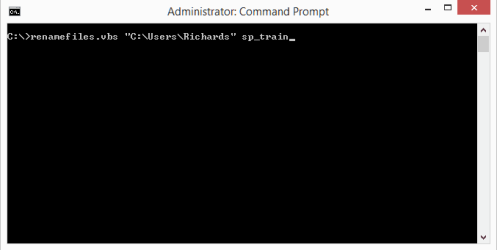
If you just want to rename the files without prompting, you would want to enter (at the command prompt, see attached image and make sure you are in the directory in which renamefiles.vbs is located):

RenameFiles.vbs "c:\Users\Richards" sp_train

Keep in mind that this script doesn't care about file extensions. This is going to rename every file with any extension "sp_train" followed by _ and a number followed by the original extension. For example: "sp_train_01.jpg".

If you're just trying to rename some files for yourself occaisionally, you might be better off using a tool like 1-4a Rename. It has a GUI and advanced renaming options.
 

Attachments

  • Untitled.png
    Untitled.png
    2.1 KB · Views: 5
Last edited:

My Computer My Computer

Computer type
PC/Desktop
OS
Windows 8.1 64-bit
Back
Top