Clear out c: drive

Kari, can you remind me why I would want to move Users to another drive. I run my desktops on 60GB SSDs and I never ran out of space. I have at east 1 virtual partition (Linux) on that drive too.
 

My Computer My Computer

At a glance

Vista, Windows7, Mint Mate, Zorin, Windows 8from 1.6GHz Duo to i7
Computer Manufacturer/Model Number
HP, Dell, Gateway, Toshiba - 4 laptops and 2 desktops
OS
Vista, Windows7, Mint Mate, Zorin, Windows 8
CPU
from 1.6GHz Duo to i7
Monitor(s) Displays
2x HP w2207
Hard Drives
5x HDD, 7x SSD, 12x Externals
Keyboard
with trackball - no mices
Mouse
Trackball mice
Internet Speed
DSL 6000
Kari, can you remind me why I would want to move Users to another drive. I run my desktops on 60GB SSDs and I never ran out of space. I have at east 1 virtual partition (Linux) on that drive too.

Wolfgang, we are old school. We do not fill the system with these strange three letter acronyms WoW, DoD and so on, I mean games. We do not have each music video published since 90's, we are used to use external drives and due our work history, we are quite used to various mobile solutions like Linux or Windows on stick and so on. We know how to utilize storage capacity.

The above is not bragging, it's just plain simple true. Yet, I use the Sysprep method; not because I want to save space on C: but to separate the complete Users folder and user profile structure from the system drive. Imaging is faster and images smaller, I exclude the drive where the Users is located from my images. I backup my user data in cloud, I don't have to include it to local backups.

Also, if the system SSD crashes, I just need to replace it, restore the latest image and with Sysprep tell that the Users folder, with all its content, can be found on drive X:.

About virtual machines, I have a separate drive for them. This is how I like it, the three highlighted drives are internal. C: only has Windows and Program Files, D: the virtual machines including VHDs, and E: the Users folder and user profiles:
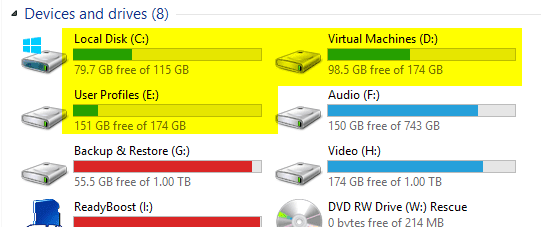

2015-01-31_03h27_39.png
 

My Computer My Computer

At a glance

Windows 10 Pro x64 EN-GB1.6 GHz Intel Core i7-720QM Processor6 GBATI Mobility Radeon HD 5850 Graphics
Computer type
Laptop
Computer Manufacturer/Model Number
HP ENVY 17-1150eg
OS
Windows 10 Pro x64 EN-GB
CPU
1.6 GHz Intel Core i7-720QM Processor
Memory
6 GB
Graphics Card(s)
ATI Mobility Radeon HD 5850 Graphics
Sound Card
Beats sound system with integrated subwoofer
Monitor(s) Displays
17" laptop display, 22" LED and 32" Full HD TV through HDMI
Screen Resolution
1600*900 (1), 1920*1080 (2&3)
Hard Drives
Internal: 2 x 500 GB SATA Hard Disk Drive 7200 rpm
External: 2TB for backups, 3TB USB3 network drive for media
Cooling
As Envy runs a bit warm, I have it on a Cooler Master pad
Keyboard
Logitech diNovo Media Desktop Laser (bluetooth)
Mouse
Logitech Performance Mouse MX
Internet Speed
50/10 Mbps VDSL
Antivirus
Windows Defender 4.3.9431.0
Browser
Maxthon 3.5.2., IE11
Sorry creating such a debate, but I really do appreciate the input! I'm old (and maybe old school, who knows). I actually have 11 TB worth of drives not including the SSD or externals. And I've always tried to install everything other than simple things like 7zip or something to the C:. If Win 7 can run at 60gb, I'm not sure what has balloned mine up so much unless it's things like steam files (which is all I can think of, my wife and I are old, but we play a lot of games). I can't think what else would have did it. I ran treefile awhile back and didn't spot anything, but will try the other program tonight (I remember tree took a while to run).
I really don't want to reinstall if I don't have to though, so a solution that would avoid that would be good to more user files off.
On a side note, do I have to worry about the virtual memory settings?
 

My Computer My Computer

At a glance

Windows 7 Professional 64bitIntel Core i7 920 @ 2.67GHz6.00 GB Triple-Channel DDR3 @ 530MHzATI Radeon HD 5800 Series (XFX Pine Group)
Computer Manufacturer/Model Number
Custom desktop
OS
Windows 7 Professional 64bit
CPU
Intel Core i7 920 @ 2.67GHz
Motherboard
EVGA 141-BL-E757 (Socket 423)
Memory
6.00 GB Triple-Channel DDR3 @ 530MHz
Graphics Card(s)
ATI Radeon HD 5800 Series (XFX Pine Group)
Sound Card
AMD High Definition Audio Device
Hard Drives
932GB Western Digital WDC WD1001FALS-00J7B1 ATA Device (SATA)
2795GB Western Digital WDC WD30EZRX-00MMMB0 ATA Device (SATA)
1863GB Western Digital WDC WD2001FASS-00W2B0 ATA Device (SATA)
1863GB Western Digital WDC WD20EADS-00S2B0 ATA Device (SATA)
Internet Speed
Cable

My Computer My Computer

At a glance

Multi-Boot W7_Pro_x64 W8.1_Pro_x64 W10_Pro_x6...AMD Athlon II x4 6206GB GSkill DDR2 800AMD 4670 GPU + AMD 4200 IGP
Computer type
PC/Desktop
Computer Manufacturer/Model Number
home built
OS
Multi-Boot W7_Pro_x64 W8.1_Pro_x64 W10_Pro_x64 +Linux_VMs +Chromium_VM
CPU
AMD Athlon II x4 620
Motherboard
Gigabyte GA-MA785G-UD3H
Memory
6GB GSkill DDR2 800
Graphics Card(s)
AMD 4670 GPU + AMD 4200 IGP
Sound Card
on board Realtek ALC889A
Monitor(s) Displays
RCA 40" LCD TV, Insignia 32" LCD TV, HP 15" LCD monitor
Screen Resolution
1680 x 1050
Hard Drives
OCZ Vertex 3 120GB,
Samsung F3 1TB (3),
Several others - WD, Seagate, Hitachi, ...
PSU
Corsair 500 W
Case
Rosewill mid tower
Cooling
CM 90mm rifle
Keyboard
Gyration wireless, Logitech wireless, Dell USB wired
Mouse
Gyration wireless, Logitech wireless, V7 USB wired
Internet Speed
Spectrum - 100Mbps D / 10Mbps U
Antivirus
Avast, MBAM3, EMET, WinPatrol
Browser
Pale Moon, Firefox, IE
Other Info
2 multi-boot PC's
Mainly HTPC/Office/Gen purpose (no gaming).
Trendnet USB KVM.
LG DVD burner/Blue Ray Player.
Tray system for removable SATA backup drives.

Not currently OCd, under-volted.
I use Hybrid sleep, rarely re-boot or shutdown.

Hauppauge HD-PVR, Avermedia PCIe TV Tuner, Hauppauge PCI TV Tuner.
Thanks Kari. I get your point. I also use a separate drive for the virtual machines. It is actually part of an external SSD attached via eSata - about as full as your's.

And you are right. We have no games and big video collections go someplace else.
 

Attachments

  • 2015-01-30_2150.png
    2015-01-30_2150.png
    19.4 KB · Views: 0

My Computer My Computer

At a glance

Vista, Windows7, Mint Mate, Zorin, Windows 8from 1.6GHz Duo to i7
Computer Manufacturer/Model Number
HP, Dell, Gateway, Toshiba - 4 laptops and 2 desktops
OS
Vista, Windows7, Mint Mate, Zorin, Windows 8
CPU
from 1.6GHz Duo to i7
Monitor(s) Displays
2x HP w2207
Hard Drives
5x HDD, 7x SSD, 12x Externals
Keyboard
with trackball - no mices
Mouse
Trackball mice
Internet Speed
DSL 6000
Sorry creating such a debate, but I really do appreciate the input!

Please Lucas (that's your name?), you have nothing to be sorry for. If a culprit must be named, let's agree it was I who started an argument, although to my defense I want to mention that I tried to spice it with as much factual information as possible :).
 

My Computer My Computer

At a glance

Windows 10 Pro x64 EN-GB1.6 GHz Intel Core i7-720QM Processor6 GBATI Mobility Radeon HD 5850 Graphics
Computer type
Laptop
Computer Manufacturer/Model Number
HP ENVY 17-1150eg
OS
Windows 10 Pro x64 EN-GB
CPU
1.6 GHz Intel Core i7-720QM Processor
Memory
6 GB
Graphics Card(s)
ATI Mobility Radeon HD 5850 Graphics
Sound Card
Beats sound system with integrated subwoofer
Monitor(s) Displays
17" laptop display, 22" LED and 32" Full HD TV through HDMI
Screen Resolution
1600*900 (1), 1920*1080 (2&3)
Hard Drives
Internal: 2 x 500 GB SATA Hard Disk Drive 7200 rpm
External: 2TB for backups, 3TB USB3 network drive for media
Cooling
As Envy runs a bit warm, I have it on a Cooler Master pad
Keyboard
Logitech diNovo Media Desktop Laser (bluetooth)
Mouse
Logitech Performance Mouse MX
Internet Speed
50/10 Mbps VDSL
Antivirus
Windows Defender 4.3.9431.0
Browser
Maxthon 3.5.2., IE11
No need to explain, I really do appreciate the information I got from the debate. I waited to run WinDirStat over night just because I remember treesizefile taking a bit to scan everything, so I did them both. I've managed to clear out quiet a bit that got dumped on the c: and shouldn't have. But drilling down I have 13.5GB in appdata (7 in local and 5 in roaming).
Just for future folks who may stumble across this thread:
- ComicRack (yes, I'm over 40 and read comics). It stores a ton of images in appdata\local
- AppData\Local\Temp was pretty full. Is it okay just to delete all that out? Some said it was shared, but much of it deleted (because of course, I just deleted it before waiting for a response to see if it was okay to do so)
- AppData\Local\Microsoft has 3.6GB in Outlook and 2GB in AppData\Local\Microsoft\Windows. That I will be smart on and wait for someone to tell me what I can clear out/move/whatever.
 

My Computer My Computer

At a glance

Windows 7 Professional 64bitIntel Core i7 920 @ 2.67GHz6.00 GB Triple-Channel DDR3 @ 530MHzATI Radeon HD 5800 Series (XFX Pine Group)
Computer Manufacturer/Model Number
Custom desktop
OS
Windows 7 Professional 64bit
CPU
Intel Core i7 920 @ 2.67GHz
Motherboard
EVGA 141-BL-E757 (Socket 423)
Memory
6.00 GB Triple-Channel DDR3 @ 530MHz
Graphics Card(s)
ATI Radeon HD 5800 Series (XFX Pine Group)
Sound Card
AMD High Definition Audio Device
Hard Drives
932GB Western Digital WDC WD1001FALS-00J7B1 ATA Device (SATA)
2795GB Western Digital WDC WD30EZRX-00MMMB0 ATA Device (SATA)
1863GB Western Digital WDC WD2001FASS-00W2B0 ATA Device (SATA)
1863GB Western Digital WDC WD20EADS-00S2B0 ATA Device (SATA)
Internet Speed
Cable
- AppData\Local\Temp was pretty full. Is it okay just to delete all that out? Some said it was shared, but much of it deleted (because of course, I just deleted it before waiting for a response to see if it was okay to do so)
It is quite safe to delete the contents of Temp folder (not the folder itself). You can do it manually or use the Disk Cleanup as told in this tutorial: http://www.sevenforums.com/tutorials/122262-windows-7-sp1-disk-cleanup-tool.html

- AppData\Local\Microsoft has 3.6GB in Outlook and 2GB in AppData\Local\Microsoft\Windows. That I will be smart on and wait for someone to tell me what I can clear out/move/whatever.
Excluding the contents of the Temp folder, you should never manually delete anything stored in AppData and its subfolders. Various applications store the application data needed for said application to run correctly.

The Outlook files for instance are probably PST files (extension .pst) and similar, they store your Outlook email messages, contacts, calendar and so on. Outlook cannot work without these files.

Kari
 

My Computer My Computer

At a glance

Windows 10 Pro x64 EN-GB1.6 GHz Intel Core i7-720QM Processor6 GBATI Mobility Radeon HD 5850 Graphics
Computer type
Laptop
Computer Manufacturer/Model Number
HP ENVY 17-1150eg
OS
Windows 10 Pro x64 EN-GB
CPU
1.6 GHz Intel Core i7-720QM Processor
Memory
6 GB
Graphics Card(s)
ATI Mobility Radeon HD 5850 Graphics
Sound Card
Beats sound system with integrated subwoofer
Monitor(s) Displays
17" laptop display, 22" LED and 32" Full HD TV through HDMI
Screen Resolution
1600*900 (1), 1920*1080 (2&3)
Hard Drives
Internal: 2 x 500 GB SATA Hard Disk Drive 7200 rpm
External: 2TB for backups, 3TB USB3 network drive for media
Cooling
As Envy runs a bit warm, I have it on a Cooler Master pad
Keyboard
Logitech diNovo Media Desktop Laser (bluetooth)
Mouse
Logitech Performance Mouse MX
Internet Speed
50/10 Mbps VDSL
Antivirus
Windows Defender 4.3.9431.0
Browser
Maxthon 3.5.2., IE11
Down to 64GB free of 150GB, so I guess that's pretty good. I appreciate all the help!
 

My Computer My Computer

At a glance

Windows 7 Professional 64bitIntel Core i7 920 @ 2.67GHz6.00 GB Triple-Channel DDR3 @ 530MHzATI Radeon HD 5800 Series (XFX Pine Group)
Computer Manufacturer/Model Number
Custom desktop
OS
Windows 7 Professional 64bit
CPU
Intel Core i7 920 @ 2.67GHz
Motherboard
EVGA 141-BL-E757 (Socket 423)
Memory
6.00 GB Triple-Channel DDR3 @ 530MHz
Graphics Card(s)
ATI Radeon HD 5800 Series (XFX Pine Group)
Sound Card
AMD High Definition Audio Device
Hard Drives
932GB Western Digital WDC WD1001FALS-00J7B1 ATA Device (SATA)
2795GB Western Digital WDC WD30EZRX-00MMMB0 ATA Device (SATA)
1863GB Western Digital WDC WD2001FASS-00W2B0 ATA Device (SATA)
1863GB Western Digital WDC WD20EADS-00S2B0 ATA Device (SATA)
Internet Speed
Cable
Back
Top