Kari, can you remind me why I would want to move Users to another drive. I run my desktops on 60GB SSDs and I never ran out of space. I have at east 1 virtual partition (Linux) on that drive too.
Wolfgang, we are old school. We do not fill the system with these strange three letter acronyms WoW, DoD and so on, I mean games. We do not have each music video published since 90's, we are used to use external drives and due our work history, we are quite used to various mobile solutions like Linux or Windows on stick and so on. We know how to utilize storage capacity.
The above is not bragging, it's just plain simple true. Yet, I use the Sysprep method; not because I want to save space on C: but to separate the complete Users folder and user profile structure from the system drive. Imaging is faster and images smaller, I exclude the drive where the Users is located from my images. I backup my user data in cloud, I don't have to include it to local backups.
Also, if the system SSD crashes, I just need to replace it, restore the latest image and with Sysprep tell that the Users folder, with all its content, can be found on drive X:.
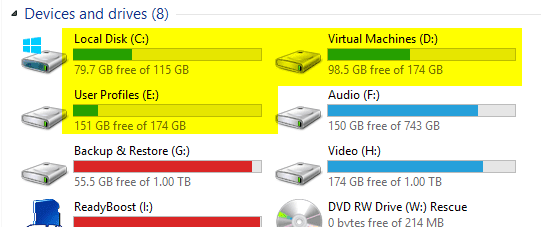
About virtual machines, I have a separate drive for them. This is how I like it, the three highlighted drives are internal. C: only has Windows and Program Files, D: the virtual machines including VHDs, and E: the Users folder and user profiles:



 .
.