2nd sata hdd not recognizedby windows 7

Preston Vanaman

New member
Local time
1:52 PM
Messages
2
Hi
Installed a 2nd sata 1 tb hdd( primary is a 2tb sata) in my system. It shows up in device manager as "online unallocated" with no drive letter. It does not show up in my computer.
How do I assign a drive letter, I have a lot of data on this hdd and do not want to have to format it?

Thank you
 

My Computer My Computer

At a glance

Windows 7 Home Premium 32bit
Computer type
PC/Desktop
Computer Manufacturer/Model Number
custom build
OS
Windows 7 Home Premium 32bit
Hard Drives
Toshiba 2 tb primary; wd 1 tb
Browser
ie8
It may show in Disk Management but not show in My Computer/Computer/This PC or in Windows Explorer [File Explorer in Win8/8.1] until it has been partitioned then formatted after which a drive letter is assigned or can be assigned. I usually boot to a GPARTED CD to check partitions and their format. Sometimes a drive will get formatted as RAW, usually hard to get it back to NTFS without reformatting. Being unallocated usually means the partitioning has been lost along with any data on it.
 

My Computer My Computer

At a glance

Windows 7 Ultimate 64-bit, Windows 8.1 64-bit...
Computer type
PC/Desktop
Computer Manufacturer/Model Number
Customs, Dell, Gateway, HP, Toshiba, Acer, ASUS
OS
Windows 7 Ultimate 64-bit, Windows 8.1 64-bit, Mac OS X 10.10, Linux Mint 17, Windows 10 Pro TP
Keyboard
Microsoft
Mouse
Microsoft
2n sata

Hi
Thanks for the reply.
I know it shows it as "unallocated" however I took it out of another computer in which it was the primary drive running XP, I know it was working at that time so I want to try and recover the data.
Is there any procedure to open the drive without putting back into the old computer that I do not have any longer?
 

My Computer My Computer

At a glance

Windows 7 Home Premium 32bit
Computer type
PC/Desktop
Computer Manufacturer/Model Number
custom build
OS
Windows 7 Home Premium 32bit
Hard Drives
Toshiba 2 tb primary; wd 1 tb
Browser
ie8
Hi
Installed a 2nd sata 1 tb hdd( primary is a 2tb sata) in my system. It shows up in device manager as "online unallocated" with no drive letter. It does not show up in my computer.
How do I assign a drive letter, I have a lot of data on this hdd and do not want to have to format it?

Thank you

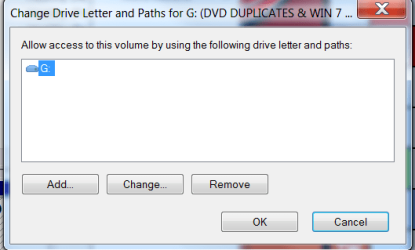
Right click and select "change drive letters and paths", click add and ok
 

Attachments

  • DRIVE LETTERS AND PATHS.png
    DRIVE LETTERS AND PATHS.png
    13.1 KB · Views: 8

My Computer My Computer

At a glance

Windows 7 Professional X64Core i7 (2nd gen) i7-2600K / 3.40GHzDDR3 2400MHz (OC) 16gbIntel(R) HD Graphics 3000, -1988 Mb
Computer type
PC/Desktop
Computer Manufacturer/Model Number
Self-Built
OS
Windows 7 Professional X64
CPU
Core i7 (2nd gen) i7-2600K / 3.40GHz
Motherboard
ASUS P8Z77-V Intel 7 Series Motherboard
Memory
DDR3 2400MHz (OC) 16gb
Graphics Card(s)
Intel(R) HD Graphics 3000, -1988 Mb
Sound Card
8 ChannelsAudio Chipset Realtek ALC892
Monitor(s) Displays
LG 29UM65 Black 29"
Screen Resolution
2560 x 1080
Hard Drives
840 EVO 250 GB SSD ;2tb (2);Seagate;1tb Seagate; 750 gb Seagate; wd ext (2) 750 gb,WD 2tb X 2;WD 3TB Black
PSU
750 watt
Case
Thermaltake RX -1
Cooling
2120mm Fans Included 1Other Fan Ports 5x 200mm Fan Ports
Keyboard
Microsoft Digital Media Pro
Mouse
Microsoft Wireless 6000
Internet Speed
U-verse 18 mbps
Antivirus
MSE
Browser
Firefox, Chrome and my favorite: Pale Moon
Other Info
HdHomerun Dual Tuner.
SRS Audio Lab,
Pioneer BDR 208-DBK
PS3-What a difference in my Surround Sound Receiver!
HP 4540s - My new Toy.
Epson R280 Printer- To personalize my Dvds.
Canon MP 560 - For scanning.
I keep a 'box' for plugging in SATA HDDs and an external adapter for the PATA HDDs. Both connect via USB cable and I can manipulate them in Disk Management.
 

My Computer My Computer

At a glance

Windows 7 Ultimate 64-bit, Windows 8.1 64-bit...
Computer type
PC/Desktop
Computer Manufacturer/Model Number
Customs, Dell, Gateway, HP, Toshiba, Acer, ASUS
OS
Windows 7 Ultimate 64-bit, Windows 8.1 64-bit, Mac OS X 10.10, Linux Mint 17, Windows 10 Pro TP
Keyboard
Microsoft
Mouse
Microsoft
Back
Top