Solved Huge amount of mystery space taken up on Hard Drive

bazmnaz

New member
Local time
7:26 AM
Messages
8
Hi there,

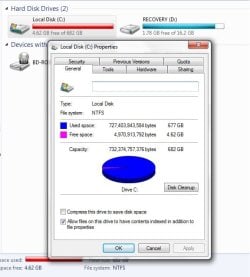
The space on my hard drive has slowly been decreasing as of late, I am stumped as to why this is happening. At this very moment I have 4.62GB free of 682GB (750GB Internal Hard Drive). However when I open Local Disk C and view the properties of all the folders to see how much space they take up, it says 173GB. I have shown the hidden folders as well when viewing properties.
So I have no idea what is taking up the remaining 509GB of space.

I have done some research for this problem already but with no successful solution.
I have:
- Used WinDirStat, it says 192GB is in use.
- Used Disk Cleaner (which was able to free about 500MB of space)
- Used Disk Cleaner to remove restore points (I had some trouble getting it to work, it would continually get stuck on "Scanning: system error memory dump files"). After getting it to work finally, it cleared only 2.5GB.
- I have used Norton 360 to do a Full System Scan
- Deleted temporary files

Does anyone know what could be taking up this huge amount of space?

Thanks.
 

Attachments
  • 1.jpg
    1.jpg
    43 KB · Views: 56
  • 2.jpg
    2.jpg
    34.5 KB · Views: 56

My Computer My Computer

At a glance

Windows 7 Home Premium, 64 Bit8GB
Computer type
Laptop
Computer Manufacturer/Model Number
HP
OS
Windows 7 Home Premium, 64 Bit
Memory
8GB
Antivirus
Norton 360

My Computer My Computer

At a glance

Multi-Boot W7_Pro_x64 W8.1_Pro_x64 W10_Pro_x6...AMD Athlon II x4 6206GB GSkill DDR2 800AMD 4670 GPU + AMD 4200 IGP
Computer type
PC/Desktop
Computer Manufacturer/Model Number
home built
OS
Multi-Boot W7_Pro_x64 W8.1_Pro_x64 W10_Pro_x64 +Linux_VMs +Chromium_VM
CPU
AMD Athlon II x4 620
Motherboard
Gigabyte GA-MA785G-UD3H
Memory
6GB GSkill DDR2 800
Graphics Card(s)
AMD 4670 GPU + AMD 4200 IGP
Sound Card
on board Realtek ALC889A
Monitor(s) Displays
RCA 40" LCD TV, Insignia 32" LCD TV, HP 15" LCD monitor
Screen Resolution
1680 x 1050
Hard Drives
OCZ Vertex 3 120GB,
Samsung F3 1TB (3),
Several others - WD, Seagate, Hitachi, ...
PSU
Corsair 500 W
Case
Rosewill mid tower
Cooling
CM 90mm rifle
Keyboard
Gyration wireless, Logitech wireless, Dell USB wired
Mouse
Gyration wireless, Logitech wireless, V7 USB wired
Internet Speed
Spectrum - 100Mbps D / 10Mbps U
Antivirus
Avast, MBAM3, EMET, WinPatrol
Browser
Pale Moon, Firefox, IE
Other Info
2 multi-boot PC's
Mainly HTPC/Office/Gen purpose (no gaming).
Trendnet USB KVM.
LG DVD burner/Blue Ray Player.
Tray system for removable SATA backup drives.

Not currently OCd, under-volted.
I use Hybrid sleep, rarely re-boot or shutdown.

Hauppauge HD-PVR, Avermedia PCIe TV Tuner, Hauppauge PCI TV Tuner.
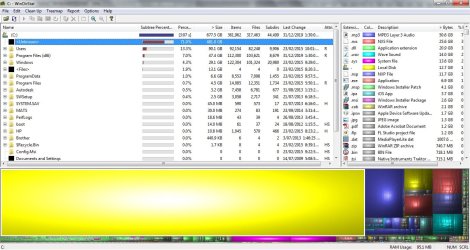
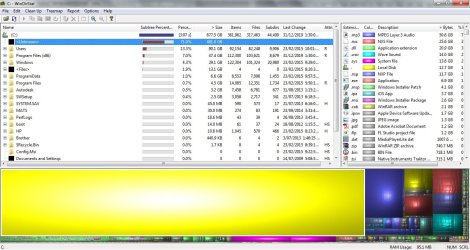
Thanks DavidE, I just did a scan with WinDirStat and have 'shown unknown'. It is showing that 71% (481GB) has been taken up by these 'unknown file/s' but how can I see what it is, or how to delete it?
 

Attachments

  • 3.jpg
    3.jpg
    150.7 KB · Views: 9

My Computer My Computer

At a glance

Windows 7 Home Premium, 64 Bit8GB
Computer type
Laptop
Computer Manufacturer/Model Number
HP
OS
Windows 7 Home Premium, 64 Bit
Memory
8GB
Antivirus
Norton 360

My Computer My Computer

At a glance

Multi-Boot W7_Pro_x64 W8.1_Pro_x64 W10_Pro_x6...AMD Athlon II x4 6206GB GSkill DDR2 800AMD 4670 GPU + AMD 4200 IGP
Computer type
PC/Desktop
Computer Manufacturer/Model Number
home built
OS
Multi-Boot W7_Pro_x64 W8.1_Pro_x64 W10_Pro_x64 +Linux_VMs +Chromium_VM
CPU
AMD Athlon II x4 620
Motherboard
Gigabyte GA-MA785G-UD3H
Memory
6GB GSkill DDR2 800
Graphics Card(s)
AMD 4670 GPU + AMD 4200 IGP
Sound Card
on board Realtek ALC889A
Monitor(s) Displays
RCA 40" LCD TV, Insignia 32" LCD TV, HP 15" LCD monitor
Screen Resolution
1680 x 1050
Hard Drives
OCZ Vertex 3 120GB,
Samsung F3 1TB (3),
Several others - WD, Seagate, Hitachi, ...
PSU
Corsair 500 W
Case
Rosewill mid tower
Cooling
CM 90mm rifle
Keyboard
Gyration wireless, Logitech wireless, Dell USB wired
Mouse
Gyration wireless, Logitech wireless, V7 USB wired
Internet Speed
Spectrum - 100Mbps D / 10Mbps U
Antivirus
Avast, MBAM3, EMET, WinPatrol
Browser
Pale Moon, Firefox, IE
Other Info
2 multi-boot PC's
Mainly HTPC/Office/Gen purpose (no gaming).
Trendnet USB KVM.
LG DVD burner/Blue Ray Player.
Tray system for removable SATA backup drives.

Not currently OCd, under-volted.
I use Hybrid sleep, rarely re-boot or shutdown.

Hauppauge HD-PVR, Avermedia PCIe TV Tuner, Hauppauge PCI TV Tuner.
Tree Size doesn't seem to be any help, it is only showing me the approx. 170GB of the 'non-unknown' data. Is there a way to show the unknown files? I have the free version.
 

My Computer My Computer

At a glance

Windows 7 Home Premium, 64 Bit8GB
Computer type
Laptop
Computer Manufacturer/Model Number
HP
OS
Windows 7 Home Premium, 64 Bit
Memory
8GB
Antivirus
Norton 360
I'd spend at least a few minutes manually going through Explorer, trying to find an unusually large folder--and then drilling into that folder's subfolders to further isolate the culprit folder.

Have you gone into C:\users\your user name\appdata and looked around?

If you try to configure System Restore, how much space does it say is supposedly allotted to System Restore?

What, if any, backup programs are you using?
 

My Computer My Computer

At a glance

Windows 7 Home Premium SP1, 64-bitIntel Skylake i5-6600K, not overclocked8 GB HyperX DDR4-2666 (2 x 4 GB)none; graphics are integrated on CPU
Computer type
PC/Desktop
Computer Manufacturer/Model Number
Ignatz Special; 4 speed manual gearbox; factory air conditioning; one of one
OS
Windows 7 Home Premium SP1, 64-bit
CPU
Intel Skylake i5-6600K, not overclocked
Motherboard
AsRock Z170M Extreme 4, micro ATX
Memory
8 GB HyperX DDR4-2666 (2 x 4 GB)
Graphics Card(s)
none; graphics are integrated on CPU
Sound Card
onboard: Realtek ALC1150; external: USB Behringer UF0-202
Monitor(s) Displays
Dell S2340M 23 inch IPS
Screen Resolution
1600 x 900
Hard Drives
System: Crucial MX100 series SSD, 128 GB;
Data: Samsung Spinpoint 103SJ, 1 TB;
Backup: WD Caviar Green WD30EZRX-00D8PB0, 3 TB
PSU
Rosewill SilentNight 500 watt fanless, semi-modular
Case
Antec Solo II
Cooling
Noctua NH-U12S; Noctua F12 intake, Noctua S12A exhaust
Keyboard
Microsoft 200 6JH-00001 USB
Mouse
Dell or Microsoft optical wired; USB
Antivirus
Microsoft Security Essentials and Malwarebytes Premium
Browser
Pale Moon
Other Info
All fans PWM; speeds at idle: CPU circa 500 rpm; intake circa 600 rpm; exhaust circa 600 rpm; CPU temps 27 idle and 47 C load in a warm room (27 C/81 F) when running Intel Extreme Tuning Utility stress test.
Hi Bazmnaz,

The disk space being used up could be related to System Restore points. I found this article that shows you how to tell if the System Restore points are using up space, how to increase/decrease the amount of space used for them, as well as the option to turn off the feature. Hope this can help.

Make System Restore Use Less Drive Space in Windows 7

Thanks,
Kevin
 

My Computer My Computer

At a glance

Windows 7 Enterprise 32 bitCore i54 GB
Computer type
PC/Desktop
Computer Manufacturer/Model Number
Lenovo ThinkCentre
OS
Windows 7 Enterprise 32 bit
CPU
Core i5
Memory
4 GB
Antivirus
Symantec
Browser
IE 8
Hi Kevin,

I have already used this method to clear my restore points. It didn't remove the 481GB of unknown file/s clogging up space.
 

My Computer My Computer

At a glance

Windows 7 Home Premium, 64 Bit8GB
Computer type
Laptop
Computer Manufacturer/Model Number
HP
OS
Windows 7 Home Premium, 64 Bit
Memory
8GB
Antivirus
Norton 360
.......Have you gone into C:\users\your user name\appdata and looked around?.....

That is a good suggestion I would pickup. Try deleting the folders in Computer>C:>Users>Username>AppData>Local>Temp

How to: http://www.auxiliary.com/mis/documents/CleanTempFolderWindows7.pdf

Select all the folders/files, right click and on the Properties page check how much space these occupy before you use Shift+Del. If you use just delete then you have to empty the Recycle Bin afterwards.. Some folders/files currently in use cannot be deleted. Just say OK to retain those.
 

My Computer My Computer

At a glance

Windows 7 Home Premium 32 bit
OS
Windows 7 Home Premium 32 bit

My Computer My Computer

At a glance

Multi-Boot W7_Pro_x64 W8.1_Pro_x64 W10_Pro_x6...AMD Athlon II x4 6206GB GSkill DDR2 800AMD 4670 GPU + AMD 4200 IGP
Computer type
PC/Desktop
Computer Manufacturer/Model Number
home built
OS
Multi-Boot W7_Pro_x64 W8.1_Pro_x64 W10_Pro_x64 +Linux_VMs +Chromium_VM
CPU
AMD Athlon II x4 620
Motherboard
Gigabyte GA-MA785G-UD3H
Memory
6GB GSkill DDR2 800
Graphics Card(s)
AMD 4670 GPU + AMD 4200 IGP
Sound Card
on board Realtek ALC889A
Monitor(s) Displays
RCA 40" LCD TV, Insignia 32" LCD TV, HP 15" LCD monitor
Screen Resolution
1680 x 1050
Hard Drives
OCZ Vertex 3 120GB,
Samsung F3 1TB (3),
Several others - WD, Seagate, Hitachi, ...
PSU
Corsair 500 W
Case
Rosewill mid tower
Cooling
CM 90mm rifle
Keyboard
Gyration wireless, Logitech wireless, Dell USB wired
Mouse
Gyration wireless, Logitech wireless, V7 USB wired
Internet Speed
Spectrum - 100Mbps D / 10Mbps U
Antivirus
Avast, MBAM3, EMET, WinPatrol
Browser
Pale Moon, Firefox, IE
Other Info
2 multi-boot PC's
Mainly HTPC/Office/Gen purpose (no gaming).
Trendnet USB KVM.
LG DVD burner/Blue Ray Player.
Tray system for removable SATA backup drives.

Not currently OCd, under-volted.
I use Hybrid sleep, rarely re-boot or shutdown.

Hauppauge HD-PVR, Avermedia PCIe TV Tuner, Hauppauge PCI TV Tuner.
Hi ignatzatsonic,

My AppData folder is only approx. 27.5GB. So I don't think any culprit would be in the AppData folder seeing as there is some unknown file/s taking up 481GB.

Also, to answer your other question, I do not currently have any restore points, as I have recently cleared them all thinking this was the initial problem, which it did not turn out to be. I also have 0 bytes allocated for system restore points. I hope this answer was in relation to your question.

I have also already previously cleared my temp folder. It currently 22MB in file size.

I am not using any back up programs. To back up my files, I copy my whole user to an external hard drive once a week. Usually takes about an hour which works fine for me.

I am going to try an Error-checking scan overnight on the Local Disk C and see if I have any luck with that (Computer > Local Disk C > Right Click > Properties > Tools (tab) > Error-checking).
 

My Computer My Computer

At a glance

Windows 7 Home Premium, 64 Bit8GB
Computer type
Laptop
Computer Manufacturer/Model Number
HP
OS
Windows 7 Home Premium, 64 Bit
Memory
8GB
Antivirus
Norton 360

My Computer My Computer

At a glance

Multi-Boot W7_Pro_x64 W8.1_Pro_x64 W10_Pro_x6...AMD Athlon II x4 6206GB GSkill DDR2 800AMD 4670 GPU + AMD 4200 IGP
Computer type
PC/Desktop
Computer Manufacturer/Model Number
home built
OS
Multi-Boot W7_Pro_x64 W8.1_Pro_x64 W10_Pro_x64 +Linux_VMs +Chromium_VM
CPU
AMD Athlon II x4 620
Motherboard
Gigabyte GA-MA785G-UD3H
Memory
6GB GSkill DDR2 800
Graphics Card(s)
AMD 4670 GPU + AMD 4200 IGP
Sound Card
on board Realtek ALC889A
Monitor(s) Displays
RCA 40" LCD TV, Insignia 32" LCD TV, HP 15" LCD monitor
Screen Resolution
1680 x 1050
Hard Drives
OCZ Vertex 3 120GB,
Samsung F3 1TB (3),
Several others - WD, Seagate, Hitachi, ...
PSU
Corsair 500 W
Case
Rosewill mid tower
Cooling
CM 90mm rifle
Keyboard
Gyration wireless, Logitech wireless, Dell USB wired
Mouse
Gyration wireless, Logitech wireless, V7 USB wired
Internet Speed
Spectrum - 100Mbps D / 10Mbps U
Antivirus
Avast, MBAM3, EMET, WinPatrol
Browser
Pale Moon, Firefox, IE
Other Info
2 multi-boot PC's
Mainly HTPC/Office/Gen purpose (no gaming).
Trendnet USB KVM.
LG DVD burner/Blue Ray Player.
Tray system for removable SATA backup drives.

Not currently OCd, under-volted.
I use Hybrid sleep, rarely re-boot or shutdown.

Hauppauge HD-PVR, Avermedia PCIe TV Tuner, Hauppauge PCI TV Tuner.
All throughout we never had a picture of Windows Disk Management.Please post one clearly showing capacity , Free Space and % Free in the drive list..

Do you have Bitlocker encryption turned on? If it is chugging along for the first time it will lock a lot of space till it completes encryption.

What all Norton programs have you installed? These can notoriously create their own hidden recycle bins and hidden space for backups.

Windows Media player can also gobble up space

Check this: <Unknown> again … | WinDirStat propaganda blog

"I had to leave windirstat running for approx 9 hours (seriously!) and I discovered that Windows Media Player had decided to continually cache millions of .jpg’s for my very (VERY!) large music collection inside its local folder on the Windows system
I’ve turned the WMP library and cache function off (I never use it for music) and added the folder to ‘CCleaners’ list of user added locations to clean out
I’ve just run CCleaner and I’m slowly watching over 50 gig’s of useless images, duplicated hundreds of times, being slowly banished. I have a slowly expanding hard drive!
Apparantly there’s some glitch in WMP on Windows 7 64 bit machines whereby the program just continually creates album art non stop the whole time the machine is on. No solution for it at this time"

"Running WDS through CMDasSys.exe allowed me to find my culprit: gigs and gigs of Microsoft Media Player (an application I never use) art cache files. They were tricky to delete — I booted into Linux and mounted my C drive there — but I have my space back! Offending files were at
C:\Windows\ServiceProfiles\NetworkService\AppData\Local\Microsoft\Media Player\Art Cache
Good riddance. "

I have no clue on running WDS through CMDasSys.exe. Perhaps DavidE could help you on it.

I have just presented some information gathered by me.
 

My Computer My Computer

At a glance

Windows 7 Home Premium 32 bit
OS
Windows 7 Home Premium 32 bit
I have no clue on running WDS through CMDasSys.exe. Perhaps DavidE could help you on it.

No, i also have no clue and can't help.
That's a good find, and may help solve some of the issues we see reported here for "missing space" !
 

My Computer My Computer

At a glance

Multi-Boot W7_Pro_x64 W8.1_Pro_x64 W10_Pro_x6...AMD Athlon II x4 6206GB GSkill DDR2 800AMD 4670 GPU + AMD 4200 IGP
Computer type
PC/Desktop
Computer Manufacturer/Model Number
home built
OS
Multi-Boot W7_Pro_x64 W8.1_Pro_x64 W10_Pro_x64 +Linux_VMs +Chromium_VM
CPU
AMD Athlon II x4 620
Motherboard
Gigabyte GA-MA785G-UD3H
Memory
6GB GSkill DDR2 800
Graphics Card(s)
AMD 4670 GPU + AMD 4200 IGP
Sound Card
on board Realtek ALC889A
Monitor(s) Displays
RCA 40" LCD TV, Insignia 32" LCD TV, HP 15" LCD monitor
Screen Resolution
1680 x 1050
Hard Drives
OCZ Vertex 3 120GB,
Samsung F3 1TB (3),
Several others - WD, Seagate, Hitachi, ...
PSU
Corsair 500 W
Case
Rosewill mid tower
Cooling
CM 90mm rifle
Keyboard
Gyration wireless, Logitech wireless, Dell USB wired
Mouse
Gyration wireless, Logitech wireless, V7 USB wired
Internet Speed
Spectrum - 100Mbps D / 10Mbps U
Antivirus
Avast, MBAM3, EMET, WinPatrol
Browser
Pale Moon, Firefox, IE
Other Info
2 multi-boot PC's
Mainly HTPC/Office/Gen purpose (no gaming).
Trendnet USB KVM.
LG DVD burner/Blue Ray Player.
Tray system for removable SATA backup drives.

Not currently OCd, under-volted.
I use Hybrid sleep, rarely re-boot or shutdown.

Hauppauge HD-PVR, Avermedia PCIe TV Tuner, Hauppauge PCI TV Tuner.
hi jumanji,

Is this the photo you are wanting to see? I also posted a photo of the WinDirStat scan of my computer, I will post again, this shows the capacity and % of space free etc.

I'm not quite sure what Bitlocker Encryption is, but as far as I know I don't have it on.

I have Norton 360 21.6.0.32 installed.

I also had a look at windows media player, but I didn't have any luck finding that folder location... I found something similar but that folder only took up a few kB's.

I'm not quite sure what that WDS thing is either, could someone explain it? Or suggest whether I should use it? I gather it is something similar to WinDirStat?

thanks
 

Attachments

  • 4.jpg
    4.jpg
    65.2 KB · Views: 1
  • 3.jpg
    3.jpg
    150.7 KB · Views: 3

My Computer My Computer

At a glance

Windows 7 Home Premium, 64 Bit8GB
Computer type
Laptop
Computer Manufacturer/Model Number
HP
OS
Windows 7 Home Premium, 64 Bit
Memory
8GB
Antivirus
Norton 360
Here is another program that was recommended in another thread.
I've never used it, but you can try it if you're interested.
Antibody Software - WizTree finds the files and folders using the most disk space on your hard drive

I just downloaded WizTree portable and ran it.
I can see the folders and files in the System Volume Information folder with this program, and delete is an option for some of the files.

Give it a try and see what is in your System Volume Information folder.
 

My Computer My Computer

At a glance

Multi-Boot W7_Pro_x64 W8.1_Pro_x64 W10_Pro_x6...AMD Athlon II x4 6206GB GSkill DDR2 800AMD 4670 GPU + AMD 4200 IGP
Computer type
PC/Desktop
Computer Manufacturer/Model Number
home built
OS
Multi-Boot W7_Pro_x64 W8.1_Pro_x64 W10_Pro_x64 +Linux_VMs +Chromium_VM
CPU
AMD Athlon II x4 620
Motherboard
Gigabyte GA-MA785G-UD3H
Memory
6GB GSkill DDR2 800
Graphics Card(s)
AMD 4670 GPU + AMD 4200 IGP
Sound Card
on board Realtek ALC889A
Monitor(s) Displays
RCA 40" LCD TV, Insignia 32" LCD TV, HP 15" LCD monitor
Screen Resolution
1680 x 1050
Hard Drives
OCZ Vertex 3 120GB,
Samsung F3 1TB (3),
Several others - WD, Seagate, Hitachi, ...
PSU
Corsair 500 W
Case
Rosewill mid tower
Cooling
CM 90mm rifle
Keyboard
Gyration wireless, Logitech wireless, Dell USB wired
Mouse
Gyration wireless, Logitech wireless, V7 USB wired
Internet Speed
Spectrum - 100Mbps D / 10Mbps U
Antivirus
Avast, MBAM3, EMET, WinPatrol
Browser
Pale Moon, Firefox, IE
Other Info
2 multi-boot PC's
Mainly HTPC/Office/Gen purpose (no gaming).
Trendnet USB KVM.
LG DVD burner/Blue Ray Player.
Tray system for removable SATA backup drives.

Not currently OCd, under-volted.
I use Hybrid sleep, rarely re-boot or shutdown.

Hauppauge HD-PVR, Avermedia PCIe TV Tuner, Hauppauge PCI TV Tuner.
Do you play StarWars on this machine.
 

My Computer My Computer

At a glance

Vista, Windows7, Mint Mate, Zorin, Windows 8from 1.6GHz Duo to i7
Computer Manufacturer/Model Number
HP, Dell, Gateway, Toshiba - 4 laptops and 2 desktops
OS
Vista, Windows7, Mint Mate, Zorin, Windows 8
CPU
from 1.6GHz Duo to i7
Monitor(s) Displays
2x HP w2207
Hard Drives
5x HDD, 7x SSD, 12x Externals
Keyboard
with trackball - no mices
Mouse
Trackball mice
Internet Speed
DSL 6000
WDS is nothing but WinDirStat. Your Windows Disk Management does not show the drive listing on the top which I wanted to see. Anyway I feel all that is not going to help and we are all still groping in the dark. :D

DavidE has suggested WizTree. Try it.

Then try TreeSize Free - Quickly Scan Directory Sizes and Find Space Hogs

"521 Gigs of Unknown Space According to WinDirStat "

"OK, I found the answer using TreeSize, there are three directories in the Profile folders that have file name over the 260 character limit, which is why I wasn't seeing the files.Now I just have to figure out how to delete these directories." The user also found the way to delete those directories. 521 Gigs of Unknown Space According to WinDirStat

If all these draw a blank, I would suggest that you examine your drive - each and every folder and subfolder - booting with a Live Linux pen drive putting Windows to sleep.
 

My Computer My Computer

At a glance

Windows 7 Home Premium 32 bit
OS
Windows 7 Home Premium 32 bit
GOOD NEWS! I FOUND THE PROBLEM!

Thankyou DavidE who suggested to download WizTree, it did the trick! I did a scan of my C drive and it found AND showed exactly where the problem was. It did take a few times to scan, it kept freezing up.

C:// > SysWOW64 > config > systemprofile > AppData > Local > Microsoft > Windows > Temporary Internet Files > Content.IE5

This folder contains THOUSANDS of files ranging up to 21MB each. This is what is taking up my hard drive space!

I am having trouble finding a way to remove this however. Any suggestions? Windows explorer keep freezing and not responding when I get to the 'systemprofile'.
 

My Computer My Computer

At a glance

Windows 7 Home Premium, 64 Bit8GB
Computer type
Laptop
Computer Manufacturer/Model Number
HP
OS
Windows 7 Home Premium, 64 Bit
Memory
8GB
Antivirus
Norton 360
Glad you found the culprit. Also try using Treesize Free also as indicated in my post #18. Just for us know which are all the programs that are effective in dealing with such situations.

I had also indicated therein that the user had found a way to delete those files. 521 Gigs of Unknown Space According to WinDirStat

This is it:

"The final solution was using Treesize to find the directory with the missing data.

I then used Robocopy Purge feature to regain the space as follows:

MKDIR "C:\empty"

Creates an empty directory.

ROBOCOPY "C:\empty" "c:\ProblemDir" /PURGE

Worked great and I have my space back."

If it doesn't help boot from a live Linux pendrive putting Windows to sleep, access your drive, navigate to the folder and delete the offending files/folders in Linux.

( My ADSL internet speed has gone to dogs since yesterday night with most websites not accessible - abysmally low speeds and my ISP is still to set it right. Luckily Seven Forums is loading but taking a lot of time. Resulted in my double posting since I couldn't make out whether my post had gone through to the destination. I am on datacard EVDO but still no better. Looks like a gateway problem.)
 

My Computer My Computer

At a glance

Windows 7 Home Premium 32 bit
OS
Windows 7 Home Premium 32 bit
Back
Top