
Backup - Make a "Create Incremental Backup" Shortcut

How to Make a "Create Incremental Backup" Shortcut in Vista, Windows 7, and Windows 8

   Information
This will show how to download a Create Incremental Backup shortcut that will instantly create a incremental backup of the last previously created Windows backup set, and show a progress bar in Vista, Windows 7, and Windows 8.

   Note
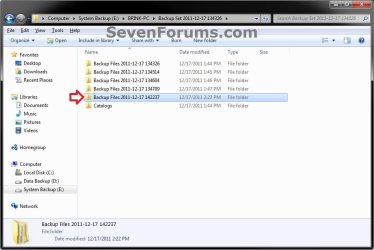
Each new backup is saved in this format:

drive letter:\computer name\Backup Set YYYY-MM-DD HHMMSS

Inside each new Backup Set folder will be Backup Files YYYY-MM-DD HHMMSS folders that are incremental backups of that specific backup set.

When this shortcut is used, it will instantly create a new Backup Files folder in the Backup Set folder for the last (newest) backup set created. This is the same as clicking on the Back up now button in "Backup and Restore" to manually create another backup of what you already had setup.
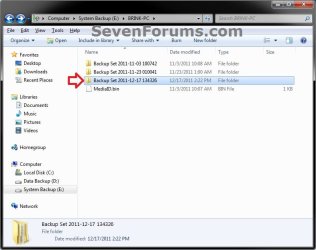
Backup_Set.jpg

Backup_Files.jpg
   Warning
To be able to use this shortcut:
  • You must be logged in as an administrator.

  • You would have needed to previously set up backup and created a Windows backup since this shortcut creates a new incremental backup of this backup set.

EXAMPLE: Progress bar
NOTE: This is the progress bar that you will see when you run the shortcut indicating that the backup is in progress and at what percentage complete. InProgress.jpg
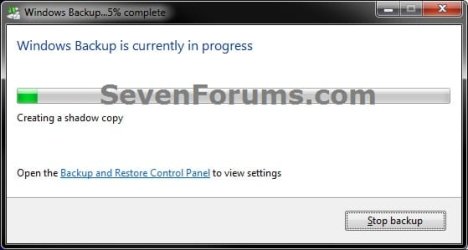
Complete.jpg


OPTION ONE

To Download and Setup the "Create Incremental Backup" Shortcut

1. Click on the Download button below to download the file below. Create_Incremental_Backup_for_Last_Backup_Set.zip


Download


2. Click on Save and save the .zip file to your desktop.

3. Open the downloaded .zip file, and extract (drag and drop) all of it's contents to your desktop.

4. Right click on the extracted Create Incremental Backup for Last Backup Set.vbs file, click on Properties, General tab, and click on the Unblock button if available.
NOTE: If you do not have a Unblock button under the General tab, then the file is already unblocked and you can continue on.

5. Right click on the now unblocked Create Incremental Backup for Last Backup Set.vbs file, and click on Cut.

6. Navigate to C:\Windows in Windows Explorer, then right click on a empty area of the window and click on Paste to move the .vbs file here.

7. If prompted by UAC, then click on Continue and Yes.

8. Right click on the extracted Create Incremental Backup shortcut, click on Properties, General tab, and click on the Unblock button if available.
NOTE: If you do not have a Unblock button under the General tab, then the file is already unblocked and you can continue on.

9. You can now assign a keyboard shortcut, place in Quick Launch, or move this Create Incremental Backup shortcut to where you like for easy use.


OPTION TWO

To Remove the "Create Incremental Backup" Shortcut

1. Delete the Create Incremental Backup shortcut.

2. In Windows Explorer, navigate to the .vbs file below, right click on it, and click on Delete. C:\Windows\Create Incremental Backup for Last Backup Set.vbs
3. If prompted by UAC, then click on Yes.
That's it,
Shawn


Attachments

Last edited:
Husker,

It really comes down to your needs for what's best.

If you have the hard drive space, then full backups are better to have.

http://www.sevenforums.com/tutorials/203196-backup-make-create-new-backup-shortcut.html

Incremental backups may save you space, but if anyone of the incremental backups become corrupted or lost, you will lose the whole backup (all incremental backups).

The backup feature in Windows 7 is good for just bare basic backups as long as you don't move or rename the backups. Otherwise 3rd party backup programs are usually more flexible and advanced.
 

My Computer My Computer

Computer type
PC/Desktop
Computer Manufacturer/Model Number
Self built custom
OS
64-bit Windows 11 Pro for Workstations
CPU
Intel i7-8700K OC'd to 5 GHz
Motherboard
ASUS ROG Maximus XI Formula Z390
Memory
64 GB (4x16GB) G.SKILL TridentZ RGB DDR4 3600 MHz
Graphics Card(s)
ASUS ROG-STRIX-GTX1080TI-O11G-GAMING
Sound Card
Integrated
Monitor(s) Displays
2 x Samsung Odyssey G7 27"
Screen Resolution
2560x1440
Hard Drives
1TB Samsung 990 PRO M.2,
4TB Samsung 990 PRO PRO M.2,
TerraMaster F8 SSD Plus NAS
PSU
Seasonic Prime Titanium 850W
Case
Thermaltake Core P3
Cooling
Corsair Hydro H115i
Keyboard
Logitech wireless K800
Mouse
Logitech MX Master 4
Internet Speed
2 Gb/s Download and 100 Mb/s Upload
Antivirus
Malwarebyte Anti-Malware Premium
Browser
Google Chrome
Other Info
Logitech Z625 speaker system,
Logitech BRIO 4K Pro webcam,
HP Color LaserJet Pro MFP M477fdn,
APC SMART-UPS RT 1000 XL - SURT1000XLI,
Galaxy S23 Plus phone
There must be a recent problem with the VSS service. On another forum I read a report of a similar problem someone had with System Restore from a restore point. He reported that a recent restore point restored stuff that had been installed after the restore point was taken.

Here is an extract of what was reported:

System Restore is not reliable, i´m not using it anymore.

I had problems after installing some upgrades, so i used system restore to "go back in time".
But, after restoring windows-update still told me that i had a few updates installed,
which is impossible since they were installed after the system restore point was created !?
I knew that without checking the date, but when i looked at the list of installed upgrades i saw several dates after the system restore point was created, which of course should be impossible.
 

My Computer My Computer

Computer Manufacturer/Model Number
HP, Dell, Gateway, Toshiba - 4 laptops and 2 desktops
OS
Vista, Windows7, Mint Mate, Zorin, Windows 8
CPU
from 1.6GHz Duo to i7
Monitor(s) Displays
2x HP w2207
Hard Drives
5x HDD, 7x SSD, 12x Externals
Keyboard
with trackball - no mices
Mouse
Trackball mice
Internet Speed
DSL 6000
Husker,

It really comes down to your needs for what's best.

If you have the hard drive space, then full backups are better to have.

http://www.sevenforums.com/tutorials/203196-backup-make-create-new-backup-shortcut.html

Incremental backups may save you space, but if anyone of the incremental backups become corrupted or lost, you will lose the whole backup (all incremental backups).

The backup feature in Windows 7 is good for just bare basic backups as long as you don't move or rename the backups. Otherwise 3rd party backup programs are usually more flexible and advanced.

Thanks Shawn,

My understanding from reading WIN XP recovery documentation is that the option of DIFFERENTIAL backups are not as vulnerable as INCREMENTAL backups. So I surmise that the WIN7 utility does not do DIFFERENTIAL backups? How did MICROSOFT let that slide by especially since they had VISTA between XP & WIN7?
 

My Computer My Computer

Computer type
PC/Desktop
OS
Windows 7 Enterprise 32 bit
How did MICROSOFT let that slide by especially since they had VISTA between XP & WIN7?
I think you should ask Microsoft that question. How would we know.
 

My Computer My Computer

Computer Manufacturer/Model Number
HP, Dell, Gateway, Toshiba - 4 laptops and 2 desktops
OS
Vista, Windows7, Mint Mate, Zorin, Windows 8
CPU
from 1.6GHz Duo to i7
Monitor(s) Displays
2x HP w2207
Hard Drives
5x HDD, 7x SSD, 12x Externals
Keyboard
with trackball - no mices
Mouse
Trackball mice
Internet Speed
DSL 6000
How did MICROSOFT let that slide by especially since they had VISTA between XP & WIN7?
I think you should ask Microsoft that question. How would we know.

Thanks WHS, I have just done that. However, my expectations are low. To my knowledge they never corrected the WINDOWS MEDIA network sharing problem with their WIN7 BACKUP & RESTORE utility. I doubt their motivation would push them to correct this.

I do not get what happened to them between the XP & WIN7 iteration. The XP documentation on this issue is far more detailed than WIN7. I now understand that if even 1 INCREMENTAL becomes inoperable all of the subsequent backups are ruined. If I am correct that is not the case for DIFFERENTIAL backups which is not possible through the WIN7 utility?
 

My Computer My Computer

Computer type
PC/Desktop
OS
Windows 7 Enterprise 32 bit
I am strictly against both incrementals and differentials. They are nothing but trouble. And why would I use that. Storage space is cheap and imaging can be done in the background. So there is no time constraint either, Besides, my Macrium system images take about 5 minutes to write.
 

My Computer My Computer

Computer Manufacturer/Model Number
HP, Dell, Gateway, Toshiba - 4 laptops and 2 desktops
OS
Vista, Windows7, Mint Mate, Zorin, Windows 8
CPU
from 1.6GHz Duo to i7
Monitor(s) Displays
2x HP w2207
Hard Drives
5x HDD, 7x SSD, 12x Externals
Keyboard
with trackball - no mices
Mouse
Trackball mice
Internet Speed
DSL 6000
Back
Top