How to clean up System Reserved area?

Win7obfuscation

New member
Local time
6:20 AM
Messages
16
I have recently tried to do a backup... the first one after having the computer for 1 and 1/2 years.
Win 7 Pro. and got the 0x81000033 error!

After reading a lot of forums I have tracked it down to the System Reserved area being too full.

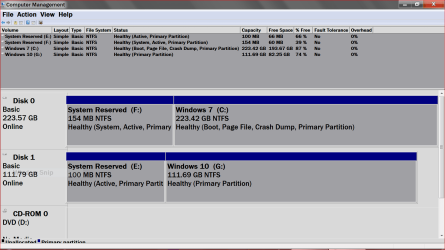
discmanagement1.PNG

Now. My question. how do I make the contents smaller? i.e. get rid of unnecessary stuff? How do I see what is in there... I did assign it a drive number but using Explorer shows nothing... maybe they are hidden? How do I unhide them?

As You can see the name of the System Reserved area is now DATA since I migrated to a Samsung 840 evo using their Magician program.

Any thoughts are appreciated.
 

My Computer My Computer

Computer type
PC/Desktop
Computer Manufacturer/Model Number
Hp Pro 6300
OS
Win 7 Pro with Service Pack 1
CPU
i7-3770
Memory
16 GB
Graphics Card(s)
AMD Radeon 7700
Hard Drives
Samsung 840 EVO 1TB
Antivirus
AVG
Browser
chrome
Rather than make the contents smaller, I'd try to make System Reserved larger, say 200 or 300 MB total.

Any decent Partition Manager should be able to do that. You may have to rob a bit from some other partition. Try Partition Wizard. I think Aomei has a free partition tool as well.

System Reserved should not have a drive letter.

Not sure why it's named "data" in your case. Are you saying that Samsung Magician forced that name on you?
 

My Computer My Computer

Computer type
PC/Desktop
Computer Manufacturer/Model Number
Ignatz Special; 4 speed manual gearbox; factory air conditioning; one of one
OS
Windows 7 Home Premium SP1, 64-bit
CPU
Intel Skylake i5-6600K, not overclocked
Motherboard
AsRock Z170M Extreme 4, micro ATX
Memory
8 GB HyperX DDR4-2666 (2 x 4 GB)
Graphics Card(s)
none; graphics are integrated on CPU
Sound Card
onboard: Realtek ALC1150; external: USB Behringer UF0-202
Monitor(s) Displays
Dell S2340M 23 inch IPS
Screen Resolution
1600 x 900
Hard Drives
System: Crucial MX100 series SSD, 128 GB;
Data: Samsung Spinpoint 103SJ, 1 TB;
Backup: WD Caviar Green WD30EZRX-00D8PB0, 3 TB
PSU
Rosewill SilentNight 500 watt fanless, semi-modular
Case
Antec Solo II
Cooling
Noctua NH-U12S; Noctua F12 intake, Noctua S12A exhaust
Keyboard
Microsoft 200 6JH-00001 USB
Mouse
Dell or Microsoft optical wired; USB
Antivirus
Microsoft Security Essentials and Malwarebytes Premium
Browser
Pale Moon
Other Info
All fans PWM; speeds at idle: CPU circa 500 rpm; intake circa 600 rpm; exhaust circa 600 rpm; CPU temps 27 idle and 47 C load in a warm room (27 C/81 F) when running Intel Extreme Tuning Utility stress test.
Yes I have seen suggestions as to how to increase this.
However I have also read posts where users have done this and then encountered the same porblem when they approached the limit of 500Mb.

When I migrated to the SSD I did not set anything it was all automatic and I have only gleaned this from posts with others
having the same issue. They like me did not find a "system Reserved area" but an area labelled DATA
Since it had the same size and was hidden, the assumption was that it was renamed from the OLD system Reserved area.

I can increase this but fear that it may come back to haunt me.

any thoughts?
 

My Computer My Computer

Computer type
PC/Desktop
Computer Manufacturer/Model Number
Hp Pro 6300
OS
Win 7 Pro with Service Pack 1
CPU
i7-3770
Memory
16 GB
Graphics Card(s)
AMD Radeon 7700
Hard Drives
Samsung 840 EVO 1TB
Antivirus
AVG
Browser
chrome
While researching your first post, I saw a thread elsewhere that indicated you need at least 40 MB of free space in System Reserved. You've got 5 free.

If that's anywhere near true, you certainly don't need to make it 500 MB. Try 200 MB.

It's quite common for System Reserved to be larger than 100. I'm not sure how large it can be safely or even if there is a limit.

I don't have a System Reserved at all. You need what's in it to be somewhere, but that somewhere can be on C just as easily. It's all in how you do the original install. I chose to avoid System Reserved.

You can copy the contents of System Reserved to C. I think Easy BCD is the tool to do that. Then you could delete System Reserved.

Or just enlarge it a bit, say to 200.
 

My Computer My Computer

Computer type
PC/Desktop
Computer Manufacturer/Model Number
Ignatz Special; 4 speed manual gearbox; factory air conditioning; one of one
OS
Windows 7 Home Premium SP1, 64-bit
CPU
Intel Skylake i5-6600K, not overclocked
Motherboard
AsRock Z170M Extreme 4, micro ATX
Memory
8 GB HyperX DDR4-2666 (2 x 4 GB)
Graphics Card(s)
none; graphics are integrated on CPU
Sound Card
onboard: Realtek ALC1150; external: USB Behringer UF0-202
Monitor(s) Displays
Dell S2340M 23 inch IPS
Screen Resolution
1600 x 900
Hard Drives
System: Crucial MX100 series SSD, 128 GB;
Data: Samsung Spinpoint 103SJ, 1 TB;
Backup: WD Caviar Green WD30EZRX-00D8PB0, 3 TB
PSU
Rosewill SilentNight 500 watt fanless, semi-modular
Case
Antec Solo II
Cooling
Noctua NH-U12S; Noctua F12 intake, Noctua S12A exhaust
Keyboard
Microsoft 200 6JH-00001 USB
Mouse
Dell or Microsoft optical wired; USB
Antivirus
Microsoft Security Essentials and Malwarebytes Premium
Browser
Pale Moon
Other Info
All fans PWM; speeds at idle: CPU circa 500 rpm; intake circa 600 rpm; exhaust circa 600 rpm; CPU temps 27 idle and 47 C load in a warm room (27 C/81 F) when running Intel Extreme Tuning Utility stress test.
If possible, try to post by TORETTO69 in https://social.technet.microsoft.co...f-acronis-true-image-2010?forum=windowsbackup .....
Offline follow up revealed that an app, suspected to be Acronis, was turning on the USN journal on the system reserved 100mb partition. The USN journal ate up space that was required during backup to create a shadow copy of the volume. This caused a backup failure.

Deleting the USN journal on the volume solved the issue. Here are the steps
(assuming the 100mb partition is F:) *

1. Launch cmd --> run as admin
2. fsutil usn queryjournal F:
The output will be USN journal settings which also includes its size (in hex bytes).
If it is anything around 30mb, the backup will fail due to snapshot creation failure because of lack of space.
3. fsutil usn deletejournal /D F:
This will delete the journal. Retry backup.


Later, if the journal is again found to be taking up space, it will be useful to try and locate the app that turns the journal on. Applications using USN to track file changes are likely to be responsible.
* You may need to add a drive letter to the hidden 100 MB partition for this purpose. Later remove the drive letter.
 

My Computer My Computer

Computer type
PC/Desktop
Computer Manufacturer/Model Number
Self Assembled
OS
Microsoft Windows 10 Pro Insider Preview 64-bit
CPU
Intel(R) Core(TM) i3-4130 CPU @ 3.40GHz
Motherboard
Gigabyte Technology Co., Ltd. B85M-D3H
Memory
Corsair Vengence 4GB x2 (8.00GB Dual-Channel DDR3 @ 798MHz)
Graphics Card(s)
2047MB GeForce GTS 450 (ZOTAC International)
Sound Card
Onboard (Realtek High Definition Audio)
Monitor(s) Displays
LG Flatron E2040T
Screen Resolution
1600x900
Hard Drives
Western Digital 1 TB
Seagate 500 GB
PSU
Corsair VS550
Case
Cooler Master K380
Cooling
Cooler Master Seidon 120V Plus
Keyboard
Logitech MK260r
Mouse
Logitech MK260r
Internet Speed
PMPL Broadband
Antivirus
Windows Defender + MBAM
Browser
Firefox
Other Info
Dell Studio 15" Laptop
Thanks ignatzatsonic and Arc.

I think I will make a system repair disc first so that I can recover if I mess something up.

was going to to use Arconis but read some threads that this may increase the size of the System reserved area.
 

My Computer My Computer

Computer type
PC/Desktop
Computer Manufacturer/Model Number
Hp Pro 6300
OS
Win 7 Pro with Service Pack 1
CPU
i7-3770
Memory
16 GB
Graphics Card(s)
AMD Radeon 7700
Hard Drives
Samsung 840 EVO 1TB
Antivirus
AVG
Browser
chrome
By the way, deleting the journal is not a permanent solution IMHO. It will work for once, but not forever.

The content of your system reserved is somehow bigger. So increasing the size of the 100 MB partition will be the real solution, undoubtedly. This will give you an idea: Increase partition size for Windows 7 by using partition manager.
 

My Computer My Computer

Computer type
PC/Desktop
Computer Manufacturer/Model Number
Self Assembled
OS
Microsoft Windows 10 Pro Insider Preview 64-bit
CPU
Intel(R) Core(TM) i3-4130 CPU @ 3.40GHz
Motherboard
Gigabyte Technology Co., Ltd. B85M-D3H
Memory
Corsair Vengence 4GB x2 (8.00GB Dual-Channel DDR3 @ 798MHz)
Graphics Card(s)
2047MB GeForce GTS 450 (ZOTAC International)
Sound Card
Onboard (Realtek High Definition Audio)
Monitor(s) Displays
LG Flatron E2040T
Screen Resolution
1600x900
Hard Drives
Western Digital 1 TB
Seagate 500 GB
PSU
Corsair VS550
Case
Cooler Master K380
Cooling
Cooler Master Seidon 120V Plus
Keyboard
Logitech MK260r
Mouse
Logitech MK260r
Internet Speed
PMPL Broadband
Antivirus
Windows Defender + MBAM
Browser
Firefox
Other Info
Dell Studio 15" Laptop
I did this just a few days ago using Partition Mini Tool.. I added and remove the Reserve partition letter from both Reserves using Disk Management.
It was quite simple to the best of my memory.

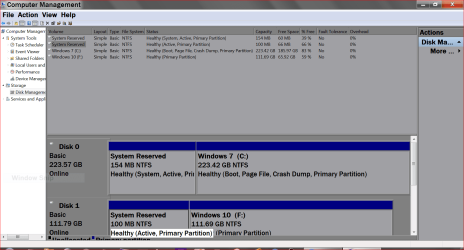
New Disc Management.PNG


Now I have this.
New Disk Management.PNG
 
Last edited:

My Computer My Computer

Computer type
PC/Desktop
Computer Manufacturer/Model Number
Home made Desktop
OS
Windows 10 Pro. 64/ version 1709 Windows 7 Pro/64
CPU
Intel i7-6800K @ 4.3
Motherboard
ASUS X-99 Deluxe II
Memory
Corsair Platinum 16 gig @2400
Graphics Card(s)
EVGA GTX 1070 OC
Monitor(s) Displays
Asus 27" LED LCD/VE278Q
Screen Resolution
1920-1080 or 1280-720 HDMI
Hard Drives
INTEL SSD 730-240 Gb Sata 3.0/
PSU
EVGA Platium 1200W
Case
Phanteks Luxe Tempered Glass 8 fans/ one radiator
Cooling
XSPC/ Water Cooled CPU
Keyboard
Das 4 Professional
Mouse
Logitech M705/MX Anywhere 2-S
Internet Speed
100 mbits
Antivirus
Microsoft Security Essentials/ Malwarebytes Premium 3.0/ SAS
Browser
I.E. 11 default/Firefox/ ISP Time Warner Cable/Spectrum
Other Info
LG BluRay Burner/
Sound system-KLipsch-THX/
Icy Dock ssd Hot Swap bays.
Hi ARC.
I have read a number of threads that support your suggestion. I agree that the answer may lie in increasing the size of the System reserve. Right now I am stuck trying to make a system repair disc if it all goes wrong and i need to recover.
(see my other post on in this area)

Thanks Layback Bear. I will get to that ... as soon as I have a recovery disc.

Maybe the 2 of you could help me out on that problem?
 

My Computer My Computer

Computer type
PC/Desktop
Computer Manufacturer/Model Number
Hp Pro 6300
OS
Win 7 Pro with Service Pack 1
CPU
i7-3770
Memory
16 GB
Graphics Card(s)
AMD Radeon 7700
Hard Drives
Samsung 840 EVO 1TB
Antivirus
AVG
Browser
chrome
A comment in general... about the increasing size of the "stuff" in this area.

What programs are doing this? I surely am not the only one having this happen... I seems to me that changing the size of the partition is a task not easily undertaken by the "average" user.
 

My Computer My Computer

Computer type
PC/Desktop
Computer Manufacturer/Model Number
Hp Pro 6300
OS
Win 7 Pro with Service Pack 1
CPU
i7-3770
Memory
16 GB
Graphics Card(s)
AMD Radeon 7700
Hard Drives
Samsung 840 EVO 1TB
Antivirus
AVG
Browser
chrome

My Computer My Computer

Computer type
PC/Desktop
Computer Manufacturer/Model Number
Home made Desktop
OS
Windows 10 Pro. 64/ version 1709 Windows 7 Pro/64
CPU
Intel i7-6800K @ 4.3
Motherboard
ASUS X-99 Deluxe II
Memory
Corsair Platinum 16 gig @2400
Graphics Card(s)
EVGA GTX 1070 OC
Monitor(s) Displays
Asus 27" LED LCD/VE278Q
Screen Resolution
1920-1080 or 1280-720 HDMI
Hard Drives
INTEL SSD 730-240 Gb Sata 3.0/
PSU
EVGA Platium 1200W
Case
Phanteks Luxe Tempered Glass 8 fans/ one radiator
Cooling
XSPC/ Water Cooled CPU
Keyboard
Das 4 Professional
Mouse
Logitech M705/MX Anywhere 2-S
Internet Speed
100 mbits
Antivirus
Microsoft Security Essentials/ Malwarebytes Premium 3.0/ SAS
Browser
I.E. 11 default/Firefox/ ISP Time Warner Cable/Spectrum
Other Info
LG BluRay Burner/
Sound system-KLipsch-THX/
Icy Dock ssd Hot Swap bays.
What programs? I'd use Partition Wizard or maybe a similar tool from Aomei or EaseUS--free programs.

PW is the common choice here. Sane interface, quite reliable. Not 100 percent guaranteed, so back up your data before you start. PW has some good tutorials on their website.

It may be that your problem is unrelated to the size of System Restore. I have no idea.
 

My Computer My Computer

Computer type
PC/Desktop
Computer Manufacturer/Model Number
Ignatz Special; 4 speed manual gearbox; factory air conditioning; one of one
OS
Windows 7 Home Premium SP1, 64-bit
CPU
Intel Skylake i5-6600K, not overclocked
Motherboard
AsRock Z170M Extreme 4, micro ATX
Memory
8 GB HyperX DDR4-2666 (2 x 4 GB)
Graphics Card(s)
none; graphics are integrated on CPU
Sound Card
onboard: Realtek ALC1150; external: USB Behringer UF0-202
Monitor(s) Displays
Dell S2340M 23 inch IPS
Screen Resolution
1600 x 900
Hard Drives
System: Crucial MX100 series SSD, 128 GB;
Data: Samsung Spinpoint 103SJ, 1 TB;
Backup: WD Caviar Green WD30EZRX-00D8PB0, 3 TB
PSU
Rosewill SilentNight 500 watt fanless, semi-modular
Case
Antec Solo II
Cooling
Noctua NH-U12S; Noctua F12 intake, Noctua S12A exhaust
Keyboard
Microsoft 200 6JH-00001 USB
Mouse
Dell or Microsoft optical wired; USB
Antivirus
Microsoft Security Essentials and Malwarebytes Premium
Browser
Pale Moon
Other Info
All fans PWM; speeds at idle: CPU circa 500 rpm; intake circa 600 rpm; exhaust circa 600 rpm; CPU temps 27 idle and 47 C load in a warm room (27 C/81 F) when running Intel Extreme Tuning Utility stress test.
Thanks to ignatzatsonic and Layback Bear. I will get to these as soon as I have a way to recover.
Your thoughts as to why I can't seem to make a system repair disc?
 

My Computer My Computer

Computer type
PC/Desktop
Computer Manufacturer/Model Number
Hp Pro 6300
OS
Win 7 Pro with Service Pack 1
CPU
i7-3770
Memory
16 GB
Graphics Card(s)
AMD Radeon 7700
Hard Drives
Samsung 840 EVO 1TB
Antivirus
AVG
Browser
chrome
Your thoughts as to why I can't seem to make a system repair disc?

Can't help you there. I have a Windows 7 installation disc, which also functions as a repair disc.
 

My Computer My Computer

Computer type
PC/Desktop
Computer Manufacturer/Model Number
Ignatz Special; 4 speed manual gearbox; factory air conditioning; one of one
OS
Windows 7 Home Premium SP1, 64-bit
CPU
Intel Skylake i5-6600K, not overclocked
Motherboard
AsRock Z170M Extreme 4, micro ATX
Memory
8 GB HyperX DDR4-2666 (2 x 4 GB)
Graphics Card(s)
none; graphics are integrated on CPU
Sound Card
onboard: Realtek ALC1150; external: USB Behringer UF0-202
Monitor(s) Displays
Dell S2340M 23 inch IPS
Screen Resolution
1600 x 900
Hard Drives
System: Crucial MX100 series SSD, 128 GB;
Data: Samsung Spinpoint 103SJ, 1 TB;
Backup: WD Caviar Green WD30EZRX-00D8PB0, 3 TB
PSU
Rosewill SilentNight 500 watt fanless, semi-modular
Case
Antec Solo II
Cooling
Noctua NH-U12S; Noctua F12 intake, Noctua S12A exhaust
Keyboard
Microsoft 200 6JH-00001 USB
Mouse
Dell or Microsoft optical wired; USB
Antivirus
Microsoft Security Essentials and Malwarebytes Premium
Browser
Pale Moon
Other Info
All fans PWM; speeds at idle: CPU circa 500 rpm; intake circa 600 rpm; exhaust circa 600 rpm; CPU temps 27 idle and 47 C load in a warm room (27 C/81 F) when running Intel Extreme Tuning Utility stress test.
The only way System Reserved can be clogged is if it is given a drive letter so programs can write to it. Why is it labeled Data, anyway? Makes me think you had a drive letter on it for some reason.

I think since there is nonsense going on there I would delete it entirely by moving the Bootmgr - Move to C:\ with EasyBCD - Windows 7 Forums.

Once the System Active flags are on C then you can delete SysReserved in Disk Mgmt.

Problem solved.
 
Hi greg.

it has never had a drive letter until now. I simply followed another thread and I started computer management and selected disk management and went to properties and assigned it a drive letter so that i could see the contents in explorer.

I migrated to an SSD 840 EVO and used the Samsung migration tool .. it did all of this AUTOMATICALLY when i switched over to the SSD a year ago. I had no knowledge of this until now. I read on other threads of others having similar problems and noted that they suggested that the "DATA" label was created by the migration software. Deduced from the size of 100 MB.

I think that I will have to move the system files in this directory.

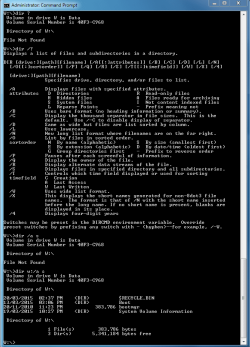
CMD-dir attributes.PNG

I see that they are system files... BTW how does one copy these and any "hidden" files?

I am presently stuck trying to make a system repair disc.. getting an 080070057 error when I load a DVD to be burned. see another post in this forum. (any help here would be appreciated)
 

My Computer My Computer

Computer type
PC/Desktop
Computer Manufacturer/Model Number
Hp Pro 6300
OS
Win 7 Pro with Service Pack 1
CPU
i7-3770
Memory
16 GB
Graphics Card(s)
AMD Radeon 7700
Hard Drives
Samsung 840 EVO 1TB
Antivirus
AVG
Browser
chrome
I have another question.... If i do move the system files to C: and change the system active flags.... whatever they are? to the c: partition then I will be OK... I hope this is not complicated by the fact that I have an SSD... does this make any difference?
 

My Computer My Computer

Computer type
PC/Desktop
Computer Manufacturer/Model Number
Hp Pro 6300
OS
Win 7 Pro with Service Pack 1
CPU
i7-3770
Memory
16 GB
Graphics Card(s)
AMD Radeon 7700
Hard Drives
Samsung 840 EVO 1TB
Antivirus
AVG
Browser
chrome
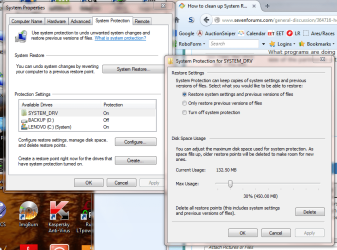
Under control panel SYSTEM => Advanced System Settings => System Protection tab, check if you have protection enabled on your SYSTEM_DRV (you probably do). Highlight it and check the 'configure' button. You probably have a large percentage of disk space enabled to be used (the slider on the bottom half). Reduce that to a smaller size.
 

Attachments

  • Capture.PNG
    Capture.PNG
    68.1 KB · Views: 0

My Computer My Computer

Computer type
Laptop
Computer Manufacturer/Model Number
Lenovo T530
OS
Windows 7 Ultimate x64 SP1
Memory
16GB
Hard Drives
1TB SSD
thanks... does an SSD complicate things...
I noticed that any HD attached to the computer via USB causes the boot sequence to hang. I suspect that it is looking to the USB drive for the system files.. and returns a "not system disc" error... remove the HD and it boots OK... I then have to reattach it later to use it... I found this out when attaching an outboard HD to copy files to.

I still need to try and make a recovery disk...ho hum..
 

My Computer My Computer

Computer type
PC/Desktop
Computer Manufacturer/Model Number
Hp Pro 6300
OS
Win 7 Pro with Service Pack 1
CPU
i7-3770
Memory
16 GB
Graphics Card(s)
AMD Radeon 7700
Hard Drives
Samsung 840 EVO 1TB
Antivirus
AVG
Browser
chrome
Back
Top