Solved Permissions.....please help

vid4763

New member
Member
Local time
6:51 PM
Messages
94
Location
Niagara Falls/ Buffalo, NY
Hello,

Thanks for reading and a million thanks for any help.

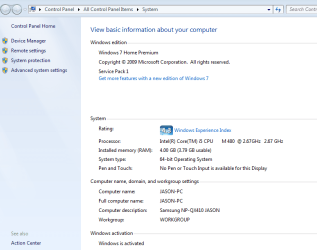
I recently resurrected my college son's "dead" Samsung NP-QX410 laptop. It suffered a dying HDD. I managed to salvage the recovery partition files and was able to re install Windows 7 Home Premium SP1 onto an older Seagate 120G Sata HDD.

After sorting and fixing several driver issues, the laptop is working well, with a few exceptions:

- It's a slow 5200rpm 7 yr. old HDD (we are replacing with a Samsung 850 EVO SSD 250G)

- Windows Update has been done many times with mostly success (have 3 updates that repeatedly fail, am currently receiving help from NoelDP regarding these WinUpdate issues, he's been excellent!)

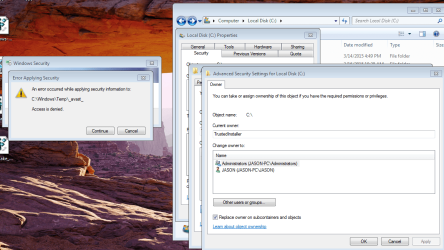
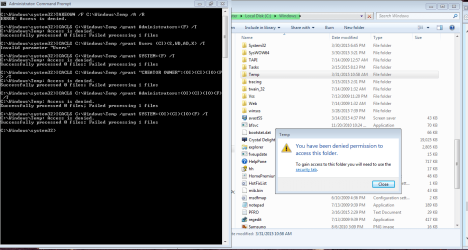
- I seem to have permission and ownership issues. It became apparent when I tried to look for files in my C:\Windows\Temp and was denied permission. tried as Administrator (denied). Installed *Brinks* take ownership download (still denied)

NoelDP provided me with a script to try top resolve this, but the issue seems to be deeper within. he's looking into it but is very busy and I thought this section of the 7Forum might be a good place to get additional advice.

I confess to being a bit of a novice, certainly compared to many of the experts on the Forum who's help we are truly grateful for, but I can follow instruction well enough. I admit I'm not even sure of the UAC and how it should be set up? What simple settings or configuration I should have regarding UAC's. This laptop, once I have it fully functional, updated, and error free is going to be a gift for our 10 yr. old son at the end of this school year. So any additional advice on how to set up the UAC's would be appreciated.

Attached are a few screen shots to illustrate what's happening:


Attachments
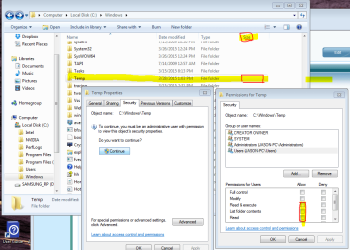
  • WIN TEMP FILE EMPTY INACCESSABLE.PNG
    WIN TEMP FILE EMPTY INACCESSABLE.PNG
    51.7 KB · Views: 2
  • Windows Version and system info.PNG
    Windows Version and system info.PNG
    24.7 KB · Views: 1
  • Windows WTF A.PNG
    Windows WTF A.PNG
    155.1 KB · Views: 2
  • Elevated Comm Prompt Noel Instructions and Result.PNG
    Elevated Comm Prompt Noel Instructions and Result.PNG
    6.2 KB · Views: 1
  • Elevated Comm Prompt Noel Instructions and Result 2.PNG
    Elevated Comm Prompt Noel Instructions and Result 2.PNG
    42.6 KB · Views: 2

My Computer My Computer

Computer type
Laptop
Computer Manufacturer/Model Number
Toshiba Satellite c855-s5214
OS
windows 7 professional 64 bit Version 6.1.7601 Service Pack 1 Build 7601
CPU
Intel(R) Pentium(R) CPU B970 @ 2.30GHz, 2300 Mhz, 2 cores
Motherboard
Toshiba Portable BIOS Insyde Corp Version 1.60 Date 4/20/12
Memory
8Gb
Graphics Card(s)
Intel HD Graphics Driver Vers 9.17.10.3347 Date 10/31/20
Hard Drives
SanDisk Extreme Pro SSD 480 Gb (approx. 381gb free)
Firmware Version X21200RL
Migrated and Installed 4/3/2015
Antivirus
BitDefender AntiVirus Free Edition Version 1.0.21.1099
Browser
Internet Explorer 11 update version 11.0.16
Other Info
Additional Systems:

Samsung NP-QX410 Laptop Windows 7 Home Premium SP1
Samsung 850 EVO 250G 4G ram
Avast! Free 2015

Toshiba A205-S7468 Laptop Windows 7 Ultimate
WD 320G HDD 4G ram
AVG free 2015
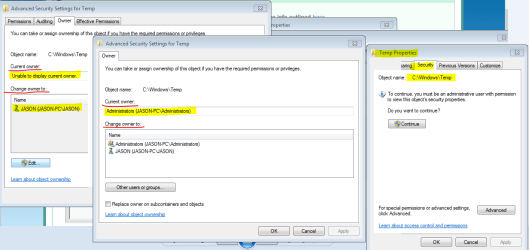
In the change owner window,change TrustedInstaller to JASON-PC.Then try modifying permissions again.
Did it help or not?
 

My Computer My Computer

Computer type
Laptop
Computer Manufacturer/Model Number
Lenovo G580 20150
OS
Windows 7 Ultimate SP1 64 bit
CPU
Intel Core i3-3110M Ivy Bridge
Motherboard
Lenovo INVALID U3E1 (Ivy Bridge)
Memory
4,00GB Single-Channel DDR3 798 MHz
Graphics Card(s)
Intel HD Graphics 4000,Nvidia GeForce 610M
Sound Card
Conexant HD SmartAudio
Monitor(s) Displays
Generic PnP Monitor, Sony BRAVIA KDL-46D3500 Full HD TV
Screen Resolution
1366x768, 1920x1080
Hard Drives
Seagate ST1000LM024 HN-M101MBB 1TB
Keyboard
AccuType
Internet Speed
72 Mbps
Antivirus
Microsoft Security Essentials
Browser
Internet Explorer 11
Other Info
PLDS DVD-RW DS8ABSH SCSI Device
VMware Workstation 11
Microsoft Office 2007 Enterprise,2010 Professional Plus,2013 Professional Plus
Sony MDR-XD150 Headset

VM's:Windows Vista SP2 x64,Windows Server 2003 Enterprise SP2 x86,Windows Server 2008 x86,Windows XP Professional x64 SP2
@VistaUltimate

In the change owner window,change TrustedInstaller to JASON-PC.Then try modifying permissions again.
Did it help or not?

Unfortunately, the "current owner" field will not allow me to edit from the "change owner to" list below it (i.e., select another user or name). I believe at some point I may have somehow changed it from "trusted installer" to Administrator (JASON-PC). Nevertheless, I have no access to the Windows\Temp folder.....
**screenshot 1 below

I have no idea what to do with or how to edit these boxes either (if they can help fix this issue)
**screenshot 2 below
 

Attachments

  • Temp 2.PNG
    Temp 2.PNG
    28.3 KB · Views: 0
  • Temp 1.PNG
    Temp 1.PNG
    39 KB · Views: 1

My Computer My Computer

Computer type
Laptop
Computer Manufacturer/Model Number
Toshiba Satellite c855-s5214
OS
windows 7 professional 64 bit Version 6.1.7601 Service Pack 1 Build 7601
CPU
Intel(R) Pentium(R) CPU B970 @ 2.30GHz, 2300 Mhz, 2 cores
Motherboard
Toshiba Portable BIOS Insyde Corp Version 1.60 Date 4/20/12
Memory
8Gb
Graphics Card(s)
Intel HD Graphics Driver Vers 9.17.10.3347 Date 10/31/20
Hard Drives
SanDisk Extreme Pro SSD 480 Gb (approx. 381gb free)
Firmware Version X21200RL
Migrated and Installed 4/3/2015
Antivirus
BitDefender AntiVirus Free Edition Version 1.0.21.1099
Browser
Internet Explorer 11 update version 11.0.16
Other Info
Additional Systems:

Samsung NP-QX410 Laptop Windows 7 Home Premium SP1
Samsung 850 EVO 250G 4G ram
Avast! Free 2015

Toshiba A205-S7468 Laptop Windows 7 Ultimate
WD 320G HDD 4G ram
AVG free 2015
Do a System Restore at the point which you remember being able to change owner,otherwise I don't have to say anything different except reinstall Windows.:(
 

My Computer My Computer

Computer type
Laptop
Computer Manufacturer/Model Number
Lenovo G580 20150
OS
Windows 7 Ultimate SP1 64 bit
CPU
Intel Core i3-3110M Ivy Bridge
Motherboard
Lenovo INVALID U3E1 (Ivy Bridge)
Memory
4,00GB Single-Channel DDR3 798 MHz
Graphics Card(s)
Intel HD Graphics 4000,Nvidia GeForce 610M
Sound Card
Conexant HD SmartAudio
Monitor(s) Displays
Generic PnP Monitor, Sony BRAVIA KDL-46D3500 Full HD TV
Screen Resolution
1366x768, 1920x1080
Hard Drives
Seagate ST1000LM024 HN-M101MBB 1TB
Keyboard
AccuType
Internet Speed
72 Mbps
Antivirus
Microsoft Security Essentials
Browser
Internet Explorer 11
Other Info
PLDS DVD-RW DS8ABSH SCSI Device
VMware Workstation 11
Microsoft Office 2007 Enterprise,2010 Professional Plus,2013 Professional Plus
Sony MDR-XD150 Headset

VM's:Windows Vista SP2 x64,Windows Server 2003 Enterprise SP2 x86,Windows Server 2008 x86,Windows XP Professional x64 SP2
When run with elevated privileges, the Takeown command should work 99 percent of the time. That one percent situation usually indicates that the particular item the command is performed on is locked by some process' handle.

If I were you, Vid, I'd just copy this Temp folder to another location and access it that way.
 

My Computer My Computer

Computer type
PC/Desktop
OS
Windows 10, Windows 8.1 Pro, Windows 7 Professional, OS X El Capitan
When run with elevated privileges, the Takeown command should work 99 percent of the time. That one percent situation usually indicates that the particular item the command is performed on is locked by some process' handle.

If I were you, Vid, I'd just copy this Temp folder to another location and access it that way.

@Pyprohly

That method worked! What seemed to be an "inaccessible" empty Windows\Temp folder is actually quite populated!

I copied the folder to the desktop and it opened right up. NOW, any idea how to repair my permission, accessibility issue with this folder in it's original location? I assume Windows want it where it installed it?

Thanks for your help!!
 

Attachments

  • Windows Temp on Desktop.PNG
    Windows Temp on Desktop.PNG
    45.7 KB · Views: 0

My Computer My Computer

Computer type
Laptop
Computer Manufacturer/Model Number
Toshiba Satellite c855-s5214
OS
windows 7 professional 64 bit Version 6.1.7601 Service Pack 1 Build 7601
CPU
Intel(R) Pentium(R) CPU B970 @ 2.30GHz, 2300 Mhz, 2 cores
Motherboard
Toshiba Portable BIOS Insyde Corp Version 1.60 Date 4/20/12
Memory
8Gb
Graphics Card(s)
Intel HD Graphics Driver Vers 9.17.10.3347 Date 10/31/20
Hard Drives
SanDisk Extreme Pro SSD 480 Gb (approx. 381gb free)
Firmware Version X21200RL
Migrated and Installed 4/3/2015
Antivirus
BitDefender AntiVirus Free Edition Version 1.0.21.1099
Browser
Internet Explorer 11 update version 11.0.16
Other Info
Additional Systems:

Samsung NP-QX410 Laptop Windows 7 Home Premium SP1
Samsung 850 EVO 250G 4G ram
Avast! Free 2015

Toshiba A205-S7468 Laptop Windows 7 Ultimate
WD 320G HDD 4G ram
AVG free 2015
NOW, any idea how to repair my permission, accessibility issue with this folder in it's original location?

As unintuitive as it sounds, because the Takeown command failed to take ownership (due to ERROR: Access is Denied), I do not think you have a permissions issue. There is no reason why the command should fail when run with administrative rights, no matter how bad-ly denied from an item you are.

"ERROR: Access is Denied" is just the generic message given when Takeown does not know what went wrong.


If you really think something permission wise is broken for this Temp folder of yours and think it's worth fixing, post the output of Icacls here and I'll check if the permissions are setup correctly for this directory:
1) In an elevated command prompt, run the command icacls C:\Windows\Temp to view access information. If that fails,
2) Start Windows in Safe Mode with Command Prompt, and try icacls C:\Windows\Temp again. If that happens to fail again,
3) Restart Windows normally. Download and install Unlocker and scan this Temp folder for any handles that may be locking it.

Honestly, there's not point in fixing anything though. At this stage, interpreting your situation, it may be a good move to Clean Reinstall this "dead" laptop. Esp. ideal before giving it away.
 

My Computer My Computer

Computer type
PC/Desktop
OS
Windows 10, Windows 8.1 Pro, Windows 7 Professional, OS X El Capitan
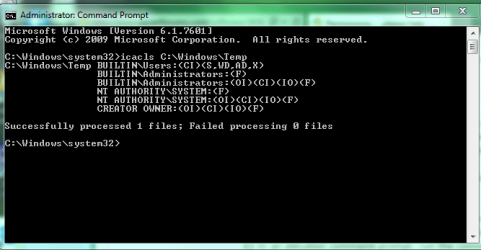
I ran it within win7 with ECP.... and then ran in safe mode with command prompt......both successful

screenshots
 

Attachments

  • icacls.PNG
    icacls.PNG
    16 KB · Views: 9
  • icacls safe mode.jpg
    icacls safe mode.jpg
    55.6 KB · Views: 0

My Computer My Computer

Computer type
Laptop
Computer Manufacturer/Model Number
Toshiba Satellite c855-s5214
OS
windows 7 professional 64 bit Version 6.1.7601 Service Pack 1 Build 7601
CPU
Intel(R) Pentium(R) CPU B970 @ 2.30GHz, 2300 Mhz, 2 cores
Motherboard
Toshiba Portable BIOS Insyde Corp Version 1.60 Date 4/20/12
Memory
8Gb
Graphics Card(s)
Intel HD Graphics Driver Vers 9.17.10.3347 Date 10/31/20
Hard Drives
SanDisk Extreme Pro SSD 480 Gb (approx. 381gb free)
Firmware Version X21200RL
Migrated and Installed 4/3/2015
Antivirus
BitDefender AntiVirus Free Edition Version 1.0.21.1099
Browser
Internet Explorer 11 update version 11.0.16
Other Info
Additional Systems:

Samsung NP-QX410 Laptop Windows 7 Home Premium SP1
Samsung 850 EVO 250G 4G ram
Avast! Free 2015

Toshiba A205-S7468 Laptop Windows 7 Ultimate
WD 320G HDD 4G ram
AVG free 2015
Those permissions are correctly set to what they should be.

The reason you previously could not view the contents of this Temp folder, or run commands on it, was most likely due to a (temporary) handle locking it. It's perfectly normal. You've got no problems Vid.
 

My Computer My Computer

Computer type
PC/Desktop
OS
Windows 10, Windows 8.1 Pro, Windows 7 Professional, OS X El Capitan
Thanks Pyprohly! I'm closing this thread. I'll report results to NoelDP on my other open thread regarding windows update issue, to let him know and see what other thoughts he may have.

Happy Easter!
 

My Computer My Computer

Computer type
Laptop
Computer Manufacturer/Model Number
Toshiba Satellite c855-s5214
OS
windows 7 professional 64 bit Version 6.1.7601 Service Pack 1 Build 7601
CPU
Intel(R) Pentium(R) CPU B970 @ 2.30GHz, 2300 Mhz, 2 cores
Motherboard
Toshiba Portable BIOS Insyde Corp Version 1.60 Date 4/20/12
Memory
8Gb
Graphics Card(s)
Intel HD Graphics Driver Vers 9.17.10.3347 Date 10/31/20
Hard Drives
SanDisk Extreme Pro SSD 480 Gb (approx. 381gb free)
Firmware Version X21200RL
Migrated and Installed 4/3/2015
Antivirus
BitDefender AntiVirus Free Edition Version 1.0.21.1099
Browser
Internet Explorer 11 update version 11.0.16
Other Info
Additional Systems:

Samsung NP-QX410 Laptop Windows 7 Home Premium SP1
Samsung 850 EVO 250G 4G ram
Avast! Free 2015

Toshiba A205-S7468 Laptop Windows 7 Ultimate
WD 320G HDD 4G ram
AVG free 2015
Back
Top