Horizontal lines across screen and then crash. Driver issue.

AndromedaM31

New member
Local time
7:57 AM
Messages
7
Hi, all.

Here's the story. At the start of January, my graphics card started acting up. I was on my PC just looking around my files when suddenly the entire screen turned to a light blue. It then crashed and when I booted it up again into Windows, there were horizontal lines across the screen. The color of the lines were green and purple. After about 10 seconds, it crashed again. This happened every time it loaded into windows.

I was positive that this had something to do with the GPU so I went into safe mode with networking and everything was fine. I then figured out that the drivers were the issue so I went into normal mode and then disabled the drivers for the GPU. This fixed the issue but my resolution was a lot lower (1400x1050 from 1920x1080.).

I then uninstalled all the drivers using GURU 3D driver sweeper in safe mode and then reinstalled the latest drivers. This did not fix anything. I haven't bothered fixing the issue since then because I've been very busy and have had no time to use my PC.

My pc is connected to my monitor via DVI to VGA.

Thank you all in advance.

AMD Phenom II X4 960T 3.00GHZ

4GB RAM

AMD Radeon hd 6870 1GB
 

My Computer My Computer

At a glance

Windows 7 ultimate 64-bitAMD Phenom(tm) II X4 960T ProcessorAMD Phenom(tm) II X4 960T ProcessorAMD Phenom(tm) II X4 960T Processor
Computer type
PC/Desktop
OS
Windows 7 ultimate 64-bit
CPU
AMD Phenom(tm) II X4 960T Processor
Motherboard
AMD Phenom(tm) II X4 960T Processor
Memory
AMD Phenom(tm) II X4 960T Processor
Graphics Card(s)
AMD Phenom(tm) II X4 960T Processor
Sound Card
AMD Phenom(tm) II X4 960T Processor
Monitor(s) Displays
BenQ, LED, senseye3.
Screen Resolution
1920x1080
Hard Drives
ST500DM002-1BD142 ATA Device 465.76 GB
PSU
540W
Have you checked to see that the card is clean, free of dirt and dust, and that the fin spins properly? From which site did you download and install the video driver?
 

My Computer My Computer

At a glance

Windows 10 Pro x64 ; Xubuntu x64Intel i7 860 @ 2.80 GHz O/C'ed to 4.0GHz16GB Corsair Vengance DDR3 @ 661 MHz Dual Cha...EVGA NVidia GTX 560 1024MB
Computer type
PC/Desktop
Computer Manufacturer/Model Number
Golden Mk. I.4
OS
Windows 10 Pro x64 ; Xubuntu x64
CPU
Intel i7 860 @ 2.80 GHz O/C'ed to 4.0GHz
Motherboard
Gigabyte P55A-UD3R Rev.1. Award BIOS F13
Memory
16GB Corsair Vengance DDR3 @ 661 MHz Dual Channel (9-9-9-24)
Graphics Card(s)
EVGA NVidia GTX 560 1024MB
Sound Card
Realtek Integrated
Monitor(s) Displays
Dual Samsung SyncMaster 2494HS
Screen Resolution
1920*1080 and 1920*1080
Hard Drives
1*Samsung 840 EVO 120GB SSD;
1*OCZ Vertex 2 60GB SSD;
2*Samsung F3 SpinPoint 1TB in RAID0;
1*Samsung F1 SpinPoint 1TB;
2*Western Digital 1TB External USB 3.0
1*Western Digital 500GB External USB 3.0
1*Seagate 500GB External USB 2.0
PSU
Thermaltake ToughPower QFan 750W
Case
Thermaltake Element S VK60001W2Z
Cooling
Corsair H60 Water Cooling, 2*230mm and 2*80mm case fans
Keyboard
Logitech G110
Mouse
Logitech MX518
Have you checked to see that the card is clean, free of dirt and dust, and that the fin spins properly? From which site did you download and install the video driver?

Yes, I clean my card regularly along with the rest of my PC. I downloaded the drivers from AMD themselves. When it still didn't work, I used the AMD auto-detect and that still didn't fix the issue.

Thanks for the reply.
 

My Computer My Computer

At a glance

Windows 7 ultimate 64-bitAMD Phenom(tm) II X4 960T ProcessorAMD Phenom(tm) II X4 960T ProcessorAMD Phenom(tm) II X4 960T Processor
Computer type
PC/Desktop
OS
Windows 7 ultimate 64-bit
CPU
AMD Phenom(tm) II X4 960T Processor
Motherboard
AMD Phenom(tm) II X4 960T Processor
Memory
AMD Phenom(tm) II X4 960T Processor
Graphics Card(s)
AMD Phenom(tm) II X4 960T Processor
Sound Card
AMD Phenom(tm) II X4 960T Processor
Monitor(s) Displays
BenQ, LED, senseye3.
Screen Resolution
1920x1080
Hard Drives
ST500DM002-1BD142 ATA Device 465.76 GB
PSU
540W
Please check in C:\Windows\Minidumps..............are there any .dmp files present there?

If so, please follow this:

1. Download the DM Log Collector application to your desktop by clicking the link below

DM Log Collector.exe

2. Run it by double-clicking the icon on your desktop, and follow the prompts.
3. Locate the .ZIP file that is created on your desktop, and upload it here in your next reply.

picture.php
 

My Computer My Computer

At a glance

Windows 10 Pro x64 ; Xubuntu x64Intel i7 860 @ 2.80 GHz O/C'ed to 4.0GHz16GB Corsair Vengance DDR3 @ 661 MHz Dual Cha...EVGA NVidia GTX 560 1024MB
Computer type
PC/Desktop
Computer Manufacturer/Model Number
Golden Mk. I.4
OS
Windows 10 Pro x64 ; Xubuntu x64
CPU
Intel i7 860 @ 2.80 GHz O/C'ed to 4.0GHz
Motherboard
Gigabyte P55A-UD3R Rev.1. Award BIOS F13
Memory
16GB Corsair Vengance DDR3 @ 661 MHz Dual Channel (9-9-9-24)
Graphics Card(s)
EVGA NVidia GTX 560 1024MB
Sound Card
Realtek Integrated
Monitor(s) Displays
Dual Samsung SyncMaster 2494HS
Screen Resolution
1920*1080 and 1920*1080
Hard Drives
1*Samsung 840 EVO 120GB SSD;
1*OCZ Vertex 2 60GB SSD;
2*Samsung F3 SpinPoint 1TB in RAID0;
1*Samsung F1 SpinPoint 1TB;
2*Western Digital 1TB External USB 3.0
1*Western Digital 500GB External USB 3.0
1*Seagate 500GB External USB 2.0
PSU
Thermaltake ToughPower QFan 750W
Case
Thermaltake Element S VK60001W2Z
Cooling
Corsair H60 Water Cooling, 2*230mm and 2*80mm case fans
Keyboard
Logitech G110
Mouse
Logitech MX518
Please check in C:\Windows\Minidumps..............are there any .dmp files present there?

If so, please follow this:

1. Download the DM Log Collector application to your desktop by clicking the link below

DM Log Collector.exe

2. Run it by double-clicking the icon on your desktop, and follow the prompts.
3. Locate the .ZIP file that is created on your desktop, and upload it here in your next reply.

picture.php

I did DM Log Collector and a file was created on my desktop. I doesn't have any .ZIP files but it has DMP files and text documents.
 

Attachments

  • Capture.PNG
    Capture.PNG
    13.7 KB · Views: 18

My Computer My Computer

At a glance

Windows 7 ultimate 64-bitAMD Phenom(tm) II X4 960T ProcessorAMD Phenom(tm) II X4 960T ProcessorAMD Phenom(tm) II X4 960T Processor
Computer type
PC/Desktop
OS
Windows 7 ultimate 64-bit
CPU
AMD Phenom(tm) II X4 960T Processor
Motherboard
AMD Phenom(tm) II X4 960T Processor
Memory
AMD Phenom(tm) II X4 960T Processor
Graphics Card(s)
AMD Phenom(tm) II X4 960T Processor
Sound Card
AMD Phenom(tm) II X4 960T Processor
Monitor(s) Displays
BenQ, LED, senseye3.
Screen Resolution
1920x1080
Hard Drives
ST500DM002-1BD142 ATA Device 465.76 GB
PSU
540W
Upload the .zip file on your desktop, here.
 

My Computer My Computer

At a glance

Windows 10 Pro x64 ; Xubuntu x64Intel i7 860 @ 2.80 GHz O/C'ed to 4.0GHz16GB Corsair Vengance DDR3 @ 661 MHz Dual Cha...EVGA NVidia GTX 560 1024MB
Computer type
PC/Desktop
Computer Manufacturer/Model Number
Golden Mk. I.4
OS
Windows 10 Pro x64 ; Xubuntu x64
CPU
Intel i7 860 @ 2.80 GHz O/C'ed to 4.0GHz
Motherboard
Gigabyte P55A-UD3R Rev.1. Award BIOS F13
Memory
16GB Corsair Vengance DDR3 @ 661 MHz Dual Channel (9-9-9-24)
Graphics Card(s)
EVGA NVidia GTX 560 1024MB
Sound Card
Realtek Integrated
Monitor(s) Displays
Dual Samsung SyncMaster 2494HS
Screen Resolution
1920*1080 and 1920*1080
Hard Drives
1*Samsung 840 EVO 120GB SSD;
1*OCZ Vertex 2 60GB SSD;
2*Samsung F3 SpinPoint 1TB in RAID0;
1*Samsung F1 SpinPoint 1TB;
2*Western Digital 1TB External USB 3.0
1*Western Digital 500GB External USB 3.0
1*Seagate 500GB External USB 2.0
PSU
Thermaltake ToughPower QFan 750W
Case
Thermaltake Element S VK60001W2Z
Cooling
Corsair H60 Water Cooling, 2*230mm and 2*80mm case fans
Keyboard
Logitech G110
Mouse
Logitech MX518
Upload the .zip file on your desktop, here.

Sorry, I don't understand. When I used the program it created a file and all the contents of the file are in my previous post. Do I upload each file?
 

My Computer My Computer

At a glance

Windows 7 ultimate 64-bitAMD Phenom(tm) II X4 960T ProcessorAMD Phenom(tm) II X4 960T ProcessorAMD Phenom(tm) II X4 960T Processor
Computer type
PC/Desktop
OS
Windows 7 ultimate 64-bit
CPU
AMD Phenom(tm) II X4 960T Processor
Motherboard
AMD Phenom(tm) II X4 960T Processor
Memory
AMD Phenom(tm) II X4 960T Processor
Graphics Card(s)
AMD Phenom(tm) II X4 960T Processor
Sound Card
AMD Phenom(tm) II X4 960T Processor
Monitor(s) Displays
BenQ, LED, senseye3.
Screen Resolution
1920x1080
Hard Drives
ST500DM002-1BD142 ATA Device 465.76 GB
PSU
540W
Zip that file (the one in the image that is on your desktop) and upload it here
 

My Computer My Computer

At a glance

Windows 10 Pro x64 ; Xubuntu x64Intel i7 860 @ 2.80 GHz O/C'ed to 4.0GHz16GB Corsair Vengance DDR3 @ 661 MHz Dual Cha...EVGA NVidia GTX 560 1024MB
Computer type
PC/Desktop
Computer Manufacturer/Model Number
Golden Mk. I.4
OS
Windows 10 Pro x64 ; Xubuntu x64
CPU
Intel i7 860 @ 2.80 GHz O/C'ed to 4.0GHz
Motherboard
Gigabyte P55A-UD3R Rev.1. Award BIOS F13
Memory
16GB Corsair Vengance DDR3 @ 661 MHz Dual Channel (9-9-9-24)
Graphics Card(s)
EVGA NVidia GTX 560 1024MB
Sound Card
Realtek Integrated
Monitor(s) Displays
Dual Samsung SyncMaster 2494HS
Screen Resolution
1920*1080 and 1920*1080
Hard Drives
1*Samsung 840 EVO 120GB SSD;
1*OCZ Vertex 2 60GB SSD;
2*Samsung F3 SpinPoint 1TB in RAID0;
1*Samsung F1 SpinPoint 1TB;
2*Western Digital 1TB External USB 3.0
1*Western Digital 500GB External USB 3.0
1*Seagate 500GB External USB 2.0
PSU
Thermaltake ToughPower QFan 750W
Case
Thermaltake Element S VK60001W2Z
Cooling
Corsair H60 Water Cooling, 2*230mm and 2*80mm case fans
Keyboard
Logitech G110
Mouse
Logitech MX518

Attachments

My Computer My Computer

At a glance

Windows 7 ultimate 64-bitAMD Phenom(tm) II X4 960T ProcessorAMD Phenom(tm) II X4 960T ProcessorAMD Phenom(tm) II X4 960T Processor
Computer type
PC/Desktop
OS
Windows 7 ultimate 64-bit
CPU
AMD Phenom(tm) II X4 960T Processor
Motherboard
AMD Phenom(tm) II X4 960T Processor
Memory
AMD Phenom(tm) II X4 960T Processor
Graphics Card(s)
AMD Phenom(tm) II X4 960T Processor
Sound Card
AMD Phenom(tm) II X4 960T Processor
Monitor(s) Displays
BenQ, LED, senseye3.
Screen Resolution
1920x1080
Hard Drives
ST500DM002-1BD142 ATA Device 465.76 GB
PSU
540W
All the BSOD .dmp files reference a 0x124 error, which means a hardware error. In this case, I suspect the video card is faulty. However, I will seek a second opinion, before we conclude that.

Please wait for a reply from Essenbe.
 

My Computer My Computer

At a glance

Windows 10 Pro x64 ; Xubuntu x64Intel i7 860 @ 2.80 GHz O/C'ed to 4.0GHz16GB Corsair Vengance DDR3 @ 661 MHz Dual Cha...EVGA NVidia GTX 560 1024MB
Computer type
PC/Desktop
Computer Manufacturer/Model Number
Golden Mk. I.4
OS
Windows 10 Pro x64 ; Xubuntu x64
CPU
Intel i7 860 @ 2.80 GHz O/C'ed to 4.0GHz
Motherboard
Gigabyte P55A-UD3R Rev.1. Award BIOS F13
Memory
16GB Corsair Vengance DDR3 @ 661 MHz Dual Channel (9-9-9-24)
Graphics Card(s)
EVGA NVidia GTX 560 1024MB
Sound Card
Realtek Integrated
Monitor(s) Displays
Dual Samsung SyncMaster 2494HS
Screen Resolution
1920*1080 and 1920*1080
Hard Drives
1*Samsung 840 EVO 120GB SSD;
1*OCZ Vertex 2 60GB SSD;
2*Samsung F3 SpinPoint 1TB in RAID0;
1*Samsung F1 SpinPoint 1TB;
2*Western Digital 1TB External USB 3.0
1*Western Digital 500GB External USB 3.0
1*Seagate 500GB External USB 2.0
PSU
Thermaltake ToughPower QFan 750W
Case
Thermaltake Element S VK60001W2Z
Cooling
Corsair H60 Water Cooling, 2*230mm and 2*80mm case fans
Keyboard
Logitech G110
Mouse
Logitech MX518
All the BSOD .dmp files reference a 0x124 error, which means a hardware error. In this case, I suspect the video card is faulty. However, I will seek a second opinion, before we conclude that.

Please wait for a reply from Essenbe.

Thank you for seeking a second opinion, and thank you for your help.
 

My Computer My Computer

At a glance

Windows 7 ultimate 64-bitAMD Phenom(tm) II X4 960T ProcessorAMD Phenom(tm) II X4 960T ProcessorAMD Phenom(tm) II X4 960T Processor
Computer type
PC/Desktop
OS
Windows 7 ultimate 64-bit
CPU
AMD Phenom(tm) II X4 960T Processor
Motherboard
AMD Phenom(tm) II X4 960T Processor
Memory
AMD Phenom(tm) II X4 960T Processor
Graphics Card(s)
AMD Phenom(tm) II X4 960T Processor
Sound Card
AMD Phenom(tm) II X4 960T Processor
Monitor(s) Displays
BenQ, LED, senseye3.
Screen Resolution
1920x1080
Hard Drives
ST500DM002-1BD142 ATA Device 465.76 GB
PSU
540W
I think the card's already had a defect.
 

My Computer My Computer

At a glance

Windows 7 Home Premium 64-BITAMD A8 7200P8GB 1600mhzRadeon R5 (APU) + Radeon R5 M230 2GB Dual Gra...
Computer type
PC/Desktop
Computer Manufacturer/Model Number
ASUS X550ZE
OS
Windows 7 Home Premium 64-BIT
CPU
AMD A8 7200P
Motherboard
N/A
Memory
8GB 1600mhz
Graphics Card(s)
Radeon R5 (APU) + Radeon R5 M230 2GB Dual Graphics
Sound Card
Realtek ALC269 with SonicMaster
Monitor(s) Displays
Laptop Display
Screen Resolution
1920 x 1080 @60hz
Hard Drives
WDC WD50 00LPVX-80V0TT0 (500GB)
PSU
Laptop Charger
Mouse
ARMAGGEDON TEXTRON SCORPION 7
Internet Speed
100 mbps DOWN / 50 mbps UP
Antivirus
Windows Defender
Browser
Mozzila FireFox, Valve Steam in-game internet browser
Hello, AndromedaM31. From the description, it sounds like what cards do when they are saying good bye. But lets see if we can find some way to bring it back or confirm that it is deceased. The first thing I would like to know are your system specs. This usually helps most people:

Please fill out your System Specs

   Information
Your System Specs will help us to help you, and doing it in this manner will make them available to all helpers in every post and keep us from hunting for them. We ask that you fill them out in as much detail as possible including Desktop or Laptop, Model number if it is an OEM computer and all components with the Manufacturer and Model number if possible.

If you will go to your last post and click the 'System Specs' in the bottom left of the post, you will find a link to update your system specs. Please fill those out in as much detail as possible, making sure to click save at the bottom of the page. If you would like to know what we would like, you can click 'My System Specs' at the bottom left of this post to see mine. If you do not know what your components are, this will help you accomplish this task. http://www.sevenforums.com/tutorials/180324-system-info-see-your-system-specs.html


Next, please go into BIOS and tell me the values of your +12V, +5V and +3.3V as well as your CPU temp, Motherboard temp and your GPU temp, if you have it listed. While there, could you find your PCIe configuration and see if it detects your card and does it say X16 or what .

When you turn on your computer, do the fans on the card spin up? And last, I think. Do you have a spare card or a friend you could ask to borrow theirs just to check if it works. Even better would be if they would put your card in their computer and see if they get the same results as you, in other words swap cards for just a test. That would be very telling of what the problem actually is. Also what is the Manufacturer and model/size of your PSU?
 

My Computers My Computers

  • At a glance

    Windows 11 ProRyzen 9 5900X32GB G Skill DDR4-3600EVGA RTX 3080 FTW 3 Ultra
    Computer type
    PC/Desktop
    Computer Manufacturer/Model Number
    ALWAYS UNDER CONSTRUCTION
    OS
    Windows 11 Pro
    CPU
    Ryzen 9 5900X
    Motherboard
    Asus X570 Crosshair Viii Hero
    Memory
    32GB G Skill DDR4-3600
    Graphics Card(s)
    EVGA RTX 3080 FTW 3 Ultra
    Sound Card
    On Board/Sennheiser PC37X Headset
    Monitor(s) Displays
    3 X Asus 27"
    Screen Resolution
    2560x1440
    Hard Drives
    2 X 1 TB NVME drives
    PSU
    EVGA 850
    Case
    Phanteks Eclipse P400A
    Cooling
    EVGA 280 AIO
    Keyboard
    Logitech G510s/ Logitech G13
    Mouse
    Logitech G502
    Internet Speed
    24/1
    Antivirus
    ESET/MBAM Pro/SAS Pro
    Browser
    Chrome/ Firefox/ Edge
  • At a glance

    Windows 11 ProIntel Ultra 9 288V32 GB LPDDR5X 8533
    Computer type
    Laptop
    System Manufacturer/Model Number
    Dell 16 Plus
    OS
    Windows 11 Pro
    CPU
    Intel Ultra 9 288V
    Memory
    32 GB LPDDR5X 8533
    Monitor(s) Displays
    16" Mini-LED HDR600 Touch 90 Hz
    Screen Resolution
    2560X1600
    Hard Drives
    1 TB NVME
Hello, AndromedaM31. From the description, it sounds like what cards do when they are saying good bye. But lets see if we can find some way to bring it back or confirm that it is deceased. The first thing I would like to know are your system specs. This usually helps most people:

Please fill out your System Specs

   Information
Your System Specs will help us to help you, and doing it in this manner will make them available to all helpers in every post and keep us from hunting for them. We ask that you fill them out in as much detail as possible including Desktop or Laptop, Model number if it is an OEM computer and all components with the Manufacturer and Model number if possible.

If you will go to your last post and click the 'System Specs' in the bottom left of the post, you will find a link to update your system specs. Please fill those out in as much detail as possible, making sure to click save at the bottom of the page. If you would like to know what we would like, you can click 'My System Specs' at the bottom left of this post to see mine. If you do not know what your components are, this will help you accomplish this task. http://www.sevenforums.com/tutorials/180324-system-info-see-your-system-specs.html


Next, please go into BIOS and tell me the values of your +12V, +5V and +3.3V as well as your CPU temp, Motherboard temp and your GPU temp, if you have it listed. While there, could you find your PCIe configuration and see if it detects your card and does it say X16 or what .

When you turn on your computer, do the fans on the card spin up? And last, I think. Do you have a spare card or a friend you could ask to borrow theirs just to check if it works. Even better would be if they would put your card in their computer and see if they get the same results as you, in other words swap cards for just a test. That would be very telling of what the problem actually is. Also what is the Manufacturer and model/size of your PSU?

Hi, essenbe.

Thanks for taking the time out to help me. I'm not too computer savy so I will post everything I can about what I have found out from what you're asking.

BIOS

3.3V= 3.44V

5V= 4.450V

12V= 11.87V

V core= 1.28v

cpu temp = 64 degrees c / 147 f (I have not cleaned my CPU in a while due to me not using this PC much after the GPU problem began).

Motherboard = 31 c / 87.5f

PCIe configuration: I have no idea on how to find this out. I searched the BIOS and I can't seem to find anything.

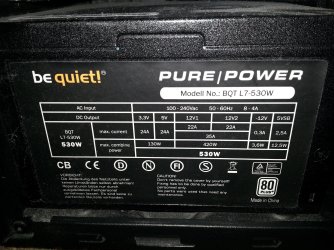
I have updated my system specs on SevenForums, but I don't know much about the PSU specs, so Instead, I have uploaded a picture.

Thanks again.
 

Attachments

  • 20150412_044802.jpg
    20150412_044802.jpg
    948.9 KB · Views: 3

My Computer My Computer

At a glance

Windows 7 ultimate 64-bitAMD Phenom(tm) II X4 960T ProcessorAMD Phenom(tm) II X4 960T ProcessorAMD Phenom(tm) II X4 960T Processor
Computer type
PC/Desktop
OS
Windows 7 ultimate 64-bit
CPU
AMD Phenom(tm) II X4 960T Processor
Motherboard
AMD Phenom(tm) II X4 960T Processor
Memory
AMD Phenom(tm) II X4 960T Processor
Graphics Card(s)
AMD Phenom(tm) II X4 960T Processor
Sound Card
AMD Phenom(tm) II X4 960T Processor
Monitor(s) Displays
BenQ, LED, senseye3.
Screen Resolution
1920x1080
Hard Drives
ST500DM002-1BD142 ATA Device 465.76 GB
PSU
540W
That looks good. Everything I see is within specs. So, no problem there. I am going to get you to do something (easy) for me. If you've already done it, just say so. Please open an elevated command prompt ( click start, type cmd in the search box, right click on the cmd entry and select run as administrator) in the black box that opens, copy/paste sfc /scannow. If you decide to type it, notice the space between the sfc and the /. It is a system file checker which will scan your system files and attempt to correct any missing or corrupt files. What we want are the results to say windows found no integrity violations. If it says files were found but could not be repaired, close the box, reboot and run it again, after opening the administrative command prompt. You may have to reboot and run it three times for it to repair all system files. If it can't repair them after 3 reboots, let us know.
 

My Computers My Computers

  • At a glance

    Windows 11 ProRyzen 9 5900X32GB G Skill DDR4-3600EVGA RTX 3080 FTW 3 Ultra
    Computer type
    PC/Desktop
    Computer Manufacturer/Model Number
    ALWAYS UNDER CONSTRUCTION
    OS
    Windows 11 Pro
    CPU
    Ryzen 9 5900X
    Motherboard
    Asus X570 Crosshair Viii Hero
    Memory
    32GB G Skill DDR4-3600
    Graphics Card(s)
    EVGA RTX 3080 FTW 3 Ultra
    Sound Card
    On Board/Sennheiser PC37X Headset
    Monitor(s) Displays
    3 X Asus 27"
    Screen Resolution
    2560x1440
    Hard Drives
    2 X 1 TB NVME drives
    PSU
    EVGA 850
    Case
    Phanteks Eclipse P400A
    Cooling
    EVGA 280 AIO
    Keyboard
    Logitech G510s/ Logitech G13
    Mouse
    Logitech G502
    Internet Speed
    24/1
    Antivirus
    ESET/MBAM Pro/SAS Pro
    Browser
    Chrome/ Firefox/ Edge
  • At a glance

    Windows 11 ProIntel Ultra 9 288V32 GB LPDDR5X 8533
    Computer type
    Laptop
    System Manufacturer/Model Number
    Dell 16 Plus
    OS
    Windows 11 Pro
    CPU
    Intel Ultra 9 288V
    Memory
    32 GB LPDDR5X 8533
    Monitor(s) Displays
    16" Mini-LED HDR600 Touch 90 Hz
    Screen Resolution
    2560X1600
    Hard Drives
    1 TB NVME
Back
Top