
betaupsilon
New member
- Local time
- 1:02 PM
- Messages
- 179
I chose to post to this tutorial thread since my problem seems to parallel the subject matter, but I do not know if this thread is being monitored. I will create a new thread if there is no response.
I recently used MACRIUM to image a laptop. I have never used MACRIUM before so I restored the image to a similar (not identical) model laptop to verify the image. The restored computer had trouble booting initially & I had to do a repair install to get it working. Upon booting I examined the OEM partition & noticed that it was empty because DISK MGR indicated that the space is UNALLOCATED.
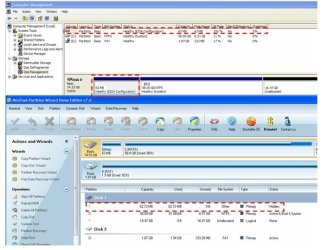
I have included a screenshot of the original laptop configuration using both DISK MGR & PARTITION WIZARD. Note that both do not indicate a file system, and DISK MGR indicates an EISA configuration. I could not view the OEM partition using DISKPART in administrator mode, but could do so when I booted from a rescue DVD. DISKPART indicated that the partition was RAW & the partition is hidden.
Should I convert the filesystem, assign a drive letter, & reimage the computer to clear up the boot problem or will that ruin the original laptop?
I recently used MACRIUM to image a laptop. I have never used MACRIUM before so I restored the image to a similar (not identical) model laptop to verify the image. The restored computer had trouble booting initially & I had to do a repair install to get it working. Upon booting I examined the OEM partition & noticed that it was empty because DISK MGR indicated that the space is UNALLOCATED.
I have included a screenshot of the original laptop configuration using both DISK MGR & PARTITION WIZARD. Note that both do not indicate a file system, and DISK MGR indicates an EISA configuration. I could not view the OEM partition using DISKPART in administrator mode, but could do so when I booted from a rescue DVD. DISKPART indicated that the partition was RAW & the partition is hidden.
Should I convert the filesystem, assign a drive letter, & reimage the computer to clear up the boot problem or will that ruin the original laptop?
Attachments
Last edited by a moderator:
My Computer
- Computer type
- PC/Desktop
- OS
- Windows 7 Home Prem 32 bit


 If so then you can't do an in-place (Win7 Repair Install) Upgrade to Win7.
