Solved What's taking up my hard drive?

mercurius

New member
Local time
7:16 AM
Messages
16
Just happened to check my hard drive this morning and was shocked to discover that out of the total disk size of 1TB there's only about 80GB free. I have done a folder by folder check and can only account for 340GB.

I did create a system image some time ago, but thought that was saved to my back up drive.

Any suggestions as to how to identify what else is on there?
 

My Computer My Computer

At a glance

Windows 7 Home Premium 64 bitAMD FX(tm)-4130 Quad-Core Processor7.48 GBATI Radeon 3000 Graphics
Computer type
PC/Desktop
Computer Manufacturer/Model Number
Custom build
OS
Windows 7 Home Premium 64 bit
CPU
AMD FX(tm)-4130 Quad-Core Processor
Motherboard
Gigabyte Technology Co., Ltd. GA-78LMT-USB3
Memory
7.48 GB
Graphics Card(s)
ATI Radeon 3000 Graphics
Sound Card
(1) AMD High Definition Audio Device (2) VIA High Definiti
Hard Drives
(1) ST1000DM 003-1CH162 SATA Disk Device (2) WDC WD50 00AAKS-00WWPA0 SATA Disk Device (3) Freecom Hard Drive XS USB Device (4) Generic Compact Flash USB Device (5) Generic MS/MS-PRO USB Device (6) Generic SD/MMC USB Device (7) Generic SM/
Antivirus
Avast
Browser
Google Chrome

My Computer My Computer

At a glance

64-bit Windows 11 Pro for WorkstationsIntel i7-8700K OC'd to 5 GHz64 GB (4x16GB) G.SKILL TridentZ RGB DDR4 3600...ASUS ROG-STRIX-GTX1080TI-O11G-GAMING
Computer type
PC/Desktop
Computer Manufacturer/Model Number
Self built custom
OS
64-bit Windows 11 Pro for Workstations
CPU
Intel i7-8700K OC'd to 5 GHz
Motherboard
ASUS ROG Maximus XI Formula Z390
Memory
64 GB (4x16GB) G.SKILL TridentZ RGB DDR4 3600 MHz
Graphics Card(s)
ASUS ROG-STRIX-GTX1080TI-O11G-GAMING
Sound Card
Integrated
Monitor(s) Displays
2 x Samsung Odyssey G7 27"
Screen Resolution
2560x1440
Hard Drives
1TB Samsung 990 PRO M.2,
4TB Samsung 990 PRO PRO M.2,
TerraMaster F8 SSD Plus NAS
PSU
Seasonic Prime Titanium 850W
Case
Thermaltake Core P3
Cooling
Corsair Hydro H115i
Keyboard
Logitech wireless K800
Mouse
Logitech MX Master 4
Internet Speed
2 Gb/s Download and 100 Mb/s Upload
Antivirus
Malwarebyte Anti-Malware Premium
Browser
Google Chrome
Other Info
Logitech Z625 speaker system,
Logitech BRIO 4K Pro webcam,
HP Color LaserJet Pro MFP M477fdn,
APC SMART-UPS RT 1000 XL - SURT1000XLI,
Galaxy S23 Plus phone
Hi Shawn,

Thanks for this help,

I've just run WINDIRSTAT and it is showing that there's only 389GB on the drive. But there's nothing to show what's taking up the other c500GB.
 

My Computer My Computer

At a glance

Windows 7 Home Premium 64 bitAMD FX(tm)-4130 Quad-Core Processor7.48 GBATI Radeon 3000 Graphics
Computer type
PC/Desktop
Computer Manufacturer/Model Number
Custom build
OS
Windows 7 Home Premium 64 bit
CPU
AMD FX(tm)-4130 Quad-Core Processor
Motherboard
Gigabyte Technology Co., Ltd. GA-78LMT-USB3
Memory
7.48 GB
Graphics Card(s)
ATI Radeon 3000 Graphics
Sound Card
(1) AMD High Definition Audio Device (2) VIA High Definiti
Hard Drives
(1) ST1000DM 003-1CH162 SATA Disk Device (2) WDC WD50 00AAKS-00WWPA0 SATA Disk Device (3) Freecom Hard Drive XS USB Device (4) Generic Compact Flash USB Device (5) Generic MS/MS-PRO USB Device (6) Generic SD/MMC USB Device (7) Generic SM/
Antivirus
Avast
Browser
Google Chrome

My Computer My Computer

At a glance

Windows 10 Pro. 64/ version 1709 Windows 7 Pr...Intel i7-6800K @ 4.3Corsair Platinum 16 gig @2400EVGA GTX 1070 OC
Computer type
PC/Desktop
Computer Manufacturer/Model Number
Home made Desktop
OS
Windows 10 Pro. 64/ version 1709 Windows 7 Pro/64
CPU
Intel i7-6800K @ 4.3
Motherboard
ASUS X-99 Deluxe II
Memory
Corsair Platinum 16 gig @2400
Graphics Card(s)
EVGA GTX 1070 OC
Monitor(s) Displays
Asus 27" LED LCD/VE278Q
Screen Resolution
1920-1080 or 1280-720 HDMI
Hard Drives
INTEL SSD 730-240 Gb Sata 3.0/
PSU
EVGA Platium 1200W
Case
Phanteks Luxe Tempered Glass 8 fans/ one radiator
Cooling
XSPC/ Water Cooled CPU
Keyboard
Das 4 Professional
Mouse
Logitech M705/MX Anywhere 2-S
Internet Speed
100 mbits
Antivirus
Microsoft Security Essentials/ Malwarebytes Premium 3.0/ SAS
Browser
I.E. 11 default/Firefox/ ISP Time Warner Cable/Spectrum
Other Info
LG BluRay Burner/
Sound system-KLipsch-THX/
Icy Dock ssd Hot Swap bays.
Hi Shaun,

Just clicked on 'Show Unknown' in Options and it's now showing 425GB as 'Unknown'.

Any idea how to find out what this is?
 

My Computer My Computer

At a glance

Windows 7 Home Premium 64 bitAMD FX(tm)-4130 Quad-Core Processor7.48 GBATI Radeon 3000 Graphics
Computer type
PC/Desktop
Computer Manufacturer/Model Number
Custom build
OS
Windows 7 Home Premium 64 bit
CPU
AMD FX(tm)-4130 Quad-Core Processor
Motherboard
Gigabyte Technology Co., Ltd. GA-78LMT-USB3
Memory
7.48 GB
Graphics Card(s)
ATI Radeon 3000 Graphics
Sound Card
(1) AMD High Definition Audio Device (2) VIA High Definiti
Hard Drives
(1) ST1000DM 003-1CH162 SATA Disk Device (2) WDC WD50 00AAKS-00WWPA0 SATA Disk Device (3) Freecom Hard Drive XS USB Device (4) Generic Compact Flash USB Device (5) Generic MS/MS-PRO USB Device (6) Generic SD/MMC USB Device (7) Generic SM/
Antivirus
Avast
Browser
Google Chrome
Yes, I do. Thanks for the tutorial. I have updated as much of my profile info as I can using the tool you suggested.
 

My Computer My Computer

At a glance

Windows 7 Home Premium 64 bitAMD FX(tm)-4130 Quad-Core Processor7.48 GBATI Radeon 3000 Graphics
Computer type
PC/Desktop
Computer Manufacturer/Model Number
Custom build
OS
Windows 7 Home Premium 64 bit
CPU
AMD FX(tm)-4130 Quad-Core Processor
Motherboard
Gigabyte Technology Co., Ltd. GA-78LMT-USB3
Memory
7.48 GB
Graphics Card(s)
ATI Radeon 3000 Graphics
Sound Card
(1) AMD High Definition Audio Device (2) VIA High Definiti
Hard Drives
(1) ST1000DM 003-1CH162 SATA Disk Device (2) WDC WD50 00AAKS-00WWPA0 SATA Disk Device (3) Freecom Hard Drive XS USB Device (4) Generic Compact Flash USB Device (5) Generic MS/MS-PRO USB Device (6) Generic SD/MMC USB Device (7) Generic SM/
Antivirus
Avast
Browser
Google Chrome
Hi Shaun,

Just clicked on 'Show Unknown' in Options and it's now showing 425GB as 'Unknown'.

Any idea how to find out what this is?

See if WizTree can show you where the unknown is used.
They have a Portable Zip available, no install needed.
Antibody Software - WizTree finds the files and folders using the most disk space on your hard drive

Check your max space used for System Restore.
Avast has a known bug to set this to 50%.
http://www.sevenforums.com/tutorials/335-system-protection-change-disk-space-usage.html
 

My Computer My Computer

At a glance

Multi-Boot W7_Pro_x64 W8.1_Pro_x64 W10_Pro_x6...AMD Athlon II x4 6206GB GSkill DDR2 800AMD 4670 GPU + AMD 4200 IGP
Computer type
PC/Desktop
Computer Manufacturer/Model Number
home built
OS
Multi-Boot W7_Pro_x64 W8.1_Pro_x64 W10_Pro_x64 +Linux_VMs +Chromium_VM
CPU
AMD Athlon II x4 620
Motherboard
Gigabyte GA-MA785G-UD3H
Memory
6GB GSkill DDR2 800
Graphics Card(s)
AMD 4670 GPU + AMD 4200 IGP
Sound Card
on board Realtek ALC889A
Monitor(s) Displays
RCA 40" LCD TV, Insignia 32" LCD TV, HP 15" LCD monitor
Screen Resolution
1680 x 1050
Hard Drives
OCZ Vertex 3 120GB,
Samsung F3 1TB (3),
Several others - WD, Seagate, Hitachi, ...
PSU
Corsair 500 W
Case
Rosewill mid tower
Cooling
CM 90mm rifle
Keyboard
Gyration wireless, Logitech wireless, Dell USB wired
Mouse
Gyration wireless, Logitech wireless, V7 USB wired
Internet Speed
Spectrum - 100Mbps D / 10Mbps U
Antivirus
Avast, MBAM3, EMET, WinPatrol
Browser
Pale Moon, Firefox, IE
Other Info
2 multi-boot PC's
Mainly HTPC/Office/Gen purpose (no gaming).
Trendnet USB KVM.
LG DVD burner/Blue Ray Player.
Tray system for removable SATA backup drives.

Not currently OCd, under-volted.
I use Hybrid sleep, rarely re-boot or shutdown.

Hauppauge HD-PVR, Avermedia PCIe TV Tuner, Hauppauge PCI TV Tuner.
Hi DavidE,
Ran WizTree and it has identified 75 files in System Volume Information with a total size of 454GB. From the format they look like some form of back up file. I wonder why they are here and not on my back up drive.
 

My Computer My Computer

At a glance

Windows 7 Home Premium 64 bitAMD FX(tm)-4130 Quad-Core Processor7.48 GBATI Radeon 3000 Graphics
Computer type
PC/Desktop
Computer Manufacturer/Model Number
Custom build
OS
Windows 7 Home Premium 64 bit
CPU
AMD FX(tm)-4130 Quad-Core Processor
Motherboard
Gigabyte Technology Co., Ltd. GA-78LMT-USB3
Memory
7.48 GB
Graphics Card(s)
ATI Radeon 3000 Graphics
Sound Card
(1) AMD High Definition Audio Device (2) VIA High Definiti
Hard Drives
(1) ST1000DM 003-1CH162 SATA Disk Device (2) WDC WD50 00AAKS-00WWPA0 SATA Disk Device (3) Freecom Hard Drive XS USB Device (4) Generic Compact Flash USB Device (5) Generic MS/MS-PRO USB Device (6) Generic SD/MMC USB Device (7) Generic SM/
Antivirus
Avast
Browser
Google Chrome
It sounds like it's restore points using the space.
 

My Computer My Computer

At a glance

64-bit Windows 11 Pro for WorkstationsIntel i7-8700K OC'd to 5 GHz64 GB (4x16GB) G.SKILL TridentZ RGB DDR4 3600...ASUS ROG-STRIX-GTX1080TI-O11G-GAMING
Computer type
PC/Desktop
Computer Manufacturer/Model Number
Self built custom
OS
64-bit Windows 11 Pro for Workstations
CPU
Intel i7-8700K OC'd to 5 GHz
Motherboard
ASUS ROG Maximus XI Formula Z390
Memory
64 GB (4x16GB) G.SKILL TridentZ RGB DDR4 3600 MHz
Graphics Card(s)
ASUS ROG-STRIX-GTX1080TI-O11G-GAMING
Sound Card
Integrated
Monitor(s) Displays
2 x Samsung Odyssey G7 27"
Screen Resolution
2560x1440
Hard Drives
1TB Samsung 990 PRO M.2,
4TB Samsung 990 PRO PRO M.2,
TerraMaster F8 SSD Plus NAS
PSU
Seasonic Prime Titanium 850W
Case
Thermaltake Core P3
Cooling
Corsair Hydro H115i
Keyboard
Logitech wireless K800
Mouse
Logitech MX Master 4
Internet Speed
2 Gb/s Download and 100 Mb/s Upload
Antivirus
Malwarebyte Anti-Malware Premium
Browser
Google Chrome
Other Info
Logitech Z625 speaker system,
Logitech BRIO 4K Pro webcam,
HP Color LaserJet Pro MFP M477fdn,
APC SMART-UPS RT 1000 XL - SURT1000XLI,
Galaxy S23 Plus phone
Their are problems all over this forum and the web about Avast creating unwanted Restore Points.

I believe most of the members with this problem went to the Avast forum and found a cure.
Basically what is happening is Avast is moving your amount of disk space for restore points to 50% and just keep adding restore points and filling up the disk.
I will find a member that had this problem and ask her to help.
 

My Computer My Computer

At a glance

Windows 10 Pro. 64/ version 1709 Windows 7 Pr...Intel i7-6800K @ 4.3Corsair Platinum 16 gig @2400EVGA GTX 1070 OC
Computer type
PC/Desktop
Computer Manufacturer/Model Number
Home made Desktop
OS
Windows 10 Pro. 64/ version 1709 Windows 7 Pro/64
CPU
Intel i7-6800K @ 4.3
Motherboard
ASUS X-99 Deluxe II
Memory
Corsair Platinum 16 gig @2400
Graphics Card(s)
EVGA GTX 1070 OC
Monitor(s) Displays
Asus 27" LED LCD/VE278Q
Screen Resolution
1920-1080 or 1280-720 HDMI
Hard Drives
INTEL SSD 730-240 Gb Sata 3.0/
PSU
EVGA Platium 1200W
Case
Phanteks Luxe Tempered Glass 8 fans/ one radiator
Cooling
XSPC/ Water Cooled CPU
Keyboard
Das 4 Professional
Mouse
Logitech M705/MX Anywhere 2-S
Internet Speed
100 mbits
Antivirus
Microsoft Security Essentials/ Malwarebytes Premium 3.0/ SAS
Browser
I.E. 11 default/Firefox/ ISP Time Warner Cable/Spectrum
Other Info
LG BluRay Burner/
Sound system-KLipsch-THX/
Icy Dock ssd Hot Swap bays.
H Layback Bear,

Ah, so that's the problem! Thank you very much for the offer of help. That's very kind of you.
 

My Computer My Computer

At a glance

Windows 7 Home Premium 64 bitAMD FX(tm)-4130 Quad-Core Processor7.48 GBATI Radeon 3000 Graphics
Computer type
PC/Desktop
Computer Manufacturer/Model Number
Custom build
OS
Windows 7 Home Premium 64 bit
CPU
AMD FX(tm)-4130 Quad-Core Processor
Motherboard
Gigabyte Technology Co., Ltd. GA-78LMT-USB3
Memory
7.48 GB
Graphics Card(s)
ATI Radeon 3000 Graphics
Sound Card
(1) AMD High Definition Audio Device (2) VIA High Definiti
Hard Drives
(1) ST1000DM 003-1CH162 SATA Disk Device (2) WDC WD50 00AAKS-00WWPA0 SATA Disk Device (3) Freecom Hard Drive XS USB Device (4) Generic Compact Flash USB Device (5) Generic MS/MS-PRO USB Device (6) Generic SD/MMC USB Device (7) Generic SM/
Antivirus
Avast
Browser
Google Chrome
I ran into the same problem a short while back and several of the guys here, most notably DavidE, were able to walk me through how to fix it for now. Look at this thread, starting with post #6.
 

My Computer My Computer

At a glance

Win 7 Ultimate 64 bitIntel i7-3930KKingston HyperX Genesis 32GB Kit (8x4GB Modul...MSI R7850 Twin Frozr 2GD5/OC Radeon HD 7850 2...
Computer type
PC/Desktop
Computer Manufacturer/Model Number
Custom Build
OS
Win 7 Ultimate 64 bit
CPU
Intel i7-3930K
Motherboard
ASUS P9X79 WS
Memory
Kingston HyperX Genesis 32GB Kit (8x4GB Modules) 1600MHz DDR
Graphics Card(s)
MSI R7850 Twin Frozr 2GD5/OC Radeon HD 7850 2GB 256-bit GDDR
Sound Card
Asus Xonar Essence STX
Monitor(s) Displays
3x Asus VG248QE 24", Vizio 32" TV
Screen Resolution
1920 x 1080, ?
Hard Drives
Samsung 128GB 840 Pro SSD (1),
Samsung 4TB 850 EVO SSDs (4)
Samsung 4TB 850 EVO SSDs (16) external backup drives used in 2.5" hot swap bays in the computer.
PSU
Corsair HX750w
Case
Antec Two Hundred v2 (modified)
Cooling
Cooler Master GeminII S524 120mm (fan replaced with a 140mm)
Keyboard
Logitech G510s
Mouse
Logitech M525 (two in use)
Internet Speed
=< 32Mbps down, 8Mbps up
Antivirus
AVAST!, MBAM, SAS, Spybot S&D (all but MBAM free) Glary Util
Browser
IE11
Other Info
LSI 9211-8i HBA card (8 SATA III ports), 2.5" & 3.5" Hot Swap Bays, HooToo HT-CR001 PCI-E to USB 3.0 Internal Hub + 6 Slot Card Reader, and LG Model CH12LS28 BD-ROM Optical Drive. Also, ScanSnap S1500 ADF duplexing scanner, Canon 9000F flat bed scanner, Corsair SP2500 2.1 speakers, Samsung CLP 415nw laser color printer, Cyberpower PP2200SW UPS
Thank you Lady Fitzgerald for answering my call for help.
 

My Computer My Computer

At a glance

Windows 10 Pro. 64/ version 1709 Windows 7 Pr...Intel i7-6800K @ 4.3Corsair Platinum 16 gig @2400EVGA GTX 1070 OC
Computer type
PC/Desktop
Computer Manufacturer/Model Number
Home made Desktop
OS
Windows 10 Pro. 64/ version 1709 Windows 7 Pro/64
CPU
Intel i7-6800K @ 4.3
Motherboard
ASUS X-99 Deluxe II
Memory
Corsair Platinum 16 gig @2400
Graphics Card(s)
EVGA GTX 1070 OC
Monitor(s) Displays
Asus 27" LED LCD/VE278Q
Screen Resolution
1920-1080 or 1280-720 HDMI
Hard Drives
INTEL SSD 730-240 Gb Sata 3.0/
PSU
EVGA Platium 1200W
Case
Phanteks Luxe Tempered Glass 8 fans/ one radiator
Cooling
XSPC/ Water Cooled CPU
Keyboard
Das 4 Professional
Mouse
Logitech M705/MX Anywhere 2-S
Internet Speed
100 mbits
Antivirus
Microsoft Security Essentials/ Malwarebytes Premium 3.0/ SAS
Browser
I.E. 11 default/Firefox/ ISP Time Warner Cable/Spectrum
Other Info
LG BluRay Burner/
Sound system-KLipsch-THX/
Icy Dock ssd Hot Swap bays.
Hi Lady Fitzgerald,

Thanks for the link. Some of the talk in the thread though is above my technical competence. I don't follow how to delete existing restore points. Any chance you could talk a non-technical user though that?

Thanks in advance for your help.
 

My Computer My Computer

At a glance

Windows 7 Home Premium 64 bitAMD FX(tm)-4130 Quad-Core Processor7.48 GBATI Radeon 3000 Graphics
Computer type
PC/Desktop
Computer Manufacturer/Model Number
Custom build
OS
Windows 7 Home Premium 64 bit
CPU
AMD FX(tm)-4130 Quad-Core Processor
Motherboard
Gigabyte Technology Co., Ltd. GA-78LMT-USB3
Memory
7.48 GB
Graphics Card(s)
ATI Radeon 3000 Graphics
Sound Card
(1) AMD High Definition Audio Device (2) VIA High Definiti
Hard Drives
(1) ST1000DM 003-1CH162 SATA Disk Device (2) WDC WD50 00AAKS-00WWPA0 SATA Disk Device (3) Freecom Hard Drive XS USB Device (4) Generic Compact Flash USB Device (5) Generic MS/MS-PRO USB Device (6) Generic SD/MMC USB Device (7) Generic SM/
Antivirus
Avast
Browser
Google Chrome

My Computer My Computer

At a glance

Multi-Boot W7_Pro_x64 W8.1_Pro_x64 W10_Pro_x6...AMD Athlon II x4 6206GB GSkill DDR2 800AMD 4670 GPU + AMD 4200 IGP
Computer type
PC/Desktop
Computer Manufacturer/Model Number
home built
OS
Multi-Boot W7_Pro_x64 W8.1_Pro_x64 W10_Pro_x64 +Linux_VMs +Chromium_VM
CPU
AMD Athlon II x4 620
Motherboard
Gigabyte GA-MA785G-UD3H
Memory
6GB GSkill DDR2 800
Graphics Card(s)
AMD 4670 GPU + AMD 4200 IGP
Sound Card
on board Realtek ALC889A
Monitor(s) Displays
RCA 40" LCD TV, Insignia 32" LCD TV, HP 15" LCD monitor
Screen Resolution
1680 x 1050
Hard Drives
OCZ Vertex 3 120GB,
Samsung F3 1TB (3),
Several others - WD, Seagate, Hitachi, ...
PSU
Corsair 500 W
Case
Rosewill mid tower
Cooling
CM 90mm rifle
Keyboard
Gyration wireless, Logitech wireless, Dell USB wired
Mouse
Gyration wireless, Logitech wireless, V7 USB wired
Internet Speed
Spectrum - 100Mbps D / 10Mbps U
Antivirus
Avast, MBAM3, EMET, WinPatrol
Browser
Pale Moon, Firefox, IE
Other Info
2 multi-boot PC's
Mainly HTPC/Office/Gen purpose (no gaming).
Trendnet USB KVM.
LG DVD burner/Blue Ray Player.
Tray system for removable SATA backup drives.

Not currently OCd, under-volted.
I use Hybrid sleep, rarely re-boot or shutdown.

Hauppauge HD-PVR, Avermedia PCIe TV Tuner, Hauppauge PCI TV Tuner.

Many thanks DavidE. That worked for me! I followed Option 1 to delete them.

Will they stay deleted or will I have to keep doing this every now and again (I am carrying on with Avast Antivirus Free version).

Just another point on that, I also selected the option 'Turn off system protection', thinking that this was the way to stop restore points being created again in future. Now I'm wondering whether this was the right thing to do. Could you please advise what the implications of this are?

Secondly, do you have a tutorial on best practice for backups and what the difference is between taking back ups and making system images? I've just wiped my back up drive and need to set it up again, but want to know what the best thing to do is.

Finally I would like to say to everyone who has responded to my query, thank you very much for all your kindness and help!
 

My Computer My Computer

At a glance

Windows 7 Home Premium 64 bitAMD FX(tm)-4130 Quad-Core Processor7.48 GBATI Radeon 3000 Graphics
Computer type
PC/Desktop
Computer Manufacturer/Model Number
Custom build
OS
Windows 7 Home Premium 64 bit
CPU
AMD FX(tm)-4130 Quad-Core Processor
Motherboard
Gigabyte Technology Co., Ltd. GA-78LMT-USB3
Memory
7.48 GB
Graphics Card(s)
ATI Radeon 3000 Graphics
Sound Card
(1) AMD High Definition Audio Device (2) VIA High Definiti
Hard Drives
(1) ST1000DM 003-1CH162 SATA Disk Device (2) WDC WD50 00AAKS-00WWPA0 SATA Disk Device (3) Freecom Hard Drive XS USB Device (4) Generic Compact Flash USB Device (5) Generic MS/MS-PRO USB Device (6) Generic SD/MMC USB Device (7) Generic SM/
Antivirus
Avast
Browser
Google Chrome
Mercurius,

Turning off system protection would just mean that you will no longer have any restore points available to be able to do a system restore if needed in the future.

If you would like to keep having restore points, then you could turn system protection back on for the C: drive, and limit the space used for restore points to what you want instead.

http://www.sevenforums.com/tutorials/335-system-protection-change-disk-space-usage.html

If you keep good updated system images, then you should be fine though.

A system image is an image backup of everything (all system drives). A Windows Backup is only a backup of folders you selected to be included in the backup.

http://www.sevenforums.com/tutorials/663-backup-complete-computer-create-image-backup.html

http://www.sevenforums.com/tutorials/615-backup-user-system-files.html

If you like, Macrium Reflect Free is a good 3rd party option for system images. It's a bit more flexible and reliable.

http://www.sevenforums.com/tutorials/73828-imaging-free-macrium.html
 

My Computer My Computer

At a glance

64-bit Windows 11 Pro for WorkstationsIntel i7-8700K OC'd to 5 GHz64 GB (4x16GB) G.SKILL TridentZ RGB DDR4 3600...ASUS ROG-STRIX-GTX1080TI-O11G-GAMING
Computer type
PC/Desktop
Computer Manufacturer/Model Number
Self built custom
OS
64-bit Windows 11 Pro for Workstations
CPU
Intel i7-8700K OC'd to 5 GHz
Motherboard
ASUS ROG Maximus XI Formula Z390
Memory
64 GB (4x16GB) G.SKILL TridentZ RGB DDR4 3600 MHz
Graphics Card(s)
ASUS ROG-STRIX-GTX1080TI-O11G-GAMING
Sound Card
Integrated
Monitor(s) Displays
2 x Samsung Odyssey G7 27"
Screen Resolution
2560x1440
Hard Drives
1TB Samsung 990 PRO M.2,
4TB Samsung 990 PRO PRO M.2,
TerraMaster F8 SSD Plus NAS
PSU
Seasonic Prime Titanium 850W
Case
Thermaltake Core P3
Cooling
Corsair Hydro H115i
Keyboard
Logitech wireless K800
Mouse
Logitech MX Master 4
Internet Speed
2 Gb/s Download and 100 Mb/s Upload
Antivirus
Malwarebyte Anti-Malware Premium
Browser
Google Chrome
Other Info
Logitech Z625 speaker system,
Logitech BRIO 4K Pro webcam,
HP Color LaserJet Pro MFP M477fdn,
APC SMART-UPS RT 1000 XL - SURT1000XLI,
Galaxy S23 Plus phone
If you have turned off system protection, you can't do a System Restore. You'll have to watch your hard drive free space to see if Avast continues to chew it up.

Some people have trouble with System Restore and are glad to have it turned off. I've had no problems with it. System Restore in my experience runs as expected perhaps 97% of the time. It can be a quick way of returning your system to the way it was a day or a week or a month ago. That can be useful when you've installed something you wish you hadn't or when you have unexplained problems that you can't quickly resolve. For the 3% of the time that it fails to solve your problem, you have to resort to some Plan B.

Plan B can be manual trouble-shooting or restoration of a system image.

System images are a proper "backup" of an entire partition, unlike System Restore.

I use both. If System Restore doesn't bail me out, I restore an image. I've only had to restore images twice in 5 years, but I was glad to have that option when the time came.

Best practices would dictate the use of imaging--with something like Macrium or Aomei. You'd make a new image periodically, perhaps weekly or monthly.

You have to store the images and they can take up considerable space, depending on exactly how much space is used on your imaged partitions--maybe 15 to 50 GB each.

But no reason you can't use System Restore as a first line of defense. Just have the image fallback as a last resort.

Look for a Macrium tutorial on this site by member WHS.
 

My Computer My Computer

At a glance

Windows 7 Home Premium SP1, 64-bitIntel Skylake i5-6600K, not overclocked8 GB HyperX DDR4-2666 (2 x 4 GB)none; graphics are integrated on CPU
Computer type
PC/Desktop
Computer Manufacturer/Model Number
Ignatz Special; 4 speed manual gearbox; factory air conditioning; one of one
OS
Windows 7 Home Premium SP1, 64-bit
CPU
Intel Skylake i5-6600K, not overclocked
Motherboard
AsRock Z170M Extreme 4, micro ATX
Memory
8 GB HyperX DDR4-2666 (2 x 4 GB)
Graphics Card(s)
none; graphics are integrated on CPU
Sound Card
onboard: Realtek ALC1150; external: USB Behringer UF0-202
Monitor(s) Displays
Dell S2340M 23 inch IPS
Screen Resolution
1600 x 900
Hard Drives
System: Crucial MX100 series SSD, 128 GB;
Data: Samsung Spinpoint 103SJ, 1 TB;
Backup: WD Caviar Green WD30EZRX-00D8PB0, 3 TB
PSU
Rosewill SilentNight 500 watt fanless, semi-modular
Case
Antec Solo II
Cooling
Noctua NH-U12S; Noctua F12 intake, Noctua S12A exhaust
Keyboard
Microsoft 200 6JH-00001 USB
Mouse
Dell or Microsoft optical wired; USB
Antivirus
Microsoft Security Essentials and Malwarebytes Premium
Browser
Pale Moon
Other Info
All fans PWM; speeds at idle: CPU circa 500 rpm; intake circa 600 rpm; exhaust circa 600 rpm; CPU temps 27 idle and 47 C load in a warm room (27 C/81 F) when running Intel Extreme Tuning Utility stress test.
Macrium Reflect Free (here is a good tutorial on how to use Macrium Reflect).

Imaging is the best way to backup system files (OS and programs) but is too slow, space consuming, clunky, and inefficient for backing up data (other than a tiny amount). For backing up data, I prefer a folder/file syncing program, such as FreeFileSync. To use a split system like that, one should have their system files on their own drive or partition and the data segregated to its own drives or partition.
 

My Computer My Computer

At a glance

Win 7 Ultimate 64 bitIntel i7-3930KKingston HyperX Genesis 32GB Kit (8x4GB Modul...MSI R7850 Twin Frozr 2GD5/OC Radeon HD 7850 2...
Computer type
PC/Desktop
Computer Manufacturer/Model Number
Custom Build
OS
Win 7 Ultimate 64 bit
CPU
Intel i7-3930K
Motherboard
ASUS P9X79 WS
Memory
Kingston HyperX Genesis 32GB Kit (8x4GB Modules) 1600MHz DDR
Graphics Card(s)
MSI R7850 Twin Frozr 2GD5/OC Radeon HD 7850 2GB 256-bit GDDR
Sound Card
Asus Xonar Essence STX
Monitor(s) Displays
3x Asus VG248QE 24", Vizio 32" TV
Screen Resolution
1920 x 1080, ?
Hard Drives
Samsung 128GB 840 Pro SSD (1),
Samsung 4TB 850 EVO SSDs (4)
Samsung 4TB 850 EVO SSDs (16) external backup drives used in 2.5" hot swap bays in the computer.
PSU
Corsair HX750w
Case
Antec Two Hundred v2 (modified)
Cooling
Cooler Master GeminII S524 120mm (fan replaced with a 140mm)
Keyboard
Logitech G510s
Mouse
Logitech M525 (two in use)
Internet Speed
=< 32Mbps down, 8Mbps up
Antivirus
AVAST!, MBAM, SAS, Spybot S&D (all but MBAM free) Glary Util
Browser
IE11
Other Info
LSI 9211-8i HBA card (8 SATA III ports), 2.5" & 3.5" Hot Swap Bays, HooToo HT-CR001 PCI-E to USB 3.0 Internal Hub + 6 Slot Card Reader, and LG Model CH12LS28 BD-ROM Optical Drive. Also, ScanSnap S1500 ADF duplexing scanner, Canon 9000F flat bed scanner, Corsair SP2500 2.1 speakers, Samsung CLP 415nw laser color printer, Cyberpower PP2200SW UPS
Many thanks DavidE. That worked for me! I followed Option 1 to delete them.

Will they stay deleted or will I have to keep doing this every now and again (I am carrying on with Avast Antivirus Free version).

You're welcome and glad to hear you have the problem solved for now.

It's a bug that should be fixed in June/July, so you should keep an eye on disk space to see if the problem happens again.

Now that we know you have Avast FREE, you shouldn't have the option that would cause this problem.
It's caused by Avast NG, aka Avast Secure Virtual Machines, aka Avast Sandbox.
They have changed the name for this "feature" making things more confusing and difficult.

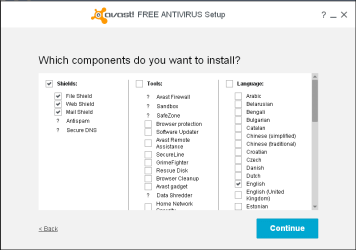
Go to Control Panel > Programs and Features.
Select the Avast program.
Click on Change.

If you see Secure Virtual Machines (aka Sandbox or NG) checked, uncheck it and continue to uninstall it.
Reboot.

Here is a screen print example of what you should see if you want to change Avast options:
I only have the basic protection installed, no optional components.

AvastComponents_01.PNG
 

My Computer My Computer

At a glance

Multi-Boot W7_Pro_x64 W8.1_Pro_x64 W10_Pro_x6...AMD Athlon II x4 6206GB GSkill DDR2 800AMD 4670 GPU + AMD 4200 IGP
Computer type
PC/Desktop
Computer Manufacturer/Model Number
home built
OS
Multi-Boot W7_Pro_x64 W8.1_Pro_x64 W10_Pro_x64 +Linux_VMs +Chromium_VM
CPU
AMD Athlon II x4 620
Motherboard
Gigabyte GA-MA785G-UD3H
Memory
6GB GSkill DDR2 800
Graphics Card(s)
AMD 4670 GPU + AMD 4200 IGP
Sound Card
on board Realtek ALC889A
Monitor(s) Displays
RCA 40" LCD TV, Insignia 32" LCD TV, HP 15" LCD monitor
Screen Resolution
1680 x 1050
Hard Drives
OCZ Vertex 3 120GB,
Samsung F3 1TB (3),
Several others - WD, Seagate, Hitachi, ...
PSU
Corsair 500 W
Case
Rosewill mid tower
Cooling
CM 90mm rifle
Keyboard
Gyration wireless, Logitech wireless, Dell USB wired
Mouse
Gyration wireless, Logitech wireless, V7 USB wired
Internet Speed
Spectrum - 100Mbps D / 10Mbps U
Antivirus
Avast, MBAM3, EMET, WinPatrol
Browser
Pale Moon, Firefox, IE
Other Info
2 multi-boot PC's
Mainly HTPC/Office/Gen purpose (no gaming).
Trendnet USB KVM.
LG DVD burner/Blue Ray Player.
Tray system for removable SATA backup drives.

Not currently OCd, under-volted.
I use Hybrid sleep, rarely re-boot or shutdown.

Hauppauge HD-PVR, Avermedia PCIe TV Tuner, Hauppauge PCI TV Tuner.
Back
Top