How restore system files when System File Checker won't work

Nisko

New member
Member
VIP
Local time
6:08 AM
Messages
242
I have run System File Checker (sfc) and it found many files that were corrupt and could not be repaired. My PC appears to be running fine - but I am anal about repairing anything that is wrong on my PC. The only suggestion I've received so far was to perform a Repair Install. That's very risky. Does anyone know of a sure fire way of repairing my corrupt files so that sfc /scannow can run again without a hitch? Thank you..................
 

My Computer My Computer

Computer Manufacturer/Model Number
HP Pavilion KQ574AV
OS
Windows 7
More about System File Checker
Use command prompt to get the log:
findstr /c:"[SR]" %windir%\Logs\CBS\CBS.log >"%userprofile%\Desktop\sfcdetails.txt"
Then follow the corrupted file's path and search for a known good copy of the files (Be careful!)
It is all mentioned the link...
If you are too lazy to read it here:
How to manually replace a corrupted system file with a known good copy of the file
After you determine which system file was corrupted and could not be repaired through the detail information in the Sfcdetails.txt file, find where the corrupted file located, and then manually replace the corrupted file with a known good copy of the file. To do this, follow these steps:

Note You may be able to get a known good copy of the system file from another computer that is running the same version of Windows with your computer. You may perform a System File Checker process on that computer to make sure the system file that you intend to copy is a good copy.
Take administrative ownership of the corrupted system file. To do this, at an elevated command prompt, copy and then paste (or type) the following command, and then press ENTER:
takeown /f Path_And_File_Name
Note The Path_And_File_Name placeholder represents the path and the file name of the corrupted file. For example, type takeown /f C:\windows\system32\jscript.dll.
Grant administrators full access to the corrupted system file. To do this, copy and paste (or type) the following command, and then press ENTER:
icacls Path_And_File_Name /GRANT ADMINISTRATORS:F
Note The Path_And_File_Name placeholder represents the path and the file name of the corrupted file. For example, type icacls C:\windows\system32\jscript.dll /grant administrators:F.
Replace the corrupted system file with a known good copy of the file. To do this, copy and paste (or type) the following command, and then press ENTER:
Copy Source_File Destination
Note The Source_File placeholder represents the path and file name of the known good copy of the file on your computer, and the Destination placeholder represents the path and file name of the corrupted file. For example, type copy E:\temp\jscript.dll C:\windows\system32\jscript.dll.
 

My Computer My Computer

Computer type
Laptop
Computer Manufacturer/Model Number
Sony Corporation VAIO VPCEL22FX
OS
Microsoft Windows 7 Ultimate x64
CPU
AMD E-450 with Radeon HD Graphics
Motherboard
Sony Corporation VAIO
Memory
Nanya Technology DDR3 4.00 GB (3.60 GB usable)
Graphics Card(s)
ATI AMD Radeon HD 6320 Graphics
Sound Card
AMD High Definition Audio Device
Monitor(s) Displays
Name Generic PnP Monitor on AMD Radeon HD 6320 Graphics
Screen Resolution
1366x768 pixels
Hard Drives
-- Controller Map ----------------------------------------------------------
+ AMD SATA Controller [ATA]
- TOSHIBA MK3259GSXP SATA Disk Device
- Optiarc DVD RW AD-7740H SATA CdRom Device

--------------------------------------------------
Antivirus
Eset Smart Security 8
Browser
Google Chrome
Other Info
Old School Rock Hard Laptop...Works like a charm and reminds you of future and past.
Repair/install is just another level of SFC and no more risky than that.

The SFC tries to repair the files from the mirror where copies of the most important - but not all - system files are kept. The installation disc has a lot more files that it can repair because it has all system files at it's disposal.

However, any files from installed programs cannot be repaired with either method.
 

My Computer My Computer

Computer Manufacturer/Model Number
HP, Dell, Gateway, Toshiba - 4 laptops and 2 desktops
OS
Vista, Windows7, Mint Mate, Zorin, Windows 8
CPU
from 1.6GHz Duo to i7
Monitor(s) Displays
2x HP w2207
Hard Drives
5x HDD, 7x SSD, 12x Externals
Keyboard
with trackball - no mices
Mouse
Trackball mice
Internet Speed
DSL 6000
Thank you both. I should have mentioned in my original post that I have a dual boot system. I haven't used the second OS yet and sfc works fine on it - it is a clean system and was made from the same installation disk that my primary OS was made from. The problem I have with replacing my corrupted files with good ones is: 1. I have at least 40 corrupted files. I think that's way too many to replace one by one. 2. Even if I replace them, I know that System File Checker uses a cache on my system from which to get good files when sfc finds corrupt files. How do I repair the cache? 3. I have heard that a Repair Install is very risky and might kill my current OS if I try it. Is this true? I can't afford a dead OS because it took me two full years to get all the programs I want installed with all the settings I want. I'm scared - not lazy.

Comments?
 

My Computer My Computer

Computer Manufacturer/Model Number
HP Pavilion KQ574AV
OS
Windows 7
Comment here...
I don't think it is risky if the sfc tool can find and replace the files correctly.
If you think you can't deal with manually replacing files then just install windows again (Better than getting all fatal to the end)
SFC most likely will find a replacement if the problem is in THE windows system...Not from third party .sys
Can you please share the log?
 
Last edited:

My Computer My Computer

Computer type
Laptop
Computer Manufacturer/Model Number
Sony Corporation VAIO VPCEL22FX
OS
Microsoft Windows 7 Ultimate x64
CPU
AMD E-450 with Radeon HD Graphics
Motherboard
Sony Corporation VAIO
Memory
Nanya Technology DDR3 4.00 GB (3.60 GB usable)
Graphics Card(s)
ATI AMD Radeon HD 6320 Graphics
Sound Card
AMD High Definition Audio Device
Monitor(s) Displays
Name Generic PnP Monitor on AMD Radeon HD 6320 Graphics
Screen Resolution
1366x768 pixels
Hard Drives
-- Controller Map ----------------------------------------------------------
+ AMD SATA Controller [ATA]
- TOSHIBA MK3259GSXP SATA Disk Device
- Optiarc DVD RW AD-7740H SATA CdRom Device

--------------------------------------------------
Antivirus
Eset Smart Security 8
Browser
Google Chrome
Other Info
Old School Rock Hard Laptop...Works like a charm and reminds you of future and past.
Repair/install is just another level of SFC and no more risky than that.

The SFC tries to repair the files from the mirror where copies of the most important - but not all - system files are kept. The installation disc has a lot more files that it can repair because it has all system files at it's disposal.

However, any files from installed programs cannot be repaired with either method.

I understand your last comment about files from installed programs cannot be repaired by either method. I'm not concerned about this. I only want to correct the corrupted system files - and the "mirror." The "mirror" being corrected is very important to me.

In Windows XP, repairing corrupted files was a simple procedure. I wonder why Microsoft, in its' wisdom, made it so difficult in Windows 7!!!
 

My Computer My Computer

Computer Manufacturer/Model Number
HP Pavilion KQ574AV
OS
Windows 7
Thank you both. I should have mentioned in my original post that I have a dual boot system. I haven't used the second OS yet and sfc works fine on it - it is a clean system and was made from the same installation disk that my primary OS was made from. The problem I have with replacing my corrupted files with good ones is: 1. I have at least 40 corrupted files. I think that's way too many to replace one by one. 2. Even if I replace them, I know that System File Checker uses a cache on my system from which to get good files when sfc finds corrupt files. How do I repair the cache? 3. I have heard that a Repair Install is very risky and might kill my current OS if I try it. Is this true? I can't afford a dead OS because it took me two full years to get all the programs I want installed with all the settings I want. I'm scared - not lazy.

Comments?
Don't be scared...It is not scary unless it is affecting your computer performance (Still reinstall the system and you shouldn't copy any program from the OS but it is okay to copy your personal data)
Laughing out loud...I am the lazy one...Things got so easy now!
You said same installation disk, eh? Copy the good files from the good OS to a usb and get it to the bad OS and do as I mentioned in the first post....And no...No fatal errors using SFC (If you know what you are doing)..I got to that knowing that you have no performance issues. Just a simple question might be relative...Have you changed anything using task manager?

 

My Computer My Computer

Computer type
Laptop
Computer Manufacturer/Model Number
Sony Corporation VAIO VPCEL22FX
OS
Microsoft Windows 7 Ultimate x64
CPU
AMD E-450 with Radeon HD Graphics
Motherboard
Sony Corporation VAIO
Memory
Nanya Technology DDR3 4.00 GB (3.60 GB usable)
Graphics Card(s)
ATI AMD Radeon HD 6320 Graphics
Sound Card
AMD High Definition Audio Device
Monitor(s) Displays
Name Generic PnP Monitor on AMD Radeon HD 6320 Graphics
Screen Resolution
1366x768 pixels
Hard Drives
-- Controller Map ----------------------------------------------------------
+ AMD SATA Controller [ATA]
- TOSHIBA MK3259GSXP SATA Disk Device
- Optiarc DVD RW AD-7740H SATA CdRom Device

--------------------------------------------------
Antivirus
Eset Smart Security 8
Browser
Google Chrome
Other Info
Old School Rock Hard Laptop...Works like a charm and reminds you of future and past.
If you are worried about startup/repair, make an image or two before you run it. Then you can always backpaddle.
 

My Computer My Computer

Computer Manufacturer/Model Number
HP, Dell, Gateway, Toshiba - 4 laptops and 2 desktops
OS
Vista, Windows7, Mint Mate, Zorin, Windows 8
CPU
from 1.6GHz Duo to i7
Monitor(s) Displays
2x HP w2207
Hard Drives
5x HDD, 7x SSD, 12x Externals
Keyboard
with trackball - no mices
Mouse
Trackball mice
Internet Speed
DSL 6000
My thoughts:

If I run system file checker on my machine I can guarantee that it will find what it thinks are corrupt/ damaged system files that need to be replaced. This is a result of applying quite a few custom settings and tweaks and disabling some stuff. Repairing involves loosing some of those custom tweaks/ settings and doesn't actually fix anything.

If your machine is working fine with no error messages don't worry about SFC. Just upload the log for experts to look at. As for replacing system files I tend to use something like https://www.technibble.com/sysmate-replace-windows-system-files/

I've never needed to replace a corrupt system file but have replaced system files for tweaking purposes.

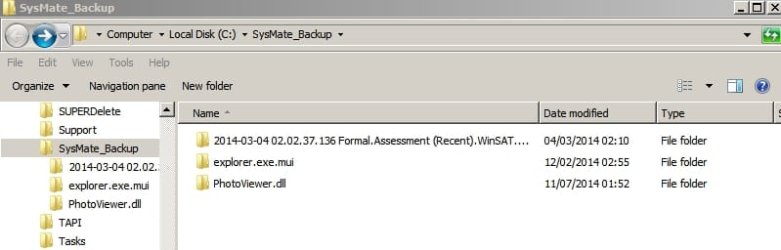
My replaced system files backup folder:

SysMate_Backup.jpg

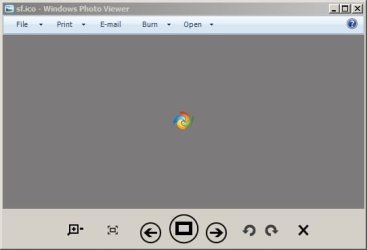
Take photoviewer.dll as an example. SFC will want to replace it as it doesn't match the original file. I've modified it to get a metro style photo viewer in Windows 7.

Windows Photo Viewer.jpg

So what I'm saying is don't just assume that SFC detecting problems actually means that anyting needs fixing. Check first before repairing!
 

My Computer My Computer

Computer type
Laptop
Computer Manufacturer/Model Number
ASUS
OS
Microsoft Windows 7 Home Premium 64-bit 7601 Multiprocessor Free Service Pack 1
CPU
AMD C-60 APU with Radeon(tm) HD Graphics
Motherboard
ASUSTeK COMPUTER INC. X501U
Memory
4.00 GB
Graphics Card(s)
AMD Radeon HD 6290 Graphics
Sound Card
(1) AMD High Definition Audio Device (2) Realtek High Defi
Screen Resolution
1366 x 768 x 32 bits (4294967296 colors) @ 60 Hz
Hard Drives
Hitachi HTS545050A7E380 SATA Disk Device
Antivirus
Comodo CIS & FW, SecureAplus App Whitelisting, Threatfire
Browser
Cyberfox 64bit, Opera 64bit, Airfox
Other Info
Spy-The-Spy, HitmanPro.Alert, Norton Connect Safe, MJRegWatcher, BitDefender TrafficLight, Voodoo Shield, Zemana AntiMalware
Thank you both. I should have mentioned in my original post that I have a dual boot system. I haven't used the second OS yet and sfc works fine on it - it is a clean system and was made from the same installation disk that my primary OS was made from. The problem I have with replacing my corrupted files with good ones is: 1. I have at least 40 corrupted files. I think that's way too many to replace one by one. 2. Even if I replace them, I know that System File Checker uses a cache on my system from which to get good files when sfc finds corrupt files. How do I repair the cache? 3. I have heard that a Repair Install is very risky and might kill my current OS if I try it. Is this true? I can't afford a dead OS because it took me two full years to get all the programs I want installed with all the settings I want. I'm scared - not lazy.

Comments?
Don't be scared...It is not scary unless it is affecting your computer performance (Still reinstall the system and you shouldn't copy any program from the OS but it is okay to copy your personal data)

I'm afraid that it WILL affect my computer performance. I have over 100 programs in my OS. What now? My personal data is on a separate drive.

Laughing out loud...I am the lazy one...Things got so easy now!
You said same installation disk, eh? Copy the good files from the good OS to a usb and get it to the bad OS and do as I mentioned in the first post

How do I find the files on the Installation disk? They won't have the same file names - and will be compressed.

....And no...No fatal errors using SFC (If you know what you are doing)..I got to that knowing that you have no performance issues. Just a simple question might be relative...Have you changed anything using task manager?

No changes using Task Manager.
 

My Computer My Computer

Computer Manufacturer/Model Number
HP Pavilion KQ574AV
OS
Windows 7
WOW....
I have over 100 programs in my OS
Delete everything that has the same purpose...Wow...
Check this Wiki page
Install one of each group (the best).
People get so many errors and slow downs having more than 40 programs installed...
Don't worry about it if you have a custom PC\Desktop. (Like 16 GB memory and so on..)
Now...The solution....
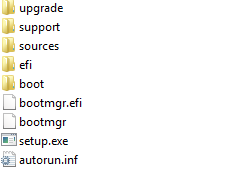
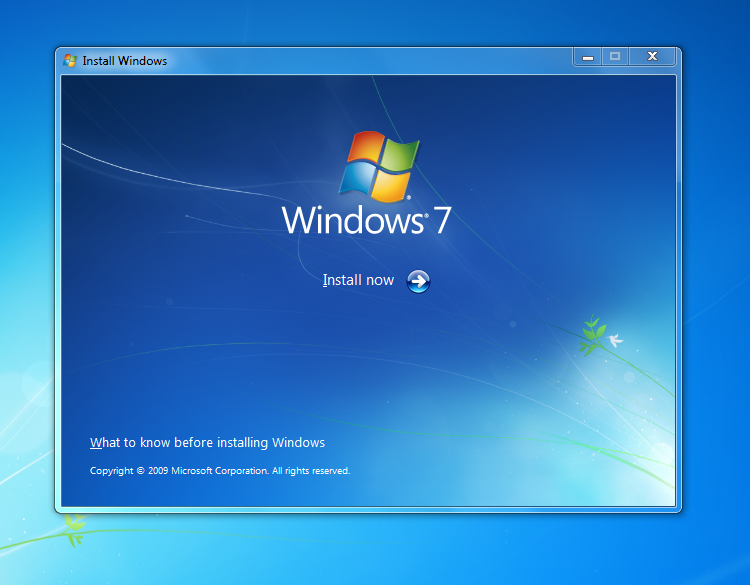
I can share with you only some original system files...For I have this life saver:
7nVndAZ.png

EiQkSey.png
 
Last edited:

My Computer My Computer

Computer type
Laptop
Computer Manufacturer/Model Number
Sony Corporation VAIO VPCEL22FX
OS
Microsoft Windows 7 Ultimate x64
CPU
AMD E-450 with Radeon HD Graphics
Motherboard
Sony Corporation VAIO
Memory
Nanya Technology DDR3 4.00 GB (3.60 GB usable)
Graphics Card(s)
ATI AMD Radeon HD 6320 Graphics
Sound Card
AMD High Definition Audio Device
Monitor(s) Displays
Name Generic PnP Monitor on AMD Radeon HD 6320 Graphics
Screen Resolution
1366x768 pixels
Hard Drives
-- Controller Map ----------------------------------------------------------
+ AMD SATA Controller [ATA]
- TOSHIBA MK3259GSXP SATA Disk Device
- Optiarc DVD RW AD-7740H SATA CdRom Device

--------------------------------------------------
Antivirus
Eset Smart Security 8
Browser
Google Chrome
Other Info
Old School Rock Hard Laptop...Works like a charm and reminds you of future and past.
Thank you. I have to have an operation today - will review what you sent me as soon as I recover. Keep watching, please!
 

My Computer My Computer

Computer Manufacturer/Model Number
HP Pavilion KQ574AV
OS
Windows 7
Thank you. I have to have an operation today - will review what you sent me as soon as I recover. Keep watching, please!
Good luck with the operation...
Take care!
I am ready to share any file you might need at any time (If it is a large file I might have to re-schedule things and upload it later).
 

My Computer My Computer

Computer type
Laptop
Computer Manufacturer/Model Number
Sony Corporation VAIO VPCEL22FX
OS
Microsoft Windows 7 Ultimate x64
CPU
AMD E-450 with Radeon HD Graphics
Motherboard
Sony Corporation VAIO
Memory
Nanya Technology DDR3 4.00 GB (3.60 GB usable)
Graphics Card(s)
ATI AMD Radeon HD 6320 Graphics
Sound Card
AMD High Definition Audio Device
Monitor(s) Displays
Name Generic PnP Monitor on AMD Radeon HD 6320 Graphics
Screen Resolution
1366x768 pixels
Hard Drives
-- Controller Map ----------------------------------------------------------
+ AMD SATA Controller [ATA]
- TOSHIBA MK3259GSXP SATA Disk Device
- Optiarc DVD RW AD-7740H SATA CdRom Device

--------------------------------------------------
Antivirus
Eset Smart Security 8
Browser
Google Chrome
Other Info
Old School Rock Hard Laptop...Works like a charm and reminds you of future and past.
Thank you - you are being very helpful. I was wondering if I could just replace the "mirror" (as you described) and then run System File Checker to fix my corrupted system files. In any case, how do I fix the "mirror" in my OS? Also, it is not practical for me to uninstall my (over 100) programs and all their settings before performing a Repair Install. There must be some other way to repair my system files - with your help?
 

My Computer My Computer

Computer Manufacturer/Model Number
HP Pavilion KQ574AV
OS
Windows 7
I must also ask you: how can I tell, on my original installation disk (or the 2nd OS I have installed with the exact same installation disk as my primary OS, the path and name of the corrupt files on my primary OS and the 2nd OS. As I said, I probably have at least 40 corrupt system files and, to repair them one-by-one will be a very tedious task - if that's the best way to do this. Also, again, how do I repair the "mirror" in my primary OS? Thank you.................
 

My Computer My Computer

Computer Manufacturer/Model Number
HP Pavilion KQ574AV
OS
Windows 7
Back
Top