Start menu not working as it used to

peterppc

New member
Local time
3:06 AM
Messages
14
Hello.

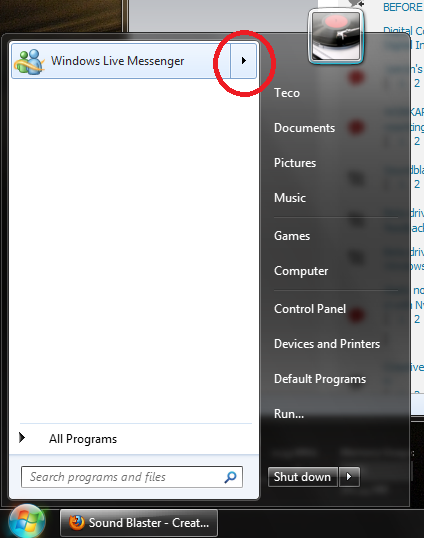
When I installed Windows 7, some programs would have a little arrow on its shortcut on the start menu that would let me do some actions (eg, word editor would let me view recently open files, media player would let me play/pause songs, messenger would let me open a conversation window). (BTW, I don't know what this feature is called - i attached a screenshot).
CdUZ0.png


But now, the arrows are still there, but when I hover my mouse over them or click them, nothing happens. Why is it not working as before and how do I make it work again?

Thanks.
 

My Computer My Computer

At a glance

Win 7 RTM
OS
Win 7 RTM
right click start orb, select properties, costomize, welcome to SevenForums, I believe you may be talking about the famed jump lists. Like them use them alot, good luck to you.
sub menues.JPG
 

My Computer My Computer

At a glance

Windows 7 Ulti. x64AMD Phenom 8450 triple-core 2.10 ghz4GBATI Radion HD 3200
Computer Manufacturer/Model Number
Gateway GT5692
OS
Windows 7 Ulti. x64
CPU
AMD Phenom 8450 triple-core 2.10 ghz
Memory
4GB
Graphics Card(s)
ATI Radion HD 3200
Monitor(s) Displays
Gateway FPD1775W
Screen Resolution
1280x720
Hard Drives
465.6613 Gibibytes
My "open submenus..." option is ticked on but it still does not work.
 

My Computer My Computer

At a glance

Win 7 RTM
OS
Win 7 RTM
My "open submenus..." option is ticked on but it still does not work.
Sorry that did not work for you. I will look some more for a solution. Good luck to you.
 

My Computer My Computer

At a glance

Windows 7 Ulti. x64AMD Phenom 8450 triple-core 2.10 ghz4GBATI Radion HD 3200
Computer Manufacturer/Model Number
Gateway GT5692
OS
Windows 7 Ulti. x64
CPU
AMD Phenom 8450 triple-core 2.10 ghz
Memory
4GB
Graphics Card(s)
ATI Radion HD 3200
Monitor(s) Displays
Gateway FPD1775W
Screen Resolution
1280x720
Hard Drives
465.6613 Gibibytes
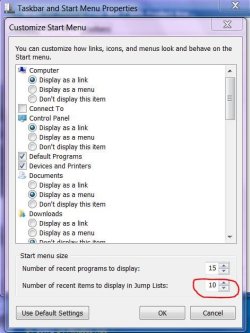
How about this not set on zero is it.
jump list numbers.JPG
 

My Computer My Computer

At a glance

Windows 7 Ulti. x64AMD Phenom 8450 triple-core 2.10 ghz4GBATI Radion HD 3200
Computer Manufacturer/Model Number
Gateway GT5692
OS
Windows 7 Ulti. x64
CPU
AMD Phenom 8450 triple-core 2.10 ghz
Memory
4GB
Graphics Card(s)
ATI Radion HD 3200
Monitor(s) Displays
Gateway FPD1775W
Screen Resolution
1280x720
Hard Drives
465.6613 Gibibytes
it's set to 10
 

My Computer My Computer

At a glance

Win 7 RTM
OS
Win 7 RTM
Power Patrick from neowin showed me this post from SevenForums > Start Menu Jumplist Not Working - Windows 7 Forums

So, as user kevvin said, the problems is that we removed the IsShortcut alue from the lnkfile key. Well, that's the problem, but I won't have my jumplists back because there's no way i'll enable those ugly arrow icons again. :cry:

Anyway, thanks all who helped me.
 

My Computer My Computer

At a glance

Win 7 RTM
OS
Win 7 RTM
Thanks peterppc,
Thanks for sharing this with us. Maybe someone has a fix for this. Good luck to you!
 

My Computer My Computer

At a glance

Windows 7 Ulti. x64AMD Phenom 8450 triple-core 2.10 ghz4GBATI Radion HD 3200
Computer Manufacturer/Model Number
Gateway GT5692
OS
Windows 7 Ulti. x64
CPU
AMD Phenom 8450 triple-core 2.10 ghz
Memory
4GB
Graphics Card(s)
ATI Radion HD 3200
Monitor(s) Displays
Gateway FPD1775W
Screen Resolution
1280x720
Hard Drives
465.6613 Gibibytes
Thanks, myzr7

I did a little research and now I have no arrow icons and jump lists working.

If any user is experiencing this:

1. rewrithe the IsShortcut value in the lnkfile key (you removed it, you'll know how to redo it) - Now you'll have jumplists working.
2. to remove the arrow shortcut icons, save this as .reg and run:

Code:
Windows Registry Editor Version 5.00

[HKEY_LOCAL_MACHINE\SOFTWARE\Microsoft\Windows\CurrentVersion\Explorer\Shell Icons]
"29"=hex(2):25,00,73,00,79,00,73,00,74,00,65,00,6d,00,72,00,6f,00,6f,00,74,00,\
  25,00,5c,00,73,00,79,00,73,00,74,00,65,00,6d,00,33,00,32,00,5c,00,73,00,68,\
  00,65,00,6c,00,6c,00,33,00,32,00,2e,00,64,00,6c,00,6c,00,2c,00,35,00,30,00,\
  00,00
and the arrow icons will be gone.

Thanks all. Consider this solved.
 

My Computer My Computer

At a glance

Win 7 RTM
OS
Win 7 RTM
Back
Top