Accidentally deleted my recovery partion

Dudeclayton

New member
Local time
12:23 PM
Messages
4
I thought I was getting rid of flash drive files and deleted files on my recovery partion instead and they are not in my trash can because I hit delete on the keyboard please help me get it back
 

My Computer My Computer

At a glance

Windows 7 home premium 64bit4gb
Computer type
PC/Desktop
Computer Manufacturer/Model Number
Compaq CQ57
OS
Windows 7 home premium 64bit
Memory
4gb
Hard Drives
1
I thought I was getting rid of flash drive files and deleted files on my recovery partion instead and they are not in my trash can because I hit delete on the keyboard please help me get it back
If you meant that you permanently deleted them, then there's probably no way to get them back unless you have a Data recovery program like R-Tools' R-Studio for which you got to spare some bucks. If you don't mind, what did you mean by hitting delete "on the Keyboard?":eek: Was it like hitting Shift+Delete so that you can permanently delete a file or something else?
 
Last edited:

My Computer My Computer

At a glance

Windows 8.1Intel - Core i7 4.2GHz8 GBNvidea GeForce 7800GT 2GB
Computer type
PC/Desktop
Computer Manufacturer/Model Number
Custom Build
OS
Windows 8.1
CPU
Intel - Core i7 4.2GHz
Motherboard
Intel
Memory
8 GB
Graphics Card(s)
Nvidea GeForce 7800GT 2GB
Screen Resolution
1980 X 1280
Hard Drives
1 TB Toshiba
500 GB SATA
Internet Speed
Download - 30 Mbps, Upload - 10 Mbps
Antivirus
BitDefender Internet Security
Browser
Mozilla Firefox,Google Chrome,Internet Explorer
If you have not made a HD image, or an image of each partition, before now, Recovery partition [which probably contains both boot files and manufacturer's rollback to factory OS & software specs] is very likely gone. MiniTool Power Data Recovery may or may not be able to help recover files.
 

My Computer My Computer

At a glance

Windows 7 Professional 64-bitDesktop i5; Acers i5 & i7desktop 16GB; 1 Acer 8GB & 1 Acer 16GB
Computer type
PC/Desktop
Computer Manufacturer/Model Number
Antec desktop; Acer Aspire laptops
OS
Windows 7 Professional 64-bit
CPU
Desktop i5; Acers i5 & i7
Memory
desktop 16GB; 1 Acer 8GB & 1 Acer 16GB
Hard Drives
1TB split into 2 equal partitions [OS and data] usable by RJS
Internet Speed
AT&T DSL
Browser
FF, GChrome, msIE
Other Info
Windows 7 Firewall, Emsisoft AM/AV, MSE [scan-only], SpywareBlaster, Ruiware/BillP combine
Hold on my dear friend,

I shall come back in a while on how to undelete complete with screenshots.

Please do not try any programs blindly and muck it up.
 

My Computer My Computer

At a glance

Windows 7 Home Premium 32 bit
OS
Windows 7 Home Premium 32 bit
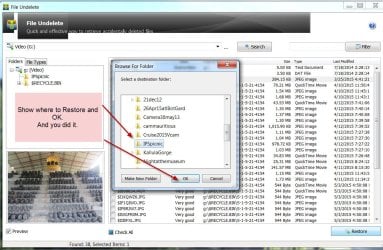
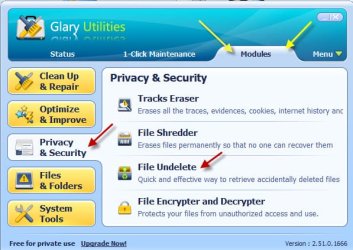
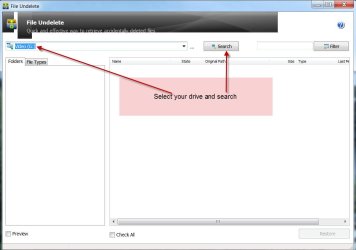
Glary Utilities > Module > Privacy and Security > File Undelete
A5-11-2015 12-47-38 PM.jpg

B5-11-2015 12-51-49 PM.jpg

C5-11-2015 12-59-24 PM.jpg

d5-11-2015 1-08-21 PM.jpg

I used Shift+delete to permanently delete that jpg and then recovered it with the original file name.

NOTE:
1.Do this restore only if your system is bootable even after the files in the Recovery partition
were deleted.
2. You may get a warning message that there are chances that recovery may be unsuccessful if
restored to the same partition. That could happen only if you have added more files after the
deletion as a result of which there may be insufficient space to write the recovered file.As long as
you haven't done that and there is sufficient space in your recovery partition you need not
bother..Say OK and finish Restore.
3. To be safe always keep an image of your system and restore from that image. Macrium Reflect
Free is recommended here. Many times factory restore with the Recovery partition can fail due to
deficiencies in the HDD that may arise over a period of time.

You may download Glary Utilities Free from Glary Utilities | Glarysoft

(The user interface in the new version may be slightly different. I used the old version - old school :))

Just for our information report the actual files you restored.

 
Last edited:

My Computer My Computer

At a glance

Windows 7 Home Premium 32 bit
OS
Windows 7 Home Premium 32 bit
Thank you so Mutch it found everything and some on the 7776 files recovers where x86_microsoft-windows-...
Amd64_adpu320.infi
 

My Computer My Computer

At a glance

Windows 7 home premium 64bit4gb
Computer type
PC/Desktop
Computer Manufacturer/Model Number
Compaq CQ57
OS
Windows 7 home premium 64bit
Memory
4gb
Hard Drives
1
After my virus protection runs out I will restore my computer to factory settings anyone know how
 

My Computer My Computer

At a glance

Windows 7 home premium 64bit4gb
Computer type
PC/Desktop
Computer Manufacturer/Model Number
Compaq CQ57
OS
Windows 7 home premium 64bit
Memory
4gb
Hard Drives
1
Oh and will it hurt my computer to do this
 

My Computer My Computer

At a glance

Windows 7 home premium 64bit4gb
Computer type
PC/Desktop
Computer Manufacturer/Model Number
Compaq CQ57
OS
Windows 7 home premium 64bit
Memory
4gb
Hard Drives
1
....... and some on the 7776 files recovers where x86_microsoft-windows-
Amd64_adpu320.infi

Sorry, I couldn't understand that part of your statement above.

".... it found everything" So I presume you could find all the files you deleted in "very good" state with original file names and were to able to restore those.

Hmmmm...... I should have asked you to post the third screenshot so that we could have seen it ourselves. It just skipped my mind.

Your posts #7 and 8 again I can't understand the problem posed even a bit and so I will give it a pass and let others handle.:)
 
Last edited:

My Computer My Computer

At a glance

Windows 7 Home Premium 32 bit
OS
Windows 7 Home Premium 32 bit
@Jumanji: As I understand he is asking how he can do a factory reset after trial period (?) of the AV software ends and whether it will cause any problems.

@Dudeclayton: I would not have done a factory reset just to fool the AV to be honest, and I am not sure if it would work. You can find better free alternatives. A factory reset wont hurt your machine but you will have to reinstall all your applications that didn't come with the laptop, and need to backup your data (you should in any case).
 

My Computer My Computer

At a glance

Windows 7 Ultimate x64 SP1AMD Phenom 2 1090T2x8GB Kingston HyperX Fury Black 1600Mhz Unga...MSI GTX 970 Gaming 4G
Computer type
PC/Desktop
Computer Manufacturer/Model Number
Custom Build
OS
Windows 7 Ultimate x64 SP1
CPU
AMD Phenom 2 1090T
Motherboard
Gigabyte GA-890FXA-UD5
Memory
2x8GB Kingston HyperX Fury Black 1600Mhz Unganged
Graphics Card(s)
MSI GTX 970 Gaming 4G
Sound Card
Realtek On-Board HD 7.1 Audio / Logitech G35
Monitor(s) Displays
3xAcer GD245HQ
Screen Resolution
1920x1080
Hard Drives
Samsung 850 Pro 512GB SSD - OS /
WD Caviar Black SATA 3 - 1 TBx2 - Dynamic RAID 0 /
WD Caviar Green SATA 2 - 640GBx2 - Dynamic RAID 0 /
WD Caviar Green SATA 2 - 640GB - Internal Backup /
Seagate Barracude SATA 3 - 3TB - External Backup/ Sync
PSU
HighPower 1000W
Case
Cooler Master HAF 932
Cooling
Noctua NH-D14
Keyboard
Logitech G19
Mouse
Logitech G500
Internet Speed
100/4 Mbit Cable (100GB quota)
Antivirus
ZoneAlarm Extreme Security / MBAM Pro / MBAE Free / SAS Free
Browser
IE 11 - Firefox - Chrome
Other Info
Logitech F710/ G27/ G940/ Z5500 // TrackIR 5 // Nvidia 3D Surround Vision
Oh! OK, GokAy, thanks. ( Someday I would like to visit Ephesus, Cappadocia, Pamukkale, Aspendos Theatre etc., if I have enough time left in my clock and stamina :D)

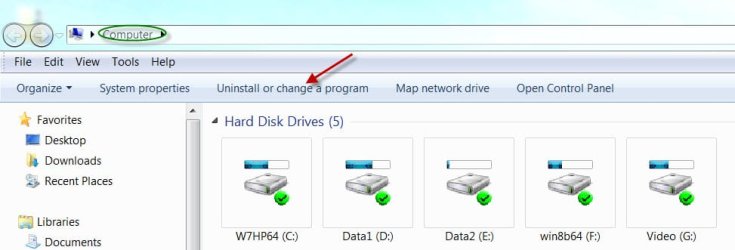
@DudeClayton, If you have installaed some time-limited trial software, as GokAy stated you do not do a Factory Restore to remove it. View Computer, Click on Uninstall or change a program and from the list select that program and click on Uninstall that appears on top. This will use the Program's Uninstaller to uninstall it.

5-11-2015 9-28-17 PM.jpg

Better you install Revo Uninstaller Free version and uninstall your program from the list of installed programs shown by it. It can remove some of the Registry entries and also folders leftover by the Program's Uninstaller. Read the help file on how to do it. ( To remove the leftover registry entries after it scans, you have to select those and click on Delete on the left hand bottom before going on to the next screen by clicking the Command for that on the right hand side. Even experienced users miss this. So watch out every screen and the commands in it. Don't worry. You will learn by doing. Nobody taught me.)

Download Revo Uninstaller Freeware - Free and Full Download - Uninstall software, remove programs, solve uninstall problems
 

My Computer My Computer

At a glance

Windows 7 Home Premium 32 bit
OS
Windows 7 Home Premium 32 bit
I guess you misunderstood again :p

From what I gather it is the original AV that came with the laptop which is most likely time-limited. And doing a factory restore would (?) restore it's original functionality. So, the reason for the restore is not to remove the AV but to fool it to continue using same AV. We can't be sure until OP comes back and tell us about it though.

Off-topic: This country is a paradise for tourists, that's for sure. You will be pleased to visit. History in this land starts at 10.000BC - Gobeklitepe | The Oldest Temple of the World or Göbekli Tepe - Wikipedia, the free encyclopedia(oldest known temple in the world at the moment)
 

My Computer My Computer

At a glance

Windows 7 Ultimate x64 SP1AMD Phenom 2 1090T2x8GB Kingston HyperX Fury Black 1600Mhz Unga...MSI GTX 970 Gaming 4G
Computer type
PC/Desktop
Computer Manufacturer/Model Number
Custom Build
OS
Windows 7 Ultimate x64 SP1
CPU
AMD Phenom 2 1090T
Motherboard
Gigabyte GA-890FXA-UD5
Memory
2x8GB Kingston HyperX Fury Black 1600Mhz Unganged
Graphics Card(s)
MSI GTX 970 Gaming 4G
Sound Card
Realtek On-Board HD 7.1 Audio / Logitech G35
Monitor(s) Displays
3xAcer GD245HQ
Screen Resolution
1920x1080
Hard Drives
Samsung 850 Pro 512GB SSD - OS /
WD Caviar Black SATA 3 - 1 TBx2 - Dynamic RAID 0 /
WD Caviar Green SATA 2 - 640GBx2 - Dynamic RAID 0 /
WD Caviar Green SATA 2 - 640GB - Internal Backup /
Seagate Barracude SATA 3 - 3TB - External Backup/ Sync
PSU
HighPower 1000W
Case
Cooler Master HAF 932
Cooling
Noctua NH-D14
Keyboard
Logitech G19
Mouse
Logitech G500
Internet Speed
100/4 Mbit Cable (100GB quota)
Antivirus
ZoneAlarm Extreme Security / MBAM Pro / MBAE Free / SAS Free
Browser
IE 11 - Firefox - Chrome
Other Info
Logitech F710/ G27/ G940/ Z5500 // TrackIR 5 // Nvidia 3D Surround Vision
NoelDP, quick question -- those who have Windows 7 64-bit, do they have to have Revo Uninstaller Pro [which is for both 32 & 64], or, can they for the most common installs/uninstalls get by with Revo Free [which is 32 only]?
 

My Computer My Computer

At a glance

Windows 7 Professional 64-bitDesktop i5; Acers i5 & i7desktop 16GB; 1 Acer 8GB & 1 Acer 16GB
Computer type
PC/Desktop
Computer Manufacturer/Model Number
Antec desktop; Acer Aspire laptops
OS
Windows 7 Professional 64-bit
CPU
Desktop i5; Acers i5 & i7
Memory
desktop 16GB; 1 Acer 8GB & 1 Acer 16GB
Hard Drives
1TB split into 2 equal partitions [OS and data] usable by RJS
Internet Speed
AT&T DSL
Browser
FF, GChrome, msIE
Other Info
Windows 7 Firewall, Emsisoft AM/AV, MSE [scan-only], SpywareBlaster, Ruiware/BillP combine
I guess you misunderstood again :p.....

Oh! I think I should have honourably kept quiet not poking my nose in again :D

NoelDP, quick question -- those who have Windows 7 64-bit, do they have to have Revo Uninstaller Pro [which is for both 32 & 64], or, can they for the most common installs/uninstalls get by with Revo Free [which is 32 only]?

But RolandJS is forcing me to poke my nose in again - though I amn't NoelDP :)

That is a good question anyway.

Well, Revo Uninstaller free is not 64bit compatible but it will still list all the 32 bit programs and these can still be uninstalled with it. It will not list native 64bit programs. In this case use the Windows Uninstaller (Uninstall or change a program) - unless you wish to buy the pro version.:)

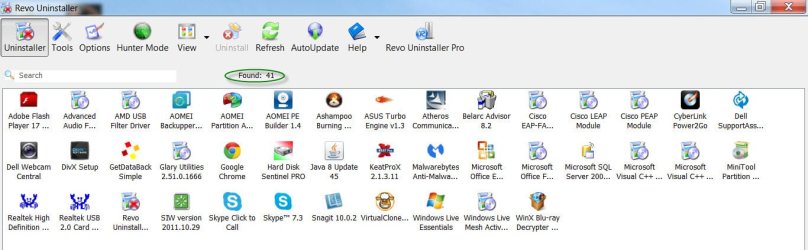
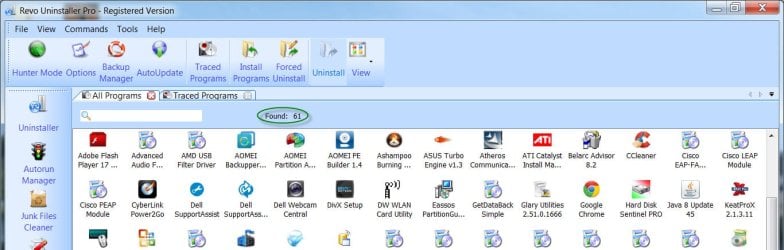
On my Windows7 64 bit lappy the freeware version listed 41 programs, whereas the pro version listed 61 programs.

Revo Free version: Found - 41

A15-12-2015 1-26-53 PM.jpg

Revo Pro version: Found - 61

A25-12-2015 1-38-12 PM.jpg
 

My Computer My Computer

At a glance

Windows 7 Home Premium 32 bit
OS
Windows 7 Home Premium 32 bit
jumanji, your nose along with the rest of your face is welcome anytime, anywhere! And, thanks for the reminder about Revo free & Pro, it made things a little clearer for me. I did get the Pro version awhile back.
 

My Computer My Computer

At a glance

Windows 7 Professional 64-bitDesktop i5; Acers i5 & i7desktop 16GB; 1 Acer 8GB & 1 Acer 16GB
Computer type
PC/Desktop
Computer Manufacturer/Model Number
Antec desktop; Acer Aspire laptops
OS
Windows 7 Professional 64-bit
CPU
Desktop i5; Acers i5 & i7
Memory
desktop 16GB; 1 Acer 8GB & 1 Acer 16GB
Hard Drives
1TB split into 2 equal partitions [OS and data] usable by RJS
Internet Speed
AT&T DSL
Browser
FF, GChrome, msIE
Other Info
Windows 7 Firewall, Emsisoft AM/AV, MSE [scan-only], SpywareBlaster, Ruiware/BillP combine
Just a reminder that the install restored by the Recovery Partition is the worst install of Win7 one can have, larded with bloatware and duplicate utilities that interfere with better versions built into Win7. For this reason most tech enthusiasts will not keep such an install but instead prefer to Clean Reinstall Windows 7 which offers the very best install of Win7 one can have.
 
Back
Top