Losing audio/sound driver every time a boot in

alfredbriffa50

New member
Local time
4:33 AM
Messages
9
I am using Windows 7 ultimate 32 bit. Every time I boot in, there is no sound coming out. I am using an auxiliary. I am not an expert on ct but I try to follow to try to get back sound. Sometimes I succeed sometimes I give up. Can somebody help me please. Bare with me as I am an 65-year old jack!
 

My Computer My Computer

At a glance

windows 7 ultimate 32bitINTEL PENTIUM D915DDR2 2GBNVIDIA GEFORCE 7300 LE
Computer type
PC/Desktop
Computer Manufacturer/Model Number
ASUS
OS
windows 7 ultimate 32bit
CPU
INTEL PENTIUM D915
Motherboard
AUSTEK P5VD2-MX
Memory
DDR2 2GB
Graphics Card(s)
NVIDIA GEFORCE 7300 LE
If you are using a separate sound card, and the motherboard has sound on it, disable the motherboard sound in the BIOS. That will eliminate a potential conflict.

Please post system spec's. Helps us to try and help you.
 

My Computer My Computer

At a glance

Windows 10 64 bitIntel i7 6700K16GB Corsair DominatorIntel CPU Graphics
Computer type
PC/Desktop
Computer Manufacturer/Model Number
My Own Build
OS
Windows 10 64 bit
CPU
Intel i7 6700K
Motherboard
ASUS ROG Maximus VIII Hero
Memory
16GB Corsair Dominator
Graphics Card(s)
Intel CPU Graphics
Sound Card
RealTek
Monitor(s) Displays
27" Dell S2719dgf
Screen Resolution
2560X1440
Hard Drives
1 TB Samsung 850 EVO SSD for Win 10 Pro
500GB Samsung 850 EVO SSD for Win 10 Insider
2 TB drive for backup
PSU
EVGA Supernova 750G2
Case
BeQuiet Silent Base 600
Cooling
Deepcool Captain 120EX
Keyboard
Microsoft Wireless 2000
Mouse
Microsoft wireless
Internet Speed
100 MB/sec (Cable)
Antivirus
Microsoft Defender and Malwarebytes
Browser
Edge/Firefox
Other Info
Cakewalk (Sonar) by BandLab and Studio One 4.1 Pro recording studio software. MOTU 896Mk3 Hybrid recording interface, Frontier Tranzport wireless control unit, Behringer X-Touch Control Surface.
Five USB connected optical drives for CD Audio production using Nero BurningROM
BIOS: Phoenix - AwardBIOS v6.00PG
Memory: 2048MB RAM
Directx version: DirectX 11

SOUND
Digital Audio9 S/PDIF 4-HDAudio
Driver: HD Audio.sys
version: 6.01.7601.17154 English by microsoft

BUt I have two cards. one on board and one at back slot...don't know which is which
 

My Computer My Computer

At a glance

windows 7 ultimate 32bitINTEL PENTIUM D915DDR2 2GBNVIDIA GEFORCE 7300 LE
Computer type
PC/Desktop
Computer Manufacturer/Model Number
ASUS
OS
windows 7 ultimate 32bit
CPU
INTEL PENTIUM D915
Motherboard
AUSTEK P5VD2-MX
Memory
DDR2 2GB
Graphics Card(s)
NVIDIA GEFORCE 7300 LE
The system specs you list do not help in identifying what sound you have.
 

My Computer My Computer

At a glance

Windows 10 64 bitIntel i7 6700K16GB Corsair DominatorIntel CPU Graphics
Computer type
PC/Desktop
Computer Manufacturer/Model Number
My Own Build
OS
Windows 10 64 bit
CPU
Intel i7 6700K
Motherboard
ASUS ROG Maximus VIII Hero
Memory
16GB Corsair Dominator
Graphics Card(s)
Intel CPU Graphics
Sound Card
RealTek
Monitor(s) Displays
27" Dell S2719dgf
Screen Resolution
2560X1440
Hard Drives
1 TB Samsung 850 EVO SSD for Win 10 Pro
500GB Samsung 850 EVO SSD for Win 10 Insider
2 TB drive for backup
PSU
EVGA Supernova 750G2
Case
BeQuiet Silent Base 600
Cooling
Deepcool Captain 120EX
Keyboard
Microsoft Wireless 2000
Mouse
Microsoft wireless
Internet Speed
100 MB/sec (Cable)
Antivirus
Microsoft Defender and Malwarebytes
Browser
Edge/Firefox
Other Info
Cakewalk (Sonar) by BandLab and Studio One 4.1 Pro recording studio software. MOTU 896Mk3 Hybrid recording interface, Frontier Tranzport wireless control unit, Behringer X-Touch Control Surface.
Five USB connected optical drives for CD Audio production using Nero BurningROM
I entered the Advanced BIOS settings. these is what is written:

Chipset

DRAM Clock/Drive Control
Frequency/Voltage control
Top Performance [Disabled]
Primary Display Adapter [PCI-E]

I could not see any audio drivers...if I am on the right place!
 

My Computer My Computer

At a glance

windows 7 ultimate 32bitINTEL PENTIUM D915DDR2 2GBNVIDIA GEFORCE 7300 LE
Computer type
PC/Desktop
Computer Manufacturer/Model Number
ASUS
OS
windows 7 ultimate 32bit
CPU
INTEL PENTIUM D915
Motherboard
AUSTEK P5VD2-MX
Memory
DDR2 2GB
Graphics Card(s)
NVIDIA GEFORCE 7300 LE
Do you know what the manufacturer and model number is for the motherboard? That would really help.

On older PC's, the sound could be identified as "legacy audio" in the BIOS.
 

My Computer My Computer

At a glance

Windows 10 64 bitIntel i7 6700K16GB Corsair DominatorIntel CPU Graphics
Computer type
PC/Desktop
Computer Manufacturer/Model Number
My Own Build
OS
Windows 10 64 bit
CPU
Intel i7 6700K
Motherboard
ASUS ROG Maximus VIII Hero
Memory
16GB Corsair Dominator
Graphics Card(s)
Intel CPU Graphics
Sound Card
RealTek
Monitor(s) Displays
27" Dell S2719dgf
Screen Resolution
2560X1440
Hard Drives
1 TB Samsung 850 EVO SSD for Win 10 Pro
500GB Samsung 850 EVO SSD for Win 10 Insider
2 TB drive for backup
PSU
EVGA Supernova 750G2
Case
BeQuiet Silent Base 600
Cooling
Deepcool Captain 120EX
Keyboard
Microsoft Wireless 2000
Mouse
Microsoft wireless
Internet Speed
100 MB/sec (Cable)
Antivirus
Microsoft Defender and Malwarebytes
Browser
Edge/Firefox
Other Info
Cakewalk (Sonar) by BandLab and Studio One 4.1 Pro recording studio software. MOTU 896Mk3 Hybrid recording interface, Frontier Tranzport wireless control unit, Behringer X-Touch Control Surface.
Five USB connected optical drives for CD Audio production using Nero BurningROM
Me Again Firebred.

I had to download CPU-Z to get the info you requested as not present on DXdiag

ASUSTEK computer NC
Model: P5VD2-MX 1.XX
Chipset: VIA P4M890 Rev: 0.0
Southbridge: VIA VT8237A ''

LPC10: ITE IT8712
 

My Computer My Computer

At a glance

windows 7 ultimate 32bitINTEL PENTIUM D915DDR2 2GBNVIDIA GEFORCE 7300 LE
Computer type
PC/Desktop
Computer Manufacturer/Model Number
ASUS
OS
windows 7 ultimate 32bit
CPU
INTEL PENTIUM D915
Motherboard
AUSTEK P5VD2-MX
Memory
DDR2 2GB
Graphics Card(s)
NVIDIA GEFORCE 7300 LE
The specs show the on-board audio as:
High Definition Audio, ADI AD1986A SoundMAX 6-channel CODEC

It should be listed somewhere in the BIOS. The ASUS does not detail where in the BIOS.

The other option is to remove the add on sound card and use the Integrated.
Here is the Vista driver download, which is also applicable to Winows 7

Motherboards | P5VD2-MX | ASUS Global
 

My Computer My Computer

At a glance

Windows 10 64 bitIntel i7 6700K16GB Corsair DominatorIntel CPU Graphics
Computer type
PC/Desktop
Computer Manufacturer/Model Number
My Own Build
OS
Windows 10 64 bit
CPU
Intel i7 6700K
Motherboard
ASUS ROG Maximus VIII Hero
Memory
16GB Corsair Dominator
Graphics Card(s)
Intel CPU Graphics
Sound Card
RealTek
Monitor(s) Displays
27" Dell S2719dgf
Screen Resolution
2560X1440
Hard Drives
1 TB Samsung 850 EVO SSD for Win 10 Pro
500GB Samsung 850 EVO SSD for Win 10 Insider
2 TB drive for backup
PSU
EVGA Supernova 750G2
Case
BeQuiet Silent Base 600
Cooling
Deepcool Captain 120EX
Keyboard
Microsoft Wireless 2000
Mouse
Microsoft wireless
Internet Speed
100 MB/sec (Cable)
Antivirus
Microsoft Defender and Malwarebytes
Browser
Edge/Firefox
Other Info
Cakewalk (Sonar) by BandLab and Studio One 4.1 Pro recording studio software. MOTU 896Mk3 Hybrid recording interface, Frontier Tranzport wireless control unit, Behringer X-Touch Control Surface.
Five USB connected optical drives for CD Audio production using Nero BurningROM
I downloaded a zipped file from above site.
file v610016070.RAR
then I had to download a temp WINZIP
but I am stuck what to do next!
any help. pls?
 

My Computer My Computer

At a glance

windows 7 ultimate 32bitINTEL PENTIUM D915DDR2 2GBNVIDIA GEFORCE 7300 LE
Computer type
PC/Desktop
Computer Manufacturer/Model Number
ASUS
OS
windows 7 ultimate 32bit
CPU
INTEL PENTIUM D915
Motherboard
AUSTEK P5VD2-MX
Memory
DDR2 2GB
Graphics Card(s)
NVIDIA GEFORCE 7300 LE
Hi, me again!

I am trying to attach a screen shot of the system info. but the icon is asking for to enter URL of my image.
The image is saved in my pictures folder. I have no web pages. Is there a way how to send you this image, pls?:cry:
 

My Computer My Computer

At a glance

windows 7 ultimate 32bitINTEL PENTIUM D915DDR2 2GBNVIDIA GEFORCE 7300 LE
Computer type
PC/Desktop
Computer Manufacturer/Model Number
ASUS
OS
windows 7 ultimate 32bit
CPU
INTEL PENTIUM D915
Motherboard
AUSTEK P5VD2-MX
Memory
DDR2 2GB
Graphics Card(s)
NVIDIA GEFORCE 7300 LE

My Computer My Computer

At a glance

Windows 7 Ultimate x64 SP1AMD Phenom 2 1090T2x8GB Kingston HyperX Fury Black 1600Mhz Unga...MSI GTX 970 Gaming 4G
Computer type
PC/Desktop
Computer Manufacturer/Model Number
Custom Build
OS
Windows 7 Ultimate x64 SP1
CPU
AMD Phenom 2 1090T
Motherboard
Gigabyte GA-890FXA-UD5
Memory
2x8GB Kingston HyperX Fury Black 1600Mhz Unganged
Graphics Card(s)
MSI GTX 970 Gaming 4G
Sound Card
Realtek On-Board HD 7.1 Audio / Logitech G35
Monitor(s) Displays
3xAcer GD245HQ
Screen Resolution
1920x1080
Hard Drives
Samsung 850 Pro 512GB SSD - OS /
WD Caviar Black SATA 3 - 1 TBx2 - Dynamic RAID 0 /
WD Caviar Green SATA 2 - 640GBx2 - Dynamic RAID 0 /
WD Caviar Green SATA 2 - 640GB - Internal Backup /
Seagate Barracude SATA 3 - 3TB - External Backup/ Sync
PSU
HighPower 1000W
Case
Cooler Master HAF 932
Cooling
Noctua NH-D14
Keyboard
Logitech G19
Mouse
Logitech G500
Internet Speed
100/4 Mbit Cable (100GB quota)
Antivirus
ZoneAlarm Extreme Security / MBAM Pro / MBAE Free / SAS Free
Browser
IE 11 - Firefox - Chrome
Other Info
Logitech F710/ G27/ G940/ Z5500 // TrackIR 5 // Nvidia 3D Surround Vision
OK...image attached by help from GoKaY
 

My Computer My Computer

At a glance

windows 7 ultimate 32bitINTEL PENTIUM D915DDR2 2GBNVIDIA GEFORCE 7300 LE
Computer type
PC/Desktop
Computer Manufacturer/Model Number
ASUS
OS
windows 7 ultimate 32bit
CPU
INTEL PENTIUM D915
Motherboard
AUSTEK P5VD2-MX
Memory
DDR2 2GB
Graphics Card(s)
NVIDIA GEFORCE 7300 LE
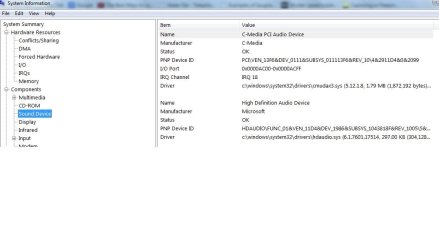
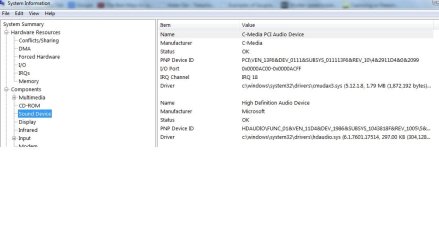
please see attached file to give you more info...problem still persists:cry:
 

Attachments

  • sys info sound device.jpg
    sys info sound device.jpg
    44.9 KB · Views: 0

My Computer My Computer

At a glance

windows 7 ultimate 32bitINTEL PENTIUM D915DDR2 2GBNVIDIA GEFORCE 7300 LE
Computer type
PC/Desktop
Computer Manufacturer/Model Number
ASUS
OS
windows 7 ultimate 32bit
CPU
INTEL PENTIUM D915
Motherboard
AUSTEK P5VD2-MX
Memory
DDR2 2GB
Graphics Card(s)
NVIDIA GEFORCE 7300 LE
Here is the info on posting screenshots on this forum

http://www.sevenforums.com/tutorials/9733-screenshots-files-upload-post-seven-forums.html

I see you have High Defintion Audio for the on-board sound and the plug in sound card uses the C-media sound chip.

As you can't find the on board in the BIOS, go to the Device Manager and disable it there. Then only use the add on card (c media) and see if the sound works OK.

I will be gone the rest of the day so I won't respond until tomorrow morning.
 

My Computer My Computer

At a glance

Windows 10 64 bitIntel i7 6700K16GB Corsair DominatorIntel CPU Graphics
Computer type
PC/Desktop
Computer Manufacturer/Model Number
My Own Build
OS
Windows 10 64 bit
CPU
Intel i7 6700K
Motherboard
ASUS ROG Maximus VIII Hero
Memory
16GB Corsair Dominator
Graphics Card(s)
Intel CPU Graphics
Sound Card
RealTek
Monitor(s) Displays
27" Dell S2719dgf
Screen Resolution
2560X1440
Hard Drives
1 TB Samsung 850 EVO SSD for Win 10 Pro
500GB Samsung 850 EVO SSD for Win 10 Insider
2 TB drive for backup
PSU
EVGA Supernova 750G2
Case
BeQuiet Silent Base 600
Cooling
Deepcool Captain 120EX
Keyboard
Microsoft Wireless 2000
Mouse
Microsoft wireless
Internet Speed
100 MB/sec (Cable)
Antivirus
Microsoft Defender and Malwarebytes
Browser
Edge/Firefox
Other Info
Cakewalk (Sonar) by BandLab and Studio One 4.1 Pro recording studio software. MOTU 896Mk3 Hybrid recording interface, Frontier Tranzport wireless control unit, Behringer X-Touch Control Surface.
Five USB connected optical drives for CD Audio production using Nero BurningROM
Would you pls see attached screen shot re sound info. Problem still persists
 

Attachments

  • sys info sound device.jpg
    sys info sound device.jpg
    44.9 KB · Views: 0

My Computer My Computer

At a glance

windows 7 ultimate 32bitINTEL PENTIUM D915DDR2 2GBNVIDIA GEFORCE 7300 LE
Computer type
PC/Desktop
Computer Manufacturer/Model Number
ASUS
OS
windows 7 ultimate 32bit
CPU
INTEL PENTIUM D915
Motherboard
AUSTEK P5VD2-MX
Memory
DDR2 2GB
Graphics Card(s)
NVIDIA GEFORCE 7300 LE
It appears the High Definition Audio Device is still present and was not disabled.
 

My Computer My Computer

At a glance

Windows 10 64 bitIntel i7 6700K16GB Corsair DominatorIntel CPU Graphics
Computer type
PC/Desktop
Computer Manufacturer/Model Number
My Own Build
OS
Windows 10 64 bit
CPU
Intel i7 6700K
Motherboard
ASUS ROG Maximus VIII Hero
Memory
16GB Corsair Dominator
Graphics Card(s)
Intel CPU Graphics
Sound Card
RealTek
Monitor(s) Displays
27" Dell S2719dgf
Screen Resolution
2560X1440
Hard Drives
1 TB Samsung 850 EVO SSD for Win 10 Pro
500GB Samsung 850 EVO SSD for Win 10 Insider
2 TB drive for backup
PSU
EVGA Supernova 750G2
Case
BeQuiet Silent Base 600
Cooling
Deepcool Captain 120EX
Keyboard
Microsoft Wireless 2000
Mouse
Microsoft wireless
Internet Speed
100 MB/sec (Cable)
Antivirus
Microsoft Defender and Malwarebytes
Browser
Edge/Firefox
Other Info
Cakewalk (Sonar) by BandLab and Studio One 4.1 Pro recording studio software. MOTU 896Mk3 Hybrid recording interface, Frontier Tranzport wireless control unit, Behringer X-Touch Control Surface.
Five USB connected optical drives for CD Audio production using Nero BurningROM
I entered the Advanced BIOS settings. these is what is written:

Chipset

DRAM Clock/Drive Control
Frequency/Voltage control
Top Performance [Disabled]
Primary Display Adapter [PCI-E]

I could not see any audio drivers...if I am on the right place!
From ASUS documentation for your motherboard, I think you're in the wrong part of BIOS setup menu.

Advanced tab->Onboard Device Configuration.
Then set the HDA (high definition audio) controller to Disabled

Full document should you ever need it HERE. (page 2-25)
 

My Computer My Computer

At a glance

Desk 1: Win 7 Pro x32; Desk 2: Windows 10 x64
Computer type
PC/Desktop
Computer Manufacturer/Model Number
Dell Optiplex 360 and Optiplex 755
OS
Desk 1: Win 7 Pro x32; Desk 2: Windows 10 x64
Hard Drives
500GB Crucial SSD in both Desktops
Other Info
Buffalo 6TB NAS, Raid 1
Back
Top