
UEFI (Unified Extensible Firmware Interface) - Install Windows 7 with

How to Install Windows 7 Using the "Unified Extensible Firmware Interface" (UEFI)


   Information
In addition to better interoperability, UEFI firmware provides several technical advantages:
  • Compatibility with operating systems that support only BIOS
  • Ability to boot from large disks
  • CPU-independent architecture
  • CPU-independent drivers
  • Flexible pre-OS environment
  • Modular design
Two of the most notable Windows features for UEFI systems are the following:
  • Multicast deployment, which enables large scale network-based image deployment in manufacturing and enterprise settings.
  • Fast boot and resume from hibernation, which improves user experience.
The rich UEFI interface provides ample room for innovation in the development of operating system features. Along with the other members of the Unified EFI Forum, Microsoft is investigating the following:
  • Rootkit prevention
  • Network authentication
-Microsoft Corporation
This method can also be used for the UEFI installation of Windows 8, Windows Server 2008 SP1, Windows Server 2008 R2, and Windows Vista SP1.

   Note
You will need to satisfy the following requirements in order to proceed:

  • A Windows 7 compatible system
  • A Windows 7 x64-bit installation media. 32-bit is not supported.
  • A UEFI v2.0+ compliant PC. Check your chipset manufacturer/firmware documentation.
  • A blank, partition-free, hard disk for installation.
   Warning

  • Disabling UEFI will make the system unbootable as there is no MBR on the disks.
  • You CANNOT make a sector-by-sector copy of GPT disks. The Disk and Partition GUIDs will no longer be unique. This must never happen. You can make a sector-by-sector copy of the contents of ESP or basic data partitions.
  • Disable secure boot before installing Windows 7.


Here's How:

1. Do step 2 or 3 below depending on what installation Media you are using.

2. If using a Retail 64-bit Windows 7 Installation DVD A) Insert the DVD, restart the computer, and go to step 4 below.
3. If using a 64-bit Windows 7 Installation USB Flash Drive with UEFI A) If you have not already, you will need to create a Windows 7 installation bootable USB flash drive for UEFI from either a Windows 7 installation ISO or DVD.

B) Connect the USB, restart the computer, and go to step 4 below.
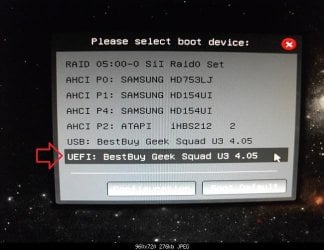
4. Press whatever key (ex: F11) it shows to boot to your motherboard's boot menu, and select to boot from the DVD or UEFI USB. (see screenshot below) UEFI_USB_Boot_Menu.jpg
5. Do steps 3 to 7 in the tutorial link below. http://www.sevenforums.com/tutorials/1649-clean-install-windows-7-a.html
6. Delete all partitions/volumes on the disk # (ex: Disk 0) that you want to install Windows 7 as UEFI on until that disk # shows as unallocated space. (see screenshot below) Step7.jpg
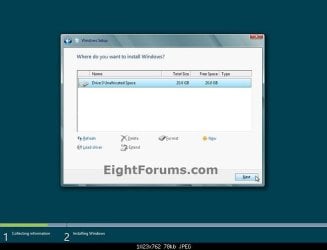
7. When you are finished, click/tap on New, Apply (for full size of disk), and OK. (see screenshot above)

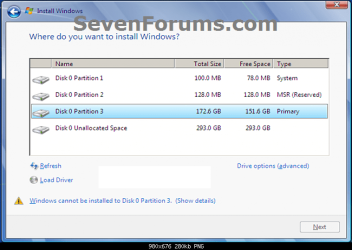
8. You will notice that the disk has now been formatted as GPT with 3 partitions. Select the "Primary" partition 3, and click/tap on Next. (see screenshot below)
NOTE: You might receive a "Windows can't be installed on drive 0" warning, but as long as you can click on the Next button, you're fine.
   Note
The 3 partitions are:
  • Partition 1 - System - The EFI System partition that contains the NTLDR, HAL, Boot.txt, and other files that are needed to boot the system, such as drivers.
  • Partition 2 - MSR - The Microsoft Reserved (MSR) partition that reserves space on each disk drive for subsequent use by operating system software.
  • Partition 3 - Primary - Where Windows is to be installed to.

    It is imperative that these 3 partitions remain in the exact order as they are


Windows7.PNG
9. You can now finish doing the steps in either tutorial below.

10. That's it. You have successfully installed Windows 7 on an UEFI system.


External Links:


Windows and GPT FAQ
Unified Extensible Firmware Interface - Wikipedia, the free encyclopedia
UEFI and Windows
 
Last edited by a moderator:
Doesn't work with this setup

Hi,

I found the installation process in this thread very promising and I did give it a try but it doesn't work on my PC (ASRock X99 WS + i7 5820K).

I'm using Windows 7 Home Premium, OEM DVD. The activation key only works with the OEM version of Windows. Windows can be installed perfectly fine using BIOS.

When booting from the DVD with the motherboard set up in EUFI mode (Secure Boot Disabled, BIOS Compatibility Disabled), the boot process reaches the Windows animated Logo. At that point, sometimes it freezes completely, other times the logo is glowing forever - it never reaches the setup wizard.

I prepared a USB stick in accordance with the instructions and that doesn't work either (using the ISO I exported from the OEM DVD). I get a "Windows Boot Manager" error: "Windows failed to start. A recent hardware or software change might be the cause....", "File: \EFI\Microsoft\Boot\BSD", "Status: 0xc000000d", "Info: An error occurred while attempting to read the boot configuration data.". I have to options: Continue or Exit. Both take me to the firmware.

I suspect this is due to the OEM version of the DVD but I'd be grateful if other users could confirm. If we verify this, I'd be grateful if the article was updated, accordingly, so as to help other users - save time!

Many thanks!
 

My Computer My Computer

At a glance

Windows 8.1 Proi7 5820K32GB DDR4MSI GTX 970 4G
Computer type
PC/Desktop
Computer Manufacturer/Model Number
Custom build
OS
Windows 8.1 Pro
CPU
i7 5820K
Motherboard
ASROCK X99 WS
Memory
32GB DDR4
Graphics Card(s)
MSI GTX 970 4G
Sound Card
Integrated
Screen Resolution
1920x1200
Hard Drives
Samsung 850 EVO
Cooling
Noctua
Browser
Chrome
I am having issues with my new build and Windows 7 Home Premium x64 Retail. I first installed as standard MBR but decided I wanted to used the new GPT UEFI method. So I deleted all the partitions, converted to GPT, booted the Windows installer via the UEFI selection and proceeded with installation. I verified it was installed via UEFI by checking I had the System, MSR, and Windows Partitions. I also checked some log that indicated that the detected boot environment was EFI.

Everything is running fine but I plan on dual booting to OSX later and discovered I need to have CSM disabled. I contacted EVGA and asked them for a UEFI compatible BIOS and they gladly obliged. I went into my bios and turned CSM off. The computer will POST and starts loading Windows. The animated logo will show and just prior to showing the desktop, it reboots.

The bios gives the following message: "The current BIOS setting do not fully support the Windows UEFI mode. The CSM (Compatibility Support Module) settings have been changed for better compatibility. For further adjustments, press <F1> to enter BIOS Setup. If No adjustment are needed, press <F2> to confirm the current settings and enter OS directly."

I thought oh Great, now I have to reinstall. So before I wiped the drive again, I unplugged my SSD and storage drive to try installation to the 180GB drive I intend to use for OSX later. I again turned CSM off and tried booting to the UEFI Windows DVD. It does the same thing, just prior to showing the installer, it reboots. I'm not sure what is wrong. Do I have a Bios setting wrong? I updated all the drivers directly from the manufacturer for Intel and Nvidia. I'm pretty sure Secure Boot is turned off, I have "Other OS" selected. It still says Secure boot is enabled but not Loaded but I guess that's normal for Asus Bios's? I also turned off Fast Boot because I thought it doesn't work with Windows 7, not sure.

My hardware:
Asus Gryphon Z97 running latest BIOS
Intel 4690K Slightly OC'd
EVGA Geforce 660 FTW ACX w/ UEFI Bios
LG BluRay Drive
Samsung Evo 850 SSD 250GB
HGST 7K1000 Travelstar 1TB
Hitachi 180GB
 

My Computer My Computer

At a glance

Windows 7 Home Premium x64Intel 4690KCorsair DDR3 Vengeance LP 1600Mhz 4GB x 2EVGA GeForce GTX 660 FTW ACX w/ UEFI Bios
Computer type
PC/Desktop
Computer Manufacturer/Model Number
Custom Build
OS
Windows 7 Home Premium x64
CPU
Intel 4690K
Motherboard
Asus Gryphon Z97
Memory
Corsair DDR3 Vengeance LP 1600Mhz 4GB x 2
Graphics Card(s)
EVGA GeForce GTX 660 FTW ACX w/ UEFI Bios
Monitor(s) Displays
Samsung B2430HD
Screen Resolution
1080P
Hard Drives
Samsung Evo 850 250GB GPT - Windows 7
HGST Travelstar 7K1000 1TB GPT - Storage
Hitachi Travelstar 160GB GPT - Future Mac OS X
PSU
Corsair HX650
Case
Silverstone PS07-B with Side Window and Orico 2.5" HDD Cage
Cooling
Enermax 120PWM Case Fans. CoolerMaster Hyper 212 EVO
Keyboard
Logitech K520 Keyboard Mouse Combo
Internet Speed
25Mb
Antivirus
AVG Free
Browser
Firefox
Other Info
LG UH12NS30 BluRay Drive
Disable Secure Boot fully.

CSM may not always allow UEFI install. Do you have the latest BIOS firmware?

Otherwise it may be an OSX issue for which you'd need to contact an Apple forums since we do not support that here.
 
I actually haven't even touched OSX yet, that's a future project for the 180GB HD when I get around to it. I wanted to make sure Windows was setup properly before I even attempt that, I don't need to be compounding problems.

Yes, I have the latest BIOS, ver 2205

Do you know how to disable secure boot fully on Asus boards? I do not have an option for that and I thought I read somewhere that just selecting Other disables it. But then again I also read somewhere that you need to clear the keys. If I have to clear my keys and I need them later how do I get them back? Will a new set regenerate?
 

My Computer My Computer

At a glance

Windows 7 Home Premium x64Intel 4690KCorsair DDR3 Vengeance LP 1600Mhz 4GB x 2EVGA GeForce GTX 660 FTW ACX w/ UEFI Bios
Computer type
PC/Desktop
Computer Manufacturer/Model Number
Custom Build
OS
Windows 7 Home Premium x64
CPU
Intel 4690K
Motherboard
Asus Gryphon Z97
Memory
Corsair DDR3 Vengeance LP 1600Mhz 4GB x 2
Graphics Card(s)
EVGA GeForce GTX 660 FTW ACX w/ UEFI Bios
Monitor(s) Displays
Samsung B2430HD
Screen Resolution
1080P
Hard Drives
Samsung Evo 850 250GB GPT - Windows 7
HGST Travelstar 7K1000 1TB GPT - Storage
Hitachi Travelstar 160GB GPT - Future Mac OS X
PSU
Corsair HX650
Case
Silverstone PS07-B with Side Window and Orico 2.5" HDD Cage
Cooling
Enermax 120PWM Case Fans. CoolerMaster Hyper 212 EVO
Keyboard
Logitech K520 Keyboard Mouse Combo
Internet Speed
25Mb
Antivirus
AVG Free
Browser
Firefox
Other Info
LG UH12NS30 BluRay Drive
Fast startup and secure boot what a pain in the rear end.
 

My Computer My Computer

At a glance

Win-7-Pro64bit 7-H-Prem-64biti7-5930K 2nd i9-9940x both water blocked VRM'...Trident-z 3200C14 2nd Trident-z 3600C16EVGA 1080ti ftw3 2nd Titan Xp both water blocked
Computer type
PC/Desktop
Computer Manufacturer/Model Number
Custom assembled by me :}
OS
Win-7-Pro64bit 7-H-Prem-64bit
CPU
i7-5930K 2nd i9-9940x both water blocked VRM's too
Motherboard
ASUS SABERTOOTH X99 2nd ASUS x299 Apex
Memory
Trident-z 3200C14 2nd Trident-z 3600C16
Graphics Card(s)
EVGA 1080ti ftw3 2nd Titan Xp both water blocked
Sound Card
Built-in Realtek
Monitor(s) Displays
1-AOC G2460PG 24"G-Sync 144Hz/ 2nd 1-ASUS VG248QE 24" 144Hz
Screen Resolution
1920 x 1080 144Hz
Hard Drives
2-Samsung M.2 Evo & Evo Plus
2-Samsung 850 EVO 500GB SSD's/ 3-2.5 W.D. Black 1tb-&3-1tb/3-3.5 WD Black 1tb hdd's
PSU
EVGA SuperNOVA 1000-P2 2nd 1200-P2
Case
2-Corsair Obsidian Series 450D Black ATX Mid Tower
Cooling
Custom water loops
Keyboard
Logitech G710+/ 2nd Logitech G910
Mouse
2-RedDragon M901 Perdition 16400 dpi Gaming mouse = wired
Internet Speed
Comcast Ping 19ms 89.31mbps download speed 6.12mbps upload
Antivirus
Malwarebytes Pro/ Superantispyware Pro
Browser
FireFox & Pale moon
Other Info
2nd ASUS X299 Apex/Intel i9-9940x with Custom water loop/7H-Prem-x64/Corsair 450D case/Ram Trident-z 3600C16 4x8gb / Samsung970Evo plus 500gb SSD/Dual ssd EZ swap evo/PSU EVGA SuperNova 1200w-P2 80+Platinum/GPU Titan Xp /8-ML-140 on push-pull on 2-280GTX rads
I fully disabled secure boot by saving the keys to an old jump drive and then clearing them. I still cannot boot windows with CSM disabled. Any ideas?
 

My Computer My Computer

At a glance

Windows 7 Home Premium x64Intel 4690KCorsair DDR3 Vengeance LP 1600Mhz 4GB x 2EVGA GeForce GTX 660 FTW ACX w/ UEFI Bios
Computer type
PC/Desktop
Computer Manufacturer/Model Number
Custom Build
OS
Windows 7 Home Premium x64
CPU
Intel 4690K
Motherboard
Asus Gryphon Z97
Memory
Corsair DDR3 Vengeance LP 1600Mhz 4GB x 2
Graphics Card(s)
EVGA GeForce GTX 660 FTW ACX w/ UEFI Bios
Monitor(s) Displays
Samsung B2430HD
Screen Resolution
1080P
Hard Drives
Samsung Evo 850 250GB GPT - Windows 7
HGST Travelstar 7K1000 1TB GPT - Storage
Hitachi Travelstar 160GB GPT - Future Mac OS X
PSU
Corsair HX650
Case
Silverstone PS07-B with Side Window and Orico 2.5" HDD Cage
Cooling
Enermax 120PWM Case Fans. CoolerMaster Hyper 212 EVO
Keyboard
Logitech K520 Keyboard Mouse Combo
Internet Speed
25Mb
Antivirus
AVG Free
Browser
Firefox
Other Info
LG UH12NS30 BluRay Drive
I am using a Retail copy of Windows 7 x64 with no service pack. Could that be the issue?
 

My Computer My Computer

At a glance

Windows 7 Home Premium x64Intel 4690KCorsair DDR3 Vengeance LP 1600Mhz 4GB x 2EVGA GeForce GTX 660 FTW ACX w/ UEFI Bios
Computer type
PC/Desktop
Computer Manufacturer/Model Number
Custom Build
OS
Windows 7 Home Premium x64
CPU
Intel 4690K
Motherboard
Asus Gryphon Z97
Memory
Corsair DDR3 Vengeance LP 1600Mhz 4GB x 2
Graphics Card(s)
EVGA GeForce GTX 660 FTW ACX w/ UEFI Bios
Monitor(s) Displays
Samsung B2430HD
Screen Resolution
1080P
Hard Drives
Samsung Evo 850 250GB GPT - Windows 7
HGST Travelstar 7K1000 1TB GPT - Storage
Hitachi Travelstar 160GB GPT - Future Mac OS X
PSU
Corsair HX650
Case
Silverstone PS07-B with Side Window and Orico 2.5" HDD Cage
Cooling
Enermax 120PWM Case Fans. CoolerMaster Hyper 212 EVO
Keyboard
Logitech K520 Keyboard Mouse Combo
Internet Speed
25Mb
Antivirus
AVG Free
Browser
Firefox
Other Info
LG UH12NS30 BluRay Drive
I am attempting to download a new copy from Microsoft right now. In case anybody is having issues, the link no longer works in anything but internet explorer.
 

My Computer My Computer

At a glance

Windows 7 Home Premium x64Intel 4690KCorsair DDR3 Vengeance LP 1600Mhz 4GB x 2EVGA GeForce GTX 660 FTW ACX w/ UEFI Bios
Computer type
PC/Desktop
Computer Manufacturer/Model Number
Custom Build
OS
Windows 7 Home Premium x64
CPU
Intel 4690K
Motherboard
Asus Gryphon Z97
Memory
Corsair DDR3 Vengeance LP 1600Mhz 4GB x 2
Graphics Card(s)
EVGA GeForce GTX 660 FTW ACX w/ UEFI Bios
Monitor(s) Displays
Samsung B2430HD
Screen Resolution
1080P
Hard Drives
Samsung Evo 850 250GB GPT - Windows 7
HGST Travelstar 7K1000 1TB GPT - Storage
Hitachi Travelstar 160GB GPT - Future Mac OS X
PSU
Corsair HX650
Case
Silverstone PS07-B with Side Window and Orico 2.5" HDD Cage
Cooling
Enermax 120PWM Case Fans. CoolerMaster Hyper 212 EVO
Keyboard
Logitech K520 Keyboard Mouse Combo
Internet Speed
25Mb
Antivirus
AVG Free
Browser
Firefox
Other Info
LG UH12NS30 BluRay Drive
Will the download have SP1 already applied? It doesn't mention it at all.
 

My Computer My Computer

At a glance

Windows 7 Home Premium x64Intel 4690KCorsair DDR3 Vengeance LP 1600Mhz 4GB x 2EVGA GeForce GTX 660 FTW ACX w/ UEFI Bios
Computer type
PC/Desktop
Computer Manufacturer/Model Number
Custom Build
OS
Windows 7 Home Premium x64
CPU
Intel 4690K
Motherboard
Asus Gryphon Z97
Memory
Corsair DDR3 Vengeance LP 1600Mhz 4GB x 2
Graphics Card(s)
EVGA GeForce GTX 660 FTW ACX w/ UEFI Bios
Monitor(s) Displays
Samsung B2430HD
Screen Resolution
1080P
Hard Drives
Samsung Evo 850 250GB GPT - Windows 7
HGST Travelstar 7K1000 1TB GPT - Storage
Hitachi Travelstar 160GB GPT - Future Mac OS X
PSU
Corsair HX650
Case
Silverstone PS07-B with Side Window and Orico 2.5" HDD Cage
Cooling
Enermax 120PWM Case Fans. CoolerMaster Hyper 212 EVO
Keyboard
Logitech K520 Keyboard Mouse Combo
Internet Speed
25Mb
Antivirus
AVG Free
Browser
Firefox
Other Info
LG UH12NS30 BluRay Drive
Yes, any download since 2010 should have it. Burn to DVD with Windows download tool or write to Flash stick using Rufus exactly as given in tutorial.
 
Thanks for that update. We have had lots of reports of Microsoft Software Recovery not working.

Has that ever worked?
Last time I tried it, it would only let me download a Swedish version, not English which is what I needed. Although never tried using IE. It kept saying my genuine retail licence wasn't valid.
 

My Computer My Computer

At a glance

Win 7 Ultimate, Win 8.1 Pro, Linux Mint 19 Ci...Intel i5 4690KCorsair Vengeance LP 32GB DDR3MSI GTX 1060 GAMING X 6GB
Computer type
PC/Desktop
Computer Manufacturer/Model Number
Custom Build
OS
Win 7 Ultimate, Win 8.1 Pro, Linux Mint 19 Cinnamon (All 64-Bit)
CPU
Intel i5 4690K
Motherboard
Gigabyte Z97X-UD3H
Memory
Corsair Vengeance LP 32GB DDR3
Graphics Card(s)
MSI GTX 1060 GAMING X 6GB
Sound Card
Onboard
Hard Drives
Samsung 850 EVO 250GB SSD (x2)
Samsung 860 EVO 1TB SSD (x2)
Crucial MX300 525GB SSD
WD Blue 2TB 5400rpm Intellipark Disabled (x2)
PSU
Corsair HX750i
Case
Phanteks Enthoo Pro
Cooling
CM Hyper 212 EVO on CPU, Noctua Redux NF-P14S 1500rpm (x6)
Keyboard
Corsair K70 RGB LUX
Mouse
Corsair Sabre RGB
Antivirus
Avast Free, MalwareBytes, SAS & CryptoPrevent
Browser
Chrome
Other Info
StarTech PEXESAT322I 2 Port PCI-E SATA Card
ASUS PCE-AC56 Dual-band AC1300 Wireless Card
Akasa FC.Six Manual Fan Controller
And a Partridge in a Pear Tree!
It's working for me. I couldn't get the website link to come up in Firefox. Then it dawned on me that Microsoft may be blocking other browsers for security reasons. Poof, it worked in IE. It's downloading the English version right now.
 

My Computer My Computer

At a glance

Windows 7 Home Premium x64Intel 4690KCorsair DDR3 Vengeance LP 1600Mhz 4GB x 2EVGA GeForce GTX 660 FTW ACX w/ UEFI Bios
Computer type
PC/Desktop
Computer Manufacturer/Model Number
Custom Build
OS
Windows 7 Home Premium x64
CPU
Intel 4690K
Motherboard
Asus Gryphon Z97
Memory
Corsair DDR3 Vengeance LP 1600Mhz 4GB x 2
Graphics Card(s)
EVGA GeForce GTX 660 FTW ACX w/ UEFI Bios
Monitor(s) Displays
Samsung B2430HD
Screen Resolution
1080P
Hard Drives
Samsung Evo 850 250GB GPT - Windows 7
HGST Travelstar 7K1000 1TB GPT - Storage
Hitachi Travelstar 160GB GPT - Future Mac OS X
PSU
Corsair HX650
Case
Silverstone PS07-B with Side Window and Orico 2.5" HDD Cage
Cooling
Enermax 120PWM Case Fans. CoolerMaster Hyper 212 EVO
Keyboard
Logitech K520 Keyboard Mouse Combo
Internet Speed
25Mb
Antivirus
AVG Free
Browser
Firefox
Other Info
LG UH12NS30 BluRay Drive
It's working for me. I couldn't get the website link to come up in Firefox. Then it dawned on me that Microsoft may be blocking other browsers for security reasons. Poof, it worked in IE. It's downloading the English version right now.

Thanks, might give it another try and see if it works. Sorry for wandering off the subject. :D

EDIT: Still won't accept my genuine key, even with IE, just gives an Unsupported Language Error. :(
 
Last edited:

My Computer My Computer

At a glance

Win 7 Ultimate, Win 8.1 Pro, Linux Mint 19 Ci...Intel i5 4690KCorsair Vengeance LP 32GB DDR3MSI GTX 1060 GAMING X 6GB
Computer type
PC/Desktop
Computer Manufacturer/Model Number
Custom Build
OS
Win 7 Ultimate, Win 8.1 Pro, Linux Mint 19 Cinnamon (All 64-Bit)
CPU
Intel i5 4690K
Motherboard
Gigabyte Z97X-UD3H
Memory
Corsair Vengeance LP 32GB DDR3
Graphics Card(s)
MSI GTX 1060 GAMING X 6GB
Sound Card
Onboard
Hard Drives
Samsung 850 EVO 250GB SSD (x2)
Samsung 860 EVO 1TB SSD (x2)
Crucial MX300 525GB SSD
WD Blue 2TB 5400rpm Intellipark Disabled (x2)
PSU
Corsair HX750i
Case
Phanteks Enthoo Pro
Cooling
CM Hyper 212 EVO on CPU, Noctua Redux NF-P14S 1500rpm (x6)
Keyboard
Corsair K70 RGB LUX
Mouse
Corsair Sabre RGB
Antivirus
Avast Free, MalwareBytes, SAS & CryptoPrevent
Browser
Chrome
Other Info
StarTech PEXESAT322I 2 Port PCI-E SATA Card
ASUS PCE-AC56 Dual-band AC1300 Wireless Card
Akasa FC.Six Manual Fan Controller
And a Partridge in a Pear Tree!
The download worked and I made a bootable UEFI Flash drive using Rufus. However, I still cannot start the installer or boot windows with csm turned off. Both will get to the animated windows logo and reboot. I also tried with the graphics card removed and cpu graphics activated. I also tried clearing the bios and set it up again. Grrrr.
 

My Computer My Computer

At a glance

Windows 7 Home Premium x64Intel 4690KCorsair DDR3 Vengeance LP 1600Mhz 4GB x 2EVGA GeForce GTX 660 FTW ACX w/ UEFI Bios
Computer type
PC/Desktop
Computer Manufacturer/Model Number
Custom Build
OS
Windows 7 Home Premium x64
CPU
Intel 4690K
Motherboard
Asus Gryphon Z97
Memory
Corsair DDR3 Vengeance LP 1600Mhz 4GB x 2
Graphics Card(s)
EVGA GeForce GTX 660 FTW ACX w/ UEFI Bios
Monitor(s) Displays
Samsung B2430HD
Screen Resolution
1080P
Hard Drives
Samsung Evo 850 250GB GPT - Windows 7
HGST Travelstar 7K1000 1TB GPT - Storage
Hitachi Travelstar 160GB GPT - Future Mac OS X
PSU
Corsair HX650
Case
Silverstone PS07-B with Side Window and Orico 2.5" HDD Cage
Cooling
Enermax 120PWM Case Fans. CoolerMaster Hyper 212 EVO
Keyboard
Logitech K520 Keyboard Mouse Combo
Internet Speed
25Mb
Antivirus
AVG Free
Browser
Firefox
Other Info
LG UH12NS30 BluRay Drive
EDIT: Still won't accept my genuine key, even with IE, just gives an Unsupported Language Error. :(

A lot of people get the same lame message.
 
Last edited by a moderator:

My Computer My Computer

At a glance

Win-7-Pro64bit 7-H-Prem-64biti7-5930K 2nd i9-9940x both water blocked VRM'...Trident-z 3200C14 2nd Trident-z 3600C16EVGA 1080ti ftw3 2nd Titan Xp both water blocked
Computer type
PC/Desktop
Computer Manufacturer/Model Number
Custom assembled by me :}
OS
Win-7-Pro64bit 7-H-Prem-64bit
CPU
i7-5930K 2nd i9-9940x both water blocked VRM's too
Motherboard
ASUS SABERTOOTH X99 2nd ASUS x299 Apex
Memory
Trident-z 3200C14 2nd Trident-z 3600C16
Graphics Card(s)
EVGA 1080ti ftw3 2nd Titan Xp both water blocked
Sound Card
Built-in Realtek
Monitor(s) Displays
1-AOC G2460PG 24"G-Sync 144Hz/ 2nd 1-ASUS VG248QE 24" 144Hz
Screen Resolution
1920 x 1080 144Hz
Hard Drives
2-Samsung M.2 Evo & Evo Plus
2-Samsung 850 EVO 500GB SSD's/ 3-2.5 W.D. Black 1tb-&3-1tb/3-3.5 WD Black 1tb hdd's
PSU
EVGA SuperNOVA 1000-P2 2nd 1200-P2
Case
2-Corsair Obsidian Series 450D Black ATX Mid Tower
Cooling
Custom water loops
Keyboard
Logitech G710+/ 2nd Logitech G910
Mouse
2-RedDragon M901 Perdition 16400 dpi Gaming mouse = wired
Internet Speed
Comcast Ping 19ms 89.31mbps download speed 6.12mbps upload
Antivirus
Malwarebytes Pro/ Superantispyware Pro
Browser
FireFox & Pale moon
Other Info
2nd ASUS X299 Apex/Intel i9-9940x with Custom water loop/7H-Prem-x64/Corsair 450D case/Ram Trident-z 3600C16 4x8gb / Samsung970Evo plus 500gb SSD/Dual ssd EZ swap evo/PSU EVGA SuperNova 1200w-P2 80+Platinum/GPU Titan Xp /8-ML-140 on push-pull on 2-280GTX rads
Is Full UEFI even possible with Windows 7? I have tried disconnecting everything and having only the mobo, cpu, and a hard drive connected. It still will not get past the animated windows graphic on boot.
 

My Computer My Computer

At a glance

Windows 7 Home Premium x64Intel 4690KCorsair DDR3 Vengeance LP 1600Mhz 4GB x 2EVGA GeForce GTX 660 FTW ACX w/ UEFI Bios
Computer type
PC/Desktop
Computer Manufacturer/Model Number
Custom Build
OS
Windows 7 Home Premium x64
CPU
Intel 4690K
Motherboard
Asus Gryphon Z97
Memory
Corsair DDR3 Vengeance LP 1600Mhz 4GB x 2
Graphics Card(s)
EVGA GeForce GTX 660 FTW ACX w/ UEFI Bios
Monitor(s) Displays
Samsung B2430HD
Screen Resolution
1080P
Hard Drives
Samsung Evo 850 250GB GPT - Windows 7
HGST Travelstar 7K1000 1TB GPT - Storage
Hitachi Travelstar 160GB GPT - Future Mac OS X
PSU
Corsair HX650
Case
Silverstone PS07-B with Side Window and Orico 2.5" HDD Cage
Cooling
Enermax 120PWM Case Fans. CoolerMaster Hyper 212 EVO
Keyboard
Logitech K520 Keyboard Mouse Combo
Internet Speed
25Mb
Antivirus
AVG Free
Browser
Firefox
Other Info
LG UH12NS30 BluRay Drive

My Computer My Computer

At a glance

64-bit Windows 11 Pro for WorkstationsIntel i7-8700K OC'd to 5 GHz64 GB (4x16GB) G.SKILL TridentZ RGB DDR4 3600...ASUS ROG-STRIX-GTX1080TI-O11G-GAMING
Computer type
PC/Desktop
Computer Manufacturer/Model Number
Self built custom
OS
64-bit Windows 11 Pro for Workstations
CPU
Intel i7-8700K OC'd to 5 GHz
Motherboard
ASUS ROG Maximus XI Formula Z390
Memory
64 GB (4x16GB) G.SKILL TridentZ RGB DDR4 3600 MHz
Graphics Card(s)
ASUS ROG-STRIX-GTX1080TI-O11G-GAMING
Sound Card
Integrated
Monitor(s) Displays
2 x Samsung Odyssey G7 27"
Screen Resolution
2560x1440
Hard Drives
1TB Samsung 990 PRO M.2,
4TB Samsung 990 PRO PRO M.2,
TerraMaster F8 SSD Plus NAS
PSU
Seasonic Prime Titanium 850W
Case
Thermaltake Core P3
Cooling
Corsair Hydro H115i
Keyboard
Logitech wireless K800
Mouse
Logitech MX Master 4
Internet Speed
2 Gb/s Download and 100 Mb/s Upload
Antivirus
Malwarebyte Anti-Malware Premium
Browser
Google Chrome
Other Info
Logitech Z625 speaker system,
Logitech BRIO 4K Pro webcam,
HP Color LaserJet Pro MFP M477fdn,
APC SMART-UPS RT 1000 XL - SURT1000XLI,
Galaxy S23 Plus phone
Do you have the latest BIOS firmware? What setting choices are in BIOS setup for CSM, UEFI or EFI, Legacy BIOS, Secure Boot and BIOS boot order.

Did you boot installer as UEFI device?
 
Back
Top