UEFI (Unified Extensible Firmware Interface) - Install Windows 7 with

How to Install Windows 7 Using the "Unified Extensible Firmware Interface" (UEFI)


   Information
In addition to better interoperability, UEFI firmware provides several technical advantages:
  • Compatibility with operating systems that support only BIOS
  • Ability to boot from large disks
  • CPU-independent architecture
  • CPU-independent drivers
  • Flexible pre-OS environment
  • Modular design
Two of the most notable Windows features for UEFI systems are the following:
  • Multicast deployment, which enables large scale network-based image deployment in manufacturing and enterprise settings.
  • Fast boot and resume from hibernation, which improves user experience.
The rich UEFI interface provides ample room for innovation in the development of operating system features. Along with the other members of the Unified EFI Forum, Microsoft is investigating the following:
  • Rootkit prevention
  • Network authentication
-Microsoft Corporation
This method can also be used for the UEFI installation of Windows 8, Windows Server 2008 SP1, Windows Server 2008 R2, and Windows Vista SP1.

   Note
You will need to satisfy the following requirements in order to proceed:

  • A Windows 7 compatible system
  • A Windows 7 x64-bit installation media. 32-bit is not supported.
  • A UEFI v2.0+ compliant PC. Check your chipset manufacturer/firmware documentation.
  • A blank, partition-free, hard disk for installation.
   Warning

  • Disabling UEFI will make the system unbootable as there is no MBR on the disks.
  • You CANNOT make a sector-by-sector copy of GPT disks. The Disk and Partition GUIDs will no longer be unique. This must never happen. You can make a sector-by-sector copy of the contents of ESP or basic data partitions.
  • Disable secure boot before installing Windows 7.


Here's How:

1. Do step 2 or 3 below depending on what installation Media you are using.

2. If using a Retail 64-bit Windows 7 Installation DVD A) Insert the DVD, restart the computer, and go to step 4 below.
3. If using a 64-bit Windows 7 Installation USB Flash Drive with UEFI A) If you have not already, you will need to create a Windows 7 installation bootable USB flash drive for UEFI from either a Windows 7 installation ISO or DVD.

B) Connect the USB, restart the computer, and go to step 4 below.
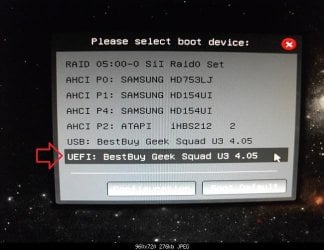
4. Press whatever key (ex: F11) it shows to boot to your motherboard's boot menu, and select to boot from the DVD or UEFI USB. (see screenshot below) UEFI_USB_Boot_Menu.jpg
5. Do steps 3 to 7 in the tutorial link below. http://www.sevenforums.com/tutorials/1649-clean-install-windows-7-a.html
6. Delete all partitions/volumes on the disk # (ex: Disk 0) that you want to install Windows 7 as UEFI on until that disk # shows as unallocated space. (see screenshot below) Step7.jpg
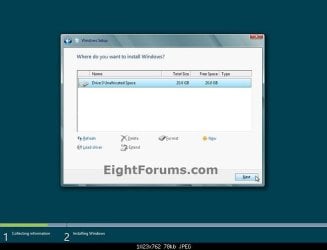
7. When you are finished, click/tap on New, Apply (for full size of disk), and OK. (see screenshot above)

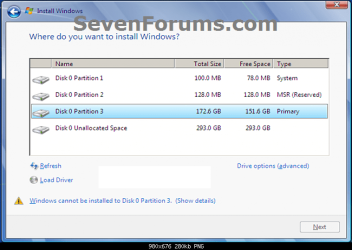
8. You will notice that the disk has now been formatted as GPT with 3 partitions. Select the "Primary" partition 3, and click/tap on Next. (see screenshot below)
NOTE: You might receive a "Windows can't be installed on drive 0" warning, but as long as you can click on the Next button, you're fine.
   Note
The 3 partitions are:
  • Partition 1 - System - The EFI System partition that contains the NTLDR, HAL, Boot.txt, and other files that are needed to boot the system, such as drivers.
  • Partition 2 - MSR - The Microsoft Reserved (MSR) partition that reserves space on each disk drive for subsequent use by operating system software.
  • Partition 3 - Primary - Where Windows is to be installed to.

    It is imperative that these 3 partitions remain in the exact order as they are


Windows7.PNG
9. You can now finish doing the steps in either tutorial below.

10. That's it. You have successfully installed Windows 7 on an UEFI system.


External Links:


Windows and GPT FAQ
Unified Extensible Firmware Interface - Wikipedia, the free encyclopedia
UEFI and Windows
 
Last edited by a moderator:
What is the problem with NTFS if you're not using UEFI? An MBR disk install can always take NTFS stick format.

You can't really use UEFI on that PC if you install 32 bit. Did it have 32 bit Windows 8? Surely it did with only 2gb RAM and an Atom.
 
Yes it did have a 32bit Windows 8.1 originally.

The UEFI on the computer only reads a USB which is formatted in FAT32 otherwise it does not show in the booting devices or anywhere if it has NTFS. That is the whole problem, otherwise I have no problem using it in NTFS
 

My Computer My Computer

At a glance

Windows 7 32bitAtom 1.33 GHz2GB RAM
Computer type
PC/Desktop
Computer Manufacturer/Model Number
Asus X205TA
OS
Windows 7 32bit
CPU
Atom 1.33 GHz
Memory
2GB RAM
Hard Drives
32 GB SSD
Hi,

Whenever I click 'New' in drive options, only 2 partitions are created: MSR and Primary. This happens with both UEFI 64-bit Windows 7 USB created with Rufus and with the manual steps.

Does anyone have any idea how to fix this? I have Clover bootloader installed on a separate SDD, so there is an EFI partition on a separate drive, would that affect this in any way? I'm new to this so I'm a little lost..

Thanks
 

My Computer My Computer

At a glance

Windows 7
Computer type
PC/Desktop
OS
Windows 7
Hello McCannon, and welcome to Seven Forums. :)

It sounds like it just created or used the EFI partition on the SSD as the boot drive instead. That's fine if you don't mind it using the SSD for this.
 

My Computer My Computer

At a glance

64-bit Windows 11 Pro for WorkstationsIntel i7-8700K OC'd to 5 GHz64 GB (4x16GB) G.SKILL TridentZ RGB DDR4 3600...ASUS ROG-STRIX-GTX1080TI-O11G-GAMING
Computer type
PC/Desktop
Computer Manufacturer/Model Number
Self built custom
OS
64-bit Windows 11 Pro for Workstations
CPU
Intel i7-8700K OC'd to 5 GHz
Motherboard
ASUS ROG Maximus XI Formula Z390
Memory
64 GB (4x16GB) G.SKILL TridentZ RGB DDR4 3600 MHz
Graphics Card(s)
ASUS ROG-STRIX-GTX1080TI-O11G-GAMING
Sound Card
Integrated
Monitor(s) Displays
2 x Samsung Odyssey G7 27"
Screen Resolution
2560x1440
Hard Drives
1TB Samsung 990 PRO M.2,
4TB Samsung 990 PRO PRO M.2,
TerraMaster F8 SSD Plus NAS
PSU
Seasonic Prime Titanium 850W
Case
Thermaltake Core P3
Cooling
Corsair Hydro H115i
Keyboard
Logitech wireless K800
Mouse
Logitech MX Master 4
Internet Speed
2 Gb/s Download and 100 Mb/s Upload
Antivirus
Malwarebyte Anti-Malware Premium
Browser
Google Chrome
Other Info
Logitech Z625 speaker system,
Logitech BRIO 4K Pro webcam,
HP Color LaserJet Pro MFP M477fdn,
APC SMART-UPS RT 1000 XL - SURT1000XLI,
Galaxy S23 Plus phone
Hi Brink, thanks for the response.

I don't mind the installation using the EFI partition on the SSD, that is fine. I actually went ahead with the install even though I was only seeing 2 partitions, and it seemed to work okay -- except for the fact that when I installed the AMD Catalyst graphics card drivers and restarted my computer, the reboot got through the windows logo, but then hangs on a black screen before the 'Welcome' and log in screen ever show up.

To try to fix this, I booted into safe mode and removed the AMD drivers, which allowed me to start the computer normally again. I tried installing several different versions of the graphics card driver, with the same result each time.

Do you have any instinct if these two things might be related? Tonight I'll be formatting the disk, reinstalling Windows 7 UEFI, and reinstalling my motherboard, networking, and graphics card drivers one at a time, while rebooting in between. Besides this, I'm not sure how else to approach this problem.

Thanks for any help you can give!
 

My Computer My Computer

At a glance

Windows 7
Computer type
PC/Desktop
OS
Windows 7

My Computer My Computer

At a glance

64-bit Windows 11 Pro for WorkstationsIntel i7-8700K OC'd to 5 GHz64 GB (4x16GB) G.SKILL TridentZ RGB DDR4 3600...ASUS ROG-STRIX-GTX1080TI-O11G-GAMING
Computer type
PC/Desktop
Computer Manufacturer/Model Number
Self built custom
OS
64-bit Windows 11 Pro for Workstations
CPU
Intel i7-8700K OC'd to 5 GHz
Motherboard
ASUS ROG Maximus XI Formula Z390
Memory
64 GB (4x16GB) G.SKILL TridentZ RGB DDR4 3600 MHz
Graphics Card(s)
ASUS ROG-STRIX-GTX1080TI-O11G-GAMING
Sound Card
Integrated
Monitor(s) Displays
2 x Samsung Odyssey G7 27"
Screen Resolution
2560x1440
Hard Drives
1TB Samsung 990 PRO M.2,
4TB Samsung 990 PRO PRO M.2,
TerraMaster F8 SSD Plus NAS
PSU
Seasonic Prime Titanium 850W
Case
Thermaltake Core P3
Cooling
Corsair Hydro H115i
Keyboard
Logitech wireless K800
Mouse
Logitech MX Master 4
Internet Speed
2 Gb/s Download and 100 Mb/s Upload
Antivirus
Malwarebyte Anti-Malware Premium
Browser
Google Chrome
Other Info
Logitech Z625 speaker system,
Logitech BRIO 4K Pro webcam,
HP Color LaserJet Pro MFP M477fdn,
APC SMART-UPS RT 1000 XL - SURT1000XLI,
Galaxy S23 Plus phone
All non-OS drives meaning all drives except the one I would be installing Windows on?
 

My Computer My Computer

At a glance

Windows 7
Computer type
PC/Desktop
OS
Windows 7
And yes, I was using the latest drivers.
 

My Computer My Computer

At a glance

Windows 7
Computer type
PC/Desktop
OS
Windows 7

My Computer My Computer

At a glance

64-bit Windows 11 Pro for WorkstationsIntel i7-8700K OC'd to 5 GHz64 GB (4x16GB) G.SKILL TridentZ RGB DDR4 3600...ASUS ROG-STRIX-GTX1080TI-O11G-GAMING
Computer type
PC/Desktop
Computer Manufacturer/Model Number
Self built custom
OS
64-bit Windows 11 Pro for Workstations
CPU
Intel i7-8700K OC'd to 5 GHz
Motherboard
ASUS ROG Maximus XI Formula Z390
Memory
64 GB (4x16GB) G.SKILL TridentZ RGB DDR4 3600 MHz
Graphics Card(s)
ASUS ROG-STRIX-GTX1080TI-O11G-GAMING
Sound Card
Integrated
Monitor(s) Displays
2 x Samsung Odyssey G7 27"
Screen Resolution
2560x1440
Hard Drives
1TB Samsung 990 PRO M.2,
4TB Samsung 990 PRO PRO M.2,
TerraMaster F8 SSD Plus NAS
PSU
Seasonic Prime Titanium 850W
Case
Thermaltake Core P3
Cooling
Corsair Hydro H115i
Keyboard
Logitech wireless K800
Mouse
Logitech MX Master 4
Internet Speed
2 Gb/s Download and 100 Mb/s Upload
Antivirus
Malwarebyte Anti-Malware Premium
Browser
Google Chrome
Other Info
Logitech Z625 speaker system,
Logitech BRIO 4K Pro webcam,
HP Color LaserJet Pro MFP M477fdn,
APC SMART-UPS RT 1000 XL - SURT1000XLI,
Galaxy S23 Plus phone
Okay, I will likely give that a try and report back. Thanks for the help.
 

My Computer My Computer

At a glance

Windows 7
Computer type
PC/Desktop
OS
Windows 7
I hope it goes smoothly.
 

My Computer My Computer

At a glance

64-bit Windows 11 Pro for WorkstationsIntel i7-8700K OC'd to 5 GHz64 GB (4x16GB) G.SKILL TridentZ RGB DDR4 3600...ASUS ROG-STRIX-GTX1080TI-O11G-GAMING
Computer type
PC/Desktop
Computer Manufacturer/Model Number
Self built custom
OS
64-bit Windows 11 Pro for Workstations
CPU
Intel i7-8700K OC'd to 5 GHz
Motherboard
ASUS ROG Maximus XI Formula Z390
Memory
64 GB (4x16GB) G.SKILL TridentZ RGB DDR4 3600 MHz
Graphics Card(s)
ASUS ROG-STRIX-GTX1080TI-O11G-GAMING
Sound Card
Integrated
Monitor(s) Displays
2 x Samsung Odyssey G7 27"
Screen Resolution
2560x1440
Hard Drives
1TB Samsung 990 PRO M.2,
4TB Samsung 990 PRO PRO M.2,
TerraMaster F8 SSD Plus NAS
PSU
Seasonic Prime Titanium 850W
Case
Thermaltake Core P3
Cooling
Corsair Hydro H115i
Keyboard
Logitech wireless K800
Mouse
Logitech MX Master 4
Internet Speed
2 Gb/s Download and 100 Mb/s Upload
Antivirus
Malwarebyte Anti-Malware Premium
Browser
Google Chrome
Other Info
Logitech Z625 speaker system,
Logitech BRIO 4K Pro webcam,
HP Color LaserJet Pro MFP M477fdn,
APC SMART-UPS RT 1000 XL - SURT1000XLI,
Galaxy S23 Plus phone
Installing Windows with other drives disconnected worked perfectly, all 3 partitions were created as shown, and my graphics card is back up and working.

Although for some reason my Clover EFI Partition (on another disk) is now acting as a Windows Boot Loader Partition, and then fails if you use it. I can still use a Clover EFI Partition I have on a USB, though, so I think I'll reinstall that EFI Configuration to the Clover SSD (with the Windows EFI SSD disconnected), and then hopefully everything will be sorted out. Thanks for you help.
 

My Computer My Computer

At a glance

Windows 7
Computer type
PC/Desktop
OS
Windows 7
Good news so far. :party:
 

My Computer My Computer

At a glance

64-bit Windows 11 Pro for WorkstationsIntel i7-8700K OC'd to 5 GHz64 GB (4x16GB) G.SKILL TridentZ RGB DDR4 3600...ASUS ROG-STRIX-GTX1080TI-O11G-GAMING
Computer type
PC/Desktop
Computer Manufacturer/Model Number
Self built custom
OS
64-bit Windows 11 Pro for Workstations
CPU
Intel i7-8700K OC'd to 5 GHz
Motherboard
ASUS ROG Maximus XI Formula Z390
Memory
64 GB (4x16GB) G.SKILL TridentZ RGB DDR4 3600 MHz
Graphics Card(s)
ASUS ROG-STRIX-GTX1080TI-O11G-GAMING
Sound Card
Integrated
Monitor(s) Displays
2 x Samsung Odyssey G7 27"
Screen Resolution
2560x1440
Hard Drives
1TB Samsung 990 PRO M.2,
4TB Samsung 990 PRO PRO M.2,
TerraMaster F8 SSD Plus NAS
PSU
Seasonic Prime Titanium 850W
Case
Thermaltake Core P3
Cooling
Corsair Hydro H115i
Keyboard
Logitech wireless K800
Mouse
Logitech MX Master 4
Internet Speed
2 Gb/s Download and 100 Mb/s Upload
Antivirus
Malwarebyte Anti-Malware Premium
Browser
Google Chrome
Other Info
Logitech Z625 speaker system,
Logitech BRIO 4K Pro webcam,
HP Color LaserJet Pro MFP M477fdn,
APC SMART-UPS RT 1000 XL - SURT1000XLI,
Galaxy S23 Plus phone
Can I Use an OEM Windows 7 x64 DVD to install in UEFI mode?

The article says that I can use a Retail (big plastic box) DVD of 64-bit Windows to install in UEFI mode. Can I use my OEM ("System Builder") DVD to install windows in UEFI mode or will I need to make a boot USB from my DVD?

Please Help! First Question!
 

My Computer My Computer

At a glance

Windows 7 Professional x64Intel Core i7 4790KCorsair Vengeance Pro 8GB CL9 1800MhzNVIDIA GTX 970
Computer type
PC/Desktop
Computer Manufacturer/Model Number
Custom Build
OS
Windows 7 Professional x64
CPU
Intel Core i7 4790K
Motherboard
ASUS Maximus VII Hero
Memory
Corsair Vengeance Pro 8GB CL9 1800Mhz
Graphics Card(s)
NVIDIA GTX 970
Hard Drives
Seagate Barracuda 500GB
Browser
Google Chrome

My Computer My Computer

At a glance

64-bit Windows 11 Pro for WorkstationsIntel i7-8700K OC'd to 5 GHz64 GB (4x16GB) G.SKILL TridentZ RGB DDR4 3600...ASUS ROG-STRIX-GTX1080TI-O11G-GAMING
Computer type
PC/Desktop
Computer Manufacturer/Model Number
Self built custom
OS
64-bit Windows 11 Pro for Workstations
CPU
Intel i7-8700K OC'd to 5 GHz
Motherboard
ASUS ROG Maximus XI Formula Z390
Memory
64 GB (4x16GB) G.SKILL TridentZ RGB DDR4 3600 MHz
Graphics Card(s)
ASUS ROG-STRIX-GTX1080TI-O11G-GAMING
Sound Card
Integrated
Monitor(s) Displays
2 x Samsung Odyssey G7 27"
Screen Resolution
2560x1440
Hard Drives
1TB Samsung 990 PRO M.2,
4TB Samsung 990 PRO PRO M.2,
TerraMaster F8 SSD Plus NAS
PSU
Seasonic Prime Titanium 850W
Case
Thermaltake Core P3
Cooling
Corsair Hydro H115i
Keyboard
Logitech wireless K800
Mouse
Logitech MX Master 4
Internet Speed
2 Gb/s Download and 100 Mb/s Upload
Antivirus
Malwarebyte Anti-Malware Premium
Browser
Google Chrome
Other Info
Logitech Z625 speaker system,
Logitech BRIO 4K Pro webcam,
HP Color LaserJet Pro MFP M477fdn,
APC SMART-UPS RT 1000 XL - SURT1000XLI,
Galaxy S23 Plus phone
When I installed it said that it was not optimal. Disk 0 is an SSD with MBR partitioning and Disk 1 is a HGST 4Tb with GPT partitioning. The HGST is one drive that won't get swapped out. Before I installed an OS to the HGST I had already transferred lots of data to it.

Do u think it will be fine? What is your opinion of using a separate partition for page file with 16Gb ram with/without an SSD?

GPT Partition Table.jpg
 
Last edited by a moderator:

My Computer My Computer

At a glance

windows 7 sp1 x64 ultimate4690k16Gb Hyper X Savage KingstonRadeon 6850
Computer type
PC/Desktop
Computer Manufacturer/Model Number
custom
OS
windows 7 sp1 x64 ultimate
CPU
4690k
Motherboard
Gigabyte Z97X Gaming 5
Memory
16Gb Hyper X Savage Kingston
Graphics Card(s)
Radeon 6850
Sound Card
Asus Xonar DX
Monitor(s) Displays
Benq GW2232
Screen Resolution
1080p
Hard Drives
4Tb HGST HDN724040ALE6400
Sandisk X300>Samsung 850 Evo
WD EARS 2Tb
WD EACS 1Tb
Seagate ST350064 1AS 500Gb
Sandisk Extreme USB 3.0 Flash Drive
Pico USB 2.0 Flash Drive
PSU
Corsair HX850
Case
Antec P180
Cooling
Prolimatec Megahelim
Keyboard
Logitech G15 + Wolfking
Mouse
G6900 Gigabyte
Internet Speed
60Mb/3Mb
Antivirus
Spybot S & D, Spyware Blaster
Browser
Firefox
Other Info
http://www.doomiii.pwp.blueyonder.co.uk/system-spec.html
Hello sgtsixpack, and welcome to Seven Forums. :)

If it's booting fine, then you're good to go.

It's fine to move the page file to another drive if you like. Usually, you would only do so if the Windows drive is low on free space, or the drive you're moving the page file is faster (ex: SSD vs HDD) than the Windows drive.
 

My Computer My Computer

At a glance

64-bit Windows 11 Pro for WorkstationsIntel i7-8700K OC'd to 5 GHz64 GB (4x16GB) G.SKILL TridentZ RGB DDR4 3600...ASUS ROG-STRIX-GTX1080TI-O11G-GAMING
Computer type
PC/Desktop
Computer Manufacturer/Model Number
Self built custom
OS
64-bit Windows 11 Pro for Workstations
CPU
Intel i7-8700K OC'd to 5 GHz
Motherboard
ASUS ROG Maximus XI Formula Z390
Memory
64 GB (4x16GB) G.SKILL TridentZ RGB DDR4 3600 MHz
Graphics Card(s)
ASUS ROG-STRIX-GTX1080TI-O11G-GAMING
Sound Card
Integrated
Monitor(s) Displays
2 x Samsung Odyssey G7 27"
Screen Resolution
2560x1440
Hard Drives
1TB Samsung 990 PRO M.2,
4TB Samsung 990 PRO PRO M.2,
TerraMaster F8 SSD Plus NAS
PSU
Seasonic Prime Titanium 850W
Case
Thermaltake Core P3
Cooling
Corsair Hydro H115i
Keyboard
Logitech wireless K800
Mouse
Logitech MX Master 4
Internet Speed
2 Gb/s Download and 100 Mb/s Upload
Antivirus
Malwarebyte Anti-Malware Premium
Browser
Google Chrome
Other Info
Logitech Z625 speaker system,
Logitech BRIO 4K Pro webcam,
HP Color LaserJet Pro MFP M477fdn,
APC SMART-UPS RT 1000 XL - SURT1000XLI,
Galaxy S23 Plus phone
Not sure if this isn't already noted in the instructions: but attempting to boot via UEFI a Windows 7 install on a USB 3.0 drive while inserted in a USB 3.0 port results in the Windows installation stating a driver is missing.

A required CD/DVD drive device driver is missing. If you have a driver floppy disk, CD, DVD, or USB flash drive, please insert it now. Note: If the Windows installation media is in the CD/DVD drive, you can safely remove it for this step.

I was able to remedy this by inserting the USB 3.0 thumb drive into a USB 2.0 port instead.

Anyone know why this happens?

This was with a fresh X17-59186.iso and RUFUS.
 

My Computer My Computer

At a glance

Microsoft Windows 7 Ultimate 64-bit 7601 Mult...Intel(R) Core(TM) i7 CPU 975 @ 3.33GHz24.00 GB Corsair Dominator GT(1) AMD Radeon HD 6900 Series (2) AMD Radeon ...
OS
Microsoft Windows 7 Ultimate 64-bit 7601 Multiprocessor Free Service Pack 1
CPU
Intel(R) Core(TM) i7 CPU 975 @ 3.33GHz
Motherboard
EVGA X58 SLI Classified
Memory
24.00 GB Corsair Dominator GT
Graphics Card(s)
(1) AMD Radeon HD 6900 Series (2) AMD Radeon HD 6900 Serie
Sound Card
High Definition Audio on board
Monitor(s) Displays
NEC PA271W
Screen Resolution
2560 x 1440 x 32 bits (4294967296 colors) @ 60 Hz
Hard Drives
(1) Hitachi HDS724040ALE640 ATA Device (2) Hitachi HDS724040ALE640 ATA Device (3) WDC WD1000DHTZ-04N21V0 (4) WDC WD2001FASS-00U0B0 (5) WDC WD2001FASS-00W2B0 (6) WDC WD2001FASS-00W2B0 ATA Device (7) LSI MR9260-4i SCSI Disk Device
PSU
Silverstone ST1500W
Case
Lian-Li PC-V2120X
Cooling
Corsair H100
Keyboard
Ducky DK 9800S-B
Mouse
Razer DeathAdder
This is because there are no USB3 drivers in the Win7 installer due to it never getting a Service Pack 3. SP2 was issued in 2010 and is the last available version of the installation media, just prior to USB3 coming online.

Most commonly, however, that error means a bad installer.
 
Back
Top