Firefox 38.0.1 a memory-gobbling abomination?

450125

New member
Power User
Local time
1:46 PM
Messages
281
I've been a loyal FF user for more than a decade, liking or disliking this or that feature with each new release, but pretty seamlessly going with the flow.

But in the week or two I've had 38.0.1, I've had numerous problems at home and at work.

At work, google maps will lock the browser up and I have to force-quit it, even if it's the only tab I have open and launch it from a fresh boot of Windows.

At home, I'll notice the browser eventually lag over the course of a day, and then look in the task manager and the memory usage keeps climbing, 1 gig of memory and ever higher. I have 8 gigs of memory on the home computer, and I don't check this type of thing much, but the browser performance is so obviously compromised that I checked and noticed this.

Even turning off hw acceleration, a popularly-suggested fix for this type of problem, hasn't helped at home.

Have others here noticed something similar? And are there known fixes for the browser declining performance I see at home, or the google maps lockup I see at work?
 

My Computer My Computer

At a glance

Win7 Professional 64Intel I3 550 (3.2 GHz)8 gig (2x4gig Kingston DDR 3)Intel HD graphics (from CPU)
Computer Manufacturer/Model Number
custom-built
OS
Win7 Professional 64
CPU
Intel I3 550 (3.2 GHz)
Motherboard
GIGABYTE|GA-H55M-S2V H55 1156 R
Memory
8 gig (2x4gig Kingston DDR 3)
Graphics Card(s)
Intel HD graphics (from CPU)
Sound Card
Realtek ALC888B
Monitor(s) Displays
ViewSonic
Screen Resolution
1280x1024
Hard Drives
Seagate ST3250310CS (250 gig C drive for OS and programs)
WDC WD5000AAKS-00V1A0 (2x500 gig drives, software mirrored in a RAID 1 configuration, as a D drive, for documents and data)
Internet Speed
download > 15 mbps; upload approx 1 mbps

My Computer My Computer

At a glance

OEM Windows 7 Ult (x64) SP1Intel Core-i7 3770 @ 3.4 GHz16 GB DDR3 SDRAM @ 1333 MHzNVidia GeForce GT620 1 GB
Computer type
PC/Desktop
Computer Manufacturer/Model Number
Dell Studio XPS 8500
OS
OEM Windows 7 Ult (x64) SP1
CPU
Intel Core-i7 3770 @ 3.4 GHz
Motherboard
"Dell" branded
Memory
16 GB DDR3 SDRAM @ 1333 MHz
Graphics Card(s)
NVidia GeForce GT620 1 GB
Sound Card
THX TruStudio PC
Monitor(s) Displays
Dell U2410 Full HD
Hard Drives
2.0 TB SATA2 @ 7200 RPM
PSU
350W
Keyboard
MS 4000 Ergon - Wired
Mouse
Logitech Anywhere MX
Internet Speed
Cable HSI w/Turbo (router)
Antivirus
KIS-MBAM Premium-MBAE Premium
Browser
Fx (current version); IE
Other Info
And a Win7/64 Pro laptop; And a Win10/64 Pro desktop.
I rolled my FF back to 33, now 36. Rollback might be the answer. Question: which earlier version of FF gave you no problems?
 

My Computer My Computer

At a glance

Windows 7 Professional 64-bitDesktop i5; Acers i5 & i7desktop 16GB; 1 Acer 8GB & 1 Acer 16GB
Computer type
PC/Desktop
Computer Manufacturer/Model Number
Antec desktop; Acer Aspire laptops
OS
Windows 7 Professional 64-bit
CPU
Desktop i5; Acers i5 & i7
Memory
desktop 16GB; 1 Acer 8GB & 1 Acer 16GB
Hard Drives
1TB split into 2 equal partitions [OS and data] usable by RJS
Internet Speed
AT&T DSL
Browser
FF, GChrome, msIE
Other Info
Windows 7 Firewall, Emsisoft AM/AV, MSE [scan-only], SpywareBlaster, Ruiware/BillP combine
I rolled my FF back to 33, now 36. Rollback might be the answer. Question: which earlier version of FF gave you no problems?

There have been a version or two here or there that gave me headaches - and from google it was easy to tell that they gave most of the free world user community the same headaches.

But pretty much, ever FF version I've had, that has worked fine for others, has worked fine for me too.

I'm sorry for a stupid question here, but (1) where do I find the rollback version I want (38 or 37.x would have been fine), and (2) how do I then prevent FF from automatically re-installing 38.0.1 back over it?
 

My Computer My Computer

At a glance

Win7 Professional 64Intel I3 550 (3.2 GHz)8 gig (2x4gig Kingston DDR 3)Intel HD graphics (from CPU)
Computer Manufacturer/Model Number
custom-built
OS
Win7 Professional 64
CPU
Intel I3 550 (3.2 GHz)
Motherboard
GIGABYTE|GA-H55M-S2V H55 1156 R
Memory
8 gig (2x4gig Kingston DDR 3)
Graphics Card(s)
Intel HD graphics (from CPU)
Sound Card
Realtek ALC888B
Monitor(s) Displays
ViewSonic
Screen Resolution
1280x1024
Hard Drives
Seagate ST3250310CS (250 gig C drive for OS and programs)
WDC WD5000AAKS-00V1A0 (2x500 gig drives, software mirrored in a RAID 1 configuration, as a D drive, for documents and data)
Internet Speed
download > 15 mbps; upload approx 1 mbps
Hi:

I respectfully disagree with that approach.
Rolling back to an older, outdated program version is probably not a good idea, at least for most users.

There are 2 major problems with that approach:

A safer approach would be to conduct a bit of basic troubleshooting

Mozilla Safe Mode
Firefox - Standard Diagnostic
Firefox - Fix slowness, crashing and other problems

With the increasing complexity of all software these days -- including browsers and their plug-ins and extensions and other add-ons -- a bit of care and feeding is a good investment of time.
From time to time, a profile cleanup or even a new, fresh profile will restore that fast, fresh feeling.:)

If you really want to rollback to an older version and prevent future upgrades, then you'd go to "Options" > "Advanced" > "Update" and disable the auto-updates (not recommended) -- see screenshot. But doing so is "at your own risk".:(

Just my humble opinion as a long-time home user, not a geek.


Cheers,
 

Attachments

  • FxNoUpdate-2015-05-25_9-59-41.png
    FxNoUpdate-2015-05-25_9-59-41.png
    8 KB · Views: 60
Last edited:

My Computer My Computer

At a glance

OEM Windows 7 Ult (x64) SP1Intel Core-i7 3770 @ 3.4 GHz16 GB DDR3 SDRAM @ 1333 MHzNVidia GeForce GT620 1 GB
Computer type
PC/Desktop
Computer Manufacturer/Model Number
Dell Studio XPS 8500
OS
OEM Windows 7 Ult (x64) SP1
CPU
Intel Core-i7 3770 @ 3.4 GHz
Motherboard
"Dell" branded
Memory
16 GB DDR3 SDRAM @ 1333 MHz
Graphics Card(s)
NVidia GeForce GT620 1 GB
Sound Card
THX TruStudio PC
Monitor(s) Displays
Dell U2410 Full HD
Hard Drives
2.0 TB SATA2 @ 7200 RPM
PSU
350W
Keyboard
MS 4000 Ergon - Wired
Mouse
Logitech Anywhere MX
Internet Speed
Cable HSI w/Turbo (router)
Antivirus
KIS-MBAM Premium-MBAE Premium
Browser
Fx (current version); IE
Other Info
And a Win7/64 Pro laptop; And a Win10/64 Pro desktop.
MoxieMomma's correct, so I add: make sure your security programs are top-notch, smart-set, updated often. oldapps.com and oldversion.com are the only two places I normally go to get a copy of an older FF.
Guess what - I'm at FF 37 :)

Addendum: MoxieMomma's later post reminded me that although many programs and utilities are on oldapps & oldversion sites, the best FF collection is where she said it was: mozilla.org
 
Last edited:

My Computer My Computer

At a glance

Windows 7 Professional 64-bitDesktop i5; Acers i5 & i7desktop 16GB; 1 Acer 8GB & 1 Acer 16GB
Computer type
PC/Desktop
Computer Manufacturer/Model Number
Antec desktop; Acer Aspire laptops
OS
Windows 7 Professional 64-bit
CPU
Desktop i5; Acers i5 & i7
Memory
desktop 16GB; 1 Acer 8GB & 1 Acer 16GB
Hard Drives
1TB split into 2 equal partitions [OS and data] usable by RJS
Internet Speed
AT&T DSL
Browser
FF, GChrome, msIE
Other Info
Windows 7 Firewall, Emsisoft AM/AV, MSE [scan-only], SpywareBlaster, Ruiware/BillP combine
oldapps.com and oldversion.com are the only two places I normally go to get a copy of an older FF.

For the record, there is an official web site hosted and maintained by Mozilla.org for older versions.
So there's no need to go to third-party sites.
(I am leery of such third-party software sources. But that is my personal opinion.)

The link embedded in my previous reply will take the user to a link for that official Mozilla website to obtain the older versions.;)

Cheers,
 

My Computer My Computer

At a glance

OEM Windows 7 Ult (x64) SP1Intel Core-i7 3770 @ 3.4 GHz16 GB DDR3 SDRAM @ 1333 MHzNVidia GeForce GT620 1 GB
Computer type
PC/Desktop
Computer Manufacturer/Model Number
Dell Studio XPS 8500
OS
OEM Windows 7 Ult (x64) SP1
CPU
Intel Core-i7 3770 @ 3.4 GHz
Motherboard
"Dell" branded
Memory
16 GB DDR3 SDRAM @ 1333 MHz
Graphics Card(s)
NVidia GeForce GT620 1 GB
Sound Card
THX TruStudio PC
Monitor(s) Displays
Dell U2410 Full HD
Hard Drives
2.0 TB SATA2 @ 7200 RPM
PSU
350W
Keyboard
MS 4000 Ergon - Wired
Mouse
Logitech Anywhere MX
Internet Speed
Cable HSI w/Turbo (router)
Antivirus
KIS-MBAM Premium-MBAE Premium
Browser
Fx (current version); IE
Other Info
And a Win7/64 Pro laptop; And a Win10/64 Pro desktop.
Have others here noticed something similar?


Mate i'm checking my firefox process just in case right now and it says: 455 812 KB WTF?

Avast Internet Security 2015 is next with 10 500 KB
 

My Computer My Computer

At a glance

Microsoft Windows 7 Ultimate 64 bits 7601 Mul...Intel(R) Core(TM) i7-3770K CPU @ 3.50GHz8.00 GBNVIDIA GeForce GTX 670
Computer type
PC/Desktop
Computer Manufacturer/Model Number
Custom Build
OS
Microsoft Windows 7 Ultimate 64 bits 7601 Multiprocessor Free Service Pack 1
CPU
Intel(R) Core(TM) i7-3770K CPU @ 3.50GHz
Motherboard
ASUSTeK Computer INC. P8Z68-V PRO GEN3
Memory
8.00 GB
Graphics Card(s)
NVIDIA GeForce GTX 670
Sound Card
Omega Striker
Monitor(s) Displays
Viewsonic vx2250wm
Screen Resolution
1920 x 1080 x 32 bits (4294967296 colors) @ 60 Hz
Hard Drives
V9CPETXT
Seagate 1TB.
PSU
Corsair Gold Series AX850
Case
nvidia 690 advanced II
Cooling
Air
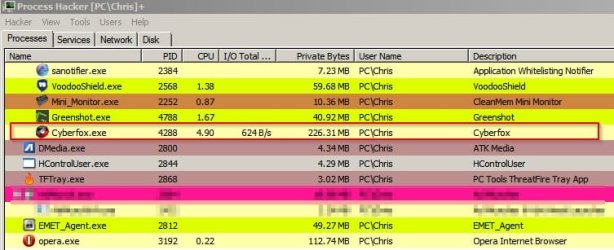
That does seem high. Here's my Cyberfox 38.0.1 (64bit) memory usage - one tab. (I don't use FF)

Each new tab adds a little more memory usage.
00
Process Hacker.jpg
 

My Computer My Computer

At a glance

Microsoft Windows 7 Home Premium 64-bit 7601 ...AMD C-60 APU with Radeon(tm) HD Graphics4.00 GBAMD Radeon HD 6290 Graphics
Computer type
Laptop
Computer Manufacturer/Model Number
ASUS
OS
Microsoft Windows 7 Home Premium 64-bit 7601 Multiprocessor Free Service Pack 1
CPU
AMD C-60 APU with Radeon(tm) HD Graphics
Motherboard
ASUSTeK COMPUTER INC. X501U
Memory
4.00 GB
Graphics Card(s)
AMD Radeon HD 6290 Graphics
Sound Card
(1) AMD High Definition Audio Device (2) Realtek High Defi
Screen Resolution
1366 x 768 x 32 bits (4294967296 colors) @ 60 Hz
Hard Drives
Hitachi HTS545050A7E380 SATA Disk Device
Antivirus
Comodo CIS & FW, SecureAplus App Whitelisting, Threatfire
Browser
Cyberfox 64bit, Opera 64bit, Airfox
Other Info
Spy-The-Spy, HitmanPro.Alert, Norton Connect Safe, MJRegWatcher, BitDefender TrafficLight, Voodoo Shield, Zemana AntiMalware
Right now i restarted the broswer and after 10 minutes i'm on 270 000 KB. IMO still high but i don't know for sure.

update: after a few more minutes i'm on 333 000 KB and going up...
 
Last edited:

My Computer My Computer

At a glance

Microsoft Windows 7 Ultimate 64 bits 7601 Mul...Intel(R) Core(TM) i7-3770K CPU @ 3.50GHz8.00 GBNVIDIA GeForce GTX 670
Computer type
PC/Desktop
Computer Manufacturer/Model Number
Custom Build
OS
Microsoft Windows 7 Ultimate 64 bits 7601 Multiprocessor Free Service Pack 1
CPU
Intel(R) Core(TM) i7-3770K CPU @ 3.50GHz
Motherboard
ASUSTeK Computer INC. P8Z68-V PRO GEN3
Memory
8.00 GB
Graphics Card(s)
NVIDIA GeForce GTX 670
Sound Card
Omega Striker
Monitor(s) Displays
Viewsonic vx2250wm
Screen Resolution
1920 x 1080 x 32 bits (4294967296 colors) @ 60 Hz
Hard Drives
V9CPETXT
Seagate 1TB.
PSU
Corsair Gold Series AX850
Case
nvidia 690 advanced II
Cooling
Air
From the mozillaZine Knowledge Base: "Normal Firefox memory usage reported by Windows might be as high as 100-150 MB. These numbers will vary because Firefox is configured by default to use more memory on systems that have more memory available and less on systems with less. If you experience substantially more usage than this, there may be a problem, or you may just be viewing pages with large amounts of data."

Reducing memory usage - Firefox - MozillaZine Knowledge Base
 

My Computer My Computer

At a glance

Microsoft Windows 7 Home Premium 64-bit 7601 ...Intel(R) Core(TM) i5-2320 CPU @ 3.00GHz8.00 GBIntel(R) HD Graphics
Computer type
PC/Desktop
Computer Manufacturer/Model Number
Intel(R) Core(TM) i5-2320 CPU @ 3.00GHz (Gateway computer)
OS
Microsoft Windows 7 Home Premium 64-bit 7601 Multiprocessor Free Service Pack 1
CPU
Intel(R) Core(TM) i5-2320 CPU @ 3.00GHz
Motherboard
Gateway IPISB-VR
Memory
8.00 GB
Graphics Card(s)
Intel(R) HD Graphics
Sound Card
(1) Realtek High Definition Audio (2) Intel(R) Display Aud
Monitor(s) Displays
ViewSonic 2250 Series
Screen Resolution
1920 x 1080 x 32 bits (4294967296 colors) @ 60 Hz
Hard Drives
(1) WDC WD10EADX-22TDHB0 (2) Generic Mini SD Reader USB Device (3) Generic USB CF Reader USB Device (4) Generic USB MS Reader USB Device (5) Generic USB SD Reader USB Device (6) Generic USB xD/SM Reader USB Device (7) Seagate FreeAgent Go
Keyboard
Gateway
Mouse
Logitech
Internet Speed
20 Mbps (Theoretical.)
Antivirus
Avast
Browser
Firefox

My Computer My Computer

At a glance

Windows 10 Pro. 64/ version 1709 Windows 7 Pr...Intel i7-6800K @ 4.3Corsair Platinum 16 gig @2400EVGA GTX 1070 OC
Computer type
PC/Desktop
Computer Manufacturer/Model Number
Home made Desktop
OS
Windows 10 Pro. 64/ version 1709 Windows 7 Pro/64
CPU
Intel i7-6800K @ 4.3
Motherboard
ASUS X-99 Deluxe II
Memory
Corsair Platinum 16 gig @2400
Graphics Card(s)
EVGA GTX 1070 OC
Monitor(s) Displays
Asus 27" LED LCD/VE278Q
Screen Resolution
1920-1080 or 1280-720 HDMI
Hard Drives
INTEL SSD 730-240 Gb Sata 3.0/
PSU
EVGA Platium 1200W
Case
Phanteks Luxe Tempered Glass 8 fans/ one radiator
Cooling
XSPC/ Water Cooled CPU
Keyboard
Das 4 Professional
Mouse
Logitech M705/MX Anywhere 2-S
Internet Speed
100 mbits
Antivirus
Microsoft Security Essentials/ Malwarebytes Premium 3.0/ SAS
Browser
I.E. 11 default/Firefox/ ISP Time Warner Cable/Spectrum
Other Info
LG BluRay Burner/
Sound system-KLipsch-THX/
Icy Dock ssd Hot Swap bays.
-- Having same exact problem --

I'm on FF 38.0.1 and having the same exact experience as the OP. Win7Pro x64. I always run taskmgr (only taskmgr is elevated so I see all processes) and FF is a cpu and memory hog, especially when I'm running google maps, but in everything, i.e. facebook, normal google searches, reading email, switching between tabs, etc.
WTF????
 

My Computer My Computer

At a glance

Win 7 Pro x64
Computer type
PC/Desktop
OS
Win 7 Pro x64
I'm on FF 38.0.1 and having the same exact experience as the OP. Win7Pro x64. I always run taskmgr (only taskmgr is elevated so I see all processes) and FF is a cpu hog, especially when I'm running google maps, but in everything, i.e. facebook, normal google searches, reading email, switching between tabs, etc.
WTF????
 

My Computer My Computer

At a glance

Win 7 Pro x64
Computer type
PC/Desktop
OS
Win 7 Pro x64
Hi:

Computer memory is there to be used.:)

As previously mentioned,

From the mozillaZine Knowledge Base: "Normal Firefox memory usage reported by Windows might be as high as 100-150 MB. These numbers will vary because Firefox is configured by default to use more memory on systems that have more memory available and less on systems with less. If you experience substantially more usage than this, there may be a problem, or you may just be viewing pages with large amounts of data."

Reducing memory usage - Firefox - MozillaZine Knowledge Base

Also, see here: Firefox uses too much memory (RAM) - How to fix

There are additional diagnostics and troubleshooting steps here:
Standard Diagnostic - Firefox
Mozilla Safe Mode
Refresh Firefox

Hope this helps,
 

My Computer My Computer

At a glance

OEM Windows 7 Ult (x64) SP1Intel Core-i7 3770 @ 3.4 GHz16 GB DDR3 SDRAM @ 1333 MHzNVidia GeForce GT620 1 GB
Computer type
PC/Desktop
Computer Manufacturer/Model Number
Dell Studio XPS 8500
OS
OEM Windows 7 Ult (x64) SP1
CPU
Intel Core-i7 3770 @ 3.4 GHz
Motherboard
"Dell" branded
Memory
16 GB DDR3 SDRAM @ 1333 MHz
Graphics Card(s)
NVidia GeForce GT620 1 GB
Sound Card
THX TruStudio PC
Monitor(s) Displays
Dell U2410 Full HD
Hard Drives
2.0 TB SATA2 @ 7200 RPM
PSU
350W
Keyboard
MS 4000 Ergon - Wired
Mouse
Logitech Anywhere MX
Internet Speed
Cable HSI w/Turbo (router)
Antivirus
KIS-MBAM Premium-MBAE Premium
Browser
Fx (current version); IE
Other Info
And a Win7/64 Pro laptop; And a Win10/64 Pro desktop.
FF Memory Usage

Also check out your addons memory usage and disable or check for updates for any that report [Edit: "unusually" ] high memory usage. Some addons can be enabled / disabled on a when needed basis.

I actually had to remove a discontinued addon yesterday as it was preventing another addon from working properly.

Try this extension: About Addons Memory

No need to leave it enabled - just enable it as and when needed.

Usage: Once installed open a new tab and type about:addons-memory in the address bar.

Add ons memory.jpg

Might be worth checking for remnant of old addons that didn't uninstall cleanly.

Try this extension: Ecleaner

Ecleaner.jpg

Note: Only remove remnants of addons that you know you've already uninstalled.
 
Last edited:

My Computer My Computer

At a glance

Microsoft Windows 7 Home Premium 64-bit 7601 ...AMD C-60 APU with Radeon(tm) HD Graphics4.00 GBAMD Radeon HD 6290 Graphics
Computer type
Laptop
Computer Manufacturer/Model Number
ASUS
OS
Microsoft Windows 7 Home Premium 64-bit 7601 Multiprocessor Free Service Pack 1
CPU
AMD C-60 APU with Radeon(tm) HD Graphics
Motherboard
ASUSTeK COMPUTER INC. X501U
Memory
4.00 GB
Graphics Card(s)
AMD Radeon HD 6290 Graphics
Sound Card
(1) AMD High Definition Audio Device (2) Realtek High Defi
Screen Resolution
1366 x 768 x 32 bits (4294967296 colors) @ 60 Hz
Hard Drives
Hitachi HTS545050A7E380 SATA Disk Device
Antivirus
Comodo CIS & FW, SecureAplus App Whitelisting, Threatfire
Browser
Cyberfox 64bit, Opera 64bit, Airfox
Other Info
Spy-The-Spy, HitmanPro.Alert, Norton Connect Safe, MJRegWatcher, BitDefender TrafficLight, Voodoo Shield, Zemana AntiMalware
Did we loose 450125 the one who started this thread??
 

My Computer My Computer

At a glance

Windows 10 Pro. 64/ version 1709 Windows 7 Pr...Intel i7-6800K @ 4.3Corsair Platinum 16 gig @2400EVGA GTX 1070 OC
Computer type
PC/Desktop
Computer Manufacturer/Model Number
Home made Desktop
OS
Windows 10 Pro. 64/ version 1709 Windows 7 Pro/64
CPU
Intel i7-6800K @ 4.3
Motherboard
ASUS X-99 Deluxe II
Memory
Corsair Platinum 16 gig @2400
Graphics Card(s)
EVGA GTX 1070 OC
Monitor(s) Displays
Asus 27" LED LCD/VE278Q
Screen Resolution
1920-1080 or 1280-720 HDMI
Hard Drives
INTEL SSD 730-240 Gb Sata 3.0/
PSU
EVGA Platium 1200W
Case
Phanteks Luxe Tempered Glass 8 fans/ one radiator
Cooling
XSPC/ Water Cooled CPU
Keyboard
Das 4 Professional
Mouse
Logitech M705/MX Anywhere 2-S
Internet Speed
100 mbits
Antivirus
Microsoft Security Essentials/ Malwarebytes Premium 3.0/ SAS
Browser
I.E. 11 default/Firefox/ ISP Time Warner Cable/Spectrum
Other Info
LG BluRay Burner/
Sound system-KLipsch-THX/
Icy Dock ssd Hot Swap bays.
same issue, moz knows, memory use

First, the comment about memory is there to be used. Yes, that is true, but when enough memory is being used that it lags and freezes the temporarily, that is a bad use of memory. There's no reason to have to wait 40+ seconds for click or tab change to take effect.

Second, Mozilla is aware of the issue (and it's considered pretty bad)... the issue seems to have first started to show up in v.37, but more pronounced in v.38 (it apparently was the result of a bugfix, and now the bugfix needs a bugfix).

Anecdotally, I'm having the same issue. Before I checked with Moz, I had done tests where I have reduced everything down to a single tab with a simple "<html><body>Test</body></html>" page open, and Firefox was still hovering around 6GB.
 

My Computer My Computer

At a glance

Win 7 64b
Computer type
PC/Desktop
OS
Win 7 64b
Never check for updates but it does

I have had "Never check for updates (not recommended: security risk)" for the last several versions (I understand the risks/caveats) however Firefox has updated every time. What can I do about this? Perhaps I should search for a 'how to prevent firefox updates' thread as this one is mostly about memory...? Let me know and I'll remove this one..


Hi:

I respectfully disagree with that approach.
Rolling back to an older, outdated program version is probably not a good idea, at least for most users.

There are 2 major problems with that approach:

A safer approach would be to conduct a bit of basic troubleshooting

Mozilla Safe Mode
Firefox - Standard Diagnostic
Firefox - Fix slowness, crashing and other problems

With the increasing complexity of all software these days -- including browsers and their plug-ins and extensions and other add-ons -- a bit of care and feeding is a good investment of time.
From time to time, a profile cleanup or even a new, fresh profile will restore that fast, fresh feeling.:)

If you really want to rollback to an older version and prevent future upgrades, then you'd go to "Options" > "Advanced" > "Update" and disable the auto-updates (not recommended) -- see screenshot. But doing so is "at your own risk".:(

Just my humble opinion as a long-time home user, not a geek.


Cheers,
 
Last edited:

My Computer My Computer

At a glance

Windows 7 Ultimate x32Pentium Dual Core CPU T4400 2.20 GHz4GB (LOL! 2.98 really)Mobile Intel(R) 4 Series Express Chipset Family
Computer Manufacturer/Model Number
Toshiba U505-2002
OS
Windows 7 Ultimate x32
CPU
Pentium Dual Core CPU T4400 2.20 GHz
Motherboard
References to a motherboard on this PC do not exist.
Memory
4GB (LOL! 2.98 really)
Graphics Card(s)
Mobile Intel(R) 4 Series Express Chipset Family
Sound Card
High Definition Audio Device
Monitor(s) Displays
Generic PnP Display: Great Wall Flat Panel
Hard Drives
1x100GB, 70GB available, external 500GB, various USB 'sticks'
PSU
Jeez, Lousie! can I paste my device manager listings?
Case
Yes, black.
Cooling
Yes.
Only 150MB?

Cruising speed is ONLY 150MB? LOL I thought it's base usage was at least 250MB-300MB. I've NEVER seen it use less! And the further it creeps above 500MB, the slower it gets. Past 1GB, I usually wind up having to reboot Firefox. Too much past 1GB, I wind up rebooting the whole machine. Ugh. I've always blamed Flash, as it and Firefox don't seem to play well together, but today, after doing some googling because I'm just sick and tired of it, I found it may have something to do with mysql, which *I* am NOT running, but I believe Firefox uses to keep track of things. Upon some site's recommendation, I went to go clean out temp files and logs and in the application logs were errors about mysql. Can't remember now what they said. (of course. they didn't immediately make sense.) For the record, I'm running v40.0.2, but the memory leak has been an issue for as far back as I can remember with Firefox. Way before v38.xx. You'd think they'd have figured it out by now. :rolleyes:
 

My Computer My Computer

At a glance

Win XP & Win 7
OS
Win XP & Win 7
Back
Top