Solved Performing SFC/SCANNOW yields inconsistent result

The CheckSUR Persist log shows what happened with the opera file...
Code:
Checking Component Store
(f) CSI Payload File Missing 0x00000000 opera.browser amd64_netfx-aspnet_regbrowser_files_b03f5f7f11d50a3a_6.1.7600.16385_none_fdde508273949e1f 
(fix) CSI Payload File Missing CSI File Replaced File: opera.browser From: C:\Windows\winsxs\x86_netfx-aspnet_regbrowser_files_b03f5f7f11d50a3a_6.1.7600.16385_none_458b87598810c725\opera.browser

There were no other problems found in any of the runs of CheckSUR - although the first one indicates that there may have been a checksum error.

This would tend to reinforce the possibility of a hardware failure - possibly RAM.

Have you run the MemTest86+ scan for at least 3 full passes yet?
 

My Computer My Computer

Computer type
Laptop
Computer Manufacturer/Model Number
Asus K52F or Lenovo B51-80
OS
Win 7 x64 Home Premium (and x86 VirtualBox VM)/Win10
CPU
i3 370M/i7 6500U
Motherboard
Asus/Lenovo
Memory
8GB - finally :)/8GB
Graphics Card(s)
it's an i3, dude!/dual Intel&nVidia
Sound Card
onboard
Monitor(s) Displays
15.6" built-in
Screen Resolution
1366x768/1920x1080
Hard Drives
750GB Seagate internal
Sundry external drives attached to other computers on the local network
1TB SSD on the Lenovo
PSU
n/a
Internet Speed
as much as I can get - usually on a dongle/phone, so <1MB/s
Antivirus
MSE/Defender
Browser
IE11/12/Edge/Chrome/FF(if I must)
The CheckSUR Persist log shows what happened with the opera file...
Code:
Checking Component Store
(f) CSI Payload File Missing 0x00000000 opera.browser amd64_netfx-aspnet_regbrowser_files_b03f5f7f11d50a3a_6.1.7600.16385_none_fdde508273949e1f 
(fix) CSI Payload File Missing CSI File Replaced File: opera.browser From: C:\Windows\winsxs\x86_netfx-aspnet_regbrowser_files_b03f5f7f11d50a3a_6.1.7600.16385_none_458b87598810c725\opera.browser
There were no other problems found in any of the runs of CheckSUR - although the first one indicates that there may have been a checksum error.

This would tend to reinforce the possibility of a hardware failure - possibly RAM.

Have you run the MemTest86+ scan for at least 3 full passes yet?

My apologies if you've been waiting for my reply.

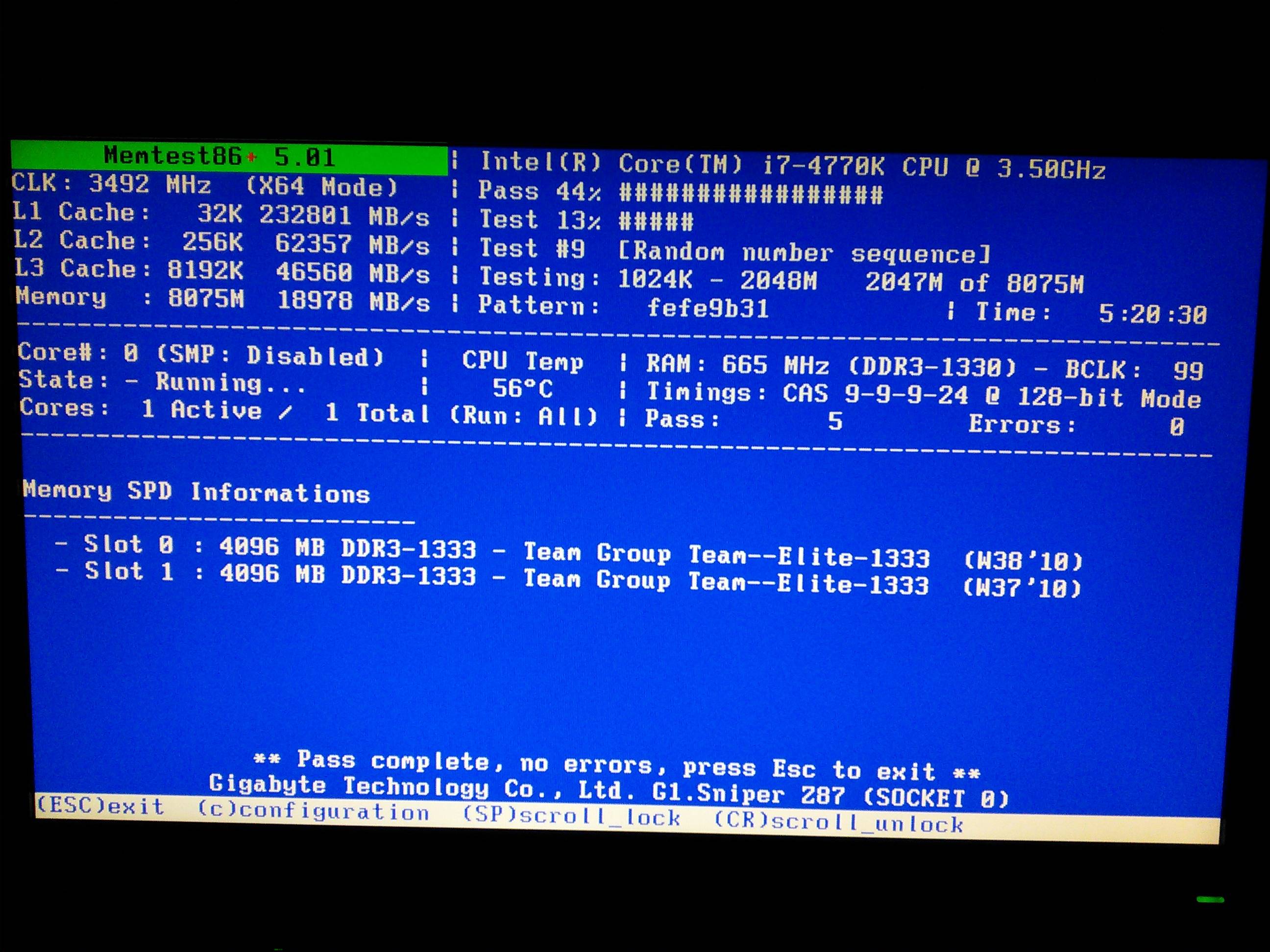
I've ran Memtest86+ and after running it for five or so hours I got a clean result as shown below:
BCNKdWt.jpg

Just curious, am suppose to run this for multiple time in different sections for "accurate" results? Or would one test suffice?

Regarding to Opera file is it gone for good? I'm having a hard time understanding what those lines actually mean. Again I've been running sfc/scannow time to time and so far I've been getting clean results only.
 

My Computer My Computer

OS
Windows 7 Ultimate x64
No problem - I have plenty to keep me occupied! ;)

Memtest is good - no, you ran 5 passes during that period, which is good enough for me.
With any luck you won't see the opera error again.
 

My Computer My Computer

Computer type
Laptop
Computer Manufacturer/Model Number
Asus K52F or Lenovo B51-80
OS
Win 7 x64 Home Premium (and x86 VirtualBox VM)/Win10
CPU
i3 370M/i7 6500U
Motherboard
Asus/Lenovo
Memory
8GB - finally :)/8GB
Graphics Card(s)
it's an i3, dude!/dual Intel&nVidia
Sound Card
onboard
Monitor(s) Displays
15.6" built-in
Screen Resolution
1366x768/1920x1080
Hard Drives
750GB Seagate internal
Sundry external drives attached to other computers on the local network
1TB SSD on the Lenovo
PSU
n/a
Internet Speed
as much as I can get - usually on a dongle/phone, so <1MB/s
Antivirus
MSE/Defender
Browser
IE11/12/Edge/Chrome/FF(if I must)
No problem - I have plenty to keep me occupied! ;)

Memtest is good - no, you ran 5 passes during that period, which is good enough for me.
With any luck you won't see the opera error again.

Alright so everything from the initial problem to opera problem has been fixed completely.

Just a last question, if I happened to find some errors while doing memtest in future do I need to replace my RAMs?
 

My Computer My Computer

OS
Windows 7 Ultimate x64
You ONLY need to run the Memtest scans again if you have good reason to suspect a problem.

....but yes, if you find a problem wit the Memtest scans, you should come back here for analysis.
 

My Computer My Computer

Computer type
Laptop
Computer Manufacturer/Model Number
Asus K52F or Lenovo B51-80
OS
Win 7 x64 Home Premium (and x86 VirtualBox VM)/Win10
CPU
i3 370M/i7 6500U
Motherboard
Asus/Lenovo
Memory
8GB - finally :)/8GB
Graphics Card(s)
it's an i3, dude!/dual Intel&nVidia
Sound Card
onboard
Monitor(s) Displays
15.6" built-in
Screen Resolution
1366x768/1920x1080
Hard Drives
750GB Seagate internal
Sundry external drives attached to other computers on the local network
1TB SSD on the Lenovo
PSU
n/a
Internet Speed
as much as I can get - usually on a dongle/phone, so <1MB/s
Antivirus
MSE/Defender
Browser
IE11/12/Edge/Chrome/FF(if I must)
You ONLY need to run the Memtest scans again if you have good reason to suspect a problem.

....but yes, if you find a problem wit the Memtest scans, you should come back here for analysis.

Got it.

Thank you very much for the help Noel, I really appreciate it.
 

My Computer My Computer

OS
Windows 7 Ultimate x64
You're welcome - good luck!
 

My Computer My Computer

Computer type
Laptop
Computer Manufacturer/Model Number
Asus K52F or Lenovo B51-80
OS
Win 7 x64 Home Premium (and x86 VirtualBox VM)/Win10
CPU
i3 370M/i7 6500U
Motherboard
Asus/Lenovo
Memory
8GB - finally :)/8GB
Graphics Card(s)
it's an i3, dude!/dual Intel&nVidia
Sound Card
onboard
Monitor(s) Displays
15.6" built-in
Screen Resolution
1366x768/1920x1080
Hard Drives
750GB Seagate internal
Sundry external drives attached to other computers on the local network
1TB SSD on the Lenovo
PSU
n/a
Internet Speed
as much as I can get - usually on a dongle/phone, so <1MB/s
Antivirus
MSE/Defender
Browser
IE11/12/Edge/Chrome/FF(if I must)
Back
Top