Transfer my Firefox from one Win 7 install to a new one

loninappleton

New member
Member
VIP
Local time
2:18 AM
Messages
892
I have hit the wall on trying to make any version of Firefox behave.
Here is the summary:

No older profiles load from a direct folder copy or from using Mozbackup-- mozbackup used from the old
XP I'm trying to wean myself off of.

Presently I have one Win 7 going on my little home network. The network shows my workgroup
and homegroup.

But any attempt I make to get anything from the my older Firefox is just ignored and the
setup screens from Mozilla appear. I am really sick of looking at what I think is taking over
my PC using some lookup.

On the current Win 7 I have a Firefox that 'looks right': it shows the

[file edit view history bookmarks tools and help]

This is not visible on the new system and I see no options.
Just fixing this would help me understand what's going on.

I have a set of bookmarks from Mozbackup and those are on this box.

Is it possible/necessary to run the Mozbackup on this x64 machine and transfer the pcv file
onto the new one?


In all of this, Doing the same Mozbackup technique with Thunderbird worked fine: I got all my
mail transferred just through Mozbackup's restore.

While waiting for any answers, I'm going to attempt getting a pcv from _this_ Win7 machine
and running Mozbackup again.

Please be patient. Setting up a new operating system on a network where XP and Win7 reside
may take a while. The goal is to get all the XP content, programs etc still in use onto the
the Win7. When testing this I can remove the XP boot disk. This is not any sort of dual boot.

What gets me is that a 'raw' Firefox install has dropped out the field at the top
with file, edit, view, history, bookmarks tools help.

I am flustered and do not know where to start. A complete re-install from scratch
with Sevenforums might be best.

I also noticed that any Win7 x64 builds at Firefox will not pick up any bookmarks either.
I have come to sevenforums because I have never gotten anything satisfactory from
Mozilla-- it's just all redirections to other parts of their haystack.
 

My Computer My Computer

At a glance

Windows 7 x64 UltimateAMD Athlon II x3 4502 GB
Computer type
PC/Desktop
Computer Manufacturer/Model Number
custom
OS
Windows 7 x64 Ultimate
CPU
AMD Athlon II x3 450
Motherboard
MSI 880GM
Memory
2 GB
Hard Drives
various
Browser
Firefox, Opera
You might need to press the Alt key one time to get Firefox to show its menu bar. I do not use Firefox - so I cannot help you much there - other than to suggest that you move to Pale Moon if you opt for a 64bit version of Firefox. Pale Moon is based on Firefox, but they opted not to change much of the stuff that Firefox is changing in newer versions. In other words, Pale Moon looks/works like Firefox did on XP.

Also, Pale Moon is compiled to run on only on the Windows OS. Some of the code used to create Firefox is a compromise so that Firefox can run on other operating systems.
 
Last edited:

My Computer My Computer

At a glance

W7 Pro SP1 64biti78GBIntel HD Graphics
Computer type
Laptop
Computer Manufacturer/Model Number
Employer provided Dell Latitude
OS
W7 Pro SP1 64bit
CPU
i7
Memory
8GB
Graphics Card(s)
Intel HD Graphics
Hard Drives
crappy SSD
Antivirus
Employer mandated Symantec Endpoint Protection
Browser
Pale Moon 64bit, IE11 64bit & Chrome 64bit
My face is red on this one.

When I used the Mozbackup on my Win7 older install to capture that configuration
onto the new (and newer) Firefox, that was successful.

I was stumped by all the bouncing around I seemed to have to do.

All the display settings in Win7 seem to be too big or too small for this Goldilocks.

But the larger problem is in Thunderbird where, once again, I just looked up
the Mozilla help. The direction was clear enough to go to options > fonts> and set a size,
but the size did not change.

I will ask a separate question if needed.

The setting loads Calibri font at about 17 points. Using Options > Fonts and changing the
preloaded numbers produced no result.

This is the newest Thunderbird at 31.7

I have no preference for a mail program that is the newest. If a reader here knows a version
in x86 or x64 where the font size change works, please respond.
 

My Computer My Computer

At a glance

Windows 7 x64 UltimateAMD Athlon II x3 4502 GB
Computer type
PC/Desktop
Computer Manufacturer/Model Number
custom
OS
Windows 7 x64 Ultimate
CPU
AMD Athlon II x3 450
Motherboard
MSI 880GM
Memory
2 GB
Hard Drives
various
Browser
Firefox, Opera
Hi:

One thing -- some online backup services (such as Carbonite) don't do a good/complete job of backing up a Fx or TB profile. It's better to use an extension such as FEBE or a standalone tool, such as Mozbackup, that's specifically designed to backup and restore Mozilla program profiles.

FWIW, the latest/last beta version of Mozbackup is supposedly a bit better than the last release version.
However, none of this will work well if your profile is corrupted or "messy" or (especially for TB) really, really huge.
Sometimes, especially with Firefox, it's best to start fresh on the new computer, importing only your saved bookmarks from the old profile into a spanking, new, clean profile.


Here are a few links about backing up and transferring profiles for Firefox:

Firefox - Backup profile
Firefox - Moving your Profile
Firefox - Moving to a New PC
Firefox - Transferring Profile Data
Firefox - Recovering Profile Data
Firefox - Profile Manager


Having said that, it's a bit confusing now: if you could please rephrase your question about Firefox with a bit more specificity about your current Firefox issue, we could probably better assist you?

To minimize confusion, it might be advisable to start a new, separate thread for the Thunderbird issues.

<just a suggestion>

Thank you,
 
Last edited:

My Computer My Computer

At a glance

OEM Windows 7 Ult (x64) SP1Intel Core-i7 3770 @ 3.4 GHz16 GB DDR3 SDRAM @ 1333 MHzNVidia GeForce GT620 1 GB
Computer type
PC/Desktop
Computer Manufacturer/Model Number
Dell Studio XPS 8500
OS
OEM Windows 7 Ult (x64) SP1
CPU
Intel Core-i7 3770 @ 3.4 GHz
Motherboard
"Dell" branded
Memory
16 GB DDR3 SDRAM @ 1333 MHz
Graphics Card(s)
NVidia GeForce GT620 1 GB
Sound Card
THX TruStudio PC
Monitor(s) Displays
Dell U2410 Full HD
Hard Drives
2.0 TB SATA2 @ 7200 RPM
PSU
350W
Keyboard
MS 4000 Ergon - Wired
Mouse
Logitech Anywhere MX
Internet Speed
Cable HSI w/Turbo (router)
Antivirus
KIS-MBAM Premium-MBAE Premium
Browser
Fx (current version); IE
Other Info
And a Win7/64 Pro laptop; And a Win10/64 Pro desktop.
Unless I miss-read the first thread; would copying the following two directories from PC A to PC B work:
Users [user acct] Appdata Local Mozilla
Users [user acct] Appdata Roaming Mozilla
I have copied the above directories from any FF I like over to other computers; after I first delete target computer' two directories to avoid problems.
 
Last edited:

My Computer My Computer

At a glance

Windows 7 Professional 64-bitDesktop i5; Acers i5 & i7desktop 16GB; 1 Acer 8GB & 1 Acer 16GB
Computer type
PC/Desktop
Computer Manufacturer/Model Number
Antec desktop; Acer Aspire laptops
OS
Windows 7 Professional 64-bit
CPU
Desktop i5; Acers i5 & i7
Memory
desktop 16GB; 1 Acer 8GB & 1 Acer 16GB
Hard Drives
1TB split into 2 equal partitions [OS and data] usable by RJS
Internet Speed
AT&T DSL
Browser
FF, GChrome, msIE
Other Info
Windows 7 Firewall, Emsisoft AM/AV, MSE [scan-only], SpywareBlaster, Ruiware/BillP combine
Hi:

Unless I miss-read the first thread; would copying the following two directories from PC A to PC B work:
Users [user acct] Appdata Local Mozilla
Users [user acct] Appdata Roaming Mozilla
I have copied the above directories from any FF I like over to other computers. I do delete on target computer the two directories to avoid problems.


You *can* do that, but it's not the recommended method.
It can screw things up.
Many threads over the years at forums.mozillazine.org about folks trying to do that and failing.
If the profiles.ini file isn't correct, then it won't work.
And IIRC, both systems need to run the same version of Windows.

FEBE (for Fx) and Mozbackup (for Fx and TB) are pretty reliable and have been around a long time.
If something goes South, it's often either "operator error" or a junked up/corrupt profile to start with.
Ditto for the procedures outlined in the KB articles to which I provided links in my previous reply.

For Firefox, IMHO it would be better/safer to backup bookmarks on the old rig > start with a fresh Fx install and a new, clean, naked profile on the new rig > import the bookmarks (and, of course, install whatever extensions one wishes to have). A Fx profile that is long in the tooth can suffer performance and stability problems and these will only get worse with a "move". JMHO.

Cheers,
 

My Computer My Computer

At a glance

OEM Windows 7 Ult (x64) SP1Intel Core-i7 3770 @ 3.4 GHz16 GB DDR3 SDRAM @ 1333 MHzNVidia GeForce GT620 1 GB
Computer type
PC/Desktop
Computer Manufacturer/Model Number
Dell Studio XPS 8500
OS
OEM Windows 7 Ult (x64) SP1
CPU
Intel Core-i7 3770 @ 3.4 GHz
Motherboard
"Dell" branded
Memory
16 GB DDR3 SDRAM @ 1333 MHz
Graphics Card(s)
NVidia GeForce GT620 1 GB
Sound Card
THX TruStudio PC
Monitor(s) Displays
Dell U2410 Full HD
Hard Drives
2.0 TB SATA2 @ 7200 RPM
PSU
350W
Keyboard
MS 4000 Ergon - Wired
Mouse
Logitech Anywhere MX
Internet Speed
Cable HSI w/Turbo (router)
Antivirus
KIS-MBAM Premium-MBAE Premium
Browser
Fx (current version); IE
Other Info
And a Win7/64 Pro laptop; And a Win10/64 Pro desktop.
I won't get involved with Tbird in this and will start something new-- even though I should be able to
navigate Mozilla it's a briar patch and I'm not that good at 'code' procedures.

In what became confusing I believe that there was no info dump from XP to Win7. Rather once I got the
Mozbackup from a Win7 machine to this new Win7 HD boot drive, the Firefox (now No. 38) is a fresh install and with the Mozbackup bookmarks.

It's off the system at the moment so I cannot check but I will be going back to that to reload programs
from their installers.

I'm still puzzled as to why I couldn't get the proper -- dunno what it's called--
File, Edit, View , etc at the very top. I still don't know how to do it if needed.
 

My Computer My Computer

At a glance

Windows 7 x64 UltimateAMD Athlon II x3 4502 GB
Computer type
PC/Desktop
Computer Manufacturer/Model Number
custom
OS
Windows 7 x64 Ultimate
CPU
AMD Athlon II x3 450
Motherboard
MSI 880GM
Memory
2 GB
Hard Drives
various
Browser
Firefox, Opera
On my Thunderbird 31.6.0 At the top margin a right click will reveal options to check at the menu bar and the mail tool bar.

This is what I couldn't find at my current install-- and still cannot.
But I know that much about it right now.
 

My Computer My Computer

At a glance

Windows 7 x64 UltimateAMD Athlon II x3 4502 GB
Computer type
PC/Desktop
Computer Manufacturer/Model Number
custom
OS
Windows 7 x64 Ultimate
CPU
AMD Athlon II x3 450
Motherboard
MSI 880GM
Memory
2 GB
Hard Drives
various
Browser
Firefox, Opera
~~~
On the current Win 7 I have a Firefox that 'looks right': it shows the

[file edit view history bookmarks tools and help]
~~~

You might need to press the Alt key one time to get Firefox to show its menu bar.
~~~

~~~
I'm still puzzled as to why I couldn't get the proper -- dunno what it's called--
File, Edit, View , etc at the very top. I still don't know how to do it if needed.
It is called the menu bar.


On my Thunderbird 31.6.0 At the top margin a right click will reveal options to check at the menu bar and the mail tool bar.

This is what I couldn't find at my current install-- and still cannot.
But I know that much about it right now.
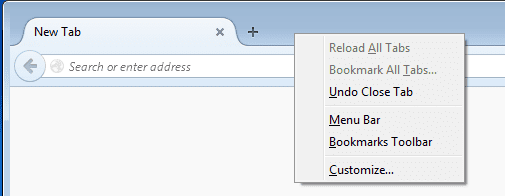
You might be clicking too high. Try right clicking next to a tab.
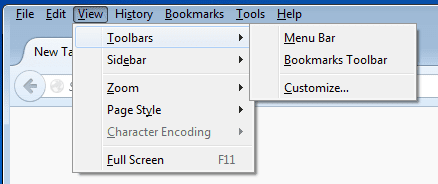
Or - use the Alt key > View > Toolbars > Menu bar.

Default look:
FF1.PNG

With the Alt key pressed - you temporarily get the menu bar.
FF2.PNG

Click on View > Toolbars > Menu bar
FF3.PNG

Or right click next to a tab - then click on menu bar:
FF4.PNG
 

My Computer My Computer

At a glance

W7 Pro SP1 64biti78GBIntel HD Graphics
Computer type
Laptop
Computer Manufacturer/Model Number
Employer provided Dell Latitude
OS
W7 Pro SP1 64bit
CPU
i7
Memory
8GB
Graphics Card(s)
Intel HD Graphics
Hard Drives
crappy SSD
Antivirus
Employer mandated Symantec Endpoint Protection
Browser
Pale Moon 64bit, IE11 64bit & Chrome 64bit
These are helpful hints and I'll try them-- maybe will print this to paper so I don't have to ask
again.
 

My Computer My Computer

At a glance

Windows 7 x64 UltimateAMD Athlon II x3 4502 GB
Computer type
PC/Desktop
Computer Manufacturer/Model Number
custom
OS
Windows 7 x64 Ultimate
CPU
AMD Athlon II x3 450
Motherboard
MSI 880GM
Memory
2 GB
Hard Drives
various
Browser
Firefox, Opera
Feel free to ask again any time. Maybe the next time I will remember to right click next to a tab. It took me a while to figure out that I was clicking too high. I knew that the Alt key would work, but I wanted the figure out the "right click" method too.
 

My Computer My Computer

At a glance

W7 Pro SP1 64biti78GBIntel HD Graphics
Computer type
Laptop
Computer Manufacturer/Model Number
Employer provided Dell Latitude
OS
W7 Pro SP1 64bit
CPU
i7
Memory
8GB
Graphics Card(s)
Intel HD Graphics
Hard Drives
crappy SSD
Antivirus
Employer mandated Symantec Endpoint Protection
Browser
Pale Moon 64bit, IE11 64bit & Chrome 64bit
Hi:

Yep, UserNameIssue's excellent and well-illustrated suggestions will work.:)
As is often the case with Fx, there is some redundancy built-in -- IOW there are multiple ways to perform the same task. The "right click" and "Alt" key methods to display the Menu Bar are "shortcuts".
Another method is explained here: Turn on the Title bar, Menu bar or Bookmarks toolbar

To turn on the Title bar:

  1. Click the menu button
    2014-01-10-13-08-08-f52b8c.png
    and choose Customize.
  2. Click the Title Bar button in the lower left.
  3. Click the green Exit Customize button.
To turn on the Menu bar or Bookmarks toolbar:

  1. Click the menu button
    2014-01-10-13-08-08-f52b8c.png
    and choose Customize.
  2. Click the Show / Hide Toolbars dropdown menu at the bottom of the screen and choose the items you want to display.
  3. Click the green Exit Customize button.
A very useful extension, especially if you're not a big fan of Australis, is Classic Theme Restorer


Cheers,
 

My Computer My Computer

At a glance

OEM Windows 7 Ult (x64) SP1Intel Core-i7 3770 @ 3.4 GHz16 GB DDR3 SDRAM @ 1333 MHzNVidia GeForce GT620 1 GB
Computer type
PC/Desktop
Computer Manufacturer/Model Number
Dell Studio XPS 8500
OS
OEM Windows 7 Ult (x64) SP1
CPU
Intel Core-i7 3770 @ 3.4 GHz
Motherboard
"Dell" branded
Memory
16 GB DDR3 SDRAM @ 1333 MHz
Graphics Card(s)
NVidia GeForce GT620 1 GB
Sound Card
THX TruStudio PC
Monitor(s) Displays
Dell U2410 Full HD
Hard Drives
2.0 TB SATA2 @ 7200 RPM
PSU
350W
Keyboard
MS 4000 Ergon - Wired
Mouse
Logitech Anywhere MX
Internet Speed
Cable HSI w/Turbo (router)
Antivirus
KIS-MBAM Premium-MBAE Premium
Browser
Fx (current version); IE
Other Info
And a Win7/64 Pro laptop; And a Win10/64 Pro desktop.
Back
Top