
DVD Drive no longer available

ExNavy11

Member
Power User
Local time
11:15 AM
Messages
256
My LG Dvd drive is no longer available under My Computer. It isnt even in the Device Manager.

I have re-installed my chipset drivers even, and still no help. Anyone else recommend any actions to fix this?
 

My Computer My Computer

Computer Manufacturer/Model Number
Built
OS
Windows 7 RTM
CPU
Intel I7 920 2.67 ghz
Motherboard
EVGA X58
Memory
6GB CORSAIR DOMINATOR
Graphics Card(s)
GeForce GTX 260 Core 216 896MB 448-bit GDDR3 PCI Express 2.0
I have the same problem (LG GSA 4163b dvd burner). My other dvd drive is recognized with no problem. If I do a scan for new hardware in device manage the drive comes back fine (until the next reboot). The problem started for me when I finally got raid 0 running on my older Chaintech motherboard (using some old ICH5 drivers). At first I thought one of my other programs were causing the problem but it persisted after a clean install (both 7057 and 7068). For now I have a device manager icon on my desktop and do a scan when I need the drive. I wish there was just a fast way to do a new device scan at startup - that would be a great workaround.

Neil
 

My Computer My Computer

Computer Manufacturer/Model Number
Home built all the way!
OS
Windows 7 x64
CPU
i7 920 Processor (revision D0) running at 3.925 mhz
Motherboard
ASUS P6T Deluxe V2
Memory
12 Gigs OCZ XMP Ready Series DDR3 1600
Graphics Card(s)
HIS Hightech Radeon HD 4890 Turbo Edition
Sound Card
Audigy 2 external
Monitor(s) Displays
24" Dell 2407WFP
Screen Resolution
1920x1200
Hard Drives
2 seagate Barracuda 7200.12 SATA 1TB Drives (RAID 0)
Seagate Barracuda 7200.11 1.5TB SATA (eSATA for backup)
PSU
ZALMAN ZM1000-HP 1000W
Case
COOLER MASTER HAF 932 full tower
Cooling
ULTRA ChillTec Thermal Electric CPU Cooler
Keyboard
Microsoft Natural
Mouse
some old logitech
Internet Speed
7meg cable
Well, it appears I have bigger problems. The dvd drive does not show up in Device Manager, even after selecting Scan for Hardware changes.
It also doesnt appear in my BIOS anymore. I believe there use to be a CD-ROM Boot Priority Option beneath Hard Disk Boot Priority option in the Advanced menu in my BIOS. It is no longer there.

Is there anything I can do or should I assume my drive is broken and send it back to Newegg? I bought it last month. Worked fine until recently.
 

My Computer My Computer

Computer Manufacturer/Model Number
Built
OS
Windows 7 RTM
CPU
Intel I7 920 2.67 ghz
Motherboard
EVGA X58
Memory
6GB CORSAIR DOMINATOR
Graphics Card(s)
GeForce GTX 260 Core 216 896MB 448-bit GDDR3 PCI Express 2.0
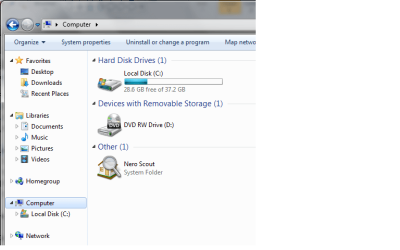
1st thing to check is the connections. I don't know about the bios but I know that Windows 7 only shows devices with content.

Untitled.png

Other than that i'm at a loss LOL

as you can see, the left panel only shows drive C but the main screen shows DVD drive
 
Last edited:

My Computer My Computer

Computer Manufacturer/Model Number
Compaq Desktop
OS
Windows 7 Ultimate x64
CPU
AMD Sempron Dual Core
Memory
3GB
Graphics Card(s)
NVIDIA GeForce 6150SE nForce 430
Screen Resolution
1024x768
Hard Drives
150GB Sata
Give me 5 secs and I will post the solution. its a common problem
 

My Computer My Computer

Computer Manufacturer/Model Number
Home Built / Acer Aspire 7720G Laptop
OS
Windows 7 Build 7600 Laptop and desktop. Also OSX 10.5.7 and 10.6 Snow on Laptop
CPU
AMD Athlon64 Dual core 4200+ / Laptop T5750
Motherboard
Gigabyte / Acer Aspire
Memory
2 x 1Gb = 2 Gb / acer 3GB
Graphics Card(s)
Geforce 8600GT / Geforce 9300M G 256Mb
Sound Card
Terratec DMX 6fire for Music production and X-Fi Xtreme
Monitor(s) Displays
2 x 17" (Dell and Compaq) / 17" WXGA Laptop Screen
Screen Resolution
1280x1024 / 1440x900 (Full HD when conneced to 32" LCD)
Hard Drives
2x Sata 160GB 2x USB 300Gb 1x 160Gb IDE 1x USB 1TB / 250Gb Sata Laptop with Blu-ray drive
PSU
400W + Not 100% sure
Keyboard
Logitech Cordless Keyboard
Mouse
Logitech Mx 700
Internet Speed
20 Meg Down / 1 Meg up Cable
Other Info
Konica Minolta Colour Laser printer, Epson Stylus R360 (Mostly used for printing on CD's/DVD's), Cannon Scanner, Mercury surround system, about 6 external hard drives all 200Gb plus along with the normall home entertainment stuff attached.... DBox 2, XBox 360, etc. etc.
Ok Here you go. Sorry had to find the registry keys. Please note you must locate the correct registry key as there are a few the same but if you get the wrong one you will screw up windows 7.

here you go:


Locate, and then click the following registry subkey:
HKEY_LOCAL_MACHINE\SYSTEM\CurrentControlSet\Control\Class\{4D36E965-E325-11CE-BFC1-08002BE10318}

In the right pane, right-click UpperFilters, and then click Delete.

In the right pane, right-click LowerFilters, and then click Delete.

Exit Registry Editor, and then restart the computer then everything should be back to normal.

Had the same problem on mine last night.

Might want to make this a sticky as a common problem.
Hope it helps
 

My Computer My Computer

Computer Manufacturer/Model Number
Home Built / Acer Aspire 7720G Laptop
OS
Windows 7 Build 7600 Laptop and desktop. Also OSX 10.5.7 and 10.6 Snow on Laptop
CPU
AMD Athlon64 Dual core 4200+ / Laptop T5750
Motherboard
Gigabyte / Acer Aspire
Memory
2 x 1Gb = 2 Gb / acer 3GB
Graphics Card(s)
Geforce 8600GT / Geforce 9300M G 256Mb
Sound Card
Terratec DMX 6fire for Music production and X-Fi Xtreme
Monitor(s) Displays
2 x 17" (Dell and Compaq) / 17" WXGA Laptop Screen
Screen Resolution
1280x1024 / 1440x900 (Full HD when conneced to 32" LCD)
Hard Drives
2x Sata 160GB 2x USB 300Gb 1x 160Gb IDE 1x USB 1TB / 250Gb Sata Laptop with Blu-ray drive
PSU
400W + Not 100% sure
Keyboard
Logitech Cordless Keyboard
Mouse
Logitech Mx 700
Internet Speed
20 Meg Down / 1 Meg up Cable
Other Info
Konica Minolta Colour Laser printer, Epson Stylus R360 (Mostly used for printing on CD's/DVD's), Cannon Scanner, Mercury surround system, about 6 external hard drives all 200Gb plus along with the normall home entertainment stuff attached.... DBox 2, XBox 360, etc. etc.
Please note if your drive does not show up in the Bios it may well be a hardware problem. This fix is for drives that don't show up in Windows or show as a driver error under Device manager.
 

My Computer My Computer

Computer Manufacturer/Model Number
Home Built / Acer Aspire 7720G Laptop
OS
Windows 7 Build 7600 Laptop and desktop. Also OSX 10.5.7 and 10.6 Snow on Laptop
CPU
AMD Athlon64 Dual core 4200+ / Laptop T5750
Motherboard
Gigabyte / Acer Aspire
Memory
2 x 1Gb = 2 Gb / acer 3GB
Graphics Card(s)
Geforce 8600GT / Geforce 9300M G 256Mb
Sound Card
Terratec DMX 6fire for Music production and X-Fi Xtreme
Monitor(s) Displays
2 x 17" (Dell and Compaq) / 17" WXGA Laptop Screen
Screen Resolution
1280x1024 / 1440x900 (Full HD when conneced to 32" LCD)
Hard Drives
2x Sata 160GB 2x USB 300Gb 1x 160Gb IDE 1x USB 1TB / 250Gb Sata Laptop with Blu-ray drive
PSU
400W + Not 100% sure
Keyboard
Logitech Cordless Keyboard
Mouse
Logitech Mx 700
Internet Speed
20 Meg Down / 1 Meg up Cable
Other Info
Konica Minolta Colour Laser printer, Epson Stylus R360 (Mostly used for printing on CD's/DVD's), Cannon Scanner, Mercury surround system, about 6 external hard drives all 200Gb plus along with the normall home entertainment stuff attached.... DBox 2, XBox 360, etc. etc.
Thanks for helping.
I navigated to the key you mentioned. There is no Upper Filters, Lower Filters in the right pane.
I attempt to click on Properties to see if it's in there and I get an error.
 

Attachments

  • CaptureRegCDROM.PNG
    CaptureRegCDROM.PNG
    22.1 KB · Views: 355

My Computer My Computer

Computer Manufacturer/Model Number
Built
OS
Windows 7 RTM
CPU
Intel I7 920 2.67 ghz
Motherboard
EVGA X58
Memory
6GB CORSAIR DOMINATOR
Graphics Card(s)
GeForce GTX 260 Core 216 896MB 448-bit GDDR3 PCI Express 2.0
I can see the drive in my BIOS now. I had to reset my CMOS. I was having similar problems with my Vista HDD. I can now see and use the DVD Drive in Vista. Still not seeing it in Win 7

Disregard the screenshot. This is the screenshot of my Device Manager in VISTA. There are issues with it, as you can see if you look at it, but perhaps I should post that in another forum.
 

Attachments

  • Capture2.JPG
    Capture2.JPG
    33.8 KB · Views: 35

My Computer My Computer

Computer Manufacturer/Model Number
Built
OS
Windows 7 RTM
CPU
Intel I7 920 2.67 ghz
Motherboard
EVGA X58
Memory
6GB CORSAIR DOMINATOR
Graphics Card(s)
GeForce GTX 260 Core 216 896MB 448-bit GDDR3 PCI Express 2.0
The problem you have there is a clasic upper and lower filter problem.

This fix should work in Windows Vista and Windows 7.
You may want to try it again under Vista as that should sort problem above as well.
Also now Bios can see drive maybe the filters will show up in Windows 7. Also sometimes you have to reboot a couple of times with windows 7 before all new hardware is seen correctly. As the bios only now sees the drive it is like new hardware in Windows.
Also do you by any chance have a second IDE card or Sata PCI card installed in your machine as I have seen this cause isues with DVD drives under Windows 7. It is then just a case of shuffling drives around.

Hope this might help
 

My Computer My Computer

Computer Manufacturer/Model Number
Home Built / Acer Aspire 7720G Laptop
OS
Windows 7 Build 7600 Laptop and desktop. Also OSX 10.5.7 and 10.6 Snow on Laptop
CPU
AMD Athlon64 Dual core 4200+ / Laptop T5750
Motherboard
Gigabyte / Acer Aspire
Memory
2 x 1Gb = 2 Gb / acer 3GB
Graphics Card(s)
Geforce 8600GT / Geforce 9300M G 256Mb
Sound Card
Terratec DMX 6fire for Music production and X-Fi Xtreme
Monitor(s) Displays
2 x 17" (Dell and Compaq) / 17" WXGA Laptop Screen
Screen Resolution
1280x1024 / 1440x900 (Full HD when conneced to 32" LCD)
Hard Drives
2x Sata 160GB 2x USB 300Gb 1x 160Gb IDE 1x USB 1TB / 250Gb Sata Laptop with Blu-ray drive
PSU
400W + Not 100% sure
Keyboard
Logitech Cordless Keyboard
Mouse
Logitech Mx 700
Internet Speed
20 Meg Down / 1 Meg up Cable
Other Info
Konica Minolta Colour Laser printer, Epson Stylus R360 (Mostly used for printing on CD's/DVD's), Cannon Scanner, Mercury surround system, about 6 external hard drives all 200Gb plus along with the normall home entertainment stuff attached.... DBox 2, XBox 360, etc. etc.
1st thing to check is the connections. I don't know about the bios but I know that Windows 7 only shows devices with content.

View attachment 6753

Other than that i'm at a loss LOL

as you can see, the left panel only shows drive C but the main screen shows DVD drive

Goto folder options/View and untick the option that says don't show drives without content, or something like that you will find it. Then you will see all drives. Does not apply to DVD or CD drives though.
 

My Computer My Computer

Computer Manufacturer/Model Number
Home Built / Acer Aspire 7720G Laptop
OS
Windows 7 Build 7600 Laptop and desktop. Also OSX 10.5.7 and 10.6 Snow on Laptop
CPU
AMD Athlon64 Dual core 4200+ / Laptop T5750
Motherboard
Gigabyte / Acer Aspire
Memory
2 x 1Gb = 2 Gb / acer 3GB
Graphics Card(s)
Geforce 8600GT / Geforce 9300M G 256Mb
Sound Card
Terratec DMX 6fire for Music production and X-Fi Xtreme
Monitor(s) Displays
2 x 17" (Dell and Compaq) / 17" WXGA Laptop Screen
Screen Resolution
1280x1024 / 1440x900 (Full HD when conneced to 32" LCD)
Hard Drives
2x Sata 160GB 2x USB 300Gb 1x 160Gb IDE 1x USB 1TB / 250Gb Sata Laptop with Blu-ray drive
PSU
400W + Not 100% sure
Keyboard
Logitech Cordless Keyboard
Mouse
Logitech Mx 700
Internet Speed
20 Meg Down / 1 Meg up Cable
Other Info
Konica Minolta Colour Laser printer, Epson Stylus R360 (Mostly used for printing on CD's/DVD's), Cannon Scanner, Mercury surround system, about 6 external hard drives all 200Gb plus along with the normall home entertainment stuff attached.... DBox 2, XBox 360, etc. etc.
The problem you have there is a clasic upper and lower filter problem.

This fix should work in Windows Vista and Windows 7.
You may want to try it again under Vista as that should sort problem above as well.
Also now Bios can see drive maybe the filters will show up in Windows 7. Also sometimes you have to reboot a couple of times with windows 7 before all new hardware is seen correctly. As the bios only now sees the drive it is like new hardware in Windows.
Also do you by any chance have a second IDE card or Sata PCI card installed in your machine as I have seen this cause isues with DVD drives under Windows 7. It is then just a case of shuffling drives around.

Hope this might help

Thanks. I will restart a couple more times and see if that helps with Win 7. So far, the dvd drive nor filters are showing up.
 

My Computer My Computer

Computer Manufacturer/Model Number
Built
OS
Windows 7 RTM
CPU
Intel I7 920 2.67 ghz
Motherboard
EVGA X58
Memory
6GB CORSAIR DOMINATOR
Graphics Card(s)
GeForce GTX 260 Core 216 896MB 448-bit GDDR3 PCI Express 2.0
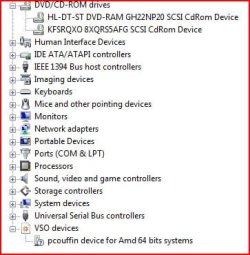
Still no luck. Ive rebooted a few times too and to answer you other question, I do not have another IDE.
Earlier this morning, I even completely re-installed Win 7 7068. This just baffles me.
 

My Computer My Computer

Computer Manufacturer/Model Number
Built
OS
Windows 7 RTM
CPU
Intel I7 920 2.67 ghz
Motherboard
EVGA X58
Memory
6GB CORSAIR DOMINATOR
Graphics Card(s)
GeForce GTX 260 Core 216 896MB 448-bit GDDR3 PCI Express 2.0
Studulike, thanks for the Lower Filters and Upper Filters fix. My DVD burner suddenly stopped working; device manager showed me a driver error, and uninstalling the burner and rebooting just got me a driver install error.

This registry hack fixed it.
 

My Computer My Computer

OS
Dual boot 7x64/xp 32
CPU
Athlon 64X2 4200
Motherboard
M2A-VM
Memory
4GB @667
Graphics Card(s)
GeForce 7900GS 256
Sound Card
Realtek onboard
Monitor(s) Displays
Acer 2216W
Screen Resolution
Native 1680X1050
Hard Drives
0 SATA 160 GB (XP)
1 IDE 120 GB (7)
Aha!

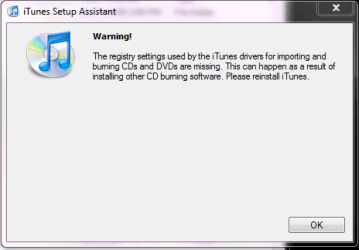
See attached. One can blame a lot on Quicktime/ITunes.
 

Attachments

  • Capture.PNG
    Capture.PNG
    10.2 KB · Views: 13

My Computer My Computer

OS
Dual boot 7x64/xp 32
CPU
Athlon 64X2 4200
Motherboard
M2A-VM
Memory
4GB @667
Graphics Card(s)
GeForce 7900GS 256
Sound Card
Realtek onboard
Monitor(s) Displays
Acer 2216W
Screen Resolution
Native 1680X1050
Hard Drives
0 SATA 160 GB (XP)
1 IDE 120 GB (7)
Turn off the computer, unplug the drive from the eSata plug, turn on the computer, turn it off, plug back in the eSata plug. I have encountered a problem similar to this on windows vista a long time ago. Only a possible solution. Good Luck.
 

My Computer My Computer

Computer Manufacturer/Model Number
Dell
OS
Windows Seven 7600
CPU
Dual Core Duo 2.4ghz
Motherboard
Dell XPS 720 Motherboard
Memory
4gb OCZ Dual Channel Memory
Graphics Card(s)
7950 GX2
Sound Card
Creative Sound Blaster X-Fi
Monitor(s) Displays
21 Inch Dell Monitor
Screen Resolution
1680X1050
Hard Drives
250gb Hard Drive
Case
Dell Xps 720
Internet Speed
7.1 Mbs Verizon DSL
Check under sata configuration in the bios - if you have AHCI or raid enabled W7 will load the intel driver for it, but unless you install the intel matrix storage manager driver software you may not be able to see the dvd drive (as in your case) or it may not function properly.
http://downloadcenter.intel.com/default.aspx
 

My Computer My Computer

OS
XP, Vista, W7 64bit Home Premium
CPU
Intel Core Duo 6850 3.0 ghz @ 3.7 ghz
Motherboard
Asus P5E
Memory
4GB Corsair DDR 2 PC-6400
Graphics Card(s)
Ati 4870 1ghz
Sound Card
Supreme FX 11
Monitor(s) Displays
View Sonic VX1962wm
Screen Resolution
1680 X1050
Hard Drives
3 Seagate Sata Drives 160gb 250gb 500gb
PSU
Thermaltake 600 watt
Case
NZXT Alpha
Cooling
3X120cm Fans
Keyboard
Microsoft Digital Media Pro Keyboard
Mouse
Microsoft Wheel Mouse Optical
Internet Speed
1.5Mb to 8Mb/384k
I've found advice to disable the drivers integrity check: Run: bcdedit /set loadoptions DDISABLE_INTEGRITY_CHECKS.

This worked for me.
 

My Computer My Computer

OS
win 7 x64
Ok i have read this thread hoping it helps me. I have similar problem with my Pioneer DVR-115DBK Burner. I have it a Vantec 5.25 enclosure. I alos have another Vantec Samsung SH-S203N SATA dvd burner. And last I have 2 internal drives, one Pioneer PATA 115 and a SATA Samsung SH-203B. When i had Vista 64 bit, I had them working. Now it seems that I cannot get this Pioneer to work ro show up. I plugged my laptop to it, bingo it works, laptop has windows 7 Ultimate 32 bit. My system is 64 bit. I did the registry change, the integrity check. Dont know what else to do. Any advise please. Thanks
 

My Computer My Computer

Computer Manufacturer/Model Number
Dell XPS 600
OS
Windows 7 Ultimate Build 7600
CPU
3.0
Motherboard
SLI NVidia
Memory
4GB
Graphics Card(s)
NVidia Gforce 9800 GT
Sound Card
Soundblaster XFI
Hard Drives
3 Western Digital 300 10k rpm
Back
Top