WiFi connects but no data is transferred

vpwin7

New member
Member
VIP
Local time
1:03 PM
Messages
122
I'm having an unusual problem where I can connect to WiFi but there does not seem to be any data transferring.

I have a PCI card which does not work, and a USB WiFi adapter which does work.

Only using Microsoft Security Essentials for security software.

Things I've tried to resolve the issue with the PCI card:
- Restarted modem/router combo.
- Uninstalled/reinstalled drivers.
- Uninstalled/reinstalled hardware.
- Restarted computer.
- Cleared stored WiFi networks.
- netsh winsock reset
- ipconfig /release and /renew
- Disable any non Microsoft services using msconfig
- Updated Windows

I have officially run out of ideas. Has anyone seen this before?

Here are the ipconfig results from the two WiFi adapters.

WORKING ADAPTER
Code:
Wireless LAN adapter Wireless Network Connection:

   Connection-specific DNS Suffix  . :
   Link-local IPv6 Address . . . . . : fe80::4970:729a:a256:60a7%13
   IPv4 Address. . . . . . . . . . . : 192.168.0.9
   Subnet Mask . . . . . . . . . . . : 255.255.255.0
   Default Gateway . . . . . . . . . : 192.168.0.1

Tunnel adapter isatap.{139F5762-4CA4-4055-B457-233C889A4300}:

   Media State . . . . . . . . . . . : Media disconnected
   Connection-specific DNS Suffix  . :

Tunnel adapter Teredo Tunneling Pseudo-Interface:

   Connection-specific DNS Suffix  . :
   IPv6 Address. . . . . . . . . . . : 2001:0:5cf2:8c44:24f6:3878:3f57:fff6
   Link-local IPv6 Address . . . . . : fe80::24f6:3878:3f57:fff6%11
   Default Gateway . . . . . . . . . : ::
BROKEN ADAPTER
Code:
Wireless LAN adapter Wireless Network Connection 2:

   Connection-specific DNS Suffix  . :
   Link-local IPv6 Address . . . . . : fe80::e9c0:da26:459e:a4a8%15
   IPv4 Address. . . . . . . . . . . : 192.168.0.3
   Subnet Mask . . . . . . . . . . . : 255.255.255.0
   Default Gateway . . . . . . . . . : 192.168.0.1

Tunnel adapter Teredo Tunneling Pseudo-Interface:

   Connection-specific DNS Suffix  . :
   IPv6 Address. . . . . . . . . . . : 2001:0:5cf2:8c44:480:3f0d:3f57:fffc
   Link-local IPv6 Address . . . . . : fe80::480:3f0d:3f57:fffc%11
   Default Gateway . . . . . . . . . : ::

Tunnel adapter isatap.{064E9E55-7F01-4C3A-A27D-2E64B76FAD21}:

   Media State . . . . . . . . . . . : Media disconnected
   Connection-specific DNS Suffix  . :
 
Last edited:

My Computer My Computer

At a glance

Windows 7 Home Premium x64Intel Core 2 Duo T6500 / 2.1 GHz4.0GB Dual-Channel DDR2 @ 398MHz (6-6-6-18)Onboard - Intel GMA 4500MHD 128MB
Computer Manufacturer/Model Number
Toshiba A505-S6960
OS
Windows 7 Home Premium x64
CPU
Intel Core 2 Duo T6500 / 2.1 GHz
Memory
4.0GB Dual-Channel DDR2 @ 398MHz (6-6-6-18)
Graphics Card(s)
Onboard - Intel GMA 4500MHD 128MB
Sound Card
Onboard
PCI card does not work but USB adapter does? Has to be one of 2 things:

  1. Bad Network Card
  2. Bad or outdated drivers for the card
How can you tell? If the card is brand new and you have properly installed Windows 7 drivers, then the card is most likely bad. You could try putting it into an older computer like XP, installing the XP drivers, and testing. Other than that, bad card. Fortunately, these cards are not expensive at all and can be replaced rather cheaply, especially if you order online from a reputable place like Amazon.

Drivers. If the card is old and you have put it into a Windows 7 PC, you have had to installed drivers for it, unless Windows found a driver for you. Those still might not work. If the card is not very old, you can try visiting the manufacturer website and finding new Windows 7 drivers, 64 bit, or 32 bit if that is your system. Right click Computer, Properties to find out. Install those and see if it works now. If not, just buy a cheap card with new Windows 7 drivers. You can get these things for just a couple of dollars online. Not worth burning up hours and hours of your time for 5 bucks, is it? You don't work for 50¢ an hour, do you? Because these cards are so cheap, they do not produce updated drivers for older cards, just have to buy a new one.

I have done a lot of this stuff and this is the best I can come up with right now, friend. Good luck!
 

My Computer My Computer

At a glance

Windows 10 Pro via free update.Intel Core i7 382016,384 MB DDR3-SDRAMNVIDIA GeForce GTX 770
Computer type
PC/Desktop
Computer Manufacturer/Model Number
Built from Maximum PC magazine article
OS
Windows 10 Pro via free update.
CPU
Intel Core i7 3820
Motherboard
Gigabyte X79-UP4
Memory
16,384 MB DDR3-SDRAM
Graphics Card(s)
NVIDIA GeForce GTX 770
Hard Drives
1) - C:/ 500 Gb Samsung SSD 840
2) - 1 Tb SATA drives
1) - 4 Tb SATA Drive
1) - t Tb USB External BU Drive
Antivirus
Avast Free Antivirus 2014.9.0.2006
Browser
Firefox
~~~
Things I've tried to resolve the issue with the PCI card:
- Restarted modem/router combo.
- Uninstalled/reinstalled d rivers.
- Restarted computer.
- Cleared stored WiFi networks.
- netsh winsock reset
- ipconfig /release and /renew
- Disable any non Microsoft services using msconfig
- Updated Windows
~~~
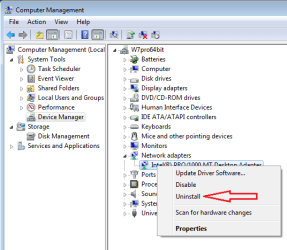
I did not see uninstalling the hardware on your list:

NIC.png

Then restart the computer and let Windows find the hardware again. That should recreate a bunch of stuff in the registry and you will probably end up with another number on the end of the adapter's name (e.g. Local Area Connection 3)
 
Last edited:

My Computer My Computer

At a glance

W7 Pro SP1 64biti78GBIntel HD Graphics
Computer type
Laptop
Computer Manufacturer/Model Number
Employer provided Dell Latitude
OS
W7 Pro SP1 64bit
CPU
i7
Memory
8GB
Graphics Card(s)
Intel HD Graphics
Hard Drives
crappy SSD
Antivirus
Employer mandated Symantec Endpoint Protection
Browser
Pale Moon 64bit, IE11 64bit & Chrome 64bit
After following UsernameIssues's advice, if you can't connect.

Try pinging
- localhost
- your IP address
- default gateway
- google.com
- 8.8.8.8

Does your PCI card support WPA2? If not, if your router wireless can be configured for WPA, try it as a diagnostic step. (Take a screenshot of current values and) experiment with other wireless options.
 

My Computer My Computer

At a glance

Windows 7 Ultimate x64 SP1AMD Phenom 2 1090T2x8GB Kingston HyperX Fury Black 1600Mhz Unga...MSI GTX 970 Gaming 4G
Computer type
PC/Desktop
Computer Manufacturer/Model Number
Custom Build
OS
Windows 7 Ultimate x64 SP1
CPU
AMD Phenom 2 1090T
Motherboard
Gigabyte GA-890FXA-UD5
Memory
2x8GB Kingston HyperX Fury Black 1600Mhz Unganged
Graphics Card(s)
MSI GTX 970 Gaming 4G
Sound Card
Realtek On-Board HD 7.1 Audio / Logitech G35
Monitor(s) Displays
3xAcer GD245HQ
Screen Resolution
1920x1080
Hard Drives
Samsung 850 Pro 512GB SSD - OS /
WD Caviar Black SATA 3 - 1 TBx2 - Dynamic RAID 0 /
WD Caviar Green SATA 2 - 640GBx2 - Dynamic RAID 0 /
WD Caviar Green SATA 2 - 640GB - Internal Backup /
Seagate Barracude SATA 3 - 3TB - External Backup/ Sync
PSU
HighPower 1000W
Case
Cooler Master HAF 932
Cooling
Noctua NH-D14
Keyboard
Logitech G19
Mouse
Logitech G500
Internet Speed
100/4 Mbit Cable (100GB quota)
Antivirus
ZoneAlarm Extreme Security / MBAM Pro / MBAE Free / SAS Free
Browser
IE 11 - Firefox - Chrome
Other Info
Logitech F710/ G27/ G940/ Z5500 // TrackIR 5 // Nvidia 3D Surround Vision
Hello,

I did try removing hardware as well but I forgot to add it to my list. I purchased the item from Amazon and the company I bought it from claims to honor their warranty so I will reach out to them before trying anything else.

The card was working previously, all of a sudden it just decided to stop and it's not that old nor has it been tampered with.

I tried to connect to another network and it just says "cannot connect" without any information. The password is correct.
 

My Computer My Computer

At a glance

Windows 7 Home Premium x64Intel Core 2 Duo T6500 / 2.1 GHz4.0GB Dual-Channel DDR2 @ 398MHz (6-6-6-18)Onboard - Intel GMA 4500MHD 128MB
Computer Manufacturer/Model Number
Toshiba A505-S6960
OS
Windows 7 Home Premium x64
CPU
Intel Core 2 Duo T6500 / 2.1 GHz
Memory
4.0GB Dual-Channel DDR2 @ 398MHz (6-6-6-18)
Graphics Card(s)
Onboard - Intel GMA 4500MHD 128MB
Sound Card
Onboard
Hello,

I did try removing hardware as well but I forgot to add it to my list. I purchased the item from Amazon and the company I bought it from claims to honor their warranty so I will reach out to them before trying anything else.

The card was working previously, all of a sudden it just decided to stop and it's not that old nor has it been tampered with.

I tried to connect to another network and it just says "cannot connect" without any information. The password is correct.

Oh, this is a SMART thing to do! Yes by all means, get help from the company with new drivers or warranty on the network card! Amazon will have copies of your receipt. It really sounds like the card or drivers are bad and you have done all the right things. You are getting very good help. We are running out of things to check. Looks like a bad card. Use your warranty and try new drivers or have them replace the card. Sweet!
 

My Computer My Computer

At a glance

Windows 10 Pro via free update.Intel Core i7 382016,384 MB DDR3-SDRAMNVIDIA GeForce GTX 770
Computer type
PC/Desktop
Computer Manufacturer/Model Number
Built from Maximum PC magazine article
OS
Windows 10 Pro via free update.
CPU
Intel Core i7 3820
Motherboard
Gigabyte X79-UP4
Memory
16,384 MB DDR3-SDRAM
Graphics Card(s)
NVIDIA GeForce GTX 770
Hard Drives
1) - C:/ 500 Gb Samsung SSD 840
2) - 1 Tb SATA drives
1) - 4 Tb SATA Drive
1) - t Tb USB External BU Drive
Antivirus
Avast Free Antivirus 2014.9.0.2006
Browser
Firefox
Back
Top