
Popup from MSE

huffman

New member
Pro User
Local time
6:44 AM
Messages
715
This just started yesterday and is very irritating. I am running Windows 7 Home 64 bit and Microsoft Security Essentials as my antivirus.

I keep getting the following popup about every 10 seconds.
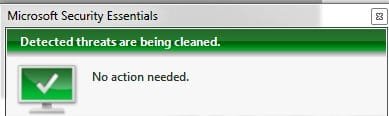
popup1.jpg

Eventually the popup does stop but probably not for at least 30 minutes.

I have run full scans with MSE and it found a few viruses. These were in programs I had had downloaded but NOT installed over 6 months ago and why a virus would show up now beats the heck out of me. At any rate I deleted these files completely since none of them were installed.

After that I am still getting the popup as shown above.

Does anyone have a clue how to stop this. I am not even sure reinstalling Windows would help.
 

My Computer My Computer

OS
Windows 7 Pro
CPU
Intel(R) Pentium(R) Duel CPU E2200 2.20 Ghz
Motherboard
GA-G41M-ES2L
Memory
4 gb 2.96 Usable
Graphics Card(s)
Onboard
Sound Card
Onboard
Hard Drives
2 - 1TB WD Sata Drives
Crap now I get this when I tried to run a full scan with MSE.

popup2.jpg

The popup comes up after about 10 minutes into the full scan. I am not sure what it means since MSE seems to still be scanning.

I can see this is going to be a PITA.
 

My Computer My Computer

OS
Windows 7 Pro
CPU
Intel(R) Pentium(R) Duel CPU E2200 2.20 Ghz
Motherboard
GA-G41M-ES2L
Memory
4 gb 2.96 Usable
Graphics Card(s)
Onboard
Sound Card
Onboard
Hard Drives
2 - 1TB WD Sata Drives
I have run full scans with MSE and it found a few viruses.

After that I am still getting the popup as shown above.

Time for a second opinion. Try MalwareBytes AntiMalware or HitmanPro.
 

My Computer My Computer

Computer type
PC/Desktop
OS
Windows 7 x64
CPU
Intel Core2 Extreme Q6850 3.00GHz
Motherboard
EVGA 132-CK-NF79
Memory
8 GB
Graphics Card(s)
Radeon R7 260X
Sound Card
Xonar DS
Hard Drives
Hitachi Deskstar 1 tb

My Computer My Computer

Computer type
Laptop
Computer Manufacturer/Model Number
Employer provided Dell Latitude
OS
W7 Pro SP1 64bit
CPU
i7
Memory
8GB
Graphics Card(s)
Intel HD Graphics
Hard Drives
crappy SSD
Antivirus
Employer mandated Symantec Endpoint Protection
Browser
Pale Moon 64bit, IE11 64bit & Chrome 64bit
After running MSE full mode several times a few days ago and deleting everything it found, I thought I had it fixed, but this morning both were back.

I then ran Malwarebytes and it found 84 items and I deleted those completely from my PC.

Again I thought it was fix, but after a few reboots they are back again.

I have done some research on this and it seems to have become a problem for a lot of people after the last Windows 7 update. NO ONE seems to know which update caused the problem and I am not sure which updates were the last ones installed. I guess I could find out but I would hope Microsoft would fix this quickly.

If anyone has more suggestion I am willing to try most anything.
 

My Computer My Computer

OS
Windows 7 Pro
CPU
Intel(R) Pentium(R) Duel CPU E2200 2.20 Ghz
Motherboard
GA-G41M-ES2L
Memory
4 gb 2.96 Usable
Graphics Card(s)
Onboard
Sound Card
Onboard
Hard Drives
2 - 1TB WD Sata Drives
After running MSE full mode several times a few days ago and deleting everything it found, I thought I had it fixed, but this morning both were back.

I then ran Malwarebytes and it found 84 items and I deleted those completely from my PC.

Again I thought it was fix, but after a few reboots they are back again.

When you say "they were back again" can you be more specific? What items are MBAM and MSE finding? Can you post screenshots of scan results?
 

My Computer My Computer

Computer type
PC/Desktop
OS
Windows 7 x64
CPU
Intel Core2 Extreme Q6850 3.00GHz
Motherboard
EVGA 132-CK-NF79
Memory
8 GB
Graphics Card(s)
Radeon R7 260X
Sound Card
Xonar DS
Hard Drives
Hitachi Deskstar 1 tb
Probably wouldn't hurt to run TDSSKiller to make sure you don't have a rootkit. That is one of the reasons some malware keeps coming back.

TDSSKiller Download

NOTE: When running TDSSKiller, launch the program, click on the blue text "Change Parameters" & check the box marked "Detect TDLFS File system." Click OK & then run the scan.

Another program you can run in AdwCleaner.

AdwCleaner Download
 

My Computer My Computer

Computer type
PC/Desktop
Computer Manufacturer/Model Number
Dell Hell oh Well
OS
Win 7 32 Home Premium, Win 7 64 Pro, Win 8.1, Win 10
CPU
Intel Core 2 Duo 2.93GHz
Memory
Not much with my ADHD
Graphics Card(s)
ATI Radeon HD 4350
Monitor(s) Displays
24" HDTV/Monitor
Screen Resolution
Blurry after a Scotch or 2
Hard Drives
1 HDD 250 GB, 1 HDD 1 TB, 3 - 1 TB Externals
Case
Don't get on my case...man :D
Cooling
I have an Air Conditioner & Diet Pepsi
Keyboard
Saitek Cyborg
Mouse
10 yr old MS optical mouse that still works
Internet Speed
Never fast enough
Antivirus
Various
Browser
Various
When I run Malwarebytes, it detects "server.exe" which I consider a hazard. I deleted it and then I ran "tdsskiller.exe" and followed your instructions. It also detected server.exe but does NOT consider it as a hazard. At least it does NOT let me deleted it.

What is really weird is I ran tdsskiller.exe after using Malwarebytes to delete server.exe and it still detected it.
 

My Computer My Computer

OS
Windows 7 Pro
CPU
Intel(R) Pentium(R) Duel CPU E2200 2.20 Ghz
Motherboard
GA-G41M-ES2L
Memory
4 gb 2.96 Usable
Graphics Card(s)
Onboard
Sound Card
Onboard
Hard Drives
2 - 1TB WD Sata Drives
When I run Malwarebytes, it detects "server.exe" which I consider a hazard. I deleted it and then I ran "tdsskiller.exe" and followed your instructions. It also detected server.exe but does NOT consider it as a hazard. At least it does NOT let me deleted it.

What is really weird is I ran tdsskiller.exe after using Malwarebytes to delete server.exe and it still detected it.

Try running MBAM and TDSSkiller in SAFE mode.
 

My Computer My Computer

Computer type
PC/Desktop
OS
Windows 7 x64
CPU
Intel Core2 Extreme Q6850 3.00GHz
Motherboard
EVGA 132-CK-NF79
Memory
8 GB
Graphics Card(s)
Radeon R7 260X
Sound Card
Xonar DS
Hard Drives
Hitachi Deskstar 1 tb
Some information on this file. It looks like it could be a trojan. Googling it brings up multiple instances of this possibility.

server.exe Windows process - What is it?

SuperAntiSpyware claims it can remove it, so you may want to give that a try. You can also opt to d/l the portable version, which will run from a USB drive.

SERVER.EXE - Trojan.Agent/Gen-Injector | SUPERAntiSpyware

SUPERAntiSpyware | Remove Malware | Remove Spyware - AntiMalware, AntiSpyware, AntiAdware!

Note for portable version:
Please note : The scanner is saved under a random filename so that malware infections won't block its execution.
 

My Computer My Computer

Computer type
PC/Desktop
Computer Manufacturer/Model Number
Dell Hell oh Well
OS
Win 7 32 Home Premium, Win 7 64 Pro, Win 8.1, Win 10
CPU
Intel Core 2 Duo 2.93GHz
Memory
Not much with my ADHD
Graphics Card(s)
ATI Radeon HD 4350
Monitor(s) Displays
24" HDTV/Monitor
Screen Resolution
Blurry after a Scotch or 2
Hard Drives
1 HDD 250 GB, 1 HDD 1 TB, 3 - 1 TB Externals
Case
Don't get on my case...man :D
Cooling
I have an Air Conditioner & Diet Pepsi
Keyboard
Saitek Cyborg
Mouse
10 yr old MS optical mouse that still works
Internet Speed
Never fast enough
Antivirus
Various
Browser
Various
Back
Top