ALT key locks my computer or sometimes shuts it down!

TechnoManiac98

New member
Local time
4:56 AM
Messages
7
as the tittle says, when i press ALT key (no matter left or right) it just turns my display off, the power button light on the CPU goes off, when i press the power button it takes me to the lock screen.. no startup animation (Motherboard info, Windows startup animation ect). i click my user to unlock it and it has closed all my programs like its just rebooted its right there where i left it actually... please help! i use ALT TAB a lot and this thing is bothering me!

EDIT:-
my rig

i3 3220 Processor (not overclocked)
Gigabyte H61M-S1 Motherboard
8 GB DDR3 Memory
GT 610 2GB DDR3 Graphics card from zotac
450v PSU

EXTRA INFO

i did a fresh install of windows 7 last week and this problem started yesterday, never encountered this problem ever!
 

My Computer My Computer

Computer type
PC/Desktop
Computer Manufacturer/Model Number
custom build
OS
Windows 7 Ultimate x64
CPU
Indel i3 3220 dual core
Motherboard
unknows
Memory
4 gb
Graphics Card(s)
nVidia gt 610 2gb
Hard Drives
500gb
Antivirus
aVast free anti virus
Browser
Google chrome
Have you tried another keyboard?

You can open the On-Screen Keyboard built into Windows.
Start > on-screen....

Click on Alt on that virtual keyboard and see if the computer does its weird thing.
 

My Computer My Computer

Computer type
Laptop
Computer Manufacturer/Model Number
Employer provided Dell Latitude
OS
W7 Pro SP1 64bit
CPU
i7
Memory
8GB
Graphics Card(s)
Intel HD Graphics
Hard Drives
crappy SSD
Antivirus
Employer mandated Symantec Endpoint Protection
Browser
Pale Moon 64bit, IE11 64bit & Chrome 64bit
Have you tried another keyboard?

You can open the On-Screen Keyboard built into Windows.
Start > on-screen....

Click on Alt on that virtual keyboard and see if the computer does its weird thing.


no, i used on-screen keyboard and it didn't. Thanks for quick response!
 
Last edited:

My Computer My Computer

Computer type
PC/Desktop
Computer Manufacturer/Model Number
custom build
OS
Windows 7 Ultimate x64
CPU
Indel i3 3220 dual core
Motherboard
unknows
Memory
4 gb
Graphics Card(s)
nVidia gt 610 2gb
Hard Drives
500gb
Antivirus
aVast free anti virus
Browser
Google chrome
It sounds like you could use a new keyboard. Maybe you can borrow one to use for a while to confirm that a new keyboard will solve the issue.
 

My Computer My Computer

Computer type
Laptop
Computer Manufacturer/Model Number
Employer provided Dell Latitude
OS
W7 Pro SP1 64bit
CPU
i7
Memory
8GB
Graphics Card(s)
Intel HD Graphics
Hard Drives
crappy SSD
Antivirus
Employer mandated Symantec Endpoint Protection
Browser
Pale Moon 64bit, IE11 64bit & Chrome 64bit
It sounds like you could use a new keyboard. Maybe you can borrow one to use for a while to confirm that a new keyboard will solve the issue.

well buying/borrowing a keyboard isn't a valid solution, i just went to safe mode and alt key was working normally.. cant i do something to find out what actually happens when i press alt?
 

My Computer My Computer

Computer type
PC/Desktop
Computer Manufacturer/Model Number
custom build
OS
Windows 7 Ultimate x64
CPU
Indel i3 3220 dual core
Motherboard
unknows
Memory
4 gb
Graphics Card(s)
nVidia gt 610 2gb
Hard Drives
500gb
Antivirus
aVast free anti virus
Browser
Google chrome

My Computer My Computer

Computer type
Laptop
Computer Manufacturer/Model Number
Employer provided Dell Latitude
OS
W7 Pro SP1 64bit
CPU
i7
Memory
8GB
Graphics Card(s)
Intel HD Graphics
Hard Drives
crappy SSD
Antivirus
Employer mandated Symantec Endpoint Protection
Browser
Pale Moon 64bit, IE11 64bit & Chrome 64bit

My Computer My Computer

Computer type
PC/Desktop
Computer Manufacturer/Model Number
custom build
OS
Windows 7 Ultimate x64
CPU
Indel i3 3220 dual core
Motherboard
unknows
Memory
4 gb
Graphics Card(s)
nVidia gt 610 2gb
Hard Drives
500gb
Antivirus
aVast free anti virus
Browser
Google chrome
You are welcome.

I have asked other forum members to join this thread.
 

My Computer My Computer

Computer type
Laptop
Computer Manufacturer/Model Number
Employer provided Dell Latitude
OS
W7 Pro SP1 64bit
CPU
i7
Memory
8GB
Graphics Card(s)
Intel HD Graphics
Hard Drives
crappy SSD
Antivirus
Employer mandated Symantec Endpoint Protection
Browser
Pale Moon 64bit, IE11 64bit & Chrome 64bit
Process Monitor might tell you what app is making the computer go to sleep when you press the Alt key. You might need to set it up to write its info to a log file rather than keep the info in virtual ram. (On the Menu bar, select File > Backing Files...)

start gathering data via Process Monitor
watch the seconds on the computer's clock*
press the Alt key at some time like 15 seconds after some minute
after you wake up the computer
stop Process Monitor from gathering data - if need be
look for events near the exact time that you pressed the Alt key

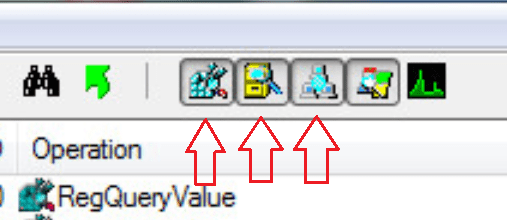
Since you are interested in Process and Thread activity (when stuff starts), you can filter out registry, file and network events via buttons below the Menu bar. Mouse over each button for a tool tip.


* I use an app that shows the seconds. You can open the applet that lets you adjust the system's time.
 

My Computer My Computer

Computer type
Laptop
Computer Manufacturer/Model Number
Employer provided Dell Latitude
OS
W7 Pro SP1 64bit
CPU
i7
Memory
8GB
Graphics Card(s)
Intel HD Graphics
Hard Drives
crappy SSD
Antivirus
Employer mandated Symantec Endpoint Protection
Browser
Pale Moon 64bit, IE11 64bit & Chrome 64bit
Process Monitor might tell you what app is making the computer go to sleep when you press the Alt key. You might need to set it up to write its info to a log file rather than keep the info in virtual ram. (On the Menu bar, select File > Backing Files...)

start gathering data via Process Monitor
watch the seconds on the...

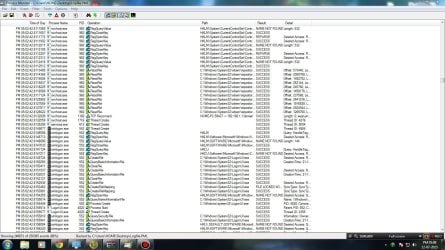
i got no idea what did that but the screenshots shows when that happened

EDIT:- what should i search for to find out what made it go to sleep?
 

Attachments

  • bandicam 2015-07-12 17-08-21-789.jpg
    bandicam 2015-07-12 17-08-21-789.jpg
    257.5 KB · Views: 3

My Computer My Computer

Computer type
PC/Desktop
Computer Manufacturer/Model Number
custom build
OS
Windows 7 Ultimate x64
CPU
Indel i3 3220 dual core
Motherboard
unknows
Memory
4 gb
Graphics Card(s)
nVidia gt 610 2gb
Hard Drives
500gb
Antivirus
aVast free anti virus
Browser
Google chrome
Click on these three icons/buttons to filter out some events:

3.png

Make the column named Operations much narrower.

Make the column named Details much wider.

Or, try to zip and upload the entire log file as an attachment to a post. You will need to tell me the time that you pressed the Alt key.
 

My Computer My Computer

Computer type
Laptop
Computer Manufacturer/Model Number
Employer provided Dell Latitude
OS
W7 Pro SP1 64bit
CPU
i7
Memory
8GB
Graphics Card(s)
Intel HD Graphics
Hard Drives
crappy SSD
Antivirus
Employer mandated Symantec Endpoint Protection
Browser
Pale Moon 64bit, IE11 64bit & Chrome 64bit
Hey,

Please do as UsernameIssues suggests, but try this too:
Download and run KeyCastOW (no installation needed) - https://brookhong.github.io/2014/04/28/keycast-on-windows.html

It will show you what keys are pressed, then try your ALT key and see if something else registers (try in Safe Mode too to see what is the normal behavior).

Even though you said you performed a clean startup (using msconfig), did you disable non-Microsoft services too?

Also try with another user - http://www.sevenforums.com/tutorials/181024-user-account-create.html
 

My Computer My Computer

Computer type
PC/Desktop
Computer Manufacturer/Model Number
Custom Build
OS
Windows 7 Ultimate x64 SP1
CPU
AMD Phenom 2 1090T
Motherboard
Gigabyte GA-890FXA-UD5
Memory
2x8GB Kingston HyperX Fury Black 1600Mhz Unganged
Graphics Card(s)
MSI GTX 970 Gaming 4G
Sound Card
Realtek On-Board HD 7.1 Audio / Logitech G35
Monitor(s) Displays
3xAcer GD245HQ
Screen Resolution
1920x1080
Hard Drives
Samsung 850 Pro 512GB SSD - OS /
WD Caviar Black SATA 3 - 1 TBx2 - Dynamic RAID 0 /
WD Caviar Green SATA 2 - 640GBx2 - Dynamic RAID 0 /
WD Caviar Green SATA 2 - 640GB - Internal Backup /
Seagate Barracude SATA 3 - 3TB - External Backup/ Sync
PSU
HighPower 1000W
Case
Cooler Master HAF 932
Cooling
Noctua NH-D14
Keyboard
Logitech G19
Mouse
Logitech G500
Internet Speed
100/4 Mbit Cable (100GB quota)
Antivirus
ZoneAlarm Extreme Security / MBAM Pro / MBAE Free / SAS Free
Browser
IE 11 - Firefox - Chrome
Other Info
Logitech F710/ G27/ G940/ Z5500 // TrackIR 5 // Nvidia 3D Surround Vision
Back
Top