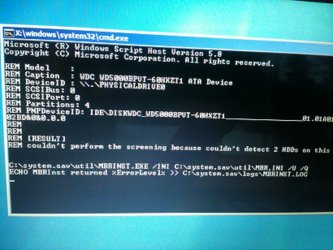
X:\windows\system32\cmd.exe - What is this...???

fishfinder2000

New member
Local time
1:16 PM
Messages
4
Hi,

You'll have to excuse any shortcomings I have with my computer literacy. The other day my laptop slowed to a crawl so my wife hard-booted it. When I restarted it, it brings up a screen that says:

Windows Error Recovery
Windows failed to start. A recent hardware or software change might be the cause.
If Windows files have been damaged or configured incorrectly, Startup Repair can help diagnose and fix the problem. If power was interrupted during startup, choose Start Windows Normally.
(here I have two choices)
Launch Startup Repair
Start Windows Normally

Choosing either selection takes me to the same command prompt screen (see attached pic).

From here I cannot type anything in the command prompt. I've tried pressing F8 at startup and selecting repair computer, but I always end up back at the command prompt after Windows tries to start.

Does anyone have any suggestions?

Thanks,
Jay
 

Attachments
  • error.jpg
    error.jpg
    131 KB · Views: 32

My Computer My Computer

Computer Manufacturer/Model Number
Hewlett Packard
OS
Windows 7 64 bit
Memory
4GB
X:/ is usually the media you are using to recover your OS. That is possibly not a command prompt but a message window. If you have the installation disk or thr recovery disk, boot from that, at the first screen hold down shift and press F10 for a command prompt. If you have not made a recovery disk, you can make one from any computer running the same version of Windows 7 sa you are using. If you are using home premium X64, ant computer running that OS can make a repair disk and be used on yours. Just go to control Panel, back up your computer, and select create system repair disk from the left column. You will need a CD. It appears from that message it cannot find the OS hard drive.
 

My Computers My Computers

System One System Two

  • Computer type
    PC/Desktop
    Computer Manufacturer/Model Number
    ALWAYS UNDER CONSTRUCTION
    OS
    Windows 11 Pro
    CPU
    Ryzen 9 5900X
    Motherboard
    Asus X570 Crosshair Viii Hero
    Memory
    32GB G Skill DDR4-3600
    Graphics Card(s)
    EVGA RTX 3080 FTW 3 Ultra
    Sound Card
    On Board/Sennheiser PC37X Headset
    Monitor(s) Displays
    3 X Asus 27"
    Screen Resolution
    2560x1440
    Hard Drives
    2 X 1 TB NVME drives
    PSU
    EVGA 850
    Case
    Phanteks Eclipse P400A
    Cooling
    EVGA 280 AIO
    Keyboard
    Logitech G510s/ Logitech G13
    Mouse
    Logitech G502
    Internet Speed
    24/1
    Antivirus
    ESET/MBAM Pro/SAS Pro
    Browser
    Chrome/ Firefox/ Edge
  • Computer type
    Laptop
    System Manufacturer/Model Number
    Dell 16 Plus
    OS
    Windows 11 Pro
    CPU
    Intel Ultra 9 288V
    Memory
    32 GB LPDDR5X 8533
    Monitor(s) Displays
    16" Mini-LED HDR600 Touch 90 Hz
    Screen Resolution
    2560X1600
    Hard Drives
    1 TB NVME
Thanks for the replay. OK, I created a repair disk. Things seem pretty buggered up. I can't get F10 to work from startup (it just takes me to the black "Window Error Recovery" screen). The only way I could access the disk is to press Esc at startup and F9 to access "boot device options" and select "Internal CD/DVD Rom Drive". I did this with the disk installed and it seemed as if something was happening, but then it brought up the windows 7 screen (blue with the little bird on it) and just froze there (mouse pointer worked but that's it). I left it for 4 hours, but nothing happened. So I tried booting again from the DVD, but nothing happens. It just takes me to the "Windows Error Recovery" screen again.
 

My Computer My Computer

Computer Manufacturer/Model Number
Hewlett Packard
OS
Windows 7 64 bit
Memory
4GB
See if any of these help, but you have to boot from the CD not the hard drive.
http://www.sevenforums.com/tutorials/2083-system-repair-disc-create.html
http://www.sevenforums.com/tutorials/681-startup-repair.html
http://www.sevenforums.com/tutorials/668-system-recovery-options.html

EDIT: I was wrong about the shift + F10 on the recovery disk, it works on the installation disk. On the recovery disk click through to recovery options and you will have several optoions one of which is a command prompt, but it will work a little different from the disk. You will have different drive options. It can fix many startup problems, but cannot fix hardware problems.
 

My Computers My Computers

System One System Two

  • Computer type
    PC/Desktop
    Computer Manufacturer/Model Number
    ALWAYS UNDER CONSTRUCTION
    OS
    Windows 11 Pro
    CPU
    Ryzen 9 5900X
    Motherboard
    Asus X570 Crosshair Viii Hero
    Memory
    32GB G Skill DDR4-3600
    Graphics Card(s)
    EVGA RTX 3080 FTW 3 Ultra
    Sound Card
    On Board/Sennheiser PC37X Headset
    Monitor(s) Displays
    3 X Asus 27"
    Screen Resolution
    2560x1440
    Hard Drives
    2 X 1 TB NVME drives
    PSU
    EVGA 850
    Case
    Phanteks Eclipse P400A
    Cooling
    EVGA 280 AIO
    Keyboard
    Logitech G510s/ Logitech G13
    Mouse
    Logitech G502
    Internet Speed
    24/1
    Antivirus
    ESET/MBAM Pro/SAS Pro
    Browser
    Chrome/ Firefox/ Edge
  • Computer type
    Laptop
    System Manufacturer/Model Number
    Dell 16 Plus
    OS
    Windows 11 Pro
    CPU
    Intel Ultra 9 288V
    Memory
    32 GB LPDDR5X 8533
    Monitor(s) Displays
    16" Mini-LED HDR600 Touch 90 Hz
    Screen Resolution
    2560X1600
    Hard Drives
    1 TB NVME
Hi Essenbe,

When I use the repair disk I get the black screen that says "Windows is loading files...". Then I get the "System Recovery Options" box where you select your language and keyboard. Once I complete this I just get the windows background screen (see pic attached). It doesn't jump to the logon option where you can enter username/password as described in the link you provided. I can use the pointer, but there's nothing else there on screen. I've tried this twice now, the first time I left it for 4 hours, but nothing else happened.

I've also tried accessing the "Advanced Boot Options" and selecting "Repair Computer". Here I just end up at the message window that I attached in my first post.
 

Attachments

  • windows7background.jpg
    windows7background.jpg
    15.9 KB · Views: 4

My Computer My Computer

Computer Manufacturer/Model Number
Hewlett Packard
OS
Windows 7 64 bit
Memory
4GB
Are you sure it is the same version of Windows you have now? are you runninh X64 and made the disk from an X68 computer? What you described is what you should get. The next screeen should be checking for windows installations and the n have options to get to the recovery options window.
If you are using the repair disk, option 2 in this tutoriak is what you should see. If you are using the recovery options built into you HP computer option 1 is what you should see.
http://www.sevenforums.com/tutorials/668-system-recovery-options.html
 

My Computers My Computers

System One System Two

  • Computer type
    PC/Desktop
    Computer Manufacturer/Model Number
    ALWAYS UNDER CONSTRUCTION
    OS
    Windows 11 Pro
    CPU
    Ryzen 9 5900X
    Motherboard
    Asus X570 Crosshair Viii Hero
    Memory
    32GB G Skill DDR4-3600
    Graphics Card(s)
    EVGA RTX 3080 FTW 3 Ultra
    Sound Card
    On Board/Sennheiser PC37X Headset
    Monitor(s) Displays
    3 X Asus 27"
    Screen Resolution
    2560x1440
    Hard Drives
    2 X 1 TB NVME drives
    PSU
    EVGA 850
    Case
    Phanteks Eclipse P400A
    Cooling
    EVGA 280 AIO
    Keyboard
    Logitech G510s/ Logitech G13
    Mouse
    Logitech G502
    Internet Speed
    24/1
    Antivirus
    ESET/MBAM Pro/SAS Pro
    Browser
    Chrome/ Firefox/ Edge
  • Computer type
    Laptop
    System Manufacturer/Model Number
    Dell 16 Plus
    OS
    Windows 11 Pro
    CPU
    Intel Ultra 9 288V
    Memory
    32 GB LPDDR5X 8533
    Monitor(s) Displays
    16" Mini-LED HDR600 Touch 90 Hz
    Screen Resolution
    2560X1600
    Hard Drives
    1 TB NVME
I created the disk from my desktop which is 64-bit as well.

I can get to that first box (from the link you just posted) where you need to select language and keyboard. But when I click "Next", the box disappears and I'm left with just the background screen and nothing seems to progress any further. As I had mentioned previously I allowed it to sit for 4 hours, but still nothing. Any Ideas?
 

My Computer My Computer

Computer Manufacturer/Model Number
Hewlett Packard
OS
Windows 7 64 bit
Memory
4GB
The only ideas I have are that it was a bad burn or some issue with your DVD drive. I've never had one that won't boot. The same thing can be done with the installation disk. Try that if you have one. I believe it is the third screen that has 'repair my computer' in the bottom left corner. If you don't have the installation ISO file, you can download one here. This tutorial will tll you how to use the Windows 7 USB/DVD tool to create an installation disk to a DVD or a USB flash drive. http://www.sevenforums.com/tutorials/31541-windows-7-usb-dvd-download-tool.html
Having the windows 7 iso file can also be useful later on too. The iso file is an image of the windows installation DVD and is a large download (about 3.5Gb I think) You may try that route. If you have a installation DVD use that to run the startup repair.

On your first post it appears that the recovery could not find a hard drive it was looking for. Do you have 2 hard drives. Can it be possible that your hard drive went out? If that is indeed the case, the disks won't be able to help. If it is just a startup problem they could very well help.
 

My Computers My Computers

System One System Two

  • Computer type
    PC/Desktop
    Computer Manufacturer/Model Number
    ALWAYS UNDER CONSTRUCTION
    OS
    Windows 11 Pro
    CPU
    Ryzen 9 5900X
    Motherboard
    Asus X570 Crosshair Viii Hero
    Memory
    32GB G Skill DDR4-3600
    Graphics Card(s)
    EVGA RTX 3080 FTW 3 Ultra
    Sound Card
    On Board/Sennheiser PC37X Headset
    Monitor(s) Displays
    3 X Asus 27"
    Screen Resolution
    2560x1440
    Hard Drives
    2 X 1 TB NVME drives
    PSU
    EVGA 850
    Case
    Phanteks Eclipse P400A
    Cooling
    EVGA 280 AIO
    Keyboard
    Logitech G510s/ Logitech G13
    Mouse
    Logitech G502
    Internet Speed
    24/1
    Antivirus
    ESET/MBAM Pro/SAS Pro
    Browser
    Chrome/ Firefox/ Edge
  • Computer type
    Laptop
    System Manufacturer/Model Number
    Dell 16 Plus
    OS
    Windows 11 Pro
    CPU
    Intel Ultra 9 288V
    Memory
    32 GB LPDDR5X 8533
    Monitor(s) Displays
    16" Mini-LED HDR600 Touch 90 Hz
    Screen Resolution
    2560X1600
    Hard Drives
    1 TB NVME
Occasionally when this error happens when you restart you CPU windows won't detect keyboard inputs not recognizing your key stroke attempting to boot from disk ,so when you restart the CPU with the install disk loaded press delete when loading to go into your bios set up , unplug keyboard and plug it back in then save and leave bios setup then when it restarts it will allow you to reboot from the disk as it will accept the keyboard input
 

My Computer My Computer

Computer type
PC/Desktop
OS
Windows 7 home premium 64bit
Magog, you are replying to a 2 and a half year old thread. It's called Necroposting :)
 

My Computer My Computer

Computer type
PC/Desktop
Computer Manufacturer/Model Number
Lenovo IdeaCenter 450
OS
Windows 10 Pro X64
CPU
Intel Quad Core i7-4770 @ 3.4Ghz
Memory
16.0GB PC3-12800 DDR3 SDRAM 1600 MHz
Graphics Card(s)
Intel Integrated HD Graphics
Sound Card
Realtek HD Audio
Monitor(s) Displays
HP 22" LCD
Screen Resolution
1680 x 1050
Hard Drives
250GB Samsung EVO SATA-3 SSD
2TB Seagate ST2000DM001 SATA-2
1.5TB Seagate ST3150041AS SATA
Keyboard
Dell USB
Mouse
Lenovo USB
Internet Speed
Cable via Road Runner 3MB Upload, 30MB Download
Antivirus
Windows Defender, MBAM Pro, MBAE
Browser
Seamonkey
Other Info
UEFI/GPT
PLDS DVD-RW DH16AERSH
Magog, you are replying to a 2 and a half year old thread. It's called Necroposting :)
The answer(s) still served a purpose even if it "seems" resolved from 2.5yrs ago..i have the same problem that of the above...unfortunately I dont have dvdbruner/cdplayer on my ultrabook..but i have a backup external harddisk... What shoul I do next after the dead end blue wallpaper without the login sign...and all the same thing told by fisherfinder2000
 

My Computer My Computer

Computer type
Laptop
Computer Manufacturer/Model Number
Samsung np530u3b
OS
Windows 7 home premium 32 bit before i tried w10 (64bit) and back to windows7
Hard Drives
Hitachi HTS545050A7E380
Browser
Mozilla/googlechrome
Occasionally when this error happens when you restart you CPU windows won't detect keyboard inputs not recognizing your key stroke attempting to boot from disk ,so when you restart the CPU with the install disk loaded press delete when loading to go into your bios set up , unplug keyboard and plug it back in then save and leave bios setup then when it restarts it will allow you to reboot from the disk as it will accept the keyboard input

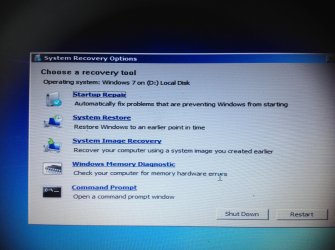
How would i do this in a laptop without disk drive? I got the same scenario as Fishersfinder2000 After sitting on more than an hour standby from a message box that is on repair fix..it shows eventually the details and end up "bad hard disk" ...i click the other recovery option button and ended up at this message:
(See photo) which recovery tool shoul i clck?
 

Attachments

  • image.jpg
    image.jpg
    759.7 KB · Views: 0

My Computer My Computer

Computer type
Laptop
Computer Manufacturer/Model Number
Samsung np530u3b
OS
Windows 7 home premium 32 bit before i tried w10 (64bit) and back to windows7
Hard Drives
Hitachi HTS545050A7E380
Browser
Mozilla/googlechrome
I have no restorations points when i tried the button...so i tried memory diagnotics...with this "developmental" new pop message as compared a month a go...can this meant reformat is an option rather than completely replacing the hard disk?
 

My Computer My Computer

Computer type
Laptop
Computer Manufacturer/Model Number
Samsung np530u3b
OS
Windows 7 home premium 32 bit before i tried w10 (64bit) and back to windows7
Hard Drives
Hitachi HTS545050A7E380
Browser
Mozilla/googlechrome
Back
Top