How to remove Windows 10 upgrade updates in Windows 7 and 8

No problem that's what we're here for :)
But if other users are on the same machine or you let others use your user account you'd run into issues like this :(
There should only be 1 administrator account on a single machine
Change their to a standard account
Uncheck the box in your account to let All users update windows on the previous tutorial instructions :)

The girl friend has the admin password, she likes to install things. She's fairly computer knowledgeable. This is the only desktop & so we share it.

Honestly I think my frustration has more to do with the steering column in pieces on the garage floor. I just flipped a wig. If could go back an hour would take a breath & chill with the pooch for while.

I've had MS install updates and change my update settings every once in a great while, maybe twice every three years. I'm the only user on my machines.

Hmm...very interesting.

thanks again
 
Last edited:

My Computer My Computer

At a glance

Windows 7 Ultimate x64Intel Core i7-950Elpida DDR3 12 Gb 1066EVGA nVidia GeForce GTX 760 2GB GDDR5
Computer type
PC/Desktop
Computer Manufacturer/Model Number
Dell XPS 435MT
OS
Windows 7 Ultimate x64
CPU
Intel Core i7-950
Motherboard
Dell 0R849J
Memory
Elpida DDR3 12 Gb 1066
Graphics Card(s)
EVGA nVidia GeForce GTX 760 2GB GDDR5
Sound Card
Syba PCI-e VIA VT1723 Envy24DT
Monitor(s) Displays
Dell 3007WFP-HC, Nixeus Vue 30
Screen Resolution
1920 x 1200
Hard Drives
Crucial M500 240GB
1TB Seagate Barracuda
PSU
Corsair CX500M
Keyboard
Logitech MX 5500 combo
Mouse
Logitech MX 5500
Internet Speed
300Mbps
Antivirus
MSE
Browser
IE11 & Chrome
Other Info
MBAM Premium
It's best in relationship to only share certain items
A computer is not one of them :p
 

My Computer My Computer

At a glance

Win-7-Pro64bit 7-H-Prem-64biti7-5930K 2nd i9-9940x both water blocked VRM'...Trident-z 3200C14 2nd Trident-z 3600C16EVGA 1080ti ftw3 2nd Titan Xp both water blocked
Computer type
PC/Desktop
Computer Manufacturer/Model Number
Custom assembled by me :}
OS
Win-7-Pro64bit 7-H-Prem-64bit
CPU
i7-5930K 2nd i9-9940x both water blocked VRM's too
Motherboard
ASUS SABERTOOTH X99 2nd ASUS x299 Apex
Memory
Trident-z 3200C14 2nd Trident-z 3600C16
Graphics Card(s)
EVGA 1080ti ftw3 2nd Titan Xp both water blocked
Sound Card
Built-in Realtek
Monitor(s) Displays
1-AOC G2460PG 24"G-Sync 144Hz/ 2nd 1-ASUS VG248QE 24" 144Hz
Screen Resolution
1920 x 1080 144Hz
Hard Drives
2-Samsung M.2 Evo & Evo Plus
2-Samsung 850 EVO 500GB SSD's/ 3-2.5 W.D. Black 1tb-&3-1tb/3-3.5 WD Black 1tb hdd's
PSU
EVGA SuperNOVA 1000-P2 2nd 1200-P2
Case
2-Corsair Obsidian Series 450D Black ATX Mid Tower
Cooling
Custom water loops
Keyboard
Logitech G710+/ 2nd Logitech G910
Mouse
2-RedDragon M901 Perdition 16400 dpi Gaming mouse = wired
Internet Speed
Comcast Ping 19ms 89.31mbps download speed 6.12mbps upload
Antivirus
Malwarebytes Pro/ Superantispyware Pro
Browser
FireFox & Pale moon
Other Info
2nd ASUS X299 Apex/Intel i9-9940x with Custom water loop/7H-Prem-x64/Corsair 450D case/Ram Trident-z 3600C16 4x8gb / Samsung970Evo plus 500gb SSD/Dual ssd EZ swap evo/PSU EVGA SuperNova 1200w-P2 80+Platinum/GPU Titan Xp /8-ML-140 on push-pull on 2-280GTX rads
Stealth Updates

Hi,
Is there a big deal with leaving it unhidden ?
If you don't want it don't download and install it ;)
http://www.sevenforums.com/tutorials/2797-windows-update-settings-change.html
The trouble is it's part of a pattern that MS started with the W8 series.
They are trying to trick users into upgrading to W10.

MS are counting on most users not having backup images to be able to restore W7 and thus they will be "forced" to accept W10.

It's just the same as the Local Account option being hidden during the W10 installation process, so that people think they have no choice but to use an Online Account.

OK - someone changed the settings to Install Updates Automatically, NOT ME.
There are "stealth" updates and "Windows Update" updates that change your update preferences. :mad:

I received a "stealth" update for Windows Update last year.
I hadn't downloaded any updates (my preference was set to "Notify").

I started my PC and noticed a message about Registry changes.
I only see that message when Windows Update has changed.

Sure enough when I checked my update preferences they had changed to "Automatic".
 
Last edited:

My Computer My Computer

At a glance

W7 Ultimate SP1, LM19.2 MATE, W10 Home 1703, ...AMD Phenom II x6 1100T, 3.3 GHz12GB DDR3 1333 G-Skill (4GB x 2), G-Skill (2G...NVIDIA GeForce GTX 660
Computer type
PC/Desktop
Computer Manufacturer/Model Number
n/a
OS
W7 Ultimate SP1, LM19.2 MATE, W10 Home 1703, W10 Pro 1703 VM, #All 64 bit
CPU
AMD Phenom II x6 1100T, 3.3 GHz
Motherboard
ASUS M4A88T-M/USB3 (AM3)
Memory
12GB DDR3 1333 G-Skill (4GB x 2), G-Skill (2GB x 2)
Graphics Card(s)
NVIDIA GeForce GTX 660
Sound Card
Realtek?
Monitor(s) Displays
Samsung S23B350
Screen Resolution
1920x1080
Hard Drives
WD Green 2TB (SATA), WD Green 3TB (SATA), WD Blue 4TB (SATA), WD Blue 6TB (SATA)
PSU
Cooler Master
Case
Antec GX300 Tower
Cooling
3x Antec TRICOOL 120mm Fans
Mouse
Wired Optical
Internet Speed
DSL
Antivirus
Avast
Browser
Pale Moon (64 bit)
Other Info
2018-12-27 Upgraded HDDs
2015-12-10 Upgraded case, graphics card, storage
2015-08-15 Upgraded motherboard & RAM
2015-07-15 Upgraded LM17.1 to LM17.2
lehnerus2000

That usually happens when windows update updates itself and it is the only update that will be auto installed on windows 7 even if you have different option selected or even turned off. Source my experience.
 

My Computer My Computer

At a glance

W10 32 bit, XUbuntu 18.xx 64 bitIntel(R) Celeron(R) CPU G1620T @ 2.40GHz, 240...4GBIntel HD graphics
Computer type
PC/Desktop
Computer Manufacturer/Model Number
Dell All in one Inspiron 2020
OS
W10 32 bit, XUbuntu 18.xx 64 bit
CPU
Intel(R) Celeron(R) CPU G1620T @ 2.40GHz, 2400 Mhz
Motherboard
Dell
Memory
4GB
Graphics Card(s)
Intel HD graphics
Sound Card
High Definition Audio Device
Monitor(s) Displays
20 inch Screen
Screen Resolution
W7=1280 x 720 & Linux Mint Xfce=1360 x 768
Hard Drives
500 GB hard drive
Keyboard
Usb
Mouse
Usb
Internet Speed
High-Speed
Antivirus
MSE
Browser
Main Browser Firefox
Other Info
I have done a clean install of Windows 7 using Dell re-installation disk (Dell sent me one). I also use Free Macrium reflect backup and restore.
I've never seen my setting be changed it's always been the same throughout my 7 tour
Always been manual every since windows live essentials 2011 busted out and well that didn't go well :p
I've been reviewing updates every since.
 

My Computer My Computer

At a glance

Win-7-Pro64bit 7-H-Prem-64biti7-5930K 2nd i9-9940x both water blocked VRM'...Trident-z 3200C14 2nd Trident-z 3600C16EVGA 1080ti ftw3 2nd Titan Xp both water blocked
Computer type
PC/Desktop
Computer Manufacturer/Model Number
Custom assembled by me :}
OS
Win-7-Pro64bit 7-H-Prem-64bit
CPU
i7-5930K 2nd i9-9940x both water blocked VRM's too
Motherboard
ASUS SABERTOOTH X99 2nd ASUS x299 Apex
Memory
Trident-z 3200C14 2nd Trident-z 3600C16
Graphics Card(s)
EVGA 1080ti ftw3 2nd Titan Xp both water blocked
Sound Card
Built-in Realtek
Monitor(s) Displays
1-AOC G2460PG 24"G-Sync 144Hz/ 2nd 1-ASUS VG248QE 24" 144Hz
Screen Resolution
1920 x 1080 144Hz
Hard Drives
2-Samsung M.2 Evo & Evo Plus
2-Samsung 850 EVO 500GB SSD's/ 3-2.5 W.D. Black 1tb-&3-1tb/3-3.5 WD Black 1tb hdd's
PSU
EVGA SuperNOVA 1000-P2 2nd 1200-P2
Case
2-Corsair Obsidian Series 450D Black ATX Mid Tower
Cooling
Custom water loops
Keyboard
Logitech G710+/ 2nd Logitech G910
Mouse
2-RedDragon M901 Perdition 16400 dpi Gaming mouse = wired
Internet Speed
Comcast Ping 19ms 89.31mbps download speed 6.12mbps upload
Antivirus
Malwarebytes Pro/ Superantispyware Pro
Browser
FireFox & Pale moon
Other Info
2nd ASUS X299 Apex/Intel i9-9940x with Custom water loop/7H-Prem-x64/Corsair 450D case/Ram Trident-z 3600C16 4x8gb / Samsung970Evo plus 500gb SSD/Dual ssd EZ swap evo/PSU EVGA SuperNova 1200w-P2 80+Platinum/GPU Titan Xp /8-ML-140 on push-pull on 2-280GTX rads
We need to wait and see. All I've seen is caution from the Windows Ten Team and learning from the 8 debacle.

They have been clearly warned by MVPs that they could self-impose a debacle if they push hundreds of millions off Win7 before they're ready. By contrast they didn't even talk to MVPs for Windows 8. I believe they've learned those lessons.

That said I see nothing different here and don't expect to have the 7 Support workload or our reputation as all-time top tech forums decline for the foreseeable future. I'm using a mix of both OSes on my devices. No friends or family are asking for 10 yet. There is as much clamor seen to avoid it. That is because of Windows 7!
 
I wasn't all that enthusiastic after reading the revised terms of usage and privacy
Matter of fact that was the final straw.
I was really going to buy it at 140.us
Now not.
They seem to have taken Onedrive terms and applied them to the entire os.
 

My Computer My Computer

At a glance

Win-7-Pro64bit 7-H-Prem-64biti7-5930K 2nd i9-9940x both water blocked VRM'...Trident-z 3200C14 2nd Trident-z 3600C16EVGA 1080ti ftw3 2nd Titan Xp both water blocked
Computer type
PC/Desktop
Computer Manufacturer/Model Number
Custom assembled by me :}
OS
Win-7-Pro64bit 7-H-Prem-64bit
CPU
i7-5930K 2nd i9-9940x both water blocked VRM's too
Motherboard
ASUS SABERTOOTH X99 2nd ASUS x299 Apex
Memory
Trident-z 3200C14 2nd Trident-z 3600C16
Graphics Card(s)
EVGA 1080ti ftw3 2nd Titan Xp both water blocked
Sound Card
Built-in Realtek
Monitor(s) Displays
1-AOC G2460PG 24"G-Sync 144Hz/ 2nd 1-ASUS VG248QE 24" 144Hz
Screen Resolution
1920 x 1080 144Hz
Hard Drives
2-Samsung M.2 Evo & Evo Plus
2-Samsung 850 EVO 500GB SSD's/ 3-2.5 W.D. Black 1tb-&3-1tb/3-3.5 WD Black 1tb hdd's
PSU
EVGA SuperNOVA 1000-P2 2nd 1200-P2
Case
2-Corsair Obsidian Series 450D Black ATX Mid Tower
Cooling
Custom water loops
Keyboard
Logitech G710+/ 2nd Logitech G910
Mouse
2-RedDragon M901 Perdition 16400 dpi Gaming mouse = wired
Internet Speed
Comcast Ping 19ms 89.31mbps download speed 6.12mbps upload
Antivirus
Malwarebytes Pro/ Superantispyware Pro
Browser
FireFox & Pale moon
Other Info
2nd ASUS X299 Apex/Intel i9-9940x with Custom water loop/7H-Prem-x64/Corsair 450D case/Ram Trident-z 3600C16 4x8gb / Samsung970Evo plus 500gb SSD/Dual ssd EZ swap evo/PSU EVGA SuperNova 1200w-P2 80+Platinum/GPU Titan Xp /8-ML-140 on push-pull on 2-280GTX rads
Every time I restart my computer I have to check my update settings because every so often it switches from "do not check for updates" to "download and install updates automatically."
 

My Computer My Computer

At a glance

Windows Home Premium, 64 4.096 biti3-2100Dimm0, Samsung 64 bit, 4.096 Mb; Dimm1, Hyund...Intel HD Graphics Family
Computer Manufacturer/Model Number
Dell Inspiron 620s
OS
Windows Home Premium, 64 4.096 bit
CPU
i3-2100
Motherboard
Dell 0DGGBY
Memory
Dimm0, Samsung 64 bit, 4.096 Mb; Dimm1, Hyundai 64 bit, 2.04
Graphics Card(s)
Intel HD Graphics Family
Sound Card
?
Monitor(s) Displays
Dell E197FP
Hard Drives
?
PSU
?
Case
?
Cooling
?
There is really no reason to avoid the automatic update setting. In fact I consider it a best practice to have it set there because without a service pack 2 Windows 7 relies on many patches queued under important and optional updates in order for hardware software and the OS to run correctly.
 
There is really no reason to avoid the automatic update setting. In fact I consider it a best practice to have it set there because without a service pack 2 Windows 7 relies on many patches queued under important and optional updates in order for hardware software and the OS to run correctly.

Apparently, you were not one of the many who have had their computers bricked or otherwise adversely affected by a bad update, something that has been documented here (and I'm not referring to the Win 10 related updates). MS has issued several of the this year. Percentagewise, the number of people burned by faulty updates is extremely small, probably less than 1%, but that still amounts to an extremely large number of people. While I haven't been burned by an update, enough have been to justify my waiting until Saturday to download and install updates. Usually, by then, MS has pulled any bad updates and often have issued a corrected one. If the bad update is still being offered, I will, at least, know by then to not download and install it.
 

My Computer My Computer

At a glance

Win 7 Ultimate 64 bitIntel i7-3930KKingston HyperX Genesis 32GB Kit (8x4GB Modul...MSI R7850 Twin Frozr 2GD5/OC Radeon HD 7850 2...
Computer type
PC/Desktop
Computer Manufacturer/Model Number
Custom Build
OS
Win 7 Ultimate 64 bit
CPU
Intel i7-3930K
Motherboard
ASUS P9X79 WS
Memory
Kingston HyperX Genesis 32GB Kit (8x4GB Modules) 1600MHz DDR
Graphics Card(s)
MSI R7850 Twin Frozr 2GD5/OC Radeon HD 7850 2GB 256-bit GDDR
Sound Card
Asus Xonar Essence STX
Monitor(s) Displays
3x Asus VG248QE 24", Vizio 32" TV
Screen Resolution
1920 x 1080, ?
Hard Drives
Samsung 128GB 840 Pro SSD (1),
Samsung 4TB 850 EVO SSDs (4)
Samsung 4TB 850 EVO SSDs (16) external backup drives used in 2.5" hot swap bays in the computer.
PSU
Corsair HX750w
Case
Antec Two Hundred v2 (modified)
Cooling
Cooler Master GeminII S524 120mm (fan replaced with a 140mm)
Keyboard
Logitech G510s
Mouse
Logitech M525 (two in use)
Internet Speed
=< 32Mbps down, 8Mbps up
Antivirus
AVAST!, MBAM, SAS, Spybot S&D (all but MBAM free) Glary Util
Browser
IE11
Other Info
LSI 9211-8i HBA card (8 SATA III ports), 2.5" & 3.5" Hot Swap Bays, HooToo HT-CR001 PCI-E to USB 3.0 Internal Hub + 6 Slot Card Reader, and LG Model CH12LS28 BD-ROM Optical Drive. Also, ScanSnap S1500 ADF duplexing scanner, Canon 9000F flat bed scanner, Corsair SP2500 2.1 speakers, Samsung CLP 415nw laser color printer, Cyberpower PP2200SW UPS
I check my updates at least once a week.
As for leaving automatic updating on: it's not that I'm worried about a bad update, that's easy to fix. My problem with it is that for some reason Windows seems to decide to update just when some another program is updating and my whole system goes nuts. This was a weekly occurrence when I was also running Norton (We now control all your computer functions whether you like it or not) AV. It happens occasionally now with Adobe when I have failed to check my download settings after a restart.
And as a final point: Nothing, and I mean nothing gets installed on this computer without my approval and anything that does sneak past (mainly search engines and ASK who change my home page) get rooted out from every corner, including the registry which I check regularly to ensure that none of them have slithered back in.
 

My Computer My Computer

At a glance

Windows Home Premium, 64 4.096 biti3-2100Dimm0, Samsung 64 bit, 4.096 Mb; Dimm1, Hyund...Intel HD Graphics Family
Computer Manufacturer/Model Number
Dell Inspiron 620s
OS
Windows Home Premium, 64 4.096 bit
CPU
i3-2100
Motherboard
Dell 0DGGBY
Memory
Dimm0, Samsung 64 bit, 4.096 Mb; Dimm1, Hyundai 64 bit, 2.04
Graphics Card(s)
Intel HD Graphics Family
Sound Card
?
Monitor(s) Displays
Dell E197FP
Hard Drives
?
PSU
?
Case
?
Cooling
?
lehnerus2000

That usually happens when windows update updates itself and it is the only update that will be auto installed on windows 7 even if you have different option selected or even turned off. Source my experience.
Indeed. :)
 

My Computer My Computer

At a glance

W7 Ultimate SP1, LM19.2 MATE, W10 Home 1703, ...AMD Phenom II x6 1100T, 3.3 GHz12GB DDR3 1333 G-Skill (4GB x 2), G-Skill (2G...NVIDIA GeForce GTX 660
Computer type
PC/Desktop
Computer Manufacturer/Model Number
n/a
OS
W7 Ultimate SP1, LM19.2 MATE, W10 Home 1703, W10 Pro 1703 VM, #All 64 bit
CPU
AMD Phenom II x6 1100T, 3.3 GHz
Motherboard
ASUS M4A88T-M/USB3 (AM3)
Memory
12GB DDR3 1333 G-Skill (4GB x 2), G-Skill (2GB x 2)
Graphics Card(s)
NVIDIA GeForce GTX 660
Sound Card
Realtek?
Monitor(s) Displays
Samsung S23B350
Screen Resolution
1920x1080
Hard Drives
WD Green 2TB (SATA), WD Green 3TB (SATA), WD Blue 4TB (SATA), WD Blue 6TB (SATA)
PSU
Cooler Master
Case
Antec GX300 Tower
Cooling
3x Antec TRICOOL 120mm Fans
Mouse
Wired Optical
Internet Speed
DSL
Antivirus
Avast
Browser
Pale Moon (64 bit)
Other Info
2018-12-27 Upgraded HDDs
2015-12-10 Upgraded case, graphics card, storage
2015-08-15 Upgraded motherboard & RAM
2015-07-15 Upgraded LM17.1 to LM17.2
While I haven't been burned by an update, enough have been to justify my waiting until Saturday to download and install updates. Usually, by then, MS has pulled any bad updates and often have issued a corrected one. If the bad update is still being offered, I will, at least, know by then to not download and install it.

Sound advice - think I'll adopt that practive :)
 
Last edited:

My Computer My Computer

At a glance

Windows 7 Ultimate x64Intel Core i7-950Elpida DDR3 12 Gb 1066EVGA nVidia GeForce GTX 760 2GB GDDR5
Computer type
PC/Desktop
Computer Manufacturer/Model Number
Dell XPS 435MT
OS
Windows 7 Ultimate x64
CPU
Intel Core i7-950
Motherboard
Dell 0R849J
Memory
Elpida DDR3 12 Gb 1066
Graphics Card(s)
EVGA nVidia GeForce GTX 760 2GB GDDR5
Sound Card
Syba PCI-e VIA VT1723 Envy24DT
Monitor(s) Displays
Dell 3007WFP-HC, Nixeus Vue 30
Screen Resolution
1920 x 1200
Hard Drives
Crucial M500 240GB
1TB Seagate Barracuda
PSU
Corsair CX500M
Keyboard
Logitech MX 5500 combo
Mouse
Logitech MX 5500
Internet Speed
300Mbps
Antivirus
MSE
Browser
IE11 & Chrome
Other Info
MBAM Premium
Yep recommended and most of all Optional updates usually cause more issues than they are suppose to fix,
And with the proper update setting Recommended updates are really Optional.

Then you get to the Important update issues.
I see no need for any remote desktop stuff or font/ time zone updates for languages and regions that do not apply to the U.S.A.
And I sure don't need any future os updates

All I need are security patches for the os and office and that is it.
 

My Computer My Computer

At a glance

Win-7-Pro64bit 7-H-Prem-64biti7-5930K 2nd i9-9940x both water blocked VRM'...Trident-z 3200C14 2nd Trident-z 3600C16EVGA 1080ti ftw3 2nd Titan Xp both water blocked
Computer type
PC/Desktop
Computer Manufacturer/Model Number
Custom assembled by me :}
OS
Win-7-Pro64bit 7-H-Prem-64bit
CPU
i7-5930K 2nd i9-9940x both water blocked VRM's too
Motherboard
ASUS SABERTOOTH X99 2nd ASUS x299 Apex
Memory
Trident-z 3200C14 2nd Trident-z 3600C16
Graphics Card(s)
EVGA 1080ti ftw3 2nd Titan Xp both water blocked
Sound Card
Built-in Realtek
Monitor(s) Displays
1-AOC G2460PG 24"G-Sync 144Hz/ 2nd 1-ASUS VG248QE 24" 144Hz
Screen Resolution
1920 x 1080 144Hz
Hard Drives
2-Samsung M.2 Evo & Evo Plus
2-Samsung 850 EVO 500GB SSD's/ 3-2.5 W.D. Black 1tb-&3-1tb/3-3.5 WD Black 1tb hdd's
PSU
EVGA SuperNOVA 1000-P2 2nd 1200-P2
Case
2-Corsair Obsidian Series 450D Black ATX Mid Tower
Cooling
Custom water loops
Keyboard
Logitech G710+/ 2nd Logitech G910
Mouse
2-RedDragon M901 Perdition 16400 dpi Gaming mouse = wired
Internet Speed
Comcast Ping 19ms 89.31mbps download speed 6.12mbps upload
Antivirus
Malwarebytes Pro/ Superantispyware Pro
Browser
FireFox & Pale moon
Other Info
2nd ASUS X299 Apex/Intel i9-9940x with Custom water loop/7H-Prem-x64/Corsair 450D case/Ram Trident-z 3600C16 4x8gb / Samsung970Evo plus 500gb SSD/Dual ssd EZ swap evo/PSU EVGA SuperNova 1200w-P2 80+Platinum/GPU Titan Xp /8-ML-140 on push-pull on 2-280GTX rads
I think MS are messing with my head :shock:

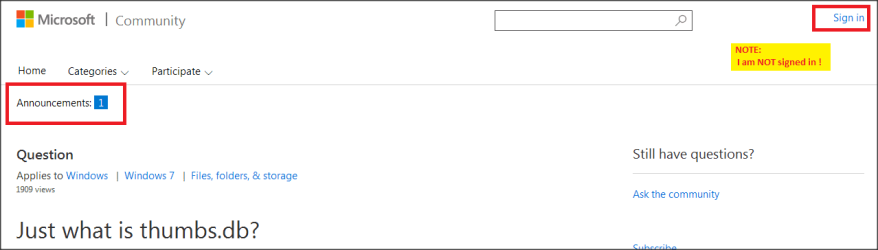
While investigating "thumbs.db" files I came across Just what is thumbs.db? a MS web page.
- in the top left corner of the web page is "Announcements [1]"

Win7.png

When I brushed past the "Announcement" link (did not have to click) this message dropped down

win-10 threat.png

Panic stations !
- all my updates are manual. No automatic updates, I have been burnt too often.
- urgently composed a new thread for sevenforums ... concerned that something had got past me during a Windows update.
- "can MS access my system without invitation and know what is on my Windows PC?" :eek:

As a paranoid skeptic ... I wonder if MS are messing with my head ?
- copied the web page URL to my pure Linux machine ... and guess what ?

win-10 threat.png
This I have got to see :roflmao:

It is 2300hrs here (Australia) on the 30th July 2015
- I want to see how MS are going to replace Linux Mint with Win10
- almost 24 hours after 29th and Mint is still there

BS Radar is armed and ready :devil:
 

My Computer My Computer

At a glance

XP Pro (x86) | 7 HP (x86) & (x64) | 7 Pro (x64)
Computer type
PC/Desktop
Computer Manufacturer/Model Number
Toshiba, Lenovo (laptops) + 4 rigs
OS
XP Pro (x86) | 7 HP (x86) & (x64) | 7 Pro (x64)
How do I hide updates on "Installed Updates" --> Uninstall updates ... list ?

All I can find is "Uninstall" ... including on the right-click context menu.

Thank you :)
(still paranoid)
 

My Computer My Computer

At a glance

XP Pro (x86) | 7 HP (x86) & (x64) | 7 Pro (x64)
Computer type
PC/Desktop
Computer Manufacturer/Model Number
Toshiba, Lenovo (laptops) + 4 rigs
OS
XP Pro (x86) | 7 HP (x86) & (x64) | 7 Pro (x64)
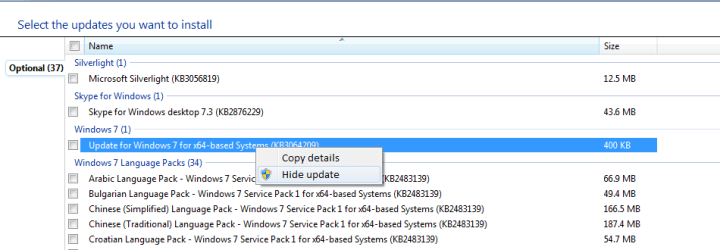
I think that you can only hide updates that haven't been installed yet.

You need to:

  • Make sure that Windows Update isn't set to "Automatic"
  • Uninstall any updates you don't want
  • Hide them when they reappear in your Update list (Right click on the update in the list and choose "Hide update")
Hide Update.png
 
Last edited:

My Computer My Computer

At a glance

W7 Ultimate SP1, LM19.2 MATE, W10 Home 1703, ...AMD Phenom II x6 1100T, 3.3 GHz12GB DDR3 1333 G-Skill (4GB x 2), G-Skill (2G...NVIDIA GeForce GTX 660
Computer type
PC/Desktop
Computer Manufacturer/Model Number
n/a
OS
W7 Ultimate SP1, LM19.2 MATE, W10 Home 1703, W10 Pro 1703 VM, #All 64 bit
CPU
AMD Phenom II x6 1100T, 3.3 GHz
Motherboard
ASUS M4A88T-M/USB3 (AM3)
Memory
12GB DDR3 1333 G-Skill (4GB x 2), G-Skill (2GB x 2)
Graphics Card(s)
NVIDIA GeForce GTX 660
Sound Card
Realtek?
Monitor(s) Displays
Samsung S23B350
Screen Resolution
1920x1080
Hard Drives
WD Green 2TB (SATA), WD Green 3TB (SATA), WD Blue 4TB (SATA), WD Blue 6TB (SATA)
PSU
Cooler Master
Case
Antec GX300 Tower
Cooling
3x Antec TRICOOL 120mm Fans
Mouse
Wired Optical
Internet Speed
DSL
Antivirus
Avast
Browser
Pale Moon (64 bit)
Other Info
2018-12-27 Upgraded HDDs
2015-12-10 Upgraded case, graphics card, storage
2015-08-15 Upgraded motherboard & RAM
2015-07-15 Upgraded LM17.1 to LM17.2
i know no one personally who has had problems with Updates. We see more here than anyone because this is where they come in the very rare case they malfunction.

I feel a little bit punked by the Win10 scaremongering after spending an afternoon rooting GWX out of my Uncles PC when it turned out performance problems had nothing to do with it.

So I'm sticking with advising that if you don't have all Important and Optional Updates (besides Bing) then you don't have Win7. It's appalling to still see no SP1 on PC's where users were given XPired advice to turn off Updates or manually choose which "sound right." :huh:
 
i know no one personally who has had problems with Updates. We see more here than anyone because this is where they come in the very rare case they malfunction.

I feel a little bit punked by the Win10 scaremongering after spending an afternoon rooting GWX out of my Uncles PC when it turned out performance problems had nothing to do with it.

So I'm sticking with advising that if you don't have all Important and Optional Updates (besides Bing) then you don't have Win7. It's appalling to still see no SP1 on PC's where users were given XPired advice to turn off Updates or manually choose which "sound right." :huh:


gregrocker, you might want to add any update relating to windows 10. I am triple booting now legally, so far without any issues. Just working on installing my programs for windows 10.
 

My Computer My Computer

At a glance

W10 32 bit, XUbuntu 18.xx 64 bitIntel(R) Celeron(R) CPU G1620T @ 2.40GHz, 240...4GBIntel HD graphics
Computer type
PC/Desktop
Computer Manufacturer/Model Number
Dell All in one Inspiron 2020
OS
W10 32 bit, XUbuntu 18.xx 64 bit
CPU
Intel(R) Celeron(R) CPU G1620T @ 2.40GHz, 2400 Mhz
Motherboard
Dell
Memory
4GB
Graphics Card(s)
Intel HD graphics
Sound Card
High Definition Audio Device
Monitor(s) Displays
20 inch Screen
Screen Resolution
W7=1280 x 720 & Linux Mint Xfce=1360 x 768
Hard Drives
500 GB hard drive
Keyboard
Usb
Mouse
Usb
Internet Speed
High-Speed
Antivirus
MSE
Browser
Main Browser Firefox
Other Info
I have done a clean install of Windows 7 using Dell re-installation disk (Dell sent me one). I also use Free Macrium reflect backup and restore.
I just don't see performance of Win7 (which I'll defend to the death) impacted at all by those GWX updates. Do you?
 
Back
Top