
How to fix Google Chrome in x64

D3R1K93

New member
Local time
1:21 AM
Messages
4
Location
Philly
( First Thread on sevenforums :] ) After downloading and booting up into my Windows 7 beta x64 (build 7000), I wanted to download my newest, most favorite web browser, Google Chrome. Unfortunately, I then found out that Google Chrome only worked with the 32-bit verison of 7, not the 64-bit. I searched google and came across a guy who found out how to fix it.
LINK OF ARTICLE HERE: http://w7info.com/articles/2009/01/fix-google-chrome-in-64-bit-windows-7/

1. Right Click on the icon of google chrome on your desktop and go to properties.
2. Change the "target" field by going to the end of the target address and adding " -in-process-plugins" (DO NOT forget the space at the begining!)
3. Click apply and okay.
4. There you go! you have chrome on x64.

(you will have to do this for every chrome shortcut you have on your desktop, which i don't see the point in having more than one shortcut but I just wanted to throw that out there!)

Pretty simple, right? I mean hopefully all you chrome enthusiasts benefited from this little trick and maybe this may make some people curious and make them want to try google chrome. I love it. :geek:
(by the way, sorry if there's already a thread here explaining how to do this.)
 

Attachments
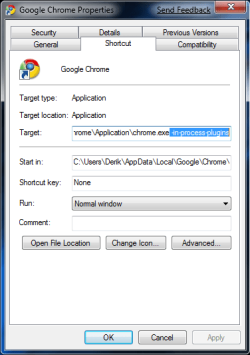
  • added code to target.png
    added code to target.png
    14 KB · Views: 1,813

My Computer My Computer

Computer Manufacturer/Model Number
Custom build
OS
Windows 7 64-bit
CPU
Intel Q9450 @ 2.67
Motherboard
EVGA 790i Ultra SLI
Memory
Patriot Memory DDR3 @ 1333 MHz
Graphics Card(s)
EVGA 9800gx2
Monitor(s) Displays
HP w2408h 24"
Screen Resolution
1920x1200
Hard Drives
250GB Seagate @ 7200 RPM
PSU
OCZ Gamexstream 700w
Case
Antec 900
Cooling
Zalman 9700NT
Keyboard
Razer Tarantula
Mouse
Razer Lachesis
Yeah, this has been known but thanks for the tip, there may be some that don't know it.
And welcome to SevenForums.
 

My Computer My Computer

Computer type
PC/Desktop
Computer Manufacturer/Model Number
Airbot 2.0
OS
Windows 7 Ultimate x64 SP1
CPU
Core i7 920 (D0) @ 4Ghz, *26c idle *65c full load on air
Motherboard
Asus P6X58D Premium - Sata 6Gb/s - USB 3.0
Memory
12GB DDR3 Corsair Dominator -CMD12GX3M6A1600C8 at 1600MHz
Graphics Card(s)
Zotac Geforce GTX 770
Sound Card
ASUS Xonar D2X
Monitor(s) Displays
1 LG 24" Flatron W2453V-PF 1 Samsung 24" P2450H both 2ms RT
Screen Resolution
1920x1080@60hz
Hard Drives
1 Samsung 250GB 840 Evo SSD
1 OCZ Vertex2 180GB SSD
1 TB Samsung Spinpoint F1 7200RPM 32MB cache
2 500GB WD Caviar Blacks 7200RPM 32MB cache (WD5001AALS)

Pioneer DVD Burner DVR-S18M
PSU
Corsair HX1000W
Case
Cooler Master HAF 932
Cooling
Case Fans *3 230mm, *1 140mm/CPU - *Tuniq Tower 120 Extreme
Keyboard
Logitech Wireless MK700
Mouse
Logitech Wireless MK700
Internet Speed
DL 15 Mbps UL 0.98 Mbps
Antivirus
None
Browser
Firefox Nightly
Other Info
Processor-7.7 *RAM- 7.9 *Graphics-7.9 *Gaming Graphics- 7.9 *SSD- 7.8 W.E.I final score= 7.7
*Phone- LG Nexus 5
Hello D3R1K93, I use Chrome. I much prefer it :)
However pages sometimes suddenly go blank after first displaying correct images.
Do I need this tweak for my x32 system?
 

My Computer My Computer

OS
Dual boot XP Pro and Seven/7127
Hello D3R1K93, I use Chrome. I much prefer it :)
However pages sometimes suddenly go blank after first displaying correct images.
Do I need this tweak for my x32 system?


I don't know. but I'd say try it. it can't hurt. if it doesn't fix your problem/it causes more problems, you can just follow the steps again, and delete that added ending to the target. good luck finding a solution to that. ;]
 

My Computer My Computer

Computer Manufacturer/Model Number
Custom build
OS
Windows 7 64-bit
CPU
Intel Q9450 @ 2.67
Motherboard
EVGA 790i Ultra SLI
Memory
Patriot Memory DDR3 @ 1333 MHz
Graphics Card(s)
EVGA 9800gx2
Monitor(s) Displays
HP w2408h 24"
Screen Resolution
1920x1200
Hard Drives
250GB Seagate @ 7200 RPM
PSU
OCZ Gamexstream 700w
Case
Antec 900
Cooling
Zalman 9700NT
Keyboard
Razer Tarantula
Mouse
Razer Lachesis
Hi,

How would I tell that it's running as an x64 application?
 

My Computer My Computer

Computer Manufacturer/Model Number
Toshiba/M10
OS
windows 7
CPU
Centrino Core 2 DUO
Memory
4GB
Hi,

How would I tell that it's running as an x64 application?
open task manager by pressing ctrl+shift+enter. 32 bit apps will have *32 next to the process name. eg: firefox.exe *32.
 

My Computer My Computer

Computer Manufacturer/Model Number
Samsung NP530U4B-S02IN
OS
Windows® 8 Pro (64-bit)
CPU
Intel® Core™ i5 Processor 2467M (1.60GHz, 3MB L3 Cache)
Motherboard
Samsung Electronics
Memory
6GB DDR3 System Memory at 1,333MHz (on BD 4GB + 2GB x 1)
Graphics Card(s)
AMD Radeon™ HD7550M 1GB DDR3 (Ext. Graphic)
Sound Card
Realtek High Definition Audio
Monitor(s) Displays
35.56cm (14.0) SuperBright 300nit HD LED Display
Screen Resolution
1366x768
Hard Drives
1TB S-ATA II Hard Drive (5400RPM) with ExpressCache 16GB SSD
Internet Speed
sucks
Antivirus
Microsoft Security Essentials
Browser
Google Chrome (Sync enabled)
Chrome is only released as 32-bit.
 

My Computer My Computer

Computer Manufacturer/Model Number
self built
OS
Windows 7 Professional 64-bit
CPU
Intel E8400 3GHz
Motherboard
Intel DX48BT2
Memory
Kingston PC3-10700H 4Gb
Graphics Card(s)
XFX Radeon HD 5850 BlackEd.
Sound Card
Asus Xonar DG
Monitor(s) Displays
2x Samsung SM-T220HD 22"
Screen Resolution
1680x1050 on two monitors
Hard Drives
OCZ Vertex 2 120gb 3.5" (OS)
Seagate Momentus XT 500gb
Samsung F3 1Tb (games)
2x Samsung F1 1Tb
PSU
Thermaltake ToughPower 850w
Case
Thermaltake Armor
Cooling
Scythe Mugen II
Keyboard
Microsoft Comfort Curve USB
Mouse
Razer Diamondback 3G
Internet Speed
8128/443
open task manager by pressing ctrl+shift+enter. 32 bit apps will have *32 next to the process name. eg: firefox.exe *32.
Thank you. I didn't know that the info was displayed in Task Manager.
Although to get to it I have to press Ctrl+Alt+Del - ctrl+shift+enter doesn't work for me.

It surprised my that most stuff I run is x32. Hardly seems worth the bother of setting up a x64 system.

So are there x64 versions of Firefox (must be GB English) and of GChrome...
 

My Computer My Computer

OS
Dual boot XP Pro and Seven/7127
I still dont understand the title and meaning of this thread. This could be misleading. I added the command and restarted chrome. its still a 32 bit browser, as seen is taskmgr. I see no changes before and after the tweak. can someone explain what does that trick mean?
 

My Computer My Computer

Computer Manufacturer/Model Number
Samsung NP530U4B-S02IN
OS
Windows® 8 Pro (64-bit)
CPU
Intel® Core™ i5 Processor 2467M (1.60GHz, 3MB L3 Cache)
Motherboard
Samsung Electronics
Memory
6GB DDR3 System Memory at 1,333MHz (on BD 4GB + 2GB x 1)
Graphics Card(s)
AMD Radeon™ HD7550M 1GB DDR3 (Ext. Graphic)
Sound Card
Realtek High Definition Audio
Monitor(s) Displays
35.56cm (14.0) SuperBright 300nit HD LED Display
Screen Resolution
1366x768
Hard Drives
1TB S-ATA II Hard Drive (5400RPM) with ExpressCache 16GB SSD
Internet Speed
sucks
Antivirus
Microsoft Security Essentials
Browser
Google Chrome (Sync enabled)
Well I tried this and it just made Chrome so much faster to load and render pages, great info.
 

My Computer My Computer

Computer type
PC/Desktop
Computer Manufacturer/Model Number
Self Built
OS
Windows 7 Home Premium (64 bit)
CPU
Intel I5 2500K 3.3Ghz Stock
Motherboard
Asus P8H 61-M LE USB 3
Memory
8Gig Kingston DDRIII HyperX Blue 1333 Mhz
Graphics Card(s)
AMD Sapphire 7870 2GB
Sound Card
Creative Fatality Pro
Monitor(s) Displays
27" BENQ LED
Screen Resolution
1920X1080
Hard Drives
1 x OCZ Agility 3 120GB SSD
1 x Seagate 250GB
1 x Western Digital 1000GB
1 x HP 500GB
PSU
700W Coolermaster Stealth Pro etc
Case
Coolermaster Scout
Cooling
Some fans
Keyboard
Some Logitech type.
Mouse
Logitech MX518
Internet Speed
Wireless 8mb
Other Info
Canon Scanner
Epson Printer
Nikon DSLR 3000
Wacom Tablet
Thank you. I didn't know that the info was displayed in Task Manager.
Although to get to it I have to press Ctrl+Alt+Del - ctrl+shift+enter doesn't work for me.

So are there x64 versions of Firefox (must be GB English) and of GChrome...

thats because its ctrl shift esc, not ctrl shift enter :)

there is a 64 bit version of firefox, but until 64 bit flash and addons are supported, it is a little pointless
 

My Computer My Computer

Computer type
PC/Desktop
Computer Manufacturer/Model Number
Medion Erazer (note to self: insert model number) - with custom additions
OS
Windows 10 Pro x64
CPU
Intel Core i5 7400 @ 3.00GHz
Motherboard
OEM supllied with PC
Memory
8GB 2133Mhz DDR4 (OEM supplied)
Graphics Card(s)
Gygabyte Windforce GTX 1050Ti (Factory Overclocked)
Sound Card
Realtek
Monitor(s) Displays
Acer Al1980 + HKC
Screen Resolution
1360*768(HKC) / 1280*1024(Acer)
Hard Drives
1TB Toshiba
1TB WD Caviar Green
120GB Samsung Evo 840
PSU
OEM supplied (no power rating on case)
Case
OEM Supplied
Cooling
Stock
Keyboard
Logitech Wireless
Mouse
Logitect Wireless
Internet Speed
40Mb/s Down 10Mb/s Up
Antivirus
Defender
Browser
Firefox
I'm running Iron portable. Tried this in the shortcut to ironportable.exe, didn't seem to change anything.
 

My Computer My Computer

OS
Windows 7 64
CPU
AMD Phenom II X4 Black Edition 940
Motherboard
Gigabyte GA-MA790X-UD3P
Memory
8 GB
Graphics Card(s)
Nvidia 8800GTS
Monitor(s) Displays
Benq G2420HDBL
Screen Resolution
1920x1080
Case
Lian-Li
Internet Speed
10/10 mb/s
Back
Top