

( First Thread on sevenforums :] ) After downloading and booting up into my Windows 7 beta x64 (build 7000), I wanted to download my newest, most favorite web browser, Google Chrome. Unfortunately, I then found out that Google Chrome only worked with the 32-bit verison of 7, not the 64-bit. I searched google and came across a guy who found out how to fix it.
LINK OF ARTICLE HERE: http://w7info.com/articles/2009/01/fix-google-chrome-in-64-bit-windows-7/
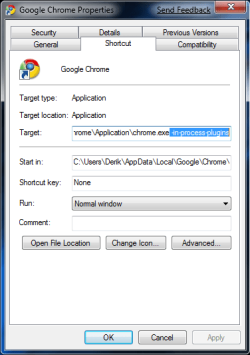
1. Right Click on the icon of google chrome on your desktop and go to properties.
2. Change the "target" field by going to the end of the target address and adding " -in-process-plugins" (DO NOT forget the space at the begining!)
3. Click apply and okay.
4. There you go! you have chrome on x64.
(you will have to do this for every chrome shortcut you have on your desktop, which i don't see the point in having more than one shortcut but I just wanted to throw that out there!)
Pretty simple, right? I mean hopefully all you chrome enthusiasts benefited from this little trick and maybe this may make some people curious and make them want to try google chrome. I love it.
(by the way, sorry if there's already a thread here explaining how to do this.)
LINK OF ARTICLE HERE: http://w7info.com/articles/2009/01/fix-google-chrome-in-64-bit-windows-7/
1. Right Click on the icon of google chrome on your desktop and go to properties.
2. Change the "target" field by going to the end of the target address and adding " -in-process-plugins" (DO NOT forget the space at the begining!)
3. Click apply and okay.
4. There you go! you have chrome on x64.
(you will have to do this for every chrome shortcut you have on your desktop, which i don't see the point in having more than one shortcut but I just wanted to throw that out there!)
Pretty simple, right? I mean hopefully all you chrome enthusiasts benefited from this little trick and maybe this may make some people curious and make them want to try google chrome. I love it.
(by the way, sorry if there's already a thread here explaining how to do this.)
Attachments
My Computer
- Computer Manufacturer/Model Number
- Custom build
- OS
- Windows 7 64-bit
- CPU
- Intel Q9450 @ 2.67
- Motherboard
- EVGA 790i Ultra SLI
- Memory
- Patriot Memory DDR3 @ 1333 MHz
- Graphics Card(s)
- EVGA 9800gx2
- Monitor(s) Displays
- HP w2408h 24"
- Screen Resolution
- 1920x1200
- Hard Drives
- 250GB Seagate @ 7200 RPM
- PSU
- OCZ Gamexstream 700w
- Case
- Antec 900
- Cooling
- Zalman 9700NT
- Keyboard
- Razer Tarantula
- Mouse
- Razer Lachesis


