Solved Black desktop icons and no "IconCache.db" in local folder?

TOOTHLESS

New member
Local time
10:23 AM
Messages
6
EDIT:
Okay, I've solved the problem simply by creating a file named iconcache.db "using notepad" and marked it as "read only" via properties menu.


Hi all, and thanks for this site that I always use to solve my problems..

Every time I boot my computer the icons of programs and folders on desktop are black squares. After each startup I have to use a "rebuildiconcache.bat" file made by someone here to restore them -see attachment-.

When I navigate to appdata/local there is no IconCache.db "I enabled hidden files view".
I wish I could elaborate more.

could be a service that I disabled? here a list of them:
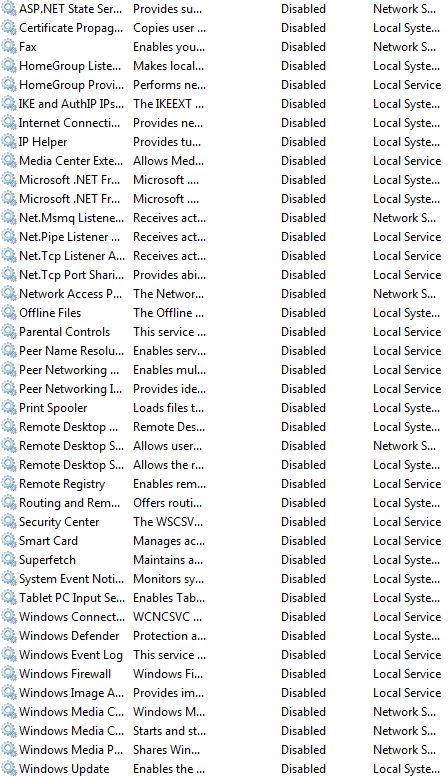
1UtvHWZ.jpg


and thank you
 

Attachments

Last edited:

My Computer My Computer

At a glance

Windows 7 Ultimate x64i7-2600k8GBGTX 970
Computer type
PC/Desktop
Computer Manufacturer/Model Number
custom build
OS
Windows 7 Ultimate x64
CPU
i7-2600k
Motherboard
gigabyte P67-D3
Memory
8GB
Graphics Card(s)
GTX 970
Hard Drives
1TB HDD
500GB HDD
Antivirus
none :)
Browser
Firefox

My Computer My Computer

At a glance

Windows 10 Pro. 64/ version 1709 Windows 7 Pr...Intel i7-6800K @ 4.3Corsair Platinum 16 gig @2400EVGA GTX 1070 OC
Computer type
PC/Desktop
Computer Manufacturer/Model Number
Home made Desktop
OS
Windows 10 Pro. 64/ version 1709 Windows 7 Pro/64
CPU
Intel i7-6800K @ 4.3
Motherboard
ASUS X-99 Deluxe II
Memory
Corsair Platinum 16 gig @2400
Graphics Card(s)
EVGA GTX 1070 OC
Monitor(s) Displays
Asus 27" LED LCD/VE278Q
Screen Resolution
1920-1080 or 1280-720 HDMI
Hard Drives
INTEL SSD 730-240 Gb Sata 3.0/
PSU
EVGA Platium 1200W
Case
Phanteks Luxe Tempered Glass 8 fans/ one radiator
Cooling
XSPC/ Water Cooled CPU
Keyboard
Das 4 Professional
Mouse
Logitech M705/MX Anywhere 2-S
Internet Speed
100 mbits
Antivirus
Microsoft Security Essentials/ Malwarebytes Premium 3.0/ SAS
Browser
I.E. 11 default/Firefox/ ISP Time Warner Cable/Spectrum
Other Info
LG BluRay Burner/
Sound system-KLipsch-THX/
Icy Dock ssd Hot Swap bays.

My Computer My Computer

At a glance

Windows 7 Ultimate x64i7-2600k8GBGTX 970
Computer type
PC/Desktop
Computer Manufacturer/Model Number
custom build
OS
Windows 7 Ultimate x64
CPU
i7-2600k
Motherboard
gigabyte P67-D3
Memory
8GB
Graphics Card(s)
GTX 970
Hard Drives
1TB HDD
500GB HDD
Antivirus
none :)
Browser
Firefox
Restart your computer.

Do not run rebuildiconcache.bat

See if IconCache.db is there.
 

My Computer My Computer

At a glance

W7 Pro SP1 64biti78GBIntel HD Graphics
Computer type
Laptop
Computer Manufacturer/Model Number
Employer provided Dell Latitude
OS
W7 Pro SP1 64bit
CPU
i7
Memory
8GB
Graphics Card(s)
Intel HD Graphics
Hard Drives
crappy SSD
Antivirus
Employer mandated Symantec Endpoint Protection
Browser
Pale Moon 64bit, IE11 64bit & Chrome 64bit

My Computer My Computer

At a glance

Windows 7 Ultimate x64i7-2600k8GBGTX 970
Computer type
PC/Desktop
Computer Manufacturer/Model Number
custom build
OS
Windows 7 Ultimate x64
CPU
i7-2600k
Motherboard
gigabyte P67-D3
Memory
8GB
Graphics Card(s)
GTX 970
Hard Drives
1TB HDD
500GB HDD
Antivirus
none :)
Browser
Firefox
Thanks for running that test.

I noticed that you have Windows Update service disabled. Is your computer up to date on patches? Videodrivers get updated to match changes in the operating system. You will need to keep them both updated.
 

My Computer My Computer

At a glance

W7 Pro SP1 64biti78GBIntel HD Graphics
Computer type
Laptop
Computer Manufacturer/Model Number
Employer provided Dell Latitude
OS
W7 Pro SP1 64bit
CPU
i7
Memory
8GB
Graphics Card(s)
Intel HD Graphics
Hard Drives
crappy SSD
Antivirus
Employer mandated Symantec Endpoint Protection
Browser
Pale Moon 64bit, IE11 64bit & Chrome 64bit
Thanks for running that test.

I noticed that you have Windows Update service disabled. Is your computer up to date on patches? Videodrivers get updated to match changes in the operating system. You will need to keep them both updated.

I'm on a very limited bandwidth, but the latest update was at 19th of past month, most are on the 18th of same month. So it can't be that old :)


I have the latest nvidia driver for windows 7. The problem happend out of nowhere.
and thanks for trying.
 

My Computer My Computer

At a glance

Windows 7 Ultimate x64i7-2600k8GBGTX 970
Computer type
PC/Desktop
Computer Manufacturer/Model Number
custom build
OS
Windows 7 Ultimate x64
CPU
i7-2600k
Motherboard
gigabyte P67-D3
Memory
8GB
Graphics Card(s)
GTX 970
Hard Drives
1TB HDD
500GB HDD
Antivirus
none :)
Browser
Firefox
I spent some time looking thru those disabled services and I don't see any that should impact the icons.

While the icons are black, what happens if you run just this one line from that batch file:
Code:
ie4uinit.exe -ClearIconCache
Please run it from a regular command prompt window.
Did that fix the icons?
 

My Computer My Computer

At a glance

W7 Pro SP1 64biti78GBIntel HD Graphics
Computer type
Laptop
Computer Manufacturer/Model Number
Employer provided Dell Latitude
OS
W7 Pro SP1 64bit
CPU
i7
Memory
8GB
Graphics Card(s)
Intel HD Graphics
Hard Drives
crappy SSD
Antivirus
Employer mandated Symantec Endpoint Protection
Browser
Pale Moon 64bit, IE11 64bit & Chrome 64bit
I spent some time looking thru those disabled services and I don't see any that should impact the icons.

While the icons are black, what happens if you run just this one line from that batch file:
Code:
ie4uinit.exe -ClearIconCache
Please run it from a regular command prompt window.
Did that fix the icons?

sorry I went for meal.

It refreshed the desktop but didn't fix it. Any new shortcut I made is not affected I forgot to mention that.
 

My Computer My Computer

At a glance

Windows 7 Ultimate x64i7-2600k8GBGTX 970
Computer type
PC/Desktop
Computer Manufacturer/Model Number
custom build
OS
Windows 7 Ultimate x64
CPU
i7-2600k
Motherboard
gigabyte P67-D3
Memory
8GB
Graphics Card(s)
GTX 970
Hard Drives
1TB HDD
500GB HDD
Antivirus
none :)
Browser
Firefox
I'm not sure hot to find what is corrupting the Icon Cache database file.

As best I can tell, Explorer writes info to that database when Windows closes Explorer (like for a restart). Perhaps at other times too.

Do the icons mess up if the OS Theme is classic?

Have you tried uninstalling as much of the Nvidia software as possible (e.g. 3D stuff)?
 

My Computer My Computer

At a glance

W7 Pro SP1 64biti78GBIntel HD Graphics
Computer type
Laptop
Computer Manufacturer/Model Number
Employer provided Dell Latitude
OS
W7 Pro SP1 64bit
CPU
i7
Memory
8GB
Graphics Card(s)
Intel HD Graphics
Hard Drives
crappy SSD
Antivirus
Employer mandated Symantec Endpoint Protection
Browser
Pale Moon 64bit, IE11 64bit & Chrome 64bit
I'm not sure hot to find what is corrupting the Icon Cache database file.

As best I can tell, Explorer writes info to that database when Windows closes Explorer (like for a restart). Perhaps at other times too.

Do the icons mess up if the OS Theme is classic?

Have you tried uninstalling as much of the Nvidia software as possible (e.g. 3D stuff)?

I don't have the 3d drivers installed, tried the old theme and even changed monitor to 16bit and back to 32.
I don't want to take more of your time, I'll try the system repair like "Layback Bear" suggested.
Thank you
 

My Computer My Computer

At a glance

Windows 7 Ultimate x64i7-2600k8GBGTX 970
Computer type
PC/Desktop
Computer Manufacturer/Model Number
custom build
OS
Windows 7 Ultimate x64
CPU
i7-2600k
Motherboard
gigabyte P67-D3
Memory
8GB
Graphics Card(s)
GTX 970
Hard Drives
1TB HDD
500GB HDD
Antivirus
none :)
Browser
Firefox
Let us know if the repair install works.
 

My Computer My Computer

At a glance

W7 Pro SP1 64biti78GBIntel HD Graphics
Computer type
Laptop
Computer Manufacturer/Model Number
Employer provided Dell Latitude
OS
W7 Pro SP1 64bit
CPU
i7
Memory
8GB
Graphics Card(s)
Intel HD Graphics
Hard Drives
crappy SSD
Antivirus
Employer mandated Symantec Endpoint Protection
Browser
Pale Moon 64bit, IE11 64bit & Chrome 64bit
Back
Top