EDIT:
Okay, I've solved the problem simply by creating a file named iconcache.db "using notepad" and marked it as "read only" via properties menu.
Hi all, and thanks for this site that I always use to solve my problems..
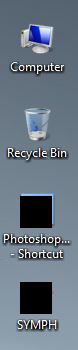
Every time I boot my computer the icons of programs and folders on desktop are black squares. After each startup I have to use a "rebuildiconcache.bat" file made by someone here to restore them -see attachment-.
When I navigate to appdata/local there is no IconCache.db "I enabled hidden files view".
I wish I could elaborate more.
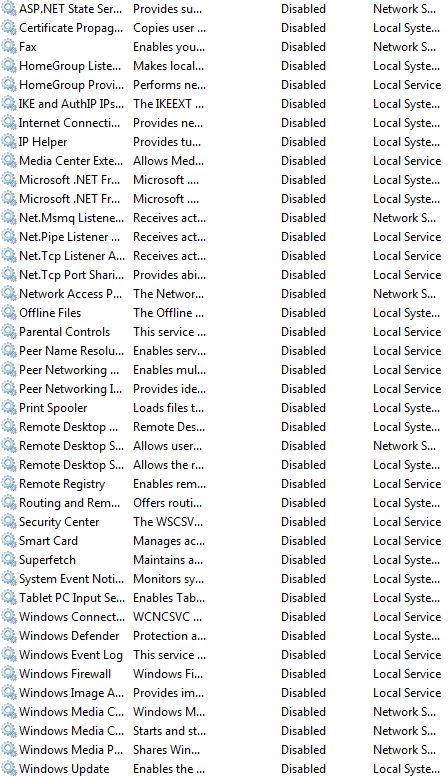
could be a service that I disabled? here a list of them:
and thank you
Okay, I've solved the problem simply by creating a file named iconcache.db "using notepad" and marked it as "read only" via properties menu.
Hi all, and thanks for this site that I always use to solve my problems..
Every time I boot my computer the icons of programs and folders on desktop are black squares. After each startup I have to use a "rebuildiconcache.bat" file made by someone here to restore them -see attachment-.
When I navigate to appdata/local there is no IconCache.db "I enabled hidden files view".
I wish I could elaborate more.
could be a service that I disabled? here a list of them:
and thank you
Attachments
Last edited:
My Computer
At a glance
Windows 7 Ultimate x64i7-2600k8GBGTX 970
- Computer type
- PC/Desktop
- Computer Manufacturer/Model Number
- custom build
- OS
- Windows 7 Ultimate x64
- CPU
- i7-2600k
- Motherboard
- gigabyte P67-D3
- Memory
- 8GB
- Graphics Card(s)
- GTX 970
- Hard Drives
- 1TB HDD
500GB HDD
- Antivirus
- none :)
- Browser
- Firefox